Posted on — Leave a comment

CCTV Camera or IP Camera for Home: What the Difference Actually Buys You

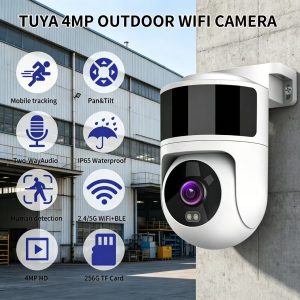
People search “CCTV camera” when they mean “a camera that records the front of my house”. That is not what the word used to mean. CCTV — closed-circuit television — described a system: cameras wired back to a recorder, on their own cables, watched on a monitor. An IP camera is a network Device that happens to have a lens. The Two overlap almost completely in what they deliver, and differ completely in what they cost to install.

So the real question is not which technology is better. It is whether you are willing to run cable. If you are, a wired system gets you continuous recording and no batteries. If you are not, a WiFi or battery camera gets you 90 per cent of the useful footage for an afternoon of work.

What each one is

Traditional CCTV IP / network camera
Cabling Coax or 4-in-1 plus power, or PoE WiFi, or One Ethernet cable with PoE
Recording DVR or NVR box, always on MicroSD in the camera, cloud, or an NVR
Resolution 1080p to 4K depending on generation 2 MP to 4 MP typical for Home models
Install Cable run, usually a professional job Screw or stick, done in an afternoon
Internet needed No, for local recording Yes, for remote viewing

The useful way to read that table: a wired system buys you continuous recording and independence from your router. A wireless camera buys you placement freedom and a much lower install cost. Most homes want the second and believe they want the first.

Where each one wins

Wired wins for a shop with a till, a driveway you Need to record at 3 a.m. without missing frames, or anywhere footage might be needed as evidence. Continuous recording is the reason: a battery camera only records when motion triggers it, and a two-second wake-up delay can miss the plate.

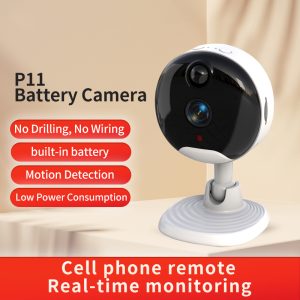
Wireless wins for a flat, a rental, a back garden with no power, or anyone who will not chase walls. Our P9 battery camera and P11 no-drill camera exist for exactly that case — mount anywhere, no cable, no hole in the wall the landlord will notice.

Resolution: what 2 MP and 4 MP actually mean

Resolution is the most oversold number on the box. For a camera watching a doorway four metres away, 2 MP (1080p) is enough to recognise a face; 4 MP helps when you need to read a number plate or zoom into a recorded frame afterwards. Beyond that, lens and sensor quality matter more than megapixels — and so does where the camera points. If you are deciding between battery and mains for the same spot, our comparison of battery versus plug-in cameras covers that specific trade. Tuya vs Sonoff Smart Switch: Which Ecosystem Should You Build On?

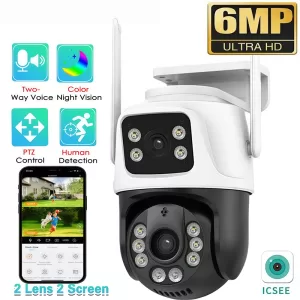
For an outdoor position with coverage in two directions, a dual-lens model does more than a higher-megapixel single lens: the KT-A36 and dual-lens PTZ keep a fixed wide view while the second lens tracks movement.

Power: the constraint that decides everything

Ask One question before shopping: is there a socket or a cable within reach of where the camera needs to be?

  • Yes — a plug-in indoor camera such as the P10 mini or the USB 3 MP camera never needs charging.
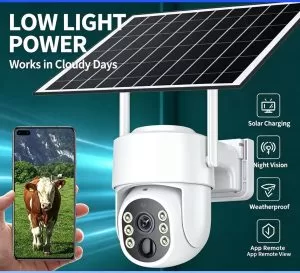
  • No, but there is sun — a solar PTZ camera runs through winter in most climates.
  • No, and no sun either — battery, and accept that you charge it every few months.
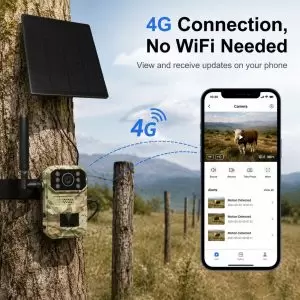
  • No power and no WiFi — a 4G LTE solar camera is the only answer, at the cost of a data plan.

Storage: local, cloud, or both

A microSD card in the camera is the cheapest and keeps footage even when the internet is out. Cloud storage survives somebody stealing the camera, which is the entire argument for it. Most people end up with both: card for continuous local recording, cloud for the clips that matter. Check the card size the model supports before ordering — this is the spec most often discovered after installation.

Night vision and false alarms: the two things people complain about

Every camera here sees in the dark; the difference is what the image looks like and how often it wakes you up. Infrared night vision gives a monochrome picture that is perfectly good for identifying a person at a doorway. Full-colour night vision keeps colour in low light, which matters when you need to describe clothing or a vehicle rather than just prove someone was there.

False alarms are the more common complaint, and they are a settings problem more than a hardware One. A camera pointing at a road will trigger on every passing car; one aimed at a hedge triggers on wind. Two adjustments solve most of it: drop the detection sensitivity a notch, and draw a detection zone that excludes the road or the hedge. Human-shape detection, available on the PTZ models, filters animals and moving branches out entirely. Aim the camera across the approach rather than straight down it and you will cut triggers again, because motion crossing the frame is detected far more reliably than motion coming at the lens.

Frequently Asked Questions

Is a wireless camera still “CCTV”?

Technically it is an IP camera on a closed network, not CCTV in the original sense. In practice the search term survives and everyone means home surveillance, so do not get hung up on the label.

Do I need a recorder (NVR/DVR)?

Only if you want continuous recording, more than a day or two of retention, or a single place to review several cameras. For one to three cameras, cards and cloud are simpler.

Will it work if the internet goes down?

Local recording continues. Remote viewing and notifications do not. A wired system with a recorder keeps working end to end.

How many cameras does a three-bedroom house need?

Usually two: the front door and the back or side access. Our guide to how many cameras a three-bedroom home needs goes through the Positions people Actually use.

Related Articles

You Might Also Like

Posted on — Leave a comment

Window Camera: Filming Through Glass Without Glare or Reflections

Pointing a normal indoor camera out of a window produces disappointing footage: a reflection of the room by day, and infrared LEDs bouncing off the glass at night so the image fogs into grey. It is one of the most common Camera mistakes, and it is not fixed by buying a better Camera — it is fixed by using a camera designed for glass.

The Tuya Smart Window Camera is built for this: it mounts flat against the pane so the Lens is coupled to the glass, which removes the air gap that causes reflections and lets infrared pass through instead of bouncing back.

Why glass breaks a normal camera

Three separate problems:

  1. Reflections. Any gap between lens and glass lets the lens see its own reflection and the room behind it, especially when it is darker outside than in.
  2. Infrared bounce. Night vision works by lighting the scene with IR LEDs. Glass reflects infrared almost perfectly, so the camera lights up the window itself and sees nothing beyond it.
  3. Exposure. A camera metering the bright outdoors will underexpose, and one metering the room will blow out the street. Auto exposure flickers between the two.

A window camera solves the first two physically — flush mounting removes the gap, and the LEDs are arranged to fire through the pane. The third is handled by exposure tuning for an outward view.

Where a window camera makes sense

  • Flats with no outdoor space — no drilling into an exterior wall you do not own.
  • Street-facing rooms — watching a parked car or the pavement without an outdoor install.
  • Ground-floor windows on a busy path — coverage where an outdoor camera would be tampered with.
  • Rentals — mounted inside, taken with you when you leave.

Getting a clean image: practical steps

  1. Clean both sides of the glass. Smears that are invisible to the eye show up as haze in footage.
  2. Mount flush and sealed. The unit adheres to the pane; any gap reintroduces reflections.
  3. Avoid direct sun on the pane. A window in full afternoon sun will glare regardless of the camera.
  4. Turn the room lights off at night if you are filming out after dark — interior light is the main source of remaining reflection.
  5. Consider the angle. Straight out through the glass gives the cleanest image; filming at a steep angle through the pane degrades it.

When to choose an outdoor camera instead

Glass always costs some image quality. If you can mount outside — an eave, a wall, a soffit — an outdoor camera such as the outdoor dual-lens PTZ will give you a sharper, wider view with better night performance. Choose the window camera when mounting outside is impossible, not merely inconvenient.

If you are weighing Battery against mains for the outdoor option, our battery vs plug-in comparison covers that decision, and this guide covers outdoor spots with no socket.

FAQ

Can I just put a normal indoor camera in the window?
You can, but expect reflections by day and a washed-out infrared picture at night. A window camera is designed around the glass rather than fighting it.
Does it work with double glazing?
Yes. Double glazing is fine — the mount couples to the inner pane. Tinted or heavily coated glass reduces image quality.
Will it fall off?
The mount uses a strong adhesive pad rated for the weight. Clean the glass with alcohol before fitting and press firmly; on a cold pane, warm the area first.
Can I see number plates?
At 3 MP / 2K, a plate directly in front of the window within a few metres is often readable. Plates at distance or at an angle are not reliable.
Does it record at night?
Yes, with the room lights off. Interior lighting is the main cause of night-time reflection.
Do I Need WiFi?
Yes, 2.4 GHz, same as the rest of the range. Test signal strength at the window before fitting.

Related Articles

You Might Also Like
Frequently Asked Questions

Is Window Camera Filming worth buying?

Based on the breakdown in this article, Window Camera Filming offers a solid mix of features and value. If your main goal matches the key benefits described above, it is a practical choice for everyday use.

How do I choose the right window camera filming for my needs?

Start with your core use case, then compare battery life, compatibility, and build quality as covered above. Choosing the right window camera filming comes down to matching specs with how you actually use it.

Does window camera filming require a companion app?

Most devices of this type pair with a free companion app for setup and firmware updates. A few advanced features may sit behind a paid plan, so check the official specs page before buying.

Posted on — Leave a comment

Outdoor Security Camera Without a Power Outlet: What Actually Works

The best place to put an outdoor Camera is almost never near a socket. Gates, driveways, side passages and sheds are exactly the spots with no mains, which is why “no Power outlet” is one of the most common reasons people give up on an outdoor camera.

There are three workable answers, and they are not interchangeable. In order of how often they are the right one: Solar panel cameras, Battery cameras, and 4G LTE cameras for places with no WiFi either.

Option 1: solar panel camera

A Camera with its own panel — such as the solar PTZ or the Xingliao solar PTZ — is the closest thing to a fit-and-forget outdoor camera. The panel trickle-charges the battery through the day; the battery runs the camera at night.

Two honest caveats. The panel needs light: a north-facing wall under an overhang collects very little, and winter output drops substantially. And the camera still needs WiFi — if the gate is 30 metres from the house, the signal is the real problem, not the power. Our solar doorbell guide covers panel siting in more detail and the same rules apply here.

Option 2: battery camera

Simplest to install and the easiest to move. A battery camera such as the P11 mounts on any surface with an adhesive pad or two screws, records on motion, and comes down for charging.

Outdoors, expect shorter intervals than indoors: cold reduces capacity, and a camera watching a windy garden triggers far more often than one in a quiet hallway. If you are willing to charge it every couple of months, this is the cheapest route to a camera at the gate.

Option 3: 4G LTE camera

When there is no power and no WiFi, the answer is a camera with its own cellular link. The 4G LTE solar trail camera is built for exactly this: remote sites, allotments, farm gates, building plots — anywhere a router will never reach.

It needs a data SIM and a signal, and it costs more to run than a WiFi camera. But it is the only option that works completely independently of the building.

What still has to reach the camera

Option Needs mains Needs home WiFi Needs charging
Solar panel camera No Yes Rarely
Battery camera No Yes Every 1-3 months
4G LTE solar camera No No (SIM data) Rarely

Note that “no mains” never means “no WiFi” unless you go to 4G. Test your 2.4 GHz signal at the mounting point before buying — stand there with a phone and check. If it is weak, an outdoor extender or a mesh node in the nearest room usually fixes it.

Weather and mounting

Outdoor means IP-rated: look for IP65 or better for rain and dust. Mount under an eave if you can — not because the camera cannot take rain, but because lenses stay cleaner and infrared night vision is not fogged by water on the glass. Aim for 2.5 to 3.5 metres high: out of easy reach, still Low enough for a usable face angle.

FAQ
Will a solar camera run through a British or northern European winter?
It will run, but the panel contributes much less. Plan on one manual charge in late autumn rather than expecting the panel to carry you through to spring.
Do I need WiFi for a solar camera?
Yes, unless it is a 4G model. The panel replaces mains power, not the network connection.
How much data does a 4G camera use?
That depends entirely on how often you view live and how Many clips upload. Motion-triggered clips with occasional live viewing are modest; continuous streaming is not.
Can I use a power bank?
Some cameras will run from one, but outdoor-rated power banks are rare and it adds a failure point. A solar model is usually the better spend.
Does night vision work on battery?
Yes, infrared LEDs draw relatively little power. Cold is the bigger drain on the battery than the LEDs.
Can I mount to a fence?
Mechanically yes, but fences move. Movement triggers false motion alerts and shakes the image — use a wall or post for a PTZ camera.

Related Articles

You Might Also Like
Frequently Asked Questions

Is Outdoor Security Camera worth buying?

Based on the breakdown in this article, Outdoor Security Camera offers a solid mix of features and value. If your main goal matches the key benefits described above, it is a practical choice for everyday use.

How do I choose the right outdoor security camera for my needs?

Start with your core use case, then compare battery life, compatibility, and build quality as covered above. Choosing the right outdoor security camera comes down to matching specs with how you actually use it.

Does outdoor security camera require a companion app?

Most devices of this type pair with a free companion app for setup and firmware updates. A few advanced features may sit behind a paid plan, so check the official specs page before buying.

Posted on — Leave a comment

Dual-Lens Security Camera: What the Second Lens Is Actually For

A second lens on a Security camera is easy to dismiss as a spec-sheet trick. In practice it solves a specific problem that a single lens cannot: you cannot simultaneously watch a whole room and read a detail in it. Wide enough to see everything means too wide to identify anything.

Our dual-lens models — the KT-A36, the KT-R13 6 MP and the outdoor dual-lens PTZ — use the second lens in one of two ways.

Two designs, two jobs

1. One fixed lens plus one moving lens

The fixed lens holds a constant view of the whole scene while the PTZ lens pans, tilts and zooms to follow movement. The value is that you never lose the overview: a single-lens PTZ Camera that swings away to follow somebody leaves you blind to whatever happens behind it. With two lenses, the overview keeps recording whatever the tracking lens is doing.

2. One wide lens plus one telephoto lens

Both lenses point at the same scene at different focal lengths. You get a wide context shot and a tight detail shot of the same moment — the difference between “a person approached the door” and “here is a readable face and the parcel they carried”.

Where a dual-lens camera earns its cost

  • Driveways and forecourts — the overview catches the vehicle, the detail lens catches the plate or the driver.
  • Shop floors and small warehouses — one camera covers the aisle and the till without a second install.
  • Large gardens — the fixed lens watches the gate, the PTZ follows whoever comes through it.

Where it does not: a small room, a corridor, or anywhere a single wide lens already covers everything you care about. If the space is smaller than about 25 square metres and has one entrance, one lens is enough and cheaper.

What to check on the spec sheet

  • Which lens does the tracking? On PTZ designs, confirm the moving lens is the one with optical zoom.
  • Night behaviour of both lenses. Two lenses need two sets of IR LEDs; a model that lights only one leaves the other blind after dark.
  • Storage load. Two streams use roughly twice the card space. Size the card accordingly.
  • Resolution honesty. A “6 MP” figure often describes the combined or the higher lens. Check per-lens resolution.

Installation notes

Dual-lens units are physically larger and heavier than a Mini camera, and the outdoor PTZ versions need a solid fixing — a soffit, a wall with proper plugs, not a fence panel that moves in the wind. Mount high enough to be out of reach but Low enough that the detail lens has a usable angle on faces; roughly 2.5 to 3.5 metres works outdoors.

Power is the other constraint: outdoors, an outdoor PTZ with two lenses wants mains or a Solar panel, not a small internal Battery. See options for outdoor cameras with no power outlet.

FAQ
Does a dual-lens camera record two videos at once?
Yes — both streams are recorded, and the app lets you view them together or separately.
Is auto-tracking useful or annoying?
Useful outdoors with pets and passing cars if sensitivity is tuned; annoying in a busy scene where it chases everything. Most models let you set tracking zones.
Can I turn one lens off?
Usually you can disable a view in the app, which is a way to halve storage use if you only need one angle.
Does it work at night?
Yes, provided both lenses have infrared or full-colour night support — check this per model rather than assuming.
Do I need a subscription for auto-tracking?
No, tracking runs on the camera itself. Cloud storage is a separate, optional service.
Is the outdoor model waterproof?
The outdoor dual-lens PTZ carries an IP65 rating for rain and dust. Indoor dual-lens models are not rated for outdoor use.

Related Articles

You Might Also Like
Frequently Asked Questions

Is Dual Lens Security worth buying?

Based on the breakdown in this article, Dual Lens Security offers a solid mix of features and value. If your main goal matches the key benefits described above, it is a practical choice for everyday use.

How do I choose the right dual lens security for my needs?

Start with your core use case, then compare battery life, compatibility, and build quality as covered above. Choosing the right dual lens Security comes down to matching specs with how you actually use it.

Does dual lens security require a companion app?

Most devices of this type pair with a free companion app for setup and firmware updates. A few advanced features may sit behind a paid plan, so check the official specs page before buying.

Posted on — Leave a comment

Battery Camera vs Plug-In Camera: Choosing Each Room’s Camera

Buying one Camera for the whole house usually means compromising somewhere. A Battery Camera can go anywhere but sleeps between events; a plug-in camera can record continuously but only where there is a socket. Most homes end up with a mix, and the trick is knowing which rooms justify which.

The models below are all in our security camera range: the battery-powered P9 and P11, and the plug-in P10 mini.

The core trade-off

Battery Camera Plug-in Camera
Placement Any surface, no wiring Within reach of a socket
Recording Clips on motion Continuous or on motion
Resolution headroom Limited by battery budget Higher bitrate and frame rate
Upkeep Recharge every few months None
Best for Hallways, shelves, rentals, garages Nurseries, living rooms, anywhere with 24/7 value

Room by room

  • Entrance hallway. Battery. You want it at head height near the door, and there is rarely a socket there. Motion clips catch whoever comes in.
  • Living room. Plug-in if you want continuous coverage of a large open space; battery if you only care about motion while you are out.
  • Nursery or pet area. Plug-in. Continuous recording and two-way audio matter more here, and a socket is usually available — see our baby monitor range for dedicated units with their own screens.
  • Garage or shed. Battery, unless there is mains. A solar panel model removes the charging trip entirely.
  • Flat or rental. Battery, mounted with an adhesive pad so nothing is drilled.

What “low power” actually costs you

A battery Camera stays asleep and wakes when its PIR sensor fires. Two consequences follow. First, there is a short delay between someone entering the frame and the clip starting — a second or two, sometimes more if the sensor is pointed away from the approach path. Second, the Camera cannot record what it never woke for.

Both are acceptable for “who came through the hallway” and unacceptable for “I need the whole afternoon”. If the second sentence describes you, plug it in.

WiFi matters more than power

Every one of these cameras needs a usable 2.4 GHz signal where it sits. The usual failure is a camera mounted in a garage or at the far end of a hallway where the phone shows one bar. Test at the exact spot before you commit — hold a phone there, force 2.4 GHz, and run a speed check. A camera on a marginal link produces constant disconnects, missed clips and a battery that drains faster because it keeps re-associating.

Night vision and where you point it

Indoor cameras use infrared LEDs for night viewing. Two practical notes: infrared reflects off glass, so do not point a camera through a window at night (you will film the room, not the street) — for that job use a dedicated window camera. And infrared does not travel far, so a camera at the far end of a long room will show a bright foreground and a dark background.

FAQ
How long does a battery camera last per charge?
Typically weeks to a few months, depending on how often motion fires and how much live viewing you do. Busy hallways drain faster than spare rooms.
Can a battery camera record continuously if I leave it plugged in?
Some models will run while connected, but they are designed around motion events. If you want continuous footage, buy a plug-in model.
Do I need a subscription?
No. Local card storage covers clips, and cloud storage is optional on most models.
Can one app show several cameras?
Yes — the Tuya / Smart Life app handles multiple cameras in one account, which is why mixing battery and plug-in models is practical.
Will it work without internet?
Local recording to a card continues, but remote viewing and notifications need the internet.
Is one camera enough for a flat?
Usually yes for a one-bedroom, covering the entrance. See how many cameras a 3-bedroom home needs for larger layouts.

Related Articles

You Might Also Like
Frequently Asked Questions

Is Battery Camera Plug worth buying?

Based on the breakdown in this article, Battery Camera Plug offers a solid mix of features and value. If your main goal matches the key benefits described above, it is a practical choice for everyday use.

How do I choose the right battery camera plug for my needs?

Start with your core use case, then compare battery life, compatibility, and build quality as covered above. Choosing the right battery camera plug comes down to matching specs with how you actually use it.

Does battery camera plug require a companion app?

Most devices of this type pair with a free companion app for setup and firmware updates. A few advanced features may sit behind a paid plan, so check the official specs page before buying.

Does battery camera plug work with both iPhone and Android?

Yes, in most cases this type of device ships with iOS and Android apps, and standard Bluetooth protocols keep cross-platform pairing simple.

Posted on — Leave a comment

Solar Security Camera OEM: Complete Sourcing Guide for Brands in 2026

Why Solar Security Cameras Are Booming in 2026

Solar Security cameras have become one of the fastest-growing segments in the smart home industry. With rising demand for wire-free, installation-free Outdoor surveillance, brands are rushing to source reliable OEM partners. This guide covers everything you need to know about solar Security Camera OEM — from key specifications to certification requirements and minimum order quantities.

Key Specifications to Look For

1. Solar Panel Efficiency

Look for monocrystalline solar panels with at least 2W output. A 2W panel can fully charge a 5200mAh Battery in 3-4 days of sunlight. Avoid cheap polycrystalline panels — they degrade 30% faster.

2. Battery Capacity

5200mAh is the sweet spot for most brands. It allows 7-10 days of standby without sunlight. Premium models offer 9000mAh for 15+ days. Never go below 4400mAh — customers will complain about dead cameras in winter.

3. Video Resolution

2K (2304×1296) is the new standard for 2026. 1080p is acceptable for budget lines but should be positioned as entry-level. 4K solar cameras exist but drain the battery too fast — avoid them for OEM.

4. Night Vision

Color night vision with 4 infrared LEDs + 2 white LEDs is preferred. Black & white IR only looks outdated. Range should be at least 10 meters.

5. Waterproof Rating

IP65 minimum. IP66 is recommended for customers in rainy or coastal regions. Never accept IP64 — it fails in heavy rain.

Top OEM Platforms: Tuya vs Custom Firmware

Tuya-Based Solar Cameras

Pros: Fast time-to-market (2-4 weeks), existing Tuya Smart app, millions of existing users, lower MOQ (500pcs), regular firmware updates from Tuya.

Cons: You are locked into Tuya ecosystem, Tuya takes a cut per device, limited UI customization, data stored on Tuya cloud servers.

Custom Firmware Solutions

Pros: Your own branded app, full UI/UX control, no per-device fees, data on your own cloud, exclusive features you can patent.

Cons: 3-6 month development time, 2000+ MOQ, you maintain your own cloud infrastructure, higher upfront engineering cost ($20,000-50,000).

Certifications You Must Have

  • FCC — required for USA market
  • CE / RED — required for EU market
  • UKCA — required for UK after Brexit
  • RoHS — environmental compliance
  • IP65/IP66 — waterproof rating
  • UL 60950 — recommended for insurance and enterprise clients

Pricing Tiers and MOQ

Tier Spec Unit Price MOQ
Budget 1080p, 4400mAh, IP65 $18-22 500pcs
Mid-range 2K, 5200mAh, IP66, Color NV $28-35 500pcs
Premium 2K, 9000mAh, AI Detection, Spotlight $45-55 300pcs

Common Pitfalls to Avoid

  1. Under-sizing the Battery. Customers in northern regions need 30% more battery capacity because winter days are short.
  2. Skipping the waterproof test. Ask the factory for IP66 test reports from a certified lab, not just their own claim.
  3. Ignoring cloud server costs. Tuya charges per device per month. Calculate this over 3 years before pricing your product.
  4. No local after-sales support. Solar cameras fail — you need a replacement policy. Budget 3-5% of revenue for returns.

Why Choose Shenzhen XingLiao as Your OEM Partner?

At Shenzhen XingLiao Smart Technology, we have been manufacturing solar Security cameras for B2B brands since 2019. We offer:

  • Tuya-based and custom firmware options
  • Full customization: logo, packaging, app UI, firmware
  • FCC, CE, UKCA, RoHS certified products
  • MOQ as Low as 300pcs for premium models
  • 24-hour technical support and 2-year warranty

Ready to start your solar camera project? Contact us today for a free technical proposal and sample unit. We reply within 24 hours with pricing, lead time, and customization options.

Related Articles

You Might Also Like
Frequently Asked Questions

Is Solar Security Camera worth buying?

Based on the breakdown in this article, Solar Security Camera offers a solid mix of features and value. If your main goal matches the key benefits described above, it is a practical choice for everyday use.

How do I choose the right solar security camera for my needs?

Start with your core use case, then compare battery life, compatibility, and build quality as covered above. Choosing the right solar security camera comes down to matching specs with how you actually use it.

Does solar security camera require a companion app?

Most devices of this type pair with a free companion app for setup and firmware updates. A few advanced features may sit behind a paid plan, so check the official specs page before buying.

Posted on — Leave a comment

Tuya Security Camera Manufacturer Review: What to Look for in 2026When sourcing Tuya-compatible security cameras for your brand or business, choosing the right manufacturer is the most important decision you’ll make. A good OEM partner means reliable products, fast lead times, and smooth custom branding. A bad one means returns, complaints, and a damaged reputation.In this review, we break down everything you need to know when evaluating a Tuya security camera manufacturer in 2026.## Why Tuya Cameras?Tuya-powered cameras work out of the box with the Tuya Smart app, supporting: – Alexa and Google Home voice control – Remote viewing from anywhere – Motion detection alerts – Cloud storage and local SD card options – Custom branding on the app splash screenFor resellers, this means you don’t need to build your own app or cloud infrastructure. Customers already know and trust the Tuya ecosystem.

When sourcing Tuya-compatible Security cameras for your brand or business, choosing the right manufacturer is the most important decision you’ll make. A good OEM partner means reliable products, fast lead times, and smooth custom branding. A bad one means returns, complaints, and a damaged reputation.

In this review, we break down everything you need to know when evaluating a Tuya security Camera manufacturer in 2026.

Why Tuya Cameras?

Tuya-powered cameras work out of the box with the Tuya Smart app, supporting:

  • Alexa and Google Home voice control
  • Remote viewing from anywhere
  • Motion detection alerts
  • Cloud storage and local SD card options
  • Custom branding on the app splash screen

For resellers, this means you don’t need to build your own app or cloud infrastructure. Customers already know and trust the Tuya ecosystem.

What to Look for in a Manufacturer

1. Real Factory, Not a Trading Company

Many “manufacturers” on Alibaba are actually trading companies marking up prices. Look for:

  • Video factory tours on their website
  • In-house SMT and assembly lines
  • Their own QC team
  • CE/FCC/RoHS certificates

2. Camera Resolution and Night Vision

For 2026, 2K (3MP) has become the minimum. 4K (8MP) is available for premium models. Check:

  • Night vision range (20m+ is standard)
  • Color night vision vs IR
  • Wide angle (110-140 degrees)
  • Two-way audio

3. OEM/ODM Customization

Good manufacturers should offer:

  • Custom logo on camera housing
  • Custom packaging
  • Custom firmware (WiFi region, language)
  • App rebranding (white label)

4. MOQ and Lead Time

Typical OEM terms:

  • Standard models: MOQ 50-100 pcs
  • Custom housing: MOQ 500-1000 pcs
  • Sample lead time: 3-5 days
  • Bulk production: 15-25 days

Common Pitfalls

  • Hidden firmware costs: Some factories charge extra for custom firmware
  • No after-sales support: Ask about replacement policy for DOA units
  • WiFi module region locks: Make sure the camera uses a global WiFi module
  • Cloud subscription fees: Tuya cloud has per-device fees — who pays?

XingLiao as Your Tuya Camera Partner

At XingLiao (Shenzhen), we manufacture Tuya-compatible security cameras, video doorbells, and smart switches for brands in 60+ countries. We offer:

  • 3MP/4MP/8MP WiFi and PoE cameras
  • Custom logo and packaging from 50 pcs
  • CE/FCC/RoHS certified
  • 24-hour technical support
  • Sample shipping within 3 days

Looking for a Tuya camera manufacturer? Contact us for a free quote and sample.

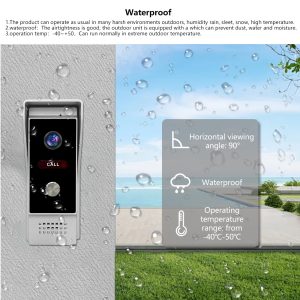
Waterproof outdoor unit of Tuya video door phone, rainproof doorbell camera, wide viewing angle, work temperature -40~50℃
Waterproof outdoor station for tuya wired video intercom, works under rain, snow and extreme temperature,90 degree horizontal viewing angle.

Related Articles

You Might Also Like
Frequently Asked Questions

Is Tuya Security Camera worth buying?

Based on the breakdown in this article, Tuya Security Camera offers a solid mix of features and value. If your main goal matches the key benefits described above, it is a practical choice for everyday use.

How do I choose the right tuya security camera for my needs?

Start with your core use case, then compare battery life, compatibility, and build quality as covered above. Choosing the right tuya security camera comes down to matching specs with how you actually use it.

Does tuya security camera require a companion app?

Most devices of this type pair with a free companion app for setup and firmware updates. A few advanced features may sit behind a paid plan, so check the official specs page before buying.

Posted on — Leave a comment

Reolink vs Tuya Security Camera

Reolink builds cameras for people who are happy to run cables to a recorder; the Tuya ecosystem builds cameras for people who want one app for the whole house. Both record locally Without a monthly fee, so the real decision is not price or storage — it is whether you are buying a camera system or a Smart Home.

The core difference: recorder-first or app-first

Reolink is built around the recorder. Its best-known models are PoE cameras that run one Ethernet cable to an NVR with a hard drive, plus battery and WiFi models for places a cable cannot reach. Power and data over one cable, weeks of retention on disk, and a single place to scrub through footage. It is a small CCTV system, and it behaves like one.

Tuya-based cameras are app-first. Each camera has its own WiFi radio and microSD slot, pair in minutes, and live in the same app as your switches, sockets, sensors and doorbell. There is no recorder in the cupboard and no cable run; you add cameras one at a time, wherever the WiFi reaches.

Installation

  • Reolink: planning, then drilling. PoE needs a cable from each camera to the recorder or a PoE Switch, which limits placement to where you can run cable. Once it is in, it is stable and never competes for WiFi bandwidth.
  • Tuya: decide the spot, check the 2.4 GHz signal with your phone, mount, pair. Ten minutes per camera, and solar models remove the power question entirely outdoors.

For a house where drilling is not allowed, or where you want to start with one camera and see, app-first wins on effort alone. For a property with four or more fixed positions and a cupboard to put a recorder in, recorder-first is the sturdier result.

Storage

  • Reolink: SD card in the camera, plus an NVR hard drive for long retention. Optional cloud. Footage survives a stolen camera if the recorder is hidden.
  • Tuya: SD card in the camera, optional cloud per camera. Adding an NVR is possible on some models but is not the default path.

Both avoid mandatory subscriptions — that is worth stating plainly, because the brands most people compare against charge monthly for the same recordings.

Ecosystem: cameras only, or the whole house

This is where the two stop being comparable. A Reolink setup is a camera system with an app. A Tuya setup can include:

  • Wall switches and sockets that turn lights and appliances on schedules
  • Door, water leak, smoke and temperature sensors that trigger cameras to record
  • A Video doorbell sharing the same notification feed
  • Curtain motors, thermostats and irrigation controllers in the same scenes

A door sensor opening and a camera panning to preset is a three-tap scene in one app. Across two brands it is either impossible or a weekend of integration work.

Image quality and detection

  • Resolution: Reolink’s higher-end PoE models reach 4K and 8MP with larger sensors, which matters for long-range identification. Tuya models in this class typically run 2MP to 4MP, which is ample for rooms, entries and driveways.
  • Night vision: both offer infrared; several Tuya models add full-colour night vision, which keeps usable detail after dark instead of grey shapes.
  • Detection: both do human or person detection. Reolink adds vehicle and pet detection on some lines; Tuya’s advantage is cross-device automation rather than more detection classes.
  • Coverage: pan/tilt and dual-lens models (one wide lens to detect, one tele lens to zoom) are common in the Tuya ecosystem and are the best value for driveways and gates.

Comparison at a glance

Reolink Tuya ecosystem
Design centre Camera + NVR system App for the whole house
Power/data PoE, battery or WiFi WiFi, battery or solar
Typical install Drilling and cable runs Mount and pair, minutes
Storage SD + NVR disk + optional cloud SD + optional cloud
Top resolution Up to 4K on PoE lines 2MP to 4MP typical
Works with Cameras Cameras, switches, sockets, sensors, doorbells
Subscription Not required Not required

Model ranges and specifications change often — check the current datasheet for the exact unit you are buying.

Which one should you buy

  • Want weeks of retention and don’t mind cables: a recorder-based PoE system.
  • Want one camera now, more later, no drilling: app-first WiFi cameras.
  • Already use Tuya or Smart Life for switches: stay in that app — one notification feed beats three.
  • Off-grid position with no power: solar or 4G camera, neither of which a PoE system solves.
  • Whole-home automation is the real goal: app-first, because sensors and switches are half the value.

XingLiao security cameras

Frequently Asked Questions

Do either of these require a monthly fee?

No. Both record to a memory card or a recorder with no subscription. Cloud plans are optional extras for off-site backup.

Which is better for a whole-house setup?

If cameras are the whole project, a recorder system is sturdier. If cameras are one part of a home that also has switches, sockets and sensors, an app-first ecosystem saves you from running three apps.

Can I mix them?

Yes, but expect separate apps and separate notification feeds. Most people regret mixing once they pass four devices.

Is 4K worth it for a home?

Only for long-range identification — a gate, a number plate, a far corner of a yard. For entries, rooms and driveways, 2MP to 4MP with good night vision gives you more usable footage per euro.

What about WiFi reliability outdoors?

Signal at the mounting point matters more than the camera. Test the 2.4 GHz signal with your phone at the exact spot before buying; if it is weak, a solar or 4G model, or a mesh node, solves it.

Do I need a recorder at all?

Not for one to three cameras. Memory cards in each camera cover most homes, and a recorder only starts to pay off when you want long retention across many cameras.

Will recordings survive if the camera is stolen?

Only if they are stored elsewhere — an NVR, a cloud plan, or an indoor monitor with its own storage. A camera with just an SD card loses everything with the camera.

Related guides

Browse all security cameras · Tell us how many positions you need and we will size the system

Related Articles

You Might Also Like
Posted on — Leave a comment

Video Doorbell Without Subscription

A video doorbell Without a subscription is entirely possible: the camera writes to its own memory card and the clips stay in your house instead of a data centre. What you give up is convenience, not Security — and once you know exactly what a plan actually buys, choosing is straightforward.

Why the subscription exists

Every time a doorbell uploads a clip, it costs the brand storage and bandwidth, so most brands charge monthly for cloud history. The marketing rarely separates the two things bundled in that fee:

  • Event history: recordings stored for 30 to 180 days so you can scroll back to Tuesday afternoon.
  • Smarter alerts: person, package and vehicle detection, plus thumbnails in the notification itself.

Detection usually runs whether you pay or not on modern Models; the history is the part you lose. If you only need “who is at the door right now” plus a record of what happened today, local storage covers it. Smart Socket vs Smart Plug: Which to Buy?

Three ways to record without paying monthly

1. A memory card in the doorbell

The simplest path. A microSD card in the doorbell records every event, costs nothing per month, and keeps working when the internet does not. The clip is retrievable from the app as long as the doorbell is online, and you can pull the card if you ever need the footage on a computer. The limitation is physical: if someone takes the doorbell, the card goes with it. Smart Switch for Water Heater and AC

2. An indoor monitor or chime with a screen

Doorbell kits with an indoor screen store recordings inside the house, which solves the theft problem neatly — the camera may go, the footage stays. Several kits also run their own 2.4 GHz wireless link between camera and monitor, so no router and no app are involved at all. That makes them the best option when the WiFi at the front door is unreliable, or when the person using it does not want a smartphone app.

3. A recorder on the network

If you already run cameras, an NVR or a Home hub with storage can pull the doorbell stream alongside everything else. This is the most work to Set up and the most robust once it is running, and it is what most people with four or more cameras end up doing.

Power: battery, wired, or solar

  • Battery doorbells install in minutes with no drilling and no transformer, and they are the right answer for rented homes. They wake on motion rather than streaming, so battery life depends on how busy your door is.
  • Wired doorbells replace the existing bell Wiring and never need charging, but they need a transformer with enough capacity — check the rating before you connect one.
  • Solar doorbells top themselves up through a small panel and effectively remove charging from your list, provided the door gets reasonable daylight.

Doorbells that need no WiFi at all

Worth knowing if your router does not reach the front door: some kits use their own 2.4 GHz link between the outdoor camera and an indoor monitor. There is no app, no cloud, no account — you press the button, the screen lights up inside, and the event is written to the card in the monitor. For a household that wants a video doorbell and nothing else connected, that is often the calmest option.

Renting: the peephole option

A peephole doorbell replaces the existing door viewer and clamps in place — no drilling, no holes, and it comes off when you move. It sees the landing and whoever is standing at the door, and it records to its own card. Battery capacity matters here, so look for a large cell if the door gets a lot of traffic.

What to check before buying

  • Storage: does it take a card, and what is the maximum size?
  • Chime: is one included, or will you reuse the existing mechanical chime?
  • Power: battery, existing bell wiring, or solar — and is the transformer rated for it?
  • WiFi: 2.4 GHz and a usable signal at the door; test on your phone before you buy.
  • Features without a plan: two-way audio, night vision, live view and motion alerts should all work with no subscription.
  • Placement rules: in flats and leased buildings, check what you are allowed to fit on the door.

XingLiao video doorbells

Frequently Asked Questions

Do video doorbells work without a subscription?

Yes. Live view, two-way audio, motion alerts and local recording all work with no plan. What a subscription adds is cloud history — the ability to scroll back weeks — and sometimes smarter notification thumbnails.

What do I actually lose by not paying?

Off-site history. If the doorbell is stolen or destroyed, local recordings go with it, so serious users pair a card with either an indoor monitor that stores footage or a cloud plan on the one camera that matters most.

How much storage do I need?

A 32 to 128 GB card covers weeks of motion clips for a typical front door, because only events are written, not continuous video. Continuous recording needs considerably more.

Can I watch it when I am away from home?

Yes, as long as the doorbell and your phone both have internet. Local storage affects where clips are kept, not whether you can connect.

Will a battery doorbell work in winter?

It will, but cold reduces battery capacity and a busy door shortens charge life further. A wired or solar model is the better choice for a door that sees constant traffic.

Do I need existing doorbell wiring?

Not for battery, solar or peephole models — they mount with adhesive or a bracket. Wired models replace an existing bell and need a transformer with adequate output.

Is a peephole doorbell good enough for a flat?

Yes, and it is usually the only option a lease allows, because nothing is drilled. It sees the landing and the person at the door, which is what a flat needs.

Related guides

Browse all video doorbells · Describe your doorway and we will recommend a doorbell that records locally

Related Articles

You Might Also Like
Posted on — Leave a comment

How to Set Up a CCTV Camera System at Home

A CCTV camera system for a house no longer needs a contractor, a rack of recorders and a day of cable runs — three or four cameras and one app will do. What still decides whether the system works is planning: where each camera goes, how it gets power, how the WiFi behaves at that exact spot, and where the recordings live. Get those four right and the installation itself takes an afternoon.

What “CCTV” means for a home today

Two architectures cover almost every home:

  • App-based wireless cameras: each camera has its own WiFi radio and records to a microSD card, to cloud storage, or both. No recorder, no wiring to a central box, and you watch everything in one app. This is what most houses should install first.
  • Recorder-based (NVR/DVR) systems: cameras run on one cable to a recorder that stores weeks of footage on a hard drive. Better for continuous 24/7 recording across many cameras and for long retention, but it needs a central location with power and network, plus cable runs.

A practical compromise many owners land on: wireless cameras for coverage and quick setup, with one recorder or a larger memory card for the camera that must not miss anything.

Step 1: plan coverage before you buy anything

Walk the property in the evening and note what you want to see. Typical priority list, in order of value: Smart Switch for Water Heater and AC

  • Front entry and driveway: who arrives, which vehicle, was the gate left open.
  • Back door and garden path: the quiet side of a house is the one that needs a camera most.
  • Side alley or parking space: anything you cannot see from a window.
  • Indoor main area: hallway or living room, mainly for pets, children, or peace of mind while travelling.

One camera per priority area beats four cameras scattered at random. Start with the entry and one outdoor watcher, live with them for a month, then add more where a gap shows up.

Step 2: solve power for each position

Power is the constraint that decides the model, not resolution:

  • Mains socket nearby: a plug-in camera can stream continuously and never runs flat. Easiest and most reliable.
  • Outdoor with sun: a solar PTZ camera tops itself up daily and forgets about charging entirely.
  • No sun, no socket: a battery camera installs in minutes, but it wakes on motion rather than streaming all day — battery life depends on how busy the spot is.
  • Long cable run and no WiFi: a 4G camera with a SIM card covers outbuildings, farms and construction sites where neither power nor network reaches.

Step 3: get the network right

Almost every consumer camera works on 2.4 GHz WiFi, and signal strength at the mounting point is the number-one cause of “my camera keeps going offline”. Before mounting, stand where the camera will hang and check the signal on your phone. If it is weak:

  • Move the camera a metre or two — often the difference between a dead spot and a solid link.
  • Point the router antenna vertically and raise the router off the floor.
  • Add a mesh node or WiFi extender on the same side of the house as the camera.
  • Keep the camera off a crowded 2.4 GHz channel if your router lets you choose one.

Also give the camera a fixed IP or DHCP reservation. Most “camera disappeared” events are the router handing out a different address after a reboot.

Step 4: mount for footage you can actually use

  • Height: 2.2 to 2.5 m. High enough to be out of reach, low enough to identify a face rather than a hat.
  • Angle: tilt down 15 to 30 degrees so the lens sees the approach path, not the sky.
  • Light: avoid aiming straight into a street lamp or the setting sun — flare wipes out detail for hours a day.
  • Weather: keep the lens under an eave if possible, and confirm IP65 or better for anything outdoors.
  • Privacy: never point a camera into a neighbour’s window or a bathroom. It is both unpleasant and often illegal.

Step 5: decide where recordings live

  • microSD card in the camera: free, local, works with no internet, survives an internet outage. This is the baseline everyone should have.
  • Cloud subscription: survives a stolen camera and lets you review events from anywhere. Usually a few dollars per camera per month.
  • Recorder with a hard drive: best for many cameras and long retention; requires a central cupboard with power and network.

Card plus cloud is the comfortable setup: the card handles everyday clips, the cloud covers the events that matter if hardware disappears.

Step 6: put the system on your phone

  1. Install the app (Tuya Smart or Smart Life for Tuya-based cameras) and create one account for the whole house.
  2. Power the camera, hold the reset button until the indicator flashes, and let the app find it.
  3. Enter the 2.4 GHz WiFi password. Pair one camera at a time, within two metres of the router, then move it to its final position.
  4. Rename each camera by location — “Front door”, “Driveway” — not by model number.
  5. Turn on human detection and draw motion zones so passing cars and trees stop triggering alerts.
  6. Set a notification schedule: alerts when nobody is home, or overnight only. Alarm fatigue is what kills a useful system.
  7. Test playback from the card and from the cloud before you call the job done.

Common problems and the usual cause

  • Camera offline at night: infrared LEDs pull more current; a marginal power supply or a weak WiFi link fails first in the dark.
  • Constant false alerts: motion detection instead of human detection, or a zone that includes a road or a swaying branch.
  • No playback: card not formatted in the camera, or a cloud plan that expired.
  • Blurry night images: lens dirty, or a plastic lens cover still on — check before blaming the sensor.
XingLiao security cameras
Frequently Asked Questions

How many cameras do I need for a house?

Two to four for most homes: front entry, one more outdoor position, and one indoor common area. Add cameras only where the first set leaves a real gap — extra cameras mostly create extra alerts.

Do CCTV cameras need WiFi?

The app-based ones do, because that is how live view and alerts reach your phone. Cameras with local card recording and no app are the exception, and a 4G camera or a Doorbell with its own wireless monitor covers sites where no router reaches.

Can I install a CCTV system myself?

Yes, with wireless cameras it is a one-person job: mount the bracket, pair the camera, set the zones. Recorder-based systems with long cable runs are the only version where an installer genuinely saves time.

What is the difference between CCTV and a security camera?

In everyday use, almost nothing. “CCTV” traditionally describes a closed system of cameras recording to a central box; “security camera” describes the single WiFi unit in an app. Modern homes usually mix both ideas: app cameras for coverage, a recorder where retention matters.

How long does a battery camera last?

Weeks to months depending on the location. A quiet indoor spot can run three months per charge; a street with constant traffic can drain one in a week or two. Solar panels remove the problem outdoors.

Do I need a subscription?

No. A microSD card in the camera gives free local recording. Subscriptions buy off-site storage, which only matters if you want footage after the camera itself is stolen or broken.

Where should I not put a camera?

Anywhere that watches a neighbour’s property, a bathroom, or a bedroom shared with guests. Point cameras at your own entrances and pathways only — that is both the useful placement and the legal one.

Related guides

Browse all security cameras · Tell us the layout of your property and we will suggest a camera plan