Posted on — Leave a comment

Outdoor Security Camera Without a Power Outlet: What Actually Works

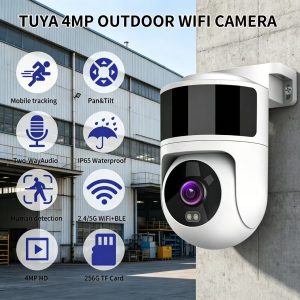
The best place to put an outdoor Camera is almost never near a socket. Gates, driveways, side passages and sheds are exactly the spots with no mains, which is why “no Power outlet” is one of the most common reasons people give up on an outdoor camera.

There are three workable answers, and they are not interchangeable. In order of how often they are the right one: Solar panel cameras, Battery cameras, and 4G LTE cameras for places with no WiFi either.

Option 1: solar panel camera

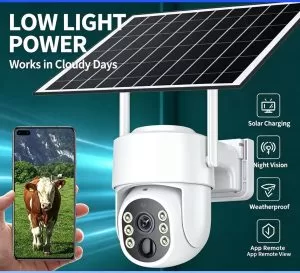
A Camera with its own panel — such as the solar PTZ or the Xingliao solar PTZ — is the closest thing to a fit-and-forget outdoor camera. The panel trickle-charges the battery through the day; the battery runs the camera at night.

Two honest caveats. The panel needs light: a north-facing wall under an overhang collects very little, and winter output drops substantially. And the camera still needs WiFi — if the gate is 30 metres from the house, the signal is the real problem, not the power. Our solar doorbell guide covers panel siting in more detail and the same rules apply here.

Option 2: battery camera

Simplest to install and the easiest to move. A battery camera such as the P11 mounts on any surface with an adhesive pad or two screws, records on motion, and comes down for charging.

Outdoors, expect shorter intervals than indoors: cold reduces capacity, and a camera watching a windy garden triggers far more often than one in a quiet hallway. If you are willing to charge it every couple of months, this is the cheapest route to a camera at the gate.

Option 3: 4G LTE camera

When there is no power and no WiFi, the answer is a camera with its own cellular link. The 4G LTE solar trail camera is built for exactly this: remote sites, allotments, farm gates, building plots — anywhere a router will never reach.

It needs a data SIM and a signal, and it costs more to run than a WiFi camera. But it is the only option that works completely independently of the building.

What still has to reach the camera

Option Needs mains Needs home WiFi Needs charging
Solar panel camera No Yes Rarely
Battery camera No Yes Every 1-3 months
4G LTE solar camera No No (SIM data) Rarely

Note that “no mains” never means “no WiFi” unless you go to 4G. Test your 2.4 GHz signal at the mounting point before buying — stand there with a phone and check. If it is weak, an outdoor extender or a mesh node in the nearest room usually fixes it.

Weather and mounting

Outdoor means IP-rated: look for IP65 or better for rain and dust. Mount under an eave if you can — not because the camera cannot take rain, but because lenses stay cleaner and infrared night vision is not fogged by water on the glass. Aim for 2.5 to 3.5 metres high: out of easy reach, still Low enough for a usable face angle.

FAQ

Will a solar camera run through a British or northern European winter?
It will run, but the panel contributes much less. Plan on one manual charge in late autumn rather than expecting the panel to carry you through to spring.
Do I need WiFi for a solar camera?
Yes, unless it is a 4G model. The panel replaces mains power, not the network connection.
How much data does a 4G camera use?
That depends entirely on how often you view live and how Many clips upload. Motion-triggered clips with occasional live viewing are modest; continuous streaming is not.
Can I use a power bank?
Some cameras will run from one, but outdoor-rated power banks are rare and it adds a failure point. A solar model is usually the better spend.
Does night vision work on battery?
Yes, infrared LEDs draw relatively little power. Cold is the bigger drain on the battery than the LEDs.
Can I mount to a fence?
Mechanically yes, but fences move. Movement triggers false motion alerts and shakes the image — use a wall or post for a PTZ camera.

Related Articles

You Might Also Like

Frequently Asked Questions

Is Outdoor Security Camera worth buying?

Based on the breakdown in this article, Outdoor Security Camera offers a solid mix of features and value. If your main goal matches the key benefits described above, it is a practical choice for everyday use.

How do I choose the right outdoor security camera for my needs?

Start with your core use case, then compare battery life, compatibility, and build quality as covered above. Choosing the right outdoor security camera comes down to matching specs with how you actually use it.

Does outdoor security camera require a companion app?

Most devices of this type pair with a free companion app for setup and firmware updates. A few advanced features may sit behind a paid plan, so check the official specs page before buying.

Posted on — Leave a comment

Battery vs Wired Video Doorbell: Power, WiFi and Mounting Compared

The battery-versus-wired decision shapes everything else about a Video doorbell: Where you can mount it, whether it can record continuously, and how often you think about it afterwards. Almost every other spec — resolution, field of view, night vision — matters less than this one.

Here is the comparison in plain terms, with the models in our video doorbell range as reference points: the AA-battery and rechargeable models such as the AA-powered WiFi doorbell and U9 rechargeable kit, against wired systems like the 2-wire intercom with a 7-inch monitor.

What each one needs at the door

Battery Doorbell Wired doorbell
Power Internal battery, charged off the Door Bell wires or a low-voltage transformer
Mounting Anywhere — adhesive pad or two screws Where the wires reach
Rental friendly Yes, fully reversible Usually not
Recording On motion / button press Can record continuously
Upkeep Recharge every few months None
Best at Flats, rentals, doors with no wiring Owned homes, high-traffic doors

Recording behaviour is the hidden difference

A battery doorbell sleeps and wakes on a trigger — a button press or a PIR detection. That is what makes a battery last months, and it is also why battery models can miss the moments between triggers. A wired unit can afford to stream and record continuously, which matters on a street-facing door where the interesting event might be a car, not a visitor.

If catching everything matters more than easy installation, wired wins. If you want a doorbell that simply works when someone presses it, battery is fine and far easier to fit.

WiFi is the other constraint, and it applies to both

App-based battery and WiFi doorbells both need a usable 2.4 GHz signal at the door. That is where installations usually fail, not at the power stage. Test before you buy: stand at the door with your phone, switch to 2.4 GHz, and check the signal. A thick external wall or a metal door can turn a strong indoor network into nothing at the doorstep.

If the signal is poor, the options are a WiFi extender nearer the entrance, or a kit that does not use your network at all — the monitor-based kits in our wireless doorbell comparison run their own link between camera and screen.

Choosing for a rental

Battery, every time. You can mount it with an adhesive bracket, take it with you when you leave, and refit the original bell. Avoid drilling into a frame unless your tenancy allows it, and keep the original chime wiring untouched so the next tenant inherits what you found.

Choosing for an owned home with existing bell wires

If there is already a working chime, you have free power at the door and a wired doorbell is the low-effort, high-reliability choice. A 2-wire Video intercom system also gives you a large indoor monitor and a properly loud ring — worth considering if the household includes people who will not check a phone notification.

FAQ
Can a battery doorbell record 24/7?
No, not practically. Continuous streaming would flatten the battery in days. Battery models record clips on motion or button presses.
Does a wired doorbell keep working during a power cut?
The doorbell loses power with the house, same as a wired chime. A battery model keeps running, though its WiFi usually goes with the router.
How often will I charge a battery doorbell?
Typically every two to six months depending on traffic, temperature and how often you view live Video. Cold winters shorten it.
Can I use the existing chime?
Some wired models can drive the existing chime; battery kits usually ship with their own indoor chime or rely on phone notifications. Check the product page for the specific model.
Is 2.4 GHz WiFi enough for Video?
Yes — doorbell Video is low-bitrate. The issue is signal strength at the door, not bandwidth.
Which is better for a door that gets strong afternoon sun?
Either works, but avoid direct sun on the lens and consider a model with an IP rating for exposed doors. Heat also ages batteries faster.

Related Articles

You Might Also Like
Frequently Asked Questions

Is Battery Wired Video worth buying?

Based on the breakdown in this article, Battery Wired Video offers a solid mix of features and value. If your main goal matches the key benefits described above, it is a practical choice for everyday use.

How do I choose the right battery wired video for my needs?

Start with your core use case, then compare battery life, compatibility, and build quality as covered above. Choosing the right battery wired video comes down to matching specs with how you actually use it.

Does battery wired video require a companion app?

Most devices of this type pair with a free companion app for setup and firmware updates. A few advanced features may sit behind a paid plan, so check the official specs page before buying.

Posted on — Leave a comment

147 × 86 mm Smart Sockets: Power, USB and Metering on One Plate

147 smart sockets - 147 × 86 mm Smart Sockets: Power, USB and Metering on One Plate
147 × 86 mm Smart Sockets: Power, USB and Metering on One Plate

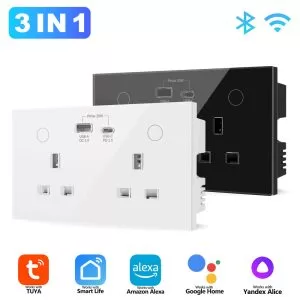
A Smart Socket on a wall plate does three jobs a plug-in adapter cannot: it meters the circuit, it switches a load that is too big for a portable adapter, and it disappears into the wall so nothing hangs out of it. The 147 × 86 mm format adds USB charging and, on some models, energy monitoring.

What the format gives you

The wider plate takes a mains Socket plus USB-A and Type-C outlets side by side, which is the configuration that actually gets used in a bedroom or a hotel desk. It is the Standard plate in Pakistan and Middle East installations. Upgrade Home Security – X8 Wireless Visual Doorbell 4.3 Inch IPS Screen IP66 Waterproof

Metering

Socket-level energy statistics are the underrated feature: you can see what a television, a kettle or an air conditioner really draws, instead of guessing from the electricity bill. Several models in this group report it in the app.

Scheduling heavy loads

Unlike a portable Smart plug, a wall socket rated for the full plate current can run an air conditioner or a water heater on a schedule. That is where the money is saved — not by switching phone chargers.

WiFi and Zigbee

WiFi models go straight to the router for quick commissioning; Zigbee models need a gateway but scale better across a building and keep standby consumption low.

FAQ
Does it replace a standard socket plate?
Yes, in a 147 × 86 mm box.
Are the USB ports switched with the socket?
On most models the USB outlets are separately controlled — check the model line.
Can it report energy use?
Yes on the metering models in the range.

Ready to specify it? Full specifications, gang options, colors and quantity pricing are on the 147 × 86 mm Smart Socket & Switch Combo Series (WiFi / ZigBee) product page — OEM logo, manual and packaging are available from the first order. Solar Flood Light: The Ultimate Guide to Camping, Emergency, and Outdoor Lighting

Related Articles

You Might Also Like
Frequently Asked Questions

Is 147 Smart Sockets worth buying?

Based on the breakdown in this article, 147 Smart Sockets offers a solid mix of features and value. If your main goal matches the key benefits described above, it is a practical choice for everyday use.

How do I choose the right 147 smart sockets for my needs?

Start with your core use case, then compare battery life, compatibility, and build quality as covered above. Choosing the right 147 Smart sockets comes down to matching specs with how you actually use it.

Does 147 smart sockets require a companion app?

Most devices of this type pair with a free companion app for setup and firmware updates. A few advanced features may sit behind a paid plan, so check the official specs page before buying.

Posted on — Leave a comment

How to Set Up a CCTV Camera System at Home

A CCTV camera system for a house no longer needs a contractor, a rack of recorders and a day of cable runs — three or four cameras and one app will do. What still decides whether the system works is planning: where each camera goes, how it gets power, how the WiFi behaves at that exact spot, and where the recordings live. Get those four right and the installation itself takes an afternoon.

What “CCTV” means for a home today

Two architectures cover almost every home:

  • App-based wireless cameras: each camera has its own WiFi radio and records to a microSD card, to cloud storage, or both. No recorder, no wiring to a central box, and you watch everything in one app. This is what most houses should install first.
  • Recorder-based (NVR/DVR) systems: cameras run on one cable to a recorder that stores weeks of footage on a hard drive. Better for continuous 24/7 recording across many cameras and for long retention, but it needs a central location with power and network, plus cable runs.

A practical compromise many owners land on: wireless cameras for coverage and quick setup, with one recorder or a larger memory card for the camera that must not miss anything.

Step 1: plan coverage before you buy anything

Walk the property in the evening and note what you want to see. Typical priority list, in order of value: Smart Switch for Water Heater and AC

  • Front entry and driveway: who arrives, which vehicle, was the gate left open.
  • Back door and garden path: the quiet side of a house is the one that needs a camera most.
  • Side alley or parking space: anything you cannot see from a window.
  • Indoor main area: hallway or living room, mainly for pets, children, or peace of mind while travelling.

One camera per priority area beats four cameras scattered at random. Start with the entry and one outdoor watcher, live with them for a month, then add more where a gap shows up.

Step 2: solve power for each position

Power is the constraint that decides the model, not resolution:

  • Mains socket nearby: a plug-in camera can stream continuously and never runs flat. Easiest and most reliable.
  • Outdoor with sun: a solar PTZ camera tops itself up daily and forgets about charging entirely.
  • No sun, no socket: a battery camera installs in minutes, but it wakes on motion rather than streaming all day — battery life depends on how busy the spot is.
  • Long cable run and no WiFi: a 4G camera with a SIM card covers outbuildings, farms and construction sites where neither power nor network reaches.

Step 3: get the network right

Almost every consumer camera works on 2.4 GHz WiFi, and signal strength at the mounting point is the number-one cause of “my camera keeps going offline”. Before mounting, stand where the camera will hang and check the signal on your phone. If it is weak:

  • Move the camera a metre or two — often the difference between a dead spot and a solid link.
  • Point the router antenna vertically and raise the router off the floor.
  • Add a mesh node or WiFi extender on the same side of the house as the camera.
  • Keep the camera off a crowded 2.4 GHz channel if your router lets you choose one.

Also give the camera a fixed IP or DHCP reservation. Most “camera disappeared” events are the router handing out a different address after a reboot.

Step 4: mount for footage you can actually use

  • Height: 2.2 to 2.5 m. High enough to be out of reach, low enough to identify a face rather than a hat.
  • Angle: tilt down 15 to 30 degrees so the lens sees the approach path, not the sky.
  • Light: avoid aiming straight into a street lamp or the setting sun — flare wipes out detail for hours a day.
  • Weather: keep the lens under an eave if possible, and confirm IP65 or better for anything outdoors.
  • Privacy: never point a camera into a neighbour’s window or a bathroom. It is both unpleasant and often illegal.

Step 5: decide where recordings live

  • microSD card in the camera: free, local, works with no internet, survives an internet outage. This is the baseline everyone should have.
  • Cloud subscription: survives a stolen camera and lets you review events from anywhere. Usually a few dollars per camera per month.
  • Recorder with a hard drive: best for many cameras and long retention; requires a central cupboard with power and network.

Card plus cloud is the comfortable setup: the card handles everyday clips, the cloud covers the events that matter if hardware disappears.

Step 6: put the system on your phone

  1. Install the app (Tuya Smart or Smart Life for Tuya-based cameras) and create one account for the whole house.
  2. Power the camera, hold the reset button until the indicator flashes, and let the app find it.
  3. Enter the 2.4 GHz WiFi password. Pair one camera at a time, within two metres of the router, then move it to its final position.
  4. Rename each camera by location — “Front door”, “Driveway” — not by model number.
  5. Turn on human detection and draw motion zones so passing cars and trees stop triggering alerts.
  6. Set a notification schedule: alerts when nobody is home, or overnight only. Alarm fatigue is what kills a useful system.
  7. Test playback from the card and from the cloud before you call the job done.

Common problems and the usual cause

  • Camera offline at night: infrared LEDs pull more current; a marginal power supply or a weak WiFi link fails first in the dark.
  • Constant false alerts: motion detection instead of human detection, or a zone that includes a road or a swaying branch.
  • No playback: card not formatted in the camera, or a cloud plan that expired.
  • Blurry night images: lens dirty, or a plastic lens cover still on — check before blaming the sensor.

XingLiao security cameras

Frequently Asked Questions

How many cameras do I need for a house?

Two to four for most homes: front entry, one more outdoor position, and one indoor common area. Add cameras only where the first set leaves a real gap — extra cameras mostly create extra alerts.

Do CCTV cameras need WiFi?

The app-based ones do, because that is how live view and alerts reach your phone. Cameras with local card recording and no app are the exception, and a 4G camera or a Doorbell with its own wireless monitor covers sites where no router reaches.

Can I install a CCTV system myself?

Yes, with wireless cameras it is a one-person job: mount the bracket, pair the camera, set the zones. Recorder-based systems with long cable runs are the only version where an installer genuinely saves time.

What is the difference between CCTV and a security camera?

In everyday use, almost nothing. “CCTV” traditionally describes a closed system of cameras recording to a central box; “security camera” describes the single WiFi unit in an app. Modern homes usually mix both ideas: app cameras for coverage, a recorder where retention matters.

How long does a battery camera last?

Weeks to months depending on the location. A quiet indoor spot can run three months per charge; a street with constant traffic can drain one in a week or two. Solar panels remove the problem outdoors.

Do I need a subscription?

No. A microSD card in the camera gives free local recording. Subscriptions buy off-site storage, which only matters if you want footage after the camera itself is stolen or broken.

Where should I not put a camera?

Anywhere that watches a neighbour’s property, a bathroom, or a bedroom shared with guests. Point cameras at your own entrances and pathways only — that is both the useful placement and the legal one.

Related guides

Browse all security cameras · Tell us the layout of your property and we will suggest a camera plan

Posted on — Leave a comment

Foldable Solar Power Bank 20000mAh: How Many Phone Charges You Actually Get, and Who Should Buy One

Foldable Solar Power Bank 20000mAh Waterproof Outdoor Charger ...

Quick answer: a 20000mAh power bank delivers roughly four to five full charges for an average 4000–5000mAh phone — but almost all of that comes from the wall outlet you charged it from before you left. The fold-out Solar panel is a trickle charger: in good sun it typically adds enough for a partial top-up over a long day, not a full refill. Buy this form factor for the rugged shell, the big battery and the built-in emergency light; treat the panel as the thing that keeps you alive on day three, not the thing that charges you on day one.

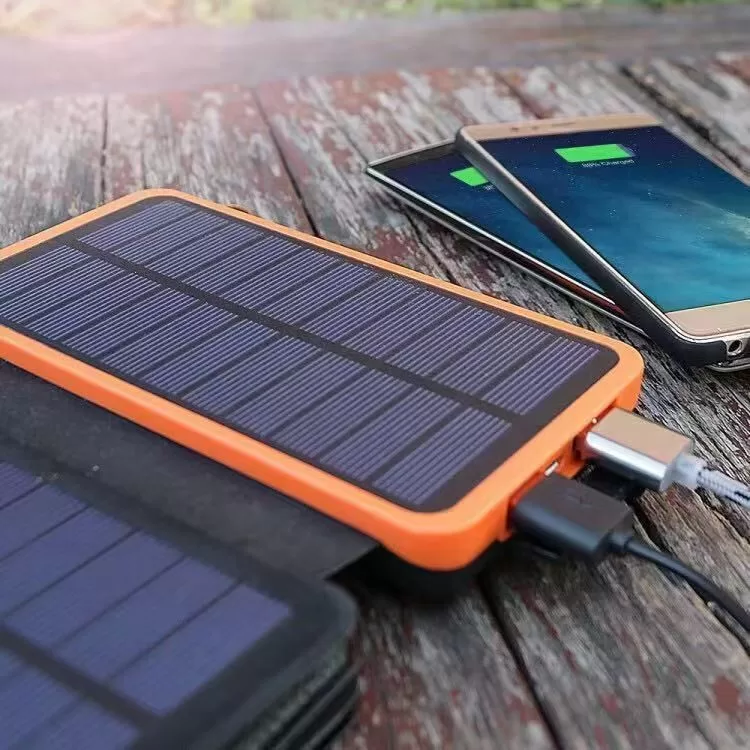
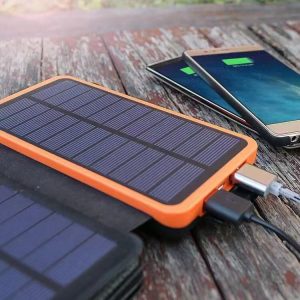
A rugged shell, a high-capacity cell and a fold-out panel — the three things that decide whether this class of product is worth Carrying.

What 20000mAh Actually Means

Capacity printed on the box is measured at the cell’s internal voltage (3.7V), but your phone charges at 5V or 9V. Therefore, The conversion loses energy, and so does heat. The rule of thumb used across the industry is that you get about 60–70% of the printed number out of the USB port.

  • 20000mAh cell → roughly 12000–14000mAh usable at the port.
  • Average phone (4000–5000mAh) → about 4 to 5 full charges.
  • A tablet or a camera battery → one to two charges.
  • A phone plus a headlamp plus a watch for a long weekend → comfortable, with margin.

That is the honest number to put on a product page. Anyone promising eight phone charges from a 20000mAh unit is quoting the cell rating, not what comes out of the cable.

Foldable Solar Power Bank 20000mAh Waterproof Outdoor Charger ... - view 3
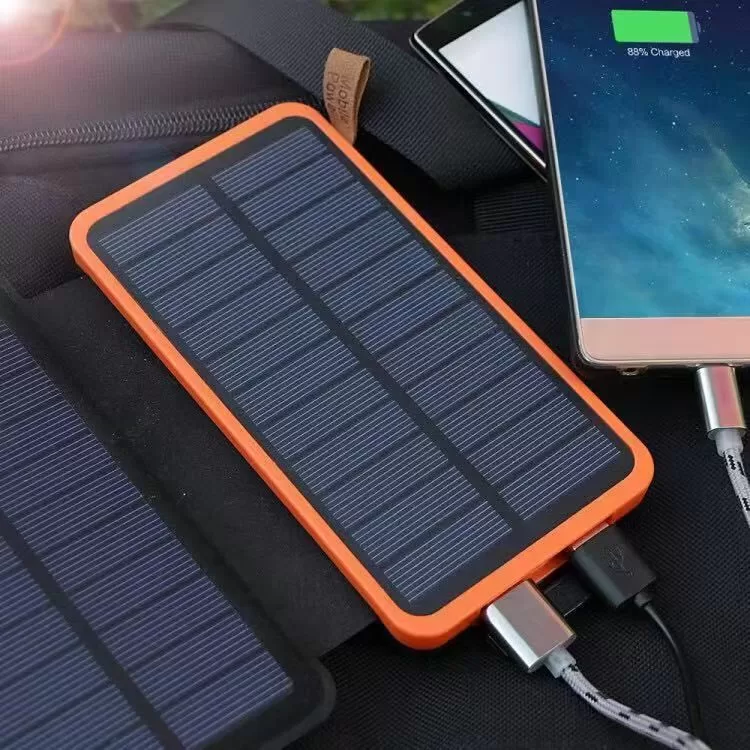
Charging a handset from the USB port is where the rated capacity meets reality — expect four to five full charges.

The Solar Panel: Set the Expectation Correctly

This is where most returns happen. For example, A panel the size of a folded paperback simply cannot produce the current a fast charger does. In direct midday sun a small fold-out panel might deliver a few hundred milliamps — enough to add perhaps 10–20% to the internal battery over an afternoon of good exposure, more if the unit is left angled and undisturbed.

  1. It is a maintenance charger. Leave it on a pack lid while you walk and it slowly offsets standby drain and small top-ups.
  2. Angle matters more than cloud cover. A flat panel at noon beats a tilted one at dusk by a wide margin.
  3. Heat is the enemy. A panel baking on a dashboard loses efficiency and heats the cells it is charging.
  4. Always leave home full. Solar is the backup plan, not the plan.

Framed this way, the panel is genuinely useful: on a three-day trip it is the difference between a dead phone and a working one. Framed as a primary charger, it disappoints.

Foldable solar power bank 20000mAh with orange rugged border and built-in LED flashlight showing three lighting modes
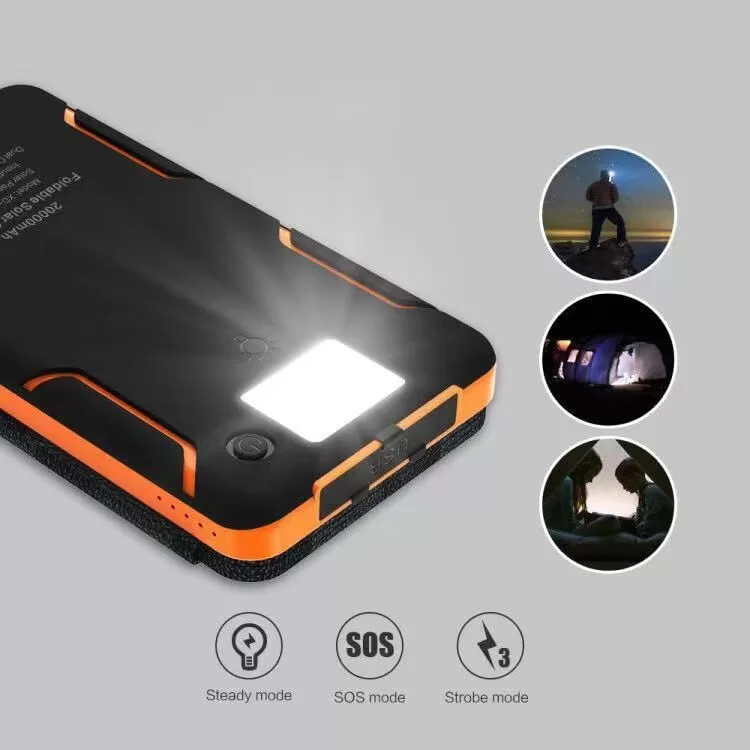
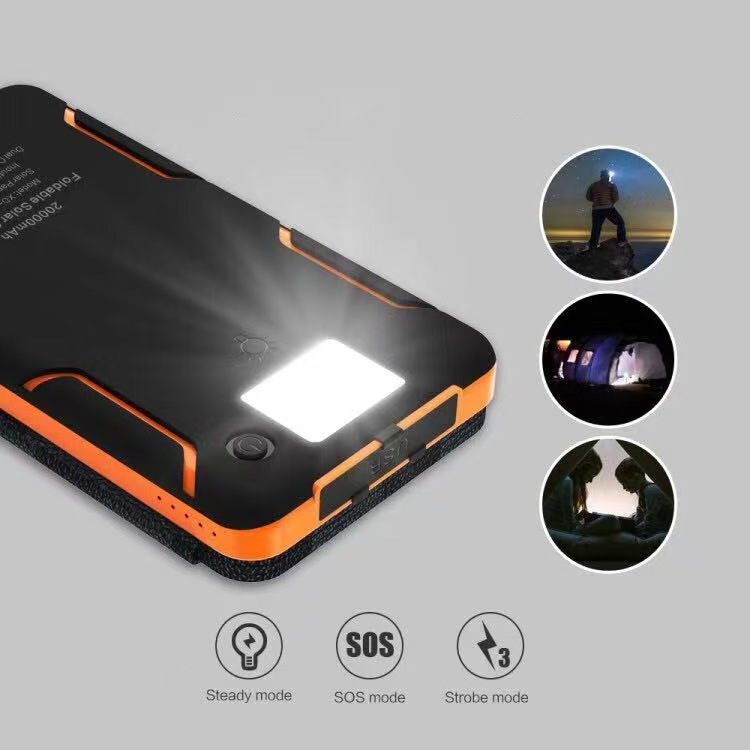
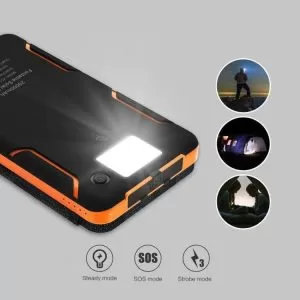
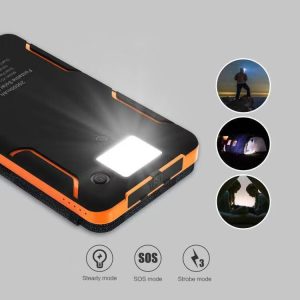
Three lighting modes turn the same battery into a lantern, a strobe and an emergency beacon.

The Built-In LED Is Half the Reason to Buy It

The torch on this class of power bank is not an afterthought. In addition, A steady beam lights a tent or a work area; a slow strobe works as a marker; a fast strobe or SOS pattern is a distress signal that carries much further than a voice. For anyone building an emergency kit — or a retail kit aimed at campers, drivers and job sites — the light is often the feature customers remember.

  • Steady mode — camp lighting, power cuts, working under a bonnet at night.
  • Slow strobe — makes a bag or a campsite easy to find in the dark.
  • SOS / fast strobe — signalling when a phone has no signal and no battery.

Where This Product Sells

Camping, hiking and overland travel

Multi-day trips are the core use case. Weight is the trade-off: a rugged 20000mAh unit is heavier than a slim travel bank, but it is the one you can drop, get rained on and still rely on.

Foldable Solar Power Bank 20000mAh Waterproof Outdoor Charger ... - view 4
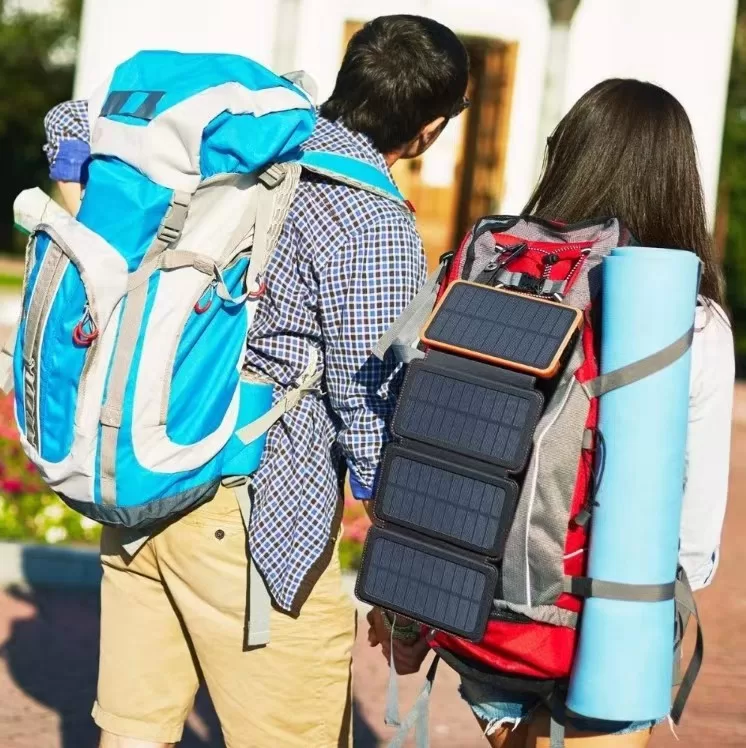
Hikers and campers are the natural audience — long days away from a socket, and gear that gets treated roughly.

Emergency and disaster kits

Households that keep a kit for outages want three things: a big cell that holds charge for months, a torch, and no dependence on the grid. Moreover, This covers all three in one object, which is exactly why it belongs in a kit rather than in a drawer.

Outdoor work and job sites

Tradespeople, survey crews and delivery drivers use the same unit for phones, radios and headlamps, and the rugged housing survives being thrown into a toolbox.

Foldable solar power bank 20000mAh outdoor rugged charger with solar panel fold-out design
A fold-out panel plus a sealed housing is what separates an outdoor unit from an indoor power bank.

What to Check Before You Buy or Stock One

  1. Real rated output — ask for the usable capacity at the port, not just the cell figure.
  2. Ingress rating — IP65 or better means it survives rain and dust rather than just splashes.
  3. Port count and protocols — two outputs and a modern fast-charge protocol cover phones and tablets without adapters.
  4. Torch modes — confirm whether it has steady, strobe and SOS, and how they are cycled.
  5. Panel durability — a fold-out panel should be laminated, not a thin film that creases and dies.
  6. Certification for transport — UN38.3 and MSDS matter the moment you ship these by air.

Get those six right and the product sells itself. Get the capacity story wrong on the listing and it comes back as a return.

Frequently Asked Questions

Can the solar panel fully recharge the power bank?

Not in a single day in most conditions. Treat it as a slow top-up that extends a trip, and charge from the mains before you leave.

How many times will it charge my phone?

Plan on four to five full charges for a typical 4000–5000mAh handset, less if you fast-charge or use the torch heavily.

Can I take it on a plane?

Yes, in cabin baggage — 20000mAh sits under the usual airline limit for spare batteries, but the unit should ship with UN38.3 documentation.

Does it work in cloudy weather?

It works, but output drops sharply. Furthermore, Bright overcast gives a fraction of direct sun; heavy cloud gives almost nothing.

Is it worth it if I only need it for day trips?

Probably not — a slim 10000mAh bank is lighter and cheaper. The rugged, solar, torch-equipped format earns its weight on trips of two days or more.

Related Reading

Product page: Foldable Solar Power Bank 20000mAh Waterproof Outdoor Charger with LED Light & SOS Strobe Modes

You Might Also Like

Related Articles
Posted on — Leave a comment

Foldable Solar Power Bank: The Ultimate Off-Grid Charging Guide for Outdoor Enthusiasts

However, Foldable Solar Power Bank: The Ultimate Off-Grid Charging Guide for OutDoor Enthusiasts

Therefore, Imagine being three days into a backcountry hike when your phone hits zero percent. No GPS, no camera, no emergency contact. A foldable Solar power bank eliminates this problem by turning sunlight into electricity, keeping your devices charged anywhere on the planet. Window Vacuum Cleaner: Say Goodbye To Streaky Glass At Home & In Your Car

Foldable solar power bank 20000mAh with orange rugged border and built-in LED flashlight displaying three lighting modes for outdoor camping and emergency use
The 20000mAh foldable solar power bank features a built-in LED flashlight with Steady, SOS, and Strobe modes, IP65 waterproof rating and Dual USB charging for outdoor adventures.

What Is a Foldable Solar Power Bank?

However, A foldable solar power bank is a portable charger that combines a high-capacity battery with foldable solar panels. Therefore, The panels collect sunlight and convert it into electricity. This is stored in the built-in battery. You can then use that stored energy to charge your phone, tablet, GPS, or any USB-powered device. Furthermore, the foldable design means the panels stay compact when stored but expand to a large collection surface when deployed.

Therefore, Unlike a standard power bank that dies after a few charges, a solar model keeps generating electricity as long as the sun is shining. For example, Additionally, most models include USB charging as a backup, so you can top up the battery at home before heading out.

Key Features to Look For

Not all solar power banks are created equal. Here are the specifications that actually matter when choosing one for outdoor use:

Feature What to Look For Why It Matters
Battery Capacity 10000-20000mAh Higher capacity means more charges per device
Solar Panel Type Monocrystalline Higher efficiency than polycrystalline in compact size
Waterproof Rating IP65 or higher Survives rain, splashes, and dust storms
USB Output Ports At least 2 ports Charge Multiple devices simultaneously
LED Flashlight Built-in with multiple modes Replaces a separate camping light
Charging Input USB-C or Micro USB Solar is backup, USB is primary charging method

foldable solar power bank

How Solar Charging Actually Works

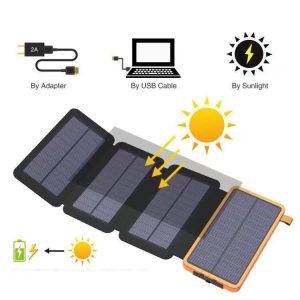
The solar panels on a foldable power bank use photovoltaic cells to convert sunlight into direct current electricity. This electricity flows into the built-in battery for storage. In addition, When you plug in your phone, the battery delivers power through the USB ports at a controlled voltage.

However, solar charging is slower than wall charging. A typical foldable solar panel on a power bank produces about 100-200mAh per hour in direct sunlight. Therefore, a full solar recharge of a 20000mAh battery takes approximately 40-60 hours of direct sun exposure. Moreover, For this reason, solar should be treated as a supplementary charging method rather than the primary one.

The best approach is to charge the power bank fully via USB before your trip, then use solar to top up the battery during the day. Meanwhile, hiking or camping.

Real-World Charging Capacity

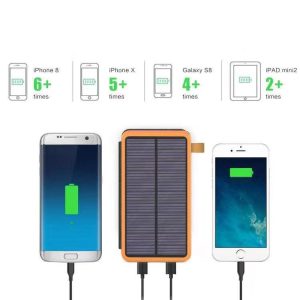
A 20000mAh foldable solar power bank delivers substantial power. Here is how many full charges you can expect for common devices:

Device Battery Size Approx. Full Charges
iPhone 8 1821mAh 6+ times
iPhone X and newer 2716-4352mAh 4-5 times
Samsung Galaxy S series 3000-5000mAh 4 times
iPad mini 5124mAh 2+ times
GPS handheld 2000mAh 5-6 times

foldable solar power bank

Note that these are approximate figures. Furthermore, Actual charging capacity depends on conversion efficiency, cable quality, and battery health. Moreover, charging two devices at once will drain the power bank faster than charging one at a time.

Dual USB Charging: Power Two Devices at Once

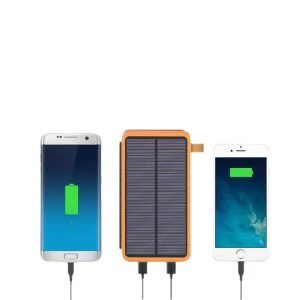
One of the most practical features of a quality foldable solar power bank is dual USB output. Two USB-A ports allow you to charge two Smartphones simultaneously at up to 5V/2.1A per port. As a result, This is particularly useful when traveling with a partner or when you need to charge your phone and GPS at the same time.

Additionally, smart IC technology inside the power bank detects the connected device and delivers the optimal charging current. This protects your devices from overcharging, overheating, and short circuits.

foldable solar power bank

Built-in LED Flashlight: Three Modes for Every Situation

A foldable solar power bank with a built-in LED flashlight eliminates the need to carry a separate camping light. The best models offer three lighting modes:

Mode Function Best Used For
Steady Continuous bright light Campsite illumination, reading, cooking, tent setup
SOS International Morse code distress signal Emergency rescue situations when lost or injured
Strobe Rapid flashing light Roadside warning, signaling, wildlife deterrence

foldable solar power bank

How to Use a Foldable Solar Power Bank on the Trail

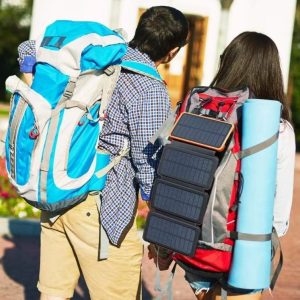
The foldable solar panel can be attached to the outside of your backpack using a carabiner clip or MOLLE straps. Importantly, As you hike during the day, the panel faces outward and collects sunlight, continuously trickle-charging the internal battery. By the time you reach camp in the evening, you have extra power stored and ready to use.

Here are some tips for maximizing solar collection. Meanwhile, hiking:

  • Face the panel toward the sun and adjust as direction changes
  • Avoid shadows from trees, buildings, or your own body
  • Clean the panel surface regularly with a cloth to remove dust and dirt
  • On cloudy days, expect 20-30% of normal charging efficiency
  • Keep the panel unfolded during rest stops for maximum exposure

foldable solar power bank

IP65 Waterproof Rating: Built for the Outdoors

An IP65 rating means the power bank is fully protected against dust ingress and water jets from any direction. Rain, splashes from a river crossing, and dusty trail conditions will not damage the device. Notably, The rugged outer shell with reinforced corners absorbs impact from drops and bumps.

However, IP65 does not mean the device can be submerged underwater. For boating or kayaking, store the power bank in a dry bag as an extra precaution.

Solar Power Bank vs. Standard Power Bank

Is a solar power bank worth it over a regular power bank? Here is a quick comparison:

Feature Foldable Solar Power Bank Standard Power Bank
Charging Method Solar + USB dual recharge USB only
Off-Grid Duration Days to weeks with sunlight Limited to stored capacity
Built-in Flashlight Yes, with 3 modes Usually no
Weight Heavier due to solar panel Lighter
Weather Resistance IP65 waterproof standard Varies by model
Best For Multi-day outdoor trips Daily city use

FAQ: Foldable Solar Power Bank

Q: How long does it take to fully charge the power bank via USB? A: Approximately 4-5 hours using a standard 5V/2A USB charger.

Q: How long does solar charging take to fully charge the battery? A: In direct sunlight, expect 40-60 hours for a full 20000mAh charge. However, Solar is best used as a top-up method during the day. Meanwhile, hiking.

Q: Can I charge two devices at the same time? A: Yes. Dual USB-A ports support simultaneous charging at up to 5V/2.1A per port.

Q: Will the solar panel charge on cloudy days? A: Yes, but efficiency drops to approximately 20-30% of full sunlight output. Overcast days will produce minimal charging.

Q: Is the power bank truly waterproof? A: The IP65 rating protects against dust and water jets from any direction. Therefore, It survives rain and splashes but should not be submerged in water.

Q: What devices are compatible? A: Any device that charges via USB, including iPhones, Android phones, iPads, tablets, GPS units, Bluetooth headphones, cameras, and small LED lights.

Q: Can I take this on an airplane? A: Yes. Power banks under 100Wh (approximately 27000mAh) are allowed in carry-on baggage. A 20000mAh power bank is well within this limit. For example, However, always check your airline’s specific regulations before flying.

Q: How heavy is a foldable solar power bank? A: A typical 20000mAh model weighs approximately 500 grams, making it manageable for backpacking trips where power is essential.

Final Thoughts

A foldable solar power bank is not a gimmick. It is a practical tool for anyone who spends time off the grid. The combination of massive 20000mAh battery storage, renewable solar charging, dual USB output, and a built-in LED flashlight with emergency modes makes it one of the most versatile pieces of outdoor gear you can carry.

Whether you are a weekend camper, a long-distance hiker, or simply someone preparing for emergency situations, this device ensures you stay connected and illuminated no matter how far you are from the nearest wall outlet.

You Might Also Like
Frequently Asked Questions

Is Foldable Solar Power Bank worth buying?

Based on the breakdown in this article, Foldable Solar Power Bank offers a solid mix of features and value. If your main goal matches the key benefits described above, it is a practical choice for everyday use.

How do I choose the right foldable solar power bank for my needs?

Start with your core use case, then compare battery life, compatibility, and build quality as covered above. Choosing the right foldable solar power bank comes down to matching specs with how you actually use it.

Does foldable solar power bank require a companion app?

Most devices of this type pair with a free companion app for setup and firmware updates. A few advanced features may sit behind a paid plan, so check the official specs page before buying.

Does foldable solar power bank work with both iPhone and Android?

Yes, in most cases this type of device ships with iOS and Android apps, and standard Bluetooth protocols keep cross-platform pairing simple.

Related Articles