Posted on — Leave a comment

How Many Security Cameras Does a 3-Bedroom Home Need?

Most people either buy one camera and discover it covers nothing useful, or buy six and spend a weekend running cables. A three-bedroom house has a finite number of genuinely useful camera positions, and covering those well beats covering everything badly.

Here is the plan that fits most layouts, using models from our security camera range.

Start with entrances, not rooms

Burglary statistics aside, the practical reason for a camera is to answer “who came to the door” and “what happened at the boundary”. That means the priority order is:

  1. Front door — the single most useful position in any house.
  2. Back door or garden access — the second most common entry point and the one people forget.
  3. Driveway or parking — vehicles, deliveries and the approach to the house.
  4. Side passage or gate — if there is one, it is worth a camera more than any indoor room.

A realistic count: three to five cameras

Position Suggested type Notes
Front door Video doorbell or compact outdoor camera The only position almost every home should have
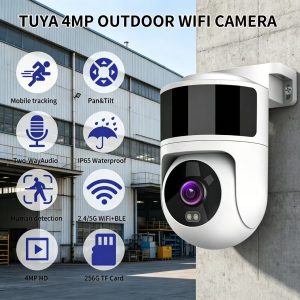
Back garden / patio door Outdoor PTZ or Solar model Covers the approach from the garden
Driveway Dual-lens camera Overview plus detail on vehicles and plates
Hallway (optional) Plug-in mini camera Indoor coverage of the main entry corridor
Nursery (optional) Baby monitor Dedicated unit with its own screen, not a Security camera

Three cameras (front, back, driveway) covers the essentials. Five adds hallway and nursery. Beyond five in a three-bedroom house, you are usually duplicating views.

Where cameras are a waste

  • Bedrooms — rarely justified unless there is a specific concern.
  • Kitchens and living rooms — large open spaces where one camera sees very little detail and pets trigger constant alerts.
  • Landings upstairs — no external access point, so nothing to catch.
  • Duplicate views of the same door — a doorbell camera plus an outdoor camera aimed at the same doorstep is usually redundant.

Practical limits that decide the real number

Three things will cut your plan short before the layout does:

  • WiFi coverage. Every camera needs a usable 2.4 GHz signal where it sits. Test at each position with a phone before buying.
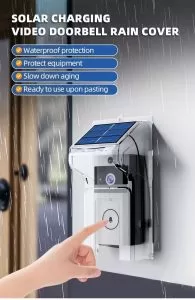
  • Power at outdoor positions. If there is no socket, you are choosing between a solar model and a Battery model — see cameras that run without a power outlet.
  • Storage. More cameras means more card space or a cloud plan. Continuous recording multiplies the requirement; motion-only clips keep it small.

One decision that saves money: doorbell or camera at the front?

If you only want to know who is at the door, a video doorbell is cheaper and better at it than a camera. If you want to see the approach, the path and the street, a camera does more. Many homes end up with a doorbell at the front and a camera at the back — which is a perfectly good three-camera plan with the driveway as the third.

FAQ

Is two cameras enough?
For a small three-bedroom house with one external door and a back gate, two (front and back) covers the main risk. Add the driveway if there is parking.
Should indoor cameras face outside?
Only with a camera designed for it. A standard indoor camera behind glass gives reflections by day and infrared fog at night — see our window camera guide.
Do I need continuous recording everywhere?
No. Motion clips are enough for most positions. Reserve continuous recording for one or two places where the timeline matters.
Can all cameras go in one app?
Yes — the Tuya / Smart Life app handles multiple cameras in a single account, including a mix of indoor, outdoor and doorbell models.
What about privacy rules?
Avoid pointing cameras into neighbours’ windows or shared spaces beyond your own boundary, and tell anyone working in the house that cameras are present.
How high should outdoor cameras be?
Roughly 2.5 to 3.5 metres: out of easy reach, still Low enough for a usable face angle.

Related Articles

You Might Also Like

Frequently Asked Questions

Is Many Security Cameras worth buying?

Based on the breakdown in this article, Many Security Cameras offers a solid mix of features and value. If your main goal matches the key benefits described above, it is a practical choice for everyday use.

How do I choose the right many security cameras for my needs?

Start with your core use case, then compare battery life, compatibility, and build quality as covered above. Choosing the right many security cameras comes down to matching specs with how you actually use it.

Does many security cameras require a companion app?

Most devices of this type pair with a free companion app for setup and firmware updates. A few advanced features may sit behind a paid plan, so check the official specs page before buying.

Posted on — Leave a comment

How to Set Up a CCTV Camera System at Home

A CCTV camera system for a house no longer needs a contractor, a rack of recorders and a day of cable runs — three or four cameras and one app will do. What still decides whether the system works is planning: where each camera goes, how it gets power, how the WiFi behaves at that exact spot, and where the recordings live. Get those four right and the installation itself takes an afternoon.

What “CCTV” means for a home today

Two architectures cover almost every home:

  • App-based wireless cameras: each camera has its own WiFi radio and records to a microSD card, to cloud storage, or both. No recorder, no wiring to a central box, and you watch everything in one app. This is what most houses should install first.
  • Recorder-based (NVR/DVR) systems: cameras run on one cable to a recorder that stores weeks of footage on a hard drive. Better for continuous 24/7 recording across many cameras and for long retention, but it needs a central location with power and network, plus cable runs.

A practical compromise many owners land on: wireless cameras for coverage and quick setup, with one recorder or a larger memory card for the camera that must not miss anything.

Step 1: plan coverage before you buy anything

Walk the property in the evening and note what you want to see. Typical priority list, in order of value: Smart Switch for Water Heater and AC

  • Front entry and driveway: who arrives, which vehicle, was the gate left open.
  • Back door and garden path: the quiet side of a house is the one that needs a camera most.
  • Side alley or parking space: anything you cannot see from a window.
  • Indoor main area: hallway or living room, mainly for pets, children, or peace of mind while travelling.

One camera per priority area beats four cameras scattered at random. Start with the entry and one outdoor watcher, live with them for a month, then add more where a gap shows up.

Step 2: solve power for each position

Power is the constraint that decides the model, not resolution:

  • Mains socket nearby: a plug-in camera can stream continuously and never runs flat. Easiest and most reliable.
  • Outdoor with sun: a solar PTZ camera tops itself up daily and forgets about charging entirely.
  • No sun, no socket: a battery camera installs in minutes, but it wakes on motion rather than streaming all day — battery life depends on how busy the spot is.
  • Long cable run and no WiFi: a 4G camera with a SIM card covers outbuildings, farms and construction sites where neither power nor network reaches.

Step 3: get the network right

Almost every consumer camera works on 2.4 GHz WiFi, and signal strength at the mounting point is the number-one cause of “my camera keeps going offline”. Before mounting, stand where the camera will hang and check the signal on your phone. If it is weak:

  • Move the camera a metre or two — often the difference between a dead spot and a solid link.
  • Point the router antenna vertically and raise the router off the floor.
  • Add a mesh node or WiFi extender on the same side of the house as the camera.
  • Keep the camera off a crowded 2.4 GHz channel if your router lets you choose one.

Also give the camera a fixed IP or DHCP reservation. Most “camera disappeared” events are the router handing out a different address after a reboot.

Step 4: mount for footage you can actually use

  • Height: 2.2 to 2.5 m. High enough to be out of reach, low enough to identify a face rather than a hat.
  • Angle: tilt down 15 to 30 degrees so the lens sees the approach path, not the sky.
  • Light: avoid aiming straight into a street lamp or the setting sun — flare wipes out detail for hours a day.
  • Weather: keep the lens under an eave if possible, and confirm IP65 or better for anything outdoors.
  • Privacy: never point a camera into a neighbour’s window or a bathroom. It is both unpleasant and often illegal.

Step 5: decide where recordings live

  • microSD card in the camera: free, local, works with no internet, survives an internet outage. This is the baseline everyone should have.
  • Cloud subscription: survives a stolen camera and lets you review events from anywhere. Usually a few dollars per camera per month.
  • Recorder with a hard drive: best for many cameras and long retention; requires a central cupboard with power and network.

Card plus cloud is the comfortable setup: the card handles everyday clips, the cloud covers the events that matter if hardware disappears.

Step 6: put the system on your phone

  1. Install the app (Tuya Smart or Smart Life for Tuya-based cameras) and create one account for the whole house.
  2. Power the camera, hold the reset button until the indicator flashes, and let the app find it.
  3. Enter the 2.4 GHz WiFi password. Pair one camera at a time, within two metres of the router, then move it to its final position.
  4. Rename each camera by location — “Front door”, “Driveway” — not by model number.
  5. Turn on human detection and draw motion zones so passing cars and trees stop triggering alerts.
  6. Set a notification schedule: alerts when nobody is home, or overnight only. Alarm fatigue is what kills a useful system.
  7. Test playback from the card and from the cloud before you call the job done.

Common problems and the usual cause

  • Camera offline at night: infrared LEDs pull more current; a marginal power supply or a weak WiFi link fails first in the dark.
  • Constant false alerts: motion detection instead of human detection, or a zone that includes a road or a swaying branch.
  • No playback: card not formatted in the camera, or a cloud plan that expired.
  • Blurry night images: lens dirty, or a plastic lens cover still on — check before blaming the sensor.

XingLiao security cameras

Frequently Asked Questions

How many cameras do I need for a house?

Two to four for most homes: front entry, one more outdoor position, and one indoor common area. Add cameras only where the first set leaves a real gap — extra cameras mostly create extra alerts.

Do CCTV cameras need WiFi?

The app-based ones do, because that is how live view and alerts reach your phone. Cameras with local card recording and no app are the exception, and a 4G camera or a Doorbell with its own wireless monitor covers sites where no router reaches.

Can I install a CCTV system myself?

Yes, with wireless cameras it is a one-person job: mount the bracket, pair the camera, set the zones. Recorder-based systems with long cable runs are the only version where an installer genuinely saves time.

What is the difference between CCTV and a security camera?

In everyday use, almost nothing. “CCTV” traditionally describes a closed system of cameras recording to a central box; “security camera” describes the single WiFi unit in an app. Modern homes usually mix both ideas: app cameras for coverage, a recorder where retention matters.

How long does a battery camera last?

Weeks to months depending on the location. A quiet indoor spot can run three months per charge; a street with constant traffic can drain one in a week or two. Solar panels remove the problem outdoors.

Do I need a subscription?

No. A microSD card in the camera gives free local recording. Subscriptions buy off-site storage, which only matters if you want footage after the camera itself is stolen or broken.

Where should I not put a camera?

Anywhere that watches a neighbour’s property, a bathroom, or a bedroom shared with guests. Point cameras at your own entrances and pathways only — that is both the useful placement and the legal one.

Related guides

Browse all security cameras · Tell us the layout of your property and we will suggest a camera plan

Posted on — Leave a comment

The Complete Guide to Smart Peephole Doorbell Cameras

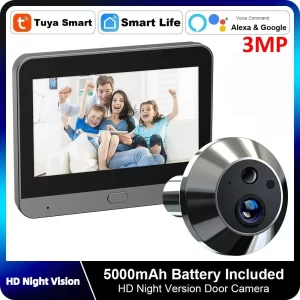
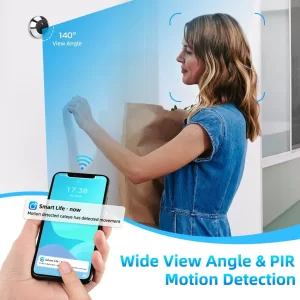
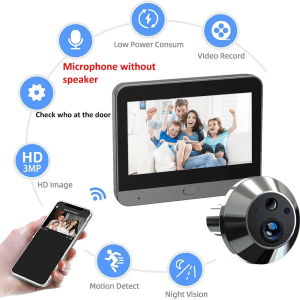
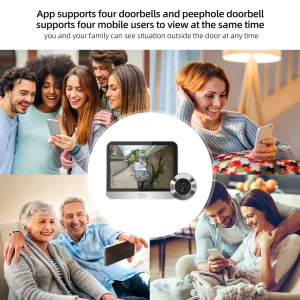
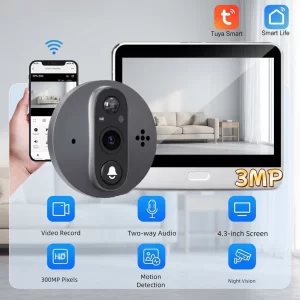
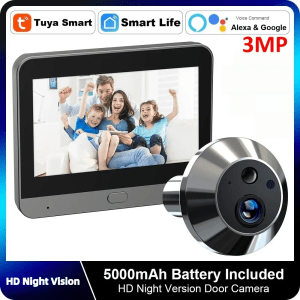
However, A Smart Doorbell camera is no longer a luxury. It is essential front door security for every home and apartment. With the Tuya Smart WiFi Digital Peephole Doorbell Camera, you get 3MP Video140 degree wide angle coverage, night vision, and motion alerts in one easy-to-install device. Therefore, This guide walks you through everything you need to know about smart peephole doorbell cameras, from how to choose one to why this model stands out for buyers in the US and Europe.

peephole doorbell cameras

What Is a Smart Peephole Doorbell Camera?

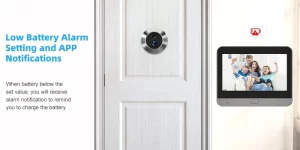
Therefore, A smart peephole doorbell camera is a two-in-one device that replaces your traditional door peephole with a high-definition digital camera and doorbell. Instead of squinting through a tiny hole, you view a live video feed on your phone from anywhere in the world. The Tuya Smart model adds WiFi connectivity, PIR motion detection, two-way audio and smart home integration to the package. For example, It installs through your existing peephole hole. This means no drilling, no wiring, and no professional installation. This makes it the ideal security solution for apartments, condos, rental properties, and any front door with a standard peephole.

Why Choose the Tuya Smart Peephole Doorbell?

However, The Tuya Smart WiFi Peephole Doorbell Camera stands out for several reasons. First, the 3MP resolution delivers sharper, more detailed video than standard 720p doorbell cameras. In addition, You can clearly identify Faces, read package labels, and see fine details. Second, the 140 degree wide angle lens covers your entire doorway and porch area, eliminating blind spots. Third, the PIR motion sensor detects human body heat rather than just pixel changes. This means fewer false alarms from passing shadows or tree branches. Moreover, Fourth, it works with Amazon Alexa and Google Assistant, so you can view the live feed on your smart display using voice commands.

peephole doorbell cameras

peephole doorbell cameras

Buying Tips: What to Look For in a Peephole Doorbell Camera

Therefore, When shopping for a smart peephole doorbell camera, keep these key factors in mind.

Moreover, First, check the video resolution. Look for at least 1080p, but 3MP or higher is ideal for capturing fine details like faces and license plates. The Tuya model offers 3MP, which provides approximately 50 percent more pixels than 1080p.

In addition, Second, consider the field of view. Furthermore, A narrow lens will miss visitors standing to the side. Look for at least 130 degrees, with 140 degrees being ideal for full doorway coverage. The wider the angle, the fewer blind spots you will have.

Third, evaluate the motion detection. As a result, PIR sensors are more accurate than pixel-based motion detection. This is because they specifically detect human body heat. This means fewer false alerts from cars, animals, or changing light conditions.

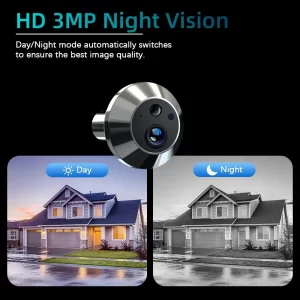
Fourth, check the night vision range. Infrared LEDs should provide clear visibility to at least 15 to 20 feet in complete darkness. Importantly, Without good night vision, your camera is useless for half the day.

Fifth, consider smart home compatibility. If you already use Alexa or Google Assistant, make sure the doorbell supports voice commands and smart display viewing. The Tuya Smart app also lets you view the feed, adjust settings, and receive alerts from anywhere.

Finally, think about installation. Notably, If you live in an apartment or rental property, a peephole-mount camera that requires no wiring is the best choice. The Tuya model installs through your existing peephole hole in minutes.

Wired vs. Peephole vs. However, Battery Doorbell Cameras

There are three main types of doorbell cameras on the market, and each has its strengths. Wired doorbell cameras like Ring Pro offer continuous power but require existing doorbell wiring and a transformer, which many apartments do not have. Battery doorbell cameras like Ring Stick Up Cam are wireless but need recharging every few months. Therefore, Peephole doorbell cameras like the Tuya Smart model install through your existing peephole hole, require no wiring, and use a rechargeable battery. They are the only option that works for apartment doors with a peephole and no doorbell wiring. If you rent your home or live in an apartment, the peephole type is your best and often only option.

Our Featured Pick: Tuya Smart WiFi Peephole Doorbell Camera

peephole doorbell cameras

peephole doorbell cameras

If you are looking for the perfect peephole doorbell camera, our featured pick checks every box.

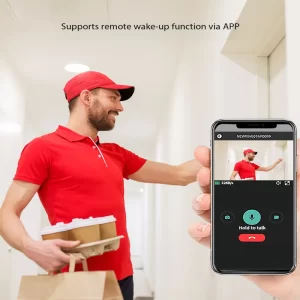
The camera features a 3MP sensor with 140 degree wide angle lens, delivering crisp, detailed video day and night. For example, The infrared night vision automatically activates in darkness, providing clear visibility to 15 to 20 feet. The PIR motion sensor detects human presence and sends instant push notifications to your phone. Two-way audio lets you speak with visitors through the built-in microphone and speaker, even when you are not home. In addition, The Tuya Smart app gives you full control from iOS or Android, and the camera works with Amazon Alexa and Google Assistant for voice control.

Installation takes minutes. Simply remove your old peephole, insert the camera unit through the hole, and secure it with the indoor display unit. No wiring, no drilling, no electrician. Moreover, The rechargeable battery lasts weeks on a single charge depending on usage. You can view it at our shop.

peephole doorbell cameras

peephole doorbell cameras

How to Set Up and Use

Setting up the Tuya Smart peephole doorbell is straightforward. First, remove your existing peephole from the door. Furthermore, Second, insert the camera unit through the peephole hole from outside. Third, attach the indoor display unit on the inside of the door to secure the camera in place. Fourth, charge the battery using the included USB cable. As a result, Fifth, download the Tuya Smart app on your iOS or Android phone. Sixth, follow the in-app instructions to connect the camera to your WiFi network. Once connected, you can view the live feed, receive motion alerts, enable cloud or MicroSD storage up to 128GB, and link the device to Alexa or Google Assistant.

Best Use Cases

This peephole doorbell camera is perfect for apartment doors, condo entrances, rental properties, hotel room doors, office doors, and any front door with a standard peephole. Importantly, It is particularly useful for renters who cannot modify their doors or run wiring. The no-wiring installation means you can take it with you when you move. It also works well as a secondary camera for back doors or side entrances where running power cables would be difficult.

peephole doorbell cameras

peephole doorbell cameras

FAQ

Do I need existing doorbell wiring to install this camera?

No. Notably, The Tuya Smart peephole doorbell camera installs through your existing peephole hole and uses a rechargeable battery. No wiring, drilling, or professional installation is required.

Can I view the live feed when I am away from home?

Yes. As long as the camera is connected to WiFi and your phone has internet, you can view the live 3MP video feed from anywhere in the world using the Tuya Smart app.

Does it work at night?

Yes. However, The infrared night vision automatically activates in low light conditions, providing clear black-and-white visibility to approximately 15 to 20 feet in complete darkness.

Will it send alerts for every passing car or shadow?

No. The PIR motion sensor detects human body heat, which significantly reduces false alarms compared to basic pixel-based motion detection. You can also adjust the motion sensitivity in the app.

Does it work with Alexa and Google Assistant?

Yes. Therefore, The camera is compatible with both Amazon Alexa and Google Assistant. You can view the live feed on compatible smart displays using voice commands.

How long does the battery last on a single charge?

Battery life depends on usage, motion events, and live view frequency. Typically, the rechargeable battery lasts 2 to 4 weeks on a single charge under normal use.

Final Thoughts

A smart peephole doorbell camera is one of the most practical and affordable security upgrades you can make to your home. For example, The Tuya Smart WiFi model offers 3MP video, 140 degree wide angle, IR night vision, PIR motion alerts, two-way audio, and smart home integration in one easy-to-install, no-wiring device. Whether you rent or own, live in an apartment or a house, this camera gives you peace of mind and total visibility of your front door from anywhere. Explore our full collection of smart home security products at Maison Elara & Co.

Related Articles

You Might Also Like
Frequently Asked Questions

Is Peephole Doorbell Cameras worth buying?

Based on the breakdown in this article, Peephole Doorbell Cameras offers a solid mix of features and value. If your main goal matches the key benefits described above, it is a practical choice for everyday use.

How do I choose the right peephole doorbell cameras for my needs?

Start with your core use case, then compare battery life, compatibility, and build quality as covered above. Choosing the right peephole doorbell cameras comes down to matching specs with how you actually use it.

Does peephole doorbell cameras require a companion app?

Most devices of this type pair with a free companion app for setup and firmware updates. A few advanced features may sit behind a paid plan, so check the official specs page before buying.

Does peephole doorbell cameras work with both iPhone and Android?

Yes, in most cases this type of device ships with iOS and Android apps, and standard Bluetooth protocols keep cross-platform pairing simple.

Posted on — Leave a comment

The Complete Guide to 4G LTE Trail Cameras: Features, Setup, and Top Pick

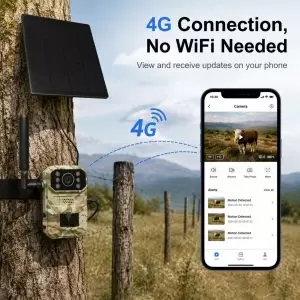
However, Choosing a trail camera used to mean hiking out to swap SD cards and hope you caught something good. A 4G LTE trail camera changes that completely. In fact, it sends photos and motion alerts straight to your phone the moment an animal trips the sensor. Therefore, No WiFi, no monthly site visits, no guesswork. This guide breaks down what to look for and highlights one model from odmhome.com that does it all without breaking the bank. In short, Lte trail Cameras features is the deciding factor for most Buyers.
lte trail cameras features

What Is a 4G Trail Camera?

A 4G trail camera is a cellular-enabled wildlife camera that connects directly to mobile networks instead of relying on WiFi. When the PIR (passive infrared) motion sensor detects movement, the camera automatically captures photos or Video. For example, Furthermore, it pushes instant notifications to your phone via a companion app. This means you can monitor a hunting lease, farm pasture, or remote cabin from hundreds of miles away — as long as there is cell service in the area. Traditional trail cameras require you to physically visit the camera to pull the SD card. In addition, Consequently, that means disturbing the site, burning gas, and waiting weeks to see what walked by. A 4G camera eliminates all of that. Instead, you get real-Time intelligence so you can make decisions faster — move your stand, check on livestock, or respond to a security alert before the trail goes cold.
lte trail cameras features

Key Features to Look For

When shopping for a 4G trail camera, these are the specs that actually matter. Moreover, Pay attention to each one, because they all affect real-world performance.

Feature What to Look For Why It Matters
Connectivity 4G LTE with external antenna Stronger signal in remote areas where cell coverage is weak
Trigger Speed 0.3 seconds or faster Faster trigger means fewer missed animals — a deer walking through will not be half out of frame
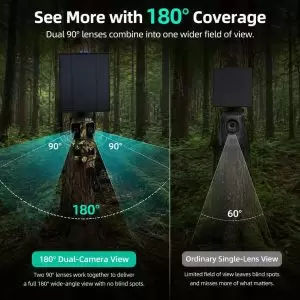
Field of View 180° dual camera (two 90° lenses combined) Covers 3x more area than standard 60° single-lens cameras — no blind spots
Night Vision Low-light color imaging + IR LEDs Color night photos let you identify animals and people, not just grainy shapes
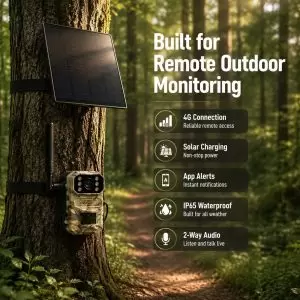
Power Supply 5W solar panel + 6000mAh battery Solar keeps it running for months without battery swaps — critical for remote setups
Storage Cloud backup + local microSD up to 128GB Dual storage means your footage survives even if the camera is stolen or damaged
Weather Rating IP65 or higher Survives heavy rain, snow, dust, and extreme temperatures year-round
Housing Camouflage pattern Blends into the environment — will not spook game or attract attention
App Alerts Real-time push notifications You know about activity the moment it happens, not days later
Two-Way Audio Built-in speaker and microphone Listen to and speak through the camera — useful for deterrence or livestock

lte trail cameras features

Where to Buy 4G Trail Cameras

You can find trail cameras on Amazon, at outdoor retailers like Cabela’s and Bass Pro, or directly from brand websites. However, for 4G cellular models specifically, buying directly from a specialized retailer like odmhome.com gives you a few advantages. First, you get better product support and clearer setup guidance. Furthermore, Additionally, pricing is often better since you are not paying marketplace markup. Just make sure the retailer offers a solid return policy and actually responds to customer questions. After all, cellular cameras involve SIM card setup and carrier compatibility that you may need help with.
lte trail cameras features

Our Featured Pick: 4G LTE Solar Trail Camera

The 4G LTE Solar Trail and Hunting Camera available at odmhome.com hits all the marks above. As a result, Here is what stands out after looking at the specs and feature set.

4G Connectivity — No WiFi Needed

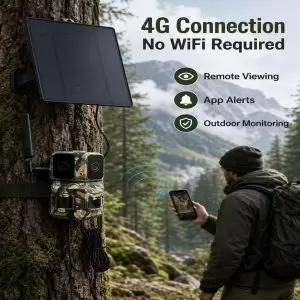
The camera connects via 4G LTE with an external antenna. Therefore, it pulls signal even in fringe coverage areas where a standard phone might show one bar. You insert a SIM card from any major carrier, download the app, pair the camera, and you are live. Importantly, No router, no WiFi, no complex network configuration.

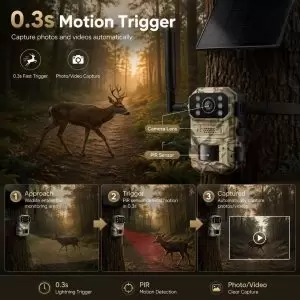
0.3-Second PIR Motion Trigger

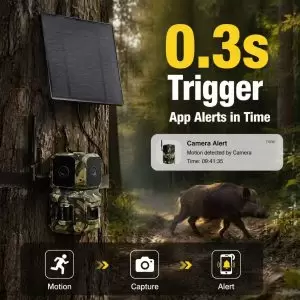
The PIR motion sensor detects heat and movement and triggers the camera in 0.3 seconds. As a result, it is fast enough to catch a running coyote, a wild boar, or a buck stepping through a trail without missing the shot. The moment motion is detected, the camera captures photos and video automatically. Notably, Furthermore, it sends a push notification to your phone with a thumbnail of what was captured. Typically, you see the alert within 5 to 10 seconds depending on carrier latency.
lte trail cameras features

180° Dual Camera — No Blind Spots

The 180° dual camera setup is where this model really pulls ahead. Most trail cameras offer a 60° field of view, which covers a narrow corridor and leaves blind spots. However, However, this camera uses two 90° lenses that combine into one full 180° wide-angle panorama with no blind spots. That means you can monitor a wide clearing, a long field edge, or an entire fence line with a single unit. In other words, fewer cameras, less cost, wider coverage.

5W Solar Panel + 6000mAh Battery

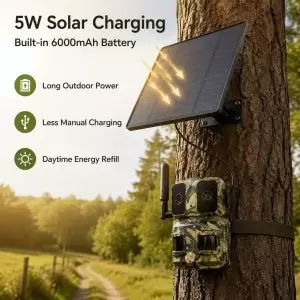
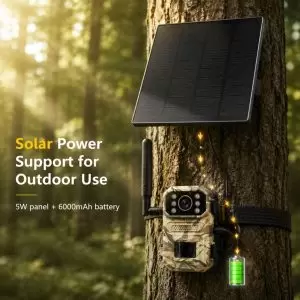
For power, the camera ships with a 5W solar panel paired with a built-in 6000mAh rechargeable battery. Therefore, In typical conditions with a few hours of sunlight per day, the solar panel keeps the battery topped off indefinitely. Specifically, the sun refills the battery during the day while the camera runs on standby at night. Even in cloudy or winter conditions, the 6000mAh battery can run the camera for weeks before needing a recharge. For example, This is a game-changer for anyone who has a remote site that takes a half-day round trip to reach. Moreover, less manual charging means fewer human visits that disturb the wildlife you are trying to monitor.
lte trail cameras features

lte trail cameras features

Low-Light Color Night Vision

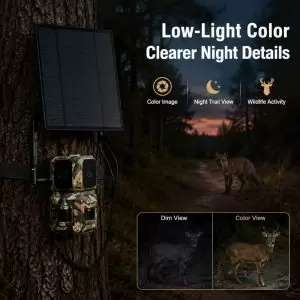
Night performance is where this camera truly separates itself from the pack. Standard trail cameras produce grainy black-and-white IR images at night. In addition, In contrast, you can tell something moved, but you cannot tell if it was a doe or a spike buck. This camera features low-light color imaging technology that captures full-color detail even in dim light. Instead of guessing at shapes in the dark, you get clear, identifiable photos with visible antler points, coat color, and environmental detail. Moreover, Additionally, eight infrared LEDs provide invisible no-glow night vision that will not spook animals. Meanwhile, the low-light color mode gives you the detail that pure IR simply cannot match. For hunters who need to identify specific animals, or property owners who need to recognize faces and license plates, this is a critical advantage.
lte trail cameras features

Cloud and Local Storage Up to 128GB

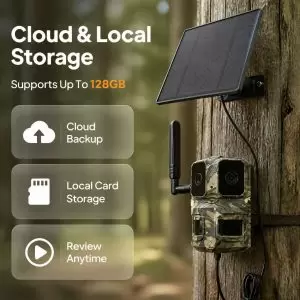
Storage is handled two ways, and both are important. Furthermore, First, the camera supports local microSD cards up to 128GB. This means you always have an on-site backup of every photo and video — even without cell service, the camera keeps recording to the card. Additionally, the cloud storage option automatically backs up footage to remote servers. As a result, Therefore, even if the camera is stolen, damaged, or the SD card fails, your recordings are safe in the cloud. You can review and download footage anytime through the phone app, from anywhere.
lte trail cameras features

Two-Way Audio and IP65 Weatherproof

The camera also features two-way audio with a built-in speaker and microphone. This means you can not only hear what is happening at the camera location — birds, wind, an animal call — but also speak through the camera remotely. Importantly, This is useful for deterring trespassers, calling livestock, or communicating with someone at a remote gate. Few trail cameras in this price range include this feature. Furthermore, the camera housing is camouflaged and rated IP65 for weather resistance. Notably, It handles rain, snow, dust storms, and temperature swings from freezing winters to scorching summers. Mount it on a tree with the included strap, connect the solar panel, and leave it. The external antenna can be positioned independently for the best signal reception.
lte trail cameras features

How to Set It Up

Setting up the camera takes about 10 minutes if you follow these steps: 1. However, Insert an activated 4G LTE SIM card. Any major carrier works — Verizon, AT&T, T-Mobile in the US, or Vodafone, EE, Orange, O2 in Europe. Make sure the SIM has a data plan active before inserting. 2. Therefore, Download the companion app on your iOS or Android phone. Create an account and log in. 3. Power on the camera and follow the in-app pairing process. For example, The camera connects to the cellular network automatically once the SIM is recognized. 4. Mount the camera on a tree or post at roughly 3 to 5 feet off the ground, angled slightly downward. Use the included mounting strap. 5. In addition, Connect the 5W solar panel and position it where it will get the most direct sunlight — south-facing if you are in the Northern Hemisphere. 6. Adjust motion sensor sensitivity in the app. Start at medium and tweak up or down based on false alerts from wind, branches, or small animals. 7. Moreover, Test the setup by walking in front of the camera. You should receive a motion alert within 10 seconds with a thumbnail.

Best Use Cases

Hunters — Scout deer patterns on a remote lease without driving out every week to pull SD cards. Set it on a trail crossing or feeding area, and check your phone for daily movement updates. Furthermore, The color night vision lets you identify specific bucks, not just “a deer walked by.” Ranchers and Farmers — Monitor cattle, horses, or other livestock in distant pastures. Get alerts when animals move near fence lines or water sources. Additionally, the two-way audio lets you call livestock from across the property. Property Owners — Secure remote cabins, construction sites, or storage areas. As a result, The camera acts as a security system with real-time alerts — no WiFi or power grid required. Moreover, the 180° coverage means one camera watches what would normally take two or three. Wildlife Researchers — Track animal populations, migration patterns, or behavior. The 180° coverage and color night vision provide data that standard cameras miss. Importantly, Furthermore, the cloud storage ensures no data is ever lost.

Frequently Asked Questions

Q: Do I need WiFi for this camera to work? A: No. The camera connects via 4G LTE cellular networks. As long as you have cell coverage at the camera location and a data plan on your SIM card, it works. Notably, WiFi is not needed at all. Q: Which SIM card should I use? A: Any 4G LTE SIM card from a major carrier works. In the US, Verizon, AT&T, and T-Mobile are all compatible. However, In Europe, Vodafone, EE, Orange, and O2 all work. Choose a carrier with the best coverage in your installation area. Q: How much data does the camera use per month? A: It depends on motion activity. Therefore, A typical setup sending 20 to 50 photos per day uses roughly 1 to 3 GB per month. However, if the camera sends video clips, expect 5 to 10 GB. A basic data plan of 2 to 5 GB is usually sufficient. For example, Q: How long does the 6000mAh battery last without solar? A: The built-in 6000mAh battery can run the camera for approximately 2 to 4 weeks on standby without any solar input. However, with the 5W solar panel connected and a few hours of sunlight per day, the camera runs indefinitely. Q: Will the night vision spook animals? A: No. In addition, The infrared LEDs use no-glow technology, meaning they emit light invisible to both animals and humans. Therefore, wildlife will not be disturbed by any visible flash. The low-light color mode also works without spooking animals — it uses available ambient light, not a flash. Moreover, Q: What storage options does the camera have? A: The camera supports local microSD cards up to 128GB for on-site recording. Additionally, it offers optional cloud storage that automatically backs up your footage online. You can use either or both. Furthermore, Q: Does the camera have audio? A: Yes. The camera features two-way audio with a built-in speaker and microphone. You can hear what is happening at the camera location and also speak through the camera remotely using the phone app. As a result, Q: Can more than one person access the camera? A: Yes. The companion app supports multiple users. Therefore, you can share access with a hunting partner, family member, or employee so everyone receives motion alerts. Importantly, Q: Can I add multiple cameras to one account? A: Yes. You can add as many cameras as you need to a single app account and monitor them all from one dashboard. This is useful for covering multiple trail crossings or properties. Notably, Q: What happens if there is no cell signal at my location? A: The camera will not be able to send real-time alerts without cellular coverage. However, it will still capture photos and video to the local microSD card up to 128GB. You can retrieve the footage manually when you visit the site.

Final Thoughts

A 4G LTE solar trail camera is the most practical upgrade you can make to your outdoor monitoring setup. However, The combination of cellular connectivity, 5W solar power with 6000mAh battery, 0.3-second trigger, 180° dual-lens coverage, low-light color night vision, two-way audio, and dual cloud/local storage up to 128GB means you spend less time driving to check cameras. Instead, you spend more time acting on real-time information. Whether you are patterning a trophy buck, watching over cattle, or securing a remote property, this camera delivers the intelligence you need without the limitations of WiFi or battery swaps. Therefore, If you are ready to upgrade your trail camera game, the 4G LTE Solar Trail and Hunting Camera is available now at odmhome.com — with shipping to both US

Related Articles

You Might Also Like