Posted on — Leave a comment

Outdoor Security Camera Without a Power Outlet: What Actually Works

The best place to put an outdoor Camera is almost never near a socket. Gates, driveways, side passages and sheds are exactly the spots with no mains, which is why “no Power outlet” is one of the most common reasons people give up on an outdoor camera.

There are three workable answers, and they are not interchangeable. In order of how often they are the right one: Solar panel cameras, Battery cameras, and 4G LTE cameras for places with no WiFi either.

Option 1: solar panel camera

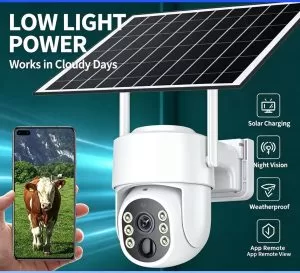
A Camera with its own panel — such as the solar PTZ or the Xingliao solar PTZ — is the closest thing to a fit-and-forget outdoor camera. The panel trickle-charges the battery through the day; the battery runs the camera at night.

Two honest caveats. The panel needs light: a north-facing wall under an overhang collects very little, and winter output drops substantially. And the camera still needs WiFi — if the gate is 30 metres from the house, the signal is the real problem, not the power. Our solar doorbell guide covers panel siting in more detail and the same rules apply here.

Option 2: battery camera

Simplest to install and the easiest to move. A battery camera such as the P11 mounts on any surface with an adhesive pad or two screws, records on motion, and comes down for charging.

Outdoors, expect shorter intervals than indoors: cold reduces capacity, and a camera watching a windy garden triggers far more often than one in a quiet hallway. If you are willing to charge it every couple of months, this is the cheapest route to a camera at the gate.

Option 3: 4G LTE camera

When there is no power and no WiFi, the answer is a camera with its own cellular link. The 4G LTE solar trail camera is built for exactly this: remote sites, allotments, farm gates, building plots — anywhere a router will never reach.

It needs a data SIM and a signal, and it costs more to run than a WiFi camera. But it is the only option that works completely independently of the building.

What still has to reach the camera

Option Needs mains Needs home WiFi Needs charging
Solar panel camera No Yes Rarely
Battery camera No Yes Every 1-3 months
4G LTE solar camera No No (SIM data) Rarely

Note that “no mains” never means “no WiFi” unless you go to 4G. Test your 2.4 GHz signal at the mounting point before buying — stand there with a phone and check. If it is weak, an outdoor extender or a mesh node in the nearest room usually fixes it.

Weather and mounting

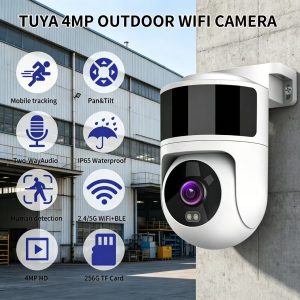
Outdoor means IP-rated: look for IP65 or better for rain and dust. Mount under an eave if you can — not because the camera cannot take rain, but because lenses stay cleaner and infrared night vision is not fogged by water on the glass. Aim for 2.5 to 3.5 metres high: out of easy reach, still Low enough for a usable face angle.

FAQ

Will a solar camera run through a British or northern European winter?
It will run, but the panel contributes much less. Plan on one manual charge in late autumn rather than expecting the panel to carry you through to spring.
Do I need WiFi for a solar camera?
Yes, unless it is a 4G model. The panel replaces mains power, not the network connection.
How much data does a 4G camera use?
That depends entirely on how often you view live and how Many clips upload. Motion-triggered clips with occasional live viewing are modest; continuous streaming is not.
Can I use a power bank?
Some cameras will run from one, but outdoor-rated power banks are rare and it adds a failure point. A solar model is usually the better spend.
Does night vision work on battery?
Yes, infrared LEDs draw relatively little power. Cold is the bigger drain on the battery than the LEDs.
Can I mount to a fence?
Mechanically yes, but fences move. Movement triggers false motion alerts and shakes the image — use a wall or post for a PTZ camera.

Related Articles

You Might Also Like

Frequently Asked Questions

Is Outdoor Security Camera worth buying?

Based on the breakdown in this article, Outdoor Security Camera offers a solid mix of features and value. If your main goal matches the key benefits described above, it is a practical choice for everyday use.

How do I choose the right outdoor security camera for my needs?

Start with your core use case, then compare battery life, compatibility, and build quality as covered above. Choosing the right outdoor security camera comes down to matching specs with how you actually use it.

Does outdoor security camera require a companion app?

Most devices of this type pair with a free companion app for setup and firmware updates. A few advanced features may sit behind a paid plan, so check the official specs page before buying.

Posted on — Leave a comment

Smart Socket vs Smart Plug: Which to Buy?

A Smart socket and a Smart plug do the same job from the app’s point of view: they switch power on and off, on a schedule or by voice. The difference is physical, and it decides which one belongs in your house. A Smart socket replaces the wall outlet itself; a smart plug goes into the outlet you already have. This guide explains where each one wins, what the power ratings mean, and how to set either type up in a few minutes.

The difference in one line

A smart wall socket is installed in place of a normal outlet, so nothing sticks out and you never lose a socket. A smart plug sits in an existing outlet and turns whatever is plugged into it into a connected device. If you own the wall, choose sockets. If you rent, move often, or want to move control from room to room, choose plugs.

Where smart wall sockets win

  • Nothing sticks out. Furniture sits flush, and a socket behind a sofa or a bed stays usable.
  • You do not lose an outlet. A plug occupies the socket it uses; a 2-gang wall socket gives you two switched channels instead of one.
  • Charging built in. Many models add USB-A and USB-C ports — a 20 W Type-C port charges a phone at full speed Without an adapter.
  • Metering where it matters. A wall socket with energy monitoring measures exactly what that appliance draws, every day, without any extra hardware.
  • Cleaner look in a finished home. One glass panel on the wall instead of a plug with an LED floating in the outlet.

The trade-off is installation: a wall socket needs the circuit isolated and the wiring moved, exactly like fitting a smart switch. That is a 20-minute job per socket for someone comfortable with basic wiring, and a short electrician visit otherwise.

Where smart plugs win

  • Zero installation. Plug in, pair, done — no breaker, no screwdriver, no landlord conversation.
  • They move. Take the plug from the lamp in winter to the fan in summer, or to a hotel room on a trip.
  • Perfect for lamps and small appliances. A floor lamp, a coffee machine, a Christmas tree, a router that needs a scheduled reboot.
  • Test before committing. If you are unsure which appliances are worth automating, a plug tells you for a few dollars.
  • No lost sockets indoors, sometimes. Slim models fit two per double outlet; the chunky ones do not.

Which one goes where in a real house

  • Kitchen counter (kettle, coffee machine): plug, because appliances get swapped and moved.
  • Living room lamps: plug, hidden behind the sofa, controlled as a group.
  • Bedside USB charging: wall socket with USB-C, so the phone charges fast without an adapter.
  • Heater or heated floor: socket with a temperature probe, or a temperature-control socket, so it switches on by temperature rather than by clock.
  • Washing machine, dishwasher, tumble dryer: wall socket, ideally one per appliance, so each can be scheduled and monitored on its own.
  • Rented flat: plugs only. Take them with you when you leave.

Power ratings and safety, in plain numbers

  • EU sockets: 16 A at 230 V is about 3,680 W. Fine for kettles, washing machines, small heaters.
  • UK sockets: 13 A at 230 V is about 3,000 W per gang.
  • US sockets: 15 A at 120 V is about 1,800 W — a single US plug should not run a large space heater continuously.

Two rules that matter more than the number: never plug an extension lead into a smart plug and then load it, and never put a smart plug on a device that draws more than the plug is rated for. A smart socket installed on its own circuit is the safer way to automate heating or laundry.

Energy monitoring: what the numbers actually tell you

Energy monitoring is the feature people use longest, because it answers a question nobody can guess: which appliance is costing money. A metering socket reports live watts, and the app keeps daily and monthly totals. In practice you learn three things:

  • The standby load of a room — the TV, console and router that together draw 30 to 60 W all night.
  • Which appliance is the real consumer — usually an old fridge, a dryer or a space heater, rarely the one you suspected.
  • Whether a scheduled run actually finished: zero watts after 90 minutes means the cycle ended, which is a useful laundry reminder for free.

Sockets that do more than switch

Two special cases are worth knowing before you buy:

  • Temperature-control sockets pair with a probe and switch by temperature — for a heater, a heat mat for seedlings, or an aquarium. No hub needed, and no schedule to fight with weather.
  • Multi-mode socket gateways act as a socket and a hub at once, so Zigbee sensors elsewhere in the house can join the same system. Useful in a small flat where you want sensors but not another box behind the television.

Setting either type up (same steps)

  1. Install the Tuya Smart or Smart Life app and create one account for the household.
  2. For a socket, switch the breaker off, connect live, neutral and earth, then switch it back on. For a plug, just put it in the outlet.
  3. Put the device in pairing mode — usually hold the button until the indicator blinks fast.
  4. Join your 2.4 GHz WiFi. A socket will not connect to a 5 GHz-only network name.
  5. Name it by what it controls, not by where it lives: “Coffee machine” beats “Socket 3”.
  6. Set a schedule and add it to a scene — “Good night” turning off lamps, heater and router in one tap.
  7. If you use Alexa or Google Home, link the Tuya account once and the names carry over.

Buying checklist

  • Own the wall, or rent? Sockets or plugs.
  • Do you need to know consumption, or only switch power? Metering costs a little more, and pays back in curiosity alone.
  • Which standard: EU 86 mm, UK, US, or a socket module for a country-specific frame?
  • How many gangs on one panel — two is the sweet spot in a kitchen or office.
  • USB charging needed? Look for Type-C at 20 W or more, not 5 W legacy ports.
  • Do you already have Zigbee sensors? A multi-mode gateway socket saves a hub.

XingLiao smart sockets

Frequently Asked Questions

Is a smart socket better than a smart plug?

Neither is better — they solve different problems. A socket is permanent, flush and never cost you an outlet, which suits appliances you want automated for years. A plug is instant and portable, which suits rented homes, lamps and anything you might automate only for a season.

Can a smart plug catch fire?

The plug itself rarely causes the problem; overload does. Keep the load inside the rating printed on the device, avoid daisy-chaining extension leads behind a plug, and use a wall socket on its own circuit for heaters, dryers and other high-draw appliances.

Do smart sockets need a neutral wire?

A wall socket needs live, neutral and earth — the same wires as a normal outlet, so no extra conductor is required. A smart switch sometimes needs a neutral that older switch boxes lack; a socket does not have that problem.

Do I need a hub or gateway?

Not for WiFi models. Tuya WiFi sockets talk to your router directly and appear in the app. A gateway is only needed for Zigbee-only devices, and some sockets combine both roles so you can skip the extra box.

Will a smart socket work with Alexa and Google Home?

Yes, for Tuya-based devices: link the Tuya Smart or Smart Life account in the voice assistant once, and every named socket appears as a controllable device. Scenes created in the app also run from voice.

What happens to schedules if the internet goes down?

Schedules stored on the device keep running, and physical switches still work. Only remote control and app history pause until the connection returns, which is why local time-based schedules are worth setting even when you mainly use voice.

Can I monitor energy without a subscription?

Yes. Metering is built into the socket or plug itself and the consumption history is shown in the app with no monthly fee. Subscriptions only appear if you opt into third-party analytics services.

Related guides

Browse smart switches and sockets · Tell us which appliances you want to automate and we will match the right socket