Buying one Camera for the whole house usually means compromising somewhere. A Battery Camera can go anywhere but sleeps between events; a plug-in camera can record continuously but only where there is a socket. Most homes end up with a mix, and the trick is knowing which rooms justify which.
The models below are all in our security camera range: the battery-powered P9 and P11, and the plug-in P10 mini.
The core trade-off
| Battery Camera | Plug-in Camera | |
|---|---|---|
| Placement | Any surface, no wiring | Within reach of a socket |
| Recording | Clips on motion | Continuous or on motion |
| Resolution headroom | Limited by battery budget | Higher bitrate and frame rate |
| Upkeep | Recharge every few months | None |
| Best for | Hallways, shelves, rentals, garages | Nurseries, living rooms, anywhere with 24/7 value |
Room by room
- Entrance hallway. Battery. You want it at head height near the door, and there is rarely a socket there. Motion clips catch whoever comes in.
- Living room. Plug-in if you want continuous coverage of a large open space; battery if you only care about motion while you are out.
- Nursery or pet area. Plug-in. Continuous recording and two-way audio matter more here, and a socket is usually available — see our baby monitor range for dedicated units with their own screens.
- Garage or shed. Battery, unless there is mains. A solar panel model removes the charging trip entirely.
- Flat or rental. Battery, mounted with an adhesive pad so nothing is drilled.
What “low power” actually costs you
A battery Camera stays asleep and wakes when its PIR sensor fires. Two consequences follow. First, there is a short delay between someone entering the frame and the clip starting — a second or two, sometimes more if the sensor is pointed away from the approach path. Second, the Camera cannot record what it never woke for.
Both are acceptable for “who came through the hallway” and unacceptable for “I need the whole afternoon”. If the second sentence describes you, plug it in.
WiFi matters more than power
Every one of these cameras needs a usable 2.4 GHz signal where it sits. The usual failure is a camera mounted in a garage or at the far end of a hallway where the phone shows one bar. Test at the exact spot before you commit — hold a phone there, force 2.4 GHz, and run a speed check. A camera on a marginal link produces constant disconnects, missed clips and a battery that drains faster because it keeps re-associating.
Night vision and where you point it
Indoor cameras use infrared LEDs for night viewing. Two practical notes: infrared reflects off glass, so do not point a camera through a window at night (you will film the room, not the street) — for that job use a dedicated window camera. And infrared does not travel far, so a camera at the far end of a long room will show a bright foreground and a dark background.
FAQ
- How long does a battery camera last per charge?
- Typically weeks to a few months, depending on how often motion fires and how much live viewing you do. Busy hallways drain faster than spare rooms.
- Can a battery camera record continuously if I leave it plugged in?
- Some models will run while connected, but they are designed around motion events. If you want continuous footage, buy a plug-in model.
- Do I need a subscription?
- No. Local card storage covers clips, and cloud storage is optional on most models.
- Can one app show several cameras?
- Yes — the Tuya / Smart Life app handles multiple cameras in one account, which is why mixing battery and plug-in models is practical.
- Will it work without internet?
- Local recording to a card continues, but remote viewing and notifications need the internet.
- Is one camera enough for a flat?
- Usually yes for a one-bedroom, covering the entrance. See how many cameras a 3-bedroom home needs for larger layouts.
Related Articles
- WiFi Smart Plug: Current Ratings, Energy Monitoring and What to Check Before Buying
- P11 Wireless Low-Power Battery Security Camera: No-Wire No-Drill Indoor Home Surveillance
- P10 Mini WiFi Security Camera: Compact 24/7 Indoor Surveillance for Home & Pets
- P9 Low Power Battery Camera: Best Wire-Free Home Security Solution for 2026
- All-in-One 4G Android Smartwatch | Rotatable Camera, Health Monitoring, NFC Access Control
You Might Also Like
 P9 Low Power Battery Camera Wireless WiFi Security Camera, Plug-Free Home Surveillance Camera with Motion Detection, Phone Remote Monitoring Original price was: $49.96.$33.99Current price is: $33.99.
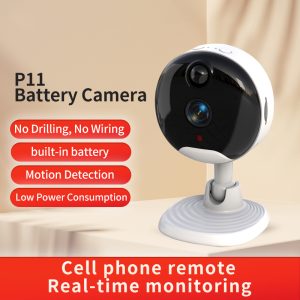 P11 Wireless Battery Powered Security Camera, No Drill No Wire Indoor Surveillance Camera with Motion Detection, Remote Real-Time Monitoring Original price was: $19.96.$11.99Current price is: $11.99.
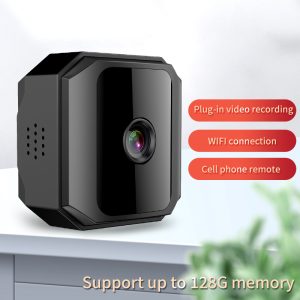 P10 Mini WiFi Security Camera Plug-in Indoor Surveillance Camera with Night Vision Motion Detection Original price was: $19.96.$11.99Current price is: $11.99.
 Tuya 4MP HD Smart WiFi Indoor Security Camera Two-Way Audio Human Detection Home Surveillance Camera Price range: $29.99 through $32.99
Frequently Asked Questions
Is Battery Camera Plug worth buying?
Based on the breakdown in this article, Battery Camera Plug offers a solid mix of features and value. If your main goal matches the key benefits described above, it is a practical choice for everyday use.
How do I choose the right battery camera plug for my needs?
Start with your core use case, then compare battery life, compatibility, and build quality as covered above. Choosing the right battery camera plug comes down to matching specs with how you actually use it.
Does battery camera plug require a companion app?
Most devices of this type pair with a free companion app for setup and firmware updates. A few advanced features may sit behind a paid plan, so check the official specs page before buying.
Does battery camera plug work with both iPhone and Android?
Yes, in most cases this type of device ships with iOS and Android apps, and standard Bluetooth protocols keep cross-platform pairing simple.
📌 This article is part of our Complete Camera Hub — more guides and buying tips inside.