A second lens on a Security camera is easy to dismiss as a spec-sheet trick. In practice it solves a specific problem that a single lens cannot: you cannot simultaneously watch a whole room and read a detail in it. Wide enough to see everything means too wide to identify anything.
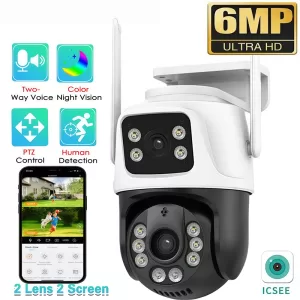
Our dual-lens models — the KT-A36, the KT-R13 6 MP and the outdoor dual-lens PTZ — use the second lens in one of two ways.
Two designs, two jobs
1. One fixed lens plus one moving lens
The fixed lens holds a constant view of the whole scene while the PTZ lens pans, tilts and zooms to follow movement. The value is that you never lose the overview: a single-lens PTZ Camera that swings away to follow somebody leaves you blind to whatever happens behind it. With two lenses, the overview keeps recording whatever the tracking lens is doing.
2. One wide lens plus one telephoto lens
Both lenses point at the same scene at different focal lengths. You get a wide context shot and a tight detail shot of the same moment — the difference between “a person approached the door” and “here is a readable face and the parcel they carried”.
Where a dual-lens camera earns its cost
- Driveways and forecourts — the overview catches the vehicle, the detail lens catches the plate or the driver.
- Shop floors and small warehouses — one camera covers the aisle and the till without a second install.
- Large gardens — the fixed lens watches the gate, the PTZ follows whoever comes through it.
Where it does not: a small room, a corridor, or anywhere a single wide lens already covers everything you care about. If the space is smaller than about 25 square metres and has one entrance, one lens is enough and cheaper.
What to check on the spec sheet
- Which lens does the tracking? On PTZ designs, confirm the moving lens is the one with optical zoom.
- Night behaviour of both lenses. Two lenses need two sets of IR LEDs; a model that lights only one leaves the other blind after dark.
- Storage load. Two streams use roughly twice the card space. Size the card accordingly.
- Resolution honesty. A “6 MP” figure often describes the combined or the higher lens. Check per-lens resolution.
Installation notes
Dual-lens units are physically larger and heavier than a Mini camera, and the outdoor PTZ versions need a solid fixing — a soffit, a wall with proper plugs, not a fence panel that moves in the wind. Mount high enough to be out of reach but Low enough that the detail lens has a usable angle on faces; roughly 2.5 to 3.5 metres works outdoors.
Power is the other constraint: outdoors, an outdoor PTZ with two lenses wants mains or a Solar panel, not a small internal Battery. See options for outdoor cameras with no power outlet.
FAQ
- Does a dual-lens camera record two videos at once?
- Yes — both streams are recorded, and the app lets you view them together or separately.
- Is auto-tracking useful or annoying?
- Useful outdoors with pets and passing cars if sensitivity is tuned; annoying in a busy scene where it chases everything. Most models let you set tracking zones.
- Can I turn one lens off?
- Usually you can disable a view in the app, which is a way to halve storage use if you only need one angle.
- Does it work at night?
- Yes, provided both lenses have infrared or full-colour night support — check this per model rather than assuming.
- Do I need a subscription for auto-tracking?
- No, tracking runs on the camera itself. Cloud storage is a separate, optional service.
- Is the outdoor model waterproof?
- The outdoor dual-lens PTZ carries an IP65 rating for rain and dust. Indoor dual-lens models are not rated for outdoor use.
Related Articles
- Dual Lens Security Camera
- 4MP Dual-Lens PTZ Outdoor Security Camera Tuya Smart Full Color Night Vision Camera
- Dual-Lens vs Single-Lens Security Camera: What the Second Lens on the KT-A36 Actually Changes
- Smart Visual Wireless Video Doorbell: Upgrade Your Home Security in 2026
- X6-A Visual Intelligent Doorbell: How A Wireless Video Doorbell Improves Your Home Front Door Security
You Might Also Like
 Dual Lens Security Camera Original price was: $75.96.$56.96Current price is: $56.96.
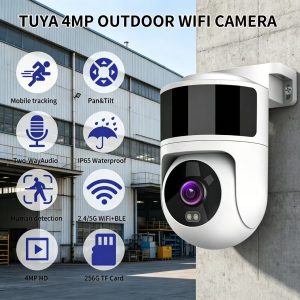 Tuya 4MP Outdoor WiFi Dual Lens PTZ Security Camera IP65 Waterproof Auto Tracking Full Color Night Vision Surveillance Camera Price range: $35.99 through $39.99
 Tuya Solar WiFi PTZ Security Camera 4MP Outdoor Wireless Camera, Full Color Night Vision IP65 Waterproof Price range: $59.99 through $65.99
 Tuya 4MP HD Smart WiFi Indoor Security Camera Two-Way Audio Human Detection Home Surveillance Camera Price range: $29.99 through $32.99
Frequently Asked Questions
Is Dual Lens Security worth buying?
Based on the breakdown in this article, Dual Lens Security offers a solid mix of features and value. If your main goal matches the key benefits described above, it is a practical choice for everyday use.
How do I choose the right dual lens security for my needs?
Start with your core use case, then compare battery life, compatibility, and build quality as covered above. Choosing the right dual lens Security comes down to matching specs with how you actually use it.
Does dual lens security require a companion app?
Most devices of this type pair with a free companion app for setup and firmware updates. A few advanced features may sit behind a paid plan, so check the official specs page before buying.
📌 This article is part of our Complete What Hub — more guides and buying tips inside.