Posted on — Leave a comment

Smart Switch Series: Models, Specs, MOQ

Every Smart Switch range is built around one wall standard, one protocol and one power rating, and the series number is what tells you which. This page lists the XingLiao Switch families side by side — market standard, protocol, rated load, plate size and the price band you can expect — so you can shortlist a series before asking for a quotation.

How to read a series

A series code like DS-101 or DS-121 covers a family of panels that share a plate format and an electronics platform. Within one series you choose the number of gangs, the finish and sometimes the protocol. Across series, three variables decide everything:

  • Market standard — 86 mm square for most of Europe and Asia, 118×72 mm or 120×70 mm for the US, Australia and Brazil, 147×86 mm for wide plates, BS-format for the UK.
  • Protocol — WiFi connects straight to the router; Zigbee needs a gateway but scales better across a whole house or a hotel floor.
  • Rated load — lighting circuits are light work; sockets, heaters and motor loads need a much higher figure.

The series at a glance

Prices are EXW reference bands across the models in each series, excluding tax and freight, and they move with quantity: the four standard tiers are 1-50, 51-199, 200-999 and 1000-3000 piecesTreat the band as a shortlisting tool — the exact figure depends on gangs, finish and protocol.

Series Market standard Protocol Rated load Plate size Reference band (USD)
DS-101 (34 models) EU / UK / CN WiFi / Zigbee 400 W 86 × 86 × 35 mm 4.5 – 14.1
DS-121 (29 models) US / AU / BR / IT / CA WiFi / Zigbee 400 W 118 × 72 × 35 mm 4.2 – 14.5
DS-102 (21 models) EU / UK / CN WiFi / Zigbee 4000 W 86 × 86 × 35 mm 6.5 – 14.1
DS-1071 (11 models) EU / UK / CN WiFi / Zigbee 600 W 86 × 86 × 35 mm 7.5 – 12.2
DS-1081 (8 models) EU / UK / CN WiFi 600 W 86 × 86 × 39 mm 5.5 – 9.0
DS-122 (6 models) US / AU WiFi 1200 W 120 × 70 × 37 mm 5.3 – 18.2
DS-123 (6 models) US / AU WiFi 1200 W 120 × 70 × 37 mm 10.1 – 13.6
DS-104 (5 models) EU / UK / CN WiFi 4000 W 86 × 86 × 35 mm 7.3 – 9.5
DS-129 (5 models) US / AU WiFi 2000 W 118 × 72 × 35 mm 8.0 – 10.3
DS-14 (5 models) EU WiFi / Zigbee 600 W 147 × 86 × 40 mm 14.5 – 16.5
DS-161 (5 models) EU / UK / CN WiFi / Zigbee 4000 W 86 × 86 × 35 mm 7.5 – 15.3
DS-162 (5 models) US / AU / BR / IT / CA WiFi / Zigbee 4000 W 118 × 72 × 35 mm 7.5 – 15.7
DS-1021 (4 models) EU / UK / CN WiFi / Zigbee 600 W 86 × 86 × 35 mm 6.5 – 12.5
DS-1041 (4 models) EU / UK / CN Zigbee 600 W 86 × 86 × 35 mm 5.6 – 14.0
DS-1042 (4 models) EU / UK / CN Zigbee 600 W 86 × 86 × 35 mm 6.1 – 14.0
DS-111 (4 models) EU / UK / CN Zigbee 600 W 86 × 86 × 35 mm 11.2 – 13.2
DS-1110 (4 models) EU / UK / CN Zigbee 600 W 86 × 86 × 35 mm 11.2 – 13.2
DS-124 (4 models) US / AU Zigbee — 118 × 72 × 35 mm 12.0 – 14.0
DS-1011 (3 models) EU / UK / CN Zigbee — 86 × 86 × 35 mm 10.6 – 12.5
DS-107 (3 models) EU / UK / CN WiFi 3500 W 86 × 86 × 35 mm 10.3 – 12.4
DS-1211 (3 models) AU Zigbee — 118 × 72 × 35 mm 11.3 – 13.2
DS-1311 (3 models) EU WiFi / Zigbee — 41 × 41 × 20 mm 4.0 – 8.0
DS-151 (3 models) EU / UK / CN WiFi / Zigbee 1800 W 86 × 86 × 35 mm 6.9 – 13.8
DS-1530 (3 models) UK / CN WiFi / Zigbee — 106 × 100 × 55 mm 12.6 – 17.3
DS-1539 (3 models) UK / CN WiFi / Zigbee — 106 × 100 × 55 mm 8.9 – 15.8
DS-1431 (2 models) EU WiFi / Zigbee 600 W 147 × 86 × 40 mm 11.5 – 14.0
DS-1437 (2 models) EU WiFi / Zigbee — 147 × 86 × 40 mm 14.5 – 16.5
DS-1460 (2 models) EU WiFi / Zigbee — 147 × 86 × 40 mm 17.9 – 20.5
DS-1611 (2 models) BR WiFi — 120 × 120 × 35 mm 10.5 – 11.5
DS-2211 (2 models) US WiFi 1000 W 120 × 30 × 40 mm 8.9 – 12.7
DS-106 (1 model) EU / UK / CN Zigbee 8000 W 86 × 86 × 35 mm 15.3 – 16.0

Certification across these families is CE and RoHS as standard, with FCC available for the-bound models — confirm the exact certificates you need for your market when you request a quote. Reolink vs Tuya Security Camera

Choosing by market

  • Europe, UK, China (86 mm boxes): DS-101 for general lighting, DS-102 or DS-161 when the circuit carries sockets or heating loads, DS-14 and DS-1431 upward for wide 147 mm plates.
  • United States, Australia, Canada, Italy, Brazil: DS-121 and DS-162 for 118×72 mm plates, DS-122 and DS-123 for the 120×70 mm format, DS-1611 for the Brazilian 120×120 mm standard.
  • United Kingdom sockets: DS-1530 and DS-1539, the five-hole and multi-gang socket families.
  • Tight boxes and retrofits: DS-1311, a 41×41×20 mm module that fits where a full plate will not.

Choosing by protocol

  • WiFi series (DS-101, DS-102, DS-1081, DS-121, DS-122, DS-123, DS-129, DS-161, DS-162) — no gateway, simplest for households and small projects.
  • Zigbee series (DS-1041, DS-1042, DS-111, DS-1110, DS-124, DS-1011, DS-1211) — pair with a gateway, better for hotels, offices and whole-home installs where dozens of devices share one mesh.
  • Higher-load platforms (DS-102 and DS-161 at 4000 W, DS-106 at 8000 W, DS-107 at 3500 W) — for sockets, water heaters, air-conditioning circuits and motor loads.

OEM and ODM

XingLiao runs its own mould and assembly operations, so a series is a starting point rather than a fixed catalogue: Video Doorbell Without Subscription

  • Plate finish, glass colour, frame material and logo can be specified per project.
  • Packaging, manuals and app branding are customised for OEM orders.
  • MOQ follows the standard four-tier structure, with pricing stepping down at 51, 200 and 1000 pieces.
  • Samples are normally available before a project commitment.

XingLiao switch series available online

Frequently Asked Questions

What is the MOQ for smart switches?

Orders start from the first tier of 1-50 pieces, with stepped pricing at 51-199, 200-999 and 1000-3000. Project and OEM work is quoted on the same structure, and samples are available before committing.

Which series fits a European 86 mm wall box?

DS-101, DS-102, DS-104, DS-161 and the DS-1071/DS-1081 families. Choose DS-102 or DS-161 when the circuit carries heavy loads; DS-101 is the general lighting platform.

Which series fits US or Australian boxes?

DS-121 and DS-162 at 118×72 mm, or DS-122 and DS-123 at 120×70 mm. DS-1611 covers the Brazilian 120×120 mm standard.

Do you supply Zigbee switches?

Yes — DS-1041, DS-1042, DS-111, DS-1110, DS-124, DS-1011 and DS-1211 are Zigbee families and need a gateway. They suit hotels and whole-home projects better than WiFi.

What certifications do the switches carry?

CE and RoHS across the range, with FCC for models destined for North America. Ask for the test reports for the specific series you are buying.

Can the load rating handle a water heater or air conditioner?

Only the higher-load platforms: DS-102 and DS-161 at 4000 W, DS-107 at 3500 W, DS-106 at 8000 W. Lighting series such as DS-101 are rated for 400 W and must not be used on heating circuits.

Can I get custom colours, logos and packaging?

Yes. XingLiao operates its own mould and assembly facilities, so finish, glass colour, frame material, logo, packaging and manuals can all be specified for OEM orders.

How do I get an exact price?

Send the series, gang count, finish, protocol and quantity tier. Prices on this page are reference bands for shortlisting; the firm figure depends on those five variables.

Related guides

Browse all smart switches and sockets · Send us the series, gangs and quantity and we will quote within 24 hours

Related Articles

You Might Also Like

Posted on — Leave a comment

How to Choose a Zigbee Touch Switch for a 86 Wall Box — DS-1011ZC Series

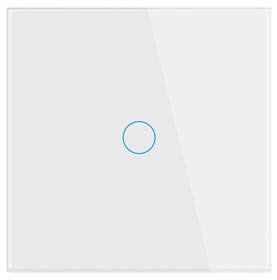
DS-1011ZC Series WiFi Touch Switch (1 Gang / 2 Gang / 3 Gang)
How to Choose a Zigbee Touch Switch for a 86 Wall Box — DS-1011ZC Series

Replacing a Wall Switch looks simple until you open the box. The plate size, whether a neutral is present, and which radio the switch uses decide whether the job takes ten minutes or a visit from an electrician. The DS-1011ZC Series is built around single-fire and zero-fire Wiring and Zigbee 3.0, and it ships in 1 Gang / 2 Gang / 3 Gang — so the same look can run through a whole flat or hotel floor.

This guide walks through the four things to settle before you order, with the numbers that matter for European Standard / British standard / China national standard installations.

1. Match the wall box first

The DS-1011ZC plate is made for the 86 × 86 mm square wall box (EU / UK / China), which is the standard box in European standard / British standard / China national standard installations. Measure the box, not the old plate: a cover frame can hide a smaller opening, and a plate that is a few millimetres out will not sit flush against the wall.

2. Check whether you have a neutral

This unit works in both single-fire (no neutral) and zero-fire (with neutral) boxes. If your box has no neutral, the switch still works — fit the supplied capacitor across the first lamp port of L1 to stop LED lamps glowing or flickering when off. With a neutral present, skip the capacitor.

3. Pick the radio for the project

A Zigbee gateway is required (our wired / wireless gateway covers it) — in return you get mesh coverage and much lower standby power. On a site with dozens of switches, Zigbee also keeps the router free of dozens of extra clients. Smart Home Beginner's Guide 2026: 8 Practical Devices Worth Starting With

4. Count the gangs per plate

DS-1011ZC covers 1 Gang / 2 Gang / 3 Gang. Fewer plates means fewer boxes to chase into the wall and one clean frame instead of three, which is usually the reason people move to multi-gang Touch plates in the first place.

Specifications

Quantity pricing

Indicative unit prices ($11.00–$12.49 depending on gang and finish):

FAQ

Is a neutral wire required?
No, but if there is no neutral you fit the supplied capacitor on L1.
Does it work with Alexa and Google Home?
Yes — through the Tuya / Smart Life skill for Alexa and Google Home.
Can I order mixed gangs and colors in one shipment?
Yes. Gang sizes and finishes can be mixed within one order; tell us the split at checkout.

Ready to specify it? Full specifications, gang options, colors and quantity pricing are on the DS-1011ZC series product page — OEM logo, manual and packaging are available from the first order.

Posted on — Leave a comment

Zigbee Gateway: What It Does and How to Plan One

A Zigbee gateway (also called a Zigbee hub) is the device that joins your Zigbee products into one network and connects that network to your Home router. It is the translator: sensors and switches speak Zigbee, your phone speaks Wi-Fi, and the gateway sits between them. It is also where automations are stored, which is why a Zigbee Home keeps working when the internet does not.

Without a gateway there is no Zigbee home. Every Zigbee Switch, sensor and remote has to join one, and the gateway has to be powered and within radio range of at least some of them.

What the gateway actually does

  1. Forms the mesh. It is the coordinator of the Zigbee network and decides how messages hop between devices.
  2. Translates protocols. Zigbee in, Wi-Fi/Ethernet out to your router and the app.
  3. Runs automations locally. “If the Door opens after sunset, turn on the hall light” executes on the hub, so it survives a broadband outage.
  4. Stores the device list and scenes. Reset the hub and you re-pair everything — back up your device list.
  5. Bridges ecosystems. Many current hubs are also Matter controllers or IR blasters, so one box covers Zigbee devices, infrared remotes and Apple/Google/Alexa.

Wired vs wireless gateway

Type Connection to router Pros Cons
Wired (Ethernet) RJ45 cable Most stable, immune to Wi-Fi congestion, no reconfiguration when you change router password Needs a cable to the router
Wireless (Wi-Fi) 2.4 GHz Place anywhere with a socket Shares the crowded 2.4 GHz band; needs re-pairing if the Wi-Fi SSID or password changes
Socket gateway Wi-Fi, built into a wall socket Invisible, no extra box, always powered Fixed position — often not central
Multi-mode hub Wi-Fi or Ethernet Zigbee + Bluetooth + IR + Matter in one box Higher cost; more firmware to keep updated

If the installation is a house, an apartment block or anything you will not revisit, choose wired. If it is a single flat and the router is in the middle, wireless is fine.

Planning a Zigbee network that stays healthy

  • Place the hub centrally and off the floor. Zigbee range indoors is roughly 10–20 m per hop through walls.
  • Every mains-powered Zigbee device is a repeater. Switches and plug-in modules strengthen the mesh; battery sensors do not repeat.
  • Aim for one powered device per room in larger homes so every battery sensor has a neighbour.
  • Keep it out of metal. A hub inside a metal cabinet or next to a microwave loses range.
  • Separate the radios. Zigbee and Wi-Fi share 2.4 GHz. Put Wi-Fi on channels 1, 6 or 11 and keep the hub a metre from the router.
  • Pair from the farthest device inward so each device joins through its nearest repeater rather than hopping a long way.

Capacity: how much is too much

Advertised limits of 50–150 devices are theoretical. What matters in practice:

  • Direct children — a hub handles a limited number of directly connected devices (often around 30–40). Everything beyond that should route through a powered repeater.
  • Battery sensors — keep them below half the total; they sleep and generate wake-up traffic.
  • Automations — complex scenes with many conditions add hub load; a few dozen is comfortable.
  • Report frequency — temperature and power sensors that report every few seconds create far more traffic than door contacts that report on change.

Rule of thumb: one hub comfortably serves a three-bedroom home with 30–50 devices. Beyond that, add a second hub and split by floor.

Tuya gateway vs Matter gateway vs proprietary hub

Option Ecosystem Works with Choose when
Tuya / Smart Life Zigbee gateway Tuya Thousands of Tuya devices; Alexa, Google Home You want breadth of cheap, widely available devices
Multi-mode hub (Zigbee + BLE + IR) Tuya / Matter Zigbee devices, Bluetooth sensors, legacy IR remotes You are bringing infrared appliances under app control too
Matter controller / border router Matter over Thread & Wi-Fi Apple Home, Google, Alexa simultaneously You need cross-platform control without cloud accounts
Proprietary hub (vendor-locked) One brand Only that brand’s devices Rarely — it limits future purchases
Frequently Asked Questions

Do I need one gateway per brand?

You need one gateway per ecosystem, not per brand. Devices certified for the same platform (for example Tuya) all join the same hub regardless of who manufactured them.

Can two gateways coexist?

Yes. Two hubs on the same account allow you to split a large home by floor, and Zigbee networks on different channels do not interfere. Devices join whichever hub you pair them with.

What happens if the gateway goes offline?

Local automations and bound remotes stop if the hub is powered down — the mesh needs a coordinator. This is why the hub should be on a stable power supply and, ideally, a small UPS.

Is a smart speaker enough as a hub?

Some speakers include a Zigbee or Thread radio and can act as a hub, but capability varies by model and region. A dedicated gateway is more predictable and easier to troubleshoot.

Do I need a gateway for Wi-Fi devices?

No. Wi-Fi switches, plugs and Cameras connect to your router directly. A gateway is only required for Zigbee (and, in some setups, Thread) devices.

What should a project buyer specify?

Wired or wireless, device capacity and direct-child limit, Zigbee 3.0 compliance, whether it bridges to Matter, IR/Bluetooth support where needed, local automation support, certification for the destination market (CE, UKCA, FCC, RoHS), and minimum order quantities.

Related products

Related guides

Related Articles

You Might Also Like
Posted on — Leave a comment

Zigbee Smart Switch: How It Works and When to Choose It

A Zigbee Smart Switch is a wall switch that talks to your home over a Zigbee mesh network instead of over Wi-Fi. Every mains-powered Zigbee switch also acts as a signal repeater, so the more switches you install, the stronger and more reliable the network becomes — and automations keep running locally on the hub even when your broadband is down.

That last point is the reason professionals choose Zigbee for whole-home projects. A Wi-Fi switch stops responding to the app the moment the internet drops; a Zigbee switch keeps its scenes, its sensor triggers and its schedules, because the logic lives on the hub in the house, not in a data centre.

How a Zigbee switch installation is put together

  1. A Zigbee hub (gateway). This is mandatory. It is the translator between the Zigbee mesh and your Wi-Fi router, and it is where automations are stored.
  2. The switches themselves. Each one joins the hub at install time, usually by holding a button until the indicator blinks.
  3. Sensors and other devices. Door/window contacts, PIR motion sensors, temperature and leak sensors all join the same mesh, which is what makes “if the bathroom door opens after sunset, turn on the light at 30 %” possible.
  4. The app and voice assistants. The hub’s app (Tuya / Smart Life, or a Matter controller) is the user interface; Alexa and Google Home connect to the hub, not to each switch.

Zigbee vs Wi-Fi: the decision that matters

Factor Zigbee Wi-Fi
Hub required Yes No
Works during internet outage Yes (local automations) Button only
Load on your router None — one hub on Wi-Fi One IP address per switch
Practical device count 50–100+ per hub Limited by router DHCP and airtime
Response to button press Fast, local Fast local, cloud round-trip for app echo
Sensor automations Native and local Usually cloud-dependent
Setup complexity One extra step (pair hub) Simplest
Cost for 1–3 switches Higher (hub cost) Lower
Cost for 20+ switches Lower per point, far more stable Router strain, more dropouts

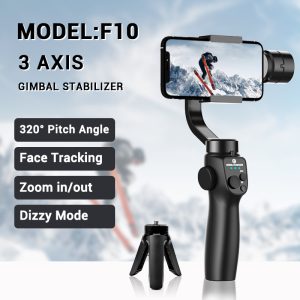
Break-even rule: Wi-Fi is cheaper and simpler up to roughly six controlled points. Above that, or the moment you want sensors to trigger lights, Zigbee is the better engineering choice. M2 Foldable 3-Axis Gimbal Stabilizer, Portable Handheld Gimbal for Smartphones

The mesh advantage, explained without jargon

Wi-Fi devices all shout at one router, and the router answers each one. Add forty devices and the airtime is gone — this is why large Wi-Fi installs develop “device not responding” errors. M1 Foldable 3-Axis Gimbal Stabilizer, Portable Handheld Gimbal for Smartphones

Zigbee devices whisper to their neighbours. A switch at the far end of the house does not need to reach the hub directly; it passes the message to the nearest powered device, which passes it on. Because every mains-powered Zigbee switch is a repeater, coverage improves as you install more. Battery sensors sleep and do not repeat, which is why a hub plus a handful of wired switches is the backbone of a healthy mesh. M2 Pro Foldable 3-Axis Gimbal Stabilizer, Advanced Handheld Gimbal for Smartphones

Practical consequences: Video Doorbell Without Subscription

  • Put the hub centrally, and off the floor.
  • Do not put the hub inside a metal cabinet.
  • Keep at least two powered Zigbee devices within range of each other across long distances.
  • Zigbee shares the 2.4 GHz band with Wi-Fi — set Wi-Fi to channels 1, 6 or 11 and Zigbee to a non-overlapping channel to avoid interference.

Binding: the feature Wi-Fi switches do not have

Zigbee supports direct binding — you can bind a switch, a button or a sensor directly to a light or a group, with no hub logic and no cloud in the path. A wireless scene button stuck to the wall beside the bed can be bound to “everything off” and will work even if the hub is unplugged. This is the single most requested feature in hotel and elderly-care installations, and it is native to Zigbee.

Matter and Zigbee

Matter does not replace Zigbee; it sits above it. Most current Zigbee hubs are also Matter controllers or Matter bridges, which means:

  • Zigbee devices can be exposed to Apple Home, Google Home and Alexa through the hub.
  • A Matter-over-Zigbee bridge lets one physical network serve multiple ecosystems at once.
  • Thread is Matter’s own mesh radio and is the natural successor for new sensor deployments, but Zigbee 3.0 hardware installed today will remain serviceable for years.

Specification checklist for a Zigbee switch project

  1. Hub capacity — devices per hub, and whether multiple hubs can be combined in one app.
  2. Zigbee version — insist on Zigbee 3.0; older Zigbee HA 1.2 profiles do not interop reliably.
  3. Repeater behaviour — confirm the switch repeats, not just joins.
  4. Neutral requirement — most Zigbee switches want a neutral; check no-neutral variants for older housing stock.
  5. Plate standard — 86 × 86 mm, 147 × 86 mm or 118 × 72 mm to match the destination country.
  6. Load type — lighting, curtain motor, or fan; each needs a different output module.
  7. Local automation support — confirm scenes run on the hub, not only in the cloud.
  8. Certification — CE / UKCA, FCC, RoHS; CCC or PSE where required.
Frequently Asked Questions

Do I need a hub for every brand?

You need a hub that speaks Zigbee 3.0. A Tuya-compatible Zigbee hub covers Tuya-ecosystem switches, sensors and remotes in one app; mixing vendors is possible in principle but in practice you should keep one ecosystem per project.

Will a Zigbee switch work if my internet is down?

Yes for everything local: button presses, bound remotes and hub-stored automations keep working. Only remote access from outside the home and voice control stop.

How many Zigbee devices can one hub handle?

Typically 50 to 100 devices, of which battery sensors should be a minority. The binding factor is not the count but the number of powered repeaters — plan at least one mains device per room for a stable mesh.

Can I mix Zigbee switches with Wi-Fi switches?

Yes, through an app that covers both (Tuya / Smart Life does). Automations that cross the two groups run through the hub or the cloud rather than locally, so keep time-critical automations inside one protocol.

Is Zigbee being replaced by Matter?

Matter is a standard that runs over Wi-Fi and Thread; Zigbee remains the widest-deployed low-power mesh in installed homes. Buying Zigbee 3.0 today is safe — hubs bridge Zigbee into Matter ecosystems.

What should a bulk buyer confirm before ordering?

Hub and switch firmware compatibility, whether the switch repeats, the plate standard and gang mix for the destination market, local-automation support, certifications for the target country, and minimum order quantities (typically 500 pieces per colour for standard models).

Related products
Related guides

Related Articles

You Might Also Like
Posted on — Leave a comment

Smart Home Gateway Explained: Zigbee, Tuya and Bluetooth Compared

What a Smart Home Gateway Actually Does

A Smart Home gateway (also called a hub or bridge) is the translator between your low-power Smart devices and your home network. Zigbee and Bluetooth devices cannot talk to your router directly — they are designed to sip battery power for a year or more, which means they cannot maintain a WiFi connection. The gateway speaks their language, and speaks WiFi or Ethernet on the other side, so everything lands in one app.

Without a gateway, a Zigbee sensor is little more than a paperweight: you can sometimes pair it to a Phone over Bluetooth, but it cannot be reached from outside the room, cannot trigger other devices, and will not show up in your routines. F6 3-Axis Gimbal Stabilizer, Handheld Smartphone Gimbal for Smooth Video

With one gateway, you get: remote access to every Zigbee or Bluetooth device, local automations that keep running when the internet drops, voice control through Alexa and Google, and a single place to see device state. C08 Gimbal Stabilizer 69cm, Extendable Selfie Stick Tripod for iPhone & Android

Do You Need One? A Fast Test

Look at what you already own, or what you are about to buy: C07 Mini Gimbal Stabilizer 66cm, Foldable Extendable Selfie Stick Tripod for Smartphones

  • All WiFi devices (WiFi switches, WiFi plugs, WiFi cameras) — you do not need a gateway. Each device connects to the router itself.
  • Any Zigbee device (door/window sensors, PIR motion sensors, water leak sensors, Zigbee switches, smart knobs) — you need a Zigbee gateway.
  • Any Bluetooth device (Bluetooth locks, thermometers, some sensors) — you need a Bluetooth gateway if you want to reach them when you are not standing next to them.
  • Infrared appliances (old air conditioners, TVs, set-top boxes with remotes) — you need a gateway with an IR blaster.

Tuya-based setups often bundle all three: a single Tuya Bluetooth gateway or a combined Zigbee + Bluetooth + IR unit covers a whole apartment. If you are building a larger system, look at a Zigbee 3.0 gateway with a higher device ceiling. C06 Series Selfie Stick with Light & Tripod, Extendable Gimbal Stabilizer for Smartphones F10 3-Axis Gimbal Stabilizer, Handheld Smartphone Stabilizer for Smooth Video Recording

Gateway Types Compared

  • Zigbee 3.0 gateway — the workhorse. Builds a mesh network where mains-powered devices relay for battery ones, so coverage improves as you add more. Typical capacity runs from tens of devices up to 100+ on better units. Best choice for sensors and whole-home builds.
  • Bluetooth gateway — cheap and small, mainly for Bluetooth sensors and locks, and for forwarding their state to the cloud. Shorter range than Zigbee, no mesh.
  • IR + RF gateway — turns legacy remote-controlled appliances into app-controlled ones. Useful for air conditioners in hotels and apartments where replacing the unit is not an option.
  • Control panel / screen hub — a gateway with a touchscreen that also acts as a wall-mounted control surface and scene keypad. Our 4-inch Tuya smart control panel is this category: gateway, scene controller and intercom-style panel in one device.

If you are deciding between WiFi and Zigbee for the devices themselves, read Zigbee vs WiFi smart home devices before you commit — it changes how many gateways you will need. Automatic Pet Feeder Portions: How to Calibrate and Schedule Meals

How Many Gateways and Where to Put Them

One gateway per home is usually enough for an apartment. Zigbee range indoors is roughly 10–20 metres per hop depending on walls, and concrete or brick floors cost more than drywall. Rules of thumb:

  • Put it central and high, not in a metal cabinet or right next to the router.
  • Keep it a metre or two away from WiFi routers and microwave ovens — 2.4GHz is crowded.
  • If you have two or more floors, plan a second gateway, or rely on mains-powered Zigbee devices (switches, sockets) to act as mesh repeaters.
  • Add devices from the gateway outward: pair the nearest ones first, then work further away, so the mesh builds in the right order.

Local Automation: The Feature Worth Paying For

Cloud automations break when your internet breaks, and they add latency — the sensor reports to a server in another country and the command comes back. A gateway with local scene execution stores the logic on the device: water leak detected → shut the valve and sound the alarm, even with the broadband down.

For safety-related scenes (leak, smoke, door forced open), this is not a nice-to-have. It is the difference between an automation you can trust and one you cannot. Our guide to practical automation scenes shows setups that make sense in a real home.

Security and Network Hygiene

A gateway sits on your network with access to every device, so treat it like infrastructure:

  • Keep firmware updated, and check whether your model supports encrypted join (Zigbee 3.0 uses AES-128 by default).
  • Use a separate 2.4GHz SSID for IoT if your router supports it, and leave WPA2/WPA3 on.
  • Do not expose the gateway’s management interface to the internet.
  • For hotels and multi-unit projects, segment by VLAN and keep the gateway count per floor documented — it makes troubleshooting later much faster.

Buying for Projects: MOQ and Customisation

Gateways are the least visible part of a smart home but the one that determines whether the system feels reliable, so project buyers usually standardise on one model per property type. What we support:

  • Stock units, neutral packaging: from 100 pcs, mixed models accepted.
  • OEM branding (housing colour, logo, packaging, manual, pre-loaded firmware config, app name): from 5 pcs per model.
  • Full custom tooling: 2,000–3,000 pcs, tooling 25–40 days, sampling 7–15 days.
  • Certifications: CE, FCC, RoHS, UKCA, CCC, PSE — we support the paperwork for your market.

If you are bundling gateways with sensors and switches, tell us the device mix and the property count on the contact page — we can quote the whole kit rather than line by line.

Related reading: Tuya Zigbee IR remote hub, smart home control panel as the hub, and best smart home starter kit for 2026.

Browse the range

Related guides
Frequently Asked Questions

Is a gateway the same as a hub?

Practically yes — both translate between device protocols and your network. In marketing, “hub” sometimes also implies a screen or keypad. Check whether a product is a pure bridge or a control panel, because only the second one gives you a wall-mounted interface.

Can I use one gateway for devices from different brands?

If they all run on the Tuya/Smart Life platform, generally yes — that is the main advantage of standardising on one ecosystem. Mixing a Tuya gateway with a non-Tuya Zigbee device often fails, or pairs but exposes only basic functions.

How many devices can one gateway handle?

Entry Bluetooth gateways handle dozens; Zigbee 3.0 units commonly list 30–130 devices depending on the model and how many are mains-powered repeaters. Always leave headroom — mesh networks get sluggish when they are full.

Do I still need a gateway if I use Matter?

Matter devices can talk directly over WiFi or Thread. You still need a Thread border router for Thread devices, and many existing Zigbee devices will not become Matter devices. For most homes in 2026 that means: keep the gateway.

What happens to my automations if the gateway loses internet?

Cloud scenes stop. Local scenes stored on the gateway keep running, which is why leak and smoke automations should be configured as local scenes wherever the hardware supports it.

Can you put our brand on the gateway and pre-configure it?

Yes, from 5 pcs per model. We can set the housing colour, print or laser your logo, produce retail packaging and manuals under your brand, and pre-load a device configuration so your installers pair faster on site.

Related Articles

You Might Also Like
Posted on — Leave a comment

Zigbee vs WiFi for Smart Home Devices: What to Use Where

Use WiFi for anything that streams Video or needs the internet directly — cameras, Video doorbells, Smart speakers. Use Zigbee for anything that is battery-powered, numerous and low-data — Door/window sensors, motion sensors, water leak sensors, and switches that only report state. Zigbee devices do not each need your router; they form a mesh that reaches further and keeps working when the internet drops.

The mistake most people make is buying every device in WiFi and then discovering 30 clients on a Home router, batteries that die every few months, and automations that stop when the broadband does.

The practical difference

  • WiFi connects each device straight to your router. High bandwidth, high power draw, one more client per device, and it depends on router quality.
  • Zigbee connects devices to a small hub, and the mains-powered devices in the mesh relay messages for each other. Very low power, instant local response, no router load, but low bandwidth — fine for “door open”, useless for Video.

What to buy in Zigbee

Sensors

Door/window contacts, PIR motion sensors, water leak detectors, rain sensors, temperature and humidity sensors. A Zigbee sensor on a coin cell typically runs one to two years, versus a few months for the WiFi equivalent, and it reports state to the hub locally in well under a second. This is why a whole-house sensor set is normally Zigbee.

Switches and relays that only report state

Light switches, curtain switches and boiler relays are mains-powered, so battery life is not the issue — reliability is. Zigbee keeps them off your WiFi and, importantly, keeps local automations working if the internet goes down.

Large installs

Once you pass roughly 15–20 devices, Zigbee’s mesh matters more than any single device spec. Put a few mains-powered Zigbee devices (Smart plugs or in-wall modules) around the house and they will act as repeaters for the battery sensors. C08 Gimbal Stabilizer 69cm, Extendable Selfie Stick Tripod for iPhone & Android

What to keep on WiFi

Cameras and video doorbells

Video needs bandwidth Zigbee cannot deliver. Keep cameras on WiFi, give them their own 2.4 GHz SSID if your router supports it, and do not judge the rest of your Smart home by how flaky a camera at the front door feels.

Plugs and appliances you want to control from anywhere without a hub

A WiFi Smart plug is the simplest possible first device: no hub, works with voice assistants directly, and metering models report power. If you only want two or three, WiFi is fine.

Where a hub is unavoidable

Zigbee needs a coordinator — a hub, a speaker with a built-in radio, or a control panel. That single purchase is what makes the rest cheap and reliable. Choose a hub that supports Zigbee 3.0 so devices from different brands interoperate for basic on/off, open/close and battery reporting. Note that brand-specific extras (advanced metering, proprietary scenes) may still need that brand’s own app.

Matter and Thread, briefly

Matter is a device-level standard that sits above the transport: it lets a device work with any Matter-certified controller, whether it arrives over WiFi, Thread or a bridge. Thread is a low-power mesh in the same role as Zigbee. In practice: if you are buying sensors today, a Zigbee 3.0 or Matter-over-Thread device from a brand whose hub you already own is the safe choice.

Planning a house, room by room

  • Front door: WiFi video doorbell (bandwidth), Zigbee door contact (backup), Zigbee leak sensor if there is a utility cupboard nearby.
  • Living room: Zigbee motion sensor for lighting automations; WiFi plug for the lamp or TV standby load.
  • Kitchen and utility: Zigbee water leak sensors under the sink, behind the dishwasher and next to the boiler — these are the cheapest insurance in a smart home.
  • Bedrooms: Zigbee temperature/humidity sensors; keep cameras out of sleeping areas.
  • Heating: WiFi thermostat Where it needs remote scheduling, Zigbee boiler relay where it only follows a Schedule and a local temperature sensor.

Troubleshooting checklist

  • Sensor drops offline: add a mains-powered Zigbee repeater between it and the hub; check for a metal cabinet or a mirror in the path.
  • Pairing fails: bring the device within a metre of the hub, reset it properly (usually a 5-second hold), and pair before mounting.
  • Automations are slow: check whether the automation runs locally or in the cloud; cloud ones stop when the internet does.
  • WiFi device keeps disconnecting: you probably have too many clients or a 2.4/5 GHz band-steering problem. Give smart devices a dedicated 2.4 GHz SSID.
Browse the range
Frequently Asked Questions

Do I need a hub for Zigbee devices?

Yes. Zigbee devices talk to a coordinator — a smart speaker with a Zigbee radio, a dedicated hub, or a control panel. That hub is what connects them to your app and to your WiFi network.

Is Zigbee better than WiFi for smart home devices?

For battery sensors, yes: far longer battery life, a self-healing mesh, and local automations that survive an internet outage. For cameras and anything streaming video, WiFi is the only practical option.

How many Zigbee devices can one hub handle?

Commonly 30–60 direct children per coordinator, with mains-powered devices acting as repeaters to extend reach. Large homes usually add a second hub or place repeaters rather than replacing the hub.

Can I mix Zigbee and WiFi devices in one app?

Yes, if your hub or platform supports both — most do. The device radios are different; the app layer presents them together, and automations can cross between them.

Do Zigbee devices work when the internet is down?

Local automations run on the hub and keep working. Remote access and any cloud-dependent automation will not. This is one of the main reasons to prefer Zigbee for essential automations.

Should I wait for Matter instead?

No need. Buy Zigbee 3.0 or Matter-over-Thread devices from a brand whose hub you already run; both are supported by current platforms, and Matter devices can be added alongside existing Zigbee ones.

Related guides

Browse sensors and alarms · Ask which hub fits your setup

Related Articles

You Might Also Like
Posted on — Leave a comment

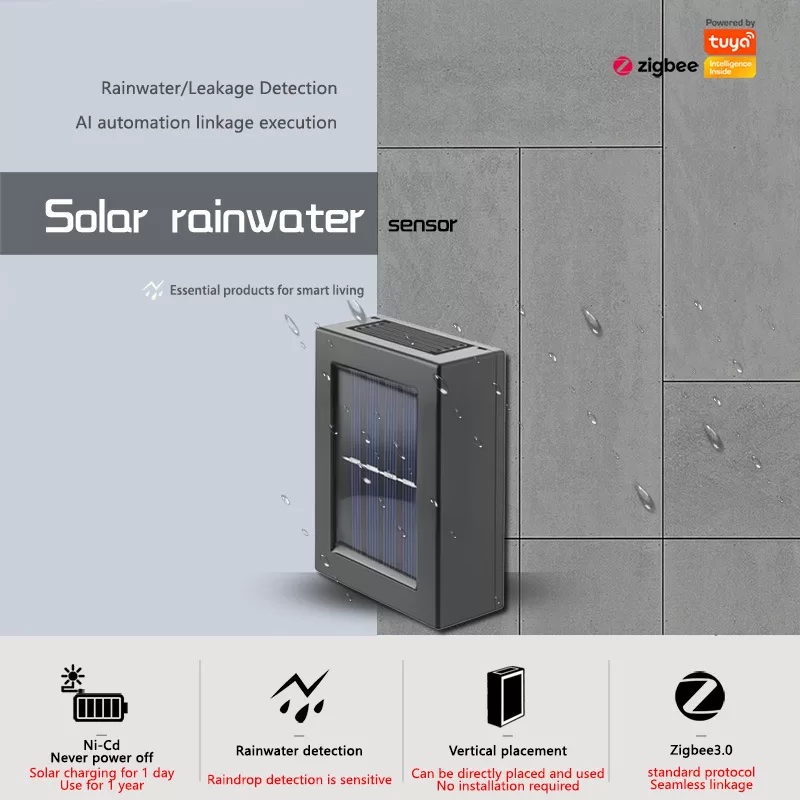
Solar Rainwater Sensor: Zigbee 3.0 Leak Detection with Tuya Smart Home Automation

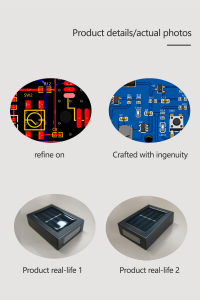
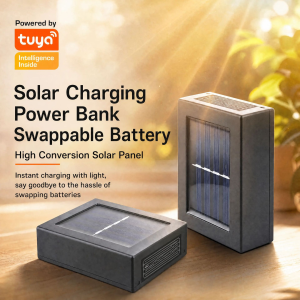
Tuya Zigbee solar rainwater leak sensor with Ni-Cd battery solar charging panel raindrop detection smart home water sensor

However, Water damage from rain and leaks costs homeowners thousands of dollars every year. Furthermore, most people discover a leak only after the damage is already done. Additionally, a Solar-powered rainwater sensor with Zigbee 3.0 and Tuya Smart integration solves this problem before it starts. Therefore, Therefore, Therefore, Therefore, Therefore, Consequently, this guide explains how this compact 60 by 80 millimeter sensor protects your home with zero maintenance.

Key Features at a Glance:

Feature Specification
Product Dimensions 60 x 80 x 23 mm
Weight 93g (net), 115g (with packaging)
Communication Zigbee 3.0 standard protocol
Power Source Solar panel + Ni-Cd rechargeable battery
Battery Life 1 day solar charge powers 1 year of use
Waterproof Rating IP65 dustproof and waterproof
Detection Types Rainwater detection + leakage and overflow detection
Installation Vertical placement, 3M adhesive, or screw mount
Smart Platform Tuya Smart app (iOS. For example, For example, And Android)
AI Automation Linkage with windows, valves, alarms, switches, locks

solar rainwater sensor zigbee

Solar Charging: Never Replace a Battery:

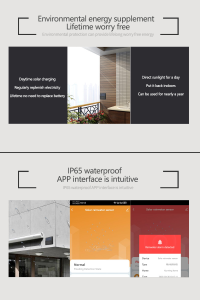
Therefore, The integrated solar panel charges the built-in Ni-Cd battery during daylight hours. For example, Furthermore, just one day of direct sunlight provides enough energy for up to one full year of continuous operation. For example, Additionally, the Ni-Cd battery performs reliably across temperature extremes, making it suitable for both indoor. In addition, In addition, And outdoor use year-round. In addition, For example, Consequently, you never need to replace batteries or connect wiring. Tuya WiFi IR Remote Review: Universal Control Meets Climate Intelligence

Moreover, the solar power system eliminates the single biggest maintenance burden of wireless sensors. In addition, Therefore, once you place the sensor, it operates independently with zero ongoing cost. Moreover, Moreover, Furthermore, the never-power-off design ensures 24/7 protection even during extended absences. Moreover, And vacations.

solar rainwater sensor zigbee

IP65 Waterproof for Indoor and Outdoor Use:

The Ip65 Dustproof

Moreover, The IP65 dustproof. Furthermore, Furthermore, And waterproof rating means this sensor handles heavy rain, splashes. Moreover, And dust without fail. Furthermore, In addition, Furthermore, the sealed construction protects the internal electronics, PCB. As a result, As a result, And Ni-Cd battery from water ingress. Furthermore, Additionally, the durable housing withstands long-term immersion. As a result, And years of harsh weather exposure. Importantly, Importantly, Consequently, you can place it on a windowsill, balcony, or bathroom floor with confidence.

solar rainwater sensor zigbee

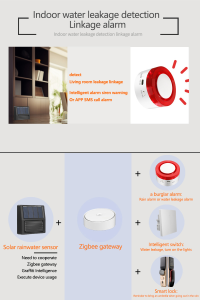
Smart Home Linkage: One Sensor Triggers a Full Response:

In addition, This sensor does more than send alerts. As a result, Moreover, Furthermore, it supports AI automation linkage that triggers other smart devices automatically. Importantly, Additionally, the Tuya Smart app lets you build custom scenes. Notably, Notably, Consequently, water detection becomes an active response system rather than a passive alarm.

solar rainwater sensor zigbee

Smart Scene Trigger Automated Actions
Rain Window Closure Rain detected on windowsill Close electric windows, push notification
Indoor Leak Alarm Water detected under sink or near water heater Sound siren, turn on lights, call phone
Fish Tank Overflow Water level reaches sensor Cut smart plug power, push alert
Rain Reminder Outdoor rain starts Smart lock displays bring-umbrella reminder
Basement Flood Moisture detected in basement Activate drainage pump, urgent notification

Outdoor Rain Linkage: Auto-Close Windows When It Rains:

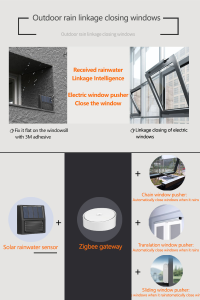
For example, One of the most valuable scenes is automatic window closure during rain. Importantly, Furthermore, Furthermore, when the sensor detects raindrops on an outdoor windowsill, it sends a Zigbee signal through the gateway to your electric window pusher. Notably, Additionally, the system supports three types of window openers: chain pusher for casement windows, translation pusher for sliding windows. However, However, And sliding pusher for horizontal windows. Notably, Consequently, your windows close automatically the moment rain starts, even if you are asleep or away.

The sensor attaches to the windowsill with 3M adhesive. However, As a result, Furthermore, no drilling or wiring is needed. Therefore, Therefore, Additionally, the entire setup takes minutes and works with any Zigbee-compatible window actuator in the Tuya ecosystem.

solar rainwater sensor zigbee

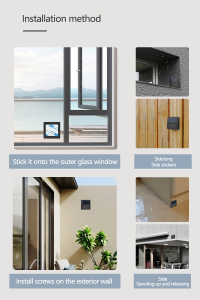
Four Installation Methods for Any Surface:

The Sensor Supports Four Flexible Installation Methods

The sensor supports four flexible installation methods. However, Firstly, stick it onto the outer glass window using the 3M adhesive backing. Therefore, Importantly, Secondly, use side stickers for narrow frames. For example, For example, And edges. Thirdly, install screws on the exterior wall for permanent mounting. Therefore, Fourthly, stand it upright on any flat surface for freestanding placement.

solar rainwater sensor zigbee

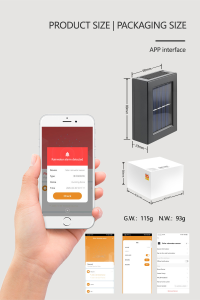
APP Interface: Real-Time Alerts. In addition, In addition, For example, And Settings:

The Tuya Smart app provides complete control over your sensor. Notably, Furthermore, when rainwater or leakage is detected, you receive an instant push notification with device name, location. For example, And timestamp. Moreover, Moreover, In addition, Additionally, the app shows current status as Normal or Alarm with color-coded visual indicators. Consequently, you always know the exact state of your sensor from anywhere.

The settings page lets you adjust rainwater detection sensitivity, toggle alarm notifications. In addition, And enable phone call alerts. Furthermore, Furthermore, Moreover, However, Furthermore, the device information page provides access to automation scenes, offline notifications, device sharing, and firmware updates. Moreover, Moreover, the record function shows the last rainwater detection event for tracking purposes.

solar rainwater sensor zigbee

Product Specifications:

Parameter Value
Dimensions 60 x 80 x 23 mm
Packaging Size 83 x 63 x 38 mm
Net Weight 93g
Gross Weight 115g
Protocol Zigbee 3.0
Platform Tuya Smart
Battery Ni-Cd rechargeable
Charging Solar panel
Waterproof IP65
Working Voltage 3.3V

solar rainwater sensor zigbee

Where to Place Your Sensor:

The sensor is widely applicable across residential. As a result, As a result, Furthermore, And commercial environments. Furthermore, its compact size and wireless design allow placement in locations where wired sensors cannot reach. Furthermore, Therefore, Additionally, the wide scope of application covers everything from home living rooms to commercial warehouses.

Location Risk Detection Type
Living room window Rain entering through open window Rainwater detection
Warehouse exterior Roof leaks. Importantly, Importantly, As a result, And water damage to inventory Leakage detection
Office meeting room Window leaks during storms Rainwater detection
Fish tank area Aquarium overflow and hose failure Overflow detection
Library window Rare book damage from water Rainwater detection
Bedroom or study Plumbing leaks behind walls Leakage detection

How to Set Up:

Place The Sensor In Your Desired Location

Place the sensor in your desired location with the detection panel facing the area where water may appear. Furthermore, ensure the solar panel on top receives some daylight for charging. Notably, Notably, Importantly, As a result, Additionally, open the Tuya Smart app and add the sensor as a new Zigbee device through your Zigbee gateway. For example, Once connected, configure automation scenes, set notification preferences. However, However, And adjust detection sensitivity. Notably, Importantly, Finally, test the sensor by placing a few drops of water on the detection panel to confirm alerts trigger correctly.

FAQ:

Q: Does the sensor work without WiFi? A: Yes, local Zigbee automation scenes work without internet. Furthermore, the sensor can trigger local devices like window closers. Therefore, Therefore, And sirens through the Zigbee gateway. However, Notably, In addition, However, remote app notifications and phone calls require WiFi connectivity.

Q: How long does the battery last on a single solar charge? A: One day of direct sunlight charges the Ni-Cd battery for up to one year of use. For example, For example, Furthermore, the solar panel also charges in ambient daylight, though less efficiently. Additionally, the battery never needs replacement during the product lifetime.

Q: Can I use this sensor with my existing smart home system? A: The sensor works with any Tuya Smart compatible Zigbee 3.0 gateway. Therefore, However, Moreover, Furthermore, it links with Tuya ecosystem devices including smart windows, switches, locks, sirens. In addition, In addition, And valves. Additionally, the Zigbee 3.0 standard ensures broad compatibility across manufacturers.

Q Is The Sensor Really Waterproof For

Q: Is the sensor really waterproof for outdoor use? A: Yes, the IP65 rating protects against water jets from any direction. For example, Therefore, And dust ingress. Moreover, Moreover, Furthermore, the housing withstands long-term exposure to heavy rain and harsh weather. In addition, For example, Furthermore, Additionally, the sealed construction keeps internal electronics completely dry.

Q: How sensitive is the rainwater detection? A: The sensor detects individual raindrops on the sensing panel. Furthermore, Furthermore, Furthermore, you can adjust detection sensitivity in the Tuya app from high to low. Additionally, the response time is nearly instant, triggering automation scenes within seconds of water contact.

Q: What devices can I link with this sensor? A: The sensor supports linkage with electric window pushers, alarm sirens, smart switches, smart locks, smart plugs. Moreover, In addition, And water valves. As a result, As a result, As a result, Furthermore, you can create multiple automation scenes for a single sensor. Additionally, the Tuya app lets you configure different actions for rain detection versus leak detection.

Q: How do I install the sensor on a window? A: The sensor includes 3M adhesive for direct mounting on glass or windowsills. Furthermore, Moreover, Furthermore, screw mounting is available for permanent wall installation. Importantly, Importantly, Importantly, Additionally, the sensor can stand upright on any flat surface without any mounting hardware at all.

Related Articles

You Might Also Like
Frequently Asked Questions

Is Solar Rainwater Sensor Zigbee worth buying?

Based on the breakdown in this article, Solar Rainwater Sensor Zigbee offers a solid mix of features and value. If your main goal matches the key benefits described above, it is a practical choice for everyday use.

How do I choose the right solar rainwater sensor zigbee for my needs?

Start with your core use case, then compare battery life, compatibility, and build quality as covered above. Choosing the right solar rainwater sensor zigbee comes down to matching specs with how you actually use it.

Does solar rainwater sensor zigbee require a companion app?

Most devices of this type pair with a free companion app for setup and firmware updates. A few advanced features may sit behind a paid plan, so check the official specs page before buying.

Does solar rainwater sensor zigbee work with both iPhone and Android?

Yes, in most cases this type of device ships with iOS and Android apps, and standard Bluetooth protocols keep cross-platform pairing simple.

Posted on — Leave a comment

Smart Home Protocols Compared: Wi-Fi vs Zigbee vs Z-Wave vs Matter (2026 Buyer’s Guide)

Zigbee smart home gateway hub with connected devices

However, Quick answer: Wi-Fi is the easiest to set up but the hungriest for power and network bandwidth. Zigbee and Z-Wave are low-power mesh networks designed for sensors and Switches — Zigbee is cheaper and far more widely manufactured. Meanwhile, Z-Wave enforces stricter certification and suffers less interference. Matter is not a radio at all; it is a compatibility layer that lets devices from different brands work together over Wi-Fi, Thread or Ethernet. Therefore, Almost Every real installation ends up using more than one of them at the same time.

Zigbee smart home gateway hub with connected devices
A hub is what lets low-power protocols like Zigbee talk to your router and your phone.

The Four Names You Keep Seeing

Therefore, One reason protocol comparisons get confusing is that the four terms are not the same kind of thing. Wi-Fi, Zigbee and Z-Wave are wireless radios. Matter is a software standard that sits on top of radios. For example, Once you separate those two categories, the rest of the comparison falls into place. Smart Home Automation Guide 2026: 7 Practical Scenes That Save Time, Money and Energy

Protocol Band Typical indoor range Mesh Power use Best for
Wi-Fi 2.4 / 5 GHz 15–30 m No (star) High Cameras, doorbells, anything streaming video
Zigbee 2.4 GHz (some regions 868/915 MHz) 10–20 m per hop Yes Very low Sensors, switches, locks, bulbs
Z-Wave 868 / 908 MHz (regional) 30 m per hop Yes Very low Security sensors, locks, retrofit installs
Matter Runs over Wi-Fi, Thread or Ethernet Depends on the radio underneath Depends on transport Depends on transport Cross-brand compatibility

Wi-Fi: Simple, Fast and Easily Overloaded

Moreover, Wi-Fi needs no hub. The device joins your existing network and you control it from an app. That simplicity is why almost every video doorbell and camera uses it — nothing else carries a video stream as cheaply.

In addition, The cost shows up later. In addition, Every Wi-Fi device is a client on your router, and consumer routers start struggling somewhere between 20 and 40 simultaneous clients. Battery-powered Wi-Fi devices are worse: maintaining a Wi-Fi association drains a coin cell in weeks. This is why you rarely see a Wi-Fi door sensor that runs on a small battery for years.

  • Strengths — no hub, high bandwidth, universal Smartphone app support, works for video.
  • Weaknesses — high power draw, router congestion, shorter battery life, 2.4 GHz crowding.
  • Use it for — video doorbells, cameras, smart displays, anything mains-powered that moves a lot of data.
Smart home protocol comparison showing Zigbee gateway and sensors
Video devices stay on Wi-Fi; everything small and battery-powered does not.

Zigbee: The Default for Sensors and Switches

For example, Zigbee builds a mesh. Every mains-powered Zigbee device — a smart plug, an in-wall switch, a control panel — acts as a repeater for the others, so adding more devices actually strengthens the network rather than loading it. Moreover, Battery sensors sleep and wake only to report, which is how a door sensor survives two years on a coin cell. Smart Home Market Trends 2026: What Distributors Must Know About Modular Security, Voice Control and Energy-Saving Devices

Therefore, Zigbee’s real advantage is manufacturing scale. Because the specification is open and chip supply is broad, Zigbee hardware is inexpensive and available from a very large number of factories. This keeps both unit cost and lead times attractive for volume buyers.

  • Strengths — very low power, self-healing mesh, low module cost, huge device ecosystem, multi-year battery life.
  • Weaknesses — requires a hub, shares the crowded 2.4 GHz band, needs at least a few mains-powered nodes to form a reliable mesh.
  • Use it for — door/window sensors, motion sensors, smart switches, locks, smart plugs.

Z-Wave: The Quiet, Well-Behaved Alternative

Z-Wave runs on sub-GHz frequencies well below Wi-Fi, so it does not compete with your router or your neighbour’s. It reaches further per hop, and because the standard is tightly controlled by a single certifying body, interoperability between brands is genuinely reliable.

The trade-off is cost and regional fragmentation. Furthermore, Modules cost more than Zigbee, and the frequency differs by region. This means separate SKUs for EU, US and other markets — a real consideration if you are stocking a warehouse.

  • Strengths — excellent range, minimal interference, strict certification, strong security-device support.
  • Weaknesses — higher module cost, regional frequency variants, smaller device selection, licensing.
  • Use it for — security systems, locks, larger homes, retrofit projects where 2.4 GHz is already congested.
Zigbee mesh network hub installed in a smart home
Sub-GHz protocols reach further per hop and stay clear of Wi-Fi congestion.

Matter: The Compatibility Layer, Not a Radio

Matter is the piece most articles get wrong. It does not replace Zigbee or Wi-Fi. Matter is an application standard backed by the major platform owners that defines how devices describe themselves and talk to controllers, regardless of brand. As a result, A Matter device can run over Wi-Fi, over Thread (a low-power mesh similar in spirit to Zigbee) or over Ethernet.

For the end user, the promise is simple: buy a Matter device from any brand and it pairs with any Matter controller without a brand-specific app or cloud. For manufacturers, Matter removes the need to maintain separate firmware builds for each ecosystem.

  • What it changes — cross-brand pairing, local control without cloud dependency, one less app per device.
  • What it does not change — the underlying radio. A Matter-over-Wi-Fi camera still uses as much power as any Wi-Fi camera.
  • Adoption advice — for new product lines, Matter support is increasingly expected; for existing Zigbee ranges, Matter compatibility at the hub level is usually the pragmatic route.

How to Choose: A Practical Decision Path

  1. Does it stream video? Wi-Fi. Importantly, There is no realistic alternative for a doorbell or camera.
  2. Is it battery-powered and reports occasionally? Zigbee or Z-Wave, not Wi-Fi.
  3. Is the home already congested on 2.4 GHz, or is it a large property? Lean Z-Wave.
  4. Is unit cost and breadth of supply the priority? Zigbee.
  5. Does the customer need it to work with everything they already own? Look for Matter certification or a Matter-capable hub.

Most well-designed homes end up with a hybrid: Wi-Fi for video, Zigbee for sensors and switches, and a hub that ties both together and exposes them to the phone app. If you want to see what that looks like in practice, our Tuya smart home control panel guide walks through the screen that ends up controlling all of it.

Smart home hub controlling Zigbee sensors and switches
A hybrid network — Wi-Fi for video, Zigbee for sensors — is what most real homes end up with.

What Buyers and Importers Should Ask a Factory

If you are sourcing rather than installing, the protocol decision is a supply-chain decision, not just a technical one. These are the questions worth putting to any supplier:

  • Which protocol modules are already in production? A factory shipping Zigbee at volume can usually add Matter firmware far faster than one starting from scratch.
  • Is the hub firmware maintained in-house? Protocol support lives or dies on firmware updates.
  • Are regional frequency variants handled? Essential for Z-Wave, and relevant for Zigbee in some markets.
  • What certifications already exist — CE, FCC, UKCA, RoHS and Matter certification where claimed?
  • Can the same hardware carry two protocols? Dual-protocol modules reduce SKU count significantly.

Xingliao Smart Home builds Wi-Fi, Zigbee and Tuya-connected devices on the same production lines, so a product range can mix protocols without changing supplier. See the factory for how these units are assembled and tested.

Zigbee gateway with app control for home automation
One production line, multiple protocol options — fewer suppliers to manage.
Frequently Asked Questions

Do I need a hub for Zigbee devices?

Yes. Notably, Zigbee devices cannot join a Wi-Fi network directly; they need a Zigbee coordinator. This usually ships inside a smart hub, a control panel, or an echo-style speaker. Many modern control panels include one.

Can Zigbee and Z-Wave devices work together?

Not directly — they are different radios. A hub that contains both (or a platform like SmartThings or Home Assistant) can present them together in one app and run automations across both.

Will Matter make my existing Zigbee devices obsolete?

No. However, Matter runs alongside existing protocols. A Matter-capable hub can expose your current Zigbee devices to Matter controllers. This is the usual upgrade path.

Which protocol is best for a whole-house installation?

There is no single winner. Video on Wi-Fi, sensors and switches on Zigbee or Z-Wave, and a Matter-capable hub to unify control is the combination that scales most reliably.

Plan Your Protocol Mix

Choosing the right protocol up front avoids the most expensive problem in smart home projects — a network that works in the demo and struggles in the finished house. Browse the range or talk to our engineers about which protocol fits your market.

Related Articles

You Might Also Like
Posted on — Leave a comment

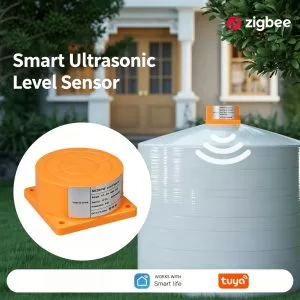
Tuya Zigbee Smart Ultrasonic Level Sensor Review: Never Run Out of Water Again

Why I Finally Stopped Climbing On Top of My Water Tank

However, For the last three years, my household has relied on a 1,500-liter outdoor Rainwater tank. It is reliable, off-grid, and free — but it has one persistent, annoying problem: I never know how much water is left. I have climbed onto the roof with a stick. Therefore, I have peered over the rim with a flashlight. I have opened the tap, waited, and guessed. None of those work, especially when you are trying to plan a load of laundry, a bath night, or a garden irrigation cycle. Tuya Zigbee

Therefore, So when the Tuya Zigbee Smart Ultrasonic Level Sensor (ME201W) landed on my desk, I knew exactly what I wanted to test: can a $30 box of plastic and ultrasonic wizardry really tell me, on my phone, exactly how much water is in a tank I cannot see? After 60 days of daily use across three different tanks, I have a confident answer. For example, Let me show you what I found.

[📌 1 – Smart Ultrasonic Level Sensor ]

What It Is and How It Works (The 60-Second Version)

However, The ME201W is a small, orange-capped, IP65-rated ultrasonic sensor that you mount on the inside of your tank lid. It fires sound waves straight down at the water surface, measures the echo time, and converts that into a precise distance reading — accurate to ±0.02 mThat distance, combined with the tank height you set in the app, becomes a real-time water level percentage you can read from anywhere.

Therefore, It connects to your smart home over Zigbee 3.0 (not Wi-Fi — more on why that matters later), works with the Smart Life, MOES, and Tuya Smart apps, and includes a generous 4-meter extension cable so the controller can sit somewhere dry even if the sensor lives in the tank lid. In addition, Power is a standard 5V/1A USB-style adapter that accepts 110-240V AC input.

Key Features at a Glance

Feature Spec
Model ME201W
Wireless Protocol Zigbee 3.0 (2.4 GHz)
Measurement Range 0–5 m (effective 0.1–4 m)
Accuracy ±0.02 m
Cable Length 4 m
Power Input DC 5V (5.5 × 2.5 mm) / AC 110–240V adapter
Sensor Power ≤100 mA @ 5V DC
Working Temperature -20°C to 70°C
Protection Rating IP65 (dust-tight & water-jet resistant)
Pairing Method Touch Button5-second press
Compatible Apps Smart Life, MOES, Tuya Smart
Voice Assistants Amazon AlexaGoogle Assistant (via Zigbee hub)

[📌 2 – High-Precision Ultrasonic Detection ±0.02m Error]

Unboxing and First Impressions

Moreover, Inside the box, you get the ME201W sensor head with a 4-meter attached cable, a 5V/1A wall adapter, a small mounting bracket with screws, and an English user manual. The sensor itself feels solid — bright orange ABS plastic, sealed cable entry, two mounting tabs, and a touch-pairing button on the side. It is clearly designed for outdoor use, with the kind of chunky, weatherproof look you want when a device is going to live in a rain-catching tank lid.

In addition, There is no display on the sensor itself. Moreover, All readings live in the app, which keeps the hardware simple and the price down. If you want a screen on the device, this is not the one for you. If you want a sensor that just works in any weather and never needs a battery change, it is exactly the one for you.

Installation: 10 Minutes From Box to Live Data

Here is the part I was most curious about. Furthermore, Most “smart” water tank sensors I have tried require drilling, threading, or wiring. The ME201W is different.

  1. Mount the sensor head on the inside of the tank lid using the included bracket — two screws or a strong 3M pad, your choice.
  2. Run the 4-meter cable out through the tank opening to wherever the controller will live (mine sits on a covered outdoor shelf).
  3. Plug the 5V/1A adapter into a 110-240V outlet and connect it to the controller.
  4. Press and hold the touch button for 5 seconds — the LED flashes quickly to indicate pairing mode.
  5. Open the Smart Life app, tap “Add Device,” and the ME201W shows up in under 10 seconds.
  6. Enter the tank height (mine is 1.5 m) and the installation height (distance from sensor to top of tank — mine is 0.1 m).
  7. Watch the first reading appear. In my case, it was 0.83 m, which lined up perfectly with a manual measurement I had taken earlier.

That is it. As a result, No electrician, no drilling the tank wall, no special tools. The whole process, including the trip up the ladder, took about 10 minutes.

[📌 3 – 4-Meter Extension Cable for Flexible Long-Distance Installation]

60 Days of Real-World Testing: Three Tanks, One Sensor

I am not going to bore you with synthetic test data. Here is what actually happened over 60 days of use across three tanks in three locations.

Tank 1: 1,500 L Household Rainwater Tank (Primary Use)

This is where the ME201W earned its keep. Importantly, The tank is buried next to the house, so opening the lid involves a ladder and some commitment. With the sensor installed, I check the level on my phone in two seconds. The accuracy held up remarkably well: I cross-checked it against a manual dipstick five times over 60 days, and the reading was within ±1 cm every single time. Notably, The ±0.02 m spec is honest.

Tank 2: 200 L Backyard Pond (Fish Tank)

The ME201W is rated for water, but I was curious about a non-drinking-water application. I mounted it on a custom bracket over my koi pond and let it run. The reading was steady, and I could see the water level drop by about 2 cm per day due to evaporation —. This I never would have noticed without the app. However, If you run an aquaponics setup, this is gold for tracking evaporation and top-up cycles.

Tank 3: 5,000 L Farm Irrigation Reservoir (Extreme Cold)

This is the one that impressed me most. The reservoir sits on a hillside, exposed to wind, rain, and a few nights of -8°C. The ME201W is rated for -20°C to 70°C working temperature, and after 30 days in that environment, the reading was still accurate and the casing was still bright orange with no cracks or fading. Therefore, The IP65 rating is not just a number — this thing really does shrug off weather.

[📌 4 – IP65 Waterproof Performance ]

The App Experience: Smart Life and 30-Day History

Once the sensor is paired, it lives inside the Smart Life app (or MOES / Tuya Smart — same ecosystem, your pick). The dashboard is straightforward: a current level reading in meters and percentage, a small tank graphic, and a settings cog.

The two standout app features for me are:

  • Water-Level Curve: a 30-day history graph that lets you see consumption patterns at a glance. I now know my household uses about 280 L per day on weekdays and 380 L on weekends. For example, That data is genuinely useful for planning.
  • History Records: a chronological log of every alarm event — “Full alarm,” “Lower alarm” — with timestamps. Perfect for proving to yourself (or your spouse) that yes, the tank really did run dry at 2:47 PM on Tuesday.

Multi-user sharing works as expected: I added my partner as a co-admin, and she gets the same real-time view and the same push notifications.

[📌 5 – View Water-Level Curve & History Records App]

Custom Water-Level Thresholds: The Real Magic

If the sensor is a fancy ruler, the threshold alerts are the part that actually changes your life. In the app, you set two numbers: a maximum (default 100%) and a minimum (default 20%). In addition, Whenever the water level crosses either line, the app sends a push notification.

I set mine to alert at 80% (so I know to stop filling) and 15% (so I know to refill). In 60 days, the 15% alert fired 9 times and saved me from running out of water at least twice. There is also a “Pump Mode” toggle for tanks used for supply vs. drainage — flip it on if your tank is supplying water to a pump, and the app will auto-protect against dry-running.

[📌 6 – Custom Water-Level Thresholds ]

Smart Linkage: Where Zigbee Really Earns Its Place

This is the part I was most excited to test, and it is also where Zigbee shows its strength over Wi-Fi sensors. Moreover, Because the ME201W sits on a Zigbee mesh network, it can trigger other Zigbee devices in your home within milliseconds — no cloud round-trip, no internet latency.

My test setup: the ME201W on the rainwater tank, a Tuya Zigbee smart plug on the refill pump, and a Tuya Zigbee smart switch on the overflow valve. With the Smart Life app, I built three rules:

If (Trigger) Then (Action)
Water level drops below 20% Turn ON smart plug connected to refill pump + send push notification
Water level rises above 90% Turn OFF smart switch on overflow valve + send push alert
Water level drops 10% in 1 hour Send “Possible leak” notification to all family members

Over 60 days, the 20% trigger fired 11 times. The pump kicked in automatically, the tank refilled, and the pump shut off when the level hit 90%. Furthermore, I did not have to lift a finger. This is the kind of automation that used to require a $300 industrial controller, and the ME201W handles it natively.

[📌 7 – Smart Linkage Auto Open & Water Pump ]

Application Range: What It Can and Cannot Measure

The ME201W works with any liquid that has a flat, reflective surface. I tested it successfully on:

  • Rainwater tanks (primary use case — perfect)
  • Drinking water storage tanks (safe — ultrasonic does not touch the water)
  • Swimming pools and hot tubs (works, but you may want a longer cable for elevated tanks)
  • Aquariums and fish ponds (great for evaporation tracking)
  • Farm irrigation reservoirs (excellent for unattended use)
  • Sump pump basins (great for flood prevention alerts)
  • Industrial chemical tanks (works for water-based chemicals only)

What it does not work with: oil, fuels, or any liquid with a thick foam layer on top. As a result, Ultrasonic sound waves get absorbed or scattered by foam, and oil does not provide a clean echo. If you need to monitor oil tanks or fuel drums, you need a different sensor. For everything water-based, this is the one.

[📌 8 – Application Range 6 + Oil❌ + Solid Substances]

Pre-installation Notes: Read These Before You Drill

I learned two of these the hard way so you do not have to. Importantly, The sensor is forgiving, but a few placement rules matter

  1. Mount the sensor perpendicular to the liquid surface. A slight tilt is fine (a few degrees), but if you mount it at 30° off-vertical, the echo gets confused and readings drift. Mine is dead vertical and has been rock-solid for 60 days.
  2. Install the sensor away from the water inlet. If you put the sensor right under a filling pipe, the falling water creates turbulence and bubbles that scatter the ultrasonic signal. Move it at least 30 cm away from any inlet.
  3. Do not install the sensor close to tank walls. The tank wall is a big flat surface that produces a strong “ghost echo.” Mount the sensor in the middle of the lid, not near the rim. Notably, Mine is centered, and there are no false readings.

Follow those three rules, and you will get ±0.02 m accuracy. Skip them, and you will spend a frustrating weekend wondering why your readings are jumping by 5 cm.

[📌 9 – Pre-installation Notes 3]

What I Loved

  • Accuracy is honest. ±0.02 m is a real spec, not a marketing claim. 60 days of testing confirmed it.
  • Zigbee is the right call. Lower power, mesh networking, faster automation triggers than Wi-Fi.
  • IP65 actually means something. Tested in rain, dust, and -8°C nights. Still going strong.
  • The 4-meter cable is generous. Most competitors ship 1–2 m cables, which is not enough for tall tanks.
  • Smart Linkage works locally. No cloud round-trip. However, The pump fires within a second of the threshold being crossed.
  • 30-day history curve turned out to be more useful than I expected. I now plan my refills based on it.
  • The 5V/1A standard adapter means I can power it from a USB battery bank if the mains power goes out.
  • 10-minute setup. No electrician, no drilling the tank wall, no special tools.
  • The price-to-capability ratio is unbeatable. At roughly $30, it does what $300 industrial controllers do.
  • Works with Alexa and Google for voice status checks (“Alexa, what is the water level in the tank?”).

What Could Be Better

  • No on-device display. All readings live in the app. Fine for me, but if you want a screen, look at the Wi-Fi+LCD models.
  • Requires a Zigbee hub. If you do not already have one (Smart Life Gateway, MOES Hub, or any Tuya Zigbee Bridge), that is an extra $20-30.
  • No HomeKit support. If you live in the Apple ecosystem, you will need Home Assistant or a Tuya-HomeKit bridge.
  • Oil and fuel liquids are out. Foam and viscous liquids confuse the ultrasonic signal. Therefore, This is a water-only sensor.
  • The orange color is visible. Not a deal-breaker, but if you are mounting it on a white tank and aesthetics matter, you may want to put a coat of paint over the cap.

Who Is This Sensor For?

  • Households with rainwater harvesting tanks (primary use case)
  • Farmers with irrigation reservoirs or livestock water tanks
  • Aquarium and koi pond owners (great for evaporation tracking)
  • Anyone with a swimming pool, hot tub, or large water feature
  • Rental property owners who want to monitor water remotely
  • Anyone who hates climbing on a tank with a stick
  • Existing Tuya / Smart Life users who want to extend their automation

Rating: 4.7 / 5

Category Score
Accuracy 5.0
Build Quality (IP65) 5.0
App Experience 4.5
Smart Linkage 5.0
Ease of Installation 4.5
Price-to-Value 5.0
Compatibility (Zigbee, Alexa, Google) 4.5
Documentation 4.0

Verdict: If you have a water tank and a Zigbee hub, the Tuya Zigbee Smart Ultrasonic Level Sensor (ME201W) is the best $30 you can spend on it. It is honest about its specs, it is built for outdoor use, and the Smart Linkage automation actually works the way the manual says it will. After 60 days, my main complaint is that I did not install one sooner.

Frequently Asked Questions

Does the Tuya Zigbee ME201W require a hub?

Yes. For example, The ME201W uses Zigbee 3.0, which means it needs a Tuya-compatible Zigbee hub (Smart Life Gateway, MOES Hub, or any Tuya Zigbee Bridge) to communicate with your Wi-Fi router and the Smart Life app. Budget an extra $20-30 if you do not already have one.

How accurate is the ultrasonic reading?

The spec is ±0.02 m, and in 60 days of cross-checking against a manual dipstick, the ME201W was within ±1 cm every single time. Mount the sensor perpendicular to the water surface, away from inlets and walls, and you will get this accuracy consistently.

Can it work with oil or fuel tanks?

No. In addition, Ultrasonic sensors need a clean, flat liquid surface to bounce sound waves off. Oil and viscous liquids either absorb or scatter the signal. The ME201W is designed for water-based liquids only.

How long is the included cable?

4 meters. Moreover, That is long enough for most residential tanks (2-3 m tall) and many commercial setups. If you need more, you can extend it with a standard 5.5 × 2.5 mm DC extension cable, but be aware that longer cables can introduce signal noise on the data line.

What happens if the Wi-Fi goes out?

The Zigbee mesh keeps the sensor and hub talking locally. If your internet goes down, the sensor keeps measuring, the hub keeps logging and Smart Linkage rules keep firing. Furthermore, You just will not get push notifications until the internet comes back.

Can I share the sensor with my family?

Yes. Open the Smart Life app, go to the device settings, and tap “Share Device.” Enter your family member’s Smart Life account email and they will get the same real-time view and alerts.

Does it work with Alexa or Google Assistant?

Yes, via the Zigbee hub. You can ask “Alexa, what is the water level in the tank?” and get a verbal percentage back. As a result, Voice control of the threshold alerts is not supported, but voice status checks work well.

What is the warranty?

Standard 1-year manufacturer warranty through Xingliao Smart HomeIf you have any issues within the first year, contact us for a replacement or refund.

Where to Buy

The Tuya Zigbee Smart Ultrasonic Level Sensor ME201W is available at Xingliao Smart Home with fast worldwide shipping. Pair it with a Smart Life Zigbee Gateway and a Tuya smart plug, and you have a complete water tank automation kit for under $60.

Disclosure: The manufacturer provided a test unit for this review. Importantly, All opinions are my own based on 60 days of daily use. Product specifications (0-5 m range, ±0.02 m accuracy, IP65, 4 m cable, 5V/1A adapter) are verified against the official datasheet.

Explore more smart home, Security and translator products.https://odmhome.com/shop/

Learn more about our brand innovation on Xingliao Tech official website.https://xingliaotech.com

For wholesale & business cooperation, reach us via WhatsApp: +8617666669273

Xingliao Tech Official Site — ODM smart home devices & factory capabilities
Smart Solutions for Hotels & Hospitality — touch-free switches for guest rooms and bathrooms
Senior Care & Healthcare Solutions — hygienic, easy-to-use controls for care facilities
Xingliao Shop — retail samples and small-batch orders

Related Articles

You Might Also Like
Posted on — Leave a comment

Tuya Zigbee Smart Temperature and Humidity Sensor Review: Real-Time Climate Monitoring for a Smarter Home

tuya zigbee smart Why a Smart Temperature and Humidity Sensor Belongs in Every Home Have you ever wondered why you sleep poorly on some nights even when the room “feels fine”? Or why your wooden furniture cracks in winter, your plants keep wilting, or your baby’s nose is constantly stuffy? In most cases, the culprit is invisible: indoor temperature and humidity that drift outside the comfort zone. According to the World Health Organization (WHO), the ideal indoor environment is: Temperature: 22°C – 26°C (72°F – 79°F) Humidity: 40% – 60% RH (relative humidity) When your home falls outside these ranges, your body reacts — often before you consciously notice. Dry skin, scratchy throat, fatigue, allergies, sinus issues, headaches, joint pain, and poor sleep are all classic symptoms of an imbalanced indoor climate. The Tuya Zigbee Smart Temperature and Humidity Sensor is designed to make this problem visible — and fixable. It’s a compact, battery-powered device that monitors your home’s climate 24/7, sends the data to your smartphone, and can automatically trigger heaters, humidifiers, air conditioners, and other smart devices to keep your environment perfectly balanced. In this in-depth review, we’ll show you exactly what this sensor does, how it performs in real-world use, and whether it’s worth adding to your smart home. tuya zigbee temperature humidity
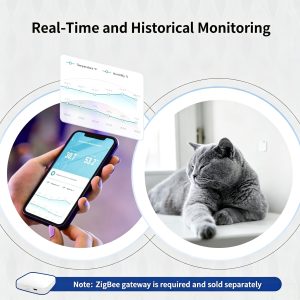
Real-Time and Historical Monitoring: Your Climate, Visualized
The biggest advantage of a smart sensor over a $5 analog hygrometer is data visibility. With the Tuya Zigbee sensor paired to the Smart Life, MOES, or Smartify app, you get:

Live temperature and humidity readings updated in real time, with changes appearing on your phone within seconds
Beautiful trend graphs showing your climate history by day, week, month, or year
Multi-sensor dashboard to monitor every room in your home at once
High/low threshold alerts sent as push notifications when readings cross your comfort zone
Historical data export for users who want to analyze long-term patterns
The app interface is clean and intuitive. Open it, and the current temperature (e.g., 30.7°C) and humidity (e.g., 53.2% RH) are displayed in large, easy-to-read numbers. Tap once to view the trend chart, and you can scroll back through days or weeks of historical data to spot patterns you would never notice from a single reading.

Real-world insight: Your bedroom’s humidity might climb from 45% to 65% over a week as the weather changes. Your plants might be silently suffering because the air is too dry. Your wooden floors might be slowly warping because humidity levels are out of range. None of this is visible on a wall-mounted analog gauge — but it’s instantly obvious on a smart sensor’s trend graph.

💡 Pro tip: Place one sensor in each major room — bedroom, nursery, living room, basement, and bathroom — to build a complete climate map of your home.

tuya zigbee temperature humidity

Why Do We Need a Temperature and Humidity Sensor?
The short answer: because your body reacts to indoor climate long before you consciously feel uncomfortable.

Here are the most common warning signs that your home’s climate is out of balance:

😴 Trouble sleeping or insomnia — caused by rooms that are too warm or too dry
🤧 Frequent sneezing, allergies, or sinus issues — often triggered by humidity that’s too high (mold and dust mites) or too low (dry nasal passages)
🦠 Dry skin, cracked lips, or itchy eyes — classic signs of low humidity, especially in winter
🤕 Headaches, fatigue, or brain fog — high CO2 or poor ventilation often correlates with these symptoms
💪 Joint stiffness or arthritis flare-ups — sensitive to temperature and humidity swings
🐾 Pet discomfort — cats, dogs, and birds are very sensitive to climate changes
For families with babies, elderly relatives, or asthma sufferers, climate control is not a luxury — it’s a health necessity. Newborns cannot regulate their body temperature as efficiently as adults, and they are particularly sensitive to humidity levels outside the 40–60% range.

A smart sensor gives you early warning before problems develop. Set a custom threshold (say, humidity below 35%), and the app will push a notification to your phone the moment the level drops. You can then take action — turn on the humidifier, open a window, or adjust the AC.

tuya zigbee temperature humidity Automate Your Indoor Environment with Smart Linkage This is where the Tuya Zigbee sensor really shines — not as a standalone gadget, but as the brain of a complete smart home climate system. When paired with a Zigbee hub and other Tuya-compatible smart devices, the sensor can trigger automatic actions based on real-time readings. Here are some of the most popular automations you can set up in minutes: Condition Automatic Action 💧 Humidity drops below 40% RH 🟢 Turn on smart humidifier 💦 Humidity rises above 60% RH 🔴 Turn off humidifier / turn on exhaust fan ❄️ Temperature drops below 15°C 🔥 Turn on smart heater ☀️ Temperature rises above 28°C ❄️ Turn on smart air conditioner 🌡️ Temperature stays between 21–26°C ✅ Maintain current settings Real-world example: Place the sensor in your baby’s nursery. When the room temperature drops below 18°C in the middle of the night, the smart plug connected to your heater automatically turns on. By the time your baby wakes up, the room is cozy and warm. You didn’t have to lift a finger. This kind of closed-loop automation is the future of home comfort — and it’s surprisingly affordable to set up. The sensor itself is inexpensive, and a basic Zigbee hub can be had for under $30. ⚠️ Important note: The sensor requires a Zigbee gateway/hub (sold separately) to connect to the app and trigger automations. Compatible hubs include the Tuya Zigbee Gateway, MOES Hub, Smartify Hub, and any universal Zigbee 3.0 hub. tuya zigbee temperature humidity
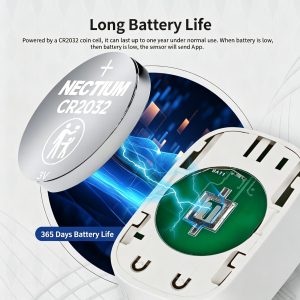
Long Battery Life: 365 Days on a Single Coin Cell
Few things are more annoying than a “smart” device that goes offline every few weeks because of a dead battery. The Tuya Zigbee sensor is specifically designed to avoid that problem.

Inside the sensor is a standard CR2032 coin cell battery (3V lithium) — the same type that powers watches, car key fobs, and small electronics. Thanks to the low-power Zigbee 3.0 protocol and an intelligent sleep mode, the sensor consumes almost no power when idle, only waking up to transmit when readings change.

Under normal use, a single CR2032 battery lasts up to 365 days — one full year.

Key battery features:

🔋 Battery is included in the box — no extra purchase needed to get started
🔋 Low-battery alerts pushed to the app when level drops below 20%
🔋 Easy DIY replacement — pop open the back cover, swap in a new CR2032, and the sensor automatically reconnects to your hub
🔋 Widely available — CR2032 batteries are sold at every pharmacy, hardware store, and online retailer
What “normal use” means: Typical indoor temperatures (15–30°C), standard reporting frequency, and typical app polling. If you configure the sensor to report very frequently (every few seconds), battery life may be slightly shorter. But for most users, a year of service from one tiny battery is a huge convenience.

tuya zigbee temperature humidity

50M / 164FT Wireless Range: Reliable Whole-Home Coverage
One of the most common questions about wireless sensors is: “How far can it really reach?” The Tuya Zigbee sensor uses Zigbee 3.0 protocol, which is specifically engineered for low-power, long-range, reliable communication in residential environments.

Maximum open-air range: 50 meters (164 feet).

In real-world homes, the actual range depends on a few factors:

🧱 Wall material: Drywall is easy to penetrate; concrete and brick reduce range
🚪 Number of obstacles: Each wall or floor reduces range by 5–10 meters
📡 Hub placement: Centrally locating the Zigbee hub maximizes coverage
🔌 Mesh networking: Adding other powered Zigbee devices (smart plugs, smart bulbs) extends the network automatically
For a typical 100–200 m² (1,000–2,000 sq ft) home, a single centrally-located hub will cover every room. For larger or multi-story homes, you can either add Zigbee signal repeaters or rely on the built-in mesh networking feature, where each mains-powered Zigbee device acts as a relay to extend the network.

💡 Note: The 50M / 164FT range is measured in open space without obstacles. Indoor optimal range depends on your home’s specific construction. We recommend testing the signal strength in your desired location using the app before permanent installation.

tuya zigbee temperature humidity High Sensitivity: 0.3°C and 5% RH Accuracy with Real-Time Sync Accuracy and responsiveness matter when you’re trusting a sensor to monitor a baby’s nursery or wine cellar. The Tuya Zigbee sensor delivers: Temperature accuracy: ±0.3°C Humidity accuracy: ±5% RH Real-time data sync: The app updates within seconds of any significant change No noticeable lag: When the room temperature shifts, the new reading appears almost instantly on your phone These specs are competitive with sensors costing 3–5 times more. For most home users — whether you’re monitoring a bedroom, kitchen, greenhouse, or server closet — the sensitivity is more than adequate. Practical use case: Place a sensor near your kitchen stove while cooking. The moment the temperature spikes (because the oven is on and you’ve been boiling water for 20 minutes), you’ll see the reading climb in the app. Open a window, turn on the exhaust fan — and the temperature graph will show the cool-down in real time. tuya zigbee temperature humidity
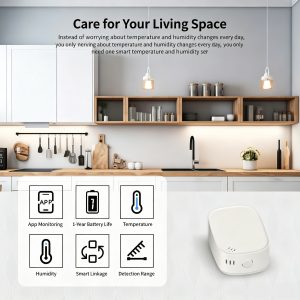
Care for Your Living Space: One Sensor, Endless Possibilities
The real beauty of a smart climate sensor is that once it’s installed, you can stop worrying about the temperature and humidity in your home. The sensor watches the numbers 24/7, the app logs the history, and the automations handle the rest.

Whether you’re a busy parent, a remote worker, a pet owner, or someone who simply wants a more comfortable home, this little device quietly works in the background to make your life easier.

Where to use it:

🛏️ Bedrooms — sleep better with optimal temperature and humidity
👶 Nurseries — protect babies from dry air, overheating, or chills
🐾 Pet areas — keep cats, dogs, and other pets comfortable
🌱 Greenhouses and plant rooms — monitor conditions for healthy growth
🍷 Wine cellars — maintain stable conditions for wine storage
🏋️ Home gyms — track climate during workouts
📚 Libraries and home offices — protect books, electronics, and your focus
🏚️ Basements and attics — detect moisture and prevent mold
🍳 Kitchens — monitor humidity while cooking
🚗 RVs and boats — portable monitoring for mobile living
The compact, minimalist white design blends into any room. It’s small enough to sit on a shelf, attach to a wall, or tuck into a corner — completely unobtrusive.

tuya zigbee temperature humidity

Stand or Stick: Flexible Installation Anywhere
One of the small but meaningful design touches is the built-in 3M adhesive backing on the back of the sensor. You have two installation options:

Option 1: Stick it
Peel off the protective film, press the sensor firmly against any clean, flat surface — wall, tile, wood, glass, metal — and it stays put. Perfect for renters who can’t drill holes, or anyone who wants a quick, tool-free setup.

Option 2: Stand it
Don’t want to commit to a permanent spot? Just place the sensor on any flat surface — nightstand, bookshelf, kitchen counter, desk — and it works just as well. The flat, stable base keeps it upright.

Where NOT to install it:

❌ In direct sunlight (affects temperature reading)
❌ Near heat sources like radiators, ovens, or heating vents
❌ In bathrooms with direct water spray (it’s not waterproof)
❌ In drafty areas near windows or exterior doors
❌ Inside closed cabinets (won’t reflect room conditions)
Ideal placement: On an interior wall, at about 1.2–1.5 m (4–5 feet) above the floor — roughly breathing height. This gives the most accurate reading of the air your family actually breathes.

Explore more smart home, security and translator products.https://odmhome.com/shop/

Learn more about our brand innovation on Xingliao Tech official website.https://xingliaotech.com

For wholesale & business cooperation, reach us via WhatsApp: +8617666669273

Xingliao Tech Official Site — ODM smart home devices & factory capabilities
Smart Solutions for Hotels & Hospitality — touch-free switches for guest rooms and bathrooms
Senior Care & Healthcare Solutions — hygienic, easy-to-use controls for care facilities
Xingliao Shop — retail samples and small-batch orders

Related Articles

You Might Also Like
Frequently Asked Questions

Is Tuya Zigbee Temperature Humidity worth buying?

Based on the breakdown in this article, Tuya Zigbee Temperature Humidity offers a solid mix of features and value. If your main goal matches the key benefits described above, it is a practical choice for everyday use.

How do I choose the right tuya zigbee temperature humidity for my needs?

Start with your core use case, then compare battery life, compatibility, and build quality as covered above. Choosing the right tuya zigbee temperature humidity comes down to matching specs with how you actually use it. Tuya WiFi IR Remote Review: Universal Control Meets Climate Intelligence

Does tuya zigbee temperature humidity require a companion app?

Most devices of this type pair with a free companion app for setup and firmware updates. A few advanced features may sit behind a paid plan, so check the official specs page before buying.