Posted on — Leave a comment

4G Smart Watch with GPS: When a Standalone Watch Beats One Tethered to a Phone

Most smartwatches are accessories to a phone: they mirror notifications over Bluetooth and their GPS is the phone’s GPS. That is fine for an adult carrying a phone, and useless for a seven-year-old walking Home from school or an eighty-year-old who does not carry one. A 4G watch has its own SIM, its own data connection and its own positioning, which means it Works as a locating device whether or not a phone is anywhere near it.

That independence is the entire product. It is also what you pay for, in money and in battery.

What you are choosing between

Bluetooth watch 4G standalone watch
Needs a phone nearby Yes No
Positioning Uses the phone’s GPS GPS plus WiFi and cell-tower positioning
Calls Through the phone Independent number
SIM and plan None Required
Battery Several days typical Often one to two days
Best for Fitness and notifications Children, elderly relatives, lone workers

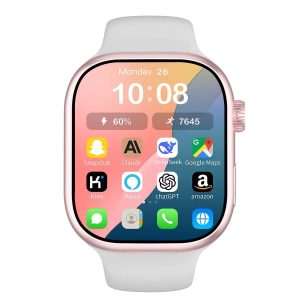
A model like the 4G LTE watch with a rotating camera sits in the second column: it places itself, makes and receives calls on its own number, and adds a camera for a quick look around — useful when the person wearing it is not going to describe where they are.

Who actually needs one

  • School-age children. A fixed number they can call, a location you can check, and no smartphone. This is the most common reason families buy one.
  • Elderly relatives living alone. Falls and confusion are the scenarios; the value is that the watch is on the wrist rather than on a table across the room.
  • People working alone outdoors — delivery, site visits, farming — where carrying a phone is impractical but being reachable is not optional.

If none of those describe the situation, a Bluetooth watch is the better buy. For health tracking rather than locating, a model such as the Tuya smart watch with heart-rate and blood-oxygen monitoring does that job without a data plan.

The ongoing cost, stated plainly

A 4G watch needs a SIM and a small data plan — usually a low-cost monthly tariff rather than anything expensive, since a watch moves very little data. Budget for it as a subscription, not a one-off. Check which LTE bands the watch supports against the carrier you intend to use before ordering; a watch that supports the wrong bands for your country is the single most common disappointment with these devices, and it is not fixable in software. Tuya vs Sonoff Smart Switch: Which Ecosystem Should You Build On?

Battery: the compromise you are accepting

A watch maintaining a cell connection, running GPS and staying reachable uses far more power than one that just mirrors a phone. Realistic expectation: charging daily or every other day. That is fine for a child who takes it off at home and bad for someone who forgets. Two practical mitigations: charge it as part of a fixed routine rather than a decision, and lower the location-reporting interval in the app — reporting every few minutes instead of continuously makes a visible difference to how long it lasts.

Accuracy, and what the map does not tell you

Positioning on these devices combines satellite, WiFi and cell-tower data, which is why accuracy varies: metres outdoors in the open, tens of metres indoors or between tall buildings. A dot that drifts by a street is normal, not a defect. Read location as “they are in this area”, and use the call function rather than the map when it Actually matters.

Privacy worth thinking about

Anyone buying a locating device for another person should say so plainly. For children that means explaining what the watch does and agreeing when it is on; many schools require watches to be in a silent mode during class, so check the rule before the first day. For elderly relatives, the conversation is about consent and dignity — the watch is worn voluntarily, and the person should know who can see the location. Store the account credentials properly and review who has access to the app periodically.

What to confirm before ordering

Four things, in this order. Bands — the watch’s LTE bands against your carrier, which decides whether it works at all. Size and strap — a watch that is uncomfortable does not get worn, and this is the most common reason these end up in a drawer; check the wrist size rather than the age on the box. Water resistance — children’s watches need to survive handwashing and rain, not swimming. Whether the app works in your language and region, since the location service is only as usable as the app that shows it.

Frequently Asked Questions

Does it work without a phone at all?

Yes. That is the point. Setup is usually done once from a parent’s phone, after which the watch works on its own.

Can I use my existing carrier’s SIM?

Often yes, if the watch supports the carrier’s LTE bands and the plan allows it. Confirm the bands first.

How accurate is the location?

Best outdoors with a clear sky; less so indoors, where it falls back on WiFi and cell towers. Expect an area rather than a pinpoint.

Is the camera necessary?

No, and it is the feature most likely to cause trouble at school. If locating and calling are the goals, a simpler watch is easier to Live with.

Related Articles

You Might Also Like

Posted on — Leave a comment

Push-Button Smart Switches: When a Click Beats a Touch Panel

US Standard WiFi Push Button Switch — Single, Double, Triple & Quadruple Covers
Push-Button Smart Switches: When a Click Beats a Touch Panel

Glass Touch panels look good in a showroom, but a lot of buyers want the Switch to feel like a Switch. On the 118 × 72 mm US Plate, the push-button range covers One to four gangs with a real mechanical travel and the same app behind it.

Why push button

Buttons can be found in the dark, they work with wet or gloved hands, and guests understand them without an explanation. In rentals and Hotels that matters more than the look of the plate. The travel also gives tactile confirmation that the command went through.

One to four gangs

The range runs 1, 2, 3 and 4 gang on one plate size, so a hallway can have two and a bedroom four while every plate on the wall matches. Each gang is an independent channel in the app.

The versions

  • WiFi — 2.4 GHz, Tuya / Smart Life, no hub.
  • HomeKit — pairs directly with Apple Home.
  • Newer variants — updated boards with the same footprint.
  • Korean-standard version — for Korean wall boxes on the same family.

Installation

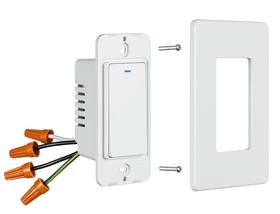
Standard US box, live to L, neutral Where the model requires it, loads to L1–L4. The mechanical button does not change the wiring — it is the same board with a different front.

FAQ

Is it a drop-in replacement for a standard US switch?
Yes for the box and the wiring; check the neutral requirement for the exact model.
Does the button still work without the network?
Yes — local control always works.
Can I mix 1 and 4 gang plates in one order?
Yes — the finishes match across the range.

Ready to specify it? Full specifications, gang options, colors and quantity pricing are on the US Standard WiFi Push Button Switch — Single, Double, Triple & Quadruple Covers product page — OEM logo, manual and packaging are available from the first order.

Related Articles

You Might Also Like
Frequently Asked Questions

Is Push Button Smart worth buying?

Based on the breakdown in this article, Push Button Smart offers a solid mix of features and value. If your main goal matches the key benefits described above, it is a practical choice for everyday use.

How do I choose the right push button smart for my needs?

Start with your core use case, then compare battery life, compatibility, and build quality as covered above. Choosing the right push button smart comes down to matching specs with how you actually use it.

Does push button smart require a companion app?

Most devices of this type pair with a free companion app for setup and firmware updates. A few advanced features may sit behind a paid plan, so check the official specs page before buying.

Posted on — Leave a comment

Touchless Wave Switches: When Not Touching the Switch Is the Whole Idea

Wave Gesture Switch — Contactless, WiFi & Standalone, EU & US Plates
Touchless Wave Switches: When Not Touching the Switch Is the Whole Idea

A wave Switch solves a problem that has nothing to do with convenience apps: the plate gets touched by hands that have just handled raw food, cleaning chemicals or a bathroom door. If you have ever wiped a light Switch twice in a row, you already know the use case.

How it works

An infrared field in front of the glass detects a hand passing within a few centimetres and toggles the channel. There is no contact, no mechanical travel and nothing to wear out — the glass stays clean because nobody touches it. Where the DS-129JL Series Fits: Apartments, Hotels and Office Retrofits

Two versions, with and without the network

  • Pure wave (no network) — behaves like a normal Switch that you operate by waving. Nothing to configure, nothing to hack, ideal for kitchens, clinics and food prep areas.
  • Wave + WiFi — adds the Tuya / Smart Life app: schedules, countdown, remote status and voice through Alexa and Google Home.

EU or US plate

The EU version is 86 × 86 mm for European, British and GB boxes; the US version is 118 × 72 mm for US and equivalent boxes. Both are single-fire and zero-fire universal, so they fit older two-wire boxes as well as new ones with a neutral. Where the DS-123Y Series Fits: Apartments, Hotels and Office Retrofits

Where it earns its keep

Kitchens and bathrooms first, then clinics, labs, food factories and anywhere with a hand-washing protocol. In a domestic setting the most common install is One plate by the kitchen door and one in the guest bathroom.

Practical notes

Keep the sensing area clear of tall taps or decorations. The switch responds to a hand pass within a few centimetres — a deliberate wave, not a brush past — so accidental triggering is rare. Where the DS-121JLHK Series Fits: Apartments, Hotels and Office Retrofits

FAQ
Does it work without a neutral?
Yes — both versions accept single-fire and zero-fire Wiring.
Can I still control it from the phone?
On the WiFi version, yes. The pure-wave version is offline by design.
Is the response reliable with wet hands?
Yes — the sensor reads the hand, not the surface, so moisture on the plate is not an issue.

Ready to specify it? Full specifications, gang options, colors and quantity pricing are on the Wave Gesture Switch — Contactless, WiFi & Standalone, EU & US Plates product page — OEM logo, manual and packaging are available from the first order.

Related Articles

You Might Also Like
Frequently Asked Questions

Is Touchless Wave Switches worth buying?

Based on the breakdown in this article, Touchless Wave Switches offers a solid mix of features and value. If your main goal matches the key benefits described above, it is a practical choice for everyday use.

How do I choose the right touchless wave switches for my needs?

Start with your core use case, then compare battery life, compatibility, and build quality as covered above. Choosing the right touchless wave Switches comes down to matching specs with how you actually use it.

Does touchless wave switches require a companion app?

Most devices of this type pair with a free companion app for setup and firmware updates. A few advanced features may sit behind a paid plan, so check the official specs page before buying.

Posted on — Leave a comment

Zigbee Smart Switch: How It Works and When to Choose It

A Zigbee Smart Switch is a wall switch that talks to your home over a Zigbee mesh network instead of over Wi-Fi. Every mains-powered Zigbee switch also acts as a signal repeater, so the more switches you install, the stronger and more reliable the network becomes — and automations keep running locally on the hub even when your broadband is down.

That last point is the reason professionals choose Zigbee for whole-home projects. A Wi-Fi switch stops responding to the app the moment the internet drops; a Zigbee switch keeps its scenes, its sensor triggers and its schedules, because the logic lives on the hub in the house, not in a data centre.

How a Zigbee switch installation is put together

  1. A Zigbee hub (gateway). This is mandatory. It is the translator between the Zigbee mesh and your Wi-Fi router, and it is where automations are stored.
  2. The switches themselves. Each one joins the hub at install time, usually by holding a button until the indicator blinks.
  3. Sensors and other devices. Door/window contacts, PIR motion sensors, temperature and leak sensors all join the same mesh, which is what makes “if the bathroom door opens after sunset, turn on the light at 30 %” possible.
  4. The app and voice assistants. The hub’s app (Tuya / Smart Life, or a Matter controller) is the user interface; Alexa and Google Home connect to the hub, not to each switch.

Zigbee vs Wi-Fi: the decision that matters

Factor Zigbee Wi-Fi
Hub required Yes No
Works during internet outage Yes (local automations) Button only
Load on your router None — one hub on Wi-Fi One IP address per switch
Practical device count 50–100+ per hub Limited by router DHCP and airtime
Response to button press Fast, local Fast local, cloud round-trip for app echo
Sensor automations Native and local Usually cloud-dependent
Setup complexity One extra step (pair hub) Simplest
Cost for 1–3 switches Higher (hub cost) Lower
Cost for 20+ switches Lower per point, far more stable Router strain, more dropouts

Break-even rule: Wi-Fi is cheaper and simpler up to roughly six controlled points. Above that, or the moment you want sensors to trigger lights, Zigbee is the better engineering choice. M2 Foldable 3-Axis Gimbal Stabilizer, Portable Handheld Gimbal for Smartphones

The mesh advantage, explained without jargon

Wi-Fi devices all shout at one router, and the router answers each one. Add forty devices and the airtime is gone — this is why large Wi-Fi installs develop “device not responding” errors. M1 Foldable 3-Axis Gimbal Stabilizer, Portable Handheld Gimbal for Smartphones

Zigbee devices whisper to their neighbours. A switch at the far end of the house does not need to reach the hub directly; it passes the message to the nearest powered device, which passes it on. Because every mains-powered Zigbee switch is a repeater, coverage improves as you install more. Battery sensors sleep and do not repeat, which is why a hub plus a handful of wired switches is the backbone of a healthy mesh. M2 Pro Foldable 3-Axis Gimbal Stabilizer, Advanced Handheld Gimbal for Smartphones

Practical consequences: Video Doorbell Without Subscription

  • Put the hub centrally, and off the floor.
  • Do not put the hub inside a metal cabinet.
  • Keep at least two powered Zigbee devices within range of each other across long distances.
  • Zigbee shares the 2.4 GHz band with Wi-Fi — set Wi-Fi to channels 1, 6 or 11 and Zigbee to a non-overlapping channel to avoid interference.

Binding: the feature Wi-Fi switches do not have

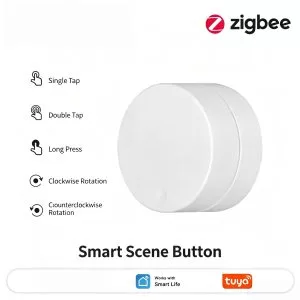
Zigbee supports direct binding — you can bind a switch, a button or a sensor directly to a light or a group, with no hub logic and no cloud in the path. A wireless scene button stuck to the wall beside the bed can be bound to “everything off” and will work even if the hub is unplugged. This is the single most requested feature in hotel and elderly-care installations, and it is native to Zigbee.

Matter and Zigbee

Matter does not replace Zigbee; it sits above it. Most current Zigbee hubs are also Matter controllers or Matter bridges, which means:

  • Zigbee devices can be exposed to Apple Home, Google Home and Alexa through the hub.
  • A Matter-over-Zigbee bridge lets one physical network serve multiple ecosystems at once.
  • Thread is Matter’s own mesh radio and is the natural successor for new sensor deployments, but Zigbee 3.0 hardware installed today will remain serviceable for years.

Specification checklist for a Zigbee switch project

  1. Hub capacity — devices per hub, and whether multiple hubs can be combined in one app.
  2. Zigbee version — insist on Zigbee 3.0; older Zigbee HA 1.2 profiles do not interop reliably.
  3. Repeater behaviour — confirm the switch repeats, not just joins.
  4. Neutral requirement — most Zigbee switches want a neutral; check no-neutral variants for older housing stock.
  5. Plate standard — 86 × 86 mm, 147 × 86 mm or 118 × 72 mm to match the destination country.
  6. Load type — lighting, curtain motor, or fan; each needs a different output module.
  7. Local automation support — confirm scenes run on the hub, not only in the cloud.
  8. Certification — CE / UKCA, FCC, RoHS; CCC or PSE where required.
Frequently Asked Questions

Do I need a hub for every brand?

You need a hub that speaks Zigbee 3.0. A Tuya-compatible Zigbee hub covers Tuya-ecosystem switches, sensors and remotes in one app; mixing vendors is possible in principle but in practice you should keep one ecosystem per project.

Will a Zigbee switch work if my internet is down?

Yes for everything local: button presses, bound remotes and hub-stored automations keep working. Only remote access from outside the home and voice control stop.

How many Zigbee devices can one hub handle?

Typically 50 to 100 devices, of which battery sensors should be a minority. The binding factor is not the count but the number of powered repeaters — plan at least one mains device per room for a stable mesh.

Can I mix Zigbee switches with Wi-Fi switches?

Yes, through an app that covers both (Tuya / Smart Life does). Automations that cross the two groups run through the hub or the cloud rather than locally, so keep time-critical automations inside one protocol.

Is Zigbee being replaced by Matter?

Matter is a standard that runs over Wi-Fi and Thread; Zigbee remains the widest-deployed low-power mesh in installed homes. Buying Zigbee 3.0 today is safe — hubs bridge Zigbee into Matter ecosystems.

What should a bulk buyer confirm before ordering?

Hub and switch firmware compatibility, whether the switch repeats, the plate standard and gang mix for the destination market, local-automation support, certifications for the target country, and minimum order quantities (typically 500 pieces per colour for standard models).

Related products

Related guides

Related Articles

You Might Also Like
Posted on — Leave a comment

Glass Switch Panel: What It Is and When It Pays Off

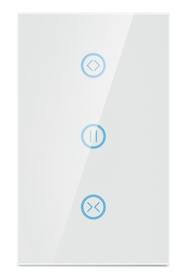
A glass Switch panel is a wall Switch whose face is a sheet of tempered glass — typically 3–4 mm thick, with the touch or soft-click zones, indicator light and icons printed or etched on the back of the glass. It replaces the plastic rocker plate of a conventional Switch with a single flat surface that can be wiped clean, and it is the standard finish for touch switches in hotels, serviced apartments and mid-to-high-end residential projects.

Glass is chosen for three reasons: it does not yellow or scratch the way white ABS plastic does, it gives a flat surface that suits touch control, and it can be printed with any colour, icon or logo. It is not chosen for impact resistance — that is the trade-off this guide is honest about. M1 Foldable 3-Axis Gimbal Stabilizer, Portable Handheld Gimbal for Smartphones

What the panel is actually made of

Layer Material What it does
Face Tempered (toughened) soda-lime glass, 3–4 mm The visible, wipeable surface. Tempering makes it 4–5× stronger than annealed glass and makes it crumble into blunt fragments instead of shards if it breaks.
Graphics Ceramic-fired or UV-cured ink on the rear face Icons, gang outlines, brand mark. Printed on the back so fingers never touch the ink.
Touch layer Capacitive sensor film or PCB pad Detects a finger through the glass. Sensitivity is tuned so a wet cloth or a passing sleeve does not trigger it.
Structure PC / ABS flame-retardant carrier (V-0) Holds the relay, the Wi-Fi or Zigbee module and the terminals; carries the safety rating.
Border Aluminium alloy or ABS frame Protects the glass edge — the most likely place to chip.

Ask your supplier two questions about the glass: is it chemically or thermally tempered, and does it comply with the fragmentation test? Untempered “glass-look” acrylic panels are common in the cheapest listings, and they scratch within a month. M2 Pro Foldable 3-Axis Gimbal Stabilizer, Advanced Handheld Gimbal for Smartphones

Glass vs plastic vs metal: honest comparison

Property Tempered glass PC / ABS plastic Metal (brushed aluminium)
Scratch resistance Excellent Poor — visible within months Fair — shows scuffs
Yellowing / UV None Yellows, especially in sunlight None
Impact resistance Fair — chips at the edge, can crack Excellent Excellent
Cleaning Flat, wipeable, no gaps Rocker gaps trap dust Depends on finish
Print / colour freedom Any colour, any icon Limited Limited
Cost Medium-high Low High
Fingerprint visibility Visible on dark glossy colours Low Medium

If the project is a rental, a school or a corridor with trolleys and impact risk, plastic is the right call. If it is a showroom, a hotel room or a private home where the plate is seen every day, glass wins. M2 Foldable 3-Axis Gimbal Stabilizer, Portable Handheld Gimbal for Smartphones

Where glass panels are used

  • Hotels and serviced apartments — a single glass plate per bedside and entry, printed with readable icons for international guests; the flat surface survives daily cleaning.
  • Premium residential — matched black, white or gold plates across the whole flat; glass is the only finish that keeps a consistent colour across 1-, 2-, 3- and 4-gang plates.
  • Kitchens — grease wipes off glass; plastic rockers discolour.
  • Offices and meeting rooms — scene buttons (presentation / meeting / off) printed directly on the plate.

Specification checklist before you buy

  1. Plate standard — 86 × 86 mm (EU/CN/UK), 147 × 86 mm (UK large format), 118 × 72 mm (US decorator). The glass is cut to the standard; there is no universal plate.
  2. Gang count — 1, 2, 3, 4, 6 or 8. Count the circuits on the wall, not what looks tidy.
  3. Control type — full touch, touch-plus-relay (soft click), or mechanical micro-switch under a glass rocker. Touch-only plates are quietest; the mechanical version gives tactile feedback that older users prefer.
  4. Backlight — always-on locator light (easy to find at night) or only-when-active (better for bedrooms). Check whether the standby glow can be switched off in the app.
  5. Colour — white, black, gold, grey; confirm whether the frame matches or contrasts, and whether the frame is included.
  6. Load rating — usually 3–10 A resistive per gang, lower for LED drivers and capacitive loads.
  7. Neutral requirement — most glass touch panels need a neutral wire. Confirm no-neutral variants if your housing stock lacks one.
  8. Certification — CE / UKCA for Europe and the UK, FCC for the US, RoHS for materials, plus CCC (China) or PSE (Japan) where the destination requires it.

Custom branding on glass panels

For OEM and project orders the glass face is the easiest part to customise, and the cheapest way to make a standard switch look bespoke: C16 AI Gimbal Stabilizer 1.3m, Smart Tracking Extendable Selfie Stick for Smartphones Reolink vs Tuya Security Camera

  • Icon set — lamp, fan, curtain, scene symbols, printed per gang.
  • Colour matching — any RAL or Pantone reference, with a physical sample for approval before mass printing.
  • Logo — a discreet brand mark at the bottom edge of the plate.
  • Packaging — retail box, manual and app splash screen under your own brand.

Typical OEM economics: standard models start at It depends on how deep the customisation goes. Samples start at 5 pcs and are charged, with the cost credited against your first bulk order. A sticker or silk-printed logo runs from 10 pcs per model, laser engraving from 300 pcs, an existing platform under your own brand and colour from 5 pcs per colour, custom packaging 500–1,000 pcs, your own product ID from 1,000 pcs, and full custom tooling from 2,000–3,000 pcs depending on how much of the design changes. Sampling takes 7–15 days; new tooling takes 25–40 days. Video Doorbell Without Subscription

Care and failure modes

  • Edge chips. Almost all breakage starts at the edge. Specifying an alloy frame and tightening the plate evenly against a flat wall prevents it.
  • Wall flatness. Glass will not flex. On a bowed wall, torque on the screws can crack the plate — use a spacer or a back box shim.
  • Cleaning. A dry or slightly damp microfibre cloth. Avoid solvent cleaners on the printed icons.
  • Touch drift. If a zone becomes insensitive, check for moisture behind the plate before assuming the panel is faulty.
Frequently Asked Questions

Is a glass switch panel safe in a bathroom or kitchen?

Yes, provided the switch carries the required IP rating for the zone and is installed outside the wet area. Glass is non-porous and does not absorb moisture; the risk is the same as with any switch — water reaching the terminals.

Do glass panels break easily?

Tempered glass resists everyday impact well and fails safely if it does break, but a sharp blow to the unprotected edge can crack it. Fitting the matching alloy frame reduces this to a rare event, and it is why hotels specify framed plates.

Can the touch zones be used with wet hands?

Capacitive panels are tuned to reject light moisture, but a soaking-wet finger or a film of water across the plate can cause missed or double triggers. For bathrooms, a mechanical-switch-under-glass version is the safer specification.

Do dark glass panels show fingerprints?

Black and mirror finishes show prints more than white or frosted finishes. If the plate is in a high-touch spot, choose a satin or frosted glass — it hides prints and still wipes clean.

Can I get a glass panel in a non-standard size?

Yes for project volumes. Custom plate shapes need new tooling (typically 25–40 days) and a minimum order in the low thousands. Colour, icons and logo on a standard plate need no tooling at all.

What is the difference between a glass panel and a “glass-look” panel?

A real panel is tempered glass with rear-printed graphics; a glass-look panel is acrylic or coated plastic. Look for tempering/fragmentation compliance and check the edge — glass has a greenish cut edge, acrylic does not.

Related products
Related guides

Related Articles

You Might Also Like