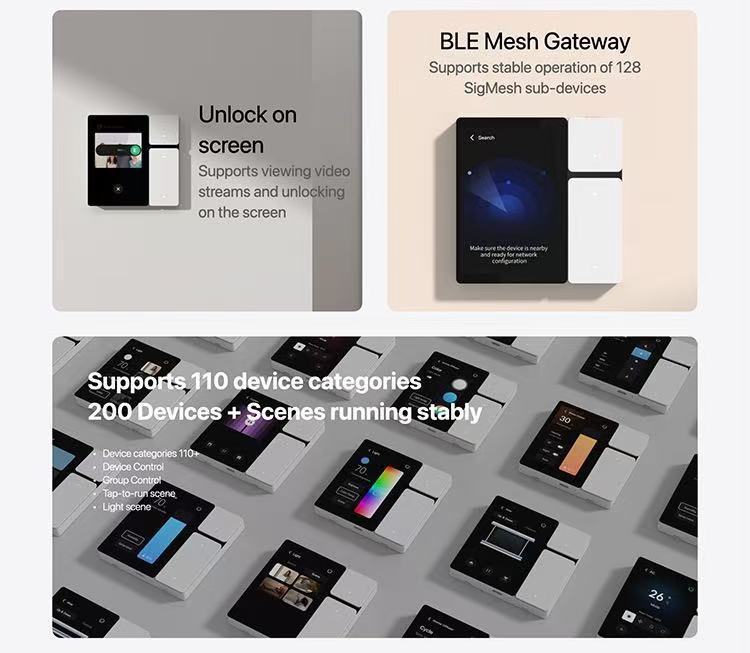
A Zigbee Smart Switch is a wall switch that talks to your home over a Zigbee mesh network instead of over Wi-Fi. Every mains-powered Zigbee switch also acts as a signal repeater, so the more switches you install, the stronger and more reliable the network becomes — and automations keep running locally on the hub even when your broadband is down.
That last point is the reason professionals choose Zigbee for whole-home projects. A Wi-Fi switch stops responding to the app the moment the internet drops; a Zigbee switch keeps its scenes, its sensor triggers and its schedules, because the logic lives on the hub in the house, not in a data centre.
How a Zigbee switch installation is put together
- A Zigbee hub (gateway). This is mandatory. It is the translator between the Zigbee mesh and your Wi-Fi router, and it is where automations are stored.
- The switches themselves. Each one joins the hub at install time, usually by holding a button until the indicator blinks.
- Sensors and other devices. Door/window contacts, PIR motion sensors, temperature and leak sensors all join the same mesh, which is what makes “if the bathroom door opens after sunset, turn on the light at 30 %” possible.
- The app and voice assistants. The hub’s app (Tuya / Smart Life, or a Matter controller) is the user interface; Alexa and Google Home connect to the hub, not to each switch.
Zigbee vs Wi-Fi: the decision that matters
| Factor | Zigbee | Wi-Fi |
|---|---|---|
| Hub required | Yes | No |
| Works during internet outage | Yes (local automations) | Button only |
| Load on your router | None — one hub on Wi-Fi | One IP address per switch |
| Practical device count | 50–100+ per hub | Limited by router DHCP and airtime |
| Response to button press | Fast, local | Fast local, cloud round-trip for app echo |
| Sensor automations | Native and local | Usually cloud-dependent |
| Setup complexity | One extra step (pair hub) | Simplest |
| Cost for 1–3 switches | Higher (hub cost) | Lower |
| Cost for 20+ switches | Lower per point, far more stable | Router strain, more dropouts |
Break-even rule: Wi-Fi is cheaper and simpler up to roughly six controlled points. Above that, or the moment you want sensors to trigger lights, Zigbee is the better engineering choice. M2 Foldable 3-Axis Gimbal Stabilizer, Portable Handheld Gimbal for Smartphones
The mesh advantage, explained without jargon
Wi-Fi devices all shout at one router, and the router answers each one. Add forty devices and the airtime is gone — this is why large Wi-Fi installs develop “device not responding” errors. M1 Foldable 3-Axis Gimbal Stabilizer, Portable Handheld Gimbal for Smartphones
Zigbee devices whisper to their neighbours. A switch at the far end of the house does not need to reach the hub directly; it passes the message to the nearest powered device, which passes it on. Because every mains-powered Zigbee switch is a repeater, coverage improves as you install more. Battery sensors sleep and do not repeat, which is why a hub plus a handful of wired switches is the backbone of a healthy mesh. M2 Pro Foldable 3-Axis Gimbal Stabilizer, Advanced Handheld Gimbal for Smartphones
Practical consequences: Video Doorbell Without Subscription
- Put the hub centrally, and off the floor.
- Do not put the hub inside a metal cabinet.
- Keep at least two powered Zigbee devices within range of each other across long distances.
- Zigbee shares the 2.4 GHz band with Wi-Fi — set Wi-Fi to channels 1, 6 or 11 and Zigbee to a non-overlapping channel to avoid interference.
Binding: the feature Wi-Fi switches do not have
Zigbee supports direct binding — you can bind a switch, a button or a sensor directly to a light or a group, with no hub logic and no cloud in the path. A wireless scene button stuck to the wall beside the bed can be bound to “everything off” and will work even if the hub is unplugged. This is the single most requested feature in hotel and elderly-care installations, and it is native to Zigbee.
Matter and Zigbee
Matter does not replace Zigbee; it sits above it. Most current Zigbee hubs are also Matter controllers or Matter bridges, which means:
- Zigbee devices can be exposed to Apple Home, Google Home and Alexa through the hub.
- A Matter-over-Zigbee bridge lets one physical network serve multiple ecosystems at once.
- Thread is Matter’s own mesh radio and is the natural successor for new sensor deployments, but Zigbee 3.0 hardware installed today will remain serviceable for years.
Specification checklist for a Zigbee switch project
- Hub capacity — devices per hub, and whether multiple hubs can be combined in one app.
- Zigbee version — insist on Zigbee 3.0; older Zigbee HA 1.2 profiles do not interop reliably.
- Repeater behaviour — confirm the switch repeats, not just joins.
- Neutral requirement — most Zigbee switches want a neutral; check no-neutral variants for older housing stock.
- Plate standard — 86 × 86 mm, 147 × 86 mm or 118 × 72 mm to match the destination country.
- Load type — lighting, curtain motor, or fan; each needs a different output module.
- Local automation support — confirm scenes run on the hub, not only in the cloud.
- Certification — CE / UKCA, FCC, RoHS; CCC or PSE where required.
Frequently Asked Questions
Do I need a hub for every brand?
You need a hub that speaks Zigbee 3.0. A Tuya-compatible Zigbee hub covers Tuya-ecosystem switches, sensors and remotes in one app; mixing vendors is possible in principle but in practice you should keep one ecosystem per project.
Will a Zigbee switch work if my internet is down?
Yes for everything local: button presses, bound remotes and hub-stored automations keep working. Only remote access from outside the home and voice control stop.
How many Zigbee devices can one hub handle?
Typically 50 to 100 devices, of which battery sensors should be a minority. The binding factor is not the count but the number of powered repeaters — plan at least one mains device per room for a stable mesh.
Can I mix Zigbee switches with Wi-Fi switches?
Yes, through an app that covers both (Tuya / Smart Life does). Automations that cross the two groups run through the hub or the cloud rather than locally, so keep time-critical automations inside one protocol.
Is Zigbee being replaced by Matter?
Matter is a standard that runs over Wi-Fi and Thread; Zigbee remains the widest-deployed low-power mesh in installed homes. Buying Zigbee 3.0 today is safe — hubs bridge Zigbee into Matter ecosystems.
What should a bulk buyer confirm before ordering?
Hub and switch firmware compatibility, whether the switch repeats, the plate standard and gang mix for the destination market, local-automation support, certifications for the target country, and minimum order quantities (typically 500 pieces per colour for standard models).
Related products
- Zigbee Smart Gateway (wired & wireless) — the hub that runs the mesh and stores automations locally.
- MZHUB Matter + Zigbee Wired Gateway — bridges Zigbee devices into Matter ecosystems including Apple Home.
- MHUB-W Zigbee + Bluetooth Multi-mode Gateway — covers Zigbee and Bluetooth devices in one hub.
- ZHUB-W Zigbee Wireless Gateway — compact hub for apartments and single-floor installs.
- UFO-R 4Z Zigbee IR Remote — Zigbee scene remote and IR blaster, ideal for bedside “everything off”.
Related guides
- Zigbee vs Wi-Fi smart home devices
- Smart switches for home
- Smart home gateways explained
- Matter PIR motion sensor: scenes and false-trigger fixes
- Contact us about Zigbee project supply.
Related Articles
- Smart Light Switch Buying Guide 2026: WiFi vs Zigbee vs Matter Protocol
- Glass Switch Panel: What It Is and When It Pays Off
- Smart Switches for Home: Choosing Plate, Gang and Protocol
- C10 AI Gimbal Stabilizer 70cm, Smart Tracking Selfie Stick for Smartphones
- C09 Gimbal Stabilizer 69cm, Extendable Selfie Stick with Tripod for Smartphones
You Might Also Like
📌 This article is part of our Complete Smart Hub — more guides and buying tips inside.