Use WiFi for anything that streams Video or needs the internet directly — cameras, Video doorbells, Smart speakers. Use Zigbee for anything that is battery-powered, numerous and low-data — Door/window sensors, motion sensors, water leak sensors, and switches that only report state. Zigbee devices do not each need your router; they form a mesh that reaches further and keeps working when the internet drops.
The mistake most people make is buying every device in WiFi and then discovering 30 clients on a Home router, batteries that die every few months, and automations that stop when the broadband does.
The practical difference
- WiFi connects each device straight to your router. High bandwidth, high power draw, one more client per device, and it depends on router quality.
- Zigbee connects devices to a small hub, and the mains-powered devices in the mesh relay messages for each other. Very low power, instant local response, no router load, but low bandwidth — fine for “door open”, useless for Video.
What to buy in Zigbee
Sensors
Door/window contacts, PIR motion sensors, water leak detectors, rain sensors, temperature and humidity sensors. A Zigbee sensor on a coin cell typically runs one to two years, versus a few months for the WiFi equivalent, and it reports state to the hub locally in well under a second. This is why a whole-house sensor set is normally Zigbee.
Switches and relays that only report state
Light switches, curtain switches and boiler relays are mains-powered, so battery life is not the issue — reliability is. Zigbee keeps them off your WiFi and, importantly, keeps local automations working if the internet goes down.
Large installs
Once you pass roughly 15–20 devices, Zigbee’s mesh matters more than any single device spec. Put a few mains-powered Zigbee devices (Smart plugs or in-wall modules) around the house and they will act as repeaters for the battery sensors. C08 Gimbal Stabilizer 69cm, Extendable Selfie Stick Tripod for iPhone & Android
What to keep on WiFi
Cameras and video doorbells
Video needs bandwidth Zigbee cannot deliver. Keep cameras on WiFi, give them their own 2.4 GHz SSID if your router supports it, and do not judge the rest of your Smart home by how flaky a camera at the front door feels.
Plugs and appliances you want to control from anywhere without a hub
A WiFi Smart plug is the simplest possible first device: no hub, works with voice assistants directly, and metering models report power. If you only want two or three, WiFi is fine.
Where a hub is unavoidable
Zigbee needs a coordinator — a hub, a speaker with a built-in radio, or a control panel. That single purchase is what makes the rest cheap and reliable. Choose a hub that supports Zigbee 3.0 so devices from different brands interoperate for basic on/off, open/close and battery reporting. Note that brand-specific extras (advanced metering, proprietary scenes) may still need that brand’s own app.
Matter and Thread, briefly
Matter is a device-level standard that sits above the transport: it lets a device work with any Matter-certified controller, whether it arrives over WiFi, Thread or a bridge. Thread is a low-power mesh in the same role as Zigbee. In practice: if you are buying sensors today, a Zigbee 3.0 or Matter-over-Thread device from a brand whose hub you already own is the safe choice.
Planning a house, room by room
- Front door: WiFi video doorbell (bandwidth), Zigbee door contact (backup), Zigbee leak sensor if there is a utility cupboard nearby.
- Living room: Zigbee motion sensor for lighting automations; WiFi plug for the lamp or TV standby load.
- Kitchen and utility: Zigbee water leak sensors under the sink, behind the dishwasher and next to the boiler — these are the cheapest insurance in a smart home.
- Bedrooms: Zigbee temperature/humidity sensors; keep cameras out of sleeping areas.
- Heating: WiFi thermostat Where it needs remote scheduling, Zigbee boiler relay where it only follows a Schedule and a local temperature sensor.
Troubleshooting checklist
- Sensor drops offline: add a mains-powered Zigbee repeater between it and the hub; check for a metal cabinet or a mirror in the path.
- Pairing fails: bring the device within a metre of the hub, reset it properly (usually a 5-second hold), and pair before mounting.
- Automations are slow: check whether the automation runs locally or in the cloud; cloud ones stop when the internet does.
- WiFi device keeps disconnecting: you probably have too many clients or a 2.4/5 GHz band-steering problem. Give smart devices a dedicated 2.4 GHz SSID.
Related guides
Browse the range
Frequently Asked Questions
Do I need a hub for Zigbee devices?
Yes. Zigbee devices talk to a coordinator — a smart speaker with a Zigbee radio, a dedicated hub, or a control panel. That hub is what connects them to your app and to your WiFi network.
Is Zigbee better than WiFi for smart home devices?
For battery sensors, yes: far longer battery life, a self-healing mesh, and local automations that survive an internet outage. For cameras and anything streaming video, WiFi is the only practical option.
How many Zigbee devices can one hub handle?
Commonly 30–60 direct children per coordinator, with mains-powered devices acting as repeaters to extend reach. Large homes usually add a second hub or place repeaters rather than replacing the hub.
Can I mix Zigbee and WiFi devices in one app?
Yes, if your hub or platform supports both — most do. The device radios are different; the app layer presents them together, and automations can cross between them.
Do Zigbee devices work when the internet is down?
Local automations run on the hub and keep working. Remote access and any cloud-dependent automation will not. This is one of the main reasons to prefer Zigbee for essential automations.
Should I wait for Matter instead?
No need. Buy Zigbee 3.0 or Matter-over-Thread devices from a brand whose hub you already run; both are supported by current platforms, and Matter devices can be added alongside existing Zigbee ones.
- Water leak sensors: where one leak starts and how to catch it early
- Motion sensors: PIR motion detectors for smart homes
- Smart plugs and WiFi wall sockets
Browse sensors and alarms · Ask which hub fits your setup
Related Articles
- Smart Light Switch Buying Guide 2026: WiFi vs Zigbee vs Matter Protocol
- White Label Smart Home Devices for Brand Owners
- Hotel Smart Security OEM Solutions
- Why Tuya 4MP Solar WiFi PTZ Camera Is The Ideal Outdoor Home Security Solution
- The X6 Visual Intelligent Doorbell: No WiFi Two-Way Video Doorbell Guide
You Might Also Like
 Tuya Smart ZigBee IR Remote Controller S11 – Universal WiFi … Original price was: $59.96.$30.96Current price is: $30.96.
 Tuya Solar WiFi PTZ Security Camera 4MP Outdoor Wireless Camera, Full Color Night Vision IP65 Waterproof Price range: $59.99 through $65.99
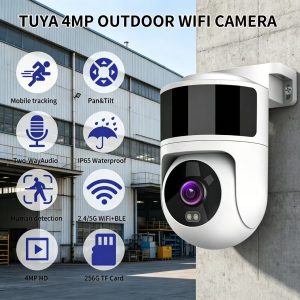 Tuya 4MP Outdoor WiFi Dual Lens PTZ Security Camera IP65 Waterproof Auto Tracking Full Color Night Vision Surveillance Camera Price range: $35.99 through $39.99
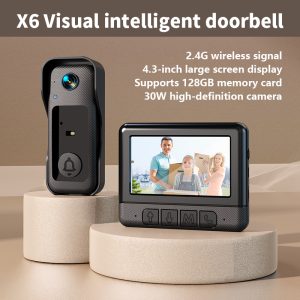 X6 Smart Visual Doorbell – 4.3 Inch Display Wireless Video Intercom Infrared Night Vision No WiFi Needed Original price was: $69.96.$59.99Current price is: $59.99.
📌 This article is part of our Complete Wifi Hub — more guides and buying tips inside.