What a Smart Home Gateway Actually Does
A Smart Home gateway (also called a hub or bridge) is the translator between your low-power Smart devices and your home network. Zigbee and Bluetooth devices cannot talk to your router directly — they are designed to sip battery power for a year or more, which means they cannot maintain a WiFi connection. The gateway speaks their language, and speaks WiFi or Ethernet on the other side, so everything lands in one app.
Without a gateway, a Zigbee sensor is little more than a paperweight: you can sometimes pair it to a Phone over Bluetooth, but it cannot be reached from outside the room, cannot trigger other devices, and will not show up in your routines. F6 3-Axis Gimbal Stabilizer, Handheld Smartphone Gimbal for Smooth Video
With one gateway, you get: remote access to every Zigbee or Bluetooth device, local automations that keep running when the internet drops, voice control through Alexa and Google, and a single place to see device state. C08 Gimbal Stabilizer 69cm, Extendable Selfie Stick Tripod for iPhone & Android
Do You Need One? A Fast Test
Look at what you already own, or what you are about to buy: C07 Mini Gimbal Stabilizer 66cm, Foldable Extendable Selfie Stick Tripod for Smartphones
- All WiFi devices (WiFi switches, WiFi plugs, WiFi cameras) — you do not need a gateway. Each device connects to the router itself.
- Any Zigbee device (door/window sensors, PIR motion sensors, water leak sensors, Zigbee switches, smart knobs) — you need a Zigbee gateway.
- Any Bluetooth device (Bluetooth locks, thermometers, some sensors) — you need a Bluetooth gateway if you want to reach them when you are not standing next to them.
- Infrared appliances (old air conditioners, TVs, set-top boxes with remotes) — you need a gateway with an IR blaster.
Tuya-based setups often bundle all three: a single Tuya Bluetooth gateway or a combined Zigbee + Bluetooth + IR unit covers a whole apartment. If you are building a larger system, look at a Zigbee 3.0 gateway with a higher device ceiling. C06 Series Selfie Stick with Light & Tripod, Extendable Gimbal Stabilizer for Smartphones F10 3-Axis Gimbal Stabilizer, Handheld Smartphone Stabilizer for Smooth Video Recording
Gateway Types Compared
- Zigbee 3.0 gateway — the workhorse. Builds a mesh network where mains-powered devices relay for battery ones, so coverage improves as you add more. Typical capacity runs from tens of devices up to 100+ on better units. Best choice for sensors and whole-home builds.
- Bluetooth gateway — cheap and small, mainly for Bluetooth sensors and locks, and for forwarding their state to the cloud. Shorter range than Zigbee, no mesh.
- IR + RF gateway — turns legacy remote-controlled appliances into app-controlled ones. Useful for air conditioners in hotels and apartments where replacing the unit is not an option.
- Control panel / screen hub — a gateway with a touchscreen that also acts as a wall-mounted control surface and scene keypad. Our 4-inch Tuya smart control panel is this category: gateway, scene controller and intercom-style panel in one device.
If you are deciding between WiFi and Zigbee for the devices themselves, read Zigbee vs WiFi smart home devices before you commit — it changes how many gateways you will need. Automatic Pet Feeder Portions: How to Calibrate and Schedule Meals
How Many Gateways and Where to Put Them
One gateway per home is usually enough for an apartment. Zigbee range indoors is roughly 10–20 metres per hop depending on walls, and concrete or brick floors cost more than drywall. Rules of thumb:
- Put it central and high, not in a metal cabinet or right next to the router.
- Keep it a metre or two away from WiFi routers and microwave ovens — 2.4GHz is crowded.
- If you have two or more floors, plan a second gateway, or rely on mains-powered Zigbee devices (switches, sockets) to act as mesh repeaters.
- Add devices from the gateway outward: pair the nearest ones first, then work further away, so the mesh builds in the right order.
Local Automation: The Feature Worth Paying For
Cloud automations break when your internet breaks, and they add latency — the sensor reports to a server in another country and the command comes back. A gateway with local scene execution stores the logic on the device: water leak detected → shut the valve and sound the alarm, even with the broadband down.
For safety-related scenes (leak, smoke, door forced open), this is not a nice-to-have. It is the difference between an automation you can trust and one you cannot. Our guide to practical automation scenes shows setups that make sense in a real home.
Security and Network Hygiene
A gateway sits on your network with access to every device, so treat it like infrastructure:
- Keep firmware updated, and check whether your model supports encrypted join (Zigbee 3.0 uses AES-128 by default).
- Use a separate 2.4GHz SSID for IoT if your router supports it, and leave WPA2/WPA3 on.
- Do not expose the gateway’s management interface to the internet.
- For hotels and multi-unit projects, segment by VLAN and keep the gateway count per floor documented — it makes troubleshooting later much faster.
Buying for Projects: MOQ and Customisation
Gateways are the least visible part of a smart home but the one that determines whether the system feels reliable, so project buyers usually standardise on one model per property type. What we support:
- Stock units, neutral packaging: from 100 pcs, mixed models accepted.
- OEM branding (housing colour, logo, packaging, manual, pre-loaded firmware config, app name): from 5 pcs per model.
- Full custom tooling: 2,000–3,000 pcs, tooling 25–40 days, sampling 7–15 days.
- Certifications: CE, FCC, RoHS, UKCA, CCC, PSE — we support the paperwork for your market.
If you are bundling gateways with sensors and switches, tell us the device mix and the property count on the contact page — we can quote the whole kit rather than line by line.
Related reading: Tuya Zigbee IR remote hub, smart home control panel as the hub, and best smart home starter kit for 2026.
Browse the range
Related guides
Frequently Asked Questions
Is a gateway the same as a hub?
Practically yes — both translate between device protocols and your network. In marketing, “hub” sometimes also implies a screen or keypad. Check whether a product is a pure bridge or a control panel, because only the second one gives you a wall-mounted interface.
Can I use one gateway for devices from different brands?
If they all run on the Tuya/Smart Life platform, generally yes — that is the main advantage of standardising on one ecosystem. Mixing a Tuya gateway with a non-Tuya Zigbee device often fails, or pairs but exposes only basic functions.
How many devices can one gateway handle?
Entry Bluetooth gateways handle dozens; Zigbee 3.0 units commonly list 30–130 devices depending on the model and how many are mains-powered repeaters. Always leave headroom — mesh networks get sluggish when they are full.
Do I still need a gateway if I use Matter?
Matter devices can talk directly over WiFi or Thread. You still need a Thread border router for Thread devices, and many existing Zigbee devices will not become Matter devices. For most homes in 2026 that means: keep the gateway.
What happens to my automations if the gateway loses internet?
Cloud scenes stop. Local scenes stored on the gateway keep running, which is why leak and smoke automations should be configured as local scenes wherever the hardware supports it.
Can you put our brand on the gateway and pre-configure it?
Yes, from 5 pcs per model. We can set the housing colour, print or laser your logo, produce retail packaging and manuals under your brand, and pre-load a device configuration so your installers pair faster on site.
Related Articles
- How to Choose Between Wired and Wireless Zigbee 3.0 Gateway for Your Smart Home
- WiFi Smart Switch Board: Neutral Wire Check, Gang Sizes and How to Choose
- 4‑in‑1 Tuya Bluetooth Smart Knob Lock Fingerprint Interior Door Lock
- Solar Rainwater Sensor: Zigbee 3.0 Leak Detection with Tuya Smart Home Automation
- Smart Curtain Motor Track: Automated Window Control System
You Might Also Like
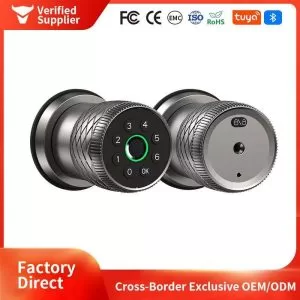 Tuya Bluetooth Smart Knob Lock|Fingerprint Password Keyless Entry Round Door Lock Original price was: $45.00.$37.00Current price is: $37.00.
 Tuya Zigbee Solar Rainwater Leak Sensor – Smart Home Water Detection Alarm with AI Automation Original price was: $35.96.$26.99Current price is: $26.99.
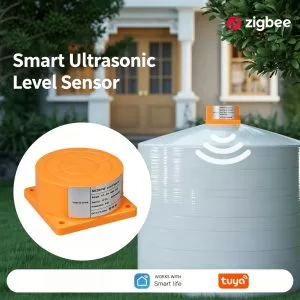 Tuya Zigbee Smart Ultrasonic Level Sensor | 0-5m Range | IP65 … Original price was: $129.96.$98.99Current price is: $98.99.
📌 This article is part of our Complete Tuya Hub — more guides and buying tips inside.