Posted on — Leave a comment

Smart Lighting Complete Guide: From Color Temperature to Automation Scenes

Why Smart Lighting?

However, Smart lighting is the entry point for most Smart Home enthusiasts ??and for good reason. It is easy to install, immediately visible, and genuinely improves daily life. Beyond simply turning lights on and off with your phone, smart lighting can transform your home’s atmosphere, improve your sleep, and save energy.

Understanding Color Temperature

Therefore, Color temperature is measured in Kelvin (K) and describes the appearance of light. Understanding it is key to creating comfortable, healthy lighting. Smart Home Automation Scenes: 6 Practical Setups That Make Your Home Think

The Kelvin Scale

  • 2700K ??3000K (Warm White) ??Soft, yellowish light similar to traditional incandescent bulbs. Ideal for bedrooms, living rooms, and evening use. Promotes relaxation and sleep.
  • 3500K ??4000K (Neutral White) ??Balanced light good for kitchens, bathrooms, and workspaces. Neither too warm nor too cool.
  • 5000K ??6500K (Daylight/Cool White) ??Bright, bluish-white light that mimics natural daylight. Best for reading, detail work, and daytime use. Boosts alertness and productivity.

Circadian Lighting

Moreover, Your body’s internal clock (circadian rhythm) responds to light color. Smart bulbs can automatically shift from cool, bright light in the morning to warm, dim light in the evening. This natural progression helps regulate sleep patterns and improves overall well-being. Smart Sensors Buying Guide: How to Make Your Home Feel Its Environment

In addition, Set your bulbs to start at 5000K in the morning, shift to 3500K midday, and gradually warm to 2700K by sunset.

Types of Smart Lighting

Smart Bulbs

For example, The most common entry point. Screw them into existing fixtures and control via app or voice. Available in white-only, tunable white, and full-color variants.

Smart Light Switches

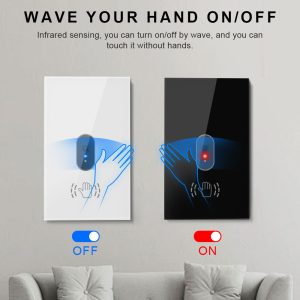
Consequently, Replace your wall switches to control existing bulbs. This is better if you have multiple bulbs on one circuit, as one switch controls them all. It also means family members can still use the wall switch normally. Why Smart Home Security Is Trending Overseas in 2026: Tech That Sells

LED Light Strips

Flexible strips for under-cabinet lighting, TV backlighting, stair illumination, and architectural accent lighting. They add depth and atmosphere to any room.

Smart Outdoor Lighting

Weatherproof bulbs, pathway lights, and floodlights for exterior spaces. Great for security and curb appeal.

Lighting Scenes: Setting the Mood

Scenes are preset combinations of brightness, color, and on/off states across multiple lights. They let you instantly transform your home’s atmosphere.

Essential Scenes to Create

  • Movie Night ??Lights dim to 10%, warm color, TV backlight on
  • Reading ??Single lamp at 80%, neutral white, everything else off
  • Dinner ??Dining area at 60% warm white, kitchen dimmed, ambient music starts
  • Party ??Color-changing lights, bright and energetic
  • Focus/Work ??All lights at 90%, cool white (5000K)
  • Sleep ??All lights off, nightlight at 1% warm amber
  • Wake Up ??Lights gradually brighten from 0% to 80% over 15 minutes

Automation: Let Your Lights Think

The real magic happens when you stop controlling lights manually and let automation handle it.

Motion-Based Automation

  • Hallway lights turn on at 30% when motion is detected after 10 PM
  • Bathroom light turns on at 20% warm white during nighttime visits
  • Garage light turns on when the garage door opens

Time-Based Automation

  • Sunset: Outdoor lights turn on, indoor lights shift to warm white
  • Sunrise: Bedroom lights gradually brighten, kitchen lights turn on
  • Midnight: All non-essential lights turn off

Event-Based Automation

  • When the TV turns on ??activate “Movie Night” scene
  • When the front door unlocks after sunset ??turn on entry lights
  • When the smoke alarm triggers ??flash all lights red

Energy Savings

Smart lighting can reduce your lighting energy consumption by 30-50% compared to traditional bulbs.

  • LED smart bulbs use 75% less energy than incandescent
  • Motion sensors ensure lights are never left on in empty rooms
  • Scheduling prevents lights from running when no one is home
  • Dimming reduces power consumption proportionally

Conclusion

Smart lighting is about more than convenience ??it is about creating the right light for every moment. Start with a few bulbs in your most-used rooms, create scenes that match your daily routines, and gradually add automation rules. The result is a home that always has the perfect lighting, automatically, without you ever touching a switch.

Related Articles

You Might Also Like

Frequently Asked Questions

Is Smart Lighting Color worth buying?

Based on the breakdown in this article, Smart Lighting Color offers a solid mix of features and value. If your main goal matches the key benefits described above, it is a practical choice for everyday use.

How do I choose the right smart lighting color for my needs?

Start with your core use case, then compare battery life, compatibility, and build quality as covered above. Choosing the right smart lighting color comes down to matching specs with how you actually use it.

Does smart lighting color require a companion app?

Most devices of this type pair with a free companion app for setup and firmware updates. A few advanced features may sit behind a paid plan, so check the official specs page before buying.

Posted on — Leave a comment

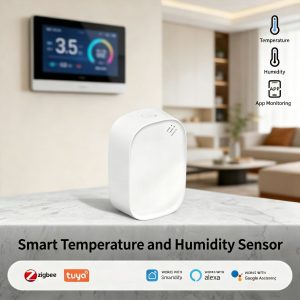
Tuya Zigbee Smart Temperature and Humidity Sensor Review: Real-Time Climate Monitoring for a Smarter Home

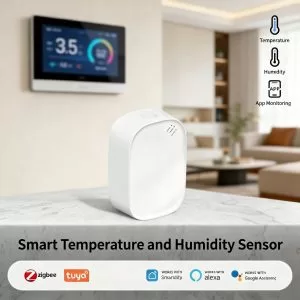
tuya zigbee smart Why a Smart Temperature and Humidity Sensor Belongs in Every Home Have you ever wondered why you sleep poorly on some nights even when the room “feels fine”? Or why your wooden furniture cracks in winter, your plants keep wilting, or your baby’s nose is constantly stuffy? In most cases, the culprit is invisible: indoor temperature and humidity that drift outside the comfort zone. According to the World Health Organization (WHO), the ideal indoor environment is: Temperature: 22°C – 26°C (72°F – 79°F) Humidity: 40% – 60% RH (relative humidity) When your home falls outside these ranges, your body reacts — often before you consciously notice. Dry skin, scratchy throat, fatigue, allergies, sinus issues, headaches, joint pain, and poor sleep are all classic symptoms of an imbalanced indoor climate. The Tuya Zigbee Smart Temperature and Humidity Sensor is designed to make this problem visible — and fixable. It’s a compact, battery-powered device that monitors your home’s climate 24/7, sends the data to your smartphone, and can automatically trigger heaters, humidifiers, air conditioners, and other smart devices to keep your environment perfectly balanced. In this in-depth review, we’ll show you exactly what this sensor does, how it performs in real-world use, and whether it’s worth adding to your smart home. tuya zigbee temperature humidity
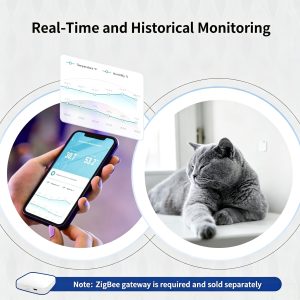
Real-Time and Historical Monitoring: Your Climate, Visualized
The biggest advantage of a smart sensor over a $5 analog hygrometer is data visibility. With the Tuya Zigbee sensor paired to the Smart Life, MOES, or Smartify app, you get:

Live temperature and humidity readings updated in real time, with changes appearing on your phone within seconds
Beautiful trend graphs showing your climate history by day, week, month, or year
Multi-sensor dashboard to monitor every room in your home at once
High/low threshold alerts sent as push notifications when readings cross your comfort zone
Historical data export for users who want to analyze long-term patterns
The app interface is clean and intuitive. Open it, and the current temperature (e.g., 30.7°C) and humidity (e.g., 53.2% RH) are displayed in large, easy-to-read numbers. Tap once to view the trend chart, and you can scroll back through days or weeks of historical data to spot patterns you would never notice from a single reading.

Real-world insight: Your bedroom’s humidity might climb from 45% to 65% over a week as the weather changes. Your plants might be silently suffering because the air is too dry. Your wooden floors might be slowly warping because humidity levels are out of range. None of this is visible on a wall-mounted analog gauge — but it’s instantly obvious on a smart sensor’s trend graph.

💡 Pro tip: Place one sensor in each major room — bedroom, nursery, living room, basement, and bathroom — to build a complete climate map of your home.

tuya zigbee temperature humidity

Why Do We Need a Temperature and Humidity Sensor?
The short answer: because your body reacts to indoor climate long before you consciously feel uncomfortable.

Here are the most common warning signs that your home’s climate is out of balance:

😴 Trouble sleeping or insomnia — caused by rooms that are too warm or too dry
🤧 Frequent sneezing, allergies, or sinus issues — often triggered by humidity that’s too high (mold and dust mites) or too low (dry nasal passages)
🦠 Dry skin, cracked lips, or itchy eyes — classic signs of low humidity, especially in winter
🤕 Headaches, fatigue, or brain fog — high CO2 or poor ventilation often correlates with these symptoms
💪 Joint stiffness or arthritis flare-ups — sensitive to temperature and humidity swings
🐾 Pet discomfort — cats, dogs, and birds are very sensitive to climate changes
For families with babies, elderly relatives, or asthma sufferers, climate control is not a luxury — it’s a health necessity. Newborns cannot regulate their body temperature as efficiently as adults, and they are particularly sensitive to humidity levels outside the 40–60% range.

A smart sensor gives you early warning before problems develop. Set a custom threshold (say, humidity below 35%), and the app will push a notification to your phone the moment the level drops. You can then take action — turn on the humidifier, open a window, or adjust the AC.
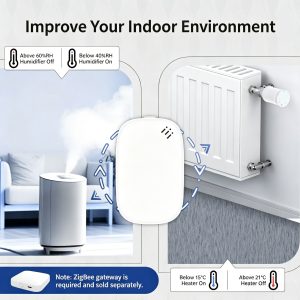
tuya zigbee temperature humidity Automate Your Indoor Environment with Smart Linkage This is where the Tuya Zigbee sensor really shines — not as a standalone gadget, but as the brain of a complete smart home climate system. When paired with a Zigbee hub and other Tuya-compatible smart devices, the sensor can trigger automatic actions based on real-time readings. Here are some of the most popular automations you can set up in minutes: Condition Automatic Action 💧 Humidity drops below 40% RH 🟢 Turn on smart humidifier 💦 Humidity rises above 60% RH 🔴 Turn off humidifier / turn on exhaust fan ❄️ Temperature drops below 15°C 🔥 Turn on smart heater ☀️ Temperature rises above 28°C ❄️ Turn on smart air conditioner 🌡️ Temperature stays between 21–26°C ✅ Maintain current settings Real-world example: Place the sensor in your baby’s nursery. When the room temperature drops below 18°C in the middle of the night, the smart plug connected to your heater automatically turns on. By the time your baby wakes up, the room is cozy and warm. You didn’t have to lift a finger. This kind of closed-loop automation is the future of home comfort — and it’s surprisingly affordable to set up. The sensor itself is inexpensive, and a basic Zigbee hub can be had for under $30. ⚠️ Important note: The sensor requires a Zigbee gateway/hub (sold separately) to connect to the app and trigger automations. Compatible hubs include the Tuya Zigbee Gateway, MOES Hub, Smartify Hub, and any universal Zigbee 3.0 hub. tuya zigbee temperature humidity
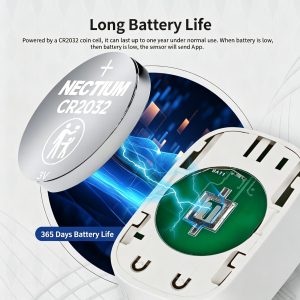
Long Battery Life: 365 Days on a Single Coin Cell
Few things are more annoying than a “smart” device that goes offline every few weeks because of a dead battery. The Tuya Zigbee sensor is specifically designed to avoid that problem.

Inside the sensor is a standard CR2032 coin cell battery (3V lithium) — the same type that powers watches, car key fobs, and small electronics. Thanks to the low-power Zigbee 3.0 protocol and an intelligent sleep mode, the sensor consumes almost no power when idle, only waking up to transmit when readings change.

Under normal use, a single CR2032 battery lasts up to 365 days — one full year.

Key battery features:

🔋 Battery is included in the box — no extra purchase needed to get started
🔋 Low-battery alerts pushed to the app when level drops below 20%
🔋 Easy DIY replacement — pop open the back cover, swap in a new CR2032, and the sensor automatically reconnects to your hub
🔋 Widely available — CR2032 batteries are sold at every pharmacy, hardware store, and online retailer
What “normal use” means: Typical indoor temperatures (15–30°C), standard reporting frequency, and typical app polling. If you configure the sensor to report very frequently (every few seconds), battery life may be slightly shorter. But for most users, a year of service from one tiny battery is a huge convenience.
tuya zigbee temperature humidity

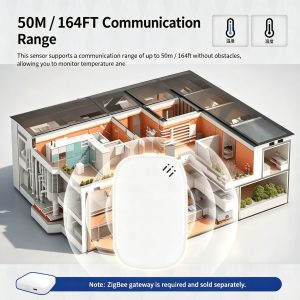
50M / 164FT Wireless Range: Reliable Whole-Home Coverage
One of the most common questions about wireless sensors is: “How far can it really reach?” The Tuya Zigbee sensor uses Zigbee 3.0 protocol, which is specifically engineered for low-power, long-range, reliable communication in residential environments.

Maximum open-air range: 50 meters (164 feet).

In real-world homes, the actual range depends on a few factors:

🧱 Wall material: Drywall is easy to penetrate; concrete and brick reduce range
🚪 Number of obstacles: Each wall or floor reduces range by 5–10 meters
📡 Hub placement: Centrally locating the Zigbee hub maximizes coverage
🔌 Mesh networking: Adding other powered Zigbee devices (smart plugs, smart bulbs) extends the network automatically
For a typical 100–200 m² (1,000–2,000 sq ft) home, a single centrally-located hub will cover every room. For larger or multi-story homes, you can either add Zigbee signal repeaters or rely on the built-in mesh networking feature, where each mains-powered Zigbee device acts as a relay to extend the network.

💡 Note: The 50M / 164FT range is measured in open space without obstacles. Indoor optimal range depends on your home’s specific construction. We recommend testing the signal strength in your desired location using the app before permanent installation.
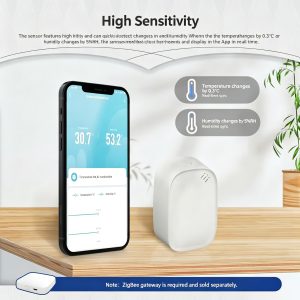
tuya zigbee temperature humidity High Sensitivity: 0.3°C and 5% RH Accuracy with Real-Time Sync Accuracy and responsiveness matter when you’re trusting a sensor to monitor a baby’s nursery or wine cellar. The Tuya Zigbee sensor delivers: Temperature accuracy: ±0.3°C Humidity accuracy: ±5% RH Real-time data sync: The app updates within seconds of any significant change No noticeable lag: When the room temperature shifts, the new reading appears almost instantly on your phone These specs are competitive with sensors costing 3–5 times more. For most home users — whether you’re monitoring a bedroom, kitchen, greenhouse, or server closet — the sensitivity is more than adequate. Practical use case: Place a sensor near your kitchen stove while cooking. The moment the temperature spikes (because the oven is on and you’ve been boiling water for 20 minutes), you’ll see the reading climb in the app. Open a window, turn on the exhaust fan — and the temperature graph will show the cool-down in real time. tuya zigbee temperature humidity
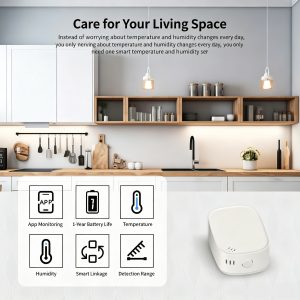
Care for Your Living Space: One Sensor, Endless Possibilities
The real beauty of a smart climate sensor is that once it’s installed, you can stop worrying about the temperature and humidity in your home. The sensor watches the numbers 24/7, the app logs the history, and the automations handle the rest.

Whether you’re a busy parent, a remote worker, a pet owner, or someone who simply wants a more comfortable home, this little device quietly works in the background to make your life easier.

Where to use it:

🛏️ Bedrooms — sleep better with optimal temperature and humidity
👶 Nurseries — protect babies from dry air, overheating, or chills
🐾 Pet areas — keep cats, dogs, and other pets comfortable
🌱 Greenhouses and plant rooms — monitor conditions for healthy growth
🍷 Wine cellars — maintain stable conditions for wine storage
🏋️ Home gyms — track climate during workouts
📚 Libraries and home offices — protect books, electronics, and your focus
🏚️ Basements and attics — detect moisture and prevent mold
🍳 Kitchens — monitor humidity while cooking
🚗 RVs and boats — portable monitoring for mobile living
The compact, minimalist white design blends into any room. It’s small enough to sit on a shelf, attach to a wall, or tuck into a corner — completely unobtrusive.
tuya zigbee temperature humidity

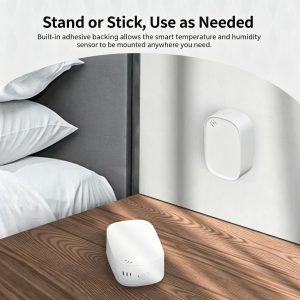
Stand or Stick: Flexible Installation Anywhere
One of the small but meaningful design touches is the built-in 3M adhesive backing on the back of the sensor. You have two installation options:

Option 1: Stick it
Peel off the protective film, press the sensor firmly against any clean, flat surface — wall, tile, wood, glass, metal — and it stays put. Perfect for renters who can’t drill holes, or anyone who wants a quick, tool-free setup.

Option 2: Stand it
Don’t want to commit to a permanent spot? Just place the sensor on any flat surface — nightstand, bookshelf, kitchen counter, desk — and it works just as well. The flat, stable base keeps it upright.

Where NOT to install it:

❌ In direct sunlight (affects temperature reading)
❌ Near heat sources like radiators, ovens, or heating vents
❌ In bathrooms with direct water spray (it’s not waterproof)
❌ In drafty areas near windows or exterior doors
❌ Inside closed cabinets (won’t reflect room conditions)
Ideal placement: On an interior wall, at about 1.2–1.5 m (4–5 feet) above the floor — roughly breathing height. This gives the most accurate reading of the air your family actually breathes.

Explore more smart home, security and translator products.https://odmhome.com/shop/

Learn more about our brand innovation on Xingliao Tech official website.https://xingliaotech.com

For wholesale & business cooperation, reach us via WhatsApp: +8617666669273

Xingliao Tech Official Site — ODM smart home devices & factory capabilities
Smart Solutions for Hotels & Hospitality — touch-free switches for guest rooms and bathrooms
Senior Care & Healthcare Solutions — hygienic, easy-to-use controls for care facilities
Xingliao Shop — retail samples and small-batch orders

Related Articles

You Might Also Like
Frequently Asked Questions

Is Tuya Zigbee Temperature Humidity worth buying?

Based on the breakdown in this article, Tuya Zigbee Temperature Humidity offers a solid mix of features and value. If your main goal matches the key benefits described above, it is a practical choice for everyday use.

How do I choose the right tuya zigbee temperature humidity for my needs?

Start with your core use case, then compare battery life, compatibility, and build quality as covered above. Choosing the right tuya zigbee temperature humidity comes down to matching specs with how you actually use it. Tuya WiFi IR Remote Review: Universal Control Meets Climate Intelligence

Does tuya zigbee temperature humidity require a companion app?

Most devices of this type pair with a free companion app for setup and firmware updates. A few advanced features may sit behind a paid plan, so check the official specs page before buying.

Posted on — Leave a comment

WiFi Smart Temperature and Humidity Switch Module: Complete Guide to Automated Climate Control for Home, Garden & Poultry

wifi temperature humidity switch

However, Whether you are a hobby gardener trying to germinate seeds faster, an aquarium keeper wanting stable water temperature for your fish, or a poultry farmer brooding chicks in a cold coop, climate control is the single most important factor for success. Yet most smart home devices are built for indoor Lighting — they have no idea what temperature or humidity is, and they cannot react automatically to changing conditions. In short, Wifi

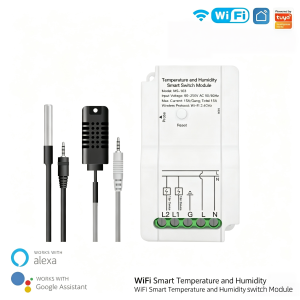
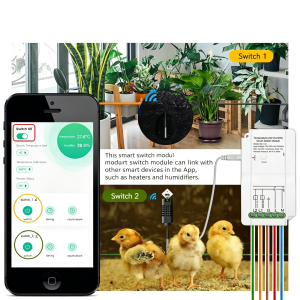
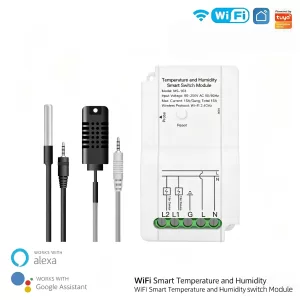
Therefore, This is exactly where the WiFi Smart Temperature and Humidity Switch Module MS-103 changes the game. It is a DIN-rail relay module with built-in climate sensing, dual 15A output, and full Tuya app integration. It turns ordinary heaters, fans, misters, pumps, and irrigation valves into autonomous climate-control devices — controlled by real temperature and humidity readings, not by timers or guesswork.

Moreover, In this guide, we will break down everything this compact module can do, the scenarios it shines in, and how to set it up for your specific needs. M8 Dopamine Color Wireless Lavalier Microphone – Best Budget 1-to-2 Lapel Mic for Vloggers & Streamers 2026

What Is the WiFi Smart T&H Switch Module?

In addition, The MS-103 module is a smart relay that combines three things in one compact device: 3-Axis Smartphone Gimbal Stabilizer: Why It’s a Must-Have Vlog Gear in 2026

  • ✅ Dual 15A relay output — control two separate high-power devices independently
  • ✅ Built-in temperature & humidity sensor port — read ambient climate in real time
  • ✅ External temperature probe — measure a second location (water, soil, air, or compost)

For example, It connects directly to your 2.4GHz Wi-Fi network, pairs with the Smart Life or Tuya Smart app, and works with Amazon Alexa and Google Assistant for voice control. No hub required, no monthly fees, and no complex programming.

In short: it is the missing link between your climate sensors and your climate-control appliances. Once you set it up, it works 24/7 in the background — even when your phone is off or you are on the other side of the world. M2 Collapsible 3-Axis Gimbal Stabilizer – Pocket-Sized Professional Video Tool for All Creators

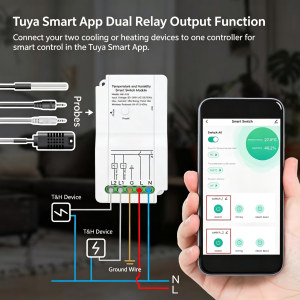
Tuya Smart App Dual Relay Output Function

The headline feature of this module is its true dual-channel independent control. Unlike single-relay smart switches, the MS-103 has two isolated 15A outputs (L1 and L2) that can be wired to two completely different devices — and controlled completely independently from the Tuya app.

wifi temperature humidity switch

Here is what that means in practice:

  • 🌡️ Gang 1 = Heater, Gang 2 = Cooler — set up automatic toggling between heating and cooling based on temperature
  • 💧 Gang 1 = Irrigation pump, Gang 2 = Mister — water plants and mist on independent schedules or sensor triggers
  • 🐠 Gang 1 = Water heater, Gang 2 = Air pump — keep your aquarium in perfect condition around the clock
  • 🌱 Gang 1 = Grow Light, Gang 2 = Inline fan — manage both lighting and airflow for a complete indoor garden

Each gang has its own schedule, its own automation rule, and its own manual override. You can switch them independently from the app, by voice, or by pressing the physical Button on the module itself.

Two Independent Channels for Total Control

What makes the dual relay design so powerful is the smart-linkage capability. The MS-103 can be paired with other Tuya-compatible devices inside the same app ecosystem, creating complex automation scenarios without any coding.

wifi temperature humidity switch

For example, you can build an automation that says:

“When humidity drops below 40%, turn on Switch 2 (humidifier). When temperature drops below 20°C, turn on Switch 1 (heater). When both conditions recover, turn off both.”

The module handles all of this locally and in real time. The Tuya app shows you the live status of both gangs, lets you adjust thresholds with simple sliders, and pushes a notification to your phone whenever an automation triggers.

Built-In Temperature and Humidity Sensor

The MS-103 ships with a cylindrical T&H probe that plugs into the dedicated Probe port on the side of the module. This probe reports:

  • 🌡️ Real-time temperature with ±0.5°C accuracy
  • 💧 Real-time humidity with ±3% RH accuracy
  • ⏱️ Live updates every few seconds in the Smart Life app

The probe cable uses a standard 3.5mm audio jack, so you can extend it with any 3.5mm extension cable up to several meters if you need to mount the sensor in a different location from the module itself.

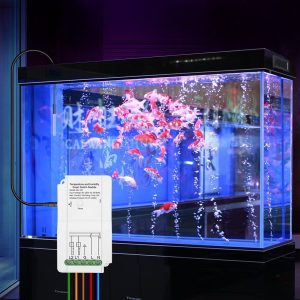
Real-Time Aquarium Climate Control

Aquarium keepers know: stable water temperature is non-negotiable for fish health. A 2-3°C swing can stress tropical fish, trigger ich outbreaks, or worse. The MS-103 solves this elegantly by combining the T&H probe with the dual relay output.

wifi temperature humidity switch

Pair the external waterproof temperature probe (rated -40°C to +125°C) into your sump or directly into the tank, and you can build an automation like:

  • 🐠 When water temperature drops below 24°C → turn on water heater (Gang 1)
  • 🐠 When water temperature rises above 28°C → turn on cooling fan (Gang 2)

The system maintains a stable temperature band automatically, 24/7, with no timer programming required. Your fish get consistent conditions, and you get peace of mind — even during a power outage, you will get a push notification as soon as Wi-Fi reconnects (with the power-restart-state feature explained below).

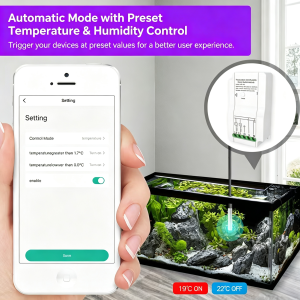
Automatic Mode with Preset Temperature & Humidity Control

The automatic mode is the heart of the MS-103. Instead of programming complex schedules, you simply set upper and lower thresholds for temperature (or humidity), and the module handles the rest.

wifi temperature humidity switch

The setup is incredibly intuitive:

  1. 📱 Open the Smart Life app and select the device
  2. ⚙️ Choose Control Mode: temperature, humidity, or both
  3. 🎚️ Set your upper threshold (e.g., 30°C → turn on exhaust fan)
  4. 🎚️ Set your lower threshold (e.g., 18°C → turn on heater)
  5. ✅ Toggle “enable” and tap Save

That is it. The MS-103 will now toggle your connected devices automatically whenever the threshold is crossed. The app even lets you set different rules for each gang — so Gang 1 reacts to temperature while Gang 2 reacts to humidity, all on the same module.

Smart Home Heating Integration

Beyond greenhouses and aquariums, the MS-103 shines in everyday smart home heating. Imagine your living room electric radiator or bathroom towel warmer turning on automatically when the room temperature drops below your comfort threshold — and turning off again when it warms up.

wifi temperature humidity switch

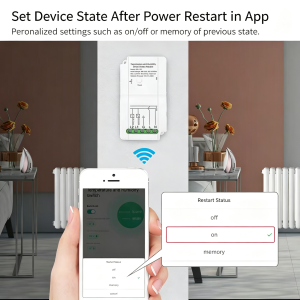
The standout feature here is the power-restart state setting. After a power outage, you can configure each gang to:

  • 🔴 Always OFF — safe default for heaters and high-power devices
  • 🟢 Always ON — for always-needed loads like circulation pumps
  • 🧠 Memory — resume the last state before power was cut

This is critical for unattended installations. You do not want a heater turning itself on full blast after a brownout if no one is home. The MS-103 lets you set the safe default in advance.

Plant Germination Optimization

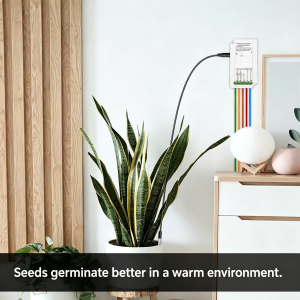
Seeds germinate faster and more reliably in warm, humid conditions. Most gardeners rely on heat mats and humidity domes — but those run 24/7 regardless of whether the conditions are already ideal. The MS-103 adds intelligence to the equation.

wifi temperature humidity switch

Drop the T&H probe into your seedling tray, set a rule like:

“When temperature drops below 22°C, turn on heat mat. When temperature rises above 26°C, turn off.”

Your seedlings get exactly the warmth they need — no more, no less. As an added bonus, the module’s app shows you the temperature curve over time, so you can see at a glance whether your germination environment is stable.

Poultry and Chick Brooding

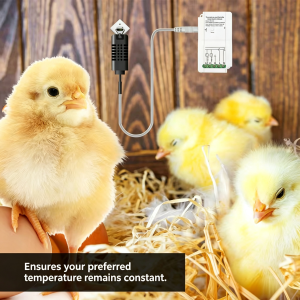
Chicks need a steady 32-35°C for the first week, dropping by about 2°C each week until they are fully feathered. Manual adjustment of heat lamps is error-prone — too cold and chicks pile up and suffocate, too hot and they dehydrate.

wifi temperature humidity switch

With the MS-103:

  • 🐥 Set upper and lower temperature thresholds for the brooder
  • 🔥 Heat lamp (Gang 1) toggles automatically to maintain the target temperature
  • 📱 Get push notifications if the temperature goes out of range
  • 📊 Review temperature history to optimize your brooding schedule

For multi-age flocks, you can deploy multiple MS-103 modules — one per brooder zone — each with its own independent settings. Commercial poultry operations use this exact setup to reduce chick mortality and improve feed conversion.

Wireless Control from Anywhere

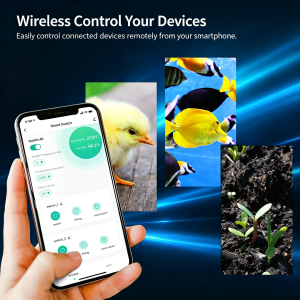
The headline benefit of any smart home device is remote control, and the MS-103 delivers this in spades. Once paired with the Smart Life or Tuya app, you can check the live temperature, humidity, and on/off status of both gangs from anywhere in the world.

wifi temperature humidity switch

Picture this: you are at work, and the weather report says a cold front is moving in tonight. Open the app, see the current coop temperature is 25°C, and turn on the brooder heater remotely so it is warm and ready when you get home. Or, you are on vacation and want to check that your greenhouse is still in the safe temperature range. One tap on the app shows you live data — and lets you intervene if needed.

Explore more smart home, security and translator products.https://odmhome.com/shop/

Learn more about our brand innovation on Xingliao Tech official website.https://xingliaotech.com

For wholesale & business cooperation, reach us via WhatsApp: +8617666669273

Related Articles

You Might Also Like
Frequently Asked Questions

Is Wifi Temperature Humidity Switch worth buying?

Based on the breakdown in this article, Wifi Temperature Humidity Switch offers a solid mix of features and value. If your main goal matches the key benefits described above, it is a practical choice for everyday use.

How do I choose the right wifi temperature humidity switch for my needs?

Start with your core use case, then compare battery life, compatibility, and build quality as covered above. Choosing the right wifi temperature humidity switch comes down to matching specs with how you actually use it.

Does wifi temperature humidity switch require a companion app?

Most devices of this type pair with a free companion app for setup and firmware updates. A few advanced features may sit behind a paid plan, so check the official specs page before buying.