Posted on — Leave a comment

Turn an Old AC or TV Into a Smart Device With an IR Remote Hub

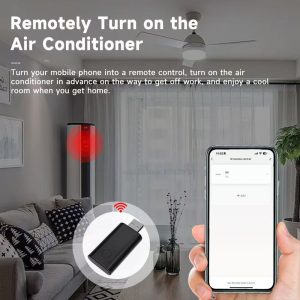
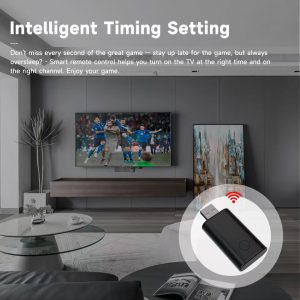
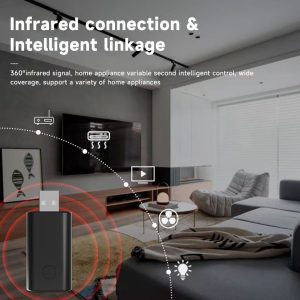
Most homes have at least one expensive appliance that will never be Smart: a split air conditioner from 2016, a television that predates apps, a set-top box with a remote and no network. An infrared hub is the cheap fix. It learns or looks up the remote codes and replays them on command, so the appliance becomes controllable from an app and from automations.

Our IR range includes the Tuya WiFi IR remote, the universal WiFi IR controller, a unit with a built-in temperature and humidity display, and Zigbee versions such as the UFO-R 11 that run through a gateway.

What an IR hub can and cannot do

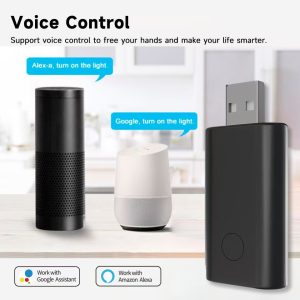
Can: send any command the original remote could — Power, temperature, mode, fan speed, input selection. Schedule it. Trigger it from a sensor. Control it by voice through the app’s assistant integrations. Tuya Curtain Motor OEM: Complete Sourcing Guide 2026

Cannot: read back the appliance’s actual state. Infrared is one-way. If someone changes the temperature with the physical remote, the app will not know, and its idea of the state drifts. This is the single biggest limitation and the reason “set to 22 degrees” is more reliable than “increase by one degree“.

Setting one up: the part people get wrong

  1. Place it with line of sight to the appliance. Infrared is light. It does not pass through walls, cabinet doors or a sofa. It does bounce off some surfaces, so a unit on a shelf facing the wall behind an AC unit often works.
  2. One hub per room, generally. A hub cannot cover two rooms separated by a wall. Multiple units in an app are normal.
  3. Pick the code library entry carefully. If the brand and model match, it works first time. If not, try the generic code for that brand, then fall back to learning mode.
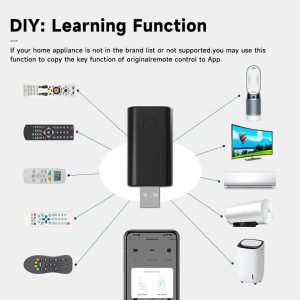
  4. Use learning mode for stubborn appliances. Point the original remote at the hub and press each button; the hub records the raw signal. Slower, but it works for almost anything.
  5. Set the state you expect. Because there is no feedback, set an absolute value in automations rather than a relative change.

WiFi or Zigbee version?

WiFi units are simpler — one fewer box, they join the router directly. ZigBee units such as the UFO-R 11 Need a gateway (see wired vs wireless gateways) but keep your WiFi clear and are easier to run alongside a larger sensor network. If you already have a Zigbee gateway for other Devices, take the Zigbee version; if this is your first Smart device, take the WiFi one.

Automations that are actually useful

  • Pre-cool the bedroom 20 minutes before bedtime in summer, off an hour later.
  • Turn the AC off when a window opens — pair with a door or window sensor.
  • Switch the TV and set-top box on together with one command instead of two remotes.
  • Turn everything off at a set time so standby loads do not run overnight.
  • Trigger from temperature Using a temperature and humidity sensor, or the hub’s own built-in sensor on models that have one.

FAQ

Will it work with my air conditioner?
Almost certainly, if the AC uses an infrared remote. Look up the brand in the app’s code library; if the exact model is missing, use learning mode with the original remote.
Can it control several appliances?
Yes, provided they are all in line of sight of the hub. Each appliance is set up as a separate virtual remote in the app.
Does it work without internet?
Remote control from outside the home needs internet. Locally scheduled commands usually continue, but voice control does not.
Why does the app show the wrong temperature?
Because infrared has no feedback. The app tracks what it last sent, not what the appliance is doing. Send absolute values.
Can I hide it?
It needs line of sight, but it is small — mounted on a shelf or the top of a cabinet, it disappears. Do not put it inside a closed cabinet.
Does it replace the original remote?
For daily use, usually yes. Keep the original somewhere for setup changes and for the rare function the hub does not map.

Related Articles

You Might Also Like

Frequently Asked Questions

Is Turn Old Smart worth buying?

Based on the breakdown in this article, Turn Old Smart offers a solid mix of features and value. If your main goal matches the key benefits described above, it is a practical choice for everyday use.

How do I choose the right turn old smart for my needs?

Start with your core use case, then compare battery life, compatibility, and build quality as covered above. Choosing the right turn old smart comes down to matching specs with how you Actually use it.

Does turn old smart require a companion app?

Most devices of this type pair with a free companion app for setup and firmware updates. A few advanced features may sit behind a paid plan, so check the official specs page before buying.

Posted on — Leave a comment

ZigBee vs ZigBee 3.0: What Actually Changed

Zigbee 3.0 is not a new radio. It is the same 2.4 GHz mesh network that ZigBee has always used, with a unified application layer on top. Before 3.0, a device had to match the hub’s application profile (Home Automation 1.2, Light Link, Building Automation and others ran as separate dialects). ZigBee 3.0 merged those dialects into one language, so a certified 3.0 Sensor, Switch or bulb can join any certified 3.0 coordinator without profile matching. That single change is what buyers actually feel.

The short answer for buyers

If you are buying new ZigBee devices today, buy ZigBee 3.0 certified ones and pair them with a ZigBee 3.0 hub. The radio, mesh routing, channel layout and practical device limits are unchanged, so 3.0 hardware does not reach further or run faster than older ZigBee. What you gain is compatibility: fewer pairing failures, fewer devices that join but expose only a fraction of their features, and a safer path when you later replace your hub.

What stayed exactly the same

The physical and network layer is untouched. ZigBee still runs on the 2.4 GHz band in most regions, still forms a self-healing mesh Where mains-powered devices route for battery devices, and still caps a practical network at roughly 30 to 50 well-behaved devices before latency creeps up. Battery sensors still sleep between reports, which is why a ZigBee door sensor can run Two years on a coin cell while a WiFi sensor of the same size lasts weeks. None of that changed with 3.0, and marketing that implies better range or speed from “3.0” is describing the certification, not the physics. Why Cameras Miss Faces but Doorbells Don’t

What actually changed in ZigBee 3.0

Three things changed that matter to a Smart home buyer. First, profile unification: Home Automation 1.2, Light Link and the building profiles merged into one application layer, which removed the “works with HA hubs only” class of incompatibility. Second, a mandatory base device behavior was defined, so every certified device supports a common set of commands for joining, reporting and identification. Third, security was tightened — install codes and network keys are handled more strictly, which cuts down the replay attacks that older Light Link commissioning allowed.

A fourth change matters to installers: TouchLink commissioning (introduced with Light Link for bulbs) carried into 3.0, so a bulb can be reset and paired close-range without touching the hub app. It is a small convenience that older pure-HA networks never had.

Backward compatibility in real rooms

Old ZigBee Home Automation 1.2 devices mostly do join a ZigBee 3.0 coordinator, because 3.0 hubs keep translation for the legacy HA profile. The honest qualifier is “mostly”: some legacy devices pair cleanly but expose only basic on/off or open/closed, because the advanced features lived in manufacturer-specific clusters the new hub never mapped. Legacy routers (mains-powered plugs and switches) repeat traffic for your 3.0 battery devices without complaint, so keeping an older ZigBee plug in a hallway is fine.

Direction matters too. A 3.0 device joining a very old HA 1.2-only hub is the fragile combination — the hub may not understand the 3.0 commissioning flow. If your hub predates 2017 and has never received a firmware update, plan to replace the hub rather than fight it.

Why hubs from different brands still behave differently

ZigBee 3.0 guarantees that devices speak the same language on the radio. It does not force the hub maker to implement every optional feature. A Tuya ZigBee gateway pairs third-party 3.0 sensors and switches, and the common functions (on/off, open/closed, motion, temperature) generally come through. Niche features — a rare configuration attribute, a manufacturer-specific alarm pattern — depend on whether the hub’s software maps that cluster. This is why a “ZigBee 3.0 certified” badge on the device is necessary but not a complete promise; the practical test is pairing one sample before ordering in volume.

Within one ecosystem the problem mostly disappears. Devices designed for the Tuya ZigBee ecosystem and a Tuya ZigBee gateway are tested against each other, which is the safe default for whole-home rollouts.

What to check before buying

  • Certification wording. “ZigBee 3.0” on the box, not just “ZigBee”. Old HA 1.2 stock is still sold cheap.
  • Hub support. Confirm your coordinator is 3.0. A hub stuck on HA 1.2 turns your new devices into the fragile combination.
  • Green Power, if you want battery-free switches. ZigBee 3.0 carries Green Power devices that harvest energy from the button press itself. Hub support for Green Power is optional, so verify it if you plan to use them.
  • Mains-powered repeaters in the right places. The mesh needs routers between the hub and far battery sensors. Any mains-powered ZigBee device acts as one.
  • Channel planning. ZigBee and WiFi share 2.4 GHz. Set the router to channel 1 or 6 in busy homes and let ZigBee settle away from it.

Devices that make a solid 3.0 starter mesh

Frequently Asked Questions

Is ZigBee 3.0 faster or longer-range than older ZigBee?

No. The radio layer is the same 2.4 GHz mesh. Range and speed improvements you may read about come from better antennas or repeater placement, not from the 3.0 certification itself.

Will my old ZigBee 1.2 devices still work on a new hub?

Usually yes. ZigBee 3.0 coordinators keep legacy Home Automation translation, so basic functions pair and report. Advanced manufacturer-specific features are the part that may not carry over.

Do ZigBee 3.0 devices need the internet?

The mesh itself is local. Devices keep talking to the hub during an internet outage, and time-based automations stored on the hub still run. Remote control from your phone and cloud-dependent scenes are what stop working.

Can I mix brands on one ZigBee 3.0 hub?

Yes, that is the point of the unified application layer. Pair one sample first if the device exposes an uncommon feature, because the hub maker decides which optional clusters to map.

Does ZigBee 3.0 interfere with WiFi?

Both live on 2.4 GHz, so planning matters. Keep the WiFi router on a fixed channel away from the ZigBee channel, and expect a few retries while both networks settle after a router reboot.

How many ZigBee devices can one hub hold?

The specification allows far more than a home needs. In practice, 30 to 50 devices per hub keeps reporting latency low; add mains-powered devices between the hub and distant sensors so battery devices can route through them.

Related Articles

You Might Also Like
Posted on — Leave a comment

Smart Switch: Types, Wiring and How to Choose

A Smart switch replaces the ordinary switch on your wall and puts the light, the fan or the heater behind it on your phone, on a schedule, and on voice command. It is the least glamorous device in a Smart home and the one people end up using every single day, because it needs no new habits: you still walk up and touch the wall.

What a smart switch actually is

Behind the plate there are two parts. A relay does the switching, exactly like the mechanism in a normal switch. A radio module — WiFi, Zigbee, Bluetooth or Thread — keeps the device on your network so it can receive commands. Add a touch or push-button surface on the front and, on many models, a small LED indicator, and that is the whole device.

What that buys you over a normal switch:

  • Remote control: turn things off from bed, from the office, or after you have left the house.
  • Schedules: hallway lights on at dusk, towel rail on at 6 am, everything off at midnight.
  • Scenes: one button or one tap that sets a whole room — lights, curtains, sockets together.
  • Voice control: once the account is linked, Alexa and Google Home can switch anything by name.
  • Measurement on some models or on the matching socket: what that appliance costs to run.

Four ways to make a switch smart

Not every “Smart switch” is the same product, and picking the wrong category is the most common disappointment:

  • Smart switch panel: replaces the plate entirely. Cleanest result, works with any fitting, needs wiring work. This is what most people mean by a smart switch.
  • Relay module: hides behind your existing switch or in the ceiling rose. Keeps the decorator look, adds app control. Best when you like the switches you have.
  • Smart socket or plug: controls what is plugged into it rather than what is wired to it. No wiring at all, ideal for lamps, heaters and appliances, and the easiest way to start.
  • Smart bulb: keeps the wall switch as a physical isolator and controls the lamp itself. Cheapest entry point, but the wall switch must stay on, which visitors will switch off.

Protocol: WiFi, Zigbee, Matter or Bluetooth

  • WiFi: connects straight to your router, no hub, and is the simplest to understand. Each device is on your network, so a crowded 2.4 GHz band is the main risk in a house with many devices.
  • Zigbee: needs a gateway, but builds a mesh where each powered device relays for the next — more robust at scale and far less load on the router. Good for whole-house installs.
  • Matter: the newer cross-brand standard. A Matter device can join Apple, Google, Amazon and SmartThings ecosystems without a per-brand app, which is the direction the market is moving.
  • Bluetooth: fine for setup and for a handful of devices near the phone, not for a whole house.

For most homes the practical answer is: WiFi panels for a few rooms, Zigbee panels plus a gateway if you are doing the whole house, and Matter if you want to stay ecosystem-independent.

What to check before you buy

  1. Neutral wire. Most panels need one to power the radio. Older houses often have only a switch loop. Deciding this first avoids the most common return.
  2. Gangs. One, two, three or four switches on one plate — count what the plate controls today.
  3. Plate size and standard. 86 mm square in most of Europe and Asia, 120 mm or 147×86 for more gangs, 118×72 in the US, BS 1363 in the UK.
  4. Load rating. 10 A covers lighting; 16 A is the figure to look for on sockets, heaters and anything that runs for hours.
  5. Load type. LED, fluorescent, inductive (fans, pumps) and resistive (heaters) behave differently — check the switch is specified for yours.
  6. Panel finish. Glass, acrylic or metal frame, and whether it matches the other plates in the room.
  7. App ecosystem. If you already run switches, sockets, sensors or a Doorbell, staying in one app is worth more than any single feature.
  8. Certification. CE, FCC, RoHS, UKCA or CCC as your market requires — and for project work, ask for the test reports.

Room by room: what to install where

  • Living room and bedroom: a 1-2 gang touch panel, optionally with a dimmer channel for the main light.
  • Kitchen: a wider plate (147×86 or 3-gang) so task lighting, extractor and worktop sockets are controlled in one place.
  • Bathroom: a panel with a fan or curtain channel; a heater or towel rail belongs on a 16 A circuit, not on a lighting switch.
  • Hallway and stairs: two-way switching with a scene button by the door — “everything off” is the scene people use most.
  • Home office: a socket with energy monitoring, so you can see what the desk actually costs to run.
  • Air conditioning and water heating: a load-rated switch, or better, a temperature controller — the thermostat saves more than the schedule does.

Installation essentials

  • Isolate at the breaker and test twice — once at the consumer unit, once at the plate. Never trust the label alone.
  • Photograph the existing wiring before disconnecting anything.
  • Label live, neutral and each load as you identify them.
  • Pair the device near the router first, then move it to its final position.
  • Use 2.4 GHz for pairing; a merged SSID usually works, but a 5 GHz-only network will not.
  • Test the physical button before you screw the plate back on.
  • No neutral, shared neutrals, no earth, or a consumer unit without RCD protection: stop and call an electrician.

Six mistakes that cost people money

  • Buying before checking for neutral. Everything else follows from this.
  • Putting a heater on a 10 A lighting switch. Size the switch to the load, with headroom for motors.
  • WiFi-only in a house with 40 devices. Use Zigbee for scale, or at least check the router’s device limit.
  • Expecting a dimmer to control a fan. Fan speed control is a different channel.
  • Mixing three brands. Three apps, three notification feeds, no shared scenes.
  • Skipping the scene setup. A smart switch that is only a phone-controlled switch gets used for a week.

Smart switch or something else?

  • Fixed ceiling lights, renovation planned: a smart switch panel.
  • Renting, or the existing switches must stay: a relay module behind the plate.
  • Lamp, heater, coffee machine, anything with a plug: a smart socket or plug, no wiring at all.
  • Colour or brightness effects: smart bulbs, and leave the wall switch alone.
  • Heating and hot water: a temperature controller rather than any switch.

Go deeper on each part

XingLiao smart switches and sockets

Frequently Asked Questions

What is a smart switch?

A wall switch with a radio inside. It replaces your existing plate, controls the circuit the old switch controlled, and adds app control, schedules, scenes and voice commands without changing how anyone physically uses the room.

Do smart switches need WiFi?

WiFi models do. Zigbee and Matter models talk to a gateway instead, which then connects to your network — that is the option for large houses, because it keeps dozens of devices off the WiFi band.

Do I need a neutral wire?

Most panels do, because the radio needs a permanent supply. Older homes often have only a switch loop at the plate. No-neutral versions exist, and a smart socket or a relay module at the fitting are the usual workarounds.

Can I install one myself?

If you can replace a normal switch and you are comfortable testing for dead before touching wires, yes — budget 30 to 60 minutes for the first one. If the box has shared neutrals, no earth, or aluminium wiring, use an electrician.

Are smart switches worth it?

For fixed lighting and appliances you already switch by hand, yes — it is the one smart device that needs no behaviour change. For a single bedside lamp, a smart plug does the same job for less money and no wiring.

What is the difference between a smart switch and a smart plug?

A switch is wired into the wall and controls a fixed circuit; a plug goes into an outlet and controls whatever is plugged in. Switches are permanent and invisible, plugs are portable and reversible — see the full comparison.

Can a smart switch dim lights?

Only models with a dimming channel, and only with dimmable lamps. A standard on/off switch will not dim, and a dimmer channel will not control a fan speed.

How many can I have in one house?

As many as circuits you have. On WiFi, watch the router’s device limit and the 2.4 GHz band; past roughly 20 devices a Zigbee or Matter setup with a gateway is the steadier choice.

Will the lights still work if the internet is down?

Yes. The physical switch always works, and schedules stored on the device keep running. App control and voice control are the only things that pause.

What should a project or hotel specify?

Plate standard and size per market, gang count per room type, load rating per circuit, panel finish, protocol and gateway capacity, plus certification documents for the destination market — then order one series so every room matches.

Related guides

Browse all smart switches and sockets · Send us your room list and we will quote the matching series

Related Articles

You Might Also Like
Posted on — Leave a comment

Zigbee Gateway: What It Does and How to Plan One

A Zigbee gateway (also called a Zigbee hub) is the device that joins your Zigbee products into one network and connects that network to your Home router. It is the translator: sensors and switches speak Zigbee, your phone speaks Wi-Fi, and the gateway sits between them. It is also where automations are stored, which is why a Zigbee Home keeps working when the internet does not.

Without a gateway there is no Zigbee home. Every Zigbee Switch, sensor and remote has to join one, and the gateway has to be powered and within radio range of at least some of them.

What the gateway actually does

  1. Forms the mesh. It is the coordinator of the Zigbee network and decides how messages hop between devices.
  2. Translates protocols. Zigbee in, Wi-Fi/Ethernet out to your router and the app.
  3. Runs automations locally. “If the Door opens after sunset, turn on the hall light” executes on the hub, so it survives a broadband outage.
  4. Stores the device list and scenes. Reset the hub and you re-pair everything — back up your device list.
  5. Bridges ecosystems. Many current hubs are also Matter controllers or IR blasters, so one box covers Zigbee devices, infrared remotes and Apple/Google/Alexa.

Wired vs wireless gateway

Type Connection to router Pros Cons
Wired (Ethernet) RJ45 cable Most stable, immune to Wi-Fi congestion, no reconfiguration when you change router password Needs a cable to the router
Wireless (Wi-Fi) 2.4 GHz Place anywhere with a socket Shares the crowded 2.4 GHz band; needs re-pairing if the Wi-Fi SSID or password changes
Socket gateway Wi-Fi, built into a wall socket Invisible, no extra box, always powered Fixed position — often not central
Multi-mode hub Wi-Fi or Ethernet Zigbee + Bluetooth + IR + Matter in one box Higher cost; more firmware to keep updated

If the installation is a house, an apartment block or anything you will not revisit, choose wired. If it is a single flat and the router is in the middle, wireless is fine.

Planning a Zigbee network that stays healthy

  • Place the hub centrally and off the floor. Zigbee range indoors is roughly 10–20 m per hop through walls.
  • Every mains-powered Zigbee device is a repeater. Switches and plug-in modules strengthen the mesh; battery sensors do not repeat.
  • Aim for one powered device per room in larger homes so every battery sensor has a neighbour.
  • Keep it out of metal. A hub inside a metal cabinet or next to a microwave loses range.
  • Separate the radios. Zigbee and Wi-Fi share 2.4 GHz. Put Wi-Fi on channels 1, 6 or 11 and keep the hub a metre from the router.
  • Pair from the farthest device inward so each device joins through its nearest repeater rather than hopping a long way.

Capacity: how much is too much

Advertised limits of 50–150 devices are theoretical. What matters in practice:

  • Direct children — a hub handles a limited number of directly connected devices (often around 30–40). Everything beyond that should route through a powered repeater.
  • Battery sensors — keep them below half the total; they sleep and generate wake-up traffic.
  • Automations — complex scenes with many conditions add hub load; a few dozen is comfortable.
  • Report frequency — temperature and power sensors that report every few seconds create far more traffic than door contacts that report on change.

Rule of thumb: one hub comfortably serves a three-bedroom home with 30–50 devices. Beyond that, add a second hub and split by floor.

Tuya gateway vs Matter gateway vs proprietary hub

Option Ecosystem Works with Choose when
Tuya / Smart Life Zigbee gateway Tuya Thousands of Tuya devices; Alexa, Google Home You want breadth of cheap, widely available devices
Multi-mode hub (Zigbee + BLE + IR) Tuya / Matter Zigbee devices, Bluetooth sensors, legacy IR remotes You are bringing infrared appliances under app control too
Matter controller / border router Matter over Thread & Wi-Fi Apple Home, Google, Alexa simultaneously You need cross-platform control without cloud accounts
Proprietary hub (vendor-locked) One brand Only that brand’s devices Rarely — it limits future purchases
Frequently Asked Questions

Do I need one gateway per brand?

You need one gateway per ecosystem, not per brand. Devices certified for the same platform (for example Tuya) all join the same hub regardless of who manufactured them.

Can two gateways coexist?

Yes. Two hubs on the same account allow you to split a large home by floor, and Zigbee networks on different channels do not interfere. Devices join whichever hub you pair them with.

What happens if the gateway goes offline?

Local automations and bound remotes stop if the hub is powered down — the mesh needs a coordinator. This is why the hub should be on a stable power supply and, ideally, a small UPS.

Is a smart speaker enough as a hub?

Some speakers include a Zigbee or Thread radio and can act as a hub, but capability varies by model and region. A dedicated gateway is more predictable and easier to troubleshoot.

Do I need a gateway for Wi-Fi devices?

No. Wi-Fi switches, plugs and Cameras connect to your router directly. A gateway is only required for Zigbee (and, in some setups, Thread) devices.

What should a project buyer specify?

Wired or wireless, device capacity and direct-child limit, Zigbee 3.0 compliance, whether it bridges to Matter, IR/Bluetooth support where needed, local automation support, certification for the destination market (CE, UKCA, FCC, RoHS), and minimum order quantities.

Related products

Related guides

Related Articles

You Might Also Like
Posted on — Leave a comment

3-in-1 CO Detector: The Smart Home Device That Could Save Your Family’s Life

detector device that save

However, Carbon monoxide is called the silent killer for one terrifying reason: you can’t see it, smell it, or taste it. By the time you feel symptoms, it may already be too late. As a resultevery household needs reliable early warning.

For examplein the U.S. alone, CO poisoning sends 50,000+ Americans to the emergency room each year. Furthermoreit kills over400 people annually — and most of these deaths are completely preventable with one small device.

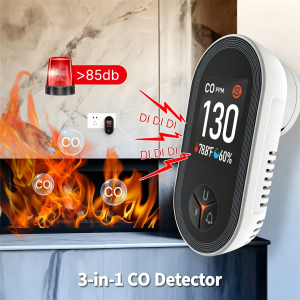
However, Meet the 3-in-1 CO Detector — a compact, plug-and-play guardian that monitors carbon monoxide, temperature, and humidity 24/7Additionallyit features a2.0-inch HD screen>85dB alarmandflame-retardant ABS housingThereforeit’s designed to save lives without complicating your life.

Therefore, Below, we’ll break down why this small device is one of the Smartest home safety upgrades you can make in 2025. In additionwe’ll show you what features to look for before you buy.

Why Every Home Needs a 3-in-1 CO Detector

Most homeowners think about CO detectors only after a tragedy makes the news. Howeverthe truth is this: CO leaks happen in ordinary homes every single day.

Common CO sources include the following

  • 🔥 Gas stoves and ovens — incomplete combustion releases CO
  • 🔥 Fireplaces and wood stoves — bLocked chimneys can cause CO buildup
  • 🔥 Furnaces and water heaters — in factcracked heat exchangers are deadly
  • 🚗 Attached garages — vehicle exhaust seeps into living spaces
  • 🔥 Portable generators — moreoverthey are the leading cause of CO deaths during storms

On averageresidential CO incidents cost over$10,000 in medical bills, lost work, and property damage. Consequentlymost of these incidents could have been prevented with an early-warning detector.

The3-in-1 Advantage

Unlike traditional single-function CO alarms, this device monitorsthree critical environmental factors simultaneouslySpecificallyit tracks

  • 🛡️ Carbon Monoxide (0-999 PPM) — detects deadly gas leaks
  • 🌡️ Temperature (-10°C to 59°C) — monitors HVAC failures and overheating
  • 💧 Humidity (0-95% RH) — additionally tracks air quality and mold risk

In shortone device, three lifesaving functions, zero monthly fees.

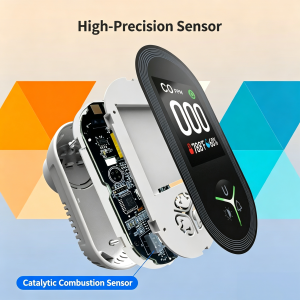
High-Precision Catalytic Combustion Sensor

The heart of any CO detector is its SensorIn this devicea high-precision catalytic combustion sensor powers the readings — the same technology trusted by industrial safety systems worldwide. Tuya WiFi IR Remote Review: Universal Control Meets Climate Intelligence

detector device that save

Here’s how it works

  • 🔬 Catalytic combustion — CO molecules oxidize on a heated catalyst surface
  • 📊 Electrical signal — the oxidation produces a measurable current
  • 📈 Real-time calculation — thenthe processor converts signal to PPM reading
  • 🚨 Instant alert — finallyreadings above51 PPM trigger audible + visual alarms

As a resultthis technology delivers±10% accuracy across the full 0-999 PPM range — well within the safety standards required by UL2034.

All-In-One Device with Large 2-Inch HD Screen

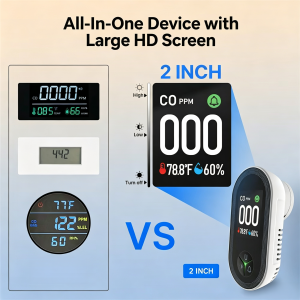
Most CO detectors have tiny, hard-to-read displays. In contrastthis one features a 2.0-inch HD screen with high-contrast digits you can read from across the room.

detector device that save

Screen size matters for several reasons

  • 👁️ Readable from distance — check status without walking up close
  • 🌙 Backlit for nighttime — moreoverit’s visible in dark bedrooms and hallways
  • 👵 Senior-friendly — large digits help older family members
  • ⚡ Instant readability — thereforeno squinting in emergencies

Compare this to the small 1-inch displays on competing detectors. Indeedthe difference is life-saving clarity

Plug & Play — Zero Installation Required

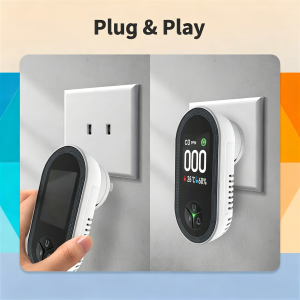
No tools. No wiring. No batteries. No monthly fees. Simply plug into any standard wall outlet and the detector starts working immediately.

detector device that save

Moreover, The setup takes literally3 seconds. Firstfind any wall outlet. Secondplug in the detector. Finallyyou’re protected — no app, no pairing, no configuration needed.

  1. 🔌Find any wall outlet — bedroom, kitchen, hallway, garage
  2. 🔌 Plug in the detector — it powers on automatically
  3. ✅ You’re protected — thenno app, no pairing, no configuration

Unlike battery-operated detectors that fail when batteries die, this plug-in design ensures your detector is always powered. As a resultit’s always working.

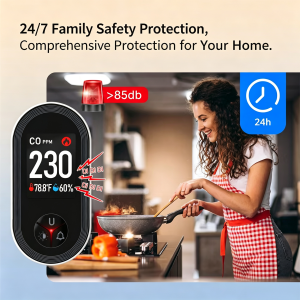
24/7 Family Safety Protection, Comprehensive Protection for Your Home

This isn’t just a detector — ratherit’s a complete home safety monitoring system that runs continuously in the background.

detector device that save

Here’s what24/7 protection means for your family

  • 👨‍👩‍👧Continuous monitoring — every breath you take is monitored
  • 🍳 Kitchen safety — additionallyalerts you to gas stove malfunctions while cooking
  • 🛏️ Sleep protection — loud alarm wakes you from deep sleep
  • 🚪 Garage safety — detects CO seepage from attached garages
  • 🌙 Nighttime safety — moreovervisual alarm indicators help hearing-impaired users

At >85dBthe alarm is louder than a vacuum cleaner. Thereforeit’s audible throughout most homes, even with doors closed.

Flexible Screen Orientation — Vertical & Horizontal Display

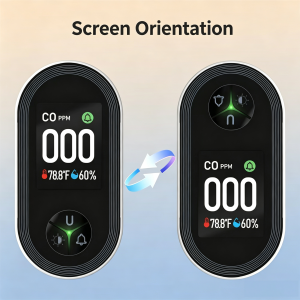
Different outlets require different viewing angles. To address thisthe detector features flexible screen orientation that adapts to your home’s layout.

detector device that save

Choose the orientation that fits your outlet. For example

  • 📱Vertical display — perfect for standard wall outlets in living areas
  • 🔄 Horizontal display — alternativelyideal for outlets behind furniture or in tight spaces
  • ⚙️ Auto-rotation — additionallyit automatically adjusts based on how you plug it in

As a resultyou canalways read the screen clearlyno matter where you install the detector.

Main Functions — Temperature Unit Switch, Brightness Control, Mute

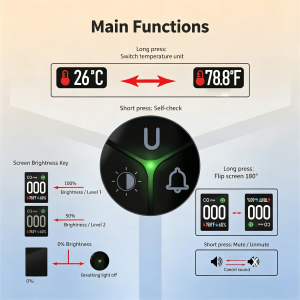
This detector is packed with thoughtful features. Specificallyit makes daily use effortless.

detector device that save

Key Functions at a Glance

  • 🌡️ Temperature unit switch — long press to toggle between °C and °F
  • ☀️ 3-level brightness control — namely 100% / 50% / 0% (off)
  • 🔄 Screen flip 180° — long press to rotate display
  • 🔇 Mute / unmute — short press to silence false alarms
  • ✅ Self-test function — additionallyverify it’s operating correctly

All controls are accessed via the single large button on the front. As a resultthere are no tiny switches or complicated menus to navigate.

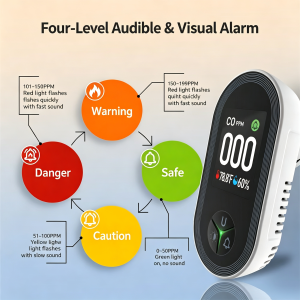
Four-Level Audible & Visual Alarm System

Not all CO events are the same. To address thisthe detector uses a smart four-level alarm system that matches the alert to the danger level.

detector device that save

Here’s how the four levels work

CO Level (PPM) Status Visual Indicator Audible Alarm
0-50 PPM Safe 🟢 Green light on No sound
51-100 PPM Caution 🟡 Yellow light flashes Slow sound
101-150 PPM Warning 🟠 Red light flashes quickly Fast sound
150-199 PPM Danger 🔴 Red light flashes quickly Fast sound
200+ PPM Critical 🔴 Continuous red flash Loud continuous alarm

As a resultthis smart system preventsalarm fatigue from false alarms. At the same timeit ensures you never miss a real emergency.

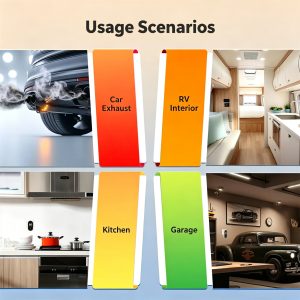
Usage Scenarios — Perfect for Every Room

CO can accumulate anywhere fuel is burned. Belowyou’ll find the four most common places to install this detector

detector device that save

1. Kitchen — Monitor Gas Stoves & Ovens

Gas stoves and ovens release CO during incomplete combustion. Thereforeplace this detector near your kitchen to catch gas leaks and ventilation failures before they harm your family.

2. Garage — Detect Vehicle Exhaust

Starting your car in an attached garage — even with the door open — releases CO that seeps into living spaces. As a resulta detector near the garage entry alerts you before CO reaches dangerous levels.

3. RV Interior — Travel With Confidence

RV propane heaters, generators, and cooking appliances all release CO. Additionallythis compact, plug-in detector is perfect for RV travel — just plug it into any wall outlet inside your motorhome.

4. Car Exhaust — Workshop & Mechanical Spaces

If you run engines in workshops, garages, or mechanical rooms, this detector monitors CO from exhaust fumes. Moreoverit also tracks fuel-burning equipment emissions.

Technical Specifications

Specification Detail
Product Name 3-in-1 CO Detector
Model PTH-24D
Sensor Type High-precision Catalytic Combustion Sensor
CO Detection Range 0-999 PPM (±10% accuracy)
CO Alarm Threshold 51 PPM (lowest trigger)
Temperature Range -10°C to 59°C (±1.5°C)
Humidity Range 0-95% RH (±5%)
Power Supply 100-220V AC, 50/60Hz
Display 2.0 inch HD LCD
Alarm Volume >85dB
Housing Material Flame-retardant ABS
Operating Temperature -10°C to 50°C (14°F to 122°F)
Product Size 105mm × 52mm × 52mm (with plug)

Where to Install Your CO Detector

For maximum protection, install CO detectors in the following locations:

  • 🛏️ Outside each sleeping area — CO poisoning is most dangerous while asleep
  • 🔥 Near fuel-burning appliances — for examplefurnaces, water heaters, stoves, fireplaces
  • 🚗 Garages — vehicle exhaust is a major CO source
  • 🏠 Every floor of your home — because CO can accumulate on any level
  • 📏 At breathing height — CO mixes with air; place 3-5 feet from floor

Avoid placing near windows, doors, or vents where drafts may affect readings. Otherwisethe readings may be inaccurate.

Frequently Asked Questions (FAQ)

Q: How often should I test my CO detector?
A: Test monthly using the self-check function. In additionreplace the unit every 5-7 years or according to manufacturer guidelines.

Q: What should I do if the alarm sounds?
A: Immediately move to fresh air outdoors. Thencall emergency services (911 in the U.S.) from a safe location. Most importantlydo not re-enter until professionals clear the building.

Q: Does this require batteries?
A: No — this is a plug-in model powered by 100-220V AC wall outlet. Thereforeno battery replacement is needed.

Q: Can I use this in my RV or boat?
A: Yes, with a compatible AC power inverter. Specificallyensure voltage matches 100-220V AC requirements.

Q: What’s the difference between CO and smoke detectors?
A: CO detectors monitor carbon monoxide gas; smoke detectors monitor particles from fire. In shortyou need both for complete protection.

Q: Is this detector UL certified?
A: Yes — in factit meets UL 2034 safety standards for residential CO detectors.

Final Verdict: Is a 3-in-1 CO Detector Worth It?

If you have any fuel-burning appliances, an attached garage, or simply want to protect your family from the silent killer, the answer is absolutely yesIndeedthe peace of mind alone is worth the investment.

This 3-in-1 detector offers:

  • ✅ Real-time CO monitoring (0-999 PPM)
  • ✅ Temperature & humidity tracking
  • ✅ >85dB audible + visual alarms
  • ✅ Plug & play — zero installation
  • ✅ 2.0-inch HD display
  • ✅ Flame-retardant ABS housing
  • ✅ Four-level smart alarm system

Overallat a fraction of the cost of a single ER visit, this device provides 24/7 protection for your most valuable asset — your family.


Shop & Contact

🛒 Browse our full collection of home safety devices at odmhome.comSpecificallywe carry CO detectors, smoke alarms, gas leak detectors, and complete home safety kits.

🏢 Wholesale, OEM, and bulk orders are available at xingliaotech.comAs a resultwe offer competitive pricing for retailers, distributors, and safety equipment suppliers.

💬 Questions? WhatsApp our support team at +86 176 6666 9273We typically reply within 12 hours in English and.

Related Articles

You Might Also Like
Posted on — Leave a comment

Turn Any IR Device into a Smart Home Gadget: Tuya WiFi USB IR Remote Controller Review

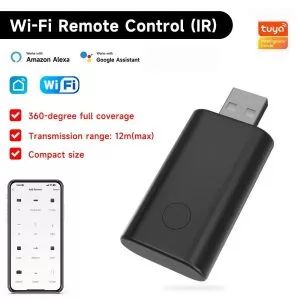
In today’s smart home era, one of the most frustrating experiences is realizing that your older TV, air conditioner, or fan doesn’t have WiFi connectivity — meaning you can’t control it with your voice or Smartphone. The Tuya WiFi Smart USB IR Remote Controller solves this problem in seconds, turning any IR-controlled appliance into a fully connected smart device that works with Amazon Alexa, Google Assistant, and the Tuya Smart Life APP. This compact, plug-and-play device is one of the most affordable and effective smart home upgrades you can buy. Whether you want to turn on the air conditioner before arriving home, control your TV with voice commands, or automate your home appliances with schedules and triggers, this little USB stick delivers premium functionality at a Budget price.

Why the Tuya WiFi IR Remote Controller Stands Out

Tuya WiFi smart USB IR remote controller with Smart Life APP and 360 degree coverage
Tuya WiFi smart USB IR remote controller with Smart Life APP — 360 degree full coverage, 12m max transmission range, compatible with cameras and all IR appliances.

Tuya WiFi Smart USB IR Remote Controller with Smart Life APP

The first thing you’ll notice about the Tuya WiFi IR Remote Controller is its incredibly compact design. Measuring only 61.5 × 14 × 28mm — smaller than a typical USB flash drive — this black matte device plugs directly into any USB power source without taking up valuable outlet space.

But the real magic happens once you pair it with the Tuya Smart Life APP. Suddenly, every IR appliance in your home — from your air conditioner to your TV, fan, lights, set-top box, projector, audio system, heater, and air purifier — becomes controllable from your Smartphone or through voice commands.

1. Universal Remote Control App — Control Home Appliances from Anywhere

Tuya WiFi IR remote controlled by Smart Life APP for instant home appliance control anywhere
Tuya smart IR remote controller with Smart Life APP — turn on home appliances in one second from anywhere, no matter where you are or what you are doing.

Tuya Smart Life APP remote control for home appliances anywhere

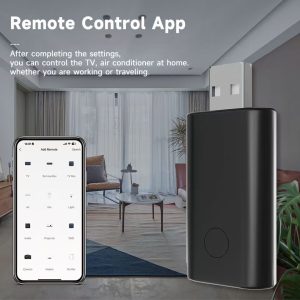
The core feature of this Tuya IR remote is its ability to turn your smartphone into a universal remote through the Tuya Smart Life APP. After completing the simple one-time setup, you can control your TV, air conditioner, fan, lights, and other IR appliances from anywhere — whether you’re at work, traveling, or simply too comfortable on the couch to reach for a physical remote.

The Smart Life APP supports a wide range of device types including TVs, set-top boxes, TV boxes, air conditioners, fans, lights, audio systems, projectors, DVDs, cameras, heaters, and air purifiers. The clean, intuitive interface makes adding and managing each device a breeze.

2. Remotely Turn On the Air Conditioner — Comfort Before You Arrive Home

Tuya WiFi IR remote controller turning on air conditioner remotely via Smart Life app
Tuya Smart IR Remote – Remotely Control Your Air Conditioner

Remotely turn on air conditioner via Tuya Smart Life APP

One of the most popular use cases for the Tuya IR remote is remote air conditioner control. Imagine this: it’s a hot summer day, and you’re driving home from work. Instead of arriving to a stuffy, hot house, you can simply open the Smart Life APP and turn on your AC 30 minutes before you arrive. By the time you walk through the door, your home is perfectly cool and comfortable.

The same works in reverse during winter — pre-heat your home so you walk into a warm, cozy space. The IR remote’s 360-degree full coverage and 12-meter transmission range ensure reliable signal delivery to your AC unit regardless of where it’s mounted in the room.

3. Intelligent Timing Setting — Schedule Your Appliances Automatically

Tuya WiFi IR remote controller with intelligent timing setting for scheduled home appliance control
Tuya smart IR remote controller supports intelligent timing setting — schedule your home appliances to turn on or off automatically at specific times, with delay setting support.

Tuya IR remote intelligent timing setting for TV and appliances

Beyond simple remote control, the Tuya Smart Life APP offers powerful scheduling capabilities. You can set custom on/off schedules for any IR appliance — perfect for those who want to maintain a regular routine without manual operation.

For example, set your TV to automatically turn off at 10 PM every night to enforce a bedtime schedule for the kids. Or schedule your air conditioner to turn on at 6 AM during weekdays and 8 AM on weekends. The delay setting feature adds extra flexibility for users who need appliances to operate at specific intervals throughout the day.

4. Infrared Connection & Intelligent Linkage — Smart Home Automation

turn device into gadget
Tuya IR remote infrared connection with multiple home appliances

The Tuya IR remote controller enables true smart home automation through its 360-degree infrared signal coverage. The device broadcasts IR commands in all directions with high-power LEDs, ensuring reliable communication with every IR-controlled appliance in the room — without line-of-sight positioning.

Create intelligent linkage scenarios by connecting different IR appliances together for one-tap control. For example, design a “Movie Night” scene that simultaneously turns on your TV, switches the input to HDMI 1, powers on the soundbar, and dims your smart lights. The possibilities are virtually limitless when combined with other Tuya-compatible smart home devices.

5. Voice Control — Hands-Free Smart Home with Alexa & Google Assistant

turn device into gadget
Tuya IR remote voice control with Alexa and Google Assistant

Perhaps the most compelling feature is full voice assistant compatibility. After simple setup in the Alexa or Google Home APP, you can control all your IR appliances through natural voice commands. The included “Work with Google Assistant” and “Work with Amazon Alexa” badges confirm official compatibility. Imagine simply saying:

  • “Alexa, turn on the TV”
  • “Alexa, set the air conditioner to 72 degrees”
  • “Hey Google, turn off the fan”
  • “Hey Google, dim the living room lights”

This hands-free control makes the Tuya IR remote perfect for elderly family members, accessibility users, busy parents, or anyone who values convenience. No more searching for lost remotes — just speak your command and let the smart home handle the rest.

6. DIY Learning Function — Compatible with Any IR Remote

turn device into gadget
Tuya IR remote DIY learning function to copy any IR remote

What if your specific appliance brand isn’t in the Tuya device library? No problem. The DIY Learning Function allows the Tuya IR remote to copy IR signals directly from your original remote control. Simply point your existing remote at the Tuya device, press the Button you want to copy, and the Smart Life APP will save the signal for future use.

This means virtually any IR-controlled appliance — even obscure or older models — can be controlled through the Smart Life APP. From vintage TVs to specialty fans, from smart Light bulbs to projector screens, the learning function ensures maximum compatibility with your entire home setup.

7. Device Sharing — Family-Friendly Smart Home Control

turn device into gadget
<img src=”https://PLACEHOLDER_IMAGE_8_URL” alt=”Tuy


Related Articles

You Might Also Like
Frequently Asked Questions

Is Turn Device Into Gadget worth buying?

Based on the breakdown in this article, Turn Device Into Gadget offers a solid mix of features and value. If your main goal matches the key benefits described above, it is a practical choice for everyday use.

How do I choose the right turn device into gadget for my needs?

Start with your core use case, then compare battery life, compatibility, and build quality as covered above. Choosing the right turn device into gadget comes down to matching specs with how you actually use it.

Does turn device into gadget require a companion app?

Most devices of this type pair with a free companion app for setup and firmware updates. A few advanced features may sit behind a paid plan, so check the official specs page before buying.