Posted on — Leave a comment

Zigbee Gateway OEM: Complete Guide for Smart Home Distributors

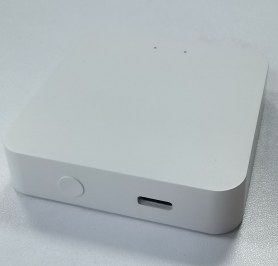
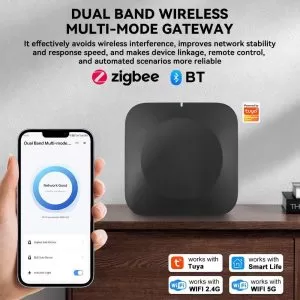
A Zigbee gateway is the brain of any Smart Home ecosystem. If you’re building a Tuya Smart home product line, the gateway is the highest-value item to get right. This guide covers what to look for when sourcing. ## What Is a Zigbee Gateway? A Zigbee gateway connects your Tuya Zigbee devices (sensors, switches, bulbs, plugs) to the cloud and your phone. Without a gateway, Zigbee devices won’t work remotely. ### Why Zigbee over WiFi? – Lower power consumption (sensors last 1-2 years on battery) – Can connect 100+ devices on one gateway – More stable for mesh networks – No WiFi congestion ## Gateway Specs That Matter ### Device Capacity – Budget: 30-50 devices – Mid-range: 100-150 devices – Premium: 200+ devices – **For distributors, recommend the 100+ version** — customers always add more devices ### Protocol Support – Tuya Zigbee 3.0 (must have) – BLE gateway option (for beacons) – Zigbee + BLE combo gateways available ### Connection Type – WiFi gateway: easiest setup, no wiring – Ethernet gateway: more stable for professional installers – Poe gateway: for commercial projects ### App Integration – Tuya Smart / Smart Life app
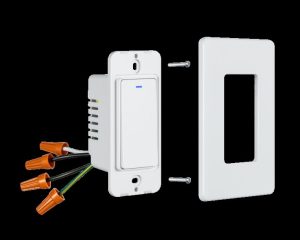
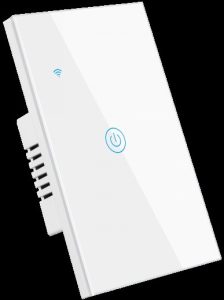
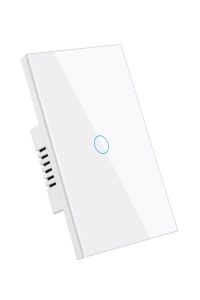
– Alexa + Google Home voice control – Home Assistant integration (open gateway firmware available) ## Device Pairs That Sell Best | Gateway + Bundle | Target Customer | Price Point | |—|—|—| | Gateway + PIR sensor + door sensor | Home security DIY | $30-50 | | Gateway + 2x smart plugs | Energy saving | $25-40 | | Gateway + curtain motor + wall switch | Curtain automation | $50-80 | | Gateway + water leak sensor x2 | Flood prevention | $35-55 | ## OEM Opportunities 1. **Bundle packaging** — gateway + sensors as a starter kit 2. **Custom app branding** — Tuya white-label app from 500 units 3. **Logo on gateway unit** — from 100 pcs 4. **Multi-language quick start guide** — EN/ES/RU/AR ## Pricing | Product | MOQ | Unit Price | |—|—|—| | WiFi Zigbee gateway (100 devices) | 50 pcs | $8-15 | | Ethernet gateway | 50 pcs | $12-20 | | Zigbee + BLE combo | 100 pcs | $15-25 | | Custom logo | 100 pcs | +$0.5/pc | ## Common Mistakes 1. **Selling Zigbee devices without a gateway** — customers can’t use them! 2. **Not explaining the gateway requirement** — add it to product listings 3. **Wrong region frequency** — Zigbee is global 2.4GHz, no issue 4. **No reset button visible** — customers need a way to factory reset ## XingLiao Gateway Range We supply: – Tuya Zigbee 3.0 WiFi gateways – Ethernet gateways for professional use – Combo Zigbee + BLE gateways – Can bundle with sensors, plugs, switches – CE/FCC/RoHS certified Ask for gateway sample pricing — 3-day shipping worldwide.

Related Articles

You Might Also Like

Frequently Asked Questions

Is Zigbee Gateway Oem worth buying?

Based on the breakdown in this article, Zigbee Gateway Oem offers a solid mix of features and value. If your main goal matches the key benefits described above, it is a practical choice for everyday use.

How do I choose the right zigbee gateway oem for my needs?

Start with your core use case, then compare battery life, compatibility, and build quality as covered above. Choosing the right zigbee gateway oem comes down to matching specs with how you Actually use it.

Does zigbee gateway oem require a companion app?

Most devices of this type pair with a free companion app for setup and firmware updates. A few advanced features may sit behind a paid plan, so check the official specs page before buying.

Posted on — Leave a comment

How Many Devices Can One Zigbee Gateway Handle?

Gateway specifications quote device counts in the hundreds. Real homes hit practical limits well before the number on the box, and the limit is rarely the count itself — it is what those devices are doing and how they are spread around the house.

This is the planning question behind any whole-home setup using our Zigbee gateways, from a single-room flat to a three-bedroom house with switches, sensors and IR blasters.

The short answer

Setup Typical device count One gateway enough?
Flat, a few sensors 5-15 Yes, comfortably
House, sensors plus switches 20-40 Yes
Whole-home, every switch plus sensors 40-80 Yes, with mains devices to relay
Large or multi-storey, heavy sensor use 80+ Consider a second hub

What actually limits a gateway

  1. Battery devices are the expensive kind. Each battery sensor is a node that sleeps and reports; dozens of them mean constant message traffic. Mains-powered devices (switches, sockets) cost far less because they are always awake and act as routers.
  2. Reporting frequency matters more than count. Twenty temperature sensors reporting every minute generate more traffic than forty switches that only report when pressed.
  3. Physical spread. A gateway with thirty devices in one flat is fine; the same thirty spread over three floors with solid floors between them will struggle at the edges.
  4. WiFi congestion. Zigbee and WiFi share the 2.4 GHz band. A crowded Wireless neighbourhood makes everything worse.

Mesh: the thing that makes it work

Zigbee is a mesh network, not a star. Battery sensors do not talk to the gateway directly — they talk to the nearest mains-powered device, which relays the message. This is the single most useful fact for planning: adding mains-powered switches improves the coverage for all your battery sensors. Mini Smart Breakers: Putting a Whole Circuit on a Schedule Tuya Curtain Motor OEM: Complete Sourcing Guide 2026

A house with twenty battery sensors and no mains Zigbee devices will behave worse at the far corners than a house with the same sensors plus four wired switches spread through it.

When to add a second gateway

  • The far end of the house keeps dropping devices despite sensible placement.
  • You have a detached garage, workshop or garden room that needs its own coverage.
  • You have passed roughly 80 devices, or a high proportion of frequently-reporting battery sensors.
  • You want a hard separation — for example, one hub for the house and one for a rented annex.

Note that devices pair to one hub at a time, so a second hub means managing two groups in the app rather than one seamless network.

Planning tips

  • Pair the farthest devices first, while the gateway is near them, then move the hub to its final position. Devices remember the route.
  • Spread mains devices evenly rather than clustering them near the hub.
  • Avoid pairing everything at once — do it in small groups so you notice a device that fails to join.
  • Keep a list of which device is which; thirty unnamed sensors in an app is unmanageable.

If you are still choosing the hub itself, wired vs wireless gateways covers that decision.

FAQ

Does a second gateway double my device limit?
Effectively yes, but devices do not roam between hubs. You assign each device to one.
Do Zigbee switches count toward the limit?
Yes, but they are the cheapest kind — they are mains-powered and act as routers for other devices.
Why does one sensor keep dropping off?
Usually range or a weak mesh route. Add a mains-powered device nearer to it, or move the gateway more central.
Can a gateway handle switches and sensors together?
Yes — that mix is normal and usually more reliable than sensors alone, because the switches relay.
Do Bluetooth devices use the same capacity?
On multi-mode hubs such as the MHUB-FL-U, Bluetooth devices are handled separately from the Zigbee mesh.
Will adding devices slow the app down?
App responsiveness depends on your network and the cloud service, not the Zigbee mesh. Local automations stay fast.

Related Articles

You Might Also Like
Frequently Asked Questions

Is Many Devices One worth buying?

Based on the breakdown in this article, Many Devices One offers a solid mix of features and value. If your main goal matches the key benefits described above, it is a practical choice for everyday use.

How do I choose the right many devices one for my needs?

Start with your core use case, then compare battery life, compatibility, and build quality as covered above. Choosing the right many devices one comes down to matching specs with how you actually use it.

Does many devices one require a companion app?

Most devices of this type pair with a free companion app for setup and firmware updates. A few advanced features may sit behind a paid plan, so check the official specs page before buying.

Posted on — Leave a comment

Wired vs Wireless Zigbee Gateway: What Changes in a Real Home

Every Zigbee device — sensors, switches, IR blasters — needs a gateway to translate between Zigbee and your network. You can buy that gateway with an Ethernet port or without One, and the choice quietly decides how reliable the whole system feels.

In our range that is the difference between a wired unit such as the TYGWZ-01 or ZHUB-C, and a Wireless one such as the ZHUB-W or MHUB-W.

The practical difference

Wired (Ethernet) Wireless (WiFi)
Connects via Ethernet cable to the router Joins WiFi
Placement Next to the router Anywhere with signal
Depends on WiFi quality No Yes
Best for Whole-home setups, reliability Flats, single-room setups, rentals
Typical failure Cable unplugged WiFi dropout takes Devices offline

Why wired is the better default

A wired gateway removes Two variables at once. It does not depend on WiFi signal quality where it sits, and it usually lives next to the router, which tends to be central to the home anyway. When a Zigbee device stops responding, the debugging path is short: is the gateway powered, is the cable in, is the device in range. Tuya Curtain Motor OEM: Complete Sourcing Guide 2026

With a wireless gateway, a WiFi hiccup looks identical to a Zigbee failure from the app’s point of view, and you spend longer working out which layer broke.

Why wireless is sometimes the right call

Placement freedom. If the router is in a corner of the house behind a television and a metal cabinet, a wired gateway has to live there too — and Zigbee range from that spot may not reach the far end of the house. A wireless gateway can sit centrally, on a shelf, where its Zigbee radio Actually covers the rooms that matter.

It is also the only practical option in a rental where you cannot leave an Ethernet cable running to the router, and the tidiest option for a single-room setup (one room’s sensors and switches).

Multi-mode gateways: Zigbee plus Bluetooth, plus Matter

Some units handle more than one protocol. The MHUB-MS and MHUB-FL-U cover Zigbee and Bluetooth in one box, which is worth it if you have Bluetooth sensors as well — one hub instead of two, one app screen instead of two. The MZHUB adds Matter, relevant if you are mixing your Zigbee devices into a newer Matter-based app.

Placement rules that matter more than the model

  • Central and elevated. Zigbee is a mesh — mains-powered devices relay for battery ones — but the gateway should still sit roughly centrally.
  • Away from metal and microwaves. Both 2.4 GHz Zigbee and WiFi suffer near large metal objects and running microwaves.
  • Not inside a cabinet. Putting the hub in a media cabinet behind a metal mesh front costs real range.
  • Give it a stable Power source. A hub that gets unplugged takes every automation with it.
FAQ
Can I use both types in one home?
You can, but devices pair to one hub. Two hubs means two sets of devices in the app. Better to pick one unless you have a genuinely separate zone, such as a garage.
Do I need a gateway for WiFi devices?
No. WiFi switches and plugs join the router directly. The gateway is only for Zigbee (and Bluetooth, on multi-mode units).
Will a wired gateway work if the internet goes down?
Local automations on the same network usually keep running; remote control from outside the home will not. Behaviour varies by app, so test it if it matters.
How far does Zigbee reach?
Tens of metres indoors per hop, less through solid walls. Mains-powered devices extend the mesh, which is why a few wired switches improve coverage for battery sensors.
Is Matter worth paying for now?
Only if you actively use a Matter-based app. If everything runs in the Tuya / Smart Life app, a standard Zigbee gateway does the same job.
Can I move the gateway later?
Yes — devices rejoin the mesh automatically, though battery sensors may need a few minutes to find the new route.

Related Articles

You Might Also Like
Frequently Asked Questions

Is Wired Wireless Zigbee worth buying?

Based on the breakdown in this article, Wired Wireless Zigbee offers a solid mix of features and value. If your main goal matches the key benefits described above, it is a practical choice for everyday use.

How do I choose the right wired wireless zigbee for my needs?

Start with your core use case, then compare battery life, compatibility, and Build quality as covered above. Choosing the right wired wireless zigbee comes down to matching specs with how you Actually use it.

Does wired wireless zigbee require a companion app?

Most devices of this type pair with a free companion app for setup and firmware updates. A few advanced features may sit behind a paid plan, so check the official specs page before buying.

Posted on — Leave a comment

Do You Actually Need a Zigbee Gateway? (And What Breaks Without One)

actually need zigbee - Do You Actually Need a Zigbee Gateway? (And What Breaks Without One)
Do You Actually Need a Zigbee Gateway? (And What Breaks Without One)

Every Zigbee project reaches the same question: which gateway, and do we really Need One? The short answer is yes — Zigbee Devices do not talk to a router, they talk to a gateway, and the gateway is what makes the mesh, the scenes and the remote access work.

What the gateway does

It is the coordinator of the Zigbee mesh: it holds the device list, runs automations locally, and bridges the mesh to your router so the app can reach it from anywhere. Without it, a Zigbee Switch is a switch — local control only, no app, no scenes, no voice. Mini Smart Breakers: Putting a Whole Circuit on a Schedule

Wired or wireless

A wired gateway connects by Ethernet, which is what you want for a permanent installation: fixed location, no WiFi dependency, stable mesh. A Wireless one connects over WiFi, which is easier to place but puts the mesh behind the router’s Wireless performance.

How many gateways

One gateway handles a large mesh — dozens of devices across a house is normal. What limits you is range, not count: Zigbee is a mesh, so mains-powered devices relay for each other, but a Battery sensor at the far end of a garden still needs something nearby to talk to. 2.8 Inch Offline Video Baby Monitor: Private, Simple, No-WiFi Nursery Monitoring

Placement

Central, off the floor, away from the router and away from large metal objects. A gateway in a metal consumer unit Works but reduces range.

FAQ
Can Zigbee devices work without a gateway?
No. Local control works, but app control, scenes and voice need the gateway.
Can I mix brands of Zigbee devices?
Usually within the same ecosystem — keep the gateway and the devices on the same platform.
Does the internet need to be up for automation?
No — scenes stored on the gateway run locally, which is one of the reasons people choose Zigbee.

Ready to specify it? Full specifications, gang options, colors and quantity pricing are on the ZigBee Smart Gateway — Wired & Wireless product page — OEM logo, manual and packaging are available from the first order.

Related Articles

You Might Also Like
Frequently Asked Questions

Is Actually Need Zigbee worth buying?

Based on the breakdown in this article, Actually Need Zigbee offers a solid mix of features and value. If your main goal matches the key benefits described above, it is a practical choice for everyday use.

How do I choose the right actually need zigbee for my needs?

Start with your core use case, then compare battery life, compatibility, and build quality as covered above. Choosing the right actually need zigbee comes down to matching specs with how you actually use it.

Does actually need zigbee require a companion app?

Most devices of this type pair with a free companion app for setup and firmware updates. A few advanced features may sit behind a paid plan, so check the official specs page before buying.

Posted on — Leave a comment

Zigbee Gateway: What It Does and How to Plan One

A Zigbee gateway (also called a Zigbee hub) is the device that joins your Zigbee products into one network and connects that network to your Home router. It is the translator: sensors and switches speak Zigbee, your phone speaks Wi-Fi, and the gateway sits between them. It is also where automations are stored, which is why a Zigbee Home keeps working when the internet does not.

Without a gateway there is no Zigbee home. Every Zigbee Switch, sensor and remote has to join one, and the gateway has to be powered and within radio range of at least some of them.

What the gateway actually does

  1. Forms the mesh. It is the coordinator of the Zigbee network and decides how messages hop between devices.
  2. Translates protocols. Zigbee in, Wi-Fi/Ethernet out to your router and the app.
  3. Runs automations locally. “If the Door opens after sunset, turn on the hall light” executes on the hub, so it survives a broadband outage.
  4. Stores the device list and scenes. Reset the hub and you re-pair everything — back up your device list.
  5. Bridges ecosystems. Many current hubs are also Matter controllers or IR blasters, so one box covers Zigbee devices, infrared remotes and Apple/Google/Alexa.

Wired vs wireless gateway

Type Connection to router Pros Cons
Wired (Ethernet) RJ45 cable Most stable, immune to Wi-Fi congestion, no reconfiguration when you change router password Needs a cable to the router
Wireless (Wi-Fi) 2.4 GHz Place anywhere with a socket Shares the crowded 2.4 GHz band; needs re-pairing if the Wi-Fi SSID or password changes
Socket gateway Wi-Fi, built into a wall socket Invisible, no extra box, always powered Fixed position — often not central
Multi-mode hub Wi-Fi or Ethernet Zigbee + Bluetooth + IR + Matter in one box Higher cost; more firmware to keep updated

If the installation is a house, an apartment block or anything you will not revisit, choose wired. If it is a single flat and the router is in the middle, wireless is fine.

Planning a Zigbee network that stays healthy

  • Place the hub centrally and off the floor. Zigbee range indoors is roughly 10–20 m per hop through walls.
  • Every mains-powered Zigbee device is a repeater. Switches and plug-in modules strengthen the mesh; battery sensors do not repeat.
  • Aim for one powered device per room in larger homes so every battery sensor has a neighbour.
  • Keep it out of metal. A hub inside a metal cabinet or next to a microwave loses range.
  • Separate the radios. Zigbee and Wi-Fi share 2.4 GHz. Put Wi-Fi on channels 1, 6 or 11 and keep the hub a metre from the router.
  • Pair from the farthest device inward so each device joins through its nearest repeater rather than hopping a long way.

Capacity: how much is too much

Advertised limits of 50–150 devices are theoretical. What matters in practice:

  • Direct children — a hub handles a limited number of directly connected devices (often around 30–40). Everything beyond that should route through a powered repeater.
  • Battery sensors — keep them below half the total; they sleep and generate wake-up traffic.
  • Automations — complex scenes with many conditions add hub load; a few dozen is comfortable.
  • Report frequency — temperature and power sensors that report every few seconds create far more traffic than door contacts that report on change.

Rule of thumb: one hub comfortably serves a three-bedroom home with 30–50 devices. Beyond that, add a second hub and split by floor.

Tuya gateway vs Matter gateway vs proprietary hub

Option Ecosystem Works with Choose when
Tuya / Smart Life Zigbee gateway Tuya Thousands of Tuya devices; Alexa, Google Home You want breadth of cheap, widely available devices
Multi-mode hub (Zigbee + BLE + IR) Tuya / Matter Zigbee devices, Bluetooth sensors, legacy IR remotes You are bringing infrared appliances under app control too
Matter controller / border router Matter over Thread & Wi-Fi Apple Home, Google, Alexa simultaneously You need cross-platform control without cloud accounts
Proprietary hub (vendor-locked) One brand Only that brand’s devices Rarely — it limits future purchases
Frequently Asked Questions

Do I need one gateway per brand?

You need one gateway per ecosystem, not per brand. Devices certified for the same platform (for example Tuya) all join the same hub regardless of who manufactured them.

Can two gateways coexist?

Yes. Two hubs on the same account allow you to split a large home by floor, and Zigbee networks on different channels do not interfere. Devices join whichever hub you pair them with.

What happens if the gateway goes offline?

Local automations and bound remotes stop if the hub is powered down — the mesh needs a coordinator. This is why the hub should be on a stable power supply and, ideally, a small UPS.

Is a smart speaker enough as a hub?

Some speakers include a Zigbee or Thread radio and can act as a hub, but capability varies by model and region. A dedicated gateway is more predictable and easier to troubleshoot.

Do I need a gateway for Wi-Fi devices?

No. Wi-Fi switches, plugs and Cameras connect to your router directly. A gateway is only required for Zigbee (and, in some setups, Thread) devices.

What should a project buyer specify?

Wired or wireless, device capacity and direct-child limit, Zigbee 3.0 compliance, whether it bridges to Matter, IR/Bluetooth support where needed, local automation support, certification for the destination market (CE, UKCA, FCC, RoHS), and minimum order quantities.

Related products

Related guides

Related Articles

You Might Also Like
Posted on — Leave a comment

Smart Home Gateway Explained: Zigbee, Tuya and Bluetooth Compared

What a Smart Home Gateway Actually Does

A Smart Home gateway (also called a hub or bridge) is the translator between your low-power Smart devices and your home network. Zigbee and Bluetooth devices cannot talk to your router directly — they are designed to sip battery power for a year or more, which means they cannot maintain a WiFi connection. The gateway speaks their language, and speaks WiFi or Ethernet on the other side, so everything lands in one app.

Without a gateway, a Zigbee sensor is little more than a paperweight: you can sometimes pair it to a Phone over Bluetooth, but it cannot be reached from outside the room, cannot trigger other devices, and will not show up in your routines. F6 3-Axis Gimbal Stabilizer, Handheld Smartphone Gimbal for Smooth Video

With one gateway, you get: remote access to every Zigbee or Bluetooth device, local automations that keep running when the internet drops, voice control through Alexa and Google, and a single place to see device state. C08 Gimbal Stabilizer 69cm, Extendable Selfie Stick Tripod for iPhone & Android

Do You Need One? A Fast Test

Look at what you already own, or what you are about to buy: C07 Mini Gimbal Stabilizer 66cm, Foldable Extendable Selfie Stick Tripod for Smartphones

  • All WiFi devices (WiFi switches, WiFi plugs, WiFi cameras) — you do not need a gateway. Each device connects to the router itself.
  • Any Zigbee device (door/window sensors, PIR motion sensors, water leak sensors, Zigbee switches, smart knobs) — you need a Zigbee gateway.
  • Any Bluetooth device (Bluetooth locks, thermometers, some sensors) — you need a Bluetooth gateway if you want to reach them when you are not standing next to them.
  • Infrared appliances (old air conditioners, TVs, set-top boxes with remotes) — you need a gateway with an IR blaster.

Tuya-based setups often bundle all three: a single Tuya Bluetooth gateway or a combined Zigbee + Bluetooth + IR unit covers a whole apartment. If you are building a larger system, look at a Zigbee 3.0 gateway with a higher device ceiling. C06 Series Selfie Stick with Light & Tripod, Extendable Gimbal Stabilizer for Smartphones F10 3-Axis Gimbal Stabilizer, Handheld Smartphone Stabilizer for Smooth Video Recording

Gateway Types Compared

  • Zigbee 3.0 gateway — the workhorse. Builds a mesh network where mains-powered devices relay for battery ones, so coverage improves as you add more. Typical capacity runs from tens of devices up to 100+ on better units. Best choice for sensors and whole-home builds.
  • Bluetooth gateway — cheap and small, mainly for Bluetooth sensors and locks, and for forwarding their state to the cloud. Shorter range than Zigbee, no mesh.
  • IR + RF gateway — turns legacy remote-controlled appliances into app-controlled ones. Useful for air conditioners in hotels and apartments where replacing the unit is not an option.
  • Control panel / screen hub — a gateway with a touchscreen that also acts as a wall-mounted control surface and scene keypad. Our 4-inch Tuya smart control panel is this category: gateway, scene controller and intercom-style panel in one device.

If you are deciding between WiFi and Zigbee for the devices themselves, read Zigbee vs WiFi smart home devices before you commit — it changes how many gateways you will need. Automatic Pet Feeder Portions: How to Calibrate and Schedule Meals

How Many Gateways and Where to Put Them

One gateway per home is usually enough for an apartment. Zigbee range indoors is roughly 10–20 metres per hop depending on walls, and concrete or brick floors cost more than drywall. Rules of thumb:

  • Put it central and high, not in a metal cabinet or right next to the router.
  • Keep it a metre or two away from WiFi routers and microwave ovens — 2.4GHz is crowded.
  • If you have two or more floors, plan a second gateway, or rely on mains-powered Zigbee devices (switches, sockets) to act as mesh repeaters.
  • Add devices from the gateway outward: pair the nearest ones first, then work further away, so the mesh builds in the right order.

Local Automation: The Feature Worth Paying For

Cloud automations break when your internet breaks, and they add latency — the sensor reports to a server in another country and the command comes back. A gateway with local scene execution stores the logic on the device: water leak detected → shut the valve and sound the alarm, even with the broadband down.

For safety-related scenes (leak, smoke, door forced open), this is not a nice-to-have. It is the difference between an automation you can trust and one you cannot. Our guide to practical automation scenes shows setups that make sense in a real home.

Security and Network Hygiene

A gateway sits on your network with access to every device, so treat it like infrastructure:

  • Keep firmware updated, and check whether your model supports encrypted join (Zigbee 3.0 uses AES-128 by default).
  • Use a separate 2.4GHz SSID for IoT if your router supports it, and leave WPA2/WPA3 on.
  • Do not expose the gateway’s management interface to the internet.
  • For hotels and multi-unit projects, segment by VLAN and keep the gateway count per floor documented — it makes troubleshooting later much faster.

Buying for Projects: MOQ and Customisation

Gateways are the least visible part of a smart home but the one that determines whether the system feels reliable, so project buyers usually standardise on one model per property type. What we support:

  • Stock units, neutral packaging: from 100 pcs, mixed models accepted.
  • OEM branding (housing colour, logo, packaging, manual, pre-loaded firmware config, app name): from 5 pcs per model.
  • Full custom tooling: 2,000–3,000 pcs, tooling 25–40 days, sampling 7–15 days.
  • Certifications: CE, FCC, RoHS, UKCA, CCC, PSE — we support the paperwork for your market.

If you are bundling gateways with sensors and switches, tell us the device mix and the property count on the contact page — we can quote the whole kit rather than line by line.

Related reading: Tuya Zigbee IR remote hub, smart home control panel as the hub, and best smart home starter kit for 2026.

Browse the range

Related guides
Frequently Asked Questions

Is a gateway the same as a hub?

Practically yes — both translate between device protocols and your network. In marketing, “hub” sometimes also implies a screen or keypad. Check whether a product is a pure bridge or a control panel, because only the second one gives you a wall-mounted interface.

Can I use one gateway for devices from different brands?

If they all run on the Tuya/Smart Life platform, generally yes — that is the main advantage of standardising on one ecosystem. Mixing a Tuya gateway with a non-Tuya Zigbee device often fails, or pairs but exposes only basic functions.

How many devices can one gateway handle?

Entry Bluetooth gateways handle dozens; Zigbee 3.0 units commonly list 30–130 devices depending on the model and how many are mains-powered repeaters. Always leave headroom — mesh networks get sluggish when they are full.

Do I still need a gateway if I use Matter?

Matter devices can talk directly over WiFi or Thread. You still need a Thread border router for Thread devices, and many existing Zigbee devices will not become Matter devices. For most homes in 2026 that means: keep the gateway.

What happens to my automations if the gateway loses internet?

Cloud scenes stop. Local scenes stored on the gateway keep running, which is why leak and smoke automations should be configured as local scenes wherever the hardware supports it.

Can you put our brand on the gateway and pre-configure it?

Yes, from 5 pcs per model. We can set the housing colour, print or laser your logo, produce retail packaging and manuals under your brand, and pre-load a device configuration so your installers pair faster on site.

Related Articles

You Might Also Like
Posted on — Leave a comment

Tuya Bluetooth Gateway: Bridge Up to 128 Smart Devices to WiFi for Voice & App Control

Why Your Smart Home Needs a Bluetooth Gateway

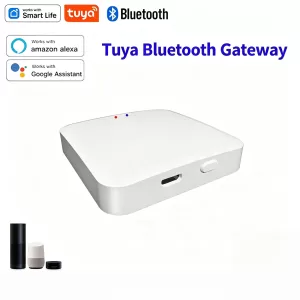
However, Many Smart home devices use Bluetooth because it’s low-power and reliable. However, Bluetooth alone has limits — you can’t control devices when you’re away from home. Therefore, a Bluetooth gateway is essential. The Tuya Bluetooth gateway bridges your Bluetooth devices to WiFi, allowing remote control from anywhere in the world.

Moreover, this compact hub connects up to 128 devices simultaneously. As a result, it becomes the central nervous system of your smart home.

tuya bluetooth gateway bridge

Three Functions in One Compact Device

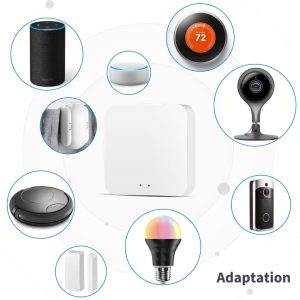
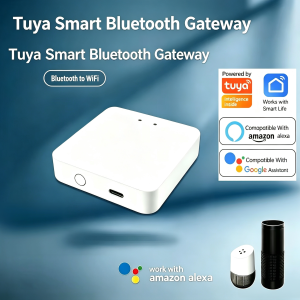
First, this gateway bridges Bluetooth to WiFi seamlessly. Second, it works with Amazon Alexa and Google Assistant for voice control. Third, it integrates with the Tuya Smart Life APP for unified management.

In addition, the device features a minimalist white square design with two LED indicators and a side Button. Furthermore, it uses a Type-C USB port for convenient Power.

bulbs, sensors and cameras” /> tuya bluetooth gateway bridge

Connect Up to 128 Bluetooth Devices

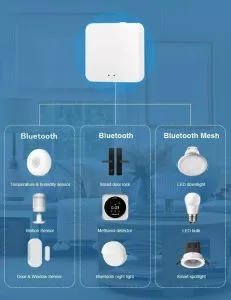
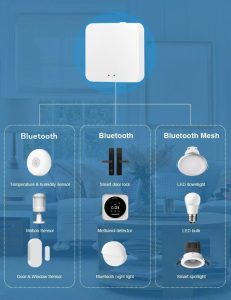
The gateway supports both standard Bluetooth and Bluetooth Mesh protocols. Consequently, you can connect a wide range of smart home devices. These include temperature and humidity sensors, smart door locks, LED downlights, motion sensors, door and window sensors, methanol detectors, Bluetooth night lights, LED bulbs, and smart spotlights.

In other words, one gateway handles your entire smart home ecosystem.

tuya bluetooth gateway bridge

More Stable Than WiFi Solutions

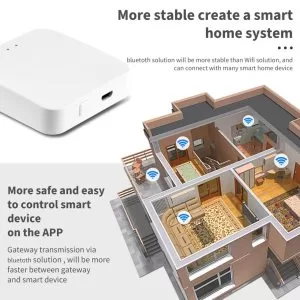
Compared to WiFi-only devices, Bluetooth solutions are more stable. Furthermore, the gateway can connect with many smart home devices at the same time. As a result, you get reliable performance across your entire home.

Additionally, Bluetooth transmission is faster between gateway and smart devices. Therefore, commands execute with minimal delay.

tuya bluetooth gateway bridge

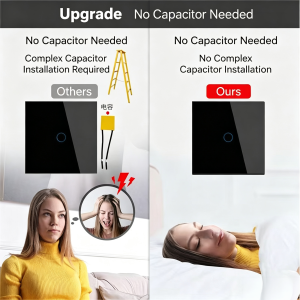
Upgrade Version — No Capacitor Needed

Unlike older smart home devices that require complex capacitor installation, this upgraded gateway features a simpler design. Moreover, there’s no need for complex capacitor substitution during setup. As a result, installation is hassle-free for everyday users.

In fact, you don’t need any electrical expertise. Simply plug in and connect.

tuya bluetooth gateway bridge

APP Link — Intelligent Control

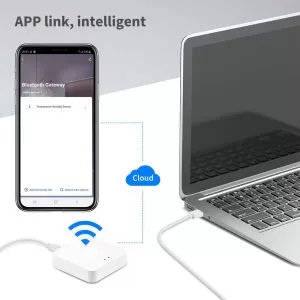
Setup takes under two minutes. First, plug the gateway into any USB power source using the included Type-C cable. Second, open the Tuya Smart Life APP and scan for the device. Third, connect to your 2.4GHz WiFi network. Finally, start pairing your Bluetooth smart devices.

Once connected, you can control all paired devices from anywhere via the APP. Furthermore, the gateway communicates through a secure cloud connection.

tuya bluetooth gateway bridge

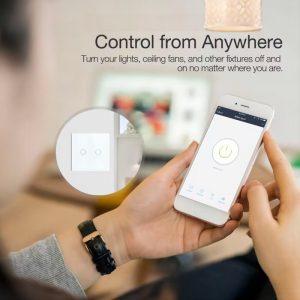
Control from Anywhere

Turn your lights, ceiling fans, and other fixtures off and on no matter where you are. In other words, as long as you have internet access, you can control your entire home. Additionally, the APP provides real-time status updates for all connected devices.

For example, you can turn off lights you accidentally left on at the office. Similarly, you can pre-heat your smart home before arriving.

tuya bluetooth gateway bridge

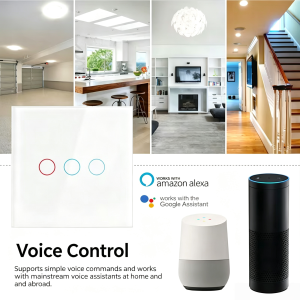
Voice Control with Alexa & Google Assistant

This gateway fully supports Amazon Alexa and Google Assistant. Therefore, you can control all paired Bluetooth devices with simple voice commands. For instance, say “Alexa, turn off the bedroom light” and the gateway executes the command instantly.

In addition, the gateway works with both Google Home Mini and Amazon Echo smart speakers. As a result, voice control is available throughout your home.

Tuya Bluetooth gateway works with voice assistants to control smart home devices like lights, fans and switches
Tuya Bluetooth gateway works with voice assistants — control lights, fans, switches, and more with simple commands to Alexa or Google Assistant.

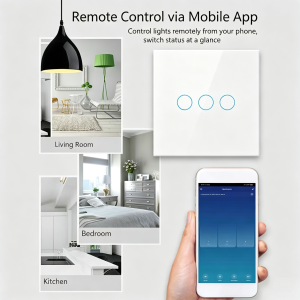
Multi-Room Lighting Control

The gateway enables comprehensive lighting control across multiple rooms. For example, control living room pendant lights, bedroom fixtures, and kitchen lights all from one APP. Moreover, the APP displays switch status at a glance.

Consequently, managing your entire home’s lighting becomes effortless.

tuya bluetooth gateway bridge

Smart Home Automation Scenes

Beyond basic control, this hub enables powerful automation. Create custom scenes such as “Good Morning” that trigger multiple Bluetooth devices at once. Alternatively, set schedules, timers, and triggers based on sensor input.

For instance, you can create a scene that turns on lights when the motion sensor detects movement. Similarly, you can automate the smart lock based on door sensor status.

tuya bluetooth gateway bridge

Technical Specifications

Model Tuya Bluetooth Gateway
Power Supply Type-C USB (5V/1A)
Size 60×60×15mm
Weight 33g
Communication WiFi 2.4GHz + Bluetooth / Bluetooth Mesh
Material ABS+PC Flame-Retardant Shell
Connectable Devices Up to 128 Bluetooth Devices
Operating Temperature -10°C to 55°C
Compatible APP Tuya Smart / Smart Life
Voice Assistants Amazon Alexa, Google Assistant
Wireless Range Up to 30m (indoor)
Color

Related Articles

You Might Also Like
Related guides
Frequently Asked Questions

Is Tuya Bluetooth Gateway Bridge worth buying?

Based on the breakdown in this article, Tuya Bluetooth Gateway Bridge offers a solid mix of features and value. If your main goal matches the key benefits described above, it is a practical choice for everyday use.

How do I choose the right tuya bluetooth gateway bridge for my needs?

Start with your core use case, then compare battery life, compatibility, and build quality as covered above. Choosing the right tuya bluetooth gateway bridge comes down to matching specs with how you actually use it.

Does tuya bluetooth gateway bridge require a companion app?

Most devices of this type pair with a free companion app for setup and firmware updates. A few advanced features may sit behind a paid plan, so check the official specs page before buying.