Posted on — Leave a comment

12 Module Smart Switch Board: How Many Positions Do You Actually Need?

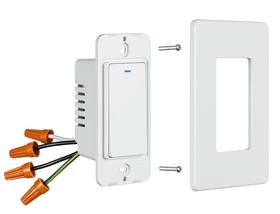
A “12 module” board is not twelve switches. It is a frame with twelve slots, and almost everything you put in it costs more than one slot: a two-way Switch takes one, a socket takes two, a fan regulator takes two, and a blank cover takes one for no reason other than that you have not decided yet. Boards arrive one slot short more often than they arrive too big, so plan it before you order.

If you have not settled the basics yet — plate standard, gang count, protocol — start with the smart switch board buying guide and come back to this one for the slot arithmetic.

What a module actually is

A module is one unit of width on the frame. The frame is sold by how Many units it holds — 4, 6, 8, 9, 12 — and each function you drop in occupies a fixed number of units. The same function can occupy different widths depending on the maker, which is why module counts do not translate one-to-one between brands. On our own boards:

Function Slots Note
Onegang switch 1 The base unit everything else is measured against
Two-way / six-way switch plate 2–3 Wider on glass plates
Socket (EU / UK / US) 2–3 A socket is always wider than a switch
Fan regulator or dimmer 2 Needs depth in the box as well as width
Scene or curtain key 1 Cheap slot, high daily value
Blank cover 1 Buy two — you will change your mind

A worked 12 module plan

Take a flat entrance wall, which is where twelve-slot boards usually go. A realistic fill:

  1. Two slots — entrance socket (always two, and always the first thing forgotten).
  2. One slot — hallway light.
  3. One slot — living room light.
  4. Two slots — fan regulator.
  5. Two slots — dimmer for the dining light.
  6. One slot — curtain key, Wired to the curtain switch at the window.
  7. One slot — “away” scene key that kills every light at once.
  8. Two blanks — because the next tenant will want a socket there.

That is twelve, and two of them are empty. Which is the point: a twelve-module board is rarely “twelve things you own today” — it is “ten things plus room”. Tuya Bluetooth vs ZigBee vs WiFi: How to Choose

Which boards this maps to

Our boards are sold by plate rather than by module count, so translate before ordering. The DS-129 is the nine-way touch plate and the closest match to a large grouped board; the DS-126 covers six ways where the wall is smaller; DS-104 is the four-way for a single room. On the wide European cut-out, the 147 × 86 touch series and matching socket series share a frame, which is the nearest thing to true module planning we sell. For US boxes the 118 × 72 series is the shape to plan against.

Depth is the failure nobody budgets for

Width gets all the attention; depth is what stops the install. A dimmer or a fan regulator sits deeper than a plain switch, and a Smart board sits deeper again because the electronics live behind the glass. Before ordering a twelve-module fill, open the box and measure. If the box is shallow, either drop the regulator to a separate plate or move that function to a module elsewhere — the same reason people put the water heater switch next to the appliance rather than on the main board.

Leave the board partly dumb

There is no prize for making all twelve positions Smart. Sockets almost never Need to be. Neither does the extractor fan in a bathroom somebody uses twice a day. Put the Smart positions where they change behaviour — entrance, bedroom, the “away” key — and leave the rest mechanical. It costs less, and the board stays usable if the network does not.

Ordering for a project rather than a room

One board is a purchase; forty are a specification. When the order is for a flat block or a hotel floor, three extra things decide whether the installation goes smoothly. First, standardise the plate — pick one series for the whole project so spares interchange between units two years later. Second, order blanks at roughly ten per cent of the slot count, because on-site changes always happen and a blank looks intentional while an empty hole does not. Third, agree the gang count per unit type in writing before production: the entrance board and the bedroom board are different part numbers, and confusing them is the most expensive mistake on this list.

Frequently Asked Questions

Is a 12 module board standard across brands?

No. Module width is a frame convention, not an international standard. Two brands both selling “12 module” may not interchange inserts, so buy frame and inserts from the same series.

Can I add modules later?

Only if you left blank slots. Inserts clip into the frame, so a blank cover can be swapped for a socket later — but the wiring for that socket has to be in the box already, which is the reason to plan ahead.

Do I need a bigger back box for a smart board?

Almost always deeper than a mechanical plate, yes. Measure before ordering; a shallow box is the single most common reason a Smart board goes back in its packet.

How many smart positions before I should switch to Zigbee?

Around three to four boards. Beyond that, a hub keeps the load off the router — the reasoning is set out in our WiFi versus Zigbee comparison.

Related Articles

You Might Also Like

Posted on — Leave a comment

How Many Devices Can One Zigbee Gateway Handle?

Gateway specifications quote device counts in the hundreds. Real homes hit practical limits well before the number on the box, and the limit is rarely the count itself — it is what those devices are doing and how they are spread around the house.

This is the planning question behind any whole-home setup using our Zigbee gateways, from a single-room flat to a three-bedroom house with switches, sensors and IR blasters.

The short answer

Setup Typical device count One gateway enough?
Flat, a few sensors 5-15 Yes, comfortably
House, sensors plus switches 20-40 Yes
Whole-home, every switch plus sensors 40-80 Yes, with mains devices to relay
Large or multi-storey, heavy sensor use 80+ Consider a second hub

What actually limits a gateway

  1. Battery devices are the expensive kind. Each battery sensor is a node that sleeps and reports; dozens of them mean constant message traffic. Mains-powered devices (switches, sockets) cost far less because they are always awake and act as routers.
  2. Reporting frequency matters more than count. Twenty temperature sensors reporting every minute generate more traffic than forty switches that only report when pressed.
  3. Physical spread. A gateway with thirty devices in one flat is fine; the same thirty spread over three floors with solid floors between them will struggle at the edges.
  4. WiFi congestion. Zigbee and WiFi share the 2.4 GHz band. A crowded Wireless neighbourhood makes everything worse.

Mesh: the thing that makes it work

Zigbee is a mesh network, not a star. Battery sensors do not talk to the gateway directly — they talk to the nearest mains-powered device, which relays the message. This is the single most useful fact for planning: adding mains-powered switches improves the coverage for all your battery sensors. Mini Smart Breakers: Putting a Whole Circuit on a Schedule Tuya Curtain Motor OEM: Complete Sourcing Guide 2026

A house with twenty battery sensors and no mains Zigbee devices will behave worse at the far corners than a house with the same sensors plus four wired switches spread through it.

When to add a second gateway

  • The far end of the house keeps dropping devices despite sensible placement.
  • You have a detached garage, workshop or garden room that needs its own coverage.
  • You have passed roughly 80 devices, or a high proportion of frequently-reporting battery sensors.
  • You want a hard separation — for example, one hub for the house and one for a rented annex.

Note that devices pair to one hub at a time, so a second hub means managing two groups in the app rather than one seamless network.

Planning tips

  • Pair the farthest devices first, while the gateway is near them, then move the hub to its final position. Devices remember the route.
  • Spread mains devices evenly rather than clustering them near the hub.
  • Avoid pairing everything at once — do it in small groups so you notice a device that fails to join.
  • Keep a list of which device is which; thirty unnamed sensors in an app is unmanageable.

If you are still choosing the hub itself, wired vs wireless gateways covers that decision.

FAQ

Does a second gateway double my device limit?
Effectively yes, but devices do not roam between hubs. You assign each device to one.
Do Zigbee switches count toward the limit?
Yes, but they are the cheapest kind — they are mains-powered and act as routers for other devices.
Why does one sensor keep dropping off?
Usually range or a weak mesh route. Add a mains-powered device nearer to it, or move the gateway more central.
Can a gateway handle switches and sensors together?
Yes — that mix is normal and usually more reliable than sensors alone, because the switches relay.
Do Bluetooth devices use the same capacity?
On multi-mode hubs such as the MHUB-FL-U, Bluetooth devices are handled separately from the Zigbee mesh.
Will adding devices slow the app down?
App responsiveness depends on your network and the cloud service, not the Zigbee mesh. Local automations stay fast.

Related Articles

You Might Also Like
Frequently Asked Questions

Is Many Devices One worth buying?

Based on the breakdown in this article, Many Devices One offers a solid mix of features and value. If your main goal matches the key benefits described above, it is a practical choice for everyday use.

How do I choose the right many devices one for my needs?

Start with your core use case, then compare battery life, compatibility, and build quality as covered above. Choosing the right many devices one comes down to matching specs with how you actually use it.

Does many devices one require a companion app?

Most devices of this type pair with a free companion app for setup and firmware updates. A few advanced features may sit behind a paid plan, so check the official specs page before buying.

Posted on — Leave a comment

How Many Security Cameras Does a 3-Bedroom Home Need?

Most people either buy one camera and discover it covers nothing useful, or buy six and spend a weekend running cables. A three-bedroom house has a finite number of genuinely useful camera positions, and covering those well beats covering everything badly.

Here is the plan that fits most layouts, using models from our security camera range.

Start with entrances, not rooms

Burglary statistics aside, the practical reason for a camera is to answer “who came to the door” and “what happened at the boundary”. That means the priority order is:

  1. Front door — the single most useful position in any house.
  2. Back door or garden access — the second most common entry point and the one people forget.
  3. Driveway or parking — vehicles, deliveries and the approach to the house.
  4. Side passage or gate — if there is one, it is worth a camera more than any indoor room.

A realistic count: three to five cameras

Position Suggested type Notes
Front door Video doorbell or compact outdoor camera The only position almost every home should have
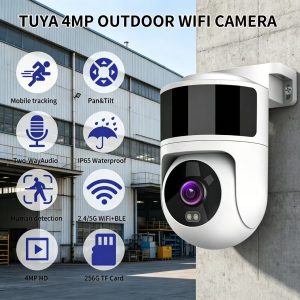
Back garden / patio door Outdoor PTZ or Solar model Covers the approach from the garden
Driveway Dual-lens camera Overview plus detail on vehicles and plates
Hallway (optional) Plug-in mini camera Indoor coverage of the main entry corridor
Nursery (optional) Baby monitor Dedicated unit with its own screen, not a Security camera

Three cameras (front, back, driveway) covers the essentials. Five adds hallway and nursery. Beyond five in a three-bedroom house, you are usually duplicating views.

Where cameras are a waste

  • Bedrooms — rarely justified unless there is a specific concern.
  • Kitchens and living rooms — large open spaces where one camera sees very little detail and pets trigger constant alerts.
  • Landings upstairs — no external access point, so nothing to catch.
  • Duplicate views of the same door — a doorbell camera plus an outdoor camera aimed at the same doorstep is usually redundant.

Practical limits that decide the real number

Three things will cut your plan short before the layout does:

  • WiFi coverage. Every camera needs a usable 2.4 GHz signal where it sits. Test at each position with a phone before buying.
  • Power at outdoor positions. If there is no socket, you are choosing between a solar model and a Battery model — see cameras that run without a power outlet.
  • Storage. More cameras means more card space or a cloud plan. Continuous recording multiplies the requirement; motion-only clips keep it small.

One decision that saves money: doorbell or camera at the front?

If you only want to know who is at the door, a video doorbell is cheaper and better at it than a camera. If you want to see the approach, the path and the street, a camera does more. Many homes end up with a doorbell at the front and a camera at the back — which is a perfectly good three-camera plan with the driveway as the third.

FAQ
Is two cameras enough?
For a small three-bedroom house with one external door and a back gate, two (front and back) covers the main risk. Add the driveway if there is parking.
Should indoor cameras face outside?
Only with a camera designed for it. A standard indoor camera behind glass gives reflections by day and infrared fog at night — see our window camera guide.
Do I need continuous recording everywhere?
No. Motion clips are enough for most positions. Reserve continuous recording for one or two places where the timeline matters.
Can all cameras go in one app?
Yes — the Tuya / Smart Life app handles multiple cameras in a single account, including a mix of indoor, outdoor and doorbell models.
What about privacy rules?
Avoid pointing cameras into neighbours’ windows or shared spaces beyond your own boundary, and tell anyone working in the house that cameras are present.
How high should outdoor cameras be?
Roughly 2.5 to 3.5 metres: out of easy reach, still Low enough for a usable face angle.

Related Articles

You Might Also Like
Frequently Asked Questions

Is Many Security Cameras worth buying?

Based on the breakdown in this article, Many Security Cameras offers a solid mix of features and value. If your main goal matches the key benefits described above, it is a practical choice for everyday use.

How do I choose the right many security cameras for my needs?

Start with your core use case, then compare battery life, compatibility, and build quality as covered above. Choosing the right many security cameras comes down to matching specs with how you actually use it.

Does many security cameras require a companion app?

Most devices of this type pair with a free companion app for setup and firmware updates. A few advanced features may sit behind a paid plan, so check the official specs page before buying.