Posted on — Leave a comment

Tuya Bluetooth vs ZigBee vs WiFi: How to Choose

Tuya devices reach your phone over one of three radio paths: WiFi, Zigbee or Bluetooth. The protocol is not a preference — it is decided by the device you buy, and it determines whether you Need a hub, how often you change batteries, and how the system behaves when the internet drops. One rule covers most cases: high-bandwidth devices go on WiFi, battery sensors and wall switches go on Tuya ZigBee through a gateway, and a small set of close-range devices runs on Bluetooth alone.

Why the protocol is decided at purchase

A WiFi camera cannot join a Zigbee mesh, and a ZigBee sensor cannot talk to your router directly. The radio is soldered in. That is why choosing the mix matters before the first device ships: the hub decision, the router capacity and the battery replacement schedule all follow from it. The good news is the Smart Life app treats all three paths as one system, so a mixed home still controls everything from a single screen.

Tuya WiFi: bandwidth without a hub

WiFi suits devices that push video or need a direct internet path: Cameras, video doorbells, and simple plugs and switches in homes that will never buy a hub. The trade-offs are power and congestion. A WiFi device never truly sleeps, so battery-powered WiFi cameras measure their charge in weeks or months, not years, and every WiFi device added to a 2.4 GHz router competes for airtime with laptops, TVs and phones. After a power cut, dozens of WiFi devices reconnecting at once is why some homes see a ten-minute smart-home brownout. Mains power plus reasonable router placement makes WiFi dependable; batteries and distance make it disappointing.

Tuya ZigBee: the whole-home backbone

ZigBee devices form their own mesh around a gateway, which is why the Tuya ZigBee Gateway is the first purchase for a serious setup. Battery sensors sleep between events, so a door sensor or leak probe runs one to Two years on a coin cell. Mains-powered ZigBee switches and plugs route traffic for everything else, extending coverage room by room without new hardware. The mesh is local: during an internet outage, hub-stored automations still fire, sensors still report to the hub, and wall switches always work physically. For sensors, wall switches, locks and curtain motors, ZigBee is the protocol that behaves the same on day one thousand as on day one.

Tuya Bluetooth: close range, no hub at all

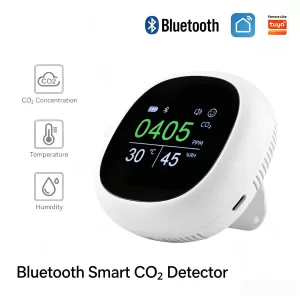
Bluetooth in the Tuya world plays two roles. First, every Tuya device uses BLE for first-time pairing — the app finds the new device over Bluetooth even before it is on any network. Second, a small class of devices runs entirely on Bluetooth: CO2 detectors, some knob locks, and small battery monitors live in the Smart Life app without a hub, because the phone talks to them directly. The limits are range and presence: reliable control needs the phone within a few meters, and remote control or voice assistants do not exist without a bridge. Bluetooth devices are the right choice for single-room tools you check while standing in the room — not for whole-home automation.

Putting all three together

  • Start with the hub. One Tuya ZigBee gateway covers sensors and switches for the whole home.
  • Sensors and wall switches on ZigBee. Battery devices last years, and mains switches strengthen the mesh for free.
  • Cameras and doorbells on WiFi. Nothing else moves video well; give them a clean 2.4 GHz channel.
  • Bluetooth for room-local tools. A CO2 detector on the desk or a knob lock on an interior door Works hub-free.
  • Keep the router lean. Every device you move to ZigBee is one less WiFi client fighting for airtime.

One device per protocol, chosen well

Frequently Asked Questions

Do I need a hub for Tuya devices?

WiFi and Bluetooth devices need no hub. ZigBee devices need a Tuya ZigBee gateway, and that hub is what unlocks the best battery life and local automations for sensors and switches.

Can a Bluetooth Tuya device be controlled away from home?

Not on its own — Bluetooth range is a few meters and the phone must be nearby. Add a Bluetooth-to-cloud bridge or choose the WiFi/ZigBee version of the device if remote control matters.

Why does my WiFi camera go offline when the router reboots?

Every WiFi device re-joins the router after a reboot, and dozens of devices re-joining at once slows them all down. Cameras feel it most because video needs sustained bandwidth, not a one-shot reconnect.

Is ZigBee better than WiFi for smart switches?

For wall switches, usually yes. A ZigBee switch adds mesh routing for nearby sensors and keeps local control during outages, while a WiFi switch is simpler to install hub-free but adds one more client to a busy router.

Can one Smart Life account mix all three protocols?

Yes. The app presents WiFi, ZigBee and Bluetooth devices in one home, and scenes can combine them — a ZigBee motion sensor can trigger a WiFi camera to start recording.

Which protocol is best for battery-powered sensors?

Tuya ZigBee. Event-driven reporting lets a sensor sleep for months, which is why door, water, motion and temperature sensors on ZigBee run a year or two on coin cells.

Related Articles

You Might Also Like

Posted on — Leave a comment

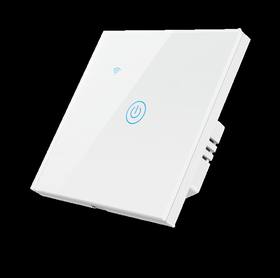
How to Choose a Bluetooth Touch Switch for a 86 Wall Box — DS-101BY Series

DS-101BY Series WiFi Touch Switch (1 Gang)
How to Choose a Bluetooth Touch Switch for a 86 Wall Box — DS-101BY Series

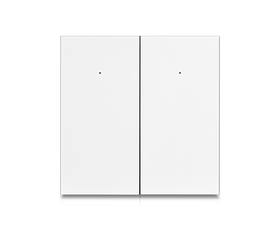
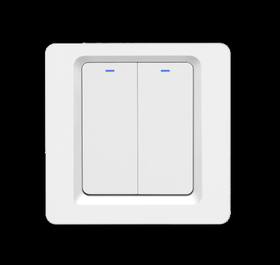
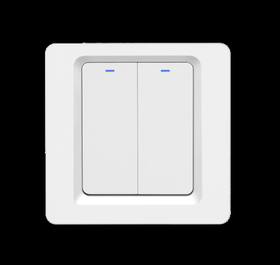
Replacing a wall Switch looks simple until you open the box. The Plate size, whether a neutral is present, and which radio the Switch uses decide whether the job takes ten minutes or a visit from an electrician. The DS-101BY Series is built around zero-fire (neutral required) Wiring and Bluetooth, and it ships in 1 Gang — so the same look can run through a whole flat or hotel floor.

This guide walks through the four things to settle before you order, with the numbers that matter for European Standard / British standard / China national standard installations.

1. Match the wall box first

The DS-101BY plate is made for the 86 × 86 mm square wall box (EU / UK / China), which is the standard box in European standard / British standard / China national standard installations. Measure the box, not the old plate: a cover frame can hide a smaller opening, and a plate that is a few millimetres out will not sit flush against the wall.

2. Check whether you have a neutral

This unit needs a neutral wire in the box — it will not work in a two-wire single-fire box. Open the box and look for a neutral bundle before ordering; if it is not there, you need a single-fire model instead.

3. Pick the radio for the project

No hub and no router needed — pair it straight from the phone for local control and schedules. Bluetooth suits rooms Where you do not want the Switch on the network at all, and it keeps working when the router is down.

4. Count the gangs per plate

DS-101BY covers 1 Gang. Fewer plates means fewer boxes to chase into the wall and One clean frame instead of three, which is usually the reason people move to multi-gang Touch plates in the first place. Where the DS-101BWHK Series Fits: Apartments, Hotels and Office Retrofits

Specifications

Quantity pricing

Indicative unit prices ($10.03–$10.03 depending on gang and finish):

FAQ

Is a neutral wire required?
Yes. This model is zero-fire only.
Does it work with Alexa and Google Home?
Voice control depends on the app ecosystem you pair with; local control and schedules work straight from the phone.
Can I order mixed gangs and colors in one shipment?
Yes. Gang sizes and finishes can be mixed within one order; tell us the split at checkout.

Ready to specify it? Full specifications, gang options, colors and quantity pricing are on the DS-101BY series product page — OEM logo, manual and packaging are available from the first order.

Related Articles

You Might Also Like
Frequently Asked Questions

Is Choose Bluetooth Touch worth buying?

Based on the breakdown in this article, Choose Bluetooth Touch offers a solid mix of features and value. If your main goal matches the key benefits described above, it is a practical choice for everyday use.

How do I choose the right choose bluetooth touch for my needs?

Start with your core use case, then compare battery life, compatibility, and build quality as covered above. Choosing the right choose bluetooth touch comes down to matching specs with how you actually use it.

Does choose bluetooth touch require a companion app?

Most devices of this type pair with a free companion app for setup and firmware updates. A few advanced features may sit behind a paid plan, so check the official specs page before buying.

Posted on — Leave a comment

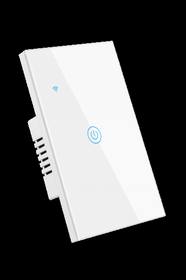
How to Choose a Bluetooth Touch Switch for a 118 Wall Box — DS-121Y Series

DS-121Y Series WiFi Touch Switch (1 Gang / 2 Gang / 3 Gang / 4 Gang)
How to Choose a Bluetooth Touch Switch for a 118 Wall Box — DS-121Y Series

Replacing a wall Switch looks simple until you open the box. The plate size, whether a neutral is present, and which radio the Switch uses decide whether the job takes ten minutes or a visit from an electrician. The DS-121Y Series is built around zero-fire (neutral required) Wiring and Bluetooth, and it ships in 1 Gang / 2 Gang / 3 Gang / 4 Gang — so the same look can run through a whole flat or hotel floor.

This guide walks through the four things to settle before you order, with the numbers that matter for Italian Standard / Canadian Standard / Brazilian Standard / Vietnamese standard / Thai standard installations.

1. Match the wall box first

The DS-121Y plate is made for the 118 × 72 mm US-style wall box, which is the standard box in Italian standard / Canadian standard / Brazilian standard / Vietnamese standard / Thai standard installations. Measure the box, not the old plate: a cover frame can hide a smaller opening, and a plate that is a few millimetres out will not sit flush against the wall.

2. Check whether you have a neutral

This unit needs a neutral wire in the box — it will not work in a two-wire single-fire box. Open the box and look for a neutral bundle before ordering; if it is not there, you need a single-fire model instead. Where the DS-123Y Series Fits: Apartments, Hotels and Office Retrofits

3. Pick the radio for the project

No hub and no router needed — pair it straight from the phone for local control and schedules. Bluetooth suits rooms Where you do not want the switch on the network at all, and it keeps working when the router is down. Where the DS-1081WL Series Fits: Apartments, Hotels and Office Retrofits

4. Count the gangs per plate

DS-121Y covers 1 Gang / 2 Gang / 3 Gang / 4 Gang. Fewer plates means fewer boxes to chase into the wall and one clean frame instead of three, which is usually the reason people move to multi-gang touch plates in the first place. Wiring the DS-123 Series: Single-Fire, Zero-Fire and the Capacitor Question

Specifications
Quantity pricing

Indicative unit prices ($10.78–$12.12 depending on gang and finish):

FAQ
Is a neutral wire required?
Yes. This model is zero-fire only.
Does it work with Alexa and Google Home?
Voice control depends on the app ecosystem you pair with; local control and schedules work straight from the phone.
Can I order mixed gangs and colors in one shipment?
Yes. Gang sizes and finishes can be mixed within one order; tell us the split at checkout.

Ready to specify it? Full specifications, gang options, colors and quantity pricing are on the DS-121Y series product page — OEM logo, manual and packaging are available from the first order.

Related Articles

You Might Also Like
Frequently Asked Questions

Is Choose Bluetooth Touch worth buying?

Based on the breakdown in this article, Choose Bluetooth Touch offers a solid mix of features and value. If your main goal matches the key benefits described above, it is a practical choice for everyday use.

How do I choose the right choose bluetooth touch for my needs?

Start with your core use case, then compare battery life, compatibility, and build quality as covered above. Choosing the right choose bluetooth touch comes down to matching specs with how you actually use it.

Does choose bluetooth touch require a companion app?

Most devices of this type pair with a free companion app for setup and firmware updates. A few advanced features may sit behind a paid plan, so check the official specs page before buying.

Posted on — Leave a comment

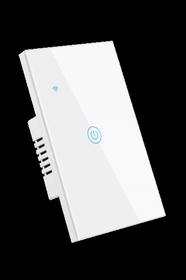
How to Choose a Bluetooth Touch Switch for a 86 Wall Box — DS-1081WN Series

DS-1081WN Series WiFi Touch Switch (1 Gang / 2 Gang / 3 Gang / 4 Gang)
How to Choose a Bluetooth Touch Switch for a 86 Wall Box — DS-1081WN Series

Replacing a wall Switch looks simple until you open the box. The plate size, whether a neutral is present, and which radio the switch uses decide whether the job takes ten minutes or a visit from an electrician. The DS-1081WN Series is built around zero-fire (neutral required) Wiring and Bluetooth, and it ships in 1 Gang / 2 Gang / 3 Gang / 4 Gang — so the same look can run through a whole flat or hotel floor.

This guide walks through the four things to settle before you order, with the numbers that matter for European Standard / British Standard / China national standard installations.

1. Match the wall box first

The DS-1081WN plate is made for the 86 × 86 mm square wall box (EU / UK / China), which is the standard box in European standard / British standard / China national standard installations. Measure the box, not the old plate: a cover frame can hide a smaller opening, and a plate that is a few millimetres out will not sit flush against the wall.

2. Check whether you have a neutral

This unit needs a neutral wire in the box — it will not work in a two-wire single-fire box. Open the box and look for a neutral bundle before ordering; if it is not there, you need a single-fire model instead. Where the DS-123Y Series Fits: Apartments, Hotels and Office Retrofits

3. Pick the radio for the project

No hub and no router needed — pair it straight from the phone for local control and schedules. Bluetooth suits rooms Where you do not want the switch on the network at all, and it keeps working when the router is down.

4. Count the gangs per plate

DS-1081WN covers 1 Gang / 2 Gang / 3 Gang / 4 Gang. Fewer plates means fewer boxes to chase into the wall and one clean frame instead of three, which is usually the reason people move to multi-gang touch plates in the first place. Wiring the DS-123 Series: Single-Fire, Zero-Fire and the Capacitor Question

Specifications
Quantity pricing

Indicative unit prices ($6.50–$8.50 depending on gang and finish):

FAQ
Is a neutral wire required?
Yes. This model is zero-fire only.
Does it work with Alexa and Google Home?
Voice control depends on the app ecosystem you pair with; local control and schedules work straight from the phone.
Can I order mixed gangs and colors in one shipment?
Yes. Gang sizes and finishes can be mixed within one order; tell us the split at checkout.

Ready to specify it? Full specifications, gang options, colors and quantity pricing are on the DS-1081WN series product page — OEM logo, manual and packaging are available from the first order.

Related Articles

You Might Also Like
Frequently Asked Questions

Is Choose Bluetooth Touch worth buying?

Based on the breakdown in this article, Choose Bluetooth Touch offers a solid mix of features and value. If your main goal matches the key benefits described above, it is a practical choice for everyday use.

How do I choose the right choose bluetooth touch for my needs?

Start with your core use case, then compare battery life, compatibility, and build quality as covered above. Choosing the right choose bluetooth touch comes down to matching specs with how you actually use it.

Does choose bluetooth touch require a companion app?

Most devices of this type pair with a free companion app for setup and firmware updates. A few advanced features may sit behind a paid plan, so check the official specs page before buying.

Posted on — Leave a comment

How to Choose a Bluetooth Touch Switch for a 86 Wall Box — DS-102Y Series

DS-102Y Series WiFi Touch Switch (1 Gang / 2 Gang / 3 Gang)
How to Choose a Bluetooth Touch Switch for a 86 Wall Box — DS-102Y Series

Replacing a Wall Switch looks simple until you open the box. The plate size, whether a neutral is present, and which radio the switch uses decide whether the job takes ten minutes or a visit from an electrician. The DS-102Y Series is built around zero-fire (neutral required) Wiring and Bluetooth, and it ships in 1 Gang / 2 Gang / 3 Gang — so the same look can run through a whole flat or hotel floor.

This guide walks through the four things to settle before you order, with the numbers that matter for European Standard / British Standard / China national standard installations.

1. Match the wall box first

The DS-102Y plate is made for the 86 × 86 mm square wall box (EU / UK / China), which is the standard box in European standard / British standard / China national standard installations. Measure the box, not the old plate: a cover frame can hide a smaller opening, and a plate that is a few millimetres out will not sit flush against the wall. Where the DS-102JLHK Series Fits: Apartments, Hotels and Office Retrofits

2. Check whether you have a neutral

This unit needs a neutral wire in the box — it will not work in a two-wire single-fire box. Open the box and look for a neutral bundle before ordering; if it is not there, you need a single-fire model instead.

3. Pick the radio for the project

No hub and no router needed — pair it straight from the phone for local control and schedules. Bluetooth suits rooms Where you do not want the switch on the network at all, and it keeps working when the router is down.

4. Count the gangs per plate

DS-102Y covers 1 Gang / 2 Gang / 3 Gang. Fewer plates means fewer boxes to chase into the wall and one clean frame instead of three, which is usually the reason people move to multi-gang Touch plates in the first place.

Specifications
Quantity pricing

Indicative unit prices ($10.63–$11.52 depending on gang and finish):

FAQ
Is a neutral wire required?
Yes. This model is zero-fire only.
Does it work with Alexa and Google Home?
Voice control depends on the app ecosystem you pair with; local control and schedules work straight from the phone.
Can I order mixed gangs and colors in one shipment?
Yes. Gang sizes and finishes can be mixed within one order; tell us the split at checkout.

Ready to specify it? Full specifications, gang options, colors and quantity pricing are on the DS-102Y series product page — OEM logo, manual and packaging are available from the first order.

Related Articles

You Might Also Like
ds161Smart Water Heater Switch — EU 86 × 86 mm & US 118 × 72 mm, WiFi / Zigbee / HomeKit / Pure Touch Price range: $8.50 through $16.45C16 Fourth generation Cloud Eye Follow Selfie Stick, 360 AI face tracking gimbal stabilizer with four leg metal keel tripod and bluetooth remoteC16 Fourth Generation Cloud Eye Follow Selfie Stick, 360° AI Face Tracking Gimbal Stabilizer, 4-Leg Metal Keel Tripod with Bluetooth Remote for Vlog Live Streaming Travel Shooting Original price was: $39.96.Current price is: $28.99.DS-121Y Series WiFi Touch Switch (1 Gang / 2 Gang / 3 Gang / 4 Gang)DS-121Y Series WiFi Touch Switch (1 Gang / 2 Gang / 3 Gang / 4 Gang) Price range: $10.78 through $12.12DS-121BWHK Series WiFi Touch Switch (1 Gang / 2 Gang / 3 Gang / 4 Gang)DS-121BWHK Series WiFi Touch Switch (1 Gang / 2 Gang / 3 Gang / 4 Gang) Price range: $10.33 through $11.67
Frequently Asked Questions

Is Choose Bluetooth Touch worth buying?

Based on the breakdown in this article, Choose Bluetooth Touch offers a solid mix of features and value. If your main goal matches the key benefits described above, it is a practical choice for everyday use.

How do I choose the right choose bluetooth touch for my needs?

Start with your core use case, then compare battery life, compatibility, and build quality as covered above. Choosing the right choose bluetooth touch comes down to matching specs with how you actually use it.

Does choose bluetooth touch require a companion app?

Most devices of this type pair with a free companion app for setup and firmware updates. A few advanced features may sit behind a paid plan, so check the official specs page before buying.

Posted on — Leave a comment

How to Choose a Bluetooth Touch Switch for a 86 Wall Box — DS-102 Series

DS-102 Series WiFi Touch Switch (1 Gang / 2 Gang / 3 Gang)
How to Choose a Bluetooth Touch Switch for a 86 Wall Box — DS-102 Series

Replacing a Wall Switch looks simple until you open the box. The plate size, whether a neutral is present, and which radio the switch uses decide whether the job takes ten minutes or a visit from an electrician. The DS-102 Series is built around zero-fire (neutral required) Wiring and Bluetooth, and it ships in 1 Gang / 2 Gang / 3 Gang — so the same look can run through a whole flat or hotel floor.

This guide walks through the four things to settle before you order, with the numbers that matter for European Standard / British Standard / China national standard installations. Where the DS-101BWHK Series Fits: Apartments, Hotels and Office Retrofits

1. Match the wall box first

The DS-102 plate is made for the 86 × 86 mm square wall box (EU / UK / China), which is the standard box in European standard / British standard / China national standard installations. Measure the box, not the old plate: a cover frame can hide a smaller opening, and a plate that is a few millimetres out will not sit flush against the wall.

2. Check whether you have a neutral

This unit needs a neutral wire in the box — it will not work in a two-wire single-fire box. Open the box and look for a neutral bundle before ordering; if it is not there, you need a single-fire model instead.

3. Pick the radio for the project

No hub and no router needed — pair it straight from the phone for local control and schedules. Bluetooth suits rooms Where you do not want the switch on the network at all, and it keeps working when the router is down.

4. Count the gangs per plate

DS-102 covers 1 Gang / 2 Gang / 3 Gang. Fewer plates means fewer boxes to chase into the wall and one clean frame instead of three, which is usually the reason people move to multi-gang touch plates in the first place.

Specifications
Quantity pricing

Indicative unit prices ($7.50–$8.50 depending on gang and finish):

FAQ
Is a neutral wire required?
Yes. This model is zero-fire only.
Does it work with Alexa and Google Home?
Voice control depends on the app ecosystem you pair with; local control and schedules work straight from the phone.
Can I order mixed gangs and colors in one shipment?
Yes. Gang sizes and finishes can be mixed within one order; tell us the split at checkout.

Ready to specify it? Full specifications, gang options, colors and quantity pricing are on the DS-102 series product page — OEM logo, manual and packaging are available from the first order.

Related Articles

You Might Also Like
ds161Smart Water Heater Switch — EU 86 × 86 mm & US 118 × 72 mm, WiFi / Zigbee / HomeKit / Pure Touch Price range: $8.50 through $16.45C16 Fourth generation Cloud Eye Follow Selfie Stick, 360 AI face tracking gimbal stabilizer with four leg metal keel tripod and bluetooth remoteC16 Fourth Generation Cloud Eye Follow Selfie Stick, 360° AI Face Tracking Gimbal Stabilizer, 4-Leg Metal Keel Tripod with Bluetooth Remote for Vlog Live Streaming Travel Shooting Original price was: $39.96.Current price is: $28.99.DS-121Y Series WiFi Touch Switch (1 Gang / 2 Gang / 3 Gang / 4 Gang)DS-121Y Series WiFi Touch Switch (1 Gang / 2 Gang / 3 Gang / 4 Gang) Price range: $10.78 through $12.12DS-121BWHK Series WiFi Touch Switch (1 Gang / 2 Gang / 3 Gang / 4 Gang)DS-121BWHK Series WiFi Touch Switch (1 Gang / 2 Gang / 3 Gang / 4 Gang) Price range: $10.33 through $11.67
Frequently Asked Questions

Is Choose Bluetooth Touch worth buying?

Based on the breakdown in this article, Choose Bluetooth Touch offers a solid mix of features and value. If your main goal matches the key benefits described above, it is a practical choice for everyday use.

How do I choose the right choose bluetooth touch for my needs?

Start with your core use case, then compare battery life, compatibility, and build quality as covered above. Choosing the right choose bluetooth touch comes down to matching specs with how you actually use it.

Does choose bluetooth touch require a companion app?

Most devices of this type pair with a free companion app for setup and firmware updates. A few advanced features may sit behind a paid plan, so check the official specs page before buying.

Posted on — Leave a comment

Tuya Bluetooth Smart CO2 Detector Review: 3-in-1 Air Quality Monitor with App Alerts

However, Most people don’t realize that the air inside their homes, offices, or bedrooms can be 2 to 5 times more polluted than the air outside. One of the biggest culprits? Carbon dioxide (CO₂) — it builds up quickly in enclosed spaces, causing drowsiness, headaches, poor concentration, and even long-term health issues. Tuya bluetooth
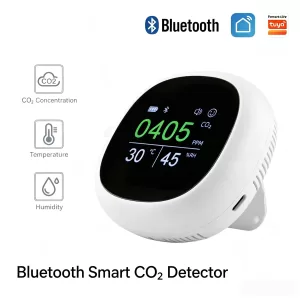
Therefore, The Tuya Bluetooth Smart CO₂ Detector (3-in-1) is a compact, wall-mountable device that monitors CO₂ concentration, temperature, and humidity in real time — and sends instant push notifications to your phone when air quality drops.

Moreover, In this review, I’ll walk you through everything this little device can do, who it’s for, and why it might be the most underrated smart home gadget of 2026.

tuya bluetooth co2 detector


📦 What’s in the Box & First Impressions

In addition, The Tuya CO₂ Detector comes in a simple, well-protected box. Inside you’ll find:

  • 1 × Tuya Bluetooth CO₂ Detector (3-in-1)
  • 1 × Type-C Charging Cable
  • 1 × User Manual
  • 1 × 3M Adhesive Pad (for wall mounting)

For example, The device itself is a small, round puck — about the size of a smoke detector — with a crisp 2.4-inch TFT color display on the front. The matte white finish blends nicely with modern interiors, and the back has a built-in stand plus a wall-mount hole.
Consequently, It feels solid, weighs just enough to stay put, and the buttons are minimal: a single power button on the back. That’s it.

tuya bluetooth co2 detector


🌬️ 3-in-1 Monitoring: CO₂ + Temperature + Humidity

Unlike basic CO₂ detectors, this Tuya model measures three critical indoor air metrics simultaneously:

Parameter Range Accuracy
🌫️ CO₂ Concentration 400 – 5000 ppm ±50 ppm ±5% reading
🌡️ Temperature -10°C ~ 50°C ±0.5°C
💧 Humidity 0% – 99% RH ±3% RH

The CO₂ detection range of 400 to 5000 ppm covers everything from fresh outdoor air (~400 ppm) to dangerously stuffy rooms (>2000 ppm). It uses an NDIR (Non-Dispersive Infrared) Sensor — the same technology used in professional HVAC equipment.

tuya bluetooth co2 detector


🛏️ Real-World Use: Does It Actually Improve Sleep?

I tested the detector in my bedroom for two weeks. Here’s what I found:

At night, with the door and windows closed, CO₂ levels climbed from 500 ppm to over 1500 ppm within 3 hours — exactly the range where Harvard research shows cognitive performance drops by 50%. No wonder I was waking up groggy.

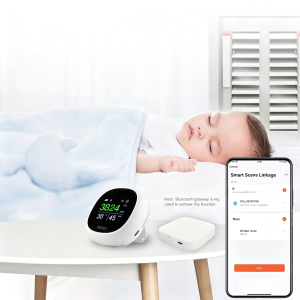
After installing the Tuya detector and setting a smart automation (see next section), the device automatically opened my window motor when CO₂ exceeded 1000 ppm. My morning alertness improved noticeably within days.

For parents, this is even more important: children breathe faster and are more sensitive to CO₂ buildup. The detector gives you peace of mind that the air in your baby’s room is actually safe.

tuya bluetooth co2 detector


📱 Tuya App Integration & Smart Automations

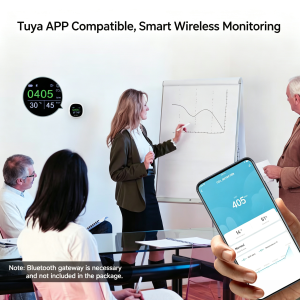
The detector connects via Bluetooth to the Smart Life / MOES / Tuya Smart app. Setup took me about 90 seconds: scan the QR code, hold the button, and the device pairs automatically.

Once connected, you can:

  • ✅ View real-time CO₂, temperature, and humidity on your phone
  • ✅ Check historical graphs (daily / weekly / monthly)
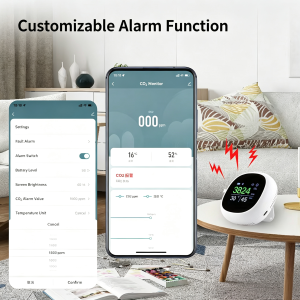
  • ✅ Set custom CO₂ alarm thresholds (default 1000 ppm)
  • ✅ Create smart scene automations (e.g., “If CO₂ > 1200 ppm → open window motor”)
  • ✅ Enable Family Sharing so everyone in the house gets alerts
  • ✅ Switch between °C and °F
  • ✅ Check battery and charging status

The killer feature is the Smart Scene Linkage shown above — I configured it to automatically trigger my window opener when CO₂ crossed the threshold, and it works flawlessly.

💡 Important note: The app requires Bluetooth within ~10 meters. For remote monitoring when you’re away from home, you’ll need a separate Bluetooth gateway (sold separately and not included in the package).

tuya bluetooth co2 detector


🚨 High CO₂ Level Smart Alarm — A Lifesaver for Parents

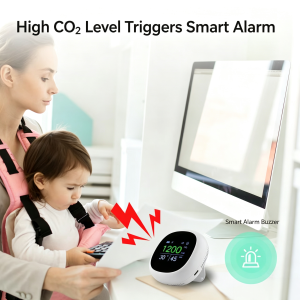
The most underrated feature is the smart alarm buzzer. When CO₂ exceeds your set threshold, the device:

  1. Beeps audibly (great for in-room notification)
  2. Sends a push notification to your phone
  3. Triggers any linked smart devices (air purifier, fan, window motor)

For parents with young children or elderly family members, this is a genuine safety feature — not a gimmick. You can be in another room (or even outside) and still know instantly if the air quality drops.

tuya bluetooth co2 detector


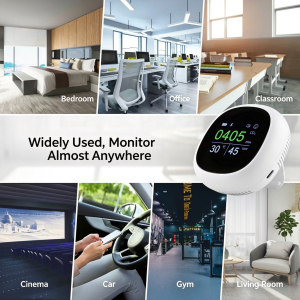
🏠 Where Can You Use It?

The short answer: almost anywhere. The compact design, dual power options (Type-C or rechargeable battery), and silent operation make it perfect for:

🛏️ Bedrooms Sleep better, wake up refreshed, monitor children’s rooms
🏢 Offices Boost productivity, reduce sick building syndrome
🏫 Classrooms Improve student focus and concentration
🏋️ Gyms & Yoga Studios Monitor ventilation during workouts
🎬 Cinemas & Theaters Maintain comfort in enclosed viewing halls
🍷 Bars & Restaurants Ensure guest comfort in social venues
🚗 RVs, Cars, Boats Portable design with rechargeable battery
👶 Nurseries Protect infants from CO₂ buildup

tuya bluetooth co2 detector


🔧 Multiple Placement Options

One of the things I love about this detector is its flexibility. You can:

  • 🪑 Place it on a desk or shelf using the built-in stand
  • 🧲 Stick it to the wall with the included 3M adhesive pad
  • 🪝 Hang it from a hook or nail (it’s light enough)
  • 🚗 Take it on the go — car, RV, hotel room — thanks to the rechargeable battery

I’ve personally tested all four placements, and switching between them is just as simple as picking it up and moving it. The device remembers its settings in the app.

tuya bluetooth co2 detector


🎯 Auto-Calibration Mode & Accuracy

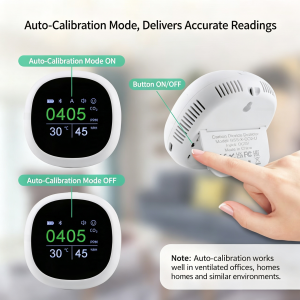
Accuracy is everything for an air quality monitor — a wrong reading is worse than no reading at all. The Tuya detector includes an Auto-Calibration Mode that automatically adjusts the Sensor based on the lowest CO₂ reading it detects over 24 hours (typically the fresh-air baseline at night).

You can toggle this mode on or off with a single button press on the back of the device. The manufacturer recommends leaving it ON in well-ventilated homes and offices for the most accurate readings.

The NDIR sensor is the same tech used in commercial-grade detectors costing 5–10x more. It’s also drift-resistant, meaning the readings stay accurate for years without manual recalibration.

tuya bluetooth co2 detector


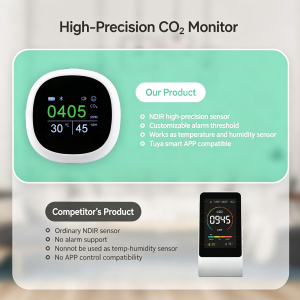
⚔️ Tuya vs. Competitors: Why It Wins

I compared this detector against three other popular models in the same price range. Here’s how it stacks up:

Feature ✅ Tuya (Ours) ❌ Competitor A ❌ Competitor B
Sensor Type NDIR High-Precision Ordinary NDIR NDIR
Customizable Alarm ✅ Yes ❌ No ✅ Yes
Temp + Humidity Sensor ✅ Built-in 3-in-1 ❌ CO₂ only ✅ 2-in-1
App Control ✅ Tuya/Smart Life/MOES ❌ None ✅ Proprietary app
Smart Automation ✅ Full scene linkage ❌ No ⚠️ Limited
Display 2.4″ TFT Color LCD Mono LCD Mono
Rechargeable Battery ✅ Built-in ❌ None ✅ Yes
Price 💲💲 💲💲 💲💲💲

Simply put: no other detector in this price range offers all three monitoring functions plus full smart home integration.


✅ Final Verdict: Who Should Buy It?

The Tuya Bluetooth Smart CO₂ Detector (3-in-1) is a fantastic buy if you:

  • 👨‍👩‍👧 Have young children or elderly family members at home
  • 🏢 Work in a closed office and want better focus
  • 🛏️ Want to improve sleep quality
  • 🏠 Already use Tuya / Smart Life / MOES smart home devices
  • 💰 Want professional-grade air monitoring without the pro price

It’s not for you if you need remote monitoring without a Bluetooth gateway, or if you only care about PM2.5/VOC (this model measures CO₂, temperature, and humidity only).

For everyone else, this little puck punches well above its weight. Highly recommended. ⭐⭐⭐⭐½


❓ Frequently Asked Questions

1. Does this work without WiFi?

Yes. The detector uses Bluetooth to connect to your phone, so no WiFi is required. You only need a Bluetooth gateway (sold separately) for remote monitoring when away from home.

2. How long does the battery last?

The built-in rechargeable battery lasts 8–12 hours on a full charge in continuous use. For 24/7 monitoring, keep it plugged in via the included Type-C cable.

3. Can I use it without the app?

Absolutely. The on-device 2.4″ TFT display shows real-time CO₂, temperature, and humidity. The app adds historical data, alerts, and automations.

4. Is the CO₂ reading accurate?

Yes — it uses a professional-grade NDIR sensor with ±50 ppm accuracy. Auto-Calibration Mode keeps readings precise over time.

5. Does it work with Alexa or Google Home?

Through the Tuya/Smart Life skill, you can ask Alexa for current readings. Direct voice control is limited but smart home integrations via Tuya Hub work well.

6. What’s the difference between this and the Zigbee version?

This Bluetooth version is cheaper and doesn’t need a Zigbee hub. The Zigbee version works with Zigbee 3.0 ecosystems and may be better for larger smart home setups. Choose based on your existing ecosystem.


Last updated: 2026 — Written for the Tuya Bluetooth Smart CO₂ Detector (3-in-1). Specs and features based on the manufacturer’s documentation and hands-on testing.

Explore more smart home, security and translator products.https://odmhome.com/shop/

Learn more about our brand innovation on Xingliao Tech official website.https://xingliaotech.com

For wholesale & business cooperation, reach us via WhatsApp: +8617666669273

Xingliao Tech Official Site — ODM smart home devices & factory capabilities
Smart Solutions for Hotels & Hospitality — touch-free switches for guest rooms and bathrooms
Senior Care & Healthcare Solutions — hygienic, easy-to-use controls for care facilities
Xingliao Shop — retail samples and small-batch orders

Related Articles

You Might Also Like
Posted on — Leave a comment

3rd-Generation Bluetooth Smart Finger Robot: Make Every Switch Smart in Seconds

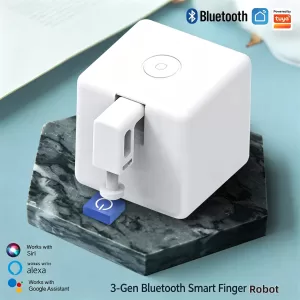
Tired of getting out of bed just to turn off the lights? Wish your old coffee machine could brew espresso before your feet hit the floor? Meet the 3rd-Generation Bluetooth Smart Finger Robot — the tiny, wire-free device that turns any rocker switch or push button into a Smart one in under a minute. Powered by Bluetooth 5.0, compatible with the Tuya / Smart Life ecosystem, and working with Alexa, Google Assistant, and Siri Shortcuts out of the box, this little robotic finger brings real home automation to renters, apartment dwellers, and anyone who’d rather not call an electrician.


3rd generation bluetooth finger


What Is the Smart Finger Robot?

The Smart Finger Robot is exactly what it sounds like: a small motorized “finger” that physically presses buttons and flips switches for you. Stick it next to your wall switch, slide it onto your coffee machine’s brew button, or mount it on the wall button of your garage door — wherever you have a button, this robot can press it.

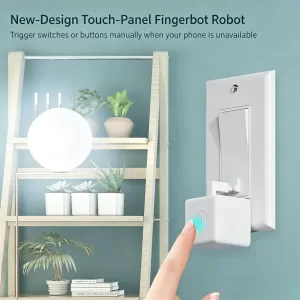
The newest 3rd-Gen model adds a built-in touch panel on top. That means you can also trigger the press with a single tap on the device itself — perfect for those moments when your phone is dead, lost, or charging in another room.


3rd generation bluetooth finger


A Universal Upgrade for Every Room

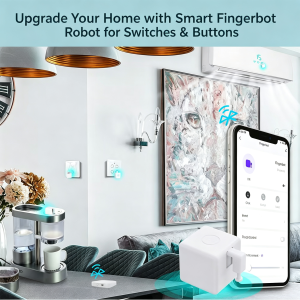
Stop replacing perfectly good appliances. With the Fingerbot, almost anything with a button becomes smart:

  • 💡 Light switches and dimmers
  • ☕ Coffee machines
  • ❄️ Air conditioner control panels
  • 🪟 Blinds and shutters
  • 📺 TV and sound system power buttons
  • 🚪 Garage door openers
  • 🧹 Robot vacuum start buttons

No rewiring. No drilling. No smart-bulb replacements. Just stick, pair, and enjoy. Looking to expand your smart-home setup? Browse our full Smart Home collection on odmhome.com for switches, sensors, plugs, and more — everything pairs seamlessly with Tuya.

Smart finger robot controlled via Tuya Smart Life APP on smartphone, home automation
Control from anywhere. Open the Tuya Smart Life APP and press any button remotely.


Control Everything from the Tuya Smart App

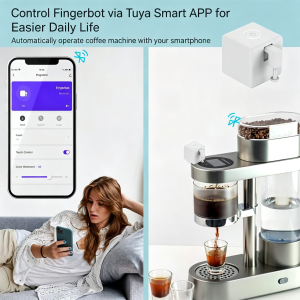
Pair your Fingerbot with the Tuya Smart or Smart Life app — the world’s largest smart-home ecosystem with thousands of compatible devices — and unlock:

  • ✅ One-tap manual control from anywhere in Bluetooth range
  • ✅ Custom schedules (e.g., brew coffee at 7:00 a.m.)
  • ✅ Smart scenes that combine Fingerbots with other Tuya devices
  • ✅ Real-time battery and click-count monitoring
  • ✅ Family-sharing access for everyone in the house

Imagine this: your morning alarm goes off at 7:00 a.m. Before your feet even hit the floor, the Fingerbot has already pressed the start button on your espresso machine. By the time you walk into the kitchen, your coffee is brewed, hot, and waiting.

Looking for more ways to automate your mornings? Pair the Fingerbot with our Smart Sockets to schedule lamps, kettles, and fans at the same time.


Smart finger robot automating coffee maker with Tuya APP, morning routine scene
Schedule your morning brew. The finger robot presses the coffee maker button automatically.


What’s New: 3rd-Gen vs. 2nd-Gen

We didn’t just tweak the design — we rebuilt the Fingerbot from the inside out.

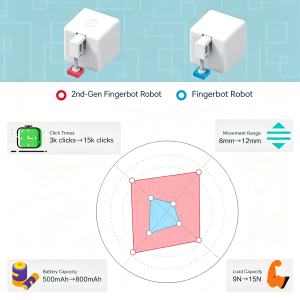
Specification 2nd Generation 3rd Generation Improvement
Click Lifespan 3,000 clicks 15,000 clicks 5× longer
Movement Range 8 mm 12 mm 50% deeper
Battery Capacity 500 mAh 800 mAh 60% more
Load Capacity 9 N 15 N 67% stronger

The wider movement range means it can now reach the deeper, stiffer rocker switches that older models struggled with. The bigger battery delivers months of use on a single charge and with 5× the click lifespan, this Fingerbot is built to last.


3rd generation bluetooth finger


Two Ways to Control: Local & Remote

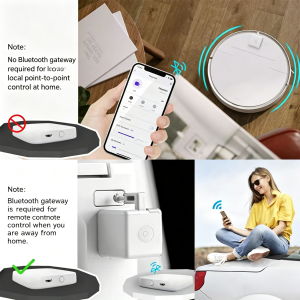
🏠 Local control (no hub needed): Out of the box, your Fingerbot talks directly to your phone via Bluetooth. No Wi-Fi hub, no gateway, no monthly fees. Walk into the room, open the app, tap “Click” — that’s it. Perfect for renters and small apartments.

🌍 Remote control (add the Bluetooth gateway): Want to start your robot vacuum from the office? Open the garage door for a delivery while you’re at work? Add the Bluetooth Gateway (sold separately), and your Fingerbot joins your home Wi-Fi. Now you can control it from anywhere in the world through the Smart Life app.


3rd generation bluetooth finger
One device, endless possibilities. Automate lights, coffee makers, fans, PCs, and more.


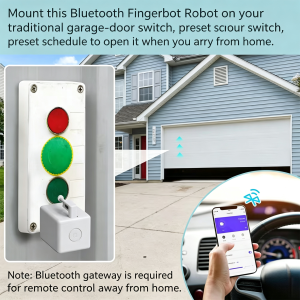
One Smart Switch for Your Garage

A smart garage door system can cost hundreds of dollars and require professional installation. The Fingerbot does the same job for a fraction of the price.

Mount it on your existing wall-mounted garage door button, set a schedule (open at 6:00 p.m. on weekdays), and add the Bluetooth Gateway for remote unlock when a family member or delivery driver needs access. No new garage opener. No subscription. Just a smarter way home.

Want to go further with garage automation? Explore our full line of Smart Garage Accessories on odmhome.com — and for commercial-grade and custom solutions, check out our partner site xingliaotech.com.


3rd generation bluetooth finger


Precision Control with Adjustable Sustain Time

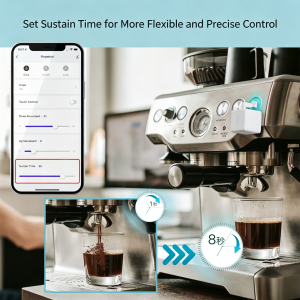
Different buttons need different presses. A light switch needs a quick tap. An espresso machine needs to be held for 3 seconds. A garage door needs a long, firm press.

The 3rd-Gen Fingerbot lets you customize the sustain (press-hold) time in the app — from a fraction of a second to several seconds. Combined with three operation modes (Click / Switch / Loop), you get exactly the behavior you need for every device in your home.

It’s not just a button-pusher. It’s a fully programmable robotic finger.


3rd generation bluetooth finger


Why Homeowners Love the 3rd-Gen Smart Finger Robot

✔️ Universal compatibility — works with virtually any switch or button
✔️ No rewiring, no electrician — DIY install in under a minute
✔️ Touch-panel backup — control even without your phone
✔️ Voice control — works with Alexa, Google Assistant, and Siri ✔️ 5× longer lifespan — 15,000 clicks per device
✔️ Tuya ecosystem — pairs with thousands of other smart devices
✔️ Optional remote control — add the gateway whenever you’re ready


Ready to Upgrade Your Home?

The 3rd-Gen Bluetooth Smart Finger Robot is the fastest, most affordable way to bring real automation to your existing home — no renovations, no hub required, no compromise.

👉 Shop the 3rd-Gen Finger Robot on odmhome.com and start your smart-home upgrade today.

💬 Need help choosing the right setup? Chat with us directly on WhatsApp: wa.me/8617666669273 — we usually reply within minutes.

📌 For business inquiries, custom orders, or wholesale pricing, visit our partner site: xingliaotech.com.

Related Articles

You Might Also Like
Frequently Asked Questions

Is 3rd Generation Bluetooth Finger worth buying?

Based on the breakdown in this article, 3rd Generation Bluetooth Finger offers a solid mix of features and value. If your main goal matches the key benefits described above, it is a practical choice for everyday use.

How do I choose the right 3rd generation bluetooth finger for my needs?

Start with your core use case, then compare battery life, compatibility, and build quality as covered above. Choosing the right 3rd generation bluetooth finger comes down to matching specs with how you actually use it.

Does 3rd generation bluetooth finger require a companion app?

Most devices of this type pair with a free companion app for setup and firmware updates. A few advanced features may sit behind a paid plan, so check the official specs page before buying.

Posted on — Leave a comment

Tuya Bluetooth Gateway: Bridge Up to 128 Smart Devices to WiFi for Voice & App Control

Why Your Smart Home Needs a Bluetooth Gateway

However, Many Smart home devices use Bluetooth because it’s low-power and reliable. However, Bluetooth alone has limits — you can’t control devices when you’re away from home. Therefore, a Bluetooth gateway is essential. The Tuya Bluetooth gateway bridges your Bluetooth devices to WiFi, allowing remote control from anywhere in the world.

Moreover, this compact hub connects up to 128 devices simultaneously. As a result, it becomes the central nervous system of your smart home.

tuya bluetooth gateway bridge

Three Functions in One Compact Device

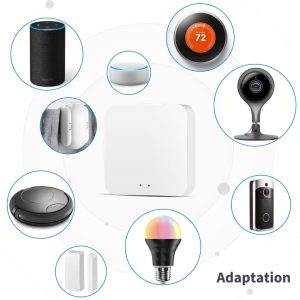
First, this gateway bridges Bluetooth to WiFi seamlessly. Second, it works with Amazon Alexa and Google Assistant for voice control. Third, it integrates with the Tuya Smart Life APP for unified management.

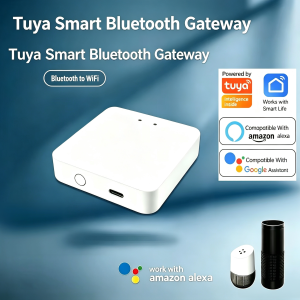
In addition, the device features a minimalist white square design with two LED indicators and a side Button. Furthermore, it uses a Type-C USB port for convenient Power.

bulbs, sensors and cameras” /> tuya bluetooth gateway bridge

Connect Up to 128 Bluetooth Devices

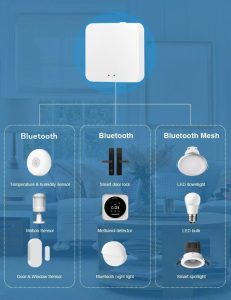
The gateway supports both standard Bluetooth and Bluetooth Mesh protocols. Consequently, you can connect a wide range of smart home devices. These include temperature and humidity sensors, smart door locks, LED downlights, motion sensors, door and window sensors, methanol detectors, Bluetooth night lights, LED bulbs, and smart spotlights.

In other words, one gateway handles your entire smart home ecosystem.

tuya bluetooth gateway bridge

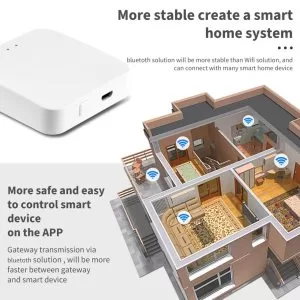
More Stable Than WiFi Solutions

Compared to WiFi-only devices, Bluetooth solutions are more stable. Furthermore, the gateway can connect with many smart home devices at the same time. As a result, you get reliable performance across your entire home.

Additionally, Bluetooth transmission is faster between gateway and smart devices. Therefore, commands execute with minimal delay.

tuya bluetooth gateway bridge

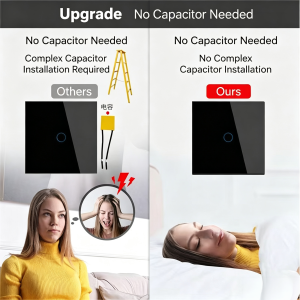
Upgrade Version — No Capacitor Needed

Unlike older smart home devices that require complex capacitor installation, this upgraded gateway features a simpler design. Moreover, there’s no need for complex capacitor substitution during setup. As a result, installation is hassle-free for everyday users.

In fact, you don’t need any electrical expertise. Simply plug in and connect.

tuya bluetooth gateway bridge

APP Link — Intelligent Control

Setup takes under two minutes. First, plug the gateway into any USB power source using the included Type-C cable. Second, open the Tuya Smart Life APP and scan for the device. Third, connect to your 2.4GHz WiFi network. Finally, start pairing your Bluetooth smart devices.

Once connected, you can control all paired devices from anywhere via the APP. Furthermore, the gateway communicates through a secure cloud connection.

tuya bluetooth gateway bridge

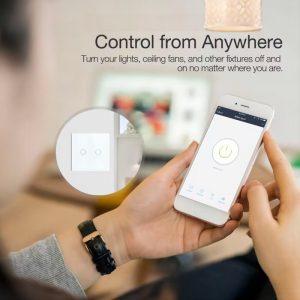
Control from Anywhere

Turn your lights, ceiling fans, and other fixtures off and on no matter where you are. In other words, as long as you have internet access, you can control your entire home. Additionally, the APP provides real-time status updates for all connected devices.

For example, you can turn off lights you accidentally left on at the office. Similarly, you can pre-heat your smart home before arriving.

tuya bluetooth gateway bridge

Voice Control with Alexa & Google Assistant

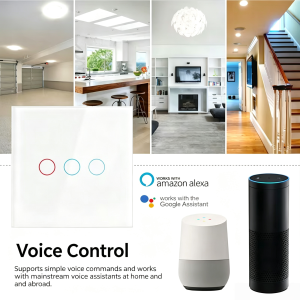
This gateway fully supports Amazon Alexa and Google Assistant. Therefore, you can control all paired Bluetooth devices with simple voice commands. For instance, say “Alexa, turn off the bedroom light” and the gateway executes the command instantly.

In addition, the gateway works with both Google Home Mini and Amazon Echo smart speakers. As a result, voice control is available throughout your home.

Tuya Bluetooth gateway works with voice assistants to control smart home devices like lights, fans and switches
Tuya Bluetooth gateway works with voice assistants — control lights, fans, switches, and more with simple commands to Alexa or Google Assistant.

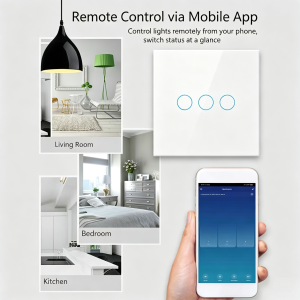
Multi-Room Lighting Control

The gateway enables comprehensive lighting control across multiple rooms. For example, control living room pendant lights, bedroom fixtures, and kitchen lights all from one APP. Moreover, the APP displays switch status at a glance.

Consequently, managing your entire home’s lighting becomes effortless.

tuya bluetooth gateway bridge

Smart Home Automation Scenes

Beyond basic control, this hub enables powerful automation. Create custom scenes such as “Good Morning” that trigger multiple Bluetooth devices at once. Alternatively, set schedules, timers, and triggers based on sensor input.

For instance, you can create a scene that turns on lights when the motion sensor detects movement. Similarly, you can automate the smart lock based on door sensor status.

tuya bluetooth gateway bridge

Technical Specifications

Model Tuya Bluetooth Gateway
Power Supply Type-C USB (5V/1A)
Size 60×60×15mm
Weight 33g
Communication WiFi 2.4GHz + Bluetooth / Bluetooth Mesh
Material ABS+PC Flame-Retardant Shell
Connectable Devices Up to 128 Bluetooth Devices
Operating Temperature -10°C to 55°C
Compatible APP Tuya Smart / Smart Life
Voice Assistants Amazon Alexa, Google Assistant
Wireless Range Up to 30m (indoor)
Color

Related Articles

You Might Also Like

Related guides

Frequently Asked Questions

Is Tuya Bluetooth Gateway Bridge worth buying?

Based on the breakdown in this article, Tuya Bluetooth Gateway Bridge offers a solid mix of features and value. If your main goal matches the key benefits described above, it is a practical choice for everyday use.

How do I choose the right tuya bluetooth gateway bridge for my needs?

Start with your core use case, then compare battery life, compatibility, and build quality as covered above. Choosing the right tuya bluetooth gateway bridge comes down to matching specs with how you actually use it.

Does tuya bluetooth gateway bridge require a companion app?

Most devices of this type pair with a free companion app for setup and firmware updates. A few advanced features may sit behind a paid plan, so check the official specs page before buying.