Posted on — Leave a comment

Turn an Old AC or TV Into a Smart Device With an IR Remote Hub

Most homes have at least one expensive appliance that will never be Smart: a split air conditioner from 2016, a television that predates apps, a set-top box with a remote and no network. An infrared hub is the cheap fix. It learns or looks up the remote codes and replays them on command, so the appliance becomes controllable from an app and from automations.

Our IR range includes the Tuya WiFi IR remote, the universal WiFi IR controller, a unit with a built-in temperature and humidity display, and Zigbee versions such as the UFO-R 11 that run through a gateway.

What an IR hub can and cannot do

Can: send any command the original remote could — Power, temperature, mode, fan speed, input selection. Schedule it. Trigger it from a sensor. Control it by voice through the app’s assistant integrations. Tuya Curtain Motor OEM: Complete Sourcing Guide 2026

Cannot: read back the appliance’s actual state. Infrared is one-way. If someone changes the temperature with the physical remote, the app will not know, and its idea of the state drifts. This is the single biggest limitation and the reason “set to 22 degrees” is more reliable than “increase by one degree“.

Setting one up: the part people get wrong

  1. Place it with line of sight to the appliance. Infrared is light. It does not pass through walls, cabinet doors or a sofa. It does bounce off some surfaces, so a unit on a shelf facing the wall behind an AC unit often works.
  2. One hub per room, generally. A hub cannot cover two rooms separated by a wall. Multiple units in an app are normal.
  3. Pick the code library entry carefully. If the brand and model match, it works first time. If not, try the generic code for that brand, then fall back to learning mode.
  4. Use learning mode for stubborn appliances. Point the original remote at the hub and press each button; the hub records the raw signal. Slower, but it works for almost anything.
  5. Set the state you expect. Because there is no feedback, set an absolute value in automations rather than a relative change.

WiFi or Zigbee version?

WiFi units are simpler — one fewer box, they join the router directly. ZigBee units such as the UFO-R 11 Need a gateway (see wired vs wireless gateways) but keep your WiFi clear and are easier to run alongside a larger sensor network. If you already have a Zigbee gateway for other Devices, take the Zigbee version; if this is your first Smart device, take the WiFi one.

Automations that are actually useful

  • Pre-cool the bedroom 20 minutes before bedtime in summer, off an hour later.
  • Turn the AC off when a window opens — pair with a door or window sensor.
  • Switch the TV and set-top box on together with one command instead of two remotes.
  • Turn everything off at a set time so standby loads do not run overnight.
  • Trigger from temperature Using a temperature and humidity sensor, or the hub’s own built-in sensor on models that have one.

FAQ

Will it work with my air conditioner?
Almost certainly, if the AC uses an infrared remote. Look up the brand in the app’s code library; if the exact model is missing, use learning mode with the original remote.
Can it control several appliances?
Yes, provided they are all in line of sight of the hub. Each appliance is set up as a separate virtual remote in the app.
Does it work without internet?
Remote control from outside the home needs internet. Locally scheduled commands usually continue, but voice control does not.
Why does the app show the wrong temperature?
Because infrared has no feedback. The app tracks what it last sent, not what the appliance is doing. Send absolute values.
Can I hide it?
It needs line of sight, but it is small — mounted on a shelf or the top of a cabinet, it disappears. Do not put it inside a closed cabinet.
Does it replace the original remote?
For daily use, usually yes. Keep the original somewhere for setup changes and for the rare function the hub does not map.

Related Articles

You Might Also Like

Frequently Asked Questions

Is Turn Old Smart worth buying?

Based on the breakdown in this article, Turn Old Smart offers a solid mix of features and value. If your main goal matches the key benefits described above, it is a practical choice for everyday use.

How do I choose the right turn old smart for my needs?

Start with your core use case, then compare battery life, compatibility, and build quality as covered above. Choosing the right turn old smart comes down to matching specs with how you Actually use it.

Does turn old smart require a companion app?

Most devices of this type pair with a free companion app for setup and firmware updates. A few advanced features may sit behind a paid plan, so check the official specs page before buying.

Posted on — Leave a comment

Smart Switch for Water Heater and AC

A water heater, an air conditioner and a bedside lamp do not ask the same thing from a switch, and the number that separates them is the current rating. Get that number wrong and the switch either trips, runs hot, or quietly dies in a few months — so this is the one specification worth reading before you buy.

Start from the appliance, not the switch

Every Smart switch, socket or controller carries a maximum current, usually printed as 10 A, 16 A or 20 A. Convert your appliance first: Reolink vs Tuya Security Camera

  • Amps ≈ watts ÷ volts. A 2,000 W heater on 230 V draws about 8.7 A. The same heater on 120 V draws about 16.7 A.
  • Motors are different. An air conditioner, a pump or a fan has a compressor or motor with a startup surge that can be several times the running current. The switch must be rated for that surge, not just the running figure.
  • Continuous loads need headroom. Anything that runs for hours — a water heater, a floor heating mat, a towel rail — should sit at roughly 80% of the switch rating or less.

So a 16 A switch at 230 V is comfortable to about 3,600 W of resistive load, and noticeably less than that for a motor load.

What each appliance actually needs

Water heaters and boilers

Heating elements are resistive and predictable: check the element rating on the nameplate and size the switch above it. What most people actually want here is not just on/off but temperature control — a controller with a probe that switches by measured temperature rather than by clock, so the tank reaches the Set point and stops. That is a different product from a plain switch and it usually saves more energy than any schedule.

Air conditioners

An AC unit is the hardest case in a house: inductive load, large startup surge, and it often runs for hours. Two safe approaches:

  • A switch rated well above the unit’s running current, specified for motor or inductive loads.
  • Infrared control instead of switching power — a universal IR controller sends the same commands as the remote Without touching the wiring at all. This is the low-risk answer and the one most installers prefer for split units.

Floor heating

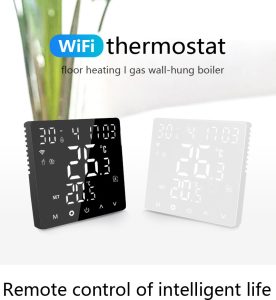
Heating mats and cables are resistive but continuous, and they are usually paired with a thermostat rather than a switch: a 16 A floor-heating thermostat with a floor probe and a boiler relay covers both electric mats and gas boilers. A plain switch here is the wrong product — the comfort gain comes from temperature control and scheduling together.

Fans, pumps and curtains

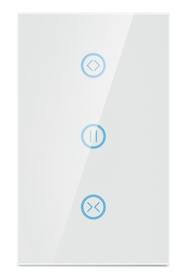
Ceiling fans and curtain motors are smaller loads but still inductive, and fan speed control is not the same as dimming a lamp. Look for a panel with a dedicated fan or curtain channel rather than repurposing a light dimmer.

Wall switch, socket, or controller?

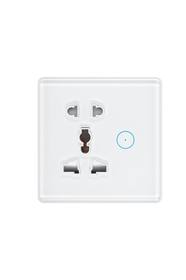
  • Wall switch (10-16 A): replaces the plate and controls a fixed circuit — best for heaters on their own circuit and for room lighting.
  • Smart socket (16 A): controls the appliance plugged into it and measures what it consumes. Best when the appliance is already on a plug, and the metering is genuinely useful for a heater.
  • Temperature controller: switches by measured temperature. Best for water heaters, floor heating, heat mats, incubators and aquariums.
  • IR controller: no power switching at all. Best for air conditioners and TVs.

Safety checklist before you order

  • Read the appliance nameplate for watts and current, and note whether it is a motor load.
  • Choose a rating with headroom — a 16 A device for a 10 A continuous load, not a 10 A device for a 9 A load.
  • Check the switch is specified for the load type: resistive, inductive or motor.
  • Never put a heater or an AC unit on a plug-in Smart plug rated below the appliance, and never daisy-chain extension leads through one.
  • Confirm the circuit itself is protected correctly; a smart device is not a substitute for a correctly-sized breaker and RCD.
  • When in doubt, or where local regulations require it, have an electrician fit it — high-current work is not the place to improvise.

XingLiao switches, sockets and controllers for high loads

Frequently Asked Questions

What does 16A mean on a smart switch?

It is the maximum current the relay can switch continuously — about 3,600 W at 230 V or roughly 1,900 W at 120 V for a resistive load. Motor loads need more headroom than the running figure suggests.

Can I put an air conditioner on a smart switch?

Sometimes, with a switch rated well above the unit’s running current and specified for motor loads. The safer alternative for split units is an infrared controller that sends the remote’s commands without switching the power at all.

Do I need a thermostat or just a switch for floor heating?

A thermostat. Floor heating needs temperature feedback from a floor probe, and the comfort and energy savings come from controlling to temperature, not from switching mains on a timer.

Why does my smart switch get warm?

Some warmth is normal under load, but a switch that is hot to the touch is undersized or poorly terminated. Check the load against the rating and have the connections inspected.

Can I use a smart plug for a heater?

Only if the plug’s rating exceeds the heater’s draw — a 2,000 W heater on 230 V needs a plug rated comfortably above 8.7 A. Many small smart plugs are 10 A and should not run heaters continuously.

Is energy monitoring useful on high-load devices?

Very. Heating and cooling are usually the largest loads in a home, and a metering socket turns “I think the heater is expensive” into a number you can act on.

Related guides

Browse all smart switches and sockets · Tell us the appliance and its rating and we will match the right switch

Related Articles

You Might Also Like
Posted on — Leave a comment

Smart Plug Energy Monitoring: Find the Appliance That Costs You Most

A Smart plug with energy monitoring answers one question a normal plug cannot: how much electricity is this appliance actually using, right now and over a month. Put one on your worst suspects — an old fridge, a tumble dryer, a games console, a TV and soundbar stack, a heater — and you will usually find a standby load of a few watts running 24 hours a day plus one appliance that dominates the bill.

This guide shows how to read the numbers, what a realistic saving looks like, and the safety limits that matter when you plug in a heater.

What the numbers mean

  • Power (W): what the appliance draws right now. A kettle at 3,000 W for three minutes costs less than a 200 W appliance left on all day.
  • Energy (kWh): what you are billed for. Your plug shows a daily, monthly or cumulative total — use that, not watts.
  • Standby: the reading when the device is “off”. Anything above 0.5 W is a real standby draw; 5–15 W is common for set-top boxes, consoles and older AV gear.
  • Cost: kWh × your tariff. A 10 W device left on all year is roughly 87 kWh — a noticeable line on a bill for something that does nothing.

How to audit a room in 20 minutes

  1. Plug the metering Smart plug in and pair it in the app; check that the power reading updates live.
  2. Plug in the suspect appliance and note the reading while it is in normal use.
  3. Switch the appliance off at its own switch and note the standby figure.
  4. Leave it a full day and read the daily kWh total — that single number is the honest answer.
  5. Multiply by your tariff and by 365 for a yearly figure.

Typical findings: an old chest freezer in a garage running 400–600 kWh/year, a games console in instant-on mode 100–200 kWh/year, a TV plus soundbar plus set-top box on standby 50–100 kWh/year.

What to automate once you know

  • Cut standby overnight: Schedule the plug off from 00:30 to 06:00 for AV stacks, consoles and chargers. Keep anything that needs a network wake-up or a clock on permanently.
  • Cap a heater: schedule an electric heater or towel rail to run only in the hours the room is used, and set a maximum daily runtime if the app supports it.
  • Alert on abnormal draw: a notification when a freezer’s daily kWh jumps can catch a failing seal or a Door left ajar before the food spoils.
  • Kill the “always on” charger: phone and tool chargers draw very little, but a scheduled off period costs nothing and removes the trickle.

Safety limits: read the rating, not the marketing

  • 10 A vs 16 A: a 10 A plug at 230 V is about 2,300 W; a 16 A plug about 3,680 W. Match the plug to the appliance, and never run a 3 kW heater through a 10 A plug.
  • Continuous load: for anything running for hours (heaters, dehumidifiers), stay well under the maximum — aim for 80% of rating or less.
  • Do not daisy-chain: never put a smart plug into an extension lead that already carries a high load.
  • Indoor use only: standard smart plugs are not weatherproof. For a garden or a garage, use an outdoor-rated socket or a proper enclosure.

Where a smart plug is the wrong tool

  • Anything with a mechanical switch you need at the wall: a plug that is switched off in the app leaves people confused (“it is plugged in and dead”).
  • Fridges and freezers on a schedule: do not switch these off to save energy — the food risk far exceeds the saving.
  • High-power appliances that should be hardwired: ovens, showers, EV chargers and Water heaters belong on a properly rated circuit, not a plug.
Frequently Asked Questions

Do smart plugs actually save money?

Directly, modestly — a few tens of pounds or dollars a year from removing standby and scheduling heaters. The bigger value is finding the one appliance that is quietly costing you several times more than everything else, which is hard to spot Without metering. Where to Place Smoke and Carbon Monoxide Alarms

How accurate is energy monitoring on a smart plug?

Good enough to rank appliances: typically within a few percent for resistive loads like heaters and kettles, and slightly less accurate for low-power switch-mode supplies. Use it for comparison, not for billing disputes.

Can I use a smart plug for an electric heater?

Only if the plug’s rating exceeds the heater’s draw with margin — a 2 kW heater needs a 10 A plug at minimum and a 16 A plug is safer. Never run heaters through a plug that is also feeding anything else.

Do smart plugs work without internet?

Schedules stored on the plug or hub run Without internet; cloud-based schedules and remote control do not. If a schedule matters, check whether your platform runs it locally.

Can I measure my whole house with one plug?

No. A plug measures one socket. Whole-house monitoring needs a meter at the consumer unit or a clamp meter; use smart plugs to break down individual appliances.

Will a smart plug work with voice assistants?

Most WiFi plugs do, directly and without a hub. Zigbee plugs need a hub, but add mesh coverage and local automations in return.

Related guides

Browse smart plugs and sockets · Ask us which rating you need

Related Articles

You Might Also Like
Posted on — Leave a comment

Smart Plug Guide: Automate Any Appliance Without Rewiring

smart plug home automation

smart plug home automationsmart plug home automation

However, A Smart plug is the simplest way to make any ordinary appliance smart. By plugging your devices into a smart plug, you can control them remotely, set schedules, and monitor energy usage, all without any rewiring. Whether you want to turn off a lamp from bed, schedule your coffee maker, or reduce standby Power waste, a smart plug offers an affordable entry point into home automation.

What Is a Smart Plug?

Therefore, A smart plug is a small adapter that sits between your wall outlet and your appliance. Therefore, It connects to your home Wi-Fi network and allows you to control Power to the device through a smartphone app or voice assistant. Most smart plugs also track energy consumption, helping you identify. This appliances use the most electricity. Setup takes less than five minutes and requires no tools or technical knowledge.

Top Uses for a Smart Plug

Moreover, Here are the most popular ways people use smart plugs at home: Video Doorbell Review 2026: What to Look For, Smart Features Compared, and Buyer’s Guide

  • Lamp automation: Schedule lights to turn on at sunset and off at bedtime.
  • Kitchen convenience: Start your coffee maker or slow cooker from bed using the app.
  • Energy savings: Cut standby power to entertainment systems when not in use.
  • Security simulation: Randomize lamp schedules when traveling to deter burglars, complementing your smart doorbell camera setup.

Choosing the Right Smart Plug

In addition, When shopping for a smart plug, check compatibility with your voice assistant. For example, Most plugs support Amazon Alexa and Google Assistant. Meanwhile, Apple HomeKit support is less common. Look for models with energy monitoring if you want to track usage. Consider the physical size, as some bulky plugs block adjacent outlets. In addition, According to Consumer Reports, the best smart plugs balance reliability, ease of setup, and affordability. Browse our smart home products for quality options. Best Smart Home Starter Kit for 2026: Switches, Doorbells, Cameras, Sensors and Pet Feeders Compared

How to Set Up a Smart Plug

For example, Setting up a smart plug is quick and simple. First, plug the smart plug into a wall outlet. Moreover, Download the manufacturer app and create an account if needed. Press and hold the pairing Button on the plug until it blinks. Follow the in-app instructions to connect it to your Wi-Fi network. Furthermore, Once connected, you can name the plug, assign it to a room, and start creating schedules or scenes. Most plugs also support grouping with other smart devices for synchronized control. Smart WiFi Pet Feeder: Automated Pet Care with APP Control Smart Home Market Trends 2026: What Distributors Must Know About Modular Security, Voice Control and Energy-Saving Devices

Smart Plug Energy Monitoring

However, Many smart plugs include real-time energy monitoring features. You can view daily, weekly, and monthly consumption reports in the app. As a result, This data helps you identify energy-hungry devices and make informed decisions about usage. Some plugs even let you set energy thresholds and receive alerts when consumption exceeds a set level. Over time, this feature can lead to significant savings on your electricity bill. Smart Home Wholesale FAQ: 15 Questions Every Buyer Asks Before Ordering in Bulk M8 Dopamine Color Wireless Lavalier Microphone: Get Clear Studio Audio For Vlogging & Live Streaming

Conclusion

A smart plug is the easiest way to start your home automation journey. Importantly, With no wiring required, affordable pricing, and instant smart control, it transforms any appliance into a smart device. Explore our collection of smart plugs and start automating your home today.

Related Articles

You Might Also Like
Related guides
Frequently Asked Questions

Is Plug Automate Appliance Without worth buying?

Based on the breakdown in this article, Plug Automate Appliance Without offers a solid mix of features and value. If your main goal matches the key benefits described above, it is a practical choice for everyday use.

How do I choose the right plug automate appliance without for my needs?

Start with your core use case, then compare battery life, compatibility, and build quality as covered above. Choosing the right plug automate appliance without comes down to matching specs with how you actually use it.

Does plug automate appliance without require a companion app?

Most devices of this type pair with a free companion app for setup and firmware updates. A few advanced features may sit behind a paid plan, so check the official specs page before buying.