Posted on — Leave a comment

Turn an Old AC or TV Into a Smart Device With an IR Remote Hub

Most homes have at least one expensive appliance that will never be Smart: a split air conditioner from 2016, a television that predates apps, a set-top box with a remote and no network. An infrared hub is the cheap fix. It learns or looks up the remote codes and replays them on command, so the appliance becomes controllable from an app and from automations.

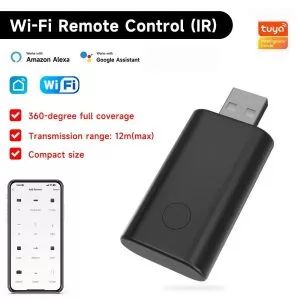
Our IR range includes the Tuya WiFi IR remote, the universal WiFi IR controller, a unit with a built-in temperature and humidity display, and Zigbee versions such as the UFO-R 11 that run through a gateway.

What an IR hub can and cannot do

Can: send any command the original remote could — Power, temperature, mode, fan speed, input selection. Schedule it. Trigger it from a sensor. Control it by voice through the app’s assistant integrations. Tuya Curtain Motor OEM: Complete Sourcing Guide 2026

Cannot: read back the appliance’s actual state. Infrared is one-way. If someone changes the temperature with the physical remote, the app will not know, and its idea of the state drifts. This is the single biggest limitation and the reason “set to 22 degrees” is more reliable than “increase by one degree“.

Setting one up: the part people get wrong

  1. Place it with line of sight to the appliance. Infrared is light. It does not pass through walls, cabinet doors or a sofa. It does bounce off some surfaces, so a unit on a shelf facing the wall behind an AC unit often works.
  2. One hub per room, generally. A hub cannot cover two rooms separated by a wall. Multiple units in an app are normal.
  3. Pick the code library entry carefully. If the brand and model match, it works first time. If not, try the generic code for that brand, then fall back to learning mode.
  4. Use learning mode for stubborn appliances. Point the original remote at the hub and press each button; the hub records the raw signal. Slower, but it works for almost anything.
  5. Set the state you expect. Because there is no feedback, set an absolute value in automations rather than a relative change.

WiFi or Zigbee version?

WiFi units are simpler — one fewer box, they join the router directly. ZigBee units such as the UFO-R 11 Need a gateway (see wired vs wireless gateways) but keep your WiFi clear and are easier to run alongside a larger sensor network. If you already have a Zigbee gateway for other Devices, take the Zigbee version; if this is your first Smart device, take the WiFi one.

Automations that are actually useful

  • Pre-cool the bedroom 20 minutes before bedtime in summer, off an hour later.
  • Turn the AC off when a window opens — pair with a door or window sensor.
  • Switch the TV and set-top box on together with one command instead of two remotes.
  • Turn everything off at a set time so standby loads do not run overnight.
  • Trigger from temperature Using a temperature and humidity sensor, or the hub’s own built-in sensor on models that have one.

FAQ

Will it work with my air conditioner?
Almost certainly, if the AC uses an infrared remote. Look up the brand in the app’s code library; if the exact model is missing, use learning mode with the original remote.
Can it control several appliances?
Yes, provided they are all in line of sight of the hub. Each appliance is set up as a separate virtual remote in the app.
Does it work without internet?
Remote control from outside the home needs internet. Locally scheduled commands usually continue, but voice control does not.
Why does the app show the wrong temperature?
Because infrared has no feedback. The app tracks what it last sent, not what the appliance is doing. Send absolute values.
Can I hide it?
It needs line of sight, but it is small — mounted on a shelf or the top of a cabinet, it disappears. Do not put it inside a closed cabinet.
Does it replace the original remote?
For daily use, usually yes. Keep the original somewhere for setup changes and for the rare function the hub does not map.

Related Articles

You Might Also Like

Frequently Asked Questions

Is Turn Old Smart worth buying?

Based on the breakdown in this article, Turn Old Smart offers a solid mix of features and value. If your main goal matches the key benefits described above, it is a practical choice for everyday use.

How do I choose the right turn old smart for my needs?

Start with your core use case, then compare battery life, compatibility, and build quality as covered above. Choosing the right turn old smart comes down to matching specs with how you Actually use it.

Does turn old smart require a companion app?

Most devices of this type pair with a free companion app for setup and firmware updates. A few advanced features may sit behind a paid plan, so check the official specs page before buying.

Posted on — Leave a comment

Turn Any IR Device into a Smart Home Gadget: Tuya WiFi USB IR Remote Controller Review

In today’s smart home era, one of the most frustrating experiences is realizing that your older TV, air conditioner, or fan doesn’t have WiFi connectivity — meaning you can’t control it with your voice or Smartphone. The Tuya WiFi Smart USB IR Remote Controller solves this problem in seconds, turning any IR-controlled appliance into a fully connected smart device that works with Amazon Alexa, Google Assistant, and the Tuya Smart Life APP. This compact, plug-and-play device is one of the most affordable and effective smart home upgrades you can buy. Whether you want to turn on the air conditioner before arriving home, control your TV with voice commands, or automate your home appliances with schedules and triggers, this little USB stick delivers premium functionality at a Budget price.

Why the Tuya WiFi IR Remote Controller Stands Out

Tuya WiFi smart USB IR remote controller with Smart Life APP and 360 degree coverage
Tuya WiFi smart USB IR remote controller with Smart Life APP — 360 degree full coverage, 12m max transmission range, compatible with cameras and all IR appliances.

Tuya WiFi Smart USB IR Remote Controller with Smart Life APP

The first thing you’ll notice about the Tuya WiFi IR Remote Controller is its incredibly compact design. Measuring only 61.5 × 14 × 28mm — smaller than a typical USB flash drive — this black matte device plugs directly into any USB power source without taking up valuable outlet space.

But the real magic happens once you pair it with the Tuya Smart Life APP. Suddenly, every IR appliance in your home — from your air conditioner to your TV, fan, lights, set-top box, projector, audio system, heater, and air purifier — becomes controllable from your Smartphone or through voice commands.

1. Universal Remote Control App — Control Home Appliances from Anywhere

Tuya WiFi IR remote controlled by Smart Life APP for instant home appliance control anywhere
Tuya smart IR remote controller with Smart Life APP — turn on home appliances in one second from anywhere, no matter where you are or what you are doing.

Tuya Smart Life APP remote control for home appliances anywhere

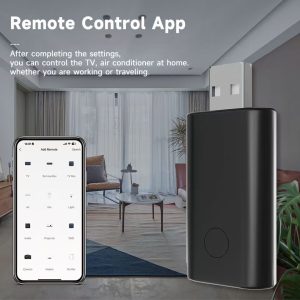
The core feature of this Tuya IR remote is its ability to turn your smartphone into a universal remote through the Tuya Smart Life APP. After completing the simple one-time setup, you can control your TV, air conditioner, fan, lights, and other IR appliances from anywhere — whether you’re at work, traveling, or simply too comfortable on the couch to reach for a physical remote.

The Smart Life APP supports a wide range of device types including TVs, set-top boxes, TV boxes, air conditioners, fans, lights, audio systems, projectors, DVDs, cameras, heaters, and air purifiers. The clean, intuitive interface makes adding and managing each device a breeze.

2. Remotely Turn On the Air Conditioner — Comfort Before You Arrive Home

Tuya WiFi IR remote controller turning on air conditioner remotely via Smart Life app
Tuya Smart IR Remote – Remotely Control Your Air Conditioner

Remotely turn on air conditioner via Tuya Smart Life APP

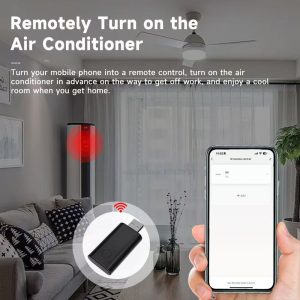
One of the most popular use cases for the Tuya IR remote is remote air conditioner control. Imagine this: it’s a hot summer day, and you’re driving home from work. Instead of arriving to a stuffy, hot house, you can simply open the Smart Life APP and turn on your AC 30 minutes before you arrive. By the time you walk through the door, your home is perfectly cool and comfortable.

The same works in reverse during winter — pre-heat your home so you walk into a warm, cozy space. The IR remote’s 360-degree full coverage and 12-meter transmission range ensure reliable signal delivery to your AC unit regardless of where it’s mounted in the room.

3. Intelligent Timing Setting — Schedule Your Appliances Automatically

Tuya WiFi IR remote controller with intelligent timing setting for scheduled home appliance control
Tuya smart IR remote controller supports intelligent timing setting — schedule your home appliances to turn on or off automatically at specific times, with delay setting support.

Tuya IR remote intelligent timing setting for TV and appliances

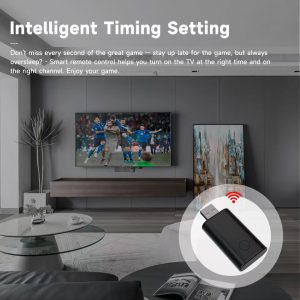
Beyond simple remote control, the Tuya Smart Life APP offers powerful scheduling capabilities. You can set custom on/off schedules for any IR appliance — perfect for those who want to maintain a regular routine without manual operation.

For example, set your TV to automatically turn off at 10 PM every night to enforce a bedtime schedule for the kids. Or schedule your air conditioner to turn on at 6 AM during weekdays and 8 AM on weekends. The delay setting feature adds extra flexibility for users who need appliances to operate at specific intervals throughout the day.

4. Infrared Connection & Intelligent Linkage — Smart Home Automation

turn device into gadget
Tuya IR remote infrared connection with multiple home appliances

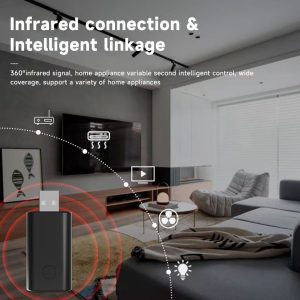
The Tuya IR remote controller enables true smart home automation through its 360-degree infrared signal coverage. The device broadcasts IR commands in all directions with high-power LEDs, ensuring reliable communication with every IR-controlled appliance in the room — without line-of-sight positioning.

Create intelligent linkage scenarios by connecting different IR appliances together for one-tap control. For example, design a “Movie Night” scene that simultaneously turns on your TV, switches the input to HDMI 1, powers on the soundbar, and dims your smart lights. The possibilities are virtually limitless when combined with other Tuya-compatible smart home devices.

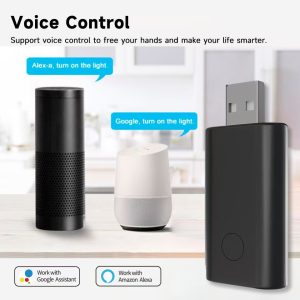
5. Voice Control — Hands-Free Smart Home with Alexa & Google Assistant

turn device into gadget
Tuya IR remote voice control with Alexa and Google Assistant

Perhaps the most compelling feature is full voice assistant compatibility. After simple setup in the Alexa or Google Home APP, you can control all your IR appliances through natural voice commands. The included “Work with Google Assistant” and “Work with Amazon Alexa” badges confirm official compatibility. Imagine simply saying:

  • “Alexa, turn on the TV”
  • “Alexa, set the air conditioner to 72 degrees”
  • “Hey Google, turn off the fan”
  • “Hey Google, dim the living room lights”

This hands-free control makes the Tuya IR remote perfect for elderly family members, accessibility users, busy parents, or anyone who values convenience. No more searching for lost remotes — just speak your command and let the smart home handle the rest.

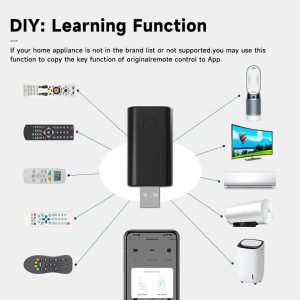
6. DIY Learning Function — Compatible with Any IR Remote

turn device into gadget
Tuya IR remote DIY learning function to copy any IR remote

What if your specific appliance brand isn’t in the Tuya device library? No problem. The DIY Learning Function allows the Tuya IR remote to copy IR signals directly from your original remote control. Simply point your existing remote at the Tuya device, press the Button you want to copy, and the Smart Life APP will save the signal for future use.

This means virtually any IR-controlled appliance — even obscure or older models — can be controlled through the Smart Life APP. From vintage TVs to specialty fans, from smart Light bulbs to projector screens, the learning function ensures maximum compatibility with your entire home setup.

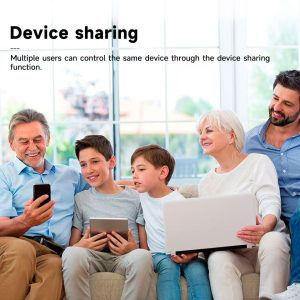
7. Device Sharing — Family-Friendly Smart Home Control

turn device into gadget
<img src=”https://PLACEHOLDER_IMAGE_8_URL” alt=”Tuy


Related Articles

You Might Also Like
Frequently Asked Questions

Is Turn Device Into Gadget worth buying?

Based on the breakdown in this article, Turn Device Into Gadget offers a solid mix of features and value. If your main goal matches the key benefits described above, it is a practical choice for everyday use.

How do I choose the right turn device into gadget for my needs?

Start with your core use case, then compare battery life, compatibility, and build quality as covered above. Choosing the right turn device into gadget comes down to matching specs with how you actually use it.

Does turn device into gadget require a companion app?

Most devices of this type pair with a free companion app for setup and firmware updates. A few advanced features may sit behind a paid plan, so check the official specs page before buying.