Posted on — Leave a comment

Dual-Lens Security Camera: What the Second Lens Is Actually For

A second lens on a Security camera is easy to dismiss as a spec-sheet trick. In practice it solves a specific problem that a single lens cannot: you cannot simultaneously watch a whole room and read a detail in it. Wide enough to see everything means too wide to identify anything.

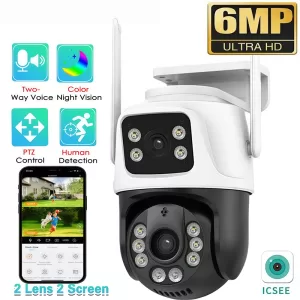
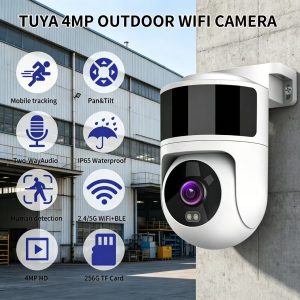
Our dual-lens models — the KT-A36, the KT-R13 6 MP and the outdoor dual-lens PTZ — use the second lens in one of two ways.

Two designs, two jobs

1. One fixed lens plus one moving lens

The fixed lens holds a constant view of the whole scene while the PTZ lens pans, tilts and zooms to follow movement. The value is that you never lose the overview: a single-lens PTZ Camera that swings away to follow somebody leaves you blind to whatever happens behind it. With two lenses, the overview keeps recording whatever the tracking lens is doing.

2. One wide lens plus one telephoto lens

Both lenses point at the same scene at different focal lengths. You get a wide context shot and a tight detail shot of the same moment — the difference between “a person approached the door” and “here is a readable face and the parcel they carried”.

Where a dual-lens camera earns its cost

  • Driveways and forecourts — the overview catches the vehicle, the detail lens catches the plate or the driver.
  • Shop floors and small warehouses — one camera covers the aisle and the till without a second install.
  • Large gardens — the fixed lens watches the gate, the PTZ follows whoever comes through it.

Where it does not: a small room, a corridor, or anywhere a single wide lens already covers everything you care about. If the space is smaller than about 25 square metres and has one entrance, one lens is enough and cheaper.

What to check on the spec sheet

  • Which lens does the tracking? On PTZ designs, confirm the moving lens is the one with optical zoom.
  • Night behaviour of both lenses. Two lenses need two sets of IR LEDs; a model that lights only one leaves the other blind after dark.
  • Storage load. Two streams use roughly twice the card space. Size the card accordingly.
  • Resolution honesty. A “6 MP” figure often describes the combined or the higher lens. Check per-lens resolution.

Installation notes

Dual-lens units are physically larger and heavier than a Mini camera, and the outdoor PTZ versions need a solid fixing — a soffit, a wall with proper plugs, not a fence panel that moves in the wind. Mount high enough to be out of reach but Low enough that the detail lens has a usable angle on faces; roughly 2.5 to 3.5 metres works outdoors.

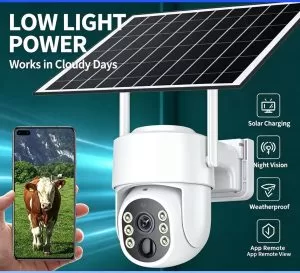
Power is the other constraint: outdoors, an outdoor PTZ with two lenses wants mains or a Solar panel, not a small internal Battery. See options for outdoor cameras with no power outlet.

FAQ

Does a dual-lens camera record two videos at once?
Yes — both streams are recorded, and the app lets you view them together or separately.
Is auto-tracking useful or annoying?
Useful outdoors with pets and passing cars if sensitivity is tuned; annoying in a busy scene where it chases everything. Most models let you set tracking zones.
Can I turn one lens off?
Usually you can disable a view in the app, which is a way to halve storage use if you only need one angle.
Does it work at night?
Yes, provided both lenses have infrared or full-colour night support — check this per model rather than assuming.
Do I need a subscription for auto-tracking?
No, tracking runs on the camera itself. Cloud storage is a separate, optional service.
Is the outdoor model waterproof?
The outdoor dual-lens PTZ carries an IP65 rating for rain and dust. Indoor dual-lens models are not rated for outdoor use.

Related Articles

You Might Also Like

Frequently Asked Questions

Is Dual Lens Security worth buying?

Based on the breakdown in this article, Dual Lens Security offers a solid mix of features and value. If your main goal matches the key benefits described above, it is a practical choice for everyday use.

How do I choose the right dual lens security for my needs?

Start with your core use case, then compare battery life, compatibility, and build quality as covered above. Choosing the right dual lens Security comes down to matching specs with how you actually use it.

Does dual lens security require a companion app?

Most devices of this type pair with a free companion app for setup and firmware updates. A few advanced features may sit behind a paid plan, so check the official specs page before buying.

Posted on — Leave a comment

Tuya Security Camera Manufacturer Review: What to Look for in 2026When sourcing Tuya-compatible security cameras for your brand or business, choosing the right manufacturer is the most important decision you’ll make. A good OEM partner means reliable products, fast lead times, and smooth custom branding. A bad one means returns, complaints, and a damaged reputation.In this review, we break down everything you need to know when evaluating a Tuya security camera manufacturer in 2026.## Why Tuya Cameras?Tuya-powered cameras work out of the box with the Tuya Smart app, supporting: – Alexa and Google Home voice control – Remote viewing from anywhere – Motion detection alerts – Cloud storage and local SD card options – Custom branding on the app splash screenFor resellers, this means you don’t need to build your own app or cloud infrastructure. Customers already know and trust the Tuya ecosystem.

When sourcing Tuya-compatible Security cameras for your brand or business, choosing the right manufacturer is the most important decision you’ll make. A good OEM partner means reliable products, fast lead times, and smooth custom branding. A bad one means returns, complaints, and a damaged reputation.

In this review, we break down everything you need to know when evaluating a Tuya security Camera manufacturer in 2026.

Why Tuya Cameras?

Tuya-powered cameras work out of the box with the Tuya Smart app, supporting:

  • Alexa and Google Home voice control
  • Remote viewing from anywhere
  • Motion detection alerts
  • Cloud storage and local SD card options
  • Custom branding on the app splash screen

For resellers, this means you don’t need to build your own app or cloud infrastructure. Customers already know and trust the Tuya ecosystem.

What to Look for in a Manufacturer

1. Real Factory, Not a Trading Company

Many “manufacturers” on Alibaba are actually trading companies marking up prices. Look for:

  • Video factory tours on their website
  • In-house SMT and assembly lines
  • Their own QC team
  • CE/FCC/RoHS certificates

2. Camera Resolution and Night Vision

For 2026, 2K (3MP) has become the minimum. 4K (8MP) is available for premium models. Check:

  • Night vision range (20m+ is standard)
  • Color night vision vs IR
  • Wide angle (110-140 degrees)
  • Two-way audio

3. OEM/ODM Customization

Good manufacturers should offer:

  • Custom logo on camera housing
  • Custom packaging
  • Custom firmware (WiFi region, language)
  • App rebranding (white label)

4. MOQ and Lead Time

Typical OEM terms:

  • Standard models: MOQ 50-100 pcs
  • Custom housing: MOQ 500-1000 pcs
  • Sample lead time: 3-5 days
  • Bulk production: 15-25 days

Common Pitfalls

  • Hidden firmware costs: Some factories charge extra for custom firmware
  • No after-sales support: Ask about replacement policy for DOA units
  • WiFi module region locks: Make sure the camera uses a global WiFi module
  • Cloud subscription fees: Tuya cloud has per-device fees — who pays?

XingLiao as Your Tuya Camera Partner

At XingLiao (Shenzhen), we manufacture Tuya-compatible security cameras, video doorbells, and smart switches for brands in 60+ countries. We offer:

  • 3MP/4MP/8MP WiFi and PoE cameras
  • Custom logo and packaging from 50 pcs
  • CE/FCC/RoHS certified
  • 24-hour technical support
  • Sample shipping within 3 days

Looking for a Tuya camera manufacturer? Contact us for a free quote and sample.

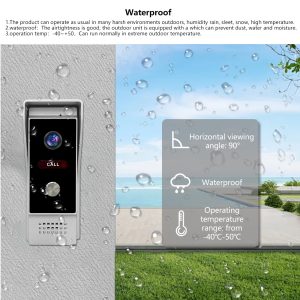
Waterproof outdoor unit of Tuya video door phone, rainproof doorbell camera, wide viewing angle, work temperature -40~50℃
Waterproof outdoor station for tuya wired video intercom, works under rain, snow and extreme temperature,90 degree horizontal viewing angle.

Related Articles

You Might Also Like
Frequently Asked Questions

Is Tuya Security Camera worth buying?

Based on the breakdown in this article, Tuya Security Camera offers a solid mix of features and value. If your main goal matches the key benefits described above, it is a practical choice for everyday use.

How do I choose the right tuya security camera for my needs?

Start with your core use case, then compare battery life, compatibility, and build quality as covered above. Choosing the right tuya security camera comes down to matching specs with how you actually use it.

Does tuya security camera require a companion app?

Most devices of this type pair with a free companion app for setup and firmware updates. A few advanced features may sit behind a paid plan, so check the official specs page before buying.

Posted on — Leave a comment

Do You Actually Need a Zigbee Gateway? (And What Breaks Without One)

actually need zigbee - Do You Actually Need a Zigbee Gateway? (And What Breaks Without One)
Do You Actually Need a Zigbee Gateway? (And What Breaks Without One)

Every Zigbee project reaches the same question: which gateway, and do we really Need One? The short answer is yes — Zigbee Devices do not talk to a router, they talk to a gateway, and the gateway is what makes the mesh, the scenes and the remote access work.

What the gateway does

It is the coordinator of the Zigbee mesh: it holds the device list, runs automations locally, and bridges the mesh to your router so the app can reach it from anywhere. Without it, a Zigbee Switch is a switch — local control only, no app, no scenes, no voice. Mini Smart Breakers: Putting a Whole Circuit on a Schedule

Wired or wireless

A wired gateway connects by Ethernet, which is what you want for a permanent installation: fixed location, no WiFi dependency, stable mesh. A Wireless one connects over WiFi, which is easier to place but puts the mesh behind the router’s Wireless performance.

How many gateways

One gateway handles a large mesh — dozens of devices across a house is normal. What limits you is range, not count: Zigbee is a mesh, so mains-powered devices relay for each other, but a Battery sensor at the far end of a garden still needs something nearby to talk to. 2.8 Inch Offline Video Baby Monitor: Private, Simple, No-WiFi Nursery Monitoring

Placement

Central, off the floor, away from the router and away from large metal objects. A gateway in a metal consumer unit Works but reduces range.

FAQ
Can Zigbee devices work without a gateway?
No. Local control works, but app control, scenes and voice need the gateway.
Can I mix brands of Zigbee devices?
Usually within the same ecosystem — keep the gateway and the devices on the same platform.
Does the internet need to be up for automation?
No — scenes stored on the gateway run locally, which is one of the reasons people choose Zigbee.

Ready to specify it? Full specifications, gang options, colors and quantity pricing are on the ZigBee Smart Gateway — Wired & Wireless product page — OEM logo, manual and packaging are available from the first order.

Related Articles

You Might Also Like
Frequently Asked Questions

Is Actually Need Zigbee worth buying?

Based on the breakdown in this article, Actually Need Zigbee offers a solid mix of features and value. If your main goal matches the key benefits described above, it is a practical choice for everyday use.

How do I choose the right actually need zigbee for my needs?

Start with your core use case, then compare battery life, compatibility, and build quality as covered above. Choosing the right actually need zigbee comes down to matching specs with how you actually use it.

Does actually need zigbee require a companion app?

Most devices of this type pair with a free companion app for setup and firmware updates. A few advanced features may sit behind a paid plan, so check the official specs page before buying.

Posted on — Leave a comment

Curtain and Dimmer Switches on a US Plate: What 118 × 72 mm Can Do

118 × 72 mm US Standard Function Switches — Curtain / Dimmer / ZigBee Push Button
Curtain and Dimmer Switches on a US Plate: What 118 × 72 mm Can Do

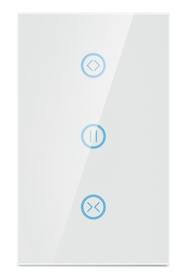
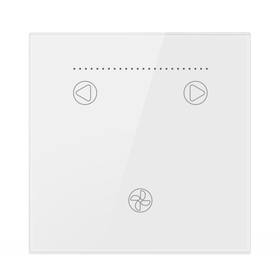
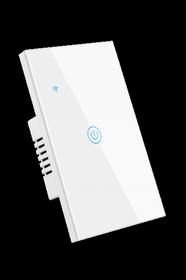
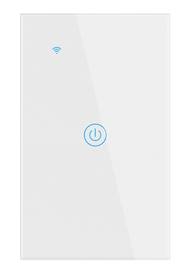
The 118 × 72 mm US plate is not just a different rectangle — it is the format used across US, Australian, Italian, Canadian, Brazilian, Vietnamese and Thai installations. On that plate the interesting part is not the light Switch, it is the function Switches: Curtains, dimming and Zigbee scene buttons.

Curtain control

A curtain Switch reverses a motor instead of switching a lamp, so the rating (1800 W here) and the interlock between open and reverse matter more than the app. One plate runs electric curtains and roller shutters, with the usual open / close / stop plus percentage position in the app. Where the DS-129JL Series Fits: Apartments, Hotels and Office Retrofits

Dimming

The dimmer in this group is rated 600 W and expects a thyristor dimmable lamp. That is the one compatibility check that trips people up: a non-dimmable LED on a dimmer either flickers or destroys the driver. Get the lamp right and the rest is simple — level from the plate, from the app, or by voice. How to Choose a Bluetooth Touch Switch for a 86 Wall Box — DS-101BY Series

Zigbee push button

A push-button Zigbee Switch is a scene controller: one Button can trigger a whole set of devices through the gateway rather than switching a load directly. It is the cheapest way to add “goodnight” or “movie” to a room without rewiring. Where the DS-123Y Series Fits: Apartments, Hotels and Office Retrofits

Colours and finishes

The curtain and dimmer plates come in White, Black, Gold and Grey, so a mixed installation keeps one look across the Wall. The ZigBee button is White only.

FAQ
Can the dimmer run any LED lamp?
No — the lamp must be thyristor dimmable, 600 W maximum.
Can the curtain Switch run roller shutters?
Yes — rated 1800 W for electric curtains and roller shutters.
Do the Zigbee models need a gateway?
Yes, the Zigbee models in this group all require a gateway.

Ready to specify it? Full specifications, gang options, colors and quantity pricing are on the 118 × 72 mm US Standard Function Switches — Curtain / Dimmer / ZigBee Push Button product page — OEM logo, manual and packaging are available from the first order.

Related Articles

You Might Also Like
Frequently Asked Questions

Is Curtain Dimmer Switches worth buying?

Based on the breakdown in this article, Curtain Dimmer Switches offers a solid mix of features and value. If your main goal matches the key benefits described above, it is a practical choice for everyday use.

How do I choose the right curtain dimmer switches for my needs?

Start with your core use case, then compare battery life, compatibility, and build quality as covered above. Choosing the right curtain dimmer switches comes down to matching specs with how you actually use it.

Does curtain dimmer switches require a companion app?

Most devices of this type pair with a free companion app for setup and firmware updates. A few advanced features may sit behind a paid plan, so check the official specs page before buying.

Posted on — Leave a comment

DS-129 vs a Standard Wall Switch: What Actually Changes in a US standard Retrofit

DS-129 Series WiFi Touch Switch (1 Gang / 2 Gang / 3 Gang / 4 Gang)
DS-129 vs a Standard Wall Switch: What Actually Changes in a US standard Retrofit

Swapping a mechanical Switch for a glass Touch Plate changes more than the look: the box has to accept it, the Wiring has to feed it, and the switch now needs somewhere to report to. Using the DS-129 Series as the example, here is what actually changes in a US Standard retrofit.

The plate and the box

The DS-129 uses the 118 × 72 mm US-style wall box. In most US standard installations the existing box already matches, so the retrofit is a like-for-like swap. What changes is depth: the electronics sit behind the glass, so a very shallow box may need a spacer or a deeper back box.

The wiring

This model needs a neutral wire in the box — it will not work in a two-wire single-fire box. Confirm it before you order in quantity — it is the One thing that cannot be fixed on site.

The radio

WiFi 2.4 GHz, no hub needed — it joins the router directly through the tuya / Smart life app. For a single room or a small flat, this is the quickest route with nothing extra to buy.

What you gain

  • Group control — one tap or one app scene can drive every gang on the plate.
  • Schedules and countdown — useful for exterior lights, towel rails and anything on a timer.
  • Status at a glance — the app shows whether a light was left on, which a mechanical switch cannot tell you.
  • Voice — Alexa and Google Home once the switch is in the app.

Specifications

Quantity pricing

FAQ
Can I keep my existing faceplate?
No — the Touch plate is part of the switch, but the standard box size means no chasing or plastering.
What happens if the WiFi drops?
The Touch panel keeps working locally, and schedules stored on the device still run.
Are the plates standard across the range?
Yes — gang sizes and finishes match across the Series, so mixed plates line up on the same wall.

Ready to specify it? Full specifications, gang options, colors and quantity pricing are on the DS-129 series product page — OEM logo, manual and packaging are available from the first order.

Related Articles

You Might Also Like
Frequently Asked Questions

Is 129 Standard Wall worth buying?

Based on the breakdown in this article, 129 Standard Wall offers a solid mix of features and value. If your main goal matches the key benefits described above, it is a practical choice for everyday use.

How do I choose the right 129 standard wall for my needs?

Start with your core use case, then compare battery life, compatibility, and build quality as covered above. Choosing the right 129 standard wall comes down to matching specs with how you actually use it.

Does 129 standard wall require a companion app?

Most devices of this type pair with a free companion app for setup and firmware updates. A few advanced features may sit behind a paid plan, so check the official specs page before buying.

Posted on — Leave a comment

DS-123HK vs a Standard Wall Switch: What Actually Changes in a US standard Retrofit

DS-123HK Series WiFi Touch Switch (1 Gang / 2 Gang / 3 Gang)
DS-123HK vs a Standard Wall Switch: What Actually Changes in a US standard Retrofit

Swapping a mechanical switch for a glass Touch plate changes more than the look: the box has to accept it, the Wiring has to feed it, and the switch now needs somewhere to report to. Using the DS-123HK Series as the example, here is what actually changes in a US Standard retrofit.

The plate and the box

The DS-123HK uses the standard wall box. In most US standard installations the existing box already matches, so the retrofit is a like-for-like swap. What changes is depth: the electronics sit behind the glass, so a very shallow box may need a spacer or a deeper back box.

The wiring

This model works in both single-fire (no neutral) and zero-fire (with neutral) boxes. That is the practical advantage of a universal relay: the same SKU covers the neutral boxes in a new build and the two-wire boxes in a refurbishment, so one order can serve both.

The radio

WiFi 2.4 GHz, no hub needed — it joins the router directly through the tuya / Smart life app. For a single room or a small flat, this is the quickest route with nothing extra to buy. Where the DS-123Y Series Fits: Apartments, Hotels and Office Retrofits

What you gain
  • Group control — one tap or one app scene can drive every gang on the plate.
  • Schedules and countdown — useful for exterior lights, towel rails and anything on a timer.
  • Status at a glance — the app shows whether a light was left on, which a mechanical switch cannot tell you.
  • Voice — Alexa and Google Home once the switch is in the app.
Specifications
Quantity pricing
FAQ
Can I keep my existing faceplate?
No — the Touch plate is part of the switch, but the standard box size means no chasing or plastering.
What happens if the WiFi drops?
The touch panel keeps working locally, and schedules stored on the device still run.
Are the plates standard across the range?
Yes — gang sizes and finishes match across the Series, so mixed plates line up on the same wall.

Ready to specify it? Full specifications, gang options, colors and quantity pricing are on the DS-123HK series product page — OEM logo, manual and packaging are available from the first order.

Related Articles

You Might Also Like
Frequently Asked Questions

Is 123hk Standard Wall worth buying?

Based on the breakdown in this article, 123hk Standard Wall offers a solid mix of features and value. If your main goal matches the key benefits described above, it is a practical choice for everyday use.

How do I choose the right 123hk standard wall for my needs?

Start with your core use case, then compare battery life, compatibility, and build quality as covered above. Choosing the right 123hk standard wall comes down to matching specs with how you actually use it.

Does 123hk standard wall require a companion app?

Most devices of this type pair with a free companion app for setup and firmware updates. A few advanced features may sit behind a paid plan, so check the official specs page before buying.

Posted on — Leave a comment

DS-121JL vs a Standard Wall Switch: What Actually Changes in a US standard Retrofit

DS-121JL Series WiFi Touch Switch (1 Gang / 2 Gang / 3 Gang / 4 Gang)
DS-121JL vs a Standard Wall Switch: What Actually Changes in a US standard Retrofit

Swapping a mechanical switch for a glass Touch plate changes more than the look: the box has to accept it, the Wiring has to feed it, and the switch now needs somewhere to report to. Using the DS-121JL Series as the example, here is what actually changes in a US Standard retrofit.

The plate and the box

The DS-121JL uses the 118 × 72 mm US-style wall box. In most US Standard installations the existing box already matches, so the retrofit is a like-for-like swap. What changes is depth: the electronics sit behind the glass, so a very shallow box may need a spacer or a deeper back box.

The wiring

This model works in both single-fire (no neutral) and zero-fire (with neutral) boxes. That is the practical advantage of a universal relay: the same SKU covers the neutral boxes in a new build and the two-wire boxes in a refurbishment, so one order can serve both.

The radio

WiFi 2.4 GHz, no hub needed — it joins the router directly through the tuya / Smart life app. For a Single room or a small flat, this is the quickest route with nothing extra to buy. Where the DS-123Y Series Fits: Apartments, Hotels and Office Retrofits

What you gain
  • Group control — one tap or one app scene can drive every gang on the plate.
  • Schedules and countdown — useful for exterior lights, towel rails and anything on a timer.
  • Status at a glance — the app shows whether a light was left on, which a mechanical switch cannot tell you.
  • Voice — Alexa and Google Home once the switch is in the app.
Specifications
Quantity pricing
FAQ
Can I keep my existing faceplate?
No — the Touch plate is part of the switch, but the Standard box size means no chasing or plastering.
What happens if the WiFi drops?
The touch panel keeps working locally, and schedules stored on the device still run.
Are the plates standard across the range?
Yes — gang sizes and finishes match across the Series, so mixed plates line up on the same wall.

Ready to specify it? Full specifications, gang options, colors and quantity pricing are on the DS-121JL series product page — OEM logo, manual and packaging are available from the first order.

Related Articles

You Might Also Like
Frequently Asked Questions

Is 121jl Standard Wall worth buying?

Based on the breakdown in this article, 121jl Standard Wall offers a solid mix of features and value. If your main goal matches the key benefits described above, it is a practical choice for everyday use.

How do I choose the right 121jl standard wall for my needs?

Start with your core use case, then compare battery life, compatibility, and build quality as covered above. Choosing the right 121jl standard wall comes down to matching specs with how you actually use it.

Does 121jl standard wall require a companion app?

Most devices of this type pair with a free companion app for setup and firmware updates. A few advanced features may sit behind a paid plan, so check the official specs page before buying.

Posted on — Leave a comment

Wiring the DS-121BWHK Series: What Your Wall Box Needs to Have

DS-121BWHK Series WiFi Touch Switch (1 Gang / 2 Gang / 3 Gang / 4 Gang)
Wiring the DS-121BWHK Series: What Your Wall Box Needs to Have

Two wires or three? It is the single question that decides which smart Switch you can fit, and it is worth answering before the plates arrive on site. The DS-121BWHK Series is zero-fire (neutral required): needs a neutral wire in the box — it will not work in a two-wire single-fire box.

What “single-fire” and “zero-fire” actually mean

A zero-fire (neutral) box has a neutral conductor alongside the live, so the Switch electronics can draw current without passing it through the lamp. A single-fire box only has live in and switched live out, so the Switch has to leak a tiny current through the lamp to stay powered — which is why LED lamps sometimes glow faintly when switched off.

Fitting the DS-121BWHK

  • With neutral — connect live to L, neutral to N, and the load to L1, L2, L3. No capacitor needed.
  • Test before closing up — power the board, check each gang switches, then clip the plate on. Chasing a Wiring fault after the glass is fitted is how plates get broken.

Which lamps behave best

Incandescent and halogen loads are trouble-free. With LED drivers, use a decent driver and keep the total load above the minimum the driver expects — the capacitor exists precisely for this. If a lamp still glows, move it to a gang with a higher load or add a second capacitor. Where the DS-1081WL Series Fits: Apartments, Hotels and Office Retrofits

Specifications

Connectivity

The DS-121BWHK talks over a direct Bluetooth link to your phone. No hub and no router needed — pair it straight from the phone for local control and schedules.

Quantity pricing
FAQ
My box has no neutral — can I still use this switch?
No. Choose a single-fire or universal model instead.
Is the capacitor included?
Not needed for this model — it is zero-fire only.
Can I wire it myself?
If you are comfortable replacing a Standard switch, yes. Otherwise use a licensed electrician — local rules vary.

Ready to specify it? Full specifications, gang options, colors and quantity pricing are on the DS-121BWHK series product page — OEM logo, manual and packaging are available from the first order.

Related Articles

You Might Also Like
Frequently Asked Questions

Is Wiring 121bwhk Series worth buying?

Based on the breakdown in this article, Wiring 121bwhk Series offers a solid mix of features and value. If your main goal matches the key benefits described above, it is a practical choice for everyday use.

How do I choose the right wiring 121bwhk series for my needs?

Start with your core use case, then compare battery life, compatibility, and build quality as covered above. Choosing the right wiring 121bwhk Series comes down to matching specs with how you actually use it.

Posted on — Leave a comment

DS-111AW vs a Standard Wall Switch: What Actually Changes in a European standard Retrofit

DS-111AW Series — New WiFi Touch Switch (1 Gang / 2 Gang / 3 Gang / 4 Gang)
DS-111AW vs a Standard Wall Switch: What Actually Changes in a European standard Retrofit

Swapping a mechanical Switch for a glass Touch plate changes more than the look: the box has to accept it, the Wiring has to feed it, and the Switch now needs somewhere to report to. Using the DS-111AW Series as the example, here is what actually changes in a European Standard retrofit.

The plate and the box

The DS-111AW uses the 86 × 86 mm square wall box (EU / UK / China). In most European Standard installations the existing box already matches, so the retrofit is a like-for-like swap. What changes is depth: the electronics sit behind the glass, so a very shallow box may need a spacer or a deeper back box.

The wiring

This model needs a neutral wire in the box — it will not work in a two-wire single-fire box. Confirm it before you order in quantity — it is the one thing that cannot be fixed on site.

The radio

Zigbee 3.0, a zigbee gateway is required (our wired / wireless gateway covers it) — in return you get mesh coverage and much lower standby power. For a whole-house project, a mesh also means switches in the far rooms stay reachable without adding WiFi repeaters. Where the DS-123Y Series Fits: Apartments, Hotels and Office Retrofits

What you gain
  • Group control — one tap or one app scene can drive every gang on the plate.
  • Schedules and countdown — useful for exterior lights, towel rails and anything on a timer.
  • Status at a glance — the app shows whether a light was left on, which a mechanical switch cannot tell you.
  • Voice — Alexa and Google Home once the switch is in the app.
Specifications
Quantity pricing
FAQ
Can I keep my existing faceplate?
No — the Touch plate is part of the switch, but the standard box size means no chasing or plastering.
What happens if the WiFi drops?
The touch panel keeps working locally, and schedules stored on the device still run.
Are the plates standard across the range?
Yes — gang sizes and finishes match across the Series, so mixed plates line up on the same wall.

Ready to specify it? Full specifications, gang options, colors and quantity pricing are on the DS-111AW series product page — OEM logo, manual and packaging are available from the first order.

Related Articles

You Might Also Like
Frequently Asked Questions

Is 111aw Standard Wall worth buying?

Based on the breakdown in this article, 111aw Standard Wall offers a solid mix of features and value. If your main goal matches the key benefits described above, it is a practical choice for everyday use. Wiring the DS-123 Series: Single-Fire, Zero-Fire and the Capacitor Question

How do I choose the right 111aw standard wall for my needs?

Start with your core use case, then compare battery life, compatibility, and build quality as covered above. Choosing the right 111aw standard wall comes down to matching specs with how you actually use it.

Does 111aw standard wall require a companion app?

Most devices of this type pair with a free companion app for setup and firmware updates. A few advanced features may sit behind a paid plan, so check the official specs page before buying.

Posted on — Leave a comment

DS-1071ZC vs a Standard Wall Switch: What Actually Changes in a European standard Retrofit

DS-1071ZC Series WiFi Touch Switch (1 Gang / 2 Gang / 3 Gang)
DS-1071ZC vs a Standard Wall Switch: What Actually Changes in a European standard Retrofit

Swapping a mechanical Switch for a glass Touch plate changes more than the look: the box has to accept it, the Wiring has to feed it, and the switch now needs somewhere to report to. Using the DS-1071ZC Series as the example, here is what actually changes in a European Standard retrofit.

The plate and the box

The DS-1071ZC uses the 86 × 86 mm square wall box (EU / UK / China). In most European Standard installations the existing box already matches, so the retrofit is a like-for-like swap. What changes is depth: the electronics sit behind the glass, so a very shallow box may need a spacer or a deeper back box. Where the DS-1042ZC Series Fits: Apartments, Hotels and Office Retrofits

The wiring

This model works in both single-fire (no neutral) and zero-fire (with neutral) boxes. That is the practical advantage of a universal relay: the same SKU covers the neutral boxes in a new build and the two-wire boxes in a refurbishment, so one order can serve both.

The radio

Zigbee 3.0, a zigbee gateway is required (our wired / wireless gateway covers it) — in return you get mesh coverage and much lower standby power. For a whole-house project, a mesh also means switches in the far rooms stay reachable without adding WiFi repeaters. Where the DS-123Y Series Fits: Apartments, Hotels and Office Retrofits

What you gain
  • Group control — one tap or one app scene can drive every gang on the plate.
  • Schedules and countdown — useful for exterior lights, towel rails and anything on a timer.
  • Status at a glance — the app shows whether a light was left on, which a mechanical switch cannot tell you.
  • Voice — Alexa and Google Home once the switch is in the app.
Specifications
Quantity pricing
FAQ
Can I keep my existing faceplate?
No — the Touch plate is part of the switch, but the standard box size means no chasing or plastering.
What happens if the WiFi drops?
The touch panel keeps working locally, and schedules stored on the device still run.
Are the plates standard across the range?
Yes — gang sizes and finishes match across the Series, so mixed plates line up on the same wall.

Ready to specify it? Full specifications, gang options, colors and quantity pricing are on the DS-1071ZC series product page — OEM logo, manual and packaging are available from the first order.

Related Articles

You Might Also Like
Frequently Asked Questions

Is 1071zc Standard Wall worth buying?

Based on the breakdown in this article, 1071zc Standard Wall offers a solid mix of features and value. If your main goal matches the key benefits described above, it is a practical choice for everyday use. Wiring the DS-123 Series: Single-Fire, Zero-Fire and the Capacitor Question

How do I choose the right 1071zc standard wall for my needs?

Start with your core use case, then compare battery life, compatibility, and build quality as covered above. Choosing the right 1071zc standard wall comes down to matching specs with how you actually use it.

Does 1071zc standard wall require a companion app?

Most devices of this type pair with a free companion app for setup and firmware updates. A few advanced features may sit behind a paid plan, so check the official specs page before buying.