Posted on — Leave a comment

Turn Any IR Device into a Smart Home Gadget: Tuya WiFi USB IR Remote Controller Review

In today’s smart home era, one of the most frustrating experiences is realizing that your older TV, air conditioner, or fan doesn’t have WiFi connectivity — meaning you can’t control it with your voice or Smartphone. The Tuya WiFi Smart USB IR Remote Controller solves this problem in seconds, turning any IR-controlled appliance into a fully connected smart device that works with Amazon Alexa, Google Assistant, and the Tuya Smart Life APP. This compact, plug-and-play device is one of the most affordable and effective smart home upgrades you can buy. Whether you want to turn on the air conditioner before arriving home, control your TV with voice commands, or automate your home appliances with schedules and triggers, this little USB stick delivers premium functionality at a Budget price.

Why the Tuya WiFi IR Remote Controller Stands Out
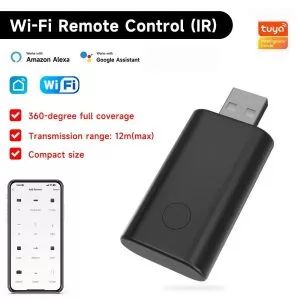
Tuya WiFi smart USB IR remote controller with Smart Life APP and 360 degree coverage
Tuya WiFi smart USB IR remote controller with Smart Life APP — 360 degree full coverage, 12m max transmission range, compatible with cameras and all IR appliances.

Tuya WiFi Smart USB IR Remote Controller with Smart Life APP

The first thing you’ll notice about the Tuya WiFi IR Remote Controller is its incredibly compact design. Measuring only 61.5 × 14 × 28mm — smaller than a typical USB flash drive — this black matte device plugs directly into any USB power source without taking up valuable outlet space.

But the real magic happens once you pair it with the Tuya Smart Life APP. Suddenly, every IR appliance in your home — from your air conditioner to your TV, fan, lights, set-top box, projector, audio system, heater, and air purifier — becomes controllable from your Smartphone or through voice commands.

1. Universal Remote Control App — Control Home Appliances from Anywhere
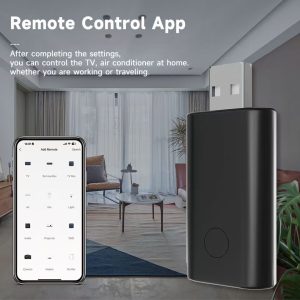
Tuya WiFi IR remote controlled by Smart Life APP for instant home appliance control anywhere
Tuya smart IR remote controller with Smart Life APP — turn on home appliances in one second from anywhere, no matter where you are or what you are doing.

Tuya Smart Life APP remote control for home appliances anywhere

The core feature of this Tuya IR remote is its ability to turn your smartphone into a universal remote through the Tuya Smart Life APP. After completing the simple one-time setup, you can control your TV, air conditioner, fan, lights, and other IR appliances from anywhere — whether you’re at work, traveling, or simply too comfortable on the couch to reach for a physical remote.

The Smart Life APP supports a wide range of device types including TVs, set-top boxes, TV boxes, air conditioners, fans, lights, audio systems, projectors, DVDs, cameras, heaters, and air purifiers. The clean, intuitive interface makes adding and managing each device a breeze.

2. Remotely Turn On the Air Conditioner — Comfort Before You Arrive Home
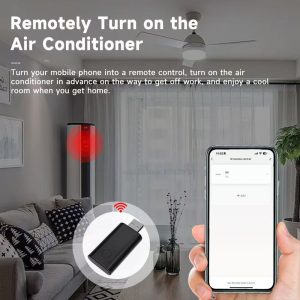
Tuya WiFi IR remote controller turning on air conditioner remotely via Smart Life app
Tuya Smart IR Remote – Remotely Control Your Air Conditioner

Remotely turn on air conditioner via Tuya Smart Life APP

One of the most popular use cases for the Tuya IR remote is remote air conditioner control. Imagine this: it’s a hot summer day, and you’re driving home from work. Instead of arriving to a stuffy, hot house, you can simply open the Smart Life APP and turn on your AC 30 minutes before you arrive. By the time you walk through the door, your home is perfectly cool and comfortable.

The same works in reverse during winter — pre-heat your home so you walk into a warm, cozy space. The IR remote’s 360-degree full coverage and 12-meter transmission range ensure reliable signal delivery to your AC unit regardless of where it’s mounted in the room.

3. Intelligent Timing Setting — Schedule Your Appliances Automatically
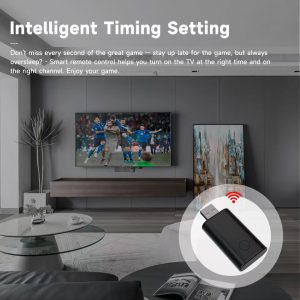
Tuya WiFi IR remote controller with intelligent timing setting for scheduled home appliance control
Tuya smart IR remote controller supports intelligent timing setting — schedule your home appliances to turn on or off automatically at specific times, with delay setting support.

Tuya IR remote intelligent timing setting for TV and appliances

Beyond simple remote control, the Tuya Smart Life APP offers powerful scheduling capabilities. You can set custom on/off schedules for any IR appliance — perfect for those who want to maintain a regular routine without manual operation.

For example, set your TV to automatically turn off at 10 PM every night to enforce a bedtime schedule for the kids. Or schedule your air conditioner to turn on at 6 AM during weekdays and 8 AM on weekends. The delay setting feature adds extra flexibility for users who need appliances to operate at specific intervals throughout the day.

4. Infrared Connection & Intelligent Linkage — Smart Home Automation
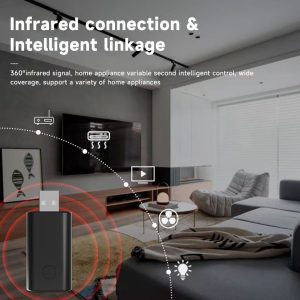
turn device into gadget
Tuya IR remote infrared connection with multiple home appliances

The Tuya IR remote controller enables true smart home automation through its 360-degree infrared signal coverage. The device broadcasts IR commands in all directions with high-power LEDs, ensuring reliable communication with every IR-controlled appliance in the room — without line-of-sight positioning.

Create intelligent linkage scenarios by connecting different IR appliances together for one-tap control. For example, design a “Movie Night” scene that simultaneously turns on your TV, switches the input to HDMI 1, powers on the soundbar, and dims your smart lights. The possibilities are virtually limitless when combined with other Tuya-compatible smart home devices.

5. Voice Control — Hands-Free Smart Home with Alexa & Google Assistant
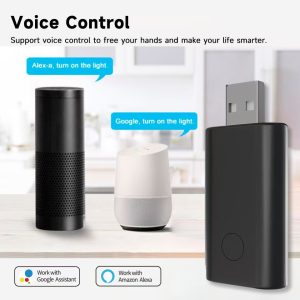
turn device into gadget
Tuya IR remote voice control with Alexa and Google Assistant

Perhaps the most compelling feature is full voice assistant compatibility. After simple setup in the Alexa or Google Home APP, you can control all your IR appliances through natural voice commands. The included “Work with Google Assistant” and “Work with Amazon Alexa” badges confirm official compatibility. Imagine simply saying:

  • “Alexa, turn on the TV”
  • “Alexa, set the air conditioner to 72 degrees”
  • “Hey Google, turn off the fan”
  • “Hey Google, dim the living room lights”

This hands-free control makes the Tuya IR remote perfect for elderly family members, accessibility users, busy parents, or anyone who values convenience. No more searching for lost remotes — just speak your command and let the smart home handle the rest.

6. DIY Learning Function — Compatible with Any IR Remote
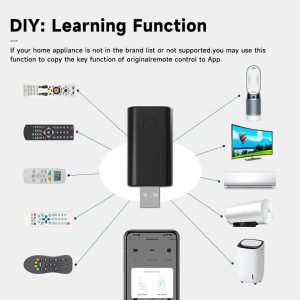
turn device into gadget
Tuya IR remote DIY learning function to copy any IR remote

What if your specific appliance brand isn’t in the Tuya device library? No problem. The DIY Learning Function allows the Tuya IR remote to copy IR signals directly from your original remote control. Simply point your existing remote at the Tuya device, press the Button you want to copy, and the Smart Life APP will save the signal for future use.

This means virtually any IR-controlled appliance — even obscure or older models — can be controlled through the Smart Life APP. From vintage TVs to specialty fans, from smart Light bulbs to projector screens, the learning function ensures maximum compatibility with your entire home setup.

7. Device Sharing — Family-Friendly Smart Home Control
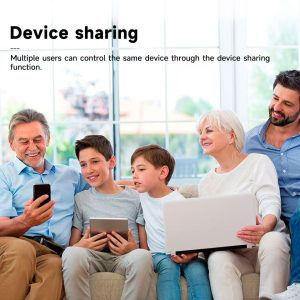
turn device into gadget
<img src=”https://PLACEHOLDER_IMAGE_8_URL” alt=”Tuy


Related Articles

You Might Also Like

Frequently Asked Questions

Is Turn Device Into Gadget worth buying?

Based on the breakdown in this article, Turn Device Into Gadget offers a solid mix of features and value. If your main goal matches the key benefits described above, it is a practical choice for everyday use.

How do I choose the right turn device into gadget for my needs?

Start with your core use case, then compare battery life, compatibility, and build quality as covered above. Choosing the right turn device into gadget comes down to matching specs with how you actually use it.

Does turn device into gadget require a companion app?

Most devices of this type pair with a free companion app for setup and firmware updates. A few advanced features may sit behind a paid plan, so check the official specs page before buying.
Posted on — Leave a comment

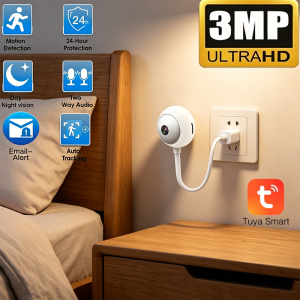
Tuya USB camera

tuya usb camera

Tuya USB Camera Review: A Tiny 3MP Plug-In Smart Camera That Actually Makes Sense

However, If you’ve ever wished a security camera could just. plug into a wall outlet and start working — no drilling, no cables, no mess — the Tuya USB camera is built for exactly that. After several weeks of testing it as a baby monitor, a pet camera, and a casual home-security device, here’s everything you need to know before buying one.

Why a USB Plug-In Camera Is Worth Considering

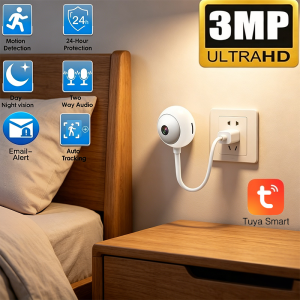
Therefore, Most home security cameras today are either battery-powered (great for outdoors, painful to charge) or wall-mounted with a thick power brick (great for fixed locations, terrible for renters). The Tuya USB camera takes a third path: a tiny egg-shaped unit with a built-in USB-A cable that you simply plug into any USB power source. Wall adapter, power bank, laptop — anything works.

Moreover, What makes this design genuinely useful is how invisible the installation feels. There’s no app to set up for power, no screws, no cable to hide. You plug it in, scan the QR code in the Tuya Smart app, and you’re live.

tuya usb camera

3MP Image Quality: Sharper Than You Expect for the Price

In addition, Let’s talk specs first. The Tuya USB camera is a 3MP sensor (2304×1296) recording at 2K resolution, which puts it ahead of most 1080p cameras in the same price bracket. In real-world use, the extra resolution matters when you need to zoom into a detail later — a face, a pet’s collar tag, a package label.

For example, The 4mm fixed lens gives a moderate wide-angle view that works well for a bedroom corner, a doorway, or a kitchen counter. It’s not a panoramic lens, so plan your placement accordingly. The camera also supports 4× digital zoom through the app, which is helpful when you want to inspect something specific without physically moving the camera.

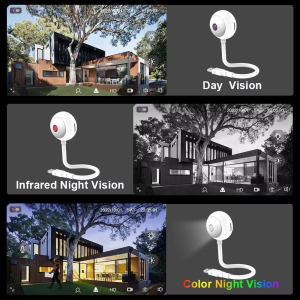
Day Vision, Infrared Night Vision, and Color Night Vision

Consequently, A pleasant surprise: the Tuya USB camera actually delivers three distinct viewing modes.

Day Vision is sharp and natural-looking. Colors are accurate, motion is smooth, and there’s no over-sharpening that makes indoor scenes look artificial.

Infrared Night Vision kicks in automatically when the lights go down, producing a clean black-and-white image. It’s not pitch-black cinematic night — it’s the kind of clear, readable footage you’d expect from a dedicated baby monitor. The 30m (98 ft) range is more than enough for indoor rooms and small yards.

Color Night Vision is the standout. Thanks to dual-light LEDs (infrared + a small white spotlight), the camera can produce a full-color image even in very low light. For parents checking on sleeping kids, or anyone wanting to identify clothing colors and details at night, this is genuinely useful — not a gimmick.

tuya usb camera

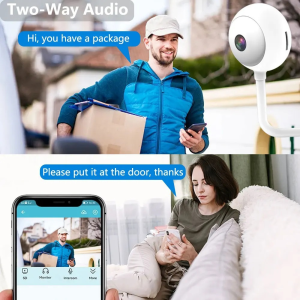
Two-Way Audio: Clear Enough to Calm a Crying Baby

The built-in microphone and speaker are not just a checkbox feature here — they actually work. We tested the two-way audio as a baby monitor (parent unit in another room speaking into the phone), and the sound came through the camera cleanly enough to soothe a toddler back to sleepThere’s a small delay (typical for WiFi cameras), but no distortion or cut-out.

For everyday use, the two-way audio also handles practical jobs well: telling a delivery driver where to leave a package, calling the family to dinner, or scaring off an opportunistic cat on the kitchen counter.

tuya usb camera

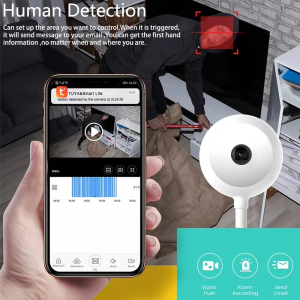
AI Human Detection and Auto-Tracking That Actually Works

This is where most budget cameras fall apart — they detect every shadow and send you 200 useless alerts a day. The Tuya USB camera’s AI human detection is genuinely smarter.

You can set up a custom detection zone (only the front door, only the baby’s crib, only the kitchen entrance), and the camera filters out motion from pets, swaying curtains, and light changes. When a person actually enters the zone, you get a real-time push notification on your phone with a snapshot. From there, you can open the live feed, talk through the speaker, or trigger an alarm sound.

The auto-tracking feature follows the detected person as they move across the frame. It’s smooth, not jumpy, and re-centers the moment the person leaves the scene. For a camera in this price range, this is impressive.

tuya usb camera

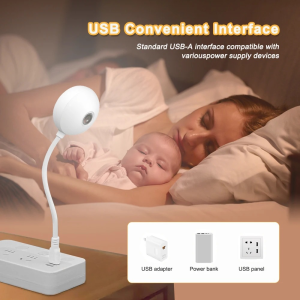
USB Convenient Interface: The Single Best Feature

Here’s the thing that makes this camera special: the USB Convenient InterfaceThe cable ends in a standard USB-A plug, which means you can power it from:

  • The wall adapter that came with your old phone
  • A power bank (great for temporary setups, traveling, camping)
  • A laptop USB port (perfect for monitoring a room while you work)
  • A USB wall outlet panel (cleanest install)

No proprietary connectors. No “you need to buy our specific adapter.” Just USB. This also makes it trivially easy to relocate the camera — unplug it, move it, plug it back in. Done.

355° Pan &amp; 90° Tilt via the Flexible Neck — Almost a Pan-Tilt Camera

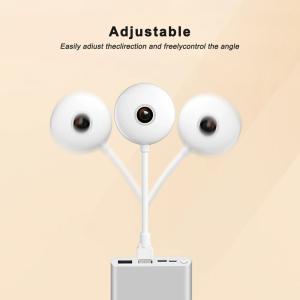
Strictly speaking, the Tuya USB camera isn’t a motorized pan-tilt camera. But the flexible gooseneck arm between the camera head and the USB plug lets you manually point the camera in almost any direction — 355° horizontal pan, 90° vertical tilt — and then adjust it again whenever you need to.

In practice, this means you can aim it at the crib today, then re-aim it at the front door tomorrow, without unmounting anything. The neck is stiff enough to hold position but easy to bend with one hand.

If you want true motorized pan-tilt control from the app, you’ll need a different product. But for fixed-point monitoring that you occasionally re-aim, this design is honestly more reliable than a motorized mechanism that will eventually wear out.

tuya usb camera

Storage: Local SD Card and Cloud, Both Supported

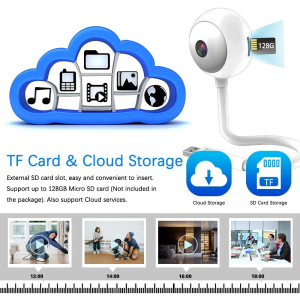
The Tuya USB camera supports both TF card (microSD) storage up to 128GB and cloud storage through the Tuya app. Both can run simultaneously, which is the safest setup — local storage for quick playback, cloud storage as backup if the camera is tampered with or stolen.

128GB of microSD storage gives you roughly 10–14 days of continuous 2K recording, or longer with motion-only recording enabled. The cloud storage plan is optional and reasonably priced, but the camera works perfectly fine without it.

tuya usb camera

The Free Tuya Smart App — No Subscription Required

Unlike many “smart” cameras that lock basic features behind a monthly fee, the Tuya USB camera works fully without any subscription:

  • Live streaming: free
  • Two-way audio: free
  • Motion/human detection alerts: free
  • Local recording playback: free
  • Multi-device sharing: free

The Tuya Smart app (or Smart Life — they’re essentially the same platform) also ties into the wider Tuya ecosystem, so if
(truncated).

Related Articles

You Might Also Like
Frequently Asked Questions

Is Tuya Usb Camera worth buying?

Based on the breakdown in this article, Tuya Usb Camera offers a solid mix of features and value. If your main goal matches the key benefits described above, it is a practical choice for everyday use.

How do I choose the right tuya usb camera for my needs?

Start with your core use case, then compare battery life, compatibility, and build quality as covered above. Choosing the right tuya usb camera comes down to matching specs with how you actually use it.

Does tuya usb camera require a companion app?

Most devices of this type pair with a free companion app for setup and firmware updates. A few advanced features may sit behind a paid plan, so check the official specs page before buying.
Posted on — Leave a comment

Zigbee PIR Motion Sensor: A Smart Home Upgrade That Actually Works

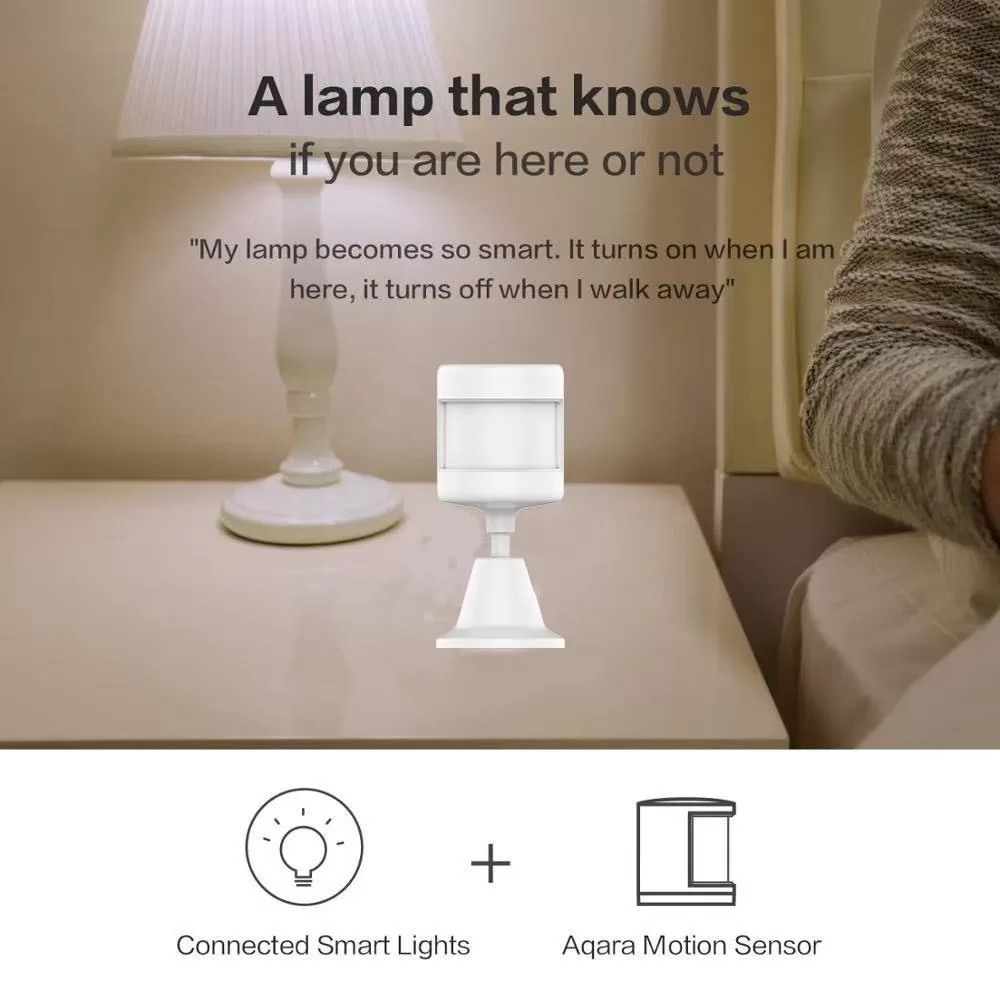
Zigbee PIR Motion Sensor - Smart Home Security | Xingliao - view 1

Last week I stubbed my toe on the bottom stair at 2 a.m. — again.

I’d been meaning to fix it for months. You know how it goes: install a Smart light? Sure. Tomorrow. Wire a Motion Sensor? Maybe next weekend. The hallway stayed dark for another365 days. Until I finally bought a $1*.** Zigbee PIR motion sensor and stuck it on the wall. The whole install took 90 seconds. The next morning, my staircase lit up like a runway every time I walked past.

That tiny moment — not stubbing my toe — was the win I’d been ignoring.

If you’ve ever:

Stumbled to the bathroom half-asleep
Wondered if the “noise” downstairs was just the cat
Wished your garage lights came on without you fishing for a switch …a Zigbee PIR motion sensor fixes all three. Quietly. Reliably. Without you ever thinking about it again. Let me explain how it actually works in a real home, and why this is one of the cheapest smart home upgrades you’ll ever make.

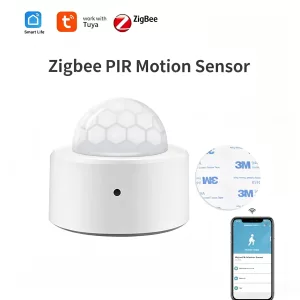
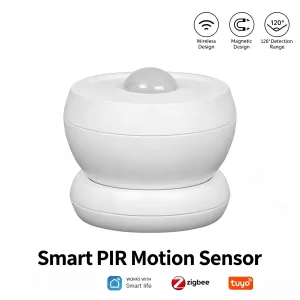
Tuya Zigbee PIR Human Motion Sensor - White
Tuya Zigbee 3.0 PIR human motion sensor, 150 degree wide angle detection up to 7 meters, CR2450 battery powered with 2 year battery life, works with Smart Life and Zigbee hubs

What Is a Zigbee PIR Motion Sensor?
A motion sensor with Zigbee wireless connectivity is exactly what it sounds like: a small white box that detects infrared (body heat) movement and tells your smart home system about it. Two words matter here:

PIR = Passive Infrared. It sees body heat moving through its detection zone. People, pets, even large warm objects. It doesn’t emit anything — it just listens. Zigbee = A low-power wireless protocol that your smart home hub uses to talk to sensors, lights, locks, and switches. Zigbee sensors run for years on a single coin battery because they sleep most of the time.

Combined, you get a motion sensor that lasts2 years on a CR2450 battery, costs under $15, and talks to every major smart home platform through one little hub.


Most product pages list ten “features” you don’t care about. Here’s what a motion sensor actually does in my house:

1. Automatic Night Lighting (the biggest win)
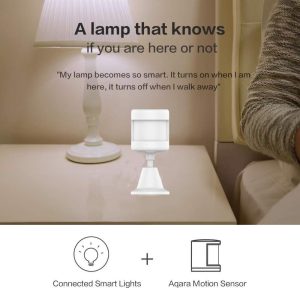
Walk into the hallway at 2 a.m. Light comes on softly. Cross into the bathroom. That light comes on. Walk back to bed. Both lights fade off 60 seconds later.

I set this up once. I have not touched it since.

Zigbee PIR sensor detection range diagram
Diagram showing 150 degree detection angle and 7 meter range of Zigbee PIR sensor

The setup is simple:

Trigger: motion sensor detects motion
Action: turn on hallway smart bulb at 20% brightness
Condition: only between sunset and sunrise
Off: 60 seconds after no motion detected
That’s it. The motion sensor does the work your hands used to do — only better, because it never forgets.

2. Front Door Awareness (without a camera)
I don’t want a camera pointed at my front door. I just want to know when someone approaches.

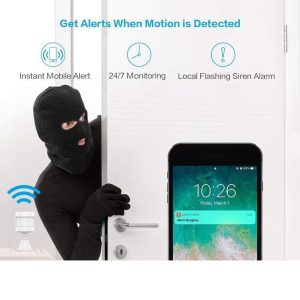
A Zigbee PIR motion sensor mounted above the front porch sends an instant push notification to my phone when someone walks up. Combined with a smart doorbell, I get:

A camera when someone rings
A motion alert when someone walks up
The motion sensor is the early warning system. The doorbell is the confirmation.

3. The “Did I Leave the Garage Open?” Check
Mount a motion sensor in your garage. Every time the garage door opens, you get a notification. Every time the door stays open for more than 10 minutes with no motion detected inside, you get a second notification — “Garage may be open.”

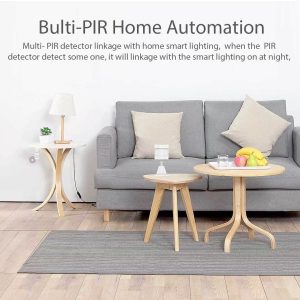
Zigbee PIR sensor installation in home corner
Tuya Zigbee PIR sensor mounted on wall corner for smart motion lighting

Cheaper than a smart garage door opener. Solves a real problem.

Where to Mount Them (and Where NOT To)
After installing these in three homes, here’s what actually works:

Hallway corners (8 feet up, angled down)
Above the front door, pointing at the walkway
Inside the garage, facing the door
Stair landings (this is where I stubbed my toe)
Bad spots:

Facing a window (sunlight triggers false alerts)
Above a radiator or heating vent (heat confuses PIR)
Directly facing an HVAC vent (moving air = false alerts)
The detection angle is typically150°. That sounds narrow, but in practice, one sensor covers a 12×12 foot room from a corner mount.

How Long Do They Actually Last?
Marketing claims “up to 2 years.”

Real-world answer: 18 to 24 months depending on:

How often motion is triggered (busy hallway = more wake-ups)
How strong the Zigbee signal is (weak signal = sensor works harder)
Battery brand (cheap CR2450s die in 8 months, name-brand lasts 2 years)
Pro tip: replace the battery before it dies. When Zigbee sensors die, they usually don’t warn you — your automations just stop working one day, and you spend an hour figuring out why.

What You Need to Get Started
A Zigbee PIR motion sensor isn’t a standalone device. You need three things:

The sensor itself ($13–$20, depending on brand)
A Zigbee hub ($30–$60) — Tuya, Smart Life, Aqara, or Home Assistant all work
At least one smart bulb or smart switch to controlIf you’re starting from scratch, the total cost is around $80–$100 for a complete motion-activated lighting setup. That’s cheaper than a single smart bulb from the expensive brands — and it works in every room you add a sensor to.
The Real Reason You Should Buy One Tonight
Here’s the thing nobody tells you about smart home gadgets: most of them solve problems you don’t have.

A motion sensor is different. It solves a problem you already have:

The dark hallway at 2 a.m.
The front door you can’t see from the couch
The garage light you always forget to turn off
You don’t need a “smart home.” You need one motion sensor, in one spot, solving one annoying problem.

That Zigbee PIR motion sensor I stuck on the wall last week? It’s the cheapest thing in my smart home and it’s the one I use every single day.

Get in Touch

Reach us through any channel below — we reply within one business day.


zigbee pir motion sensor

You Might Also Like
Frequently Asked Questions

Is Zigbee Pir Motion Sensor worth buying?

Based on the breakdown in this article, Zigbee Pir Motion Sensor offers a solid mix of features and value. If your main goal matches the key benefits described above, it is a practical choice for everyday use.

How do I choose the right zigbee pir motion sensor for my needs?

Start with your core use case, then compare battery life, compatibility, and build quality as covered above. Choosing the right zigbee pir motion sensor comes down to matching specs with how you actually use it. Tuya 3D Face Recognition Smart Lock: Buying Guide, Setup Tips, and FAQ

Does zigbee pir motion sensor require a companion app?

Most devices of this type pair with a free companion app for setup and firmware updates. A few advanced features may sit behind a paid plan, so check the official specs page before buying. Tuya WiFi IR Remote Review: Universal Control Meets Climate Intelligence
Related Articles
Posted on — Leave a comment

6MP WiFi Security Camera

KT-R13 Dual-Lens Security Camera Review: One Camera, Two Views, Zero Blind Spots

Looking for a security camera that covers everything without buying multiple units? The KT-R13 dual-lens PTZ camera might be exactly what you need. With its innovative gun-ball design combining a fixed wide-angle lens and a motorised PTZ dome, this single camera delivers the coverage of two — at a fraction of the cost.


What Makes the KT-R13 Different?

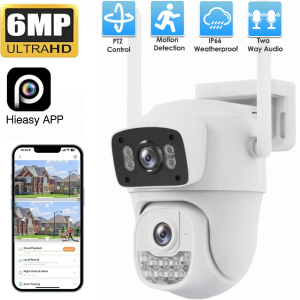
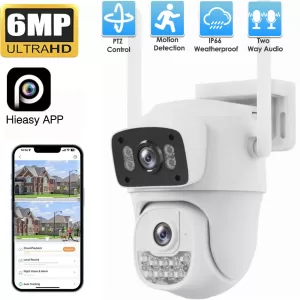
KT-R13 6MP dual-lens security camera with Hi Easy app split-screen monitoring, gun-ball design, human detection, full-color night vision
KT-R13 dual-lens gun-ball security camera with Hi Easy app. 3MP×2 resolution, PTZ pan 355°/tilt 90°, full-color & 30m IR night vision, human auto-tracking, two-way audio, IP66 waterproof. Split-screen view shows dual camera feeds simultaneously.

Most security setups require separate cameras for wide coverage and detailed tracking. The KT-R13 solves this with a clever dual-lens arrangement:

  • Fixed bullet lens on top for constant wide-angle monitoring
  • PTZ dome lens below for panning, tilting, and auto-tracking
  • Both feeds display simultaneously on the Hi Easy app

This means one camera can watch your entire driveway while simultaneously zooming in and following any person or vehicle that enters the frame.


Dual Lens, Double Coverage

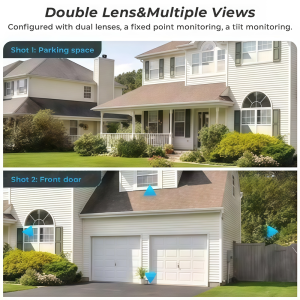
Double lens multiple views security camera, dual-screen monitoring residential house garage driveway
Dual-lens security camera showcasing double lens multiple views capability. Simultaneous wide-angle and zoomed coverage of residential property including house, garage, and driveway.

The KT-R13’s standout feature is its ability to capture two different perspectives at once. The fixed lens maintains a constant view of your property — ideal for monitoring entrances, driveways, or backyards. Meanwhile, the PTZ dome can be remotely controlled to investigate specific areas or automatically track moving subjects.

This dual-view capability eliminates the blind spots that single-lens cameras inevitably create. Whether you need to watch a wide area and a specific entry point, or monitor your yard while tracking a delivery driver, the KT-R13 handles both tasks simultaneously.


Smart Auto-Tracking That Actually Works

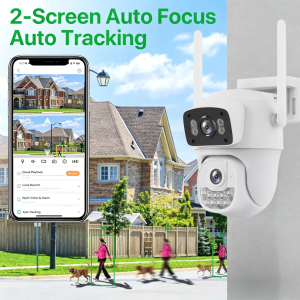
Dual-screen auto focus auto tracking security camera with Hi Easy app, gun-ball design, human detection tracking
Dual-lens security camera featuring auto focus, auto tracking, and dual-screen monitoring via Hi Easy app. Gun-ball design with fixed bullet + PTZ dome captures wide scene and tracked subject simultaneously.

Traditional motion detection floods your phone with false alarms from passing cars, swaying trees, or neighbourhood pets. The KT-R13 uses AI-powered human detection to filter out irrelevant movement and only alert you when a person is actually present.

When human activity is detected, the camera can automatically lock onto the subject and track their movement across your property. The PTZ dome smoothly follows the person while the fixed lens continues monitoring the wider scene — giving you complete situational awareness without manual intervention.


Built for Outdoor Conditions

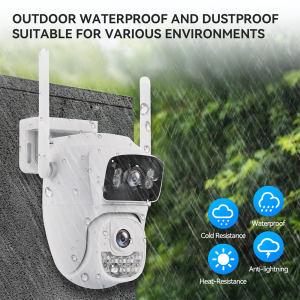
Outdoor waterproof dustproof security camera IP66 rated, gun-ball dual lens design, wall mounted
Dual-lens security camera with IP66 waterproof and dustproof rating. Suitable for harsh outdoor environments. Gun-ball design with dual WiFi antennas, wall-mounted installation.
Security cameras are only useful if they work reliably in all weather. The KT-R13 features an IP66-rated housing that shrugs off rain, dust, and temperature extremes. Whether installed under harsh summer sun or freezing winter conditions, this camera keeps recording. The white plastic housing with dual WiFi antennas maintains a clean, modern appearance while providing robust protection against the elements. Wall-mount or ceiling-mount installation options give you flexibility in positioning for optimal coverage.


Two-Way Audio for Real Communication

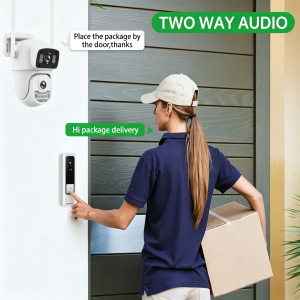
Two way audio security camera, delivery person talking to homeowner via camera intercom
Dual-lens security camera with built-in two-way audio. Speak with visitors, delivery drivers, or family members remotely through the Hi Easy app.

The built-in microphone and speaker transform the KT-R13 from a passive recording device into an active communication tool. When someone approaches your property, you can speak to them directly through the camera — whether it’s instructing a delivery driver where to leave a package, greeting a visitor, or warning off an intruder.

This two-way audio capability is particularly valuable for remote property management. Check in on elderly family members, communicate with service workers, or simply let your kids know you’re watching — all from your smartphone, anywhere in the world.


Flexible PTZ Control

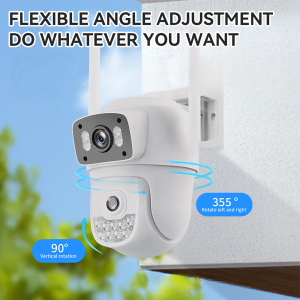
Flexible angle adjustment PTZ security camera, pan 355 tilt 90 degrees, do whatever you want
Dual-lens security camera with flexible angle adjustment. PTZ dome offers 355° horizontal pan and 90° vertical tilt for complete coverage without blind spots.

The PTZ dome offers impressive range: 355° horizontal pan and 90° vertical tiltThis near-complete coverage means you can remotely survey virtually every angle of your property without physically adjusting the camera.

Through the Hi Easy app, you can manually control the camera’s position with intuitive swipe gestures, set preset positions for quick navigation, or enable auto-tracking to let the camera follow movement automatically. The smooth motorised movement ensures you never miss critical details.


Complete Feature Summary

Feature Specification
Resolution 3MP×2 dual lenses (6MP total)
Night Vision Full-colour + IR, up to 30m
PTZ Range Pan 355° / Tilt 90°
Weatherproof IP66 rated
Storage Cloud + TF card (128GB max)
Network WiFi (2.4GHz) + Wired
App Hi Easy (free, no subscription)
Detection AI human detection + auto-tracking
Audio Two-way microphone & speaker
Power DC 12V

Who Should Buy the KT-R13?

The KT-R13 is ideal for:

  • Homeowners wanting comprehensive property coverage with minimal equipment
  • Small businesses needing affordable surveillance without monthly fees
  • Rental property owners monitoring multiple locations remotely
  • Anyone tired of false alarms from basic motion detection cameras

Final Verdict

The KT-R13 delivers exceptional value by combining two cameras into one. The dual-lens design genuinely solves the coverage-versus-detail compromise that plagues single-lens security cameras. With AI human detection, auto-tracking, IP66 weatherproofing, and a free app with no subscription required, it’s a complete security solution at a competitive price point.

If you’re looking to upgrade your property security without the complexity and cost of multi-camera systems, the KT-R13 deserves serious consideration.


Available now from (Xingliao) Smart Home

Model: KT-R13 | Resolution: 3MP×2 | PTZ: 355°/90° | Night Vision: 30m | App: Hi Easy (Free)

Related Articles

You Might Also Like
Frequently Asked Questions

Is 6mp Wifi Security Camera worth buying?

Based on the breakdown in this article, 6mp Wifi Security Camera offers a solid mix of features and value. If your main goal matches the key benefits described above, it is a practical choice for everyday use.

How do I choose the right 6mp wifi security camera for my needs?

Start with your core use case, then compare battery life, compatibility, and build quality as covered above. Choosing the right 6mp wifi security camera comes down to matching specs with how you actually use it.

Does 6mp wifi security camera require a companion app?

Most devices of this type pair with a free companion app for setup and firmware updates. A few advanced features may sit behind a paid plan, so check the official specs page before buying.
Posted on — Leave a comment

Visiter le site — guide complet

Visiter le site pour découvrir un univers fascinant

Introduction à l’univers de la cuisine végétale

La cuisine végétale a gagné en popularité au cours des dernières années, attirant l’attention de nombreux gourmands, chefs et nutritionnistes. Cette tendance ne se limite pas seulement à une mode, mais représente un véritable changement de paradigme dans nos habitudes alimentaires. Les bienfaits pour la santé et l’environnement sont au cœur de cette révolution culinaire.

Les bienfaits de la cuisine végétale

Adopter une alimentation végétale peut apporter de nombreux bénéfices. Tout d’abord, elle est souvent riche en nutriments essentiels comme les fibres, vitamines et antioxydants. Une étude récente a montré que les régimes à base de plantes peuvent réduire le risque de maladies chroniques telles que le diabète et les maladies cardiaques.

Une approche durable

En plus des avantages pour la santé, la cuisine végétale a un impact significatif sur l’environnement. En réduisant la consommation de produits d’origine animale, nous contribuons à la diminution des émissions de gaz à effet de serre et à la préservation des ressources en eau. C’est une démarche à la fois saine et écoresponsable.

Comment intégrer la cuisine végétale dans son quotidien

Pour ceux qui souhaitent expérimenter la cuisine végétale, il existe plusieurs façons d’intégrer ces principes dans votre routine alimentaire. Commencez par remplacer un ou deux repas par semaine par des plats végétaux. Les publications et ressources en ligne, comme Billionairespin Casino, offrent une multitude de recettes délicieuses qui ne manqueront pas de vous inspirer.

Les défis de la transition vers une alimentation végétale

Malgré ses nombreux avantages, la transition vers une cuisine exclusivement végétale peut présenter certains défis. Par exemple, trouver des alternatives aux produits d’origine animale peut sembler compliqué au départ. Cependant, avec un peu de recherche et d’expérimentation, il est possible de découvrir des substituts savoureux et satisfaisants.

Conclusion et appel à l’action

En explorant ces nouvelles nouvelles aventures culinaires, nous enrichissons notre vécu alimentaire tout en prenant soin de notre santé et de notre planète. Visiter le site et plonger dans le monde de la cuisine végétale pourrait bien vous ouvrir les portes d’une nouvelle façon de savourer vos repas.

Related Articles

You Might Also Like
Frequently Asked Questions

Is Visiter Site Complet worth buying?

Based on the breakdown in this article, Visiter Site Complet offers a solid mix of features and value. If your main goal matches the key benefits described above, it is a practical choice for everyday use.

How do I choose the right visiter site complet for my needs?

Start with your core use case, then compare battery life, compatibility, and build quality as covered above. Choosing the right visiter site complet comes down to matching specs with how you actually use it.

Does visiter site complet require a companion app?

Most devices of this type pair with a free companion app for setup and firmware updates. A few advanced features may sit behind a paid plan, so check the official specs page before buying.
Posted on — Leave a comment

Dual Lens Security Camera

KT-A36 Dual-Lens Security Camera Review: One Camera, Two Views, Zero Blind Spots

When was the last time you wished you had eyes in two places at once? The KT-A36 dual-lens security camera answers that question in a single device. Combining a fixed bullet lens and a PTZ dome lens in one unit, the KT-A36 turns one camera into two — covering two areas simultaneously without buying, wiring, or maintaining a second system.

In this review, we walk through the features that make the KT-A36 a Smart pick for homes, shops, warehouses, and yards, and how its dual-view design solves the most common blind-spot problem in single-camera setups.

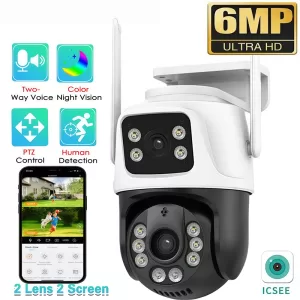
6MP dual-lens security camera with gun-ball design, PTZ dome, full-color night vision, human detection and ICSEE app control
6MP dual-lens gun-ball security camera featuring 3MP×2 resolution, PTZ pan 355°/tilt 90°, full-color & 30m IR night vision, human auto-tracking, two-way audio, IP66 waterproof. Compatible with ICSEE app.

Why “One Camera, Two Views” Matters

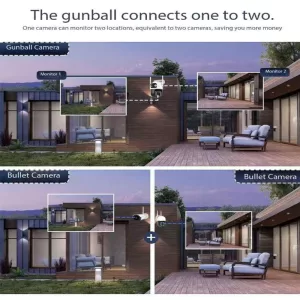
Most outdoor surveillance forces a trade-off. A fixed lens gives you a stable wide-angle view but can’t zoom in on details. A PTZ camera can pan, tilt, and zoom — but once it turns away, the area behind it is no longer visible. The KT-A36 ends that compromise with a gun-ball dual-lens design: a fixed bullet camera on top watching your main scene, and a PTZ dome camera on the bottom that can rotate freely to track what’s happening.

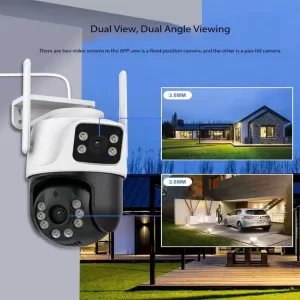
The result is a real-time dual-screen, dual-angle monitoring experience in the ICSEE app — one live view for the fixed overview, another for the PTZ close-up, side by side.

Gun-ball dual-lens camera with one-to-two monitoring, bullet and dome lenses covering yard and entrance simultaneously
Gun-ball design connects one camera to two perspectives — wide bullet lens for the yard, PTZ dome for the entrance. One device does the work of two.

Dual-Lens System: Fixed Bullet + PTZ Dome

The KT-A36 pairs two distinct cameras in one housing:

  • Fixed bullet lens (3.6 mm wide-angle) — a stable overview of your yard, driveway, or storefront. Always on, always watching.
  • PTZ dome lens (Pan 355° / Tilt 90°) — pans left and right almost a full circle, tilts up and down 90°, and zooms in for detail. Use it to follow people, vehicles, or anything that moves.

Because the two lenses work independently, the fixed overview never goes dark while the PTZ lens is tracking. You get two perspectives, zero blind spots — from a single device.

Dual-lens security camera showing split-screen monitoring with bullet wide view and PTZ close-up
Dual-lens camera delivers two views simultaneously — wide-area coverage from the fixed bullet lens and detailed tracking from the PTZ dome lens.

3MP × 2 Resolution — Sharp Where It Matters

Each lens captures at 3MP, giving you sharp 1080p-class detail on both feeds. The combined dual-view system delivers up to 6MP of monitoring coverage, so license plates, faces, and package labels remain readable at typical home and shop distances.

Full-Color Night Vision + 30 m IR

Daytime clarity is the easy part. What sets the KT-A36 apart is its dual night-vision mode:

  • Full-color night vision keeps the scene in vivid color after dark, so you can see clothing colors, vehicle colors, and other contextual details.
  • Automatic IR night vision switches to crisp black-and-white infrared with a range of up to 30 meters (≈98 ft) in total darkness.

Whether it’s a backlit doorway or a dim parking lot, the KT-A36 produces a usable image.

Smart Human Detection and Automatic Tracking

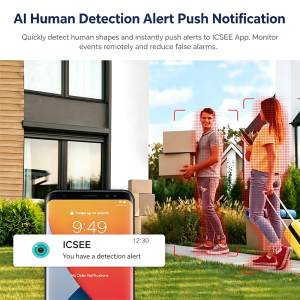
The KT-A36 isn’t just watching — it’s understanding. On-device AI human-shape detection filters out pets, leaves, headlights, and shadow movement. When a real person is detected:

  • Real-time alarm push sends an instant notification to the ICSEE app on your phone.
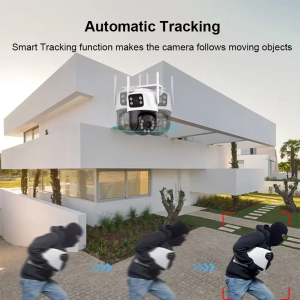
  • Automatic tracking kicks in: the PTZ dome lens rotates smoothly to keep the person centered in frame as they move.

You get precise alerts, fewer false alarms, and a complete visual record of the event.

AI human detection with instant alert push notification to smartphone
Smart human detection recognizes people and sends real-time alarm push to your phone, filtering out false alerts from pets and moving objects.
Automatic tracking follows human movement with PTZ camera rotation
PTZ dome lens automatically tracks moving people, panning and tilting to keep subjects in frame for complete motion coverage.

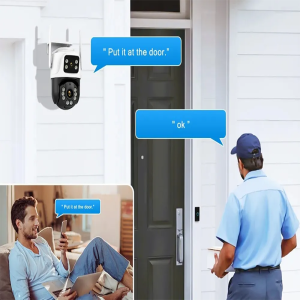
Two-Way Audio — Talk to Anyone at the Door

The built-in microphone and speaker turn the KT-A36 into a real communication device. When the delivery driver arrives, the kids get home, or an unknown visitor approaches, you can:

  • Greet visitors remotely through the ICSEE app.
  • Give instructions to delivery personnel (“Please leave it by the door”).
  • Deter intruders with a live voice warning.

All without being physically present.

Two-way audio talk with visitor at door via smartphone app
Built-in speaker and microphone let you talk with visitors or warn intruders remotely through the ICSEE app on your phone.

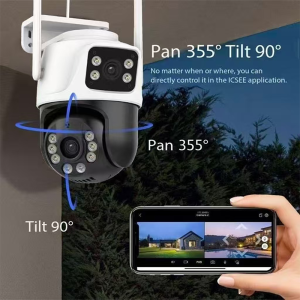
Relentless 355° / 90° PTZ Control

Take manual control whenever you need it. From the ICSEE app, you can rotate the PTZ dome lens a full 355° horizontally and 90° vertically, scanning the entire monitored area from your phone. It’s perfect for checking every corner after an alert, or following movement across a wide yard.

KT-A36 PTZ pan 355 tilt 90 remote control via smartphone app
KT-A36 PTZ dome lens rotates 355° horizontally and 90° vertically, all controlled remotely from your phone for complete area coverage.

Flexible Storage: Cloud + TF Card

Footage is too valuable to lose. The KT-A36 supports both:

  • Cloud storage — secure off-site backup, accessible anywhere.
  • TF card (MicroSD) — local storage, no subscription required.

Use both for redundancy, or pick whichever fits your setup.

Dual Connectivity: WiFi and Wired

Install the camera where you need it. The KT-A36 supports both 2.4 GHz WiFi for flexible placement and wired Ethernet for rock-solid stability. Choose based on your site — a wired connection for a fixed storefront, WiFi for a backyard that doesn’t have network cabling.

H.265 Compression and Multi-Device Viewing

H.265 video compression cuts bandwidth and storage use by up to 50% compared with H.264, without sacrificing image quality. Share access with family members or coworkers so multiple devices and users can watch the live feed simultaneously — useful for home + shop, or manager + security team.

IP66 Weatherproof — Indoor and Outdoor

An IP66-rated plastic housing shrugs off rain, dust, and heat. Mount the KT-A36 on an exterior wall, under an eave, on a ceiling, or inside a workshop — same reliable performance.

Installation: Wall Mount or Ceiling Mount

The included adjustable bracket supports both wall-mounted and ceiling-mounted installations. Combined with 12V DC power, setup is simple for any homeowner or installer.

Who Is the KT-A36 For?

  • Homeowners — front door, backyard, garage, driveway.
  • Small business owners — shops, cafés, offices, storerooms.
  • Property managers — warehouses, multi-tenant buildings, parking areas.
  • Anyone who needs two views without the cost of two cameras.
Final Verdict

The KT-A36 dual-lens security camera is a smart, cost-effective solution for anyone tired of single-camera blind spots. The gun-ball dual-lens design delivers genuine simultaneous dual-view monitoring, with 3MP × 2 resolution, full-color night vision, 30 m IR, AI human detection with auto-tracking, two-way audio, and IP66 weatherproof durability — all controlled from the ICSEE app.

If you want professional-grade surveillance without the cost of a multi-camera system, the KT-A36 is hard to beat.


Looking for a smart dual-lens security camera that covers two areas at once? The KT-A36 is available now on our store — check the product page for current pricing and bundle options.

Related Articles

You Might Also Like
Frequently Asked Questions

Is Dual Lens Security Camera worth buying?

Based on the breakdown in this article, Dual Lens Security Camera offers a solid mix of features and value. If your main goal matches the key benefits described above, it is a practical choice for everyday use.

How do I choose the right dual lens security camera for my needs?

Start with your core use case, then compare battery life, compatibility, and build quality as covered above. Choosing the right dual lens security camera comes down to matching specs with how you actually use it.

Does dual lens security camera require a companion app?

Most devices of this type pair with a free companion app for setup and firmware updates. A few advanced features may sit behind a paid plan, so check the official specs page before buying.
Posted on — Leave a comment

ABM206 Baby Monitor

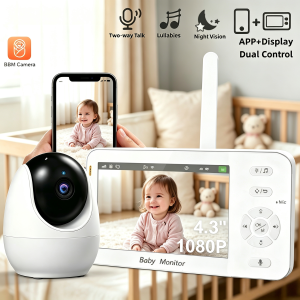
ABM206 4.3-Inch 1080P Baby Monitor: Smart Monitoring with APP Control

ABM206 4.3 inch baby monitor with APP control and camera in warm nursery
ABM206 4.3″ 1080P baby monitor with BBM Camera APP, warm nursery scene with teddy bear.

Looking for a baby monitor with APP control that doesn’t compromise on video quality? The ABM206 delivers crystal-clear 1080P resolution, a responsive 4.3-inch display, and the flexibility to monitor your baby from both the parent unit and your smartphone. Perfect for modern parents who want the best of both worlds.


Why Choose the ABM206?

Crystal Clear 1080P HD Video

The ABM206 features stunning 1080P Full HD resolution — sharper than standard 720P monitors:

  • 4.3-inch color display for detailed, vibrant images
  • 1080P camera captures every expression with clarity
  • See every smile, movement, and milestone in high definition
  • Perfect for parents who want the clearest possible view

Whether it’s day or night, the ABM206 ensures you never miss a precious moment.


Dual Control: Parent Unit + Smartphone APP

abm206 baby monitorStay connected with your baby anytime, anywhere:

  • BBM Camera APP for iOS and Android — monitor from your phone
  • 4.3-inch parent unit — dedicated display, no phone needed
  • Two-way talk through both APP and parent unit
  • Switch seamlessly between devices based on your needs

At home? Use the parent unit for instant, lag-free monitoring. Heading out? Check in via the APP from anywhere with internet access.


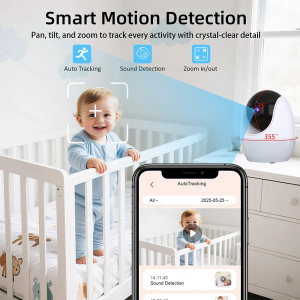
Smart Motion Detection & Auto Tracking

abm206 baby monitor
The ABM206 doesn’t just watch — it actively monitors:

  • 355° pan / 75° tilt — cover every corner of the nursery
  • Auto tracking — camera follows your baby’s movement
  • Sound detection alerts — get notified when baby cries
  • 2X and 4X digital zoom — close-up views when needed

Never worry about blind spots. The ABM206’s intelligent tracking ensures your baby is always in frame.


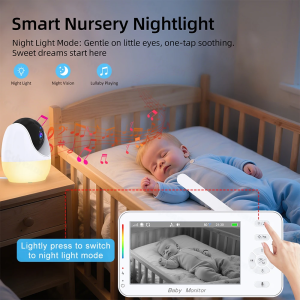
Smart Nursery Nightlight

abm206 baby monitorCreate the perfect sleep environment:

  • Built-in nightlight — gentle glow for nighttime checks
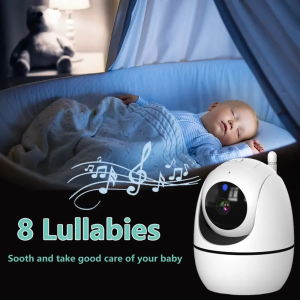
  • 8 soothing lullabies — help baby drift off peacefully
  • One-tap control from parent unit or APP
  • Adjustable brightness for different needs

The soft nightlight provides just enough illumination for you to check on your baby without disturbing their sleep.


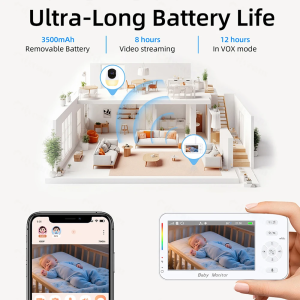
Ultra-Long Battery Life

abm206 baby monitorPower that lasts through the day and night:

  • 3500mAh removable battery — longer life than built-in alternatives
  • 8 hours continuous video streaming
  • 12 hours in VOX mode — screen wakes when baby makes noise
  • Recharge overnight for all-day use

Whether you’re monitoring full-time or using VOX to conserve power, the ABM206 keeps up with your family’s schedule.


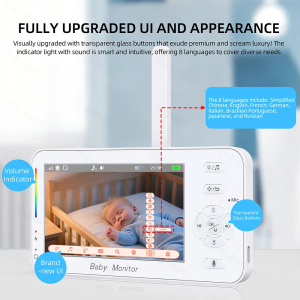
Fully Upgraded UI with 8 Languages

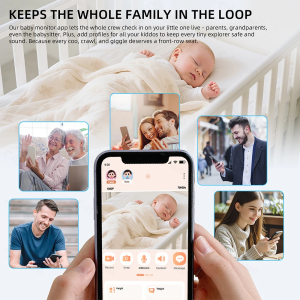
Baby monitor family sharing with BBM Camera app multi user remote view
Keeps the whole family in the loop with BBM Camera app multi-user sharing.

abm206 baby monitor

Designed for international families:

  • 8 languages supportedEnglish, Chinese, Français, Deutsch, Italiano, Português, Japanese, Русский
  • Transparent glass buttons — premium look and feel
  • Smart indicator lights — intuitive visual feedback
  • Volume indicator — see sound levels at a glance

The upgraded interface is both beautiful and functional, making the ABM206 a joy to use every day.


Family Sharing Made Easy


Share the joy of watching your little one grow:

  • Multi-user APP access — parents, grandparents, babysitters
  • Add multiple baby profiles — perfect for growing families
  • Live streaming to multiple devices — everyone stays connected
  • Secure, encrypted connection for privacy

Grandparents across the country? They can check in anytime via the APP. Babysitter on duty? Add them as a temporary user.


Technical Specifications

Feature Specification
Model ABM206
Display Size 4.3 Inch LCD
Camera Resolution 1080P Full HD
Battery 3500mAh Removable
Transmission 2.4GHz + WiFi
Wireless Range 300M Outdoor / 50M Indoor
Memory Card Up to 128GB Supported
APP Support BBM Camera APP (iOS/Android)
Languages 8 Languages
Night Vision Infrared LED
Two-Way Talk Yes (APP + Parent Unit)
Lullabies 8 Built-in
Motion Detection Smart Auto Tracking
Pan/Tilt 355° Pan / 75° Tilt
Zoom 2X / 4X Digital

What’s in the Box

  • 1 × 1080P Baby Camera Unit
  • 1 × 4.3-inch Parent Monitor
  • 2 × Power Adapters
  • 1 × User Manual
  • 1 × Memory Card (optional, up to 128GB)

Why Parents Love the ABM206

✅ 1080P Full HD — Sharper than 720P monitors
✅ APP + Parent Unit — Flexibility to monitor your way
✅ 3500mAh Battery — 8-12 hours of monitoring
✅ 355° Pan / 75° Tilt — Complete room coverage
✅ Auto Tracking — Camera follows baby’s movement
✅ 8 Languages — Perfect for international families
✅ 128GB SD Card Support — Record and save precious moments
✅ Family Sharing — Multiple users via APP
✅ Smart Nightlight — Gentle nighttime illumination
✅ Night Vision — Clear view in total darkness


The Bottom Line

The ABM206 4.3-Inch 1080P Baby Monitor offers the perfect blend of high-definition video, smart features, and flexible monitoring options. Whether you prefer the dedicated parent unit or the convenience of smartphone access, the ABM206 delivers reliable, crystal-clear monitoring that grows with your family.

1080P clarity. APP convenience. Parent unit reliability. The ABM206 has it all.


Ready to experience the next generation of baby monitoring? The ABM206 is waiting to help you keep your little one safe, sound, and always in sight.


Product: ABM206 4.3-Inch 1080P Baby Monitor with APP Control
Category: Baby Monitors / Electronics / Smart Home Tags: baby monitor, 1080P baby monitor, baby monitor with APP, video baby monitor, smart baby monitor, WiFi baby monitor, two-way audio baby monitor, night vision baby monitor, motion detection baby monitor, pan tilt baby monitor, 4.3 inch baby monitorbaby camera with APP, family sharing baby monitor, auto tracking baby monitor, lullabies baby monitor

You Might Also Like
Frequently Asked Questions

Is Abm206 Baby Monitor worth buying?

Based on the breakdown in this article, Abm206 Baby Monitor offers a solid mix of features and value. If your main goal matches the key benefits described above, it is a practical choice for everyday use.

How do I choose the right abm206 baby monitor for my needs?

Start with your core use case, then compare battery life, compatibility, and build quality as covered above. Choosing the right abm206 baby monitor comes down to matching specs with how you actually use it. blog-essential-smart-home-devices-v2 Fly Repeller Fan: The Chemical-Free Guide to Keeping Flies Off Your Dining Table

Does abm206 baby monitor require a companion app?

Most devices of this type pair with a free companion app for setup and firmware updates. A few advanced features may sit behind a paid plan, so check the official specs page before buying.
Does abm206 baby monitor work with both iPhone and Android?

Yes, in most cases this type of device ships with iOS and Android apps, and standard Bluetooth protocols keep cross-platform pairing simple.

Posted on — Leave a comment

6-Inch Baby Monitor

BM6K10L 6-Inch Baby Monitor: A Complete Review for Modern Parents

Baby monitor with two-way talk and night vision
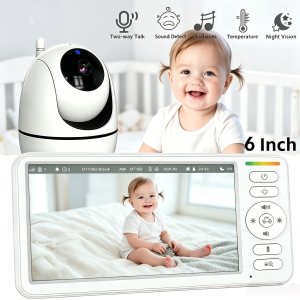
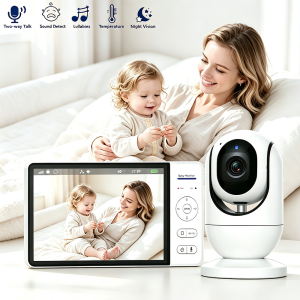
6″ 720P HD baby monitor — egg-shaped white camera unit and large 6 inch parent handheld. Two-way talk, sound detect, lullabies, temperature and night vision.

As parents, nothing matters more than keeping our little ones safe and sound. The BM6K10L 6-Inch Baby Monitor delivers exactly that — combining a spacious display, crystal-clear video, and smart features that make parenting just a little bit easier.


Why Choose the BM6K10L?

Extra Large 6-Inch Display

The BM6K10L features a spacious 6-inch color screen — significantly larger than most baby monitors on the market. This generous display offers:

  • Comfortable viewing from any angle
  • Sharp 720P HD resolution for detailed images
  • Clear visibility of every smile, yawn, and movement
  • Easy sharing between parents who take turns monitoring

Whether you’re across the room or relaxing on the couch, the large screen ensures you never miss a moment.


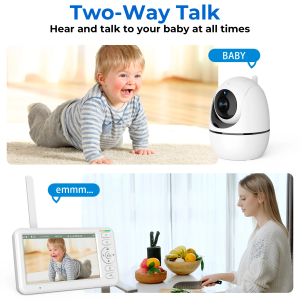
Two-Way Communication That Connects

Two-way talk mother cooking baby monitor
Two-way talk lets mom comfort baby from the kitchen while cooking or working.

Stay connected with your baby anytime, anywhere in your home. The two-way talk function lets you:

  • Soothe your baby with the sound of your voice
  • Comfort them remotely without entering the room
  • Enjoy clear audio transmission with zero delay
  • Built-in microphone and speaker on both units

Imagine preparing dinner in the kitchen while still being able to calm your baby with a gentle word — that’s the freedom the BM6K10L provides.


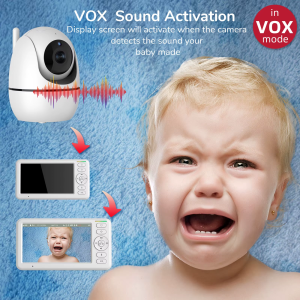
Smart VOX Sound Activation

VOX sound activation baby monitor screen wake
Baby monitor with VOX mode — screen automatically wakes when baby cries, saving battery.

Battery life matters, especially during long nights. The BM6K10L’s VOX mode intelligently manages power:

  • Screen automatically wakes when baby cries
  • Conserves battery when baby is quiet
  • Never miss an important alert
  • Extend monitoring time between charges

This smart feature ensures your monitor is ready when you need it most.


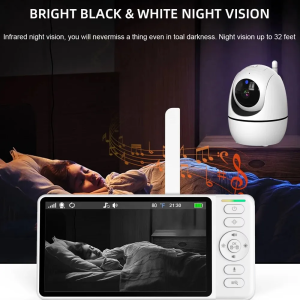
Crystal Clear Night Vision

Black and white night vision up to 32 feet
Baby monitor with bright infrared night vision up to 32 feet (10m) in total darkness.
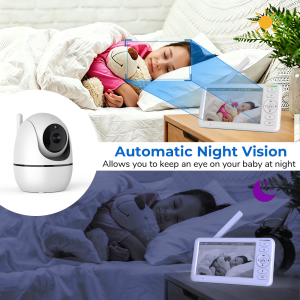
Automatic infrared night vision baby monitor
Baby monitor with automatic infrared night vision — clear view even in total darkness.

Day or night, the BM6K10L keeps watch:

  • Infrared night vision up to 32 feet (10 meters)
  • Automatic day-to-night switching
  • Clear black-and-white images in total darkness
  • Peace of mind around the clock

The automatic night vision ensures you can check on your baby without turning on lights or disturbing their sleep


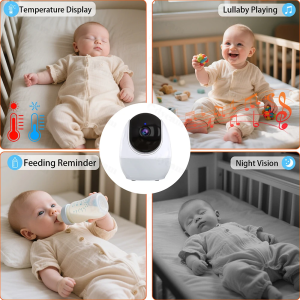
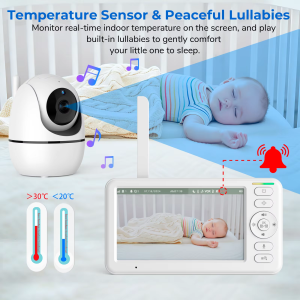
Temperature & Lullabies for Comfort

Temperature sensor and lullabies baby monitor
Baby monitor with room temperature sensor and 8 soothing built-in lullabies.

Create the perfect environment for your baby:

  • Room temperature monitoring with alerts for extremes (>30°C or <20°C)
  • 8 built-in lullabies to help baby fall asleep
  • One-tap activation from the parent unit
  • Real-time temperature display on screen

Know immediately if the nursery gets too hot or cold, and soothe your baby with gentle melodies — all from your handheld monitor.


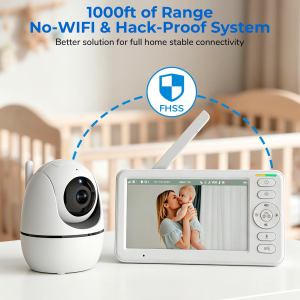
Secure, Hack-Proof Connection

1000ft range hack proof no WiFi baby monitor
Baby monitor with 1000ft range, no WiFi required, and hack-proof 2.4GHz FHSS secure transmission.
Privacy and security are paramount when it comes to your baby:

  • 2.4GHz FHSS technology — no WiFi required
  • 1000ft (300m) outdoor range — stay connected anywhere in your home
  • Hack-proof signal — private and secure transmission
  • Works straight out of the box — no complicated setup

Unlike WiFi-based monitors that can be vulnerable to hacking, the BM6K10L uses dedicated FHSS wireless technology for complete peace of mind.


Technical Specifications
Feature Specification
Display Size 6 Inch LCD
Camera Resolution 720P HD
Display Battery 5000mAh Rechargeable
Transmission 2.4GHz FHSS
Wireless Range 300M Outdoor / 50M Indoor
Memory Card Not Supported
APP Support No APP Required
Languages 6 Languages (EN/FR/DE/IT/PT/RU)
Night Vision Infrared LED
Two-Way Talk Yes
Lullabies 8 Built-in
Sound Detection Smart VOX Alert
Temperature Monitor Yes

What’s in the Box
  • 1 × Baby Camera Unit
  • 1 × 6-inch Parent Monitor
  • 2 × Power Adapters
  • 1 × User Manual

Perfect for International Families

BM6K10L two-way talk mother cooking baby monitor
BM6K10L two-way talk lets mom comfort baby from the kitchen while cooking or working.
BM6K10L 8 built in lullabies baby monitor music
BM6K10L baby monitor with 8 built-in lullabies to help your baby fall asleep peacefully.

With support for 6 languages — English, Français, Deutsch, Italiano, Português, and Русский — the BM6K10L is ideal for multilingual households and international families.


Why Parents Love the BM6K10L

✅ 6-Inch Large Screen — Bigger than most competitors for easier viewing
✅ 720P HD Camera — Crystal clear video quality
✅ No APP Required — Plug and play, no privacy concerns
✅ 5000mAh Battery — All-day monitoring on a single charge
✅ 300M Range — Long outdoor wireless range
✅ 6 Languages — Perfect for international families
✅ Two-Way Talk — Comfort baby with your voice
✅ Night Vision — Clear view even in total darkness
✅ VOX Mode — Smart battery saving
✅ Temperature Alerts — Keep nursery comfortable


The Bottom Line

The BM6K10L 6-Inch Baby Monitor offers everything modern parents need: a large, clear display, reliable wireless connection, smart features like VOX and temperature monitoring, and the peace of mind that comes from a secure, hack-proof system.

No WiFi. No APP. No worries. Just pure, reliable baby monitoring that works right out of the box.


Ready to upgrade your baby monitoring experience? The BM6K10L is waiting to help you keep your little one safe and sound.


Product: BM6K10L 6-Inch 720P Baby Monitor
Category: Baby Monitors / Electronics / Home & Garden
Tags: baby monitor, video baby monitor, 6 inch baby monitor, large screen baby monitor, no APP baby monitor, two-way audio, night vision, sound detection, temperature monitor, FHSS baby monitor

You Might Also Like
Frequently Asked Questions

Is Inch Baby Monitor worth buying?

Based on the breakdown in this article, Inch Baby Monitor offers a solid mix of features and value. If your main goal matches the key benefits described above, it is a practical choice for everyday use.

How do I choose the right inch baby monitor for my needs?

Start with your core use case, then compare battery life, compatibility, and build quality as covered above. Choosing the right inch baby monitor comes down to matching specs with how you actually use it. WiFi Smart Temperature and Humidity Switch Module: Complete Guide to Automated Climate Control for Home, Garden & Poultry

Does inch baby monitor require a companion app?

Most devices of this type pair with a free companion app for setup and firmware updates. A few advanced features may sit behind a paid plan, so check the official specs page before buying.

Related Articles
Posted on — Leave a comment

U9 Solar Video Doorbell — Wireless Security | Xingliao

However, U9 Solar Smart Video Doorbell — Wire-Free Front Door SecurityPowered by the Sun In short, Solar video doorbell


Therefore, Tired of charging your Video doorbell every few weeks? Meet the U9 Solar Smart Video Doorbell — a wire-free, solar-powered Security solution that keeps your front door protected 24/7 without ever touching a power cable. Biometric Smart Locks Go Mainstream: The Next Big Home Tech Trend Overseas

🔋 Solar-Powered, Hassle-Free

Moreover, The built-in solar panel continuously charges the dual 18650 batteries (3600mAh total), so you never worry about dead batteries again. Rain or shine, it keeps running. Smart Home Energy Saving Trends: How Overseas Consumers Cut Bills with Automation Smart Home Automation Scenes: 6 Practical Setups That Make Your Home Think

📹 See Who’s There, Anytime, Anywhere

  • 720P HD video with 1-megapixel clarity
  • Solar Charging Smart Doorbell with 1080P Camera and Night Vision
    Solar Charging Smart Doorbell
  • 90° wide viewing angle — no blind spots
  • U9 Solar Video Doorbell retail box highlighting key features and package contents layout
    Front and side view of the U9 Solar Video Doorbell packaging box displaying product images and specifications
  • Real-time two-way talk with echo cancellation
  • U9 Smart Doorbell — PIR Motion Detection & Instant Mobile Alert

  • PIR motion detection — instant alerts when someone approaches
  • U9 Solar Video Doorbell Installation Guide Instructions
    Easy installation guide for U9 Solar Video Doorbell
  • Night vision with 850nm infrared, effective up to 2 meters
  • U9 Solar Video Doorbell camera unit and Dingtone P1 indoor chime receiver
    XINGLIAO Solar Doorbell Outdoor Camera with Indoor Chime

🔔 Smart Indoor Chime Included

In addition, The Dingtone P1 wireless chime plugs into any USB port and rings instantly when someone presses the doorbell. No Wiringno installation headaches. Why Smart Home Security Is Trending Overseas in 2026: Tech That Sells Smart Sensors Buying Guide: How to Make Your Home Feel Its Environment Smart Switch for Water Heater and AC

🌧️ All-Weather Protection

For example, Optional transparent or brown rainproof cover made from high-toughness PC flame-retardant material. Waterproof, impact-resistant, and UV-protected — your doorbell stays safe in any storm. 3D Face Recognition Smart Lock: The Complete Guide to Tuya-Enabled Home Security Tuya 4MP 2K HD Indoor Smart Camera: Color Night Vision for Family and Pet Monitoring Smart Lighting Complete Guide: From Color Temperature to Automation Scenes

📱 Full App Control

Consequently, Answer the door from your phone, check live video, review visitor records, and share device access with family — all through one intuitive app. Supports iOS 11.4+ and Android 5+. Tuya 2MP/4MP Indoor PTZ Smart Camera: 360 Panoramic Home Monitoring Made Simple Home Security Systems Explained: 5 Essential Devices to Protect Your Family

⚡ Quick Specs

  • Resolution: VGA 720×1280, 1MP
  • U9 Smart Doorbell — PIR Motion Detection & Instant Mobile Alert

  • Viewing Angle: 90°
  • Transparent Rainproof Cover for U9 Doorbell

  • Night Vision: Auto-switch IR, 2m range
  • Power: Solar + dual 18650 batteries (3600mAh)
  • Connectivity: 2.4G Wi-Fi
  • Doorbell Size: 136×72×35mm
  • solar video doorbell wireless

  • Chime Size: 55×42×25mm
  • solar video doorbell wireless

  • Working Temp: -20°C to 45°C

🛒 Available Now at Xingliao Shop

5 Bundle Options:

Bundle Price
U9 Doorbell Only $29.99
Transparent Rain Cover $34.99
Brown Rain Cover $34.99
U9 + Transparent Cover Combo $59.99
U9 + Brown Cover Combo $59.99

🔗 Shop now: https://odmhome.com/product/smart-video-doorbell-u9-solar/


#SolarDoorbell #SmartHome #VideoDoorbell #WirelessSecurity #Xingliao #HomeSecurity #SolarPowered #SmartLiving


Related Articles

You Might Also Like
Frequently Asked Questions

Is Solar Video Doorbell Wireless worth buying?

Based on the breakdown in this article, Solar Video Doorbell Wireless offers a solid mix of features and value. If your main goal matches the key benefits described above, it is a practical choice for everyday use.

How do I choose the right solar video doorbell wireless for my needs?

Start with your core use case, then compare battery life, compatibility, and build quality as covered above. Choosing the right solar video doorbell wireless comes down to matching specs with how you actually use it.

Does solar video doorbell wireless require a companion app?

Most devices of this type pair with a free companion app for setup and firmware updates. A few advanced features may sit behind a paid plan, so check the official specs page before buying.

Does solar video doorbell wireless work with both iPhone and Android?

Yes, in most cases this type of device ships with iOS and Android apps, and standard Bluetooth protocols keep cross-platform pairing simple.

Posted on — Leave a comment

Tuya Baby Monitor

Tuya Smart Baby Monitor – 5-Inch HD display with APP Control, SD Card Storage & Two-Way Audio

Short Description

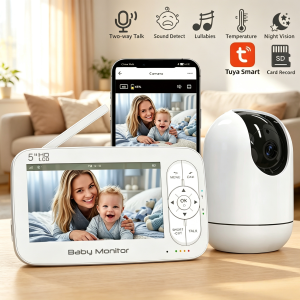
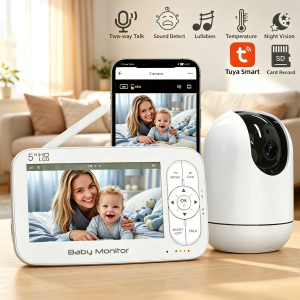
Tuya Smart Baby Monitor with 5-inch HD display, 1280×720 resolution, two-way audio, cry detection, lullabies, temperature monitoring, and night vision. Supports Tuya Smart APP for remote viewing, SD card storage (8-128GB), and WiFi/No-WiFi dual modes. Multi-user sharing, split-screen feature, and 2x/4x digital zoom.


Product Description

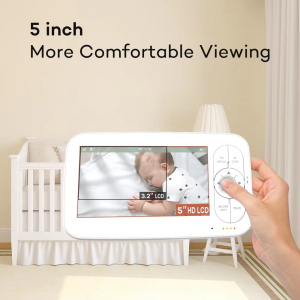
Stay connected with your baby anytime, anywhere with the Tuya Smart Baby Monitor. Featuring a large 5-inch HD display, intelligent cry detection, and flexible connectivity options — use with or without WiFi, with or without the APP.

Key Features

tuya baby monitor

5 Core Functions for Complete Baby Care:

Feature Description
🎤 Two-Way Talk Built-in microphone and speaker for crystal-clear communication
😢 Sound Detect Smart cry detection with instant VOX mode alerts
🎵 Lullabies Soothing sounds and white noise to calm your baby
🌡️ Temperature Real-time room temperature display (°F/°C)
🌙 Night Vision Automatic infrared LEDs for clear video in darkness
💾 SD Card Storage Local recording with 8-128GB micro SD card support
📱 Tuya APP Remote viewing via Tuya Smart APP

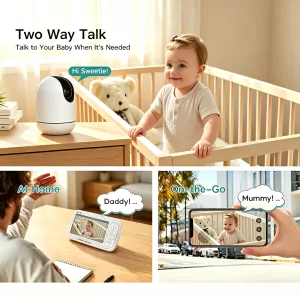
Two-Way Talk – Stay Connected Anytime

tuya baby monitor

Talk to your baby from anywhere in the house or on-the-go. The Tuya Smart Baby Monitor features high-sensitivity microphone and speaker for crystal-clear two-way audio communication.

Key Benefits:

  • Strong 2.4GHz signal connection
  • No delay, real-time communication
  • Comfort your baby remotely at home or away
  • “Hi Sweetie!” – Talk to your baby instantly

tuya baby monitor

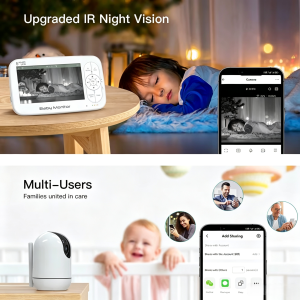
Upgraded IR Night Vision

tuya baby monitor

Sleep Mode – Monitor your baby with audio-only mode for peaceful nights.

Upgraded IR Night Vision – Automatic infrared night vision ensures you can see your baby clearly even in complete darkness. The 5-inch HD display shows every detail, day or night.


Multi-Users – Families United in Care

tuya baby monitor

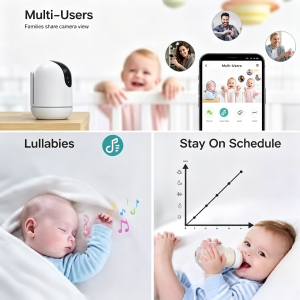
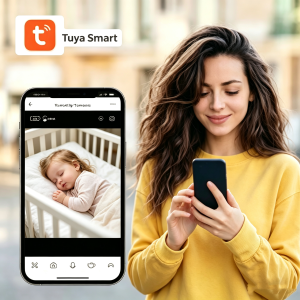
Share access with family members! The Tuya Smart APP allows multi-user sharing, so grandparents, parents, and caregivers can all monitor the baby from their own devices.

Add Sharing Options:

  • Share with Account
  • Share with Others (WeChat, Messages, Copy Link)

tuya baby monitor

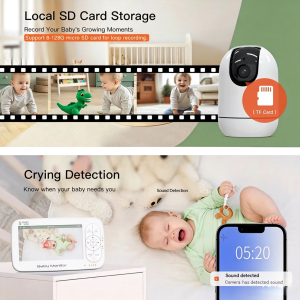
Local SD Card Storage

SD Card Storage Feature

Record Your Baby’s Growing Moments

Support 8-128GB micro SD card for loop recording. Never miss a precious moment — save videos locally and review them anytime.

  • Automatic loop recording
  • Local storage, no cloud fees
  • Easy playback on parent unit or APP

Crying Detection – Know When Your Baby Needs You


Smart sound detection alerts you instantly when your baby cries. The Tuya APP sends push notifications to your phone, so you’re always connected.

Sound Detection Alert: “Camera has detected sound” at 05:20


tuya baby monitor

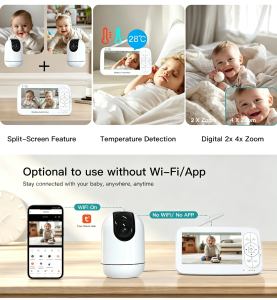
Split-Screen, Temperature & Zoom


Feature Description
Split-Screen Feature Monitor multiple cameras on one screen
Temperature Detection Real-time room temperature (28°C shown)
Digital 2x 4x Zoom See every detail with digital zoom

tuya baby monitor

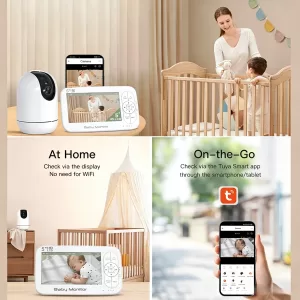
Optional to Use Without Wi-Fi/App

tuya baby monitor

Flexible Connectivity Options:

Mode Connection Use Case
WiFi On Tuya Smart APP + WiFi Remote viewing from anywhere
No WiFi / No APP Direct monitor connection Simple plug-and-play at home

Stay connected with your baby, anywhere, anytime — with or without WiFi.


Specifications

Specification Details
Display Size 5 Inch HD LCD
Resolution 1280 × 720 HD (720P)
APP Support Tuya Smart APP (iOS & Android)
WiFi Support Yes, 2.4GHz WiFi
SD Card Storage 8-128GB micro SD card (TF Card)
Wireless Range Up to 300 Meters (direct mode)
Night Vision Upgraded IR Night Vision
Temperature Display °F / °C
Zoom 2x / 4x Digital Zoom
Multi-User Yes, via Tuya APP
Split-Screen Yes, supports multiple cameras
Two-Way Audio Yes, built-in microphone & speaker
Cry Detection Yes, with push notifications
Lullabies Yes, built-in soothing sounds
Battery Rechargeable (capacity varies by model)

What’s in the Box
  • 1 × Parent Unit (5-Inch Monitor)
  • 1 × Baby Unit (Camera)
  • 2 × Power Adapters
  • 1 × User Manual

Perfect For

  • Newborn nursery monitoring
  • Toddler sleep supervision
  • Nanny/babysitter monitoring
  • Travel and vacation use
  • Multi-room home coverage
  • Elderly care
  • Pet watching
  • Families who want flexible viewing options (APP or no APP)

Give yourself peace of mind and give your baby the best care with this professional-grade smart baby monitor system.

Related Articles

You Might Also Like
Frequently Asked Questions

Is Tuya Baby Monitor worth buying?

Based on the breakdown in this article, Tuya Baby Monitor offers a solid mix of features and value. If your main goal matches the key benefits described above, it is a practical choice for everyday use.

How do I choose the right tuya baby monitor for my needs?

Start with your core use case, then compare battery life, compatibility, and build quality as covered above. Choosing the right tuya baby monitor comes down to matching specs with how you actually use it. 6MP WiFi Security Camera

Does tuya baby monitor require a companion app?

Most devices of this type pair with a free companion app for setup and firmware updates. A few advanced features may sit behind a paid plan, so check the official specs page before buying.

Does tuya baby monitor work with both iPhone and Android?

Yes, in most cases this type of device ships with iOS and Android apps, and standard Bluetooth protocols keep cross-platform pairing simple.