Posted on — Leave a comment

Smart WiFi Plant Watering Pump: A Must-Have for Indoor Plant Parents

wifi plant watering pump

Smart WiFi Plant Watering Pump: A Must-Have for Indoor Plant Parents

If you’ve ever come Home to a drooping pothos, a crispy fern, or a tragically over-watered succulent — you’re not alone. Studies show that over 60% of houseplants die from inconsistent watering, and most plant parents simply can’t keep up with the daily grind of checking soil, refilling cans, and remembering which plant likes what.

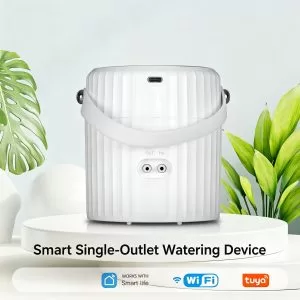
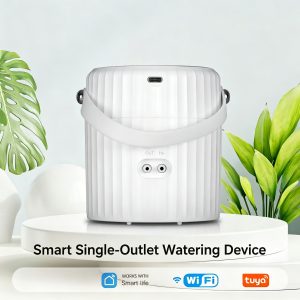
Enter the Smart WiFi Plant Watering Pump — a compact, app-controlled device that turns any container of water into a fully automatic, precision irrigation system for your indoor jungle. Pair it with a Tuya smart soil moisture sensor and your plants essentially water themselves.

In this guide, we’ll break down the features that make this little white bucket one of the smartest upgrades for plant parents in 2025 — and why it’s flying off the shelves of indoor gardeners worldwide.
wifi plant watering pump

Why Every Plant Parent Needs a Smart Watering Pump

Plant Care is a relationship built on consistency — and humans are notoriously bad at it. Here’s what every plant parent struggles with:

  • 🌿 Different species, different needs — Pothos, ferns, monsteras, succulents, orchids all want completely different watering schedules
  • ✈️ Travel and vacations — Two weeks in Bali shouldn’t mean two weeks of dead plants
  • 💼 Busy workdays — By the time you get home, the Light has shifted and you’ve forgotten
  • 🧠 Memory fatigue — “Did I water it Tuesday or Wednesday?”

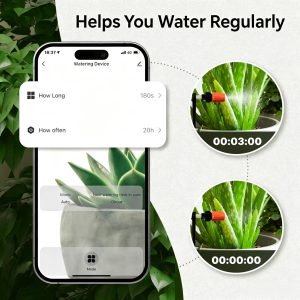
A smart watering pump solves all four problems in one device. The screenshot above shows the Smart Life app interface — set “How Long” to 180 seconds, “How often” to 20 hours, and the pump automatically runs the cycle. You can also see the live countdown (00:03:00) as the pump waters your plant on schedule, with the Mode set to Auto for hands-off operation.
wifi plant watering pump

5 Key Features That Set This Pump Apart

This isn’t just “a pump with WiFi” — every detail is built for real-world indoor use.

1. 🌿 Automatic Watering With the Smart Life App

The pump connects seamlessly to the Smart Life and Tuya Smart apps, giving you complete control from anywhere in the world. Set custom schedules by day, time, and duration. The pump follows your schedule to the minute — even when your phone is in another room or off entirely.

Real-world example: Set the pump to run for 60 seconds every 24 hours. Your pothos gets consistent moisture, your monstera stays lush, and you never have to think about it again.

2. 💧 Manual Mode for On-Demand Watering

Sometimes a plant needs a quick extra drink outside the schedule. Switch to Manual Mode directly on the device or in the app, and trigger a single watering cycle without disturbing your automated routine. The pump runs for the duration you set, then returns to the auto schedule on the next cycle.

3. 🔒 Child Lock for Family Safety

Pets and curious toddlers can change device settings with a single tap. The built-in Child Lock prevents accidental setting changes, so your carefully designed plant care schedule stays exactly how you set it. A long press on the device unlocks it when you need to make changes.

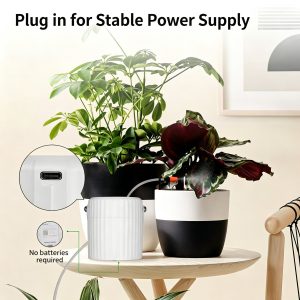
4. 🔌 USB-C Powered — No Batteries Required

No batteries to replace. No proprietary chargers. Just plug in any standard USB-C cable (5.0–6.0V) and let the pump run continuously. Use a power bank for ultra-flexible placement, or plug it into a wall adapter and forget about it. This is the kind of set-it-and-forget-it reliability indoor gardeners love.

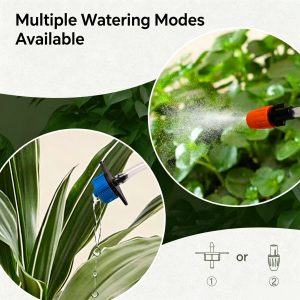
5. 🚿 Multiple Watering Modes — Drip or Spray

The pump supports two interchangeable nozzles:

  • Drip mode (blue nozzle) — Slow, deep watering for established plants like monsteras, pothos, and peace lilies
  • Spray mode (orange nozzle) — Gentle misting for humidity-loving tropicals like ferns, calatheas, and seedlings

Just swap the nozzle to match your plant’s needs. With a flow rate of 550 mL/min, the pump is calibrated for both styles without over-watering.
wifi plant watering pump

Pair With a Tuya Smart Soil Moisture Sensor — The Magic Combo

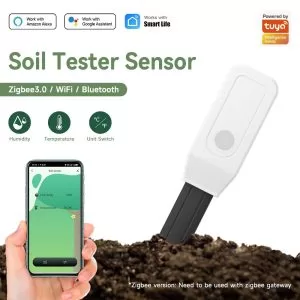
Here’s where the device goes from “smart” to genius. Pair this watering pump with a Tuya Smart Soil Moisture Sensor in the same Smart Life app, and you unlock fully automatic, soil-aware irrigation:

  1. 🌡️ Soil moisture sensor measures real-time moisture levels in the pot
  2. 📉 When moisture drops below your set threshold (e.g., 30%), it triggers the watering pump
  3. 💧 Pump runs for the exact duration you set to bring moisture back to ideal levels
  4. ✅ Pump stops automatically — no over-watering, no root rot, no waste

This is called a closed-loop smart irrigation system, and it’s the same technology used in professional greenhouses — now available for your living room at a fraction of the cost.

Real-world example:

  • Set soil threshold to 35% (ideal for pothos)
  • Set pump duration to 15 seconds per trigger
  • Connect a 10L water reservoir with the included 5m tube
  • Go on a 3-week vacation
  • Come back to perfectly watered, healthy plants
wifi plant watering pump

Water Multiple Plants Simultaneously

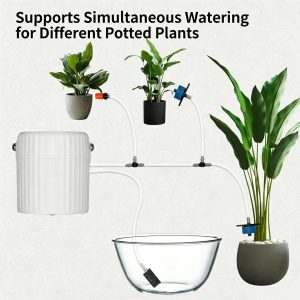
One of the most underrated features of this watering pump is its ability to water multiple potted plants at the same time with a simple 4-way splitter. The image above shows the pump connected to three different plants:

  • 🪴 Pothos (left, gray pot)
  • 🌿 Peace Lily (center, black pot)
  • 🌱 Boston Fern (right, white pot)

All three plants get watered from the same reservoir (the clear glass bowl in the foreground) at the same time, with each outlet getting exactly the right amount of water for its specific plant. The built-in sponge filter in the reservoir keeps debris out of the pump, extending its lifespan and preventing clogs.

This makes the pump perfect for:

  • 🌸 Balcony gardens with multiple hanging baskets
  • 🪴 Indoor plant collections with 5–20+ plants
  • 🌿 Greenhouse setups with rows of seedlings
  • 🏡 Mixed-species displays where every plant has different water needs
wifi plant watering pump

11-Settings Control Panel — Total Customization at a Glance

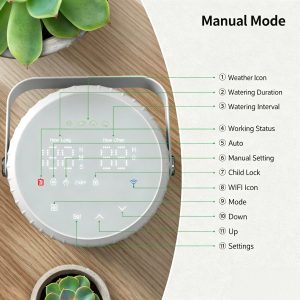
For users who prefer hands-on control, the pump features a circular LCD control panel with 11 customizable settings. As the diagram above shows:

  1. Weather Icon — Visual weather status display
  2. Watering Duration — Set how long each cycle runs (in seconds)
  3. Watering Interval — How often the pump runs (in hours)
  4. Working Status — Real-time pump activity indicator
  5. Auto — One-tap activation of automatic mode
  6. Manual Setting — Trigger a manual watering cycle
  7. Child Lock — Long-press to lock/unlock
  8. WiFi Icon — Connection status indicator
  9. Mode — Switch between Auto and Manual
  10. Down — Decrease value
  11. Up — Increase value

The bright LED display makes every setting easy to read at a glance — no need to dig into the app for basic adjustments. The 4 directional buttons (Set / Up/ Down / Mode) make navigation intuitive, even for users who aren’t tech-savvy.

wifi plant watering pump

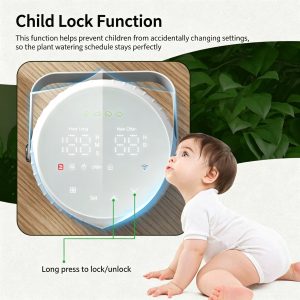
Child Lock Function — Built for Family Homes

If you have toddlers, curious kids, or pets in the house, the Child Lock function is essential. The image above shows the lock activated on the device display, with a “Long press to lock/unlock” indicator showing the simple operation. A long press on the device locks the control panel and app interface, preventing any accidental setting changes.

This means:

  • 👶 Toddlers can’t change your carefully tuned watering schedule
  • 🐕 Cats and dogs bumping into the device won’t trigger unwanted cycles
  • 🧒 Kids playing near the device can’t accidentally disable the pump
  • 🔒 Your settings stay exactly as you set them, week after week

Related Articles

You Might Also Like

Frequently Asked Questions

Is Wifi Plant Watering Pump worth buying?

Based on the breakdown in this article, Wifi Plant Watering Pump offers a solid mix of features and value. If your main goal matches the key benefits described above, it is a practical choice for everyday use.

How do I choose the right wifi plant watering pump for my needs?

Start with your core use case, then compare battery life, compatibility, and build quality as covered above. Choosing the right wifi plant watering pump comes down to matching specs with how you actually use it. Solar Ultrasonic Pest Repeller: The Complete Guide to Chemical-Free Mole and Snake Control

Does wifi plant watering pump require a companion app?

Most devices of this type pair with a free companion app for setup and firmware updates. A few advanced features may sit behind a paid plan, so check the official specs page before buying.

Posted on — Leave a comment

Smart Rain Sensors: The Weather-Proof Home Upgrade Every Homeowner Needs

Whether it’s a sudden summer downpour, a leaking pipe under the sink, or an overflowing bathtub while you’re away at work — water damage is one of the most expensive and stressful problems a homeowner can Face. A single forgotten open window during a storm can ruin floors, furniture, electronics, and walls in a matter of minutes. This is exactly where a Smart rain sensor changes the game. Compact, wireless, and surprisingly affordable, a Zigbee rain detection Sensor acts as an always-on guardian for your home — instantly alerting you the moment water shows up where it shouldn’t. Below, we’ll break down why this small device is one of the smartest upgrades you can make to your smart home in 2025, and what features to look for before you buy.

Why Every Home Needs a Smart Rain Sensor

Most homeowners only think about water damage after it happens. The average residential water damage incident costs $11,000+ in the U.S. alone, and most of those events are completely preventable with an early-warning sensor.

A smart rain sensor catches the very first sign of trouble — the kind of slow leak or unexpected downpour that humans simply miss when they’re asleep, at work, or on vacation.

rain sensors weather proof

These are the four most common water-related household disasters, and they all share one trait: you don’t notice them until the damage is already done. A rain sensor with push notifications turns silent disasters into instant alerts on your phone.

Meet the Smart Rain Detection Sensor

rain sensors weather proof

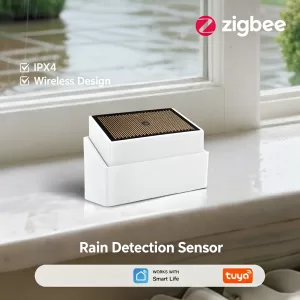
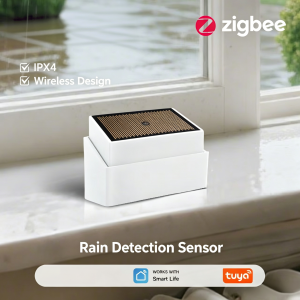
This wireless, battery-powered rain detection sensor is built on the Zigbee 3.0 protocol and works natively with the Smart Life and Tuya apps — two of the largest smart home ecosystems in the world. Setup takes under two minutes: pair, place, and you’re protected. Key headline features at a glance:

  • ✅ IPX4 waterproof — survives splashes, humidity, and outdoor use
  • ✅ Wireless design — no cables, no drilling
  • ✅ Battery powered — runs for months on a single set of batteries
  • ✅ Zigbee mesh — rock-solid connectivity throughout the home

Instant Phone Alerts — The Moment Water Is Detected


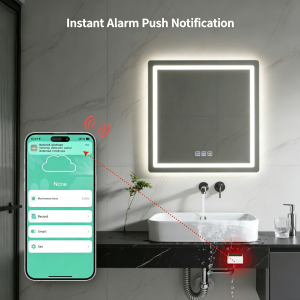
The single most important feature of any smart leak detector is speed of notification. When the sensor detects moisture, it sends a real-time push notification through the Smart Life or Tuya app within seconds.

Picture this: you’re at the office, and a sudden storm rolls in. You left a bedroom window cracked. Rain starts, water seeps onto the sill, and within a few seconds your phone buzzes with:

“Detected raindrops”rain sensors weather proof

You immediately close the smart blinds remotely, send a command to shut a connected exhaust fan, or call a neighbor to close the window. Disaster averted in under a minute.

When comparing sensors, look for these notification essentials:

  • ⚡ Low-latency push (no longer than 5-second delay)
  • 📶 Reliable Zigbee mesh connectivity that pushes through walls
  • 🔋 Battery-status monitoring so you know when to replace cells

Works as Part of a Complete Zigbee Alarm System

rain sensors weather proof

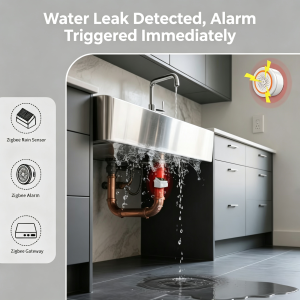
One of the most powerful features of a Zigbee-based rain sensor is its ability to integrate with a complete home alarm ecosystem. When water is detected, the sensor can trigger all three layers of response:

  1. Zigbee Gateway — sends push notifications and logs every event in the app
  2. Zigbee Siren / Alarm — emits a loud, attention-grabbing sound that alerts anyone in the home, even if their phone is on silent
  3. Other smart devices — like smart plugs that shut off a water pump, motorized blinds that close to prevent rain entry, or smart bulbs that flash red as a visual warning

This turns one tiny sensor into the trigger point for a fully automatic water-emergency response. You don’t just get a notification — your home actually responds for you.

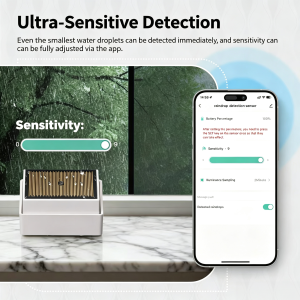
Ultra-Sensitive Detection With Adjustable Levels

rain sensors weather proof

Not every water event is the same. A light mist shouldn’t trigger alarms the same way a fully open window in a thunderstorm should. That’s why the best smart rain sensors offer adjustable sensitivity levels (0–9) through the app:

  • Low (1–3): Best for indoor placement where you want to ignore tiny condensation but catch real leaks
  • Medium (4–6): Balanced setting for general-purpose monitoring
  • High (7–9): Maximum detection — picks up the smallest droplets, ideal for outdoor windowsills or sensitive equipment areas

You can fine-tune the same sensor for different environments and seasons. After adjusting in the app, simply press the SET button on the sensor once to apply the change — no re-pairing required.

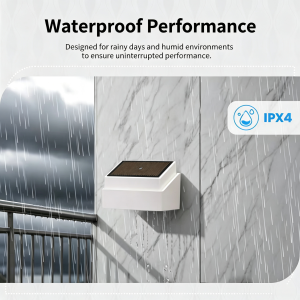
Waterproof IPX4 — Built for Real-World Conditions

rain sensors weather proof

Many homeowners ask: “But what if the sensor itself gets wet?”

That’s exactly why a quality rain sensor is built with IPX4-rated waterproofing. This rating means the device is protected against:

  • 💧 Splashing water from any direction
  • 🌧️ Light rain and condensation
  • 💨 Humid bathroom environments
  • 🏡 Outdoor balcony installations

Whether you mount it on an exposed windowsill that occasionally gets splashed, place it near a steamy bathroom, or set it up on a covered patio — the sensor keeps working reliably, season after season.

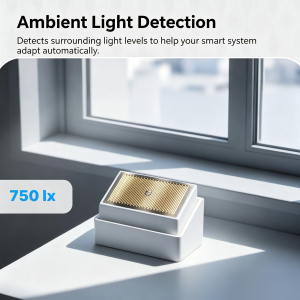
Bonus: Ambient Light Detection

rain sensors weather proof

Here’s a feature many buyers overlook but quickly fall in love with: the sensor also reports real-time ambient light levels to your app (e.g., 750 lx shown in the screenshot).

Why does this matter? Quite a lot, actually:

  • 🌅 Automate your lighting — set your Zigbee smart lights to turn on at dusk when the sensor detects falling light levels
  • 🔒 Security routines — trigger different behaviors at home vs. away based on lighting changes
  • 🌱 Plant care — monitor natural light for indoor gardens and greenhouses
  • 😴 Sleep optimization — detect evening light drops to wind down with circadian-aligned smart bulbs

It’s a small bonus feature that turns a leak sensor into a multi-purpose environmental monitor, adding even more value per dollar.

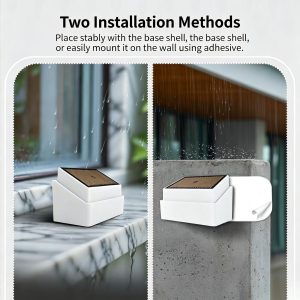
Two Installation Methods — Place It Anywhere

rain sensors weather proof

Worried about complicated installation? Don’t be. This wireless rain sensor comes with two easy mounting options:

Option 1: Place It on a Flat Surface

The included base shell keeps the sensor stable on windowsills, countertops, beside aquariums, under sinks — anywhere with a flat surface. No tools, no drilling. Just place and pair.

Option 2: Wall-Mount With Adhesive

For tight spaces or to monitor pipes directly, use the included adhesive pad to mount the sensor on a wall, under a cabinet, or behind a toilet. The wireless design means no cables to run, and the battery lasts for months of maintenance-free operation.

Either way, you’re protected in under 60 seconds.

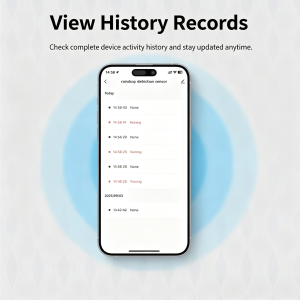
Full Activity History — See Everything That Happened

rain sensors weather proof

Curious whether you actually got an alert last Tuesday at 2 PM? Want to verify a leak started before or after you left the house? The Smart Life / Tuya app keeps a complete, time-stamped activity log of every event:

  • 🟢 None — no water detected at this moment
  • 🔴 Raining / Detected — water detected at this moment

Each entry includes the exact time and date, so you can:

  • 📋 Review past incidents when troubleshooting recurring leaks
  • 📑 Document damage for insurance claims with exact timestamps
  • ✅ Verify the system is working properly with a cl

You Might Also Like
Frequently Asked Questions

Is Rain Sensors Weather Proof worth buying?

Based on the breakdown in this article, Rain Sensors Weather Proof offers a solid mix of features and value. If your main goal matches the key benefits described above, it is a practical choice for everyday use.

How do I choose the right rain sensors weather proof for my needs?

Start with your core use case, then compare battery life, compatibility, and build quality as covered above. Choosing the right rain sensors weather proof comes down to matching specs with how you actually use it. Solar Motion Sensor Street Light: Buying Guide, 4 Lighting Modes, and FAQ

Does rain sensors weather proof require a companion app?

Most devices of this type pair with a free companion app for setup and firmware updates. A few advanced features may sit behind a paid plan, so check the official specs page before buying. Tuya WiFi IR Remote Review: Universal Control Meets Climate Intelligence
Related Articles
Posted on — Leave a comment

Motion-Sensing Night Light: The Smart Way to Navigate Your Home After Dark

Stumbling through dark hallways at 2 a.m.? Fumbling for light Switches with full hands? There’s a Smarter way. The latest motion-sensing night lights combine advanced PIR sensors, warm LED glow, and wireless convenience to transform how you move through your Home after sunset.

motion sensing night light

Light That Follows You

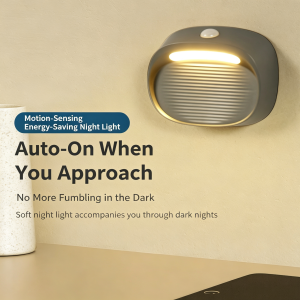
Modern motion-sensing lights don’t just turn on. They anticipate your movement. Walk into a room, and the light activates before your hand reaches the switch. Leave, and it fades after you go. No buttons. No fumbling. Just seamless illumination that respects your sleep and your safety. The best models use dual-sensor technology: human body detection plus ambient light sensing. This means they only activate when it’s truly dark, conserving battery and avoiding unnecessary glare during daylight hours. motion sensing night light

Why 3000K Warm White Matters

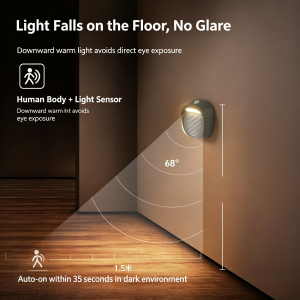
Harsh blue-white light disrupts your circadian rhythm and strains your eyes at night. That’s why premium night lights use 3000K warm white LEDs — soft enough for midnight bathroom trips, bright enough to prevent trips and falls.

The downward beam design is equally important. Instead of shining directly into your eyes, quality lights cast illumination toward the floor. You see where you’re stepping without the jarring brightness of overhead fixtures.

motion sensing night light

Linkage Technology: One Sensor, Multiple Lights

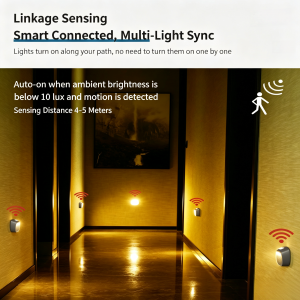
Here’s where modern night lights get truly Smart. Linkage sensing allows multiple lights to communicate with each other. Walk down a hallway, and the lights turn on in sequence — not all at once, but in a smooth wave that follows your movement.

With sensing distances of 4-5 meters and linkage ranges reaching 6-7 meters, you can create a continuous path of light from bedroom to bathroom to kitchen. No more dark gaps. No more searching for switches in unfamiliar spaces.

motion sensing night light

Installation in 60 Seconds: No Tools, No Wiring

The biggest barrier to better home lighting has always been installation. Drilling holes. Running wires. Hiring electricians. Modern magnetic night lights eliminate all of it.

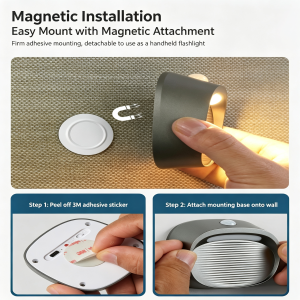
Peel the 3M adhesive backing. Stick the mounting plate to the wall. Attach the light via built-in magnets. Done. The magnetic feature serves double duty — easy removal for recharging, and the ability to detach the light for use as a handheld flashlight in emergencies.

motion sensing night light

Kitchen Nights Made Safer

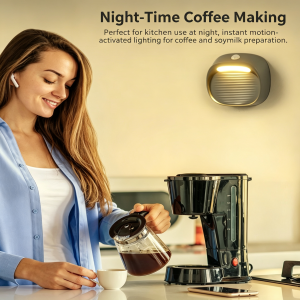
Late-night snack runs shouldn’t require flipping harsh overhead lights. A motion-sensing light near your coffee station or kitchen counter provides just enough illumination to navigate safely without waking the household.

The instant activation means no waiting — step into the kitchen, and your path is lit. Prepare your morning coffee or midnight tea with confidence, knowing you can see clearly without disturbing others.

motion sensing night light

Stair Safety: Where Motion Lights Matter Most

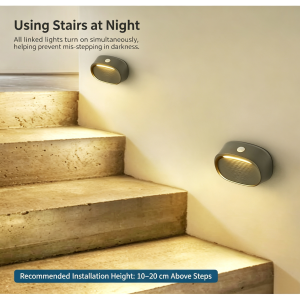
Staircases are the most dangerous places in any home after dark. One missed step can lead to serious injury. Motion-sensing lights installed 10-20 cm above stair treads cast direct illumination where you need it most.

The linked lighting feature is particularly valuable here. Multiple lights along a staircase activate simultaneously, ensuring every step is visible from top to bottom. For households with children or elderly members, this isn’t just convenient — it’s essential safety equipment.

motion sensing night light

Bathroom Bliss: Gentle Light for Midnight Visits

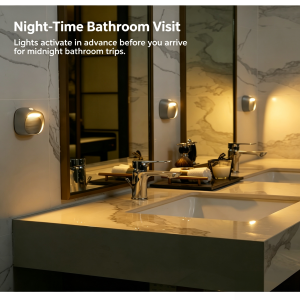
Bathroom overhead lights are designed for morning routines, not 3 a.m. visits. The shock of bright light disrupts sleep and leaves you squinting. A warm 3000K motion light positioned near the vanity or along the wall provides gentle guidance without the jarring brightness. Multiple lights in larger bathrooms create even illumination without shadows. The motion sensor activates the lights before you fully enter, so you’re never stepping into darkness. motion sensing night light

Flexible Power, Adjustable Brightness

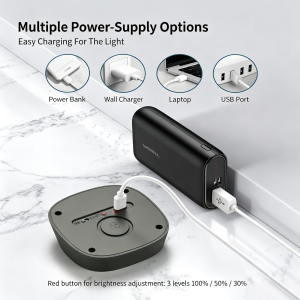
Modern night lights adapt to your lifestyle with multiple charging options. Power bank. Wall charger. Laptop USB. Any standard USB port keeps your light ready for action.

Three brightness levels — 100%, 50%, and 30% — let you customize illumination for each location. Use full brightness for staircases and hallways. Dim mode for bedrooms and nurseries. The red button on the back makes adjustment simple, even in the dark.

Battery life extends for months between charges, depending on usage and brightness settings. When it’s time to recharge, simply detach the magnetic light and plug in.

motion sensing night light

Renter-Friendly, Damage-Free

Perhaps the best feature of magnetic night lights is their respect for your walls. No drilling. No screws. No permanent marks. The 3M adhesive mounting plate holds securely yet removes cleanly when it’s time to relocate or redecorate.

This makes motion-sensing lights perfect for renters, dorm rooms, temporary housing, or anyone who values flexibility. Install them today, move them tomorrow, take them with you when you go.

Choosing the Right Motion Light for Your Home

When selecting a motion-sensing night light, consider these key factors:

  • Detection range: 4-5 meters covers most residential spaces
  • Linkage capability: Essential for hallways and staircases
  • Color temperature: 3000K warm white for sleep-friendly illumination
  • Installation method: Magnetic mounting offers maximum flexibility
  • Power options: USB rechargeable with multiple charging methods
  • Brightness adjustment: Multiple levels adapt to different spaces

Ready to Light Your Nights Smarter?

Motion-sensing night lights represent one of the simplest yet most impactful upgrades you can make to your home. They enhance safety, preserve sleep quality, and add a touch of modern convenience to everyday life — all without the cost or complexity of wired lighting systems.

👉 Explore motion-sensing night lights on odmhome.com and discover how effortless nighttime navigation can be.

💬 Questions about installation or choosing the right model? Chat with us on WhatsApp: wa.me/8617666669273 — we usually reply within minutes.

📌 For business inquiries, wholesale pricing, or custom OEM solutions, visit our partner site: xingliaotech.com.

Related Articles

You Might Also Like
Frequently Asked Questions

Is Motion Sensing Night Light worth buying?

Based on the breakdown in this article, Motion Sensing Night Light offers a solid mix of features and value. If your main goal matches the key benefits described above, it is a practical choice for everyday use.

How do I choose the right motion sensing night light for my needs?

Start with your core use case, then compare battery life, compatibility, and build quality as covered above. Choosing the right motion sensing night light comes down to matching specs with how you actually use it. Smart Fingerprint Door Lock: Keyless Security with Tuya Smart Smart Home Automation Guide 2026: 7 Practical Scenes That Save Time, Money and Energy

Does motion sensing night light require a companion app?

Most devices of this type pair with a free companion app for setup and firmware updates. A few advanced features may sit behind a paid plan, so check the official specs page before buying. Smart WiFi Pet Feeder: Automated Pet Care with APP Control Video Doorbell Review 2026: What to Look For, Smart Features Compared, and Buyer's Guide
Posted on — Leave a comment

Tuya Smart Soil Tester Sensor: Stop Guessing, Start Growing

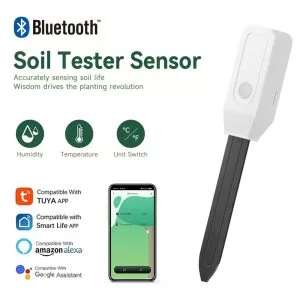
Stop killing your plants with kindness. The Tuya Smart Soil Tester Sensor sends real-time moisture and temperature data straight to your phone — so you know exactly when to water, and when to wait. Powered by Bluetooth 5.0 and fully compatible with the Smart Life app, Amazon Alexa, and Google Assistant, this compact sensor turns any plant parent into a data-driven gardener. No subscriptions. No complicated setup. Just insert the probe and open the app.

tuya soil tester sensor


Real-Time Soil Monitoring at Your Fingertips

Overwatering is the #1 cause of houseplant death. However, this sensor removes all the guesswork.

The probe continuously measures soil moisture from 0% to 100% with ±10% accuracy and temperature from -20°C to 60°C with ±1°C accuracy. Readings sync to your phone in seconds through the Smart Life app. As a result, you’ll never wonder “does my plant need water?” again.

Switch between °C and °F directly in the app — perfect for spring seedlings, summer gardens, or winter tropicals.

tuya soil tester sensor


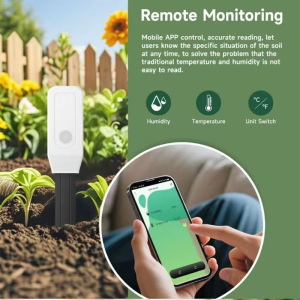
Remote Monitoring from Anywhere

Check your plants while you’re at work. Monitor the garden while on vacation. The Smart Life app puts real-time soil data in your pocket.

Mobile APP control gives you accurate readings anytime. Plus, you can solve the problem that traditional thermometers and hygrometers can’t — knowing the specific situation of your soil without walking outside.

tuya soil tester sensor


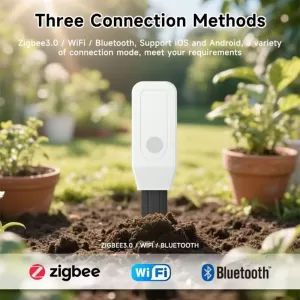
Three Connection Methods — Pick What Fits Your Home

Unlike most soil sensors that lock you into one protocol, this one gives you three choices:

  • 📶 WiFi — connects directly to your router, no hub needed
  • 🔵 Bluetooth — pairs with your phone for ultra-low-power local monitoring
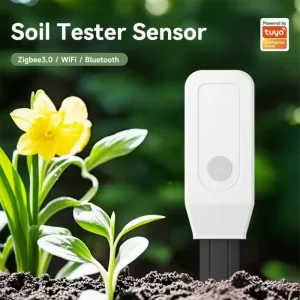
  • 📡 Zigbee 3.0 — best for whole-home setups with multiple sensors (requires gateway)

For most home gardeners, WiFi is the easiest. However, for larger setups with many sensors, Zigbee is more reliable. All three versions support iOS and Android.

tuya soil tester sensor


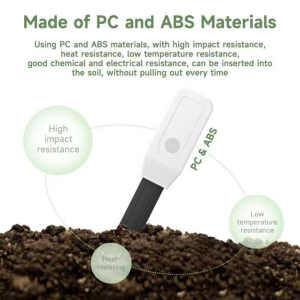
Built Tough for Indoor and Outdoor Use

Made of durable PC and ABS materials, this sensor withstands real garden conditions:

  • ✅ High impact resistance
  • ✅ Heat resistance
  • ✅ Low temperature resistance
  • ✅ Good chemical and electrical resistance

Insert it into the soil and leave it there — no need to pull it out every time you want a reading. The rugged housing protects the internal electronics from moisture, UV, and temperature swings.

tuya soil tester sensor


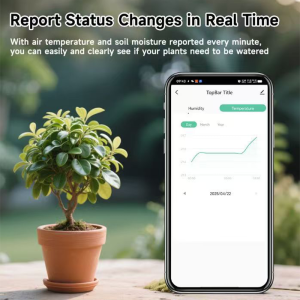
See Status Changes in Real Time

With air temperature and soil moisture reported every minute, you can easily and clearly see if your plants need water.

The Smart Life app displays historical trend graphs showing how your soil conditions change throughout the day, week, or month. Notice a sudden drop in moisture? Time to water. Temperature spiking in the greenhouse? Time to ventilate.

Data-driven plant care beats guesswork every time.

tuya soil tester sensor


Simple Setup, Clear Instructions

Getting started takes under 60 seconds:

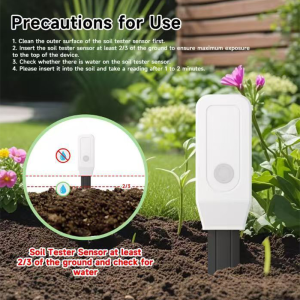
  1. Clean the outer surface of the soil tester sensor first
  2. Insert the sensor at least 2/3 of the probe into the ground for maximum accuracy
  3. Check whether there is water on the sensor surface
  4. Wait 1 to 2 minutes for the first stable reading

The probe’s metal sensors detect moisture through direct soil contact. Deeper insertion means more accurate readings — especially in larger pots and garden beds.

tuya soil tester sensor


Never Miss a Battery Change

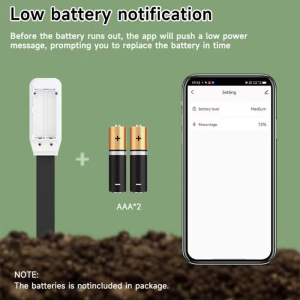
Before the battery runs out, the app pushes a low power notification — prompting you to replace the battery in time.

The sensor runs on 2 × AAA batteries (not included in package), delivering months of continuous monitoring per set. Check battery percentage directly in the Smart Life app settings.

No surprises. No dead sensors. Just reliable plant care.

tuya soil tester sensor


One Sensor, Endless Applications

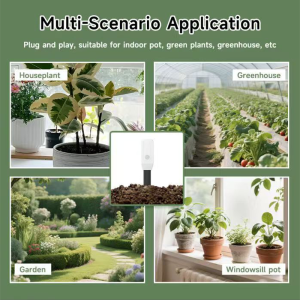
Plug and play. Suitable for:

  • 🪴 Houseplant — monstera, fiddle leaf fig, succulents, and tropicals
  • 🌱 Greenhouse — vegetable rows, herbs, and controlled growing
  • 🌻 Garden — outdoor beds, borders, and lawns
  • 🪟 Windowsill pot — herbs, flowers, and small vegetables

One sensor works across every corner of your home. Whether you’re a beginner with one pothos or a serious gardener with a full greenhouse, this tool scales with you.

tuya soil tester sensor


Why Plant Lovers Choose Tuya Smart Soil Sensor

✔️ Universal compatibility — works with Smart Life, Alexa, and Google Assistant ✔️ Three connection options — WiFi, Bluetooth, or Zigbee 3.0
✔️ Real-time + historical data — trend graphs show patterns over time
✔️ Rugged construction — PC + ABS housing for indoor and outdoor use
✔️ Low battery alerts — never miss a battery change
✔️ No subscriptions — buy once, monitor forever


Ready to Stop Killing Your Plants?

The Tuya Smart Soil Tester Sensor turns plant care from guesswork into science. Real-time moisture. Accurate temperature. App alerts. Full smart home integration. All for less than the cost of replacing one dead houseplant. 👉 Shop the Soil Tester Sensor on odmhome.com today.

💬 Need help choosing WiFi, Bluetooth, or Zigbee? Chat with us on WhatsApp: wa.me/8617666669273 — we usually reply within minutes.

📌 For business inquiries, wholesale orders, or custom OEM solutions, visit our partner site: xingliaotech.com.

Related Articles

You Might Also Like
Frequently Asked Questions

Is Tuya Soil Tester Sensor worth buying?

Based on the breakdown in this article, Tuya Soil Tester Sensor offers a solid mix of features and value. If your main goal matches the key benefits described above, it is a practical choice for everyday use.

How do I choose the right tuya soil tester sensor for my needs?

Start with your core use case, then compare battery life, compatibility, and build quality as covered above. Choosing the right tuya soil tester sensor comes down to matching specs with how you actually use it.

Does tuya soil tester sensor require a companion app?

Most devices of this type pair with a free companion app for setup and firmware updates. A few advanced features may sit behind a paid plan, so check the official specs page before buying.
Does tuya soil tester sensor work with both iPhone and Android?

Yes, in most cases this type of device ships with iOS and Android apps, and standard Bluetooth protocols keep cross-platform pairing simple.

Posted on — Leave a comment

3rd-Generation Bluetooth Smart Finger Robot: Make Every Switch Smart in Seconds

Tired of getting out of bed just to turn off the lights? Wish your old coffee machine could brew espresso before your feet hit the floor? Meet the 3rd-Generation Bluetooth Smart Finger Robot — the tiny, wire-free device that turns any rocker switch or push button into a Smart one in under a minute. Powered by Bluetooth 5.0, compatible with the Tuya / Smart Life ecosystem, and working with Alexa, Google Assistant, and Siri Shortcuts out of the box, this little robotic finger brings real home automation to renters, apartment dwellers, and anyone who’d rather not call an electrician.


3rd generation bluetooth finger


What Is the Smart Finger Robot?

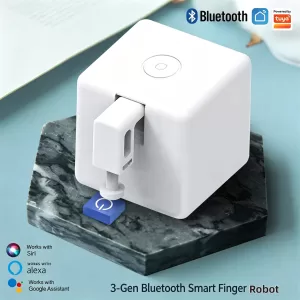
The Smart Finger Robot is exactly what it sounds like: a small motorized “finger” that physically presses buttons and flips switches for you. Stick it next to your wall switch, slide it onto your coffee machine’s brew button, or mount it on the wall button of your garage door — wherever you have a button, this robot can press it.

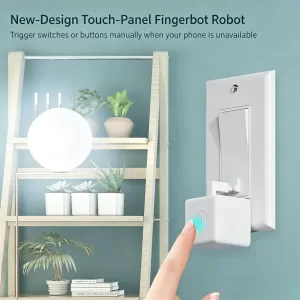
The newest 3rd-Gen model adds a built-in touch panel on top. That means you can also trigger the press with a single tap on the device itself — perfect for those moments when your phone is dead, lost, or charging in another room.


3rd generation bluetooth finger


A Universal Upgrade for Every Room

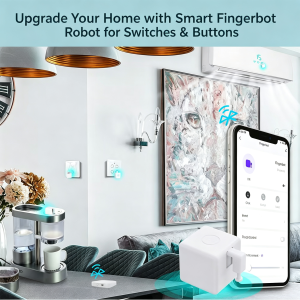
Stop replacing perfectly good appliances. With the Fingerbot, almost anything with a button becomes smart:

  • 💡 Light switches and dimmers
  • ☕ Coffee machines
  • ❄️ Air conditioner control panels
  • 🪟 Blinds and shutters
  • 📺 TV and sound system power buttons
  • 🚪 Garage door openers
  • 🧹 Robot vacuum start buttons

No rewiring. No drilling. No smart-bulb replacements. Just stick, pair, and enjoy. Looking to expand your smart-home setup? Browse our full Smart Home collection on odmhome.com for switches, sensors, plugs, and more — everything pairs seamlessly with Tuya.

Smart finger robot controlled via Tuya Smart Life APP on smartphone, home automation
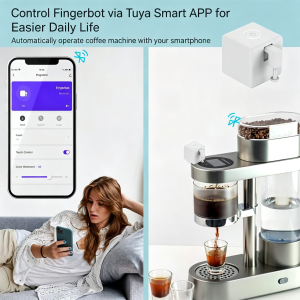
Control from anywhere. Open the Tuya Smart Life APP and press any button remotely.


Control Everything from the Tuya Smart App

Pair your Fingerbot with the Tuya Smart or Smart Life app — the world’s largest smart-home ecosystem with thousands of compatible devices — and unlock:

  • ✅ One-tap manual control from anywhere in Bluetooth range
  • ✅ Custom schedules (e.g., brew coffee at 7:00 a.m.)
  • ✅ Smart scenes that combine Fingerbots with other Tuya devices
  • ✅ Real-time battery and click-count monitoring
  • ✅ Family-sharing access for everyone in the house

Imagine this: your morning alarm goes off at 7:00 a.m. Before your feet even hit the floor, the Fingerbot has already pressed the start button on your espresso machine. By the time you walk into the kitchen, your coffee is brewed, hot, and waiting.

Looking for more ways to automate your mornings? Pair the Fingerbot with our Smart Sockets to schedule lamps, kettles, and fans at the same time.


Smart finger robot automating coffee maker with Tuya APP, morning routine scene
Schedule your morning brew. The finger robot presses the coffee maker button automatically.


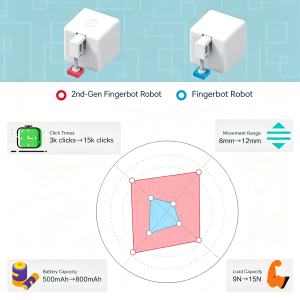
What’s New: 3rd-Gen vs. 2nd-Gen

We didn’t just tweak the design — we rebuilt the Fingerbot from the inside out.

Specification 2nd Generation 3rd Generation Improvement
Click Lifespan 3,000 clicks 15,000 clicks 5× longer
Movement Range 8 mm 12 mm 50% deeper
Battery Capacity 500 mAh 800 mAh 60% more
Load Capacity 9 N 15 N 67% stronger

The wider movement range means it can now reach the deeper, stiffer rocker switches that older models struggled with. The bigger battery delivers months of use on a single charge and with 5× the click lifespan, this Fingerbot is built to last.


3rd generation bluetooth finger


Two Ways to Control: Local & Remote

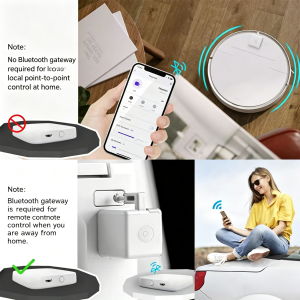
🏠 Local control (no hub needed): Out of the box, your Fingerbot talks directly to your phone via Bluetooth. No Wi-Fi hub, no gateway, no monthly fees. Walk into the room, open the app, tap “Click” — that’s it. Perfect for renters and small apartments.

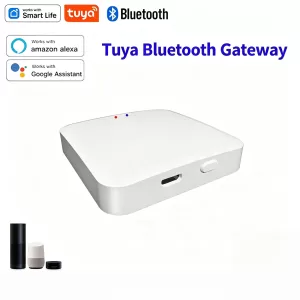
🌍 Remote control (add the Bluetooth gateway): Want to start your robot vacuum from the office? Open the garage door for a delivery while you’re at work? Add the Bluetooth Gateway (sold separately), and your Fingerbot joins your home Wi-Fi. Now you can control it from anywhere in the world through the Smart Life app.


3rd generation bluetooth finger
One device, endless possibilities. Automate lights, coffee makers, fans, PCs, and more.


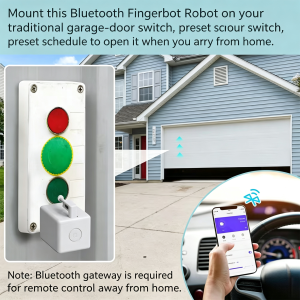
One Smart Switch for Your Garage

A smart garage door system can cost hundreds of dollars and require professional installation. The Fingerbot does the same job for a fraction of the price.

Mount it on your existing wall-mounted garage door button, set a schedule (open at 6:00 p.m. on weekdays), and add the Bluetooth Gateway for remote unlock when a family member or delivery driver needs access. No new garage opener. No subscription. Just a smarter way home.

Want to go further with garage automation? Explore our full line of Smart Garage Accessories on odmhome.com — and for commercial-grade and custom solutions, check out our partner site xingliaotech.com.


3rd generation bluetooth finger


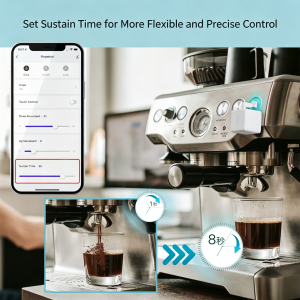
Precision Control with Adjustable Sustain Time

Different buttons need different presses. A light switch needs a quick tap. An espresso machine needs to be held for 3 seconds. A garage door needs a long, firm press.

The 3rd-Gen Fingerbot lets you customize the sustain (press-hold) time in the app — from a fraction of a second to several seconds. Combined with three operation modes (Click / Switch / Loop), you get exactly the behavior you need for every device in your home.

It’s not just a button-pusher. It’s a fully programmable robotic finger.


3rd generation bluetooth finger


Why Homeowners Love the 3rd-Gen Smart Finger Robot

✔️ Universal compatibility — works with virtually any switch or button
✔️ No rewiring, no electrician — DIY install in under a minute
✔️ Touch-panel backup — control even without your phone
✔️ Voice control — works with Alexa, Google Assistant, and Siri ✔️ 5× longer lifespan — 15,000 clicks per device
✔️ Tuya ecosystem — pairs with thousands of other smart devices
✔️ Optional remote control — add the gateway whenever you’re ready


Ready to Upgrade Your Home?

The 3rd-Gen Bluetooth Smart Finger Robot is the fastest, most affordable way to bring real automation to your existing home — no renovations, no hub required, no compromise.

👉 Shop the 3rd-Gen Finger Robot on odmhome.com and start your smart-home upgrade today.

💬 Need help choosing the right setup? Chat with us directly on WhatsApp: wa.me/8617666669273 — we usually reply within minutes.

📌 For business inquiries, custom orders, or wholesale pricing, visit our partner site: xingliaotech.com.

Related Articles

You Might Also Like
Frequently Asked Questions

Is 3rd Generation Bluetooth Finger worth buying?

Based on the breakdown in this article, 3rd Generation Bluetooth Finger offers a solid mix of features and value. If your main goal matches the key benefits described above, it is a practical choice for everyday use.

How do I choose the right 3rd generation bluetooth finger for my needs?

Start with your core use case, then compare battery life, compatibility, and build quality as covered above. Choosing the right 3rd generation bluetooth finger comes down to matching specs with how you actually use it.

Does 3rd generation bluetooth finger require a companion app?

Most devices of this type pair with a free companion app for setup and firmware updates. A few advanced features may sit behind a paid plan, so check the official specs page before buying.
Posted on — Leave a comment

Tuya Bluetooth Gateway: Bridge Up to 128 Smart Devices to WiFi for Voice & App Control

Why Your Smart Home Needs a Bluetooth Gateway

However, Many Smart home devices use Bluetooth because it’s low-power and reliable. However, Bluetooth alone has limits — you can’t control devices when you’re away from home. Therefore, a Bluetooth gateway is essential. The Tuya Bluetooth gateway bridges your Bluetooth devices to WiFi, allowing remote control from anywhere in the world.

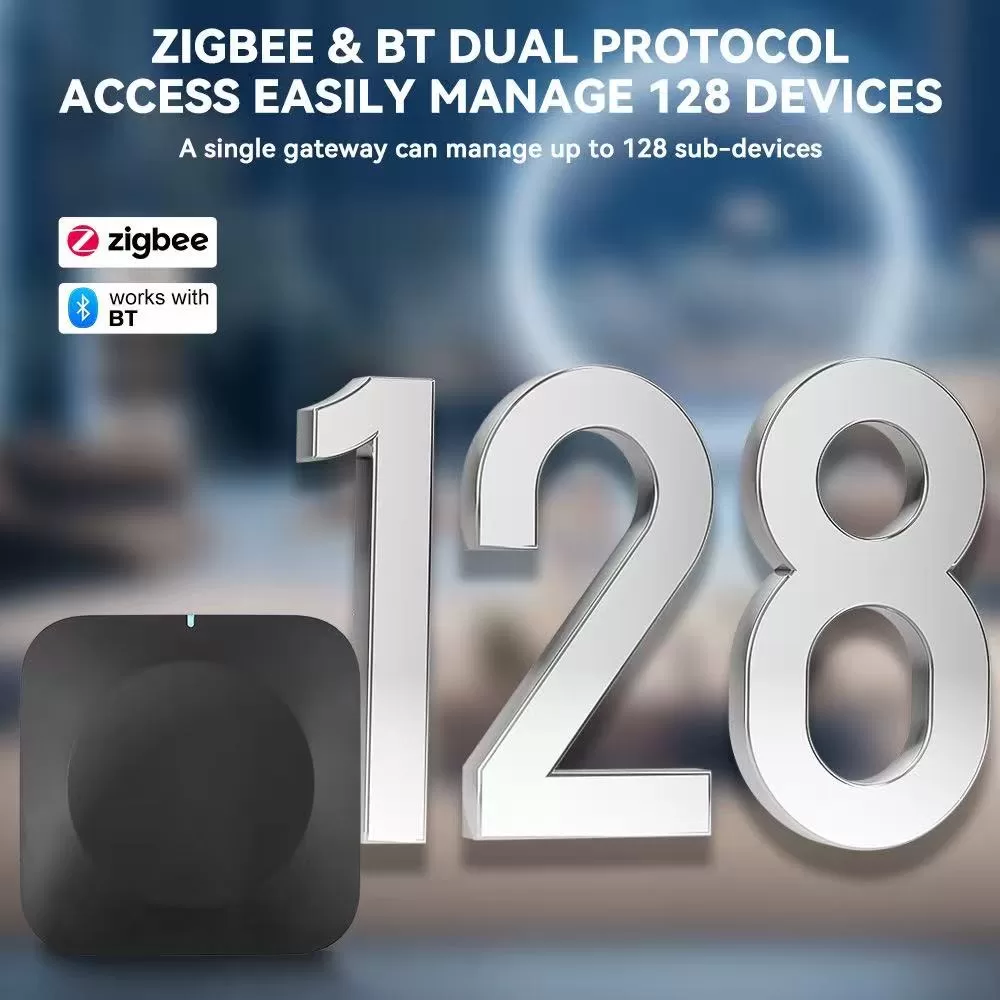
Moreover, this compact hub connects up to 128 devices simultaneously. As a result, it becomes the central nervous system of your smart home.

tuya bluetooth gateway bridge

Three Functions in One Compact Device

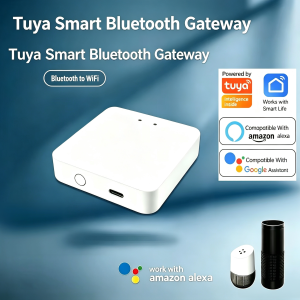
First, this gateway bridges Bluetooth to WiFi seamlessly. Second, it works with Amazon Alexa and Google Assistant for voice control. Third, it integrates with the Tuya Smart Life APP for unified management.

In addition, the device features a minimalist white square design with two LED indicators and a side Button. Furthermore, it uses a Type-C USB port for convenient Power.

bulbs, sensors and cameras” /> tuya bluetooth gateway bridge

Connect Up to 128 Bluetooth Devices

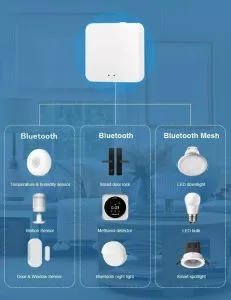
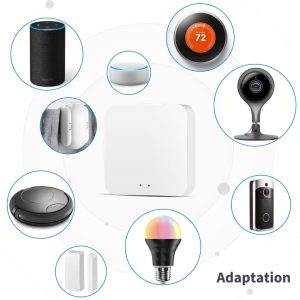
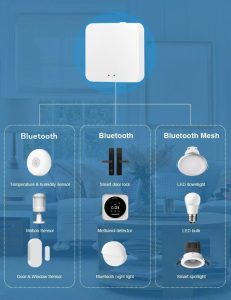
The gateway supports both standard Bluetooth and Bluetooth Mesh protocols. Consequently, you can connect a wide range of smart home devices. These include temperature and humidity sensors, smart door locks, LED downlights, motion sensors, door and window sensors, methanol detectors, Bluetooth night lights, LED bulbs, and smart spotlights.

In other words, one gateway handles your entire smart home ecosystem.

tuya bluetooth gateway bridge

More Stable Than WiFi Solutions

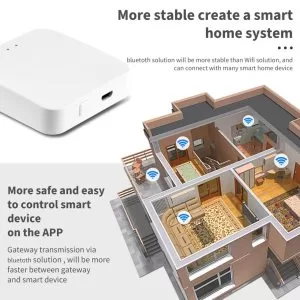
Compared to WiFi-only devices, Bluetooth solutions are more stable. Furthermore, the gateway can connect with many smart home devices at the same time. As a result, you get reliable performance across your entire home.

Additionally, Bluetooth transmission is faster between gateway and smart devices. Therefore, commands execute with minimal delay.

tuya bluetooth gateway bridge

Upgrade Version — No Capacitor Needed

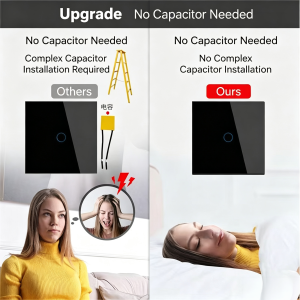
Unlike older smart home devices that require complex capacitor installation, this upgraded gateway features a simpler design. Moreover, there’s no need for complex capacitor substitution during setup. As a result, installation is hassle-free for everyday users.

In fact, you don’t need any electrical expertise. Simply plug in and connect.

tuya bluetooth gateway bridge

APP Link — Intelligent Control

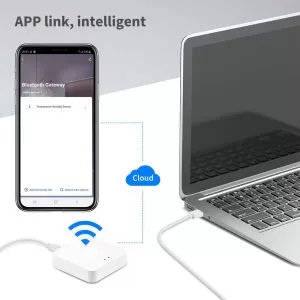
Setup takes under two minutes. First, plug the gateway into any USB power source using the included Type-C cable. Second, open the Tuya Smart Life APP and scan for the device. Third, connect to your 2.4GHz WiFi network. Finally, start pairing your Bluetooth smart devices.

Once connected, you can control all paired devices from anywhere via the APP. Furthermore, the gateway communicates through a secure cloud connection.

tuya bluetooth gateway bridge

Control from Anywhere

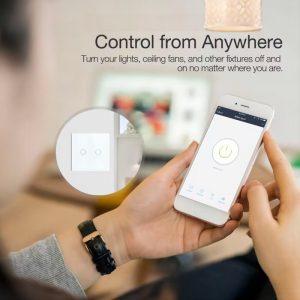
Turn your lights, ceiling fans, and other fixtures off and on no matter where you are. In other words, as long as you have internet access, you can control your entire home. Additionally, the APP provides real-time status updates for all connected devices.

For example, you can turn off lights you accidentally left on at the office. Similarly, you can pre-heat your smart home before arriving.

tuya bluetooth gateway bridge

Voice Control with Alexa & Google Assistant

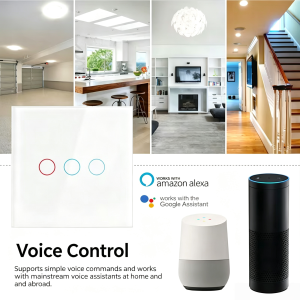
This gateway fully supports Amazon Alexa and Google Assistant. Therefore, you can control all paired Bluetooth devices with simple voice commands. For instance, say “Alexa, turn off the bedroom light” and the gateway executes the command instantly.

In addition, the gateway works with both Google Home Mini and Amazon Echo smart speakers. As a result, voice control is available throughout your home.

Tuya Bluetooth gateway works with voice assistants to control smart home devices like lights, fans and switches
Tuya Bluetooth gateway works with voice assistants — control lights, fans, switches, and more with simple commands to Alexa or Google Assistant.

Multi-Room Lighting Control

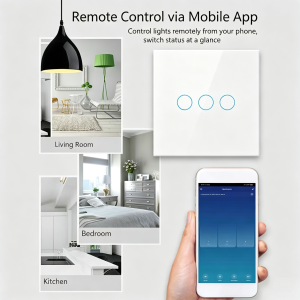
The gateway enables comprehensive lighting control across multiple rooms. For example, control living room pendant lights, bedroom fixtures, and kitchen lights all from one APP. Moreover, the APP displays switch status at a glance.

Consequently, managing your entire home’s lighting becomes effortless.

tuya bluetooth gateway bridge

Smart Home Automation Scenes

Beyond basic control, this hub enables powerful automation. Create custom scenes such as “Good Morning” that trigger multiple Bluetooth devices at once. Alternatively, set schedules, timers, and triggers based on sensor input.

For instance, you can create a scene that turns on lights when the motion sensor detects movement. Similarly, you can automate the smart lock based on door sensor status.

tuya bluetooth gateway bridge

Technical Specifications

Model Tuya Bluetooth Gateway
Power Supply Type-C USB (5V/1A)
Size 60×60×15mm
Weight 33g
Communication WiFi 2.4GHz + Bluetooth / Bluetooth Mesh
Material ABS+PC Flame-Retardant Shell
Connectable Devices Up to 128 Bluetooth Devices
Operating Temperature -10°C to 55°C
Compatible APP Tuya Smart / Smart Life
Voice Assistants Amazon Alexa, Google Assistant
Wireless Range Up to 30m (indoor)
Color

Related Articles

You Might Also Like

Related guides

Frequently Asked Questions

Is Tuya Bluetooth Gateway Bridge worth buying?

Based on the breakdown in this article, Tuya Bluetooth Gateway Bridge offers a solid mix of features and value. If your main goal matches the key benefits described above, it is a practical choice for everyday use.

How do I choose the right tuya bluetooth gateway bridge for my needs?

Start with your core use case, then compare battery life, compatibility, and build quality as covered above. Choosing the right tuya bluetooth gateway bridge comes down to matching specs with how you actually use it.

Does tuya bluetooth gateway bridge require a companion app?

Most devices of this type pair with a free companion app for setup and firmware updates. A few advanced features may sit behind a paid plan, so check the official specs page before buying.
Posted on — Leave a comment

3-in-1 Smart Wall Light: Wireless Charging, Motion Sensor & Night Light for Every Room

The 3-in-1 Smart Wall Light: Your Perfect Nighttime Solution

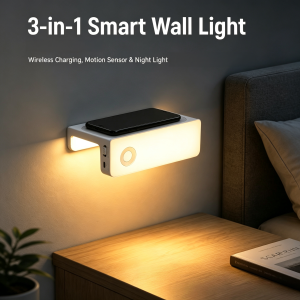
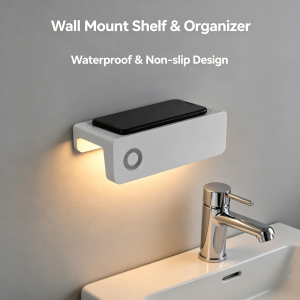
However, Walking in the dark is frustrating. Moreover, it can be dangerous. Therefore, you need a better solution. This 3-in-1 Smart wall light is exactly what you need. In short, wall light wireless charging

Therefore, It combines Motion sensing, Wireless charging, and warm lighting. In addition, it requires no tools to install. As a result, you get instant convenience.

wall light wireless charging

Three Functions in One Compact Device

Moreover, First, the PIR motion Sensor detects your movement automatically. Second, the Qi wireless pad charges your phone overnight. Third, the warm LED provides soft ambient lighting. P10 Mini WiFi Security Camera: Compact 24/7 Indoor Surveillance for Home & Pets

Furthermore, all three functions fit into one sleek ABS shell. Consequently, your nightstand stays clean and organized.

wall light wireless charging

Motion Sensor That Actually Works

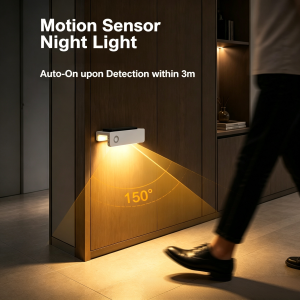
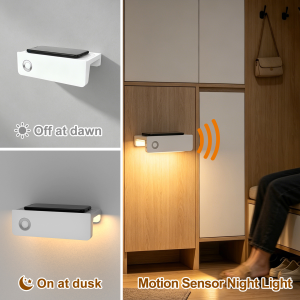
The PIR sensor detects movement within 3 meters. Additionally, it covers a wide 150° angle. When you walk into the room, the light turns on instantly. Subsequently, it shuts off automatically when you leave.

Because of this, you never fumble for switches again. Similarly, you won’t wake your partner at night.

wall light wireless charging

Wireless Charging Made Effortless

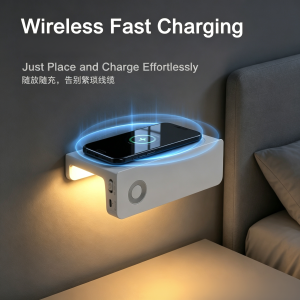
Simply place your phone on top. Then, the Qi pad begins charging automatically. Meanwhile, the flat surface holds your device securely.

Therefore, your nightstand stays tidy. In contrast to traditional chargers, there are no cables to manage.

wall light wireless charging

Two Light Modes for Any Situation

You can choose bright warm white for reading. Alternatively, select soft ambient glow for nighttime navigation. The 3000K temperature is gentle on your eyes.

Consequently, it’s perfect for any mood. Whether you need task lighting or ambient glow, this light delivers.

wall light wireless charging

Tool-Free Installation in Seconds

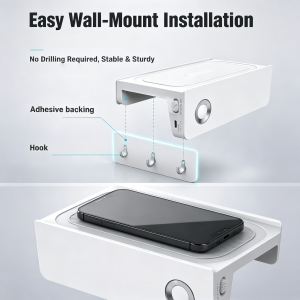
The adhesive backing sticks to any smooth wall. Moreover, the hook design keeps it firmly in place. If you want to move it, simply peel and re-stick elsewhere.

As a result, installation takes under one minute. In fact, no drilling or tools are required.

wall light wireless charging

Simple, Intuitive Controls

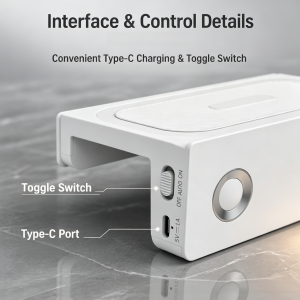
The Type-C port recharges the battery quickly. Additionally, the side toggle offers three modes: OFF, AUTO, or ON. Ultimately, one button controls everything.

Therefore, anyone can use it easily. Even children and elderly users find it straightforward.

wall light wireless charging

Perfect for Every Room in Your Home

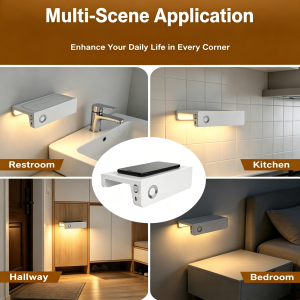
Use this light in your bedroom, hallway, bathroom, kitchen, or staircase. Furthermore, the motion sensor works automatically in any space.

In summary, one light serves multiple rooms. Ultimately, you get endless convenience throughout your home.

wall light wireless charging

Technical Specifications
Light Source LED
Power Consumption 0.7W
Color Temperature 3000K Warm White
Motion Sensor PIR, 3 Meters / 150°
Battery Life 4+ Hours Continuous
Charging Port USB Type-C
Wireless Charging Qi-Compatible
Material ABS
Installation Adhesive, No Drilling

Final Verdict: Why This Light Stands Out

This 3-in-1 device solves real everyday problems. First, the motion sensor eliminates fumbling for switches. Second, the Wireless charger declutters your space. Third, the warm light provides safe nighttime navigation.

Best for: Anyone wanting smarter, hands-free lighting.

Key advantages: Truly wireless, tool-free installation, multi-room versatility, energy-efficient design, and modern aesthetics.

Ready to transform your nights? Add this Smart wall light to your cart today.

Related Articles

You Might Also Like
Frequently Asked Questions

Is Wall Light Wireless Charging worth buying?

Based on the breakdown in this article, Wall Light Wireless Charging offers a solid mix of features and value. If your main goal matches the key benefits described above, it is a practical choice for everyday use.

How do I choose the right wall light wireless charging for my needs?

Start with your core use case, then compare battery life, compatibility, and build quality as covered above. Choosing the right wall light wireless charging comes down to matching specs with how you actually use it. Tuya WiFi IR Remote Review: Universal Control Meets Climate Intelligence

Posted on — Leave a comment

Tuya WiFi Smart Socket EU 16A: The Ultimate Smart Plug for Energy Monitoring & Voice Control

Transform any ordinary appliance into a Smart device with the Tuya WiFi Smart Socket EU 16A. This compact yet powerful smart plug plugs into any standard European outlet and instantly gives you full remote control via the Tuya Smart Life APP — from anywhere in the world. With built-in energy monitoring, voice control via Alexa and Google Home, and robust 16A / 3520W power handling, it’s the perfect entry point into smart home automation. Whether you want to schedule your coffee maker, monitor your electricity usage, or control devices with simple voice commands, this versatile smart socket delivers premium features at an affordable price. The high-power design even supports demanding appliances like water heaters, air conditioners, and washing machines.

Why the Tuya WiFi Smart Socket EU 16A Stands Out

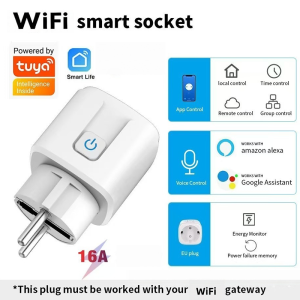
tuya wifi socket 16a Tuya WiFi Smart Socket EU 16A with energy monitoring and voice control main image The first thing you’ll notice is the clean, compact design of this EU-style smart plug. The white housing features a subtle LED indicator and a physical power button for manual control when needed. Five official compatibility badges confirm its capabilities: Tuya Intelligence Inside, Smart Life APP, WiFi connectivity, Amazon Alexa, and Google Assistant. Key features highlighted in the main image include: App Control for smartphone management, Local Control for Bluetooth operation without internet, Time Control for scheduling, Remote Control for worldwide access, Group Control for managing multiple devices, Voice Control for hands-free operation, Energy Monitor for tracking power usage, and Power Failure Memory to restore settings after outages. The 16A high-current rating and EU plug design make it ideal for European households.

1. Timing Function — Automate Your Daily Routine

tuya wifi socket 16a
Tuya WiFi Smart Socket EU timing function for kettle and appliances scheduling

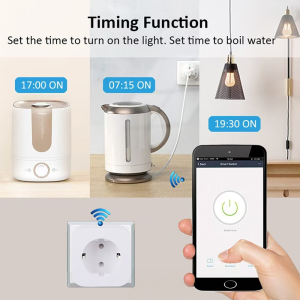
One of the most practical features is the intelligent timing function. As the image illustrates, you can set precise schedules for any connected appliance:

  • 17:00 ON — Turn on the humidifier before you arrive home
  • 07:15 ON — Start the electric kettle for your morning coffee
  • 19:30 ON — Automatically turn on living room lights at sunset

The countdown timer is equally useful — set your phone charger to turn off after 3 hours to prevent overcharging, or schedule the heater to run for exactly 2 hours before automatically shutting off. The Smart Life APP interface shows a large power button with clear on/off status, plus tabs for Switch, Countdown, and Timer functions. This scheduling capability helps you save energy, enhance security with simulated presence when away, and build automated routines that match your lifestyle.

2. Group Control — Manage Multiple Devices with One Tap

tuya wifi socket 16a
Tuya WiFi Smart Socket EU group control multiple devices one tap

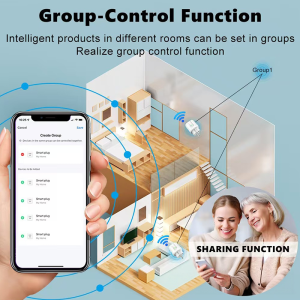
The group control feature transforms how you manage multiple smart devices. As shown in the bird’s-eye floor plan view, you can place Tuya smart sockets throughout your home — living room, bedroom, kitchen, dining room, and office — and control them all from a single interface.

Simply create a group in the Smart Life APP, assign your smart plugs to it, then turn all devices on or off with one click. This is perfect for:

  • “All Lights” group — Turn off every lamp in the house at bedtime
  • “Living Room” group — Activate entertainment devices with one tap
  • “Heaters” group — Manage multiple space heaters for consistent warmth
  • “Morning Routine” group — Turn on coffee maker, lights, and radio simultaneously

Group control eliminates the hassle of switching between individual device controls, making whole-home automation effortless for families of any size.

3. APP Remote Control — Your Home in Your Pocket

tuya wifi socket 16a
Tuya WiFi Smart Socket EU APP remote control from anywhere via smartphone

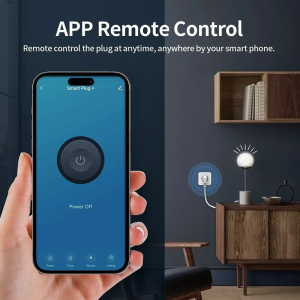
The APP remote control feature puts complete command of your home appliances in your smartphone. Whether you’re at work, on vacation, or simply in another room, you can check device status and control power with a single tap.

The Smart Life APP interface shown in the image features a large, intuitive power button with clear “Power Off” or “Power On” status display. Additional controls at the bottom include Power (instant on/off), Timer (schedule settings), Electric (energy monitoring), and Setting (device configuration). The visual demonstrates a modern living room scene where the smart socket controls a desk lamp — showing how seamlessly the device integrates into contemporary home decor while providing powerful smart functionality.

4. Voice Control — Hands-Free Smart Home

tuya wifi socket 16a
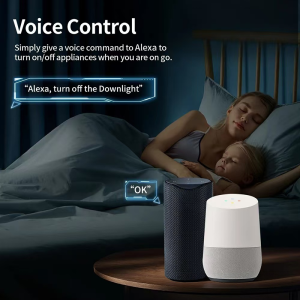
Tuya WiFi Smart Socket EU voice control with Alexa and Google Home

Perhaps the most convenient feature is full voice control integration with Amazon Alexa and Google Home. As the image shows, you can control devices hands-free from anywhere in your home — even from bed.

The example command “Alexa, turn off the Downlight” demonstrates natural language control that’s intuitive for the whole family. Both Amazon Echo and Google Home smart speakers are shown in the bedroom scene, confirming dual-platform compatibility. Simply say:

  • “Alexa, turn on the coffee maker”
  • “Hey Google, turn off the heater”
  • “Alexa, is the living room lamp on?”
  • “Hey Google, set the bedroom light timer for 30 minutes”

This hands-free control is perfect for when your hands are full, you’re relaxing, or for elderly family members and children who find smartphone apps challenging. The voice assistants respond instantly, making smart home control as easy as speaking.

5. Energy Monitoring — Track and Save on Electricity

tuya wifi socket 16a
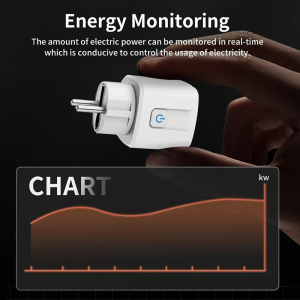
Tuya WiFi Smart Socket EU energy monitoring with real-time power consumption chart

The built-in energy monitoring chip tracks real-time power consumption with precision accuracy, helping you understand and optimize your electricity usage. As the image shows, the Smart Life APP displays a detailed power consumption chart with kW measurements over time.

Related Articles
Frequently Asked Questions

Is Tuya Wifi Socket 16a worth buying?

Based on the breakdown in this article, Tuya Wifi Socket 16a offers a solid mix of features and value. If your main goal matches the key benefits described above, it is a practical choice for everyday use.

How do I choose the right tuya wifi socket 16a for my needs?

Start with your core use case, then compare battery life, compatibility, and build quality as covered above. Choosing the right tuya wifi socket 16a comes down to matching specs with how you actually use it. Best_Smart_Rain_Sensor_2026 Tuya Smart Switch Wholesale Guide: The Ultimate B2B Solution for Smart Home Automation Solar Step Lights: Complete Guide to Wire-Free Stair and Deck Lighting Smart Home Starter Guide 2026: How to Build Your First Connected Home WiFi Smart Wall Switch Buying Guide for Wholesale Distributors

Does tuya wifi socket 16a require a companion app?

Most devices of this type pair with a free companion app for setup and firmware updates. A few advanced features may sit behind a paid plan, so check the official specs page before buying. How to Choose a Video Intercom Doorbell in 2026: The Complete Buying Guide 6-Inch Baby Monitor The Complete Guide to Smart Peephole Doorbell Cameras The Ultimate Guide to Smart Baby Monitors (2026) Solar Lights for Garden: Complete Buying Guide for 2026
Posted on — Leave a comment

How to Choose Between Wired and Wireless Zigbee 3.0 Gateway for Your Smart Home

Zigbee 3.0 smart gateway hub supports 128 devices dual protocol access

Why Your Gateway Choice Matters

Wired vs Wireless Zigbee 3.0 Gateway
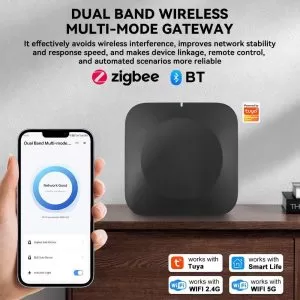
Zigbee 3.0 Smart Gateway Hub with mobile APP Control interface” width=”300″ height=”300″> Xingliao Zigbee 3.0 Smart gateway hub connected to mobile app for home automation control
Your smart home gateway is the brain of your entire system. Every light, sensor, lock, and switch connects through it. Pick the wrong one, and you’ll face dead zones, lag, or constant re-pairing headaches. Pick the right one, and your home runs like magic. Zigbee 3.0 is the gold standard for smart home connectivity. It’s fast, secure, and uses so little power that battery devices last for years. But here’s the decision most buyers miss: wired or wireless gateway?


Wired Gateway: The Powerhouse

A wired Zigbee 3.0 gateway connects via Ethernet cable. It’s the heavy-duty option built for serious smart homes.

Best for:

  • Large homes with 50+ devices
  • Users who want maximum stability
  • Smart home enthusiasts expanding their ecosystem

The numbers: Supports up to 130 connected devicesThat’s enough for every room, every sensor, every switch in a multi-story house.

Pros:

  • Rock-solid connection. No Wi-Fi interference, no dropouts.
  • Faster response times. Commands travel through cable, not air.
  • Handles massive device loads without slowing down.
  • Works even if your Wi-Fi router acts up.

Cons:

  • Needs an Ethernet port nearby.
  • Less flexible placement. You’re tied to the cable.

Wireless Gateway: The Flexible Starter

A wireless Zigbee 3.0 gateway connects through Wi-Fi. It’s the plug-and-play option for getting started fast.

Best for:

  • Apartments and small homes
  • Renters who can’t run cables
  • Beginners testing smart home waters

The numbers: Supports 30-40 connected devicesPerfect for a few rooms of automation.

Zigbee 3.0 gateway hub front view compact design
Compact palm-sized Zigbee 3.0 gateway hub with minimalist design

Pros:

  • Place it anywhere. No cable restrictions.
  • Setup in minutes. Plug in, connect to Wi-Fi, done.
  • Easy to relocate if you rearrange your space.

Cons:

  • Wi-Fi.

1-2,30
3,30,
()
Wi-Fi

Zigbee mesh network multiple smart devices connected
Zigbee 3.0,

Zigbee 3.0:

  • AES-128—
  • —,
  • —,
  • —
  • —,

odmhome.com?WhatsApp+86 176 6666 9273xingliaoshop@gmail.comxingliaotech.com


?

Zigbee gateway hub package contents unboxing
USB-C,

odmhome.com —,


odmhome.com?WhatsApp +86 176 6666 9273,xingliaoshop@gmail.com.xingliaotech.com.

Related Articles

You Might Also Like
Frequently Asked Questions

Is Choose Between Wired Wireless worth buying?

Based on the breakdown in this article, Choose Between Wired Wireless offers a solid mix of features and value. If your main goal matches the key benefits described above, it is a practical choice for everyday use.

How do I choose the right choose between wired wireless for my needs?

Start with your core use case, then compare battery life, compatibility, and build quality as covered above. Choosing the right choose between wired wireless comes down to matching specs with how you actually use it. Smart Fingerprint Door Lock: Keyless Security with Tuya Smart

Does choose between wired wireless require a companion app?

Most devices of this type pair with a free companion app for setup and firmware updates. A few advanced features may sit behind a paid plan, so check the official specs page before buying. Video Doorbell Review 2026: What to Look For, Smart Features Compared, and Buyer's Guide
Posted on — Leave a comment

Tuya ZigBee IR Remote

In today’s smart home world, one of the most common frustrations is that your existing remote-controlled appliances don’t speak WiFi. Your TV, air conditioner, fan, set-top box, and other IR devices still rely on their old infrared remotes. The Tuya Smart Zigbee IR Remote Controller S11 solves this elegantly — combining a ZigBee gateway, a universal IR blaster, and a built-in temperature & humidity sensor in one compact device. This all-in-one device works with Tuya Smart Life APP, Amazon Alexa, and Google Home, turning your traditional home into a fully connected smart home. Whether you want to control your AC before arriving home, schedule your TV to auto-off at bedtime, or build whole-home automation with ZigBee sensors, this little black box delivers premium smart home control at an accessible price.
Why the Tuya ZigBee IR Remote S11 Stands Out

Tuya Smart ZigBee IR remote controller S11 universal remote with Alexa and Google Home
Tuya Smart ZigBee IR Remote Controller S11 – universal IR remote control with built-in temperature & humidity sensor. Works with Tuya Smart Life, Amazon Alexa, and Google Home.
Tuya Smart ZigBee IR Remote Controller S11 universal remote main image

The first thing you’ll notice about the Tuya ZigBee IR Remote S11 is its sleek, minimalist design. The compact matte black square housing with rounded corners features a small blue WiFi status LED indicator on the front and a Micro USB port on the back. The device is officially certified for Tuya Intelligence Inside, Works with Smart Life, ZigBee 3.0, Amazon Alexa, and Google Assistant — ensuring seamless integration with your existing smart home ecosystem.

Despite its tiny 32.5g footprint, this device packs three powerful functions: a ZigBee 3.0 gateway for connecting hundreds of smart home sensors, a 360-degree universal IR blaster for controlling all your traditional IR appliances, and a built-in temperature & humidity sensor for environmental monitoring and smart triggers.

1. Whole Linkage of Your Smart Home — ZigBee Gateway Function

Tuya ZigBee gateway S11 connecting smart home devices with APP and voice control
Tuya ZigBee IR Remote S11 serves as a whole linkage hub for your smart home — connect APP control and voice control to ZigBee subdevices via the ZigBee gateway.

Tuya ZigBee IR Remote S11 whole linkage of your smart home gateway diagram

The S11 serves as a ZigBee smart home gateway — the central hub that connects and controls all your ZigBee-compatible devices. As the diagram shows, the gateway acts as a connection bridge: user commands from APP control (via Smartphone) and Voice control (via smart speakers like Google Home and Amazon Echo) are received and routed through the Tuya cloud, then transmitted to the ZigBee gateway, which broadcasts commands to all connected ZigBee subdevices.

With one device, you can connect:

  • ZigBee sensors — door/window sensors, motion sensors, temperature/humidity sensors, water leak sensors
  • ZigBee smart switches and dimmers — for lights, fans, and appliances
  • ZigBee smart bulbs and LED strips — for whole-home lighting control
  • ZigBee smart locks and security devices — for home security integration
  • WiFi smart devices — for hybrid ZigBee + WiFi ecosystems

Instead of buying multiple hubs for different brands, this Single device serves as the unified control center for your entire smart home.

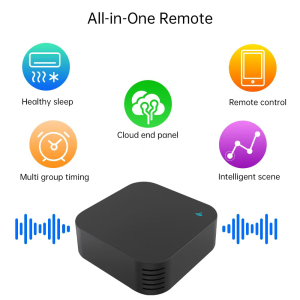
2. All-in-One Remote — 5 Powerful Smart Functions

Tuya ZigBee IR remote S11 all-in-one remote with five smart functions
Tuya ZigBee IR Remote S11 combines 5 all-in-one remote functions: healthy sleep, remote control, cloud end panel, multi group timing, and intelligent scene.
Tuya ZigBee IR Remote S11 all-in-one remote five smart functions The Tuya IR Remote combines five powerful smart home functions into one compact device, as illustrated in the feature overview:

  • Healthy Sleep — schedule air conditioners, lights, and bedroom devices for optimal sleep environments
  • Remote Control — control all your IR appliances from anywhere via smartphone
  • Cloud End Panel — automatic cloud-based device matching for instant setup with thousands of brands
  • Multi Group Timing — set up multiple schedule groups for different rooms and routines
  • Intelligent Scene — create automation scenarios that trigger multiple devices at once

Whether you’re looking to control a Single TV or build a complex multi-room automation system, this device scales to fit your needs.

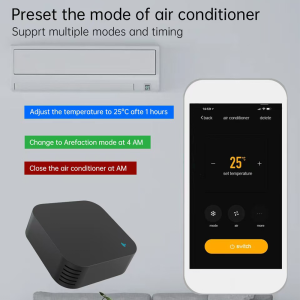
3. Preset Air Conditioner Modes — Multi-Mode & Timing

Tuya ZigBee IR remote S11 preset air conditioner modes with multi-mode timing
Tuya ZigBee IR Remote S11 supports preset air conditioner modes with multiple timing options — schedule temperature adjustments, defrost mode, and auto shutoff.

Tuya ZigBee IR Remote S11 preset air conditioner modes and timing

One of the most popular use cases is smart air conditioner control. The Tuya IR Remote supports multiple AC modes and timing functions, allowing you to preset commands like:

  • Adjust the temperature to 25°C after 1 hour — perfect for falling asleep at a comfortable temperature then auto-adjusting through the night
  • Change to Defrost mode at 4 AM — for energy-saving overnight cooling in winter
  • Close the air conditioner at 6 AM — automatic shutoff when you wake up

The Tuya Smart Life APP provides a full virtual remote interface for your AC unit, with controls for temperature, fan speed, mode (cool, heat, dry, fan), timer, and all the functions you’d find on your original AC remote. No more getting out of bed to adjust the temperature!

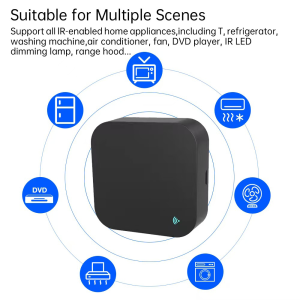
4. Suitable for Multiple Scenes — Universal IR Appliance Compatibility

Tuya ZigBee IR remote S11 suitable for multiple scenes with all IR home appliances
Tuya ZigBee IR Remote S11 is suitable for multiple scenes — supports TVs, refrigerators, washing machines, air conditioners, fans, DVDs, LED dimming lamps, and range hoods.

Tuya ZigBee IR Remote S11 suitable for multiple scenes universal IR appliance compatibility

The Tuya IR Remote S11 supports all IR-enabled home appliances, making it truly universal. As the image illustrates, it works seamlessly with:

  • TVs — all major brands
  • Refrigerators — IR-controlled smart fridges
  • Washing Machines — IR-controlled models with remote start/stop
  • Air Conditioners — full temperature and mode control for 99% of brands
  • Fans — tower fans, ceiling fans, stand fans
  • DVD Players — all major brands
  • IR LED Dimming Lamps — smart lighting with IR control
  • Range Hoods — kitchen exhaust fans with IR remotes

With the automatic cloud-based device matching, adding a new IR appliance takes just seconds — the APP recognizes your device brand and model, then downloads the corresponding IR code library automatically.

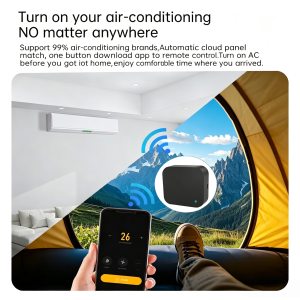
5. Turn On Your Air-Conditioning Anywhere — 99% Brand Compatibility

tuya zigbee remote

Tuya ZigBee IR Remote S11 turn on air conditioner anywhere 99 percent brand compatibility

Imagine this: it’s a hot summer day, and you’re camping in the mountains, hiking on a trail, or stuck at work late. With the Tuya IR Remote, you can turn on your home air co

Related Articles

You Might Also Like
Related guides
Frequently Asked Questions

Is Tuya Zigbee Remote worth buying?

Based on the breakdown in this article, Tuya Zigbee Remote offers a solid mix of features and value. If your main goal matches the key benefits described above, it is a practical choice for everyday use.

How do I choose the right tuya zigbee remote for my needs?

Start with your core use case, then compare Battery life, compatibility, and build quality as covered above. Choosing the right tuya zigbee remote comes down to matching specs with how you actually use it.

Does tuya zigbee remote require a companion app?

Most devices of this type pair with a free companion app for setup and firmware updates. A few advanced features may sit behind a paid plan, so check the official specs page before buying.