Posted on — Leave a comment

Zigbee PIR Motion Sensor: The Smart Home Upgrade for Security, Lighting & Pet Care

zigbee pir motionZigbee pir motion sensor” width=”300″ height=”300″>

However, From a stranger slipping in through the back door at 2 AM, to fumbling in the dark for a Light switch on the way to the bathroom, to wondering what your cat is up to while you’re at work — a single small Sensor can quietly handle all of these everyday worries. The Tuya Zigbee PIR Motion Sensor is one of the most versatile smart home devices you can add in 2025, and it costs less than a single takeout dinner.

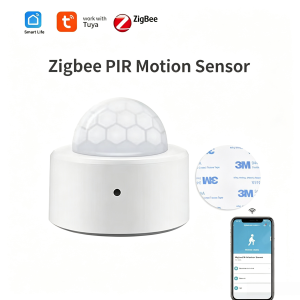
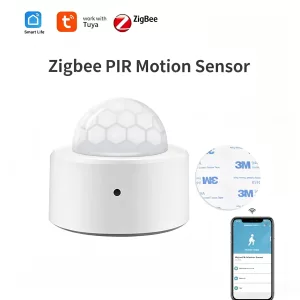
Therefore, Compact, battery-powered, and equipped with a hemispherical Fresnel lens, this tiny white dome detects human (and animal) body heat with 120° wide-angle coverage. The moment motion is detected, it sends an instant push notification to your smartphone via the Smart Life or Tuya Smart app. More importantly, it can automatically trigger lights, sirens, cameras, and any other smart device in your home — turning a passive sensor into the brain of your home’s automation.

Moreover, In this guide, we’ll walk through everything this little device can do, how to set it up in under 2 minutes, and the most popular real-world scenarios where it makes life noticeably better.

Why Every Smart Home Needs a PIR Motion Sensor

In addition, Most “smart” homes only automate the obvious things: lights, plugs, thermostats. But the real magic happens when your home reacts to your presence. A PIR (Passive Infrared) motion sensor is the trigger that makes every other smart device smarter.

Here’s what this sensor catches in real time:

  • 🚨 Intruders at night — instant alert + automatic siren when armed
  • 🌙 You getting out of bed — bedroom lights or floor light strip turn on softly
  • 💄 You sitting at the vanity — makeup mirror lights turn on automatically
  • 🐈 Your pet jumping on the sofa — smart camera starts recording
  • 📦 Someone walking past your front door — push notification with optional video
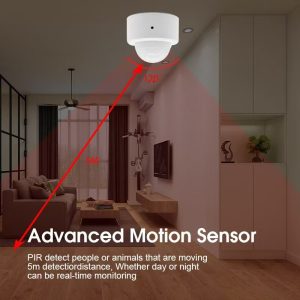
zigbee pir motion sensor

For example, The average cost of a basic smart motion sensor is now under $15, but the value it adds to a home security and automation system is easily ten times that. A single sensor, properly placed, can protect an entire room, automate a hallway, or watch over an elderly relative for years.

The Technology: Passive Infrared (PIR) Explained

Consequently, This sensor uses passive infrared (PIR) technology — the same technology used in commercial security systems for decades. It works by detecting the infrared radiation (body heat) emitted by humans and animals.

  • 🔒 Privacy-friendly — no camera, no recording, no video surveillance concerns
  • ⚡ Ultra-low power — battery lasts 2+ years because PIR draws almost no current
  • 🎯 Highly accurate — detects body heat specifically, fewer false alarms than radar or ultrasonic
  • 📐 Wide coverage — 120° detection angle covers most rooms with a single sensor
  • 💡 Works in total darkness — infrared detection works at night, in closets, under beds

Hemispherical Lens — Wider Angle, Larger Coverage

Unlike flat-faced PIR sensors, the hemispherical (half-ball) lens design enables much wider detection coverage. The Fresnel lens divides the detection area into multiple zones, dramatically increasing the field of view while maintaining accurate human detection.
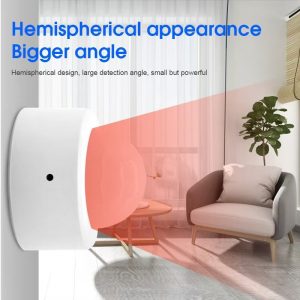
zigbee pir motion sensor

Real-world coverage with a single sensor:

  • 🏠 Living rooms — single sensor covers the entire space
  • 🚪 Hallways & entryways — detects anyone entering or passing through
  • 🛏️ Bedrooms — can trigger gentle night lighting when you get up
  • 🛁 Bathrooms — automatic night light when you enter at night
  • 🏢 Offices — track occupancy and automate lighting/HVAC
  • 🏪 Retail stores — customer counting and after-hours security

For larger rooms, simply add multiple sensors — the Zigbee mesh network handles coordination seamlessly across your home.

Real-World Scenario 1: Bedroom Night Light Automation

You wake up at 2 AM. You’re half asleep. The room is pitch black. Fumbling for the light switch is uncomfortable, and turning on a bright overhead light ruins your sleep rhythm.
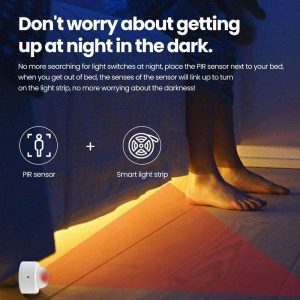
zigbee pir motion sensor

With this PIR sensor, here’s what happens instead:

  1. 🌙 You put your foot on the floor
  2. 👀 The PIR sensor (placed under the bed) detects your movement within 1 second
  3. 💡 The smart LED light strip under the bed automatically turns on at 10% warm brightness
  4. 🚶 You walk to the bathroom, lit by gentle warm light
  5. 😴 You get back into bed; after 90 seconds of no motion, the light strip turns off

No more stumbling. No more blinding lights. No more disturbing your partner. The sensor, the strip, and the app handle it all automatically.

Real-World Scenario 2: Vanity Mirror Light Automation

If you’ve ever sat in front of a makeup mirror in a dimly-lit room, you know the frustration of bad lighting. With this PIR sensor, your mirror lights can turn on automatically the moment you sit down.
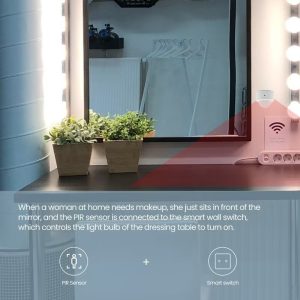
zigbee pir motion sensor

Setup takes 60 seconds:

  • 📍 Stick the PIR sensor under the dressing table or beside the mirror
  • 💡 Pair your smart wall switch with the sensor in the Smart Life app
  • ⚙️ Create a one-tap automation: “When motion detected → turn on dressing table light”
  • ✅ Done. Every time you sit down, the light turns on. Every time you leave, it turns off after 60 seconds.

It’s like having a personal lighting assistant — and it works for the whole family.

Real-World Scenario 3: Pet Monitoring with Smart Camera

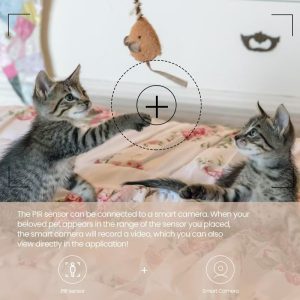
Ever wonder what your cat or dog does while you’re at work? Pair the PIR sensor with a Tuya-compatible smart camera, and you’ll get an instant video clip the moment your pet enters the monitored area.
zigbee pir motion sensor

Real-World Scenario 3: Pet Monitoring with Smart Camera

Ever wonder what your cat or dog does while you’re at work? Pair the PIR sensor with a Tuya-compatible smart camera, and you’ll get an instant video clip the moment your pet enters the monitored area.

Here’s how it works:

  1. 📍 Place the PIR sensor near your pet’s favorite spot (couch, food bowl, litter box)
  2. 📹 Pair your smart camera with the sensor in the same Smart Life app
  3. ⚙️ Set automation: “When motion detected → start camera recording + send push notification”
  4. 📱 You receive a 10-second video clip on your phone every time your pet moves

It’s not just for fun — pet monitoring with motion sensors also helps catch early signs of illness. If your normally active dog stops moving for hours, you’ll know something is wrong. Conversely, if your cat is suddenly bouncing off the walls at 3 AM, you can see exactly what mischief they’re getting into.

Bonus: The same setup works for baby monitoring. Place a PIR sensor in the nursery, pair it with a smart camera, and you’ll know the moment your little one starts moving — without constantly watching a video feed.
zigbee pir motion sensor

Real-World Scenario 4: Home Security Against Burglars

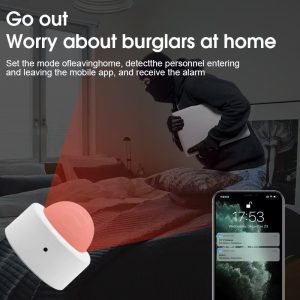
Worrying about home break-ins is exhausting. With this PIR sensor and a Zigbee siren, you can set up a complete security system in under 10 minutes.

Set up an “Away” mode in the Smart Life app:

  • 🏠 Step 1: Place PIR sensors at entry points (front door, back door, windows)
  • 📱 Step 2: Enable “Away” mode in the app when you leave home
  • 🚨 Step 3: When motion is detected, the Zigbee siren sounds at 100+ dB
  • 📞 Step 4: You receive an instant push notification with a map of which sensor triggered
  • 📹 Step 5: Optional — start a smart camera recording for visual evidence

Compare this to a traditional PIR alarm that just beeps locally: the burglar smashes it and goes on with the crime. With a smart PIR + siren + camera setup, you and your neighbors know about the intrusion in real time.

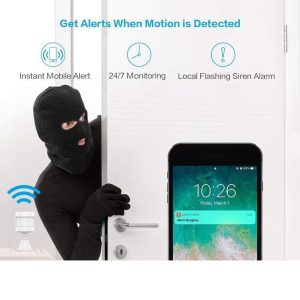
The push notification includes the exact sensor name (e.g., “Living Room PIR Motion Detection”) and the precise timestamp (e.g., “17:31”). If you have multiple sensors around the home, you’ll know exactly which entry point the intruder is using — critical information for both you and the police.

Armed mode flexibility:

  • 🏠 Home mode — only perimeter sensors (windows, doors) trigger the alarm; indoor sensors remain inactive so you can move freely
  • 🚪 Away mode — all sensors active; the system arms in full
  • 🌙 Night mode — only downstairs sensors active while you sleep upstairs
zigbee pir motion sensor

Zigbee 3.0 + Smart Life App — The Complete Ecosystem

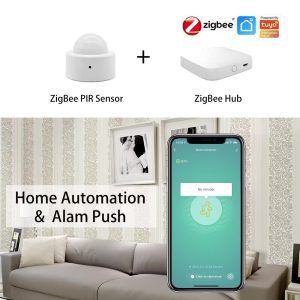
This sensor uses the Zigbee 3.0 protocol, which is the most widely adopted smart home standard in the world. Pair it natively with the Tuya Smart and Smart Life apps — two of the largest smart home ecosystems on the planet, supporting over 1 million compatible devices.

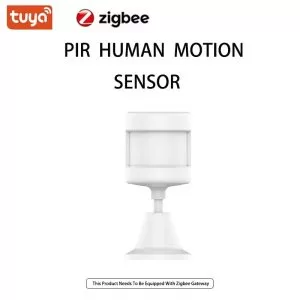
The Zigbee Hub (gateway) shown in the product image is the brain that connects your PIR sensor to your home network and the Smart Life app. It’s a one-time purchase that opens up your entire smart home.

Why Zigbee is the right choice:

  • ✅ Low power — battery lasts 2+ years vs. 2-3 months for Wi-Fi sensors
  • ✅ Mesh networking — each Zigbee device extends the network range
  • ✅ Reliable — doesn’t depend on Wi-Fi bandwidth or router performance
  • ✅ Massive ecosystem — works with thousands of Zigbee 3.0 devices from hundreds of brands
  • ✅ Local automation — automations run on the gateway, even if internet is down

The Smart Life app shows you real-time sensor status at a glance. The home screen displays the current battery level (e.g., 80% as shown in the screenshot), the latest motion event (“No intruder” or “Motion detected”), and a full event history with timestamps. Tap “Click to view more” to see every motion event in chronological order — perfect for reviewing when the kids got home, when the dog walker arrived, or when suspicious activity happened.

Note: A Tuya-compatible Zigbee gateway is required (sold separately). The sensor does not work as a standalone Wi-Fi or Bluetooth device.
zigbee pir motion sensor

Smart App Control — Know What’s Happening, Anywhere

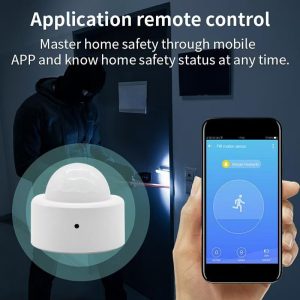
The single biggest advantage of a smart PIR sensor is remote monitoring. You no longer have to wonder “did I leave the window open?” or “is the dog okay?” — the app tells you in real time.

Through the Smart Life or Tuya Smart app, you can:

  • 📊 View real-time status — see if motion was detected in the last 5 minutes
  • 📜 Check event history — every motion event logged with a timestamp
  • 👨‍👩‍👧 Share with family — multiple household members get alerts
  • 🤖 Build automations — trigger sirens, lights, cameras, plugs, blinds, etc.
  • 🔋 Monitor battery — get low-battery alerts before the sensor dies
  • 📱 Receive push notifications — instant alerts the moment motion is detected

The app’s HISTORY tab lets you scroll through every motion event with timestamps. The RECORD tab shows the actual video clip captured by your paired smart camera (if you have one). The BATTERY tab displays the current battery percentage so you know when it’s time to replace the cell — usually every 2+ years.

Real-world example: you’re on a business trip in another country. At 3 AM local time, you receive a push notification: “Stranger Passing By”. You open the app, see the event happened in your living room 2 minutes ago, tap into the RECORD tab to see a video clip, and immediately call your neighbor to check on the house. The entire response — notification, review, action — takes under 60 seconds. Compare that to a traditional alarm system that just beeps into an empty room.

It’s like having a security guard in every room, working 24/7, costing pennies per month.

You Might Also Like
Frequently Asked Questions

Is Zigbee Pir Motion Sensor worth buying?

Based on the breakdown in this article, Zigbee Pir Motion Sensor offers a solid mix of features and value. If your main goal matches the key benefits described above, it is a practical choice for everyday use.

How do I choose the right zigbee pir motion sensor for my needs?

Start with your core use case, then compare battery life, compatibility, and build quality as covered above. Choosing the right zigbee pir motion sensor comes down to matching specs with how you actually use it. Smart Home Sensors Explained: Window Camera and Rain Sensor for a Home That Reacts

Does zigbee pir motion sensor require a companion app?

Most devices of this type pair with a free companion app for setup and firmware updates. A few advanced features may sit behind a paid plan, so check the official specs page before buying. Tuya WiFi IR Remote Review: Universal Control Meets Climate Intelligence

Related Articles

Posted on — Leave a comment

Smart PIR Motion Sensor: The Wireless, Battery-Powered Home Security Upgrade

pir motion sensor wireless

However, Whether it’s a stranger slipping into your front door at 3 AM, a toddler wandering out of the bedroom in the middle of the night, or a delivery person walking away with a package that should have been handed over — every one of these moments is invisible until it’s too late. Traditional wired security systems are expensive, complicated to install, and easy for intruders to disable.

Therefore, This is exactly where a Smart PIR motion Sensor changes the game. Compact, wireless, and battery-powered, this Zigbee motion detection sensor acts as an always-on guardian for your home — instantly alerting you the moment movement is detected, no matter where you are.

Moreover, Below, we’ll break down why this small device is one of the smartest home security upgrades you can make in 2025, and what features to look for before you buy.

Why Every Home Needs a Smart PIR Motion Sensor

In addition, Most homeowners only think about motion detection after an incident happens. By then, the package is gone, the window is broken, or the damage is done.

For example, A smart PIR motion sensor catches the very first sign of movement. It detects the kind of activity humans simply miss when they’re asleep, at work, or on vacation. Whether it’s a burglar testing a door handle or a child waking in the night, you’ll know within seconds.

pir motion sensor wireless

Consequently, These are the everyday situations where a PIR sensor makes a difference, and they all share one trait: you don’t notice them until it’s already too late. A motion sensor with real-time push notifications turns silent intrusions into instant alerts on your phone.

Meet the Smart PIR Motion Sensor

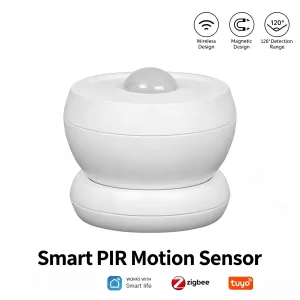
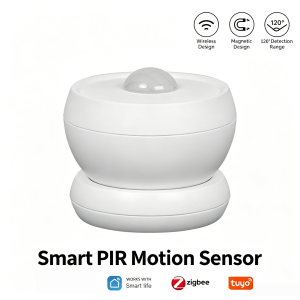
This wireless, battery-powered motion detection sensor is built on the Zigbee 3.0 protocol and works natively with the Smart Life and Tuya apps — two of the largest smart home ecosystems in the world. Setup takes under two minutes: pair, place, and you’re protected.

Key headline features at a glance:

  • ✅ Wireless design — no cables, no drilling
  • ✅ Magnetic mount — install in seconds, reposition anytime
  • ✅ 120° wide detection — covers a broad area from a single unit
  • ✅ Up to 2 years battery life — set it and forget it
  • ✅ Real-time push notifications — know the instant motion is detected

Wireless, Magnetic Design — Install in Seconds

pir motion sensor wireless

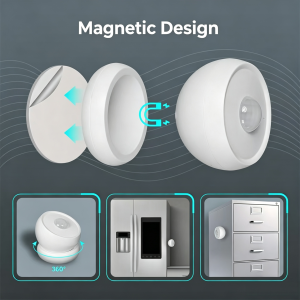
Forget the screwdriver, the drill, and the tangled mess of cables. This PIR motion sensor features a 3M adhesive magnetic mount that installs in literally seconds.

Here’s how it works:

  1. 🧲 Peel the protective film from the 3M adhesive pad
  2. 📍 Stick the metal base to any clean, flat surface — wall, ceiling, cabinet, or furniture
  3. 🧲 The magnetic sensor body snaps onto the base — instantly secured
  4. 🔄 The 360° rotating base lets you fine-tune the detection angle without moving the adhesive

Need to reposition the sensor? Just pull it off the magnetic base and snap it somewhere new. No tools. No holes in the wall. No residue. The same sensor can move from the front door to the hallway to the baby’s room in seconds — perfect for renters, frequent travelers, and anyone who likes to rearrange.

Because there are no cables to run, you can place this sensor in places wired sensors simply can’t go: above a door frame, on the back of a bookshelf, inside a closet, or on a refrigerator door.

120° Wide Detection Range — One Sensor, Broad Coverage

pir motion sensor wireless

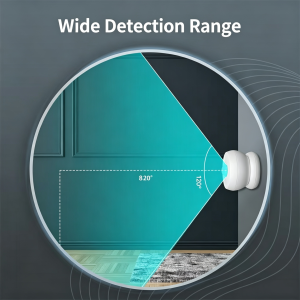
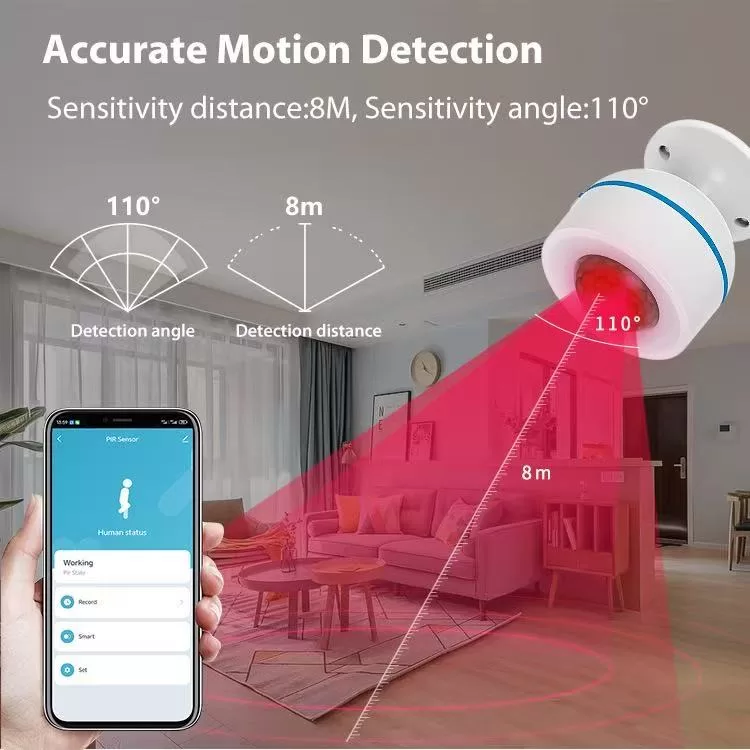
A motion sensor that misses half the room is useless. That’s why this PIR sensor is engineered with a 120° wide detection angle and an 8-meter detection distance — enough coverage to protect an entire entryway, hallway, or room from a single mounting point.

What can you protect with 120° coverage?

  • 🚪 Front doors and back doors — catch anyone approaching or leaving
  • 🛗 Hallways and staircases — log movement between rooms
  • 🛏️ Bedrooms and nurseries — get alerts when kids or elderly parents get up at night
  • 🏠 Living rooms and offices — detect unauthorized access during off hours
  • 🏪 Garages, basements, and storage rooms — monitor low-traffic areas

For larger spaces, pair multiple sensors in the same Zigbee mesh network. Each one reports independently to the Smart Life or Tuya app, so you always know exactly where motion was detected.

2-Year Battery Life — Set It and Forget It

pir motion sensor wireless

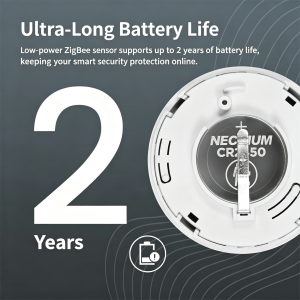
No one wants a security device that dies in the middle of the night. That’s why this PIR motion sensor is engineered for ultra-low power consumption — a single CR2450 coin cell battery keeps the sensor running for up to 2 full years under typical usage.

How is that possible? Three engineering choices make the difference:

  • 🔋 Zigbee 3.0 protocol — far more power-efficient than Wi-Fi or Bluetooth
  • 😴 Deep sleep mode — the sensor only wakes up when motion is detected
  • 📡 Short-burst transmissions — the sensor sends signals in milliseconds, not continuously

The Smart Life and Tuya apps also display a real-time battery level indicator for every paired sensor. When the battery finally does run low, you’ll get a push notification weeks in advance — no surprise failures, no unprotected windows.

Replacing the battery is just as easy as installation: pull the sensor off the magnetic mount, swap in a fresh CR2450 coin cell, snap it back on. The whole process takes about 30 seconds.

Real-Time APP Notification — Know the Instant Motion Is Detected

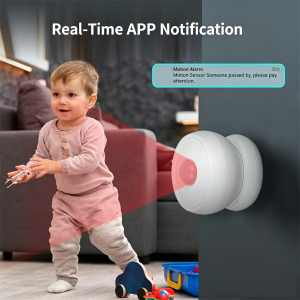
The single most important feature of any motion sensor is speed of notification. When movement crosses the detection zone, this PIR sensor sends a real-time push notification through the Smart Life or Tuya app within seconds.

Picture this: you’re at the office, and your phone buzzes with:

“Motion Sensor: Someone passed by, please pay attention.”

You open the live camera feed from a paired smart camera, see the delivery driver at your front door, and unlock the smart lock remotely so they can leave the package inside. Crisis averted in under a minute.

Beyond the basic alert, the app also shows a complete timestamped history of every motion event — so you can review who came and went, when, and how often. This is invaluable for secu

Motion / No-Motion Detection — Customize Your Smart Scenes

pir motion sensor wireless

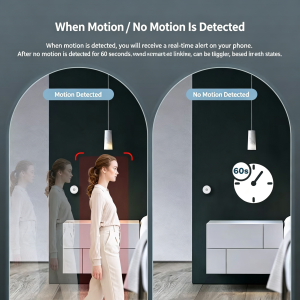
This isn’t a one-way sensor. The PIR detector monitors both motion AND no motion states, which unlocks a much wider range of smart home automations.

Motion Detected — Triggers Active Responses

  • 💡 Smart lights turn on automatically when you walk into a dark hallway at night
  • 🔔 Smart siren or chime plays when an unexpected visitor enters a restricted area
  • 📹 Security cameras start recording the moment a door or window is crossed
  • 📱 Push notification alerts are sent to every family member’s phone

No Motion Detected for 60 Seconds — Triggers Standby Responses

  • 💡 Smart lights turn off when nobody’s in the room for 60 seconds — perfect for energy savings
  • 🌡️ Smart thermostat adjusts to eco-mode when the house is empty
  • 🔒 Smart locks re-engage when no motion is detected at the entryway for several minutes
  • 🛏️ Sleep mode activates when no motion is detected in the bedroom for 10 minutes at bedtime

All of this is configured through simple if-then rules in the Smart Life or Tuya app. No programming. No coding. Just pick a trigger, pick an action, and you’re done.

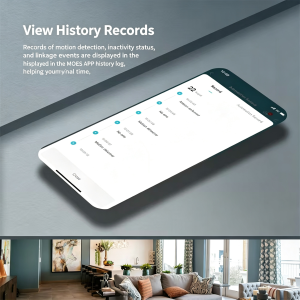
View History Records — Every Event Logged

pir motion sensor wireless

Curious whether you actually got an alert at 2 PM on Tuesday? Want to verify when your kids got home from school, or how long the cleaning service was in the house? The Smart Life / Tuya app keeps a complete, time-stamped activity log of every motion event:

  • 🟢 Motion detected — the moment someone entered the detection zone
  • 🔴 No motion — the moment the zone became empty
  • 🔵 Smart linkage — every time a paired device was triggered by the sensor

Each entry includes the exact time and date. So you can:

  • 📋 Review past incidents when troubleshooting false alarms or unusual activity
  • 📑 Document patterns for insurance claims or security audits
  • ✅ Verify the system is working properly with a clear event log
  • 🤝 Share data with family members, house sitters, or security services

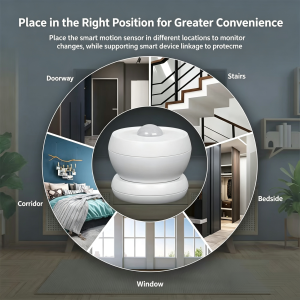
Place It Anywhere — The Right Spot for Total Coverage

pir motion sensor wireless

Worried about complicated installation or limited placement options? Don’t be. This wireless motion sensor is designed to fit seamlessly into every corner of your home. Here are the best locations to place it:

  • 🚪 Doorways — alert the moment anyone enters or exits a room
  • 🪜 Staircases — track movement between floors, especially helpful for elderly care
  • 🛏️ Bedside — monitor nighttime activity in the bedroom or nursery
  • 🪟 Windows — detect when someone approaches an open or vulnerable window
  • 🚶 Corridors — log movement through long hallways and entryways

Thanks to the magnetic mount, you can experiment with different placements until you find the perfect spot — without leaving marks on the wall. Built on a 360° rotating base, you can fine-tune the detection angle without re-sticking the adhesive.

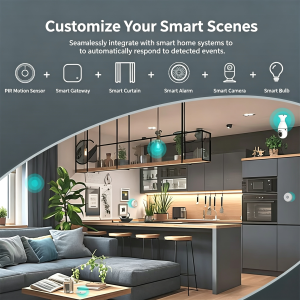
Seamless Smart Home Integration — Build Your Custom Scene

pir motion sensor wireless

One of the most powerful features of this Zigbee-based motion sensor is its ability to link with other smart devices through your Zigbee gateway. The motion event becomes the trigger point for an entire ecosystem of automated responses:

  • 🔊 Zigbee Siren / Alarm — emits a loud sound to scare off intruders the moment motion is detected in a restricted zone
  • 💡 Smart Bulbs — flash red as a visual warning, or turn on automatically when you enter a dark room
  • 🪟 Smart Curtains — close automatically when the room is unoccupied to save energy
  • 📹 Security Cameras — start recording the instant motion is detected, capturing video evidence
  • 🔌 Smart Plugs — turn on lights, fans, or even coffee machines when you walk into the room
  • 🔒 Smart Locks — re-engage automatically when no motion is detected for several minutes

All of this is configured through the Smart Life or Tuya app using simple “if-this-then-that” rules. You don’t need to write a single line of code. You don’t need an expensive proprietary hub. You just need this sensor, a Zigbee gateway, and a few minutes to set up the scenes that matter to you.

Related Articles

You Might Also Like
Frequently Asked Questions

Is Pir Motion Sensor Wireless worth buying?

Based on the breakdown in this article, Pir Motion Sensor Wireless offers a solid mix of features and value. If your main goal matches the key benefits described above, it is a practical choice for everyday use.

How do I choose the right pir motion sensor wireless for my needs?

Start with your core use case, then compare battery life, compatibility, and build quality as covered above. Choosing the right pir motion sensor wireless comes down to matching specs with how you actually use it. Tuya WiFi IR Remote Review: Universal Control Meets Climate Intelligence

Does pir motion sensor wireless require a companion app?

Most devices of this type pair with a free companion app for setup and firmware updates. A few advanced features may sit behind a paid plan, so check the official specs page before buying.

Further reading: How to Choose Between Wired and Wireless Zigbee 3.0 Gateway for Your Smart Home

Posted on — Leave a comment

Zigbee PIR Motion Sensor: A Smart Home Upgrade That Actually Works

Zigbee PIR Motion Sensor - Smart Home Security | Xingliao - view 1

Last week I stubbed my toe on the bottom stair at 2 a.m. — again.

I’d been meaning to fix it for months. You know how it goes: install a Smart light? Sure. Tomorrow. Wire a Motion Sensor? Maybe next weekend. The hallway stayed dark for another365 days. Until I finally bought a $1*.** Zigbee PIR motion sensor and stuck it on the wall. The whole install took 90 seconds. The next morning, my staircase lit up like a runway every time I walked past.

That tiny moment — not stubbing my toe — was the win I’d been ignoring.

If you’ve ever:

Stumbled to the bathroom half-asleep
Wondered if the “noise” downstairs was just the cat
Wished your garage lights came on without you fishing for a switch …a Zigbee PIR motion sensor fixes all three. Quietly. Reliably. Without you ever thinking about it again. Let me explain how it actually works in a real home, and why this is one of the cheapest smart home upgrades you’ll ever make.

Tuya Zigbee PIR Human Motion Sensor - White
Tuya Zigbee 3.0 PIR human motion sensor, 150 degree wide angle detection up to 7 meters, CR2450 battery powered with 2 year battery life, works with Smart Life and Zigbee hubs

What Is a Zigbee PIR Motion Sensor?
A motion sensor with Zigbee wireless connectivity is exactly what it sounds like: a small white box that detects infrared (body heat) movement and tells your smart home system about it. Two words matter here:

PIR = Passive Infrared. It sees body heat moving through its detection zone. People, pets, even large warm objects. It doesn’t emit anything — it just listens. Zigbee = A low-power wireless protocol that your smart home hub uses to talk to sensors, lights, locks, and switches. Zigbee sensors run for years on a single coin battery because they sleep most of the time.

Combined, you get a motion sensor that lasts2 years on a CR2450 battery, costs under $15, and talks to every major smart home platform through one little hub.


Most product pages list ten “features” you don’t care about. Here’s what a motion sensor actually does in my house:

1. Automatic Night Lighting (the biggest win)
Walk into the hallway at 2 a.m. Light comes on softly. Cross into the bathroom. That light comes on. Walk back to bed. Both lights fade off 60 seconds later.

I set this up once. I have not touched it since.

Zigbee PIR sensor detection range diagram
Diagram showing 150 degree detection angle and 7 meter range of Zigbee PIR sensor

The setup is simple:

Trigger: motion sensor detects motion
Action: turn on hallway smart bulb at 20% brightness
Condition: only between sunset and sunrise
Off: 60 seconds after no motion detected
That’s it. The motion sensor does the work your hands used to do — only better, because it never forgets.

2. Front Door Awareness (without a camera)
I don’t want a camera pointed at my front door. I just want to know when someone approaches.

A Zigbee PIR motion sensor mounted above the front porch sends an instant push notification to my phone when someone walks up. Combined with a smart doorbell, I get:

A camera when someone rings
A motion alert when someone walks up
The motion sensor is the early warning system. The doorbell is the confirmation.

3. The “Did I Leave the Garage Open?” Check
Mount a motion sensor in your garage. Every time the garage door opens, you get a notification. Every time the door stays open for more than 10 minutes with no motion detected inside, you get a second notification — “Garage may be open.”

Zigbee PIR sensor installation in home corner
Tuya Zigbee PIR sensor mounted on wall corner for smart motion lighting

Cheaper than a smart garage door opener. Solves a real problem.

Where to Mount Them (and Where NOT To)
After installing these in three homes, here’s what actually works:

Hallway corners (8 feet up, angled down)
Above the front door, pointing at the walkway
Inside the garage, facing the door
Stair landings (this is where I stubbed my toe)
Bad spots:

Facing a window (sunlight triggers false alerts)
Above a radiator or heating vent (heat confuses PIR)
Directly facing an HVAC vent (moving air = false alerts)
The detection angle is typically150°. That sounds narrow, but in practice, one sensor covers a 12×12 foot room from a corner mount.

How Long Do They Actually Last?
Marketing claims “up to 2 years.”

Real-world answer: 18 to 24 months depending on:

How often motion is triggered (busy hallway = more wake-ups)
How strong the Zigbee signal is (weak signal = sensor works harder)
Battery brand (cheap CR2450s die in 8 months, name-brand lasts 2 years)
Pro tip: replace the battery before it dies. When Zigbee sensors die, they usually don’t warn you — your automations just stop working one day, and you spend an hour figuring out why.

What You Need to Get Started
A Zigbee PIR motion sensor isn’t a standalone device. You need three things:

The sensor itself ($13–$20, depending on brand)
A Zigbee hub ($30–$60) — Tuya, Smart Life, Aqara, or Home Assistant all work
At least one smart bulb or smart switch to controlIf you’re starting from scratch, the total cost is around $80–$100 for a complete motion-activated lighting setup. That’s cheaper than a single smart bulb from the expensive brands — and it works in every room you add a sensor to.
The Real Reason You Should Buy One Tonight
Here’s the thing nobody tells you about smart home gadgets: most of them solve problems you don’t have.

A motion sensor is different. It solves a problem you already have:

The dark hallway at 2 a.m.
The front door you can’t see from the couch
The garage light you always forget to turn off
You don’t need a “smart home.” You need one motion sensor, in one spot, solving one annoying problem.

That Zigbee PIR motion sensor I stuck on the wall last week? It’s the cheapest thing in my smart home and it’s the one I use every single day.

Get in Touch

Reach us through any channel below — we reply within one business day.


zigbee pir motion sensor

You Might Also Like
Frequently Asked Questions

Is Zigbee Pir Motion Sensor worth buying?

Based on the breakdown in this article, Zigbee Pir Motion Sensor offers a solid mix of features and value. If your main goal matches the key benefits described above, it is a practical choice for everyday use.

How do I choose the right zigbee pir motion sensor for my needs?

Start with your core use case, then compare battery life, compatibility, and build quality as covered above. Choosing the right zigbee pir motion sensor comes down to matching specs with how you actually use it. Tuya 3D Face Recognition Smart Lock: Buying Guide, Setup Tips, and FAQ

Does zigbee pir motion sensor require a companion app?

Most devices of this type pair with a free companion app for setup and firmware updates. A few advanced features may sit behind a paid plan, so check the official specs page before buying. Tuya WiFi IR Remote Review: Universal Control Meets Climate Intelligence

Related Articles
Posted on — Leave a comment

Matter PIR Motion Sensor: The 2027 Buyer’s Guide to Truly Smart Home Motion Detection

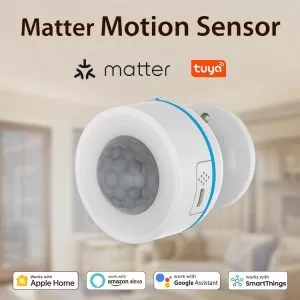
Matter PIR motion sensor with accurate human detection for smart home

Matter PIR motion sensor side view with size dimensions showing compact 72mm design for discreet wall or ceiling mounting in smart homes
Matter Motion Sensor – Compact Size Dimensions
## Why Your Old Motion Sensor Keeps Letting You Down You bought a “smart” motion sensor. It took 40 minutes to set up. It only works in one app. Your cat triggers it at 3 a.m and last week, when your Wi-Fi blipped, the whole thing went dark. Sound familiar? The problem was never motion detection itself. The problem is the **protocol** behind it. Most sensors are locked into one ecosystem, rely on the cloud, and fall apart the moment your network hiccups. Enter the **Matter PIR motion sensor** — a device built on the smart home industry’s first truly universal standard. In this guide, we’ll cover what a Matter PIR sensor is, how it works, who it’s for, and why it’s quickly becoming the default choice for new smart homes in 2025. — ## What Is a Matter PIR Motion Sensor? A **Matter PIR motion sensor** combines two things: 1. **PIR (Passive Infrared) technology** — the sensor detects the infrared heat signature emitted by the human body. When someone walks into range, the sensor “sees” the change in heat and triggers an action. 2. **Matter connectivity** — the device speaks Matter, the unified smart home protocol backed by Apple, Google, Amazon, and Samsung. Put them together and you get a **wireless human-body sensor that works natively with every major smart home platform** — no bridges, no proprietary hubs, no app lock-in. > **Quick definition:** A Matter PIR motion sensor is a battery-powered infrared detector that senses human movement and talks directly to your Apple Home, Alexa, Google Homeor SmartThings setup using the Matter standard.

—

Matter PIR motion sensor side view with size dimensions showing compact 72mm design for discreet wall or ceiling mounting in smart homes
Matter Motion Sensor – Compact Size Dimensions
Matter PIR motion sensor showing accurate detection in a smart home — pet-immune 25kg with adjustable sensitivity and 120° wide-angle security coverage
Matter Motion Sensor – Accurate Pet-Immune Detection
## What Is Matter (and Why Should You Care)? Matter launched in 2022 as a joint effort by the **Connectivity Standards Alliance (CSA)** — the same group behind Zigbee — with founding members including Apple, Amazon, Google, and Samsung. Before Matter, buying a smart device meant playing a guessing game: “Will this work with my hub?” Matter ended that. **A Matter-certified device works with:** | Ecosystem | Native Matter Support | |———–|———————-| | 🍎 Apple Home (HomeKit) | ✅ Yes | | 🗣️ Amazon Alexa | ✅ Yes | | 🔍 Google Home | ✅ Yes | | 🏠 Samsung SmartThings | ✅ Yes | | 🛠️ Home Assistant | ✅ Yes | One device. Every platform. That’s the entire pitch — and it works. —
Matter PIR motion sensor showing accurate detection in a smart home — pet-immune 25kg with adjustable sensitivity and 120° wide-angle security coverage
Matter Motion Sensor – Accurate Pet-Immune Detection

## How Does a PIR Motion Sensor Actually Work?

PIR stands for **Passive Infrared**. Here’s the simple version:

– Every warm object (including you) emits infrared radiation.
– A PIR sensor has a **Fresnel lens** that splits the room into detection zones.
– When a warm body moves between those zones, the sensor detects the change in infrared levels.
– It sends a signal: “Motion detected.”

Modern Matter PIR sensors add **smart filtering** on top of this. Advanced firmware can distinguish a 25 kg (55 lb) pet from a full-grown human, so your dog doesn’t set off the alarm every time it walks past the sofa.

—

Matter PIR motion sensor showing accurate detection in a smart home — pet-immune 25kg with adjustable sensitivity and 120° wide-angle security coverage
Matter Motion Sensor – Accurate Pet-Immune Detection
Matter PIR motion sensor side view with size dimensions showing compact 72mm design for discreet wall or ceiling mounting in smart homes
Matter Motion Sensor – Compact Size Dimensions

## Why Choose a Matter PIR Sensor Over Older Options?

### Matter vs. Zigbee / Z-Wave / Wi-Fi Sensors
Feature | Matter over Thread | Zigbee | Z-Wave | Wi-Fi |
———|——————-|——–|——–|——-|
Cross-platform | ✅ Native | ⚠️ Needs hub/bridge | ⚠️ Needs hub/bridge | ⚠️ App-dependent |
Local control (no cloud) | ✅ Yes | ✅ Yes | ✅ Yes | ❌ Usually cloud |
Battery life | 🔋 Excellent (years) | 🔋 Good | 🔋 Good | 🔋 Poor (drains fast) |
Mesh networking | ✅ Thread mesh | ✅ Yes | ✅ Yes | ❌ No |
Setup speed | ⚡ Under 60 sec | 🐢 Slower | 🐢 Slower | 🐢 Slower |
Future-proof | ✅ High | ⚠️ Medium | ⚠️ Medium | ⚠️ Medium |

**The takeaway:** Matter over Thread gives you the **local speed of Zigbee, the battery life of Z-Wave, and the universal compatibility none of them had.**

—

## 7 Ways a Matter PIR Sensor Makes Life Easier

🏠 **1. Hands-Free Hallway Lights**
Walk to the kitchen at midnight — lights fade on gently. No fumbling for switches.

🚪 **2. Front-Porch Welcome Lighting**
Greeting lights turn on the moment a guest approaches your door.

📦 **3. Package & Intruder Alerts**
Get a push notification the second someone steps onto your porch or into your garage.

🛡️ **4. Basement & Garage Security**
Monitor the low-traffic areas where break-ins most often start.

👶 **5. Toddler Wandering Alerts**
Get notified if your toddler (age 2+) leaves the bedroom at night.

🐕 **6. Pet Activity Tracking**
Know when your cat visits the food bowl — or sneaks onto the couch.

👴 **7. Aging-in-Place Safety**
Set up “no motion for X hours” alerts for elderly family members living alone.

—

## Key Features to Look For in a Matter PIR Sensor

When shopping, prioritize these specs:

– ✅ **Matter over Thread** (not a bridged/Zigbee device awkwardly labeled “Matter-compatible”)
– ✅ **Pet immunity** up to 25 kg / 55 lb
– ✅ **Battery life of 2+ years** (CR123A or coin-cell)
– ✅ **Detection range ≥ 5 m** with a **120° field of view**
– ✅ **Local automation** (works even when the internet is down)
– ✅ **Certifications**: Matter, FCC, CE, RoHS

—

## Technical Specifications (Reference Table)
Feature | Typical Specification |
———|———————-|
**Protocol** | Matter over Thread |
**Detection Type** | Passive Infrared (PIR) |
**Detection Range** | 5 m (16.4 ft) |
**Detection Angle** | 120° |
**Pet Immunity** | Up to 25 kg / 55 lb |
**Power** | 2× CR123A (or 2× AAA) |
**Battery Life** | Up to 3 years |
**Wireless Range** | 30 m indoor |
**Mounting** | 3M adhesive or screws |
**Certifications** | Matter, FCC, CE, RoHS |
**Warranty** | 2-year limited |

—

## How to Set Up a Matter PIR Sensor (It Really Is 60 Seconds)
Open your ecosystem app (Apple Home, Alexa, or Google Home).
Tap “Add Device” and scan the QR code on the sensor.
Stick it to the wall with the included 3M adhesive.
Done — start automating immediately.

**No hub required** if you already own a Thread border router (Apple TV 4K, HomePod mini, Nest Hub Max, or Echo 4th Gen). Most 2021+ smart homes already have one.

—

## Frequently Asked Questions

**Do I need a hub for a Matter PIR sensor?**
You need a Thread border router (Apple TV 4K, HomePod mini, Nest Hub Max, or Echo 4th Gen). Most users already own one.

**Does it work without internet?**
Yes. Local automations like “lights on with motion” run entirely on your home network.

**Is my data private?**
Yes. Matter devices run locally with end-to-end encryption. No cloud uploads, no tracking.

**Can I use it outdoors?**
Most Matter PIR sensors are rated for indoor use. For outdoor coverage, look for a weatherproof model.

**What if my pet is heavier than 25 kg?**
Disable pet-immunity mode in the app to detect any motion regardless of size.

—

## Final Verdict: Is a Matter PIR Sensor Worth It?

If you’re building or upgrading a smart home in 2025, a **Matter PIR motion sensor is one of the highest-ROI devices you can buy**. It’s cheap, it lasts years on a battery, it works with everything you own, and it keeps working when the internet doesn’t.

Skip the proprietary hubs. Skip the cloud dependency. Go Matter.

—

*Ready to upgrade? [Browse our Matter PIR Motion Sensors →](#)*

**Internal linking suggestions for SEO:**
– Link “Thread border router” → your blog post about Matter hubs
– Link “pet immunity” → a guide on pet-friendly smart home
(truncated).

Related Articles

You Might Also Like