Posted on — Leave a comment

Shelly vs Tapo vs Tuya: Smart Switch Comparison

Shelly, Tapo and Tuya are three different answers to the same problem, and they are not really competitors: Shelly sells relay modules that hide behind your existing switch, Tapo is a consumer retail brand of ready-made plug-and-play devices, and Tuya is the platform (not a brand) that thousands of manufacturers — including us — build on. Choosing between them comes down to whether you are retrofitting one switch, buying a few devices for a flat, or specifying a product line for a market.

This page is written for the last two cases, with the trade-offs stated plainly, including where a Tuya-based wall switch is the wrong answer.

The one-line difference

Option What it is Installs where Best for
Shelly A relay module (Wi-Fi) wired into the back box Behind an existing switch or in the consumer unit Keeping the original switches; DIN-rail and panel installs; EU market
Tapo Finished retail devices (plugs, bulbs, cameras) under TP-Link’s brand Plug-in or direct replacement Consumers who want one app and retail warranty support
Tuya The platform and cloud behind many brands’ devices Inside the product — switches, sockets, cameras, sensors Buyers who need a wide catalogue, OEM branding, or a wall switch in a specific plate standard

Shelly: the retrofit specialist

What it does well. A Shelly module sits behind your existing switch, so the wall plate, the decor and the switch feel stay exactly as they are. It has a dry-contact relay, it can be powered from the line or from a low-voltage supply, many models measure power, and it runs local scripts and MQTT Without any cloud account. For a landlord who cannot change the switches, an electrician doing a panel, or anyone who wants Home Assistant control, this is the cleanest solution on the market.

Where it is not the answer. It is a component, not a finish. You still need to buy a wall plate if the existing one is tired, it does not give you a touch panel, a glass face or a multi-gang plate, and the price per point is higher than a finished Wi-Fi switch once you add an electrician’s time. It also does not help if you want the switch itself to look like part of a matched range.

Tapo: the retail brand

What it does well. Tapo is TP-Link’s smart-home brand: plugs, bulbs, cameras and a few switches that work out of the box with one polished app, availability in high-street and online retail, and a warranty you can claim locally. For a consumer who wants two plugs and a Camera this weekend, it is a sensible, low-friction choice.

Where it is not the answer. The catalogue is centred on the US and EU consumer market, wall switches are a small part of it, and there is no OEM route — you cannot put your own brand on it, choose a plate standard for a specific country, or specify gang layouts and printing for a project. Prices are retail, not factory.

Tuya: the platform behind the product

What it does well. Tuya is the ecosystem, not a competitor product. A Tuya-based switch from any manufacturer works in the same app as a Tuya camera, sensor, plug or lock, which means one account covers the whole home. Because thousands of factories build on it, you get the widest possible choice of physical formats: 86 × 86 mm, 118 × 72 mm and 147 × 86 mm plates, 1 to 8 gangs, glass or plastic, neutral or no-neutral, Wi-Fi or Zigbee. For a distributor or a project buyer, this is the only one of the three that can be branded, certified for a specific market and produced at a defined MOQ.

Where it is not the answer. Quality varies by manufacturer — the platform does not guarantee the relay, the glass or the certification, the brand does. Cloud-dependent automations stop working without internet unless you choose Zigbee models with a hub. And because the app is Tuya’s, a brand that wants its own application has to move to a private app, which is a separate project.

Decision table

Situation Choose Why
Keep the existing switches, add app control Shelly module No change to the wall; dry contact; local control
Two plugs and a camera, bought retail Tapo One app, local warranty, no installation
Replace switches in an EU / UK / US home Tuya wall switch in the local plate standard Correct plate size, gang count, glass finish
Hotel or apartment project, 100+ rooms Tuya (OEM) with Zigbee hub Custom icons, colour, packaging; local automations
Whole-home with sensors and scenes Tuya Zigbee + gateway Automations run locally, mesh coverage
DIY / Home Assistant / MQTT Shelly Local API, no cloud dependency
You need your own brand on the product Tuya white-label or private app OEM/ODM at defined MOQ

What buyers get wrong

  • Comparing prices across categories. A Shelly module, a Tapo plug and a Tuya wall switch are three different products. Compare like with like: per controlled point, installed.
  • Forgetting the plate standard. A switch bought for one market will not fit another. 86 × 86 mm, 118 × 72 mm and 147 × 86 mm are not interchangeable.
  • Assuming “Tuya” means one quality level. It means one app. Ask for the relay rating, tempering certificate on the glass, and the actual certification documents.
  • Ignoring the neutral wire. Most wall switches need one; check the housing stock before specifying.
  • Buying Wi-Fi for a whole building. Above roughly six controlled points per router, Zigbee with a hub is more stable and cheaper per point.

Frequently Asked Questions

Is Tuya a brand?

No. Tuya is a platform and cloud service. Devices from many different manufacturers run on it and all appear in the Tuya Smart or Smart Life app. Tapo is a brand (TP-Link); Shelly is a brand (Allterco).

Can Shelly and Tuya devices work together?

Not natively in one app — Shelly runs its own app and local API, Tuya devices run in Tuya/Smart Life. They can be bridged through Home Assistant or through voice assistants, but for a single-app home, pick one ecosystem.

Which is cheapest per switch point?

For a finished wall switch in volume, a Tuya-based switch from a factory is usually the lowest cost per point, because you are buying direct rather than paying retail margin. For a single retrofit where the existing switch stays, a module can be cheaper than replacing the plate — but only if you are doing the work yourself.

Which is most reliable without internet?

Shelly, because it is designed for local control. Among Tuya-based devices, Zigbee models with a hub keep automations running locally; Wi-Fi models keep the physical button working but lose app control.

Can I put my own brand on any of them?

Only on Tuya-based hardware bought through an OEM/ODM manufacturer. Shelly and Tapo are finished branded retail products with no OEM route.

What should a distributor ask a Tuya manufacturer?

Plate standard and gang mix for your market, neutral/no-neutral variants, relay rating and cycle life, tempering certificate for glass panels, certification documents for the destination country, whether the switch acts as a Zigbee repeater, app branding options, and MOQ — typically 500 pieces per colour for standard models.

Related products

Related guides

Related Articles

You Might Also Like

Posted on — Leave a comment

Tuya Smart Plug: Setup, Energy Monitoring and Limits

A Tuya Smart plug is a Wi-Fi socket adapter that turns any mains appliance into a connected one: it plugs into an existing socket, you pair it with the Tuya Smart or Smart Life app, and from then on you can Switch it on and off remotely, put it on a schedule, and — on models with metering — read the appliance’s live power draw and accumulated energy use.

Tuya is the platform, not a manufacturer. That is why a Tuya plug from one brand works in the same app as a Tuya switch, Camera or sensor from another, and why the same plug is sold under dozens of brand names. For a buyer this is good news: one app, one account, and no lock-in to a single hardware vendor.

What a smart plug is actually good for

  • Removing standby waste. TVs, set-top boxes, consoles and chargers draw power all night. A schedule that cuts them at 01:00 pays for the plug within months.
  • Appliances you should not leave running. Irons, hair straighteners, slow cookers, space heaters — a timer is a genuine safety feature here.
  • Lighting Without rewiring. A floor lamp on a plug gets app control, voice control and a dusk-to-dawn schedule with no electrician.
  • Energy measurement. Metering models show watts, voltage, current and kWh, which is how you find the appliance that is actually costing you money.
  • Presence simulation. Random on/off while you are away is a cheap, effective deterrent.

What it is not good for: high-power fixed appliances. Never put a water heater, an air conditioner, an oven or an EV charger on a 10 A or 16 A plug — check the rating and use a proper contactor or a dedicated Smart switch for those.

Types and ratings

Type Rating Metering Best for
Compact plug (EU / UK / US) 10 A or 13 A Optional Lamps, chargers, small appliances
High-power plug 16 A Usually yes Heaters, kettles, washing machines
Energy-monitoring plug 16 A Yes — W, V, A, kWh Finding which appliance costs the most
In-wall socket module 10–16 A Optional Replace the socket itself, flush finish
Outdoor plug IP44–IP65 Optional Garden lighting, pond pumps
Power strip Per-socket + total Optional Desks, TV stands, workshops

Energy monitoring: how to read it

A metering plug reports four things, and only one of them is what you pay for:

  • Power (W) — what the appliance is drawing right now. Useful for spotting a fault: a fridge that never drops below 150 W has a problem.
  • Voltage (V) and current (A) — for checking that a circuit is not overloaded.
  • Energy (kWh) — the accumulated total. This is the number on your bill. Multiply by your tariff to get the running cost.

Practical method: put a metering plug on a suspect appliance for seven days, read the kWh total, divide by 7 for a daily figure, then multiply by 365 and your tariff for the annual cost. Most households find one appliance that justifies replacing.

Setup, and the one fault that stops everyone

  1. Plug it in; the indicator should blink. If it does not, hold the button for 5 seconds.
  2. Open Tuya Smart or Smart Life, add device, and select the socket category.
  3. Confirm your phone is on the 2.4 GHz network. Tuya plugs do not join 5 GHz. If your router merges both bands under one name, split them temporarily or move out of range of the 5 GHz band during pairing.
  4. Enter the Wi-Fi password, wait for the device to register, then name it by room and appliance.
  5. Link the account to Alexa or Google Home once; every device then appears in both.

If pairing fails after the device is found, the usual causes are: a Wi-Fi password with unusual characters, MAC filtering or AP isolation on the router, and a router that is already near its device limit.

Safety rules that are not optional

  • Respect the rating. A 10 A plug at 230 V is about 2,300 W; at 120 V it is about 1,200 W. Continuous loads should stay below 80 % of the rating.
  • No daisy chaining. Never plug an extension lead or another smart plug into a smart plug.
  • Heat is a warning. A plug that is warm to the touch under load is either overloaded or failing. Replace it.
  • Outdoor means IP-rated. A standard indoor plug in the garden is a shock hazard.
  • Certification. Look for CE / UKCA and RoHS in Europe and the UK, FCC in the US, and a flame-retardant enclosure rating.

Tuya vs a private app

Factor Tuya / Smart Life Private app (OEM)
Time to market Days Months
Ecosystem Works with thousands of other devices Only your own catalog
Cloud cost Included in the platform fee You run and pay for it
Branding Limited (app is Tuya’s) Full control
Data control Tuya’s cloud Yours

For most brands Tuya is the correct starting point. Private apps make sense once you have a catalogue wide enough that customers would otherwise need two apps.

Frequently Asked Questions

Does a Tuya smart plug work without internet?

Remote control from outside your home needs internet. Locally, schedules stored on the device continue to run, and LAN control is available in some apps. Voice assistants always need the cloud.

Do I need a hub?

No. Tuya Wi-Fi plugs connect directly to your router. Zigbee versions exist and do need a Tuya Zigbee gateway, but they are the minority.

Are Tuya and Smart Life the same app?

They are different brands on the same platform and the same account system. Devices pair in either app, and you can move between them — choose one and stay with it to keep automations simple.

How accurate is the energy reading?

Consumer metering plugs are typically within a few percent for resistive loads such as heaters and kettles, and less precise on switch-mode supplies such as phone chargers. They are accurate enough for finding the expensive appliances, not for billing disputes.

Can I use one outdoors?

Only a model with an IP rating designed for it. Check the rating against exposure — IP44 for a covered balcony, IP65 for an open garden — and never rely on an indoor plug outdoors.

What should a wholesale buyer check?

Plug standard for the destination country (EU, UK, US, universal), current rating and certification, whether metering is included, enclosure flame rating, app platform (Tuya vs private), packaging and manual language, and minimum order quantities — typically 500 pieces per model.

Related products
Related guides

Related Articles

You Might Also Like
Posted on — Leave a comment

Smart Home Gateway Explained: Zigbee, Tuya and Bluetooth Compared

What a Smart Home Gateway Actually Does

A Smart Home gateway (also called a hub or bridge) is the translator between your low-power Smart devices and your home network. Zigbee and Bluetooth devices cannot talk to your router directly — they are designed to sip battery power for a year or more, which means they cannot maintain a WiFi connection. The gateway speaks their language, and speaks WiFi or Ethernet on the other side, so everything lands in one app.

Without a gateway, a Zigbee sensor is little more than a paperweight: you can sometimes pair it to a Phone over Bluetooth, but it cannot be reached from outside the room, cannot trigger other devices, and will not show up in your routines. F6 3-Axis Gimbal Stabilizer, Handheld Smartphone Gimbal for Smooth Video

With one gateway, you get: remote access to every Zigbee or Bluetooth device, local automations that keep running when the internet drops, voice control through Alexa and Google, and a single place to see device state. C08 Gimbal Stabilizer 69cm, Extendable Selfie Stick Tripod for iPhone & Android

Do You Need One? A Fast Test

Look at what you already own, or what you are about to buy: C07 Mini Gimbal Stabilizer 66cm, Foldable Extendable Selfie Stick Tripod for Smartphones

  • All WiFi devices (WiFi switches, WiFi plugs, WiFi cameras) — you do not need a gateway. Each device connects to the router itself.
  • Any Zigbee device (door/window sensors, PIR motion sensors, water leak sensors, Zigbee switches, smart knobs) — you need a Zigbee gateway.
  • Any Bluetooth device (Bluetooth locks, thermometers, some sensors) — you need a Bluetooth gateway if you want to reach them when you are not standing next to them.
  • Infrared appliances (old air conditioners, TVs, set-top boxes with remotes) — you need a gateway with an IR blaster.

Tuya-based setups often bundle all three: a single Tuya Bluetooth gateway or a combined Zigbee + Bluetooth + IR unit covers a whole apartment. If you are building a larger system, look at a Zigbee 3.0 gateway with a higher device ceiling. C06 Series Selfie Stick with Light & Tripod, Extendable Gimbal Stabilizer for Smartphones F10 3-Axis Gimbal Stabilizer, Handheld Smartphone Stabilizer for Smooth Video Recording

Gateway Types Compared

  • Zigbee 3.0 gateway — the workhorse. Builds a mesh network where mains-powered devices relay for battery ones, so coverage improves as you add more. Typical capacity runs from tens of devices up to 100+ on better units. Best choice for sensors and whole-home builds.
  • Bluetooth gateway — cheap and small, mainly for Bluetooth sensors and locks, and for forwarding their state to the cloud. Shorter range than Zigbee, no mesh.
  • IR + RF gateway — turns legacy remote-controlled appliances into app-controlled ones. Useful for air conditioners in hotels and apartments where replacing the unit is not an option.
  • Control panel / screen hub — a gateway with a touchscreen that also acts as a wall-mounted control surface and scene keypad. Our 4-inch Tuya smart control panel is this category: gateway, scene controller and intercom-style panel in one device.

If you are deciding between WiFi and Zigbee for the devices themselves, read Zigbee vs WiFi smart home devices before you commit — it changes how many gateways you will need. Automatic Pet Feeder Portions: How to Calibrate and Schedule Meals

How Many Gateways and Where to Put Them

One gateway per home is usually enough for an apartment. Zigbee range indoors is roughly 10–20 metres per hop depending on walls, and concrete or brick floors cost more than drywall. Rules of thumb:

  • Put it central and high, not in a metal cabinet or right next to the router.
  • Keep it a metre or two away from WiFi routers and microwave ovens — 2.4GHz is crowded.
  • If you have two or more floors, plan a second gateway, or rely on mains-powered Zigbee devices (switches, sockets) to act as mesh repeaters.
  • Add devices from the gateway outward: pair the nearest ones first, then work further away, so the mesh builds in the right order.

Local Automation: The Feature Worth Paying For

Cloud automations break when your internet breaks, and they add latency — the sensor reports to a server in another country and the command comes back. A gateway with local scene execution stores the logic on the device: water leak detected → shut the valve and sound the alarm, even with the broadband down.

For safety-related scenes (leak, smoke, door forced open), this is not a nice-to-have. It is the difference between an automation you can trust and one you cannot. Our guide to practical automation scenes shows setups that make sense in a real home.

Security and Network Hygiene

A gateway sits on your network with access to every device, so treat it like infrastructure:

  • Keep firmware updated, and check whether your model supports encrypted join (Zigbee 3.0 uses AES-128 by default).
  • Use a separate 2.4GHz SSID for IoT if your router supports it, and leave WPA2/WPA3 on.
  • Do not expose the gateway’s management interface to the internet.
  • For hotels and multi-unit projects, segment by VLAN and keep the gateway count per floor documented — it makes troubleshooting later much faster.

Buying for Projects: MOQ and Customisation

Gateways are the least visible part of a smart home but the one that determines whether the system feels reliable, so project buyers usually standardise on one model per property type. What we support:

  • Stock units, neutral packaging: from 100 pcs, mixed models accepted.
  • OEM branding (housing colour, logo, packaging, manual, pre-loaded firmware config, app name): from 5 pcs per model.
  • Full custom tooling: 2,000–3,000 pcs, tooling 25–40 days, sampling 7–15 days.
  • Certifications: CE, FCC, RoHS, UKCA, CCC, PSE — we support the paperwork for your market.

If you are bundling gateways with sensors and switches, tell us the device mix and the property count on the contact page — we can quote the whole kit rather than line by line.

Related reading: Tuya Zigbee IR remote hub, smart home control panel as the hub, and best smart home starter kit for 2026.

Browse the range

Related guides
Frequently Asked Questions

Is a gateway the same as a hub?

Practically yes — both translate between device protocols and your network. In marketing, “hub” sometimes also implies a screen or keypad. Check whether a product is a pure bridge or a control panel, because only the second one gives you a wall-mounted interface.

Can I use one gateway for devices from different brands?

If they all run on the Tuya/Smart Life platform, generally yes — that is the main advantage of standardising on one ecosystem. Mixing a Tuya gateway with a non-Tuya Zigbee device often fails, or pairs but exposes only basic functions.

How many devices can one gateway handle?

Entry Bluetooth gateways handle dozens; Zigbee 3.0 units commonly list 30–130 devices depending on the model and how many are mains-powered repeaters. Always leave headroom — mesh networks get sluggish when they are full.

Do I still need a gateway if I use Matter?

Matter devices can talk directly over WiFi or Thread. You still need a Thread border router for Thread devices, and many existing Zigbee devices will not become Matter devices. For most homes in 2026 that means: keep the gateway.

What happens to my automations if the gateway loses internet?

Cloud scenes stop. Local scenes stored on the gateway keep running, which is why leak and smoke automations should be configured as local scenes wherever the hardware supports it.

Can you put our brand on the gateway and pre-configure it?

Yes, from 5 pcs per model. We can set the housing colour, print or laser your logo, produce retail packaging and manuals under your brand, and pre-load a device configuration so your installers pair faster on site.

Related Articles

You Might Also Like
Posted on — Leave a comment

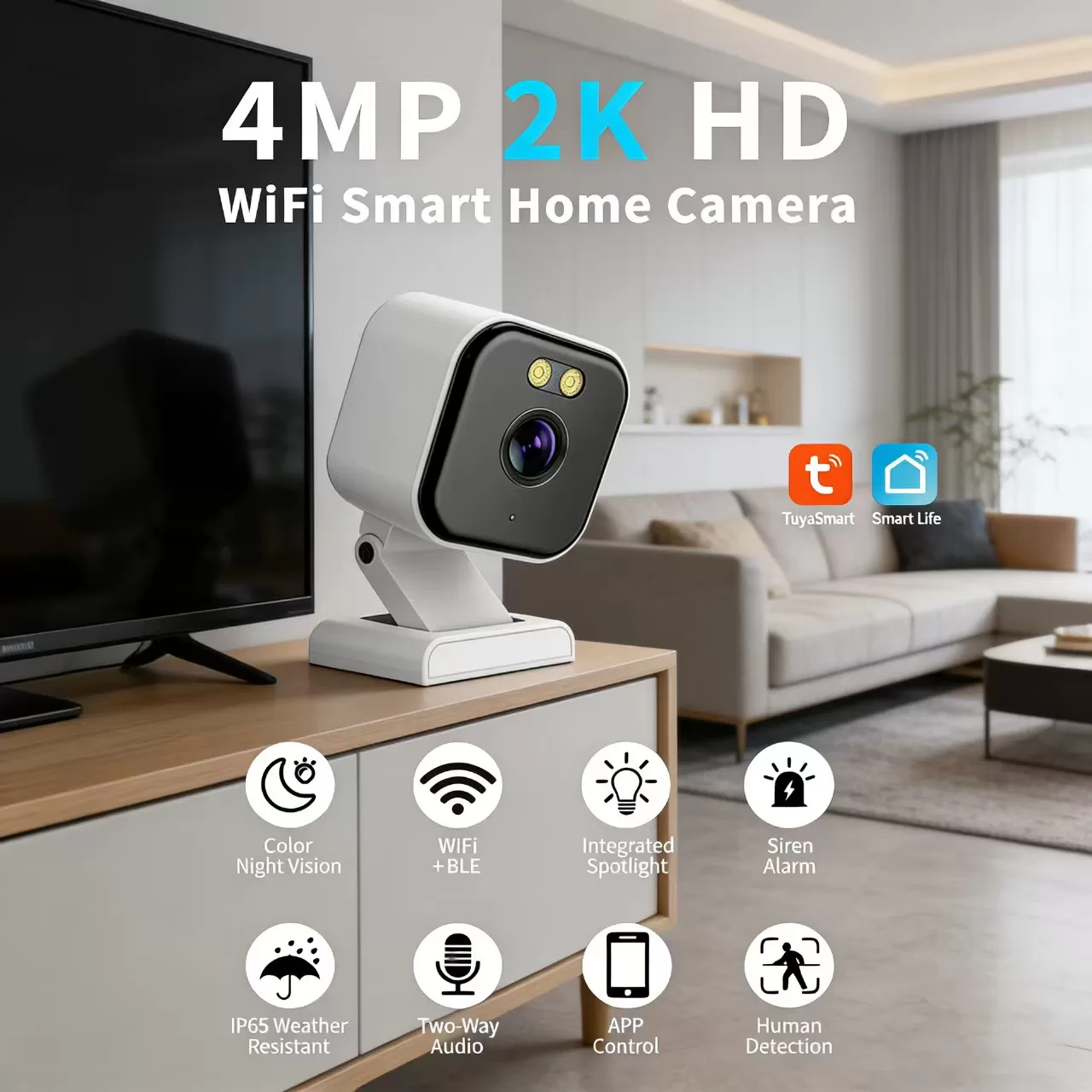
Tuya 4MP 2K HD Indoor Smart Camera: Color Night Vision for Family and Pet Monitoring

However, See your Home in vivid Color — even at night. The Tuya 4MP 2K HD Smart Camera delivers sharp 2K resolution with color night vision, human detection and Smart alerts, making it an ideal choice for keeping an eye on babies, pets and elderly family members. Tuya 4mp indoor

4MP 2K HD WiFi smart home camera indoor color night vision human detection two-way audio pet monitoring camera with spotlight and siren alarm Smart Home Automation Scenes: 6 Practical Setups That Make Your Home Think

Key Features

  • 2K ultra-clear video with full-color night vision
  • Human detection filters out false alarms
  • Two-way talk and built-in siren
  • SD card and cloud storage options
  • Smart Life app with Alexa / Google Assistant support

Peace of Mind Around the Clock

Therefore, Whether you are checking your baby, your pets, or your front door area, this camera gives you reliable monitoring with instant push notifications when it detects people. Smart Home Energy Saving Trends: How Overseas Consumers Cut Bills with Automation Smart Sensors Buying Guide: How to Make Your Home Feel Its Environment

However, Buy the Tuya 4MP 2K HD Camera at Xingliao Shop Why Smart Home Security Is Trending Overseas in 2026: Tech That Sells

Moreover, Set an activity zone, adjust sensitivity, and let smart automation handle the rest. Home Security Systems Explained: 5 Essential Devices to Protect Your Family

You Might Also Like
Frequently Asked Questions

Is Tuya 4mp Indoor worth buying?

Based on the breakdown in this article, Tuya 4mp Indoor offers a solid mix of features and value. If your main goal matches the key benefits described above, it is a practical choice for everyday use. Smart Home Starter Guide 2026: How to Build Your First Connected Home

How do I choose the right tuya 4mp indoor for my needs?

Start with your core use case, then compare battery life, compatibility, and build quality as covered above. Choosing the right tuya 4mp indoor comes down to matching specs with how you actually use it.

Does tuya 4mp indoor require a companion app?

Most devices of this type pair with a free companion app for setup and firmware updates. A few advanced features may sit behind a paid plan, so check the official specs page before buying.

Related Articles
Posted on — Leave a comment

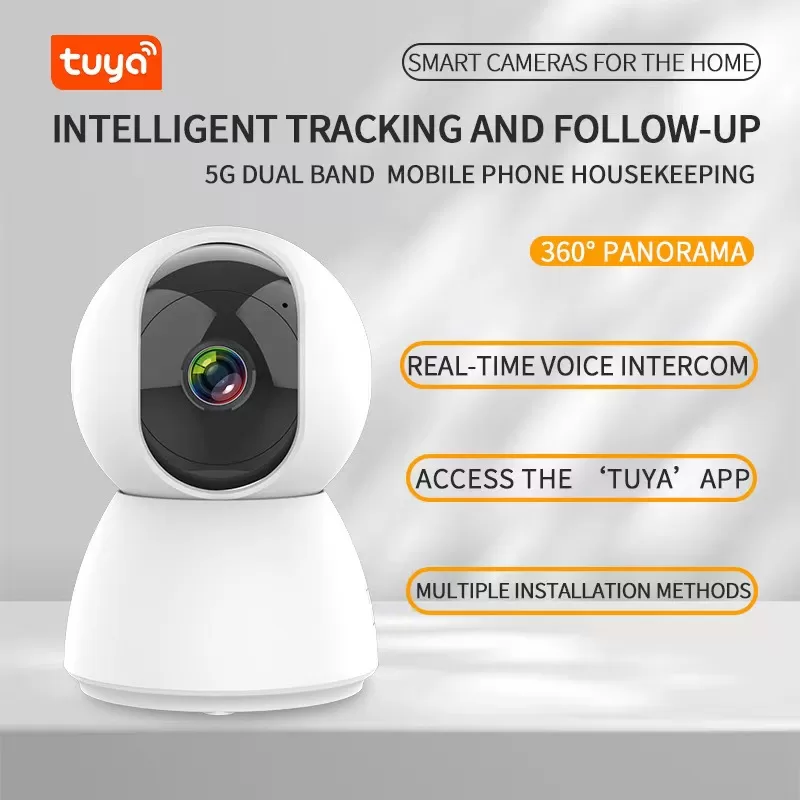
Tuya 2MP/4MP Indoor PTZ Smart Camera: 360 Panoramic Home Monitoring Made Simple

However, Keep every corner of your Home in view with the Tuya 2MP/4MP Indoor PTZ Smart Camera. Its 360-degree panoramic motor lets you pan and tilt remotely, so a single camera covers a whole room — perfect for living rooms, nurseries, offices and retail spaces.

Tuya 2MP 4MP indoor PTZ smart camera 360 degree panoramic WiFi pan-tilt home monitor with intelligent tracking real-time voice intercom and dual band WiFi Smart Home Automation Scenes: 6 Practical Setups That Make Your Home Think

Key Features

  • 360° panorama pan and tilt with app control
  • Sharp 2MP or 4MP video, crisp day and night
  • Two-way audio for talking to family or staff
  • Smart motion tracking follows movement
  • Works with Tuya / Smart Life, Alexa and Google Assistant

One Camera, Full Coverage

Therefore, Instead of buying several fixed cameras, one PTZ unit rotates to watch the whole space. You can sweep the room from your phone, set privacy mode, and review events anytime. Smart Home Energy Saving Trends: How Overseas Consumers Cut Bills with Automation Smart Sensors Buying Guide: How to Make Your Home Feel Its Environment

However, Get the Tuya 2MP/4MP PTZ Camera at Xingliao Shop Why Smart Home Security Is Trending Overseas in 2026: Tech That Sells Smart Lighting Complete Guide: From Color Temperature to Automation Scenes

Moreover, Instant setup via QR code makes it ready to use in minutes. WiFi Smart Wall Socket: Tuya 16A with PD20W Fast Charging Home Security Systems Explained: 5 Essential Devices to Protect Your Family

You Might Also Like
Frequently Asked Questions

Is Tuya 2mp 4mp worth buying?

Based on the breakdown in this article, Tuya 2mp 4mp offers a solid mix of features and value. If your main goal matches the key benefits described above, it is a practical choice for everyday use. Smart Home Starter Guide 2026: How to Build Your First Connected Home

How do I choose the right tuya 2mp 4mp for my needs?

Start with your core use case, then compare battery life, compatibility, and build quality as covered above. Choosing the right tuya 2mp 4mp comes down to matching specs with how you actually use it.

Does tuya 2mp 4mp require a companion app?

Most devices of this type pair with a free companion app for setup and firmware updates. A few advanced features may sit behind a paid plan, so check the official specs page before buying.

Related Articles
Posted on — Leave a comment

Tuya 4MP Indoor WiFi Smart Camera Review: Pan-Tilt Night Vision Home Monitor

However, Worried about what happens at Home while you are away? The Tuya 4MP Indoor WiFi Smart Camera gives you crystal-clear 4MP HD video, smooth pan-tilt control, and two-way audio so you can check in on your family, pets or property from anywhere via the Smart Life app.

Tuya 2MP 4MP indoor WiFi smart camera HD night vision pan-tilt remote home monitor with two-way audio auto tracking dual band WiFi and mobile phone remote Smart Home Automation Scenes: 6 Practical Setups That Make Your Home Think

Key Features

  • 4MP ultra HD resolution with enhanced night vision
  • Pan-tilt motor for full-room remote monitoring
  • Two-way audio to talk and listen in real time
  • Motion detection with push alerts
  • Tuya / Smart Life app control, works with Alexa and Google Assistant

Why It Is a Must-Have

Therefore, Home Security no longer needs a costly subscription. With local storage and free cloud trials, this smart camera lets you keep an eye on your home day and night without ongoing fees. Smart Sensors Buying Guide: How to Make Your Home Feel Its Environment

However, Get the Tuya 4MP Indoor Smart Camera at Xingliao Shop Why Smart Home Security Is Trending Overseas in 2026: Tech That Sells Smart Lighting Complete Guide: From Color Temperature to Automation Scenes

Moreover, Set it up in minutes, point it where you need it most, and enjoy total peace of mind. Home Security Systems Explained: 5 Essential Devices to Protect Your Family

Related Articles

You Might Also Like
Frequently Asked Questions

Is Tuya 4mp Indoor worth buying?

Based on the breakdown in this article, Tuya 4mp Indoor offers a solid mix of features and value. If your main goal matches the key benefits described above, it is a practical choice for everyday use. Tuya 2MP/4MP Indoor PTZ Smart Camera: 360 Panoramic Home Monitoring Made Simple Smart Home Starter Guide 2026: How to Build Your First Connected Home

How do I choose the right tuya 4mp indoor for my needs?

Start with your core use case, then compare battery life, compatibility, and build quality as covered above. Choosing the right tuya 4mp indoor comes down to matching specs with how you actually use it.

Does tuya 4mp indoor require a companion app?

Most devices of this type pair with a free companion app for setup and firmware updates. A few advanced features may sit behind a paid plan, so check the official specs page before buying.

Posted on — Leave a comment

Tuya Smart Watch 1.28 Inch Review: Best Budget Health & Alexa Smartwatch in 2026

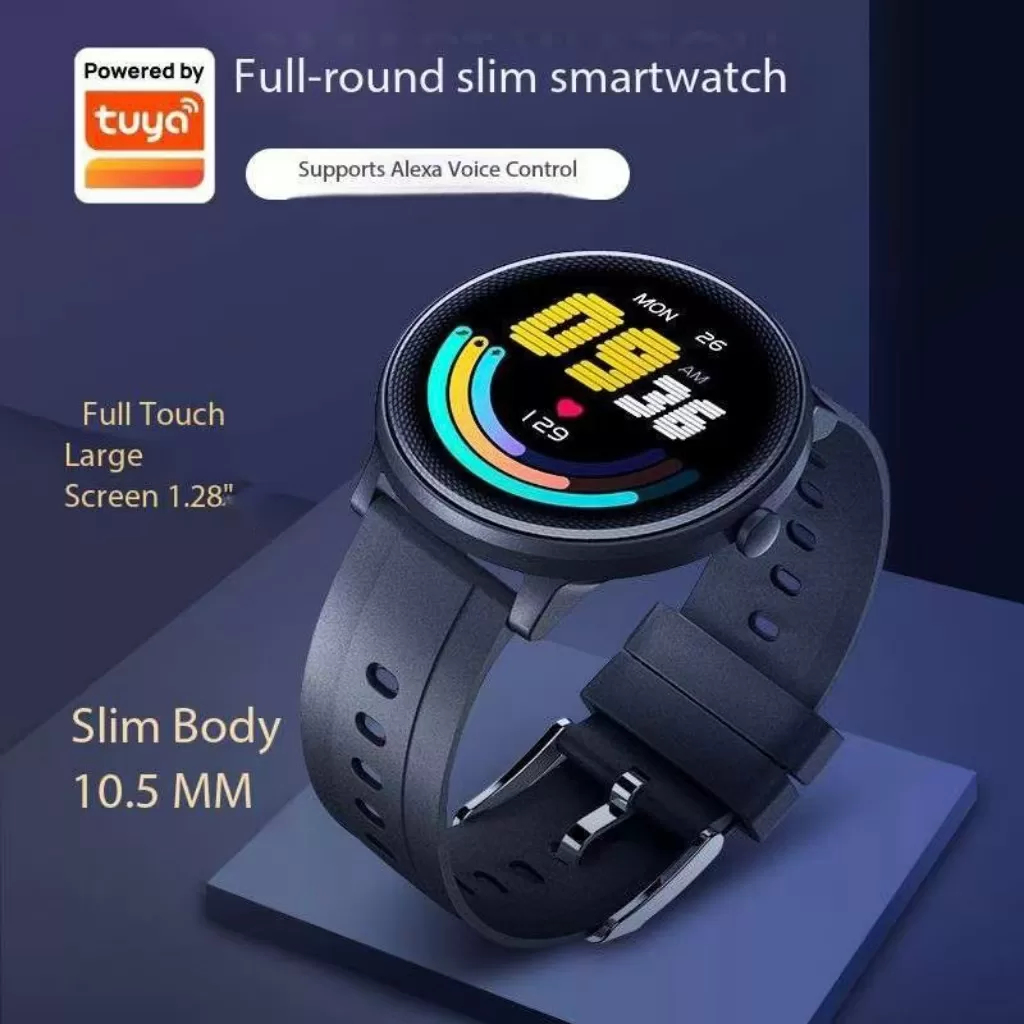
However, The Tuya Smart Watch 1.28 Inch Full Round HD is one of the most affordable Smartwatches that still packs serious health tracking and Smart voice control into a compact round dial. Whether you are new to smart wearables or simply want a budget-friendly everyday watch, this Tuya-powered device deserves a closer look.

Tuya Smart Watch 1.28 Inch Full Round HD Smart Home Automation Scenes: 6 Practical Setups That Make Your Home Think

Key Features

  • 1.28-inch full round HD display
  • Alexa voice control built in
  • Blood oxygen (SpO2), heart rate and blood pressure monitoring
  • Sports modes, sleep tracking and smart notifications
  • IP-friendly daily wear design

Why We Recommend It

Therefore, Health monitoring that used to require a premium smartwatch is now available at a price everyone can afford. The heart rate, blood pressure and blood oxygen Sensors give you a clearer picture of your body at a fraction of the cost. Outdoor Security Camera Bulk Sourcing: Complete B2B Wholesale Guide Smart Home Energy Saving Trends: How Overseas Consumers Cut Bills with Automation Smart Sensors Buying Guide: How to Make Your Home Feel Its Environment

However, Check the Tuya Smart Watch price & availability on Xingliao Shop Why Smart Home Security Is Trending Overseas in 2026: Tech That Sells Smart Lighting Complete Guide: From Color Temperature to Automation Scenes

Moreover, Pair it with your Tuya Smart Life app for seamless integration, and enjoy hands-free Alexa control from your wrist every single day. Surveillance Camera Wholesale Guide: Complete B2B Solutions for Security Distributors Home Security Systems Explained: 5 Essential Devices to Protect Your Family

Related Articles

You Might Also Like
Frequently Asked Questions

Is Tuya Smart Watch worth buying?

Based on the breakdown in this article, Tuya Smart Watch offers a solid mix of features and value. If your main goal matches the key benefits described above, it is a practical choice for everyday use. Tuya 2MP/4MP Indoor PTZ Smart Camera: 360 Panoramic Home Monitoring Made Simple Smart Home Starter Guide 2026: How to Build Your First Connected Home

How do I choose the right tuya smart watch for my needs?

Start with your core use case, then compare battery life, compatibility, and build quality as covered above. Choosing the right tuya smart watch comes down to matching specs with how you actually use it.

Does tuya smart watch require a companion app?

Most devices of this type pair with a free companion app for setup and firmware updates. A few advanced features may sit behind a paid plan, so check the official specs page before buying.

Posted on — Leave a comment

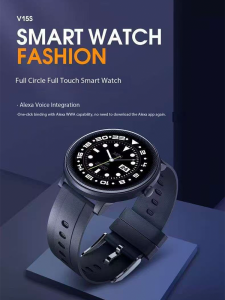
V15S Tuya Smart Watch: Alexa Voice Control, SpO2 Health Monitoring, and Smart Home Integration

Tuya smart watch full round 1.28 inch HD touch screen Alexa voice control blood oxygen SpO2 dynamic heart rate pressure detection 10.5mm slim metal body black silicone sport band
Model‑A Smart Watch is far more than just a Step counter on your wrist. Powered by Tuyathe V15S Smart watch integrates health tracking, Alexa voice control and full‑fledged smart home connectivity, housed in a slim 10.5 mm full‑round design.

It monitors blood‑oxygen levels, 24‑hour continuous heart rate and stress levels. Via the Tuya ecosystem, you can control household devices such as lights, curtains and smart thermostats right from your wrist.
This guide walks you through its full suite of features, helping you decide whether this wearable device is worth upgrading for your household and your pursuit of a healthy lifestyle.

Key Features Overview:

Function Specifications
Model V15S Fashion Smart Watch
Display 1.28‑inch Full‑Round Full‑Touch HD Screen
Body Thickness 10.5 mm Ultra‑Slim Metal Body
Voice Control Built‑in Amazon Alexa, One‑tap WWA Binding
Smart Ecosystem Powered by Tuya Smartsupports control of Tuya‑enabled smart home devices

Heart Rate24-hour dynamic monitoring, 100ms measurement intervalBlood OxygenSpO2 measurement with trend chartsStress DetectionPressure monitoring via HRV analysisSports ModesUp to 20 built-in sports modesSmart ScenesHome Mode, AWay Mode, Audio. Therefore, In addition, And Video ModeApp PlatformTuya Smart app (iOS and Android)BandBlack silicone sport band with pin buckleDesignFull circle fashion design, dark gray metal case

However, v15s tuya watch alexa Portable UV Toothbrush Sterilizer Box USB Type-C Charging Smart Curtain Motor Track: Automated Window Control System 4MP 2K HD WiFi Smart Home Camera: Color Night Vision, Spotlight, and Siren Alarm Guide Portable UV Toothbrush Sterilizer Box Guide: Clean Teeth Anywhere

Therefore, Alexa Voice Control: Your Wrist Assistant: Multi-Function COB Pen Light: The Versatile Tool for Medical, Repair and Outdoor Use How to Choose a Video Intercom Doorbell in 2026: The Complete Buying Guide WiFi_Smoke_CO_Detector_Product_Copy Outdoor Solar Wall Lights: Best Weatherproof Options Reviewed Tuya 4MP 2K HD Indoor Smart Camera: Color Night Vision for Family and Pet Monitoring Smart PIR Motion Sensor: The Wireless, Battery-Powered Home Security Upgrade WiFi Smart Wall Socket: Intelligent Power Control for Modern Homes

Moreover, This watch has Amazon Alexa built directly in. For example, Therefore, Therefore, In addition, And setup is surprisingly simple. Moreover, Furthermore, one-click binding with Alexa WWA capability means you do not need to download the Alexa app separately. Additionally, the integration works through the Tuya Smart app, so setup completes in minutes rather than requiring multiple accounts. In addition, For example, For example, Moreover, For example, Consequently, voice control is ready faster than with most third-party Alexa devices. tuya_rain_sensor_guide_2026_wp.html 6MP WiFi Security Camera Factory Direct vs. Trading Company: Where Smart Home Buyers Really Save Money Tuya Smart Home Ecosystem: Complete Setup Guide Smart Home Energy Saving Trends: How Overseas Consumers Cut Bills with Automation Smart WiFi Pet Feeder: Automated Pet Care with APP Control Why Your Video Doorbell Keeps Going Offline (And How to Fix It for Good) Xiaomi Smart Aromatherapy Diffuser

In addition, Voice commands handle a wide range of daily tasks. Furthermore, Furthermore, you can say “Turn Off the Lights” to dim your smart Lights”Open the curtains” to start your morning, or “Turn on the light” for late-night arrivals. Additionally, Alexa answers questions, sets timers, creates shopping lists. Moreover, In addition, In addition, Furthermore, And checks the weather. As a result, In addition, Therefore, the watch becomes a genuine voice assistant on your wrist rather than just a notification pager. Automatic Pet Feeder OEM: Complete Wholesale Buying Guide 4-in-1 Kitchen Defroster Review: Fast, Safe Thawing with UVC Sterilization Best_Tuya_Smart_Control_Screen_2026 The Complete Guide to 4G LTE Trail Cameras: Features, Setup, and Top Pick WiFi Security Camera Wholesale: B2B Guide to Smart Security Camera Sourcing Smart Camera Buying and Usage Complete Guide

v15s tuya watch alexa

For example, Smart Scene Control: Your Home on Your Wrist: Wearable Ionic Air Purifier: What a Neck-Hung Negative Ion Device Actually Does (and What It Doesn’t) Outdoor Security Camera Bulk Sourcing: Complete B2B Wholesale Guide 4-in-1 Defroster: The Smart Kitchen Solution for Thawing, Washing & Sterilizing

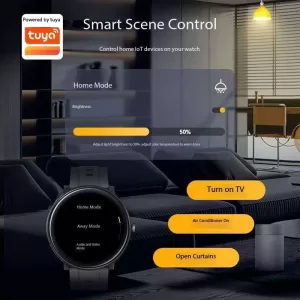
Consequently, The Powered by Tuya designation means this watch does far more than track steps. Furthermore, you can control all your Tuya smart home devices directly from the watch screen. Furthermore, Moreover, Moreover, As a result, Additionally, the Smart Scene Control interface shows Home Mode with brightness sliders. Importantly, And color temperature adjustment. Moreover, Consequently, walking in the door and tapping “Home Mode” on your wrist turns on lights, adjusts the thermostat. As a result, Furthermore, Furthermore, Importantly, And opens curtains automatically.

The watch supports multiple scene modes. Notably, Firstly, Home Mode adjusts lighting and climate for everyday living. Secondly, Away Mode secures the house by turning off lights. Importantly, As a result, As a result, Notably, And activating Security devices. However, Furthermore, Thirdly, Audio and Video Mode dims lights for movie watching. Moreover, individual device controls let you turn on the TV, activate the air conditioner, or open smart curtains with a single tap.

v15s tuya watch alexa

24-Hour Dynamic Heart Rate Monitoring:

The Precise Dynamic Heart Rate Sensor Tracks

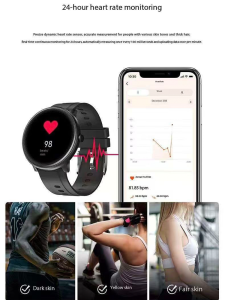
The precise dynamic heart rate sensor tracks your pulse around the clock with exceptional accuracy. Notably, Importantly, Importantly, However, Furthermore, the sensor works reliably for people with various skin tones including dark skin, yellow skin. Therefore, And fair skin, as well as those with thick arm hair. As a result, Additionally, real-time continuous monitoring automatically measures once every 100 milliseconds. However, Notably, Notably, Therefore, And uploads data once per minute. For example, Consequently, you get a true picture of your heart rate throughout the day, not just spot checks.

The paired smartphone app displays heart rate trends in detailed charts. Furthermore, you can view daily, weekly, and monthly data with average heart rate, maximum. Therefore, However, However, For example, And minimum readings. In addition, Importantly, Additionally, the watch displays your current heart rate prominently on the main watch face with a red heart icon. Therefore, you can glance at your wrist during workouts to stay in the right intensity zone.

v15s tuya watch alexa

Blood Oxygen Detection: Watch Your Body Signals:

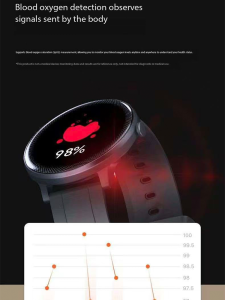
Blood oxygen saturation is one of the most important health metrics most wearables ignore. For example, Therefore, Therefore, In addition, Furthermore, this watch supports SpO2 measurement so you can monitor your blood oxygen levels anytime. Moreover, And anywhere to understand your health status. Notably, Additionally, the trend chart shows how your oxygen levels change throughout the day. In addition, For example, For example, Moreover, And night. Furthermore, Consequently, you can spot patterns that may indicate breathing issues, poor sleep quality, or altitude effects.

The watch displays your current SpO2 reading in a large, easy-to-read format with a red lung graphic. Furthermore, the measurement takes just seconds using the optical sensor on the back of the watch. Moreover, In addition, In addition, Furthermore, However, Additionally, the app records historical data so you can share trends with your healthCare provider. As a result, Therefore, blood oxygen monitoring becomes a simple daily check rather than something only measured at doctor visits.

Please Note This Product Is Not A

Please note: This product is not a medical device. Monitoring data and results are for reference only and not intended for diagnostic or medical use.

v15s tuya watch alexa

20 Sports Modes for Every Fitness Style:

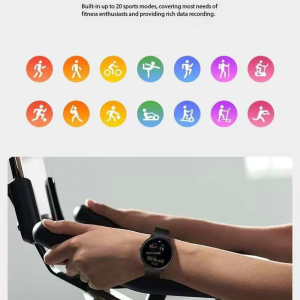
Whether you are a runner, cyclist, yogi, or gym enthusiast, the built-in 20 sports modes cover most needs of fitness enthusiasts. Furthermore, Moreover, Moreover, As a result, And provide rich data recording. Importantly, Therefore, Furthermore, each mode tracks specific metrics relevant to that activity, including duration, calories burned, heart rate zones, and recovery time. As a result, Furthermore, Furthermore, Importantly, Additionally, the watch automatically detects some activities like walking. Notably, And running, so you do not always need to manually start a session.

The colorful icon grid shows the variety of supported activities. Furthermore, modes include running, walking, cycling, yoga, hiking, elliptical training, soccer, baseball, basketball, rowing. Importantly, As a result, As a result, Notably, And more. However, For example, Additionally, data from each workout syncs to the Tuya Smart app for detailed analysis. Therefore, you can track progress over weeks and months across all your favorite activities.

v15s tuya watch alexa

10.5mm Slim Full-Round Fashion Design:

At just 10.5mm thick, this watch is significantly slimmer than most budget smart watches. Notably, Importantly, Importantly, However, Furthermore, the full-circle design means no flat edges or cut corners, giving it the look of a traditional analog watch with the functionality of a modern smart watch. Therefore, In addition, Additionally, the dark gray metal case with textured bezel ring provides a premium appearance at an accessible price. Consequently, the watch transitions naturally from the gym to the office to a dinner out.

The black silicone sport band with pin buckle is comfortable for all-day wear. However, Notably, Notably, Therefore, And easy to adjust. For example, Furthermore, the 1.28 inch full-touch HD screen is crisp and responsive. Moreover, Additionally, you can customize watch faces through the Tuya Smart app to match your style, from sporty digital designs to classic analog faces with date. Therefore, However, However, For example, And step counters.

v15s tuya watch alexa

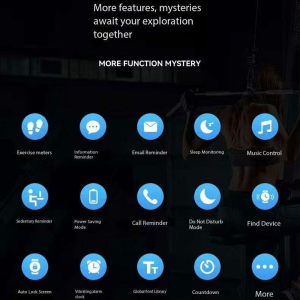
More Features to Explore:

The Watch Packs 15 Additional Features Beyond

The watch packs 15 additional features beyond health monitoring. In addition, And smart home control. Furthermore, these everyday functions make the watch genuinely useful rather than a gimmick.

What It Does
Exercise meters Tracks steps, distance. For example, And calories throughout the day
Information Reminder Notifications from messaging apps. Therefore, And social media
Email Reminder Alerts for incoming email messages
Sleep Monitoring Tracks deep, light. Therefore, And REM sleep stages
Music Control Play, pause, skip tracks from your wrist
Sedentary Reminder Vibrates to remind you to move after inactivity
Power Saving Mode Extends battery life by reducing background functions
Call Reminder Shows caller ID. In addition, And lets you reject calls
Do Not Disturb Mode Silences notifications during set hours
Find Device Rings the watch to help locate it
Auto Lock Screen Secures the watch when not on wrist
Vibrating Alarm Clock Silent wake-up vibration alarm
Global Font Library Multi-language character support
Countdown Timer function for cooking, workouts, focus
More Additional features. For example, Moreover, In addition, And settings menu

v15s tuya watch alexa

Comparison: Tuya Smart Watch vs. For example, Budget Alternatives:

V15S Tuya Smart Watch Budget Fitness Tracker Premium Smart Watch
1.28 inch full-round touch Small rectangular, limited touch AMOLED, always-on
Amazon Alexa built-in None Assistant built-in
Smart Home Full Tuya ecosystem control None Limited to brand devices
Heart Rate 24h dynamic, 100ms interval Basic spot checks Continuous + ECG
Blood Oxygen SpO2 with trends Rarely included SpO2 included
Stress Detection Yes, via HRV No Yes, premium models
Sports Modes 20 modes 3-5 modes 100+ modes
Design 10.5mm slim, full round Thick, rectangular Slim, premium materials
Setup One-click Alexa WWA binding Complex app setup Proprietary app setup
Price Point Budget-friendly Lowest cost Premium price

How to Set Up:

Charge the watch fully before first use. Moreover, Furthermore, Furthermore, download the Tuya Smart app on your smartphone. In addition, Furthermore, Moreover, And create an account. In addition, Additionally, pair the watch via Bluetooth and follow the in-app setup wizard to connect to your Tuya smart home devices. Furthermore, Once connected, set up Alexa voice control with one-click WWA binding. Moreover, As a result, Furthermore, As a result, Finally, customize watch faces, configure health monitoring settings, set up sports mode shortcuts. Moreover, And test smart scene controls.

FAQ:

Q: Do I need to download the Alexa app to use voice control? A: No, one-click binding with Alexa WWA capability means you do not need to download the Alexa app again. As a result, Furthermore, voice control works directly through the Tuya Smart app integration. Furthermore, Importantly, As a result, Additionally, setup completes in minutes without creating a separate Alexa account.

Q: How accurate is the heart rate monitor? A: The precise dynamic heart rate sensor provides accurate measurement for people with various skin tones including dark skin, yellow skin. Furthermore, And fair skin, as well as those with thick hair. Importantly, Importantly, Furthermore, it measures automatically every 100 milliseconds. As a result, Notably, Importantly, And uploads data once per minute for 24-hour continuous monitoring. As a result, However, it is not a medical device and results are for reference only.

Q Can I Really Control My Smart

Q: Can I really control my smart home from the watch? A: Yes, the Powered by Tuya smart watch lets you control home IoT devices directly on your watch. Notably, Furthermore, you can activate scenes like Home Mode, Away Mode. Importantly, However, And Audio. Importantly, Notably, And Video Mode with one tap. However, Notably, Additionally, individual device controls let you turn on the TV, activate the air conditioner, or open curtains.

Q: How many sports modes does the watch have? A: The watch has up to 20 built-in sports modes, covering most needs of fitness enthusiasts. Notably, Therefore, And providing rich data recording. Notably, However, Furthermore, modes include running, walking, cycling, yoga, hiking, elliptical training, soccer, basketball. Therefore, And more. However, For example, Additionally, each mode tracks specific metrics. However, And syncs to the Tuya app for detailed analysis.

Q: Is blood oxygen monitoring continuous? A: Blood oxygen SpO2 measurement can be taken on demand at any time. For example, Therefore, However, Furthermore, the watch records measurements. Therefore, And displays trend charts in the app. Therefore, In addition, Additionally, you can monitor your blood oxygen levels anytime. In addition, And anywhere to understand your health status. For example, For example, Note that this product is not a medical device. For example, Moreover, And data is for reference only.

Q: How thin is the watch body? A: The watch body measures just 10.5mm thick, making it one of the slimmest smart watches in its price range. Moreover, Therefore, Furthermore, the full-round design looks more like a traditional watch. In addition, And less like a tech gadget. In addition, Furthermore, In addition, Additionally, the slim profile means it fits comfortably under shirt cuffs. Furthermore, And does not catch on sleeves.

Q: Does the watch track sleep? A: Yes, sleep monitoring is one of the 15 additional features. Moreover, Furthermore, it tracks sleep stages including deep sleep, light sleep. Moreover, As a result, Moreover, And REM sleep. As a result, For example, Additionally, the app shows sleep quality scores. Furthermore, And historical trends. Furthermore, Importantly, Furthermore, Moreover, the vibrating alarm clock can wake you gently during light sleep stages.

You Might Also Like
Frequently Asked Questions

Is V15s Tuya Watch Alexa worth buying?

Based on the breakdown in this article, V15s Tuya Watch Alexa offers a solid mix of features and value. If your main goal matches the key benefits described above, it is a practical choice for everyday use.

How do I choose the right v15s tuya watch alexa for my needs?

Start with your core use case, then compare battery life, compatibility, and build quality as covered above. Choosing the right v15s tuya watch alexa comes down to matching specs with how you actually use it.

Does v15s tuya watch alexa require a companion app?

Most devices of this type pair with a free companion app for setup and firmware updates. A few advanced features may sit behind a paid plan, so check the official specs page before buying.

Does v15s tuya watch alexa work with both iPhone and Android?

Yes, in most cases this type of device ships with iOS and Android apps, and standard Bluetooth protocols keep cross-platform pairing simple.

Related Articles
Posted on — Leave a comment

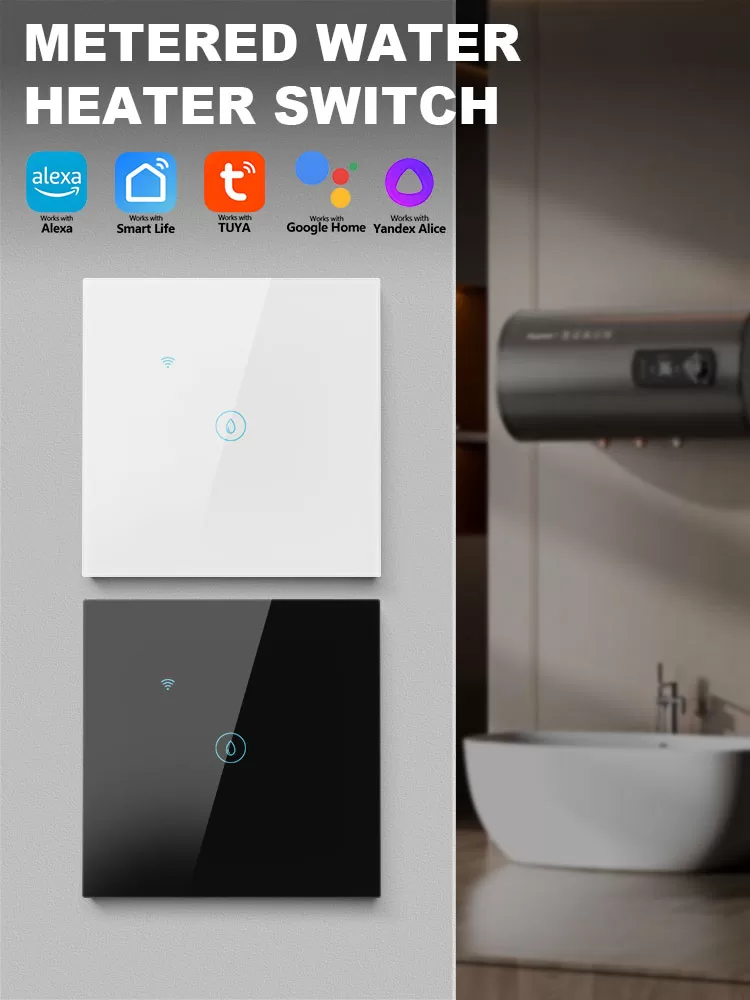
Tuya WiFi Smart Boiler Switch: Energy‑Saving Control for Electric Water Heaters & Home Heating

5000W high power WiFi smart touch switch for electric boiler and water heater, white tempered glass panel, Tuya Smart Life app remote control, power metering function, works with Alexa Google Home, EU Israel standard wall mount

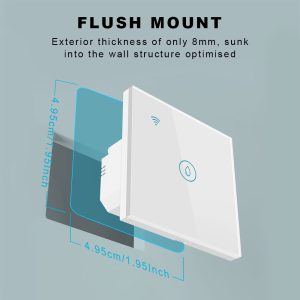
5000W WiFi smart boiler water heater touch switch, flush mount design, fits standard EU‑Israel 86‑type wall mounting box, embedded wall installation

5000W Tuya WiFi Smart Boiler Switch: Why Choose Our High‑Power Smart Switch?

Standard smart wall switches cannot handle heavy‑load heating devices such as electric boilers and electric water heaters. Our 5000W WiFi Smart Boiler Switch is specially designed for 220‑240V household systems in EU and Israel, supporting remote control, power consumption metering and voice automation for high‑power home appliances.

Product Feature Comparison Table

Item Our 5000W Smart Boiler Switch Ordinary Low‑Power Smart Switch
Max. Load Power 5000W 2000W‑2500W Max
Application Scenarios Electric boilers, water heaters, high‑power heating equipment Only for lighting and small low‑power devices
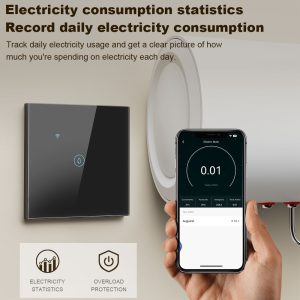
Power Consumption Metering ✅ Real‑time energy monitoring built‑in Tuya App ❌ No power statistics function
Panel Material Tempered glass touch panel, 4 colors: Black / White / Gold / Grey Plastic panel, limited color options
Mounting Box Standard EU / Israel 86‑type flush‑mount junction box 86‑type box, not for heavy‑load heating applications
Control Methods WiFi App remote control, manual touch, timer function, Alexa / Google Home voice control supported WiFi App, touch control, partial voice support
Safety Construction Flame‑retardant inner housing for heavy‑duty operation General‑grade plastic, not for continuous high‑power load

5000W WiFi Smart Boiler Switch

Key Advantages

  • ✅ 5000W High‑Power Capacity — Safely drives electric boilers and water heaters to avoid overload burnout risks
  • ✅ Real‑time power metering: Track daily & monthly power consumption via Tuya / Smart Life App to optimize electricity costs
  • ✅ Remote & Timer Control: Pre‑heat hot water before arriving home from anywhere via your smartphone
  • ✅ Full Voice Control Compatibility: Works with Alexa and Google Home for hands‑free operation
  • ✅ 4‑Color Tempered Glass Panel: Black, White, Gold, Grey to match modern home styles
  • ✅ Easy Retrofit: Direct replacement for old wall switches, fits standard EU & Israel 86‑type wall junction boxes

FAQ

Q1: Can this switch work with my electric water heater / boiler?

A1: Yes. It supports up to 5000W under 220‑240V AC. This unit is purpose‑built for electric boilers and high‑power water heaters. Please make sure your appliance power rating does NOT exceed 5000W.

Q2: Does it require a neutral wire?

A2: This high‑power boiler switch requires a neutral wire for stable operation. Please check wiring inside your wall box before installation.

Q3: Which countries is this switch suitable for?

A3: Ideal for EU countries and the Israel market. Compatible with local 86‑type wall junction boxes and 220‑240V power grid.

Q4: Can I check energy usage history record?

A4: Yes. Moreover, You can view real‑time wattage, daily and monthly energy consumption records inside the Tuya Smart Life mobile App.

Who should buy this smart boiler switch?

Homeowners who want smart control of water heaters / boilers; smart home installers, electric contractors, and wholesale buyers from EU & Israel. In addition, If you need samples or bulk‑order quotation, please visit our product detail page.

View 5000W WiFi Smart Boiler Switch Product PageView the 5000W WiFi smart boiler switch product page

Related Articles
Frequently Asked Questions

Is Tuya Wifi Boiler Switch worth buying?

Based on the breakdown in this article, Tuya Wifi Boiler Switch offers a solid mix of features and value. If your main goal matches the key benefits described above, it is a practical choice for everyday use.

How do I choose the right tuya wifi boiler switch for my needs?

Start with your core use case, then compare battery life, compatibility, and build quality as covered above. Choosing the right tuya wifi boiler switch comes down to matching specs with how you actually use it.

Does tuya wifi boiler switch require a companion app?

Most devices of this type pair with a free companion app for setup and firmware updates. A few advanced features may sit behind a paid plan, so check the official specs page before buying.

Posted on — Leave a comment

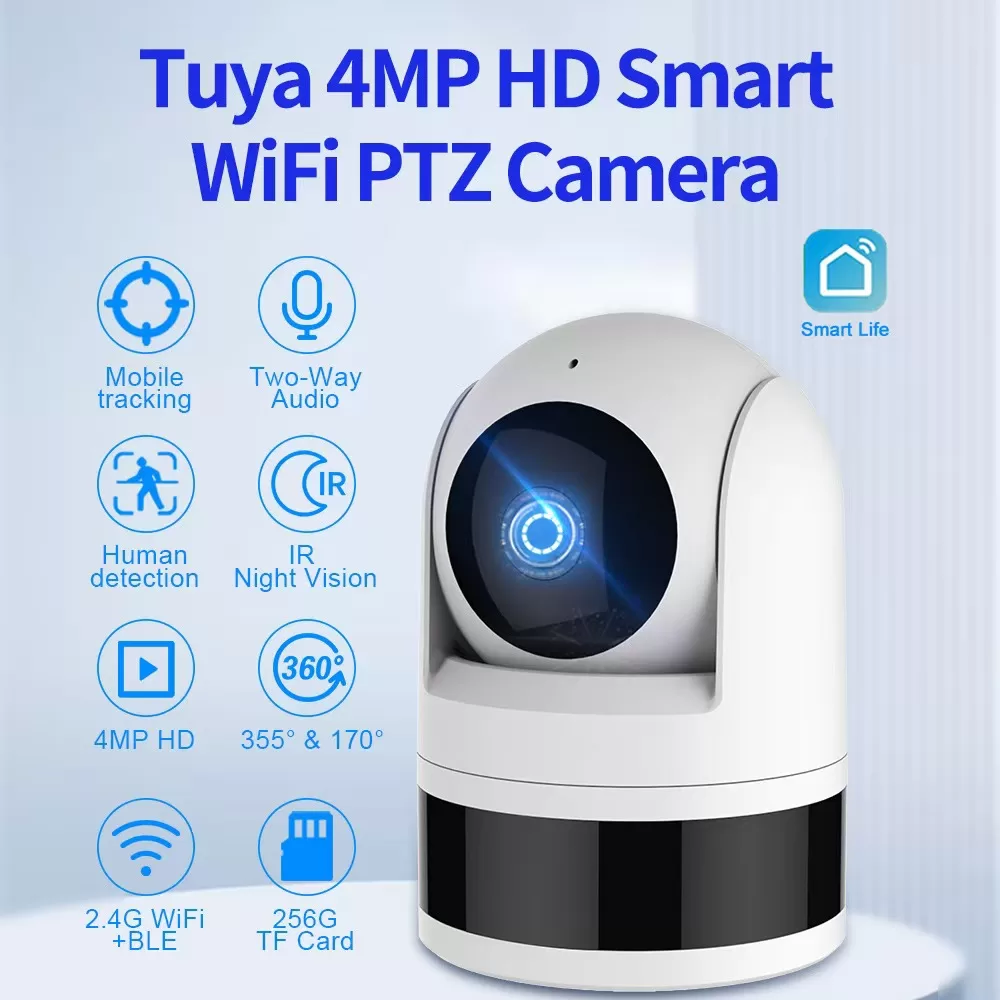
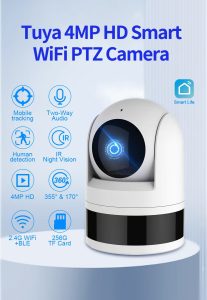
Tuya 4MP HD Smart WiFi PTZ Camera: 360° Auto Tracking Home Monitoring Guide

Tuya 2MP 4MP indoor WiFi smart camera HD night vision pan-tilt remote home monitor with two-way audio auto tracking dual band WiFi and mobile phone remote control

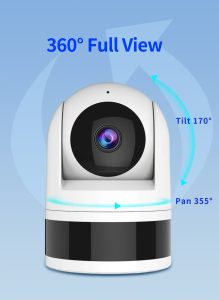
However, A fixed camera only shows what is directly in front of it, leaving blind spots where important moments go unseen. Furthermore, the Tuya 4MP HD Smart WiFi PTZ Camera solves this problem with 355° pan and 170° tilt rotation that covers an entire room from a single device. Therefore, Therefore, Therefore, Therefore, Therefore, Additionally, it features auto tracking, human detection, two-way audio and 256GB local storage with no subscription required. Therefore, Consequently, this guide explains how this pan-tilt camera transforms home monitoring for families, pet owners. For example, For example, For example, For example, For example, And small business owners.

Key Features at a Glance: Smart Home Market Trends 2026: What Distributors Must Know About Modular Security, Voice Control and Energy-Saving Devices

Feature Specification
Resolution 4MP HD (2560×1440)
Rotation Pan 355° horizontal, Tilt 170° vertical
Tracking Auto tracking with multi-target detection
Detection Human detection with AI bounding box
Night Vision Enhanced infrared night vision, day and night monitoring
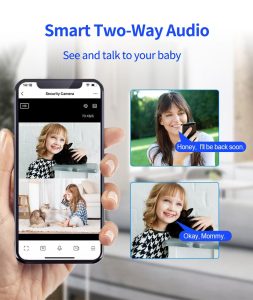
Audio Two-way voice intercom, see and talk to your baby
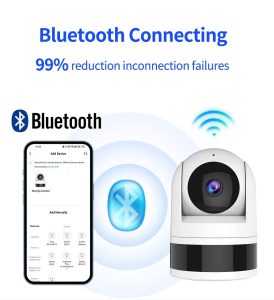
Connectivity 2.4G WiFi + BLE Bluetooth pairing
App Platform Tuya Smart / Smart Life (iOS. In addition, In addition, In addition, In addition, And Android)
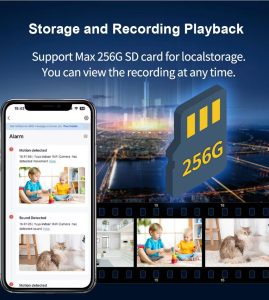
Storage Up to 256GB micro SD card, local storage, no subscription
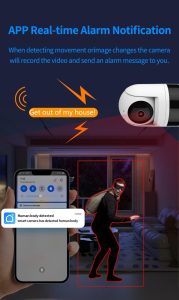
Alerts APP real-time alarm notification, motion and sound detection
Design White egg-shaped PTZ body with conical base
Color White body with black lens panel

tuya 4mp wifi ptz

360° Full View: No Blind Spots:

Therefore, The motorized pan-tilt mechanism rotates 355 degrees horizontally. In addition, And 170 degrees vertically. Moreover, Moreover, Moreover, Moreover, Furthermore, this combination covers virtually every direction in a room, from floor to ceiling and wall to wall. Moreover, Additionally, you control the angle remotely by swiping on your phone screen through the Tuya Smart app. Furthermore, Furthermore, Furthermore, Furthermore, For example, Consequently, one PTZ camera replaces multiple fixed cameras and eliminates blind spots entirely.

Moreover, the camera calibration feature ensures precise positioning. Furthermore, Furthermore, when you swipe to move the camera, it goes exactly where you expect. As a result, As a result, As a result, As a result, Additionally, you can save preset positions for favorite viewing angles and jump to them with one tap. As a result, In addition, Therefore, checking different parts of your home takes seconds rather than manually panning across the room. The Complete Guide to 4G LTE Trail Cameras: Features, Setup, and Top Pick

tuya 4mp wifi ptz

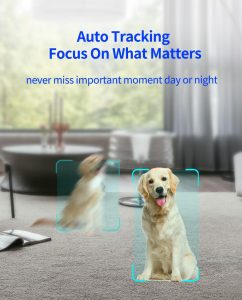
Auto Tracking: Focus On What Matters:

Moreover, When a person or pet moves through the room, the camera automatically rotates to follow them. Importantly, Importantly, Importantly, Importantly, Furthermore, the intelligent tracking algorithm detects motion and keeps the subject centered in the frame with a cyan bounding box. Importantly, Additionally, tracking works on multiple targets simultaneously, so both a moving. Notably, Notably, Notably, Notably, And a stationary subject stay monitored. Moreover, Consequently, you never miss important moments day or night without manual adjustment.

The Dual-dog Demonstration Shows This Perfectly

In addition, The dual-dog demonstration shows this perfectly. Notably, Furthermore, one dog moves through the living room. However, However, However, However, Meanwhile, the other sits still. Additionally, the camera places a tracking box around each dog, following the moving one. Meanwhile, keeping the stationary one in view. Therefore, Therefore, Therefore, Therefore, However, Furthermore, Therefore, auto tracking provides complete coverage whether your pet is running or resting.

tuya 4mp wifi ptz

Enhanced Infrared Night Vision:

Standard cameras produce grainy, unusable footage in darkness. However, this camera features enhanced infrared night vision that keeps track of abnormal situations with day and night monitoring. For example, For example, For example, For example, Therefore, Furthermore, the infrared array provides clear illumination even in complete darkness. As a result, Additionally, the night vision mode activates automatically when ambient light drops below a threshold. Consequently, nighttime footage stays sharp enough to identify faces, clothing. In addition, In addition, In addition, In addition, For example, And objects.

The bedroom intrusion scene demonstrates this capability. Furthermore, even in a dark bedroom at night, the camera clearly captures a person carrying a laptop. Importantly, Additionally, the infrared image shows detailed clothing patterns. Moreover, Moreover, Moreover, Moreover, In addition, And physical features. Therefore, enhanced night vision provides real security rather than blurry gray shapes.

tuya 4mp wifi ptz

APP Real-Time Alarm Notification:

When the camera detects movement or image changes, it records the video and sends an alarm message to your phone instantly. Furthermore, Furthermore, Furthermore, Furthermore, Moreover, Furthermore, the APP real-time alarm notification appears as a push alert reading “Human body detected” with a timestamp. Notably, Additionally, the notification includes a thumbnail preview so you can see what triggered the alert before opening the full app. Consequently, you can respond to security events in seconds rather than discovering them hours later.

Moreover, the camera supports both motion detection. As a result, As a result, As a result, As a result, Furthermore, And sound detection alerts. Furthermore, you can receive notifications via SMS message or phone call in addition to the standard app push. However, Additionally, the alarm interface shows each event with device name, detection type. Importantly, Importantly, Importantly, Importantly, As a result, And timestamp for organized review. Therefore, you always know exactly what happened and when.

tuya 4mp wifi ptz

Smart Two-Way Audio: See and Talk to Your Baby:

The Built-in Microphone

The built-in microphone. Notably, Notably, Notably, Notably, And speaker enable clear two-way voice communication through the Tuya Smart app. Importantly, Furthermore, you can see and talk to your baby, kids, or pets from anywhere in the world. Therefore, Additionally, the app interface includes HD video streaming, a bandwidth indicator. However, However, However, However, And a push-to-talk microphone button. Notably, Consequently, conversations feel natural with minimal latency.

The baby monitoring scenario shows a mother speaking to her daughter through the camera. Furthermore, the mother says “Honey, I’ll be back soon” from outdoors. Therefore, Therefore, Therefore, Therefore, For example, Additionally, the daughter responds “Okay, Mommy” through the camera speaker. However, Therefore, the two-way audio feature provides genuine connection and comfort for family members, not just surveillance.

tuya 4mp wifi ptz

Bluetooth Connecting: 99% Reduction in Connection Failure:

Setting up a smart camera should not require scanning QR codes or entering complex network settings. For example, For example, For example, For example, Furthermore, this camera uses Bluetooth Low Energy for fast. Therefore, And reliable pairing. In addition, Additionally, Bluetooth connecting achieves a 99% reduction in connection failures compared to standard WiFi-only setup methods. In addition, In addition, In addition, In addition, Consequently, the entire setup takes seconds rather than minutes.

Simply open the Tuya Smart or Smart Life app on your smartphone. For example, And the camera appears automatically in the “Add Device” screen. Furthermore, the app shows “Searching for nearby devices” and detects the camera instantly. Moreover, Moreover, Moreover, Moreover, Moreover, Additionally, the Bluetooth pairing process eliminates the frustration of failed WiFi connections that plague many smart cameras. In addition, Therefore, setup is accessible for users of all technical levels.

tuya 4mp wifi ptz

Storage and Recording Playback: No Subscription Needed:

The Camera Supports Micro Sd Cards Up

The camera supports micro SD cards up to 256GB for local storage with no subscription required. Furthermore, Furthermore, Furthermore, Furthermore, Furthermore, you can view recordings at any time through the Tuya Smart app playback interface. Moreover, Furthermore, Additionally, the timeline shows continuous recording segments and motion event markers for quick navigation. As a result, As a result, As a result, As a result, Consequently, finding a specific event takes seconds rather than scrubbing through hours of footage.

The alarm interface organizes detected events by type, including motion detection. Furthermore, And sound detection. Furthermore, each alert includes a timestamp, device name, and thumbnail preview. Importantly, Importantly, Importantly, Importantly, As a result, Additionally, the bottom timeline displays recording frames from different times, letting you jump directly to important moments. As a result, Therefore, the combination of local SD card storage and intelligent event organization provides complete recording management without monthly fees.

tuya 4mp wifi ptz

Comparison: PTZ Camera vs. Notably, Notably, Notably, Notably, Fixed Indoor Camera:

Feature 4MP PTZ Camera Fixed Indoor Camera
Field of View 355° pan, 170° tilt Fixed angle, blind spots
Resolution 4MP HD (2560×1440) 2MP 1080P typical
Tracking Auto tracking, multi-target None
Night Vision Enhanced infrared Basic infrared
Detection Human + sound detection Motion only on most models
Audio Two-way voice intercom One-way audio or none
Setup Bluetooth, 99% success rate QR code required
Storage 256GB local, no subscription Cloud subscription only on many
Alerts APP push + SMS + phone call App push only
Playback Timeline with event markers Basic timeline

How to Set Up:

Place the camera on a flat surface or mount it on a wall or ceiling with the included hardware. Importantly, Furthermore, plug in the power adapter and download the Tuya Smart or Smart Life app. Importantly, Additionally, the app automatically detects the camera via Bluetooth pairing without QR codes. However, However, However, However, Once connected to your WiFi network, insert a micro SD card up to 256GB for local recording. Notably, Finally, test the pan-tilt controls, enable auto tracking, configure motion and sound detection settings. Therefore, Therefore, Therefore, Therefore, Notably, And try the two-way audio feature.

FAQ:

Q: Does this camera require a monthly subscription for storage? A: No, local recording to a micro SD card up to 256GB requires no subscription. Furthermore, all core features including live viewing, two-way audio, motion detection, and auto tracking work without any monthly fee. For example, For example, For example, For example, However, However, optional cloud storage is available if you want remote backup.

Q: How does auto tracking work? A: The camera uses intelligent algorithms to detect moving subjects and automatically rotates to follow them. However, Furthermore, the tracking box appears around the subject on your phone screen. In addition, In addition, In addition, In addition, Therefore, Additionally, tracking works on multiple targets simultaneously, so both moving and stationary subjects stay monitored.

Q Can I Talk To My Family

Q: Can I talk to my family through the camera? A: Yes, the smart two-way audio feature lets you see and talk to your baby, kids, or pets. Moreover, Moreover, Moreover, Moreover, For example, Furthermore, the built-in microphone and speaker provide clear voice communication through the Tuya Smart app. Therefore, Additionally, conversations work with minimal latency so they feel natural.

Q: What happens when the camera detects motion at night? A: The enhanced infrared night vision captures clear footage even in complete darkness. Furthermore, Furthermore, Furthermore, Furthermore, the camera sends an instant APP real-time alarm notification to your phone. Furthermore, In addition, Additionally, the alert includes a thumbnail preview and timestamp so you can assess the situation quickly.

Q: How easy is the Bluetooth setup? A: Very easy, simply open the Tuya Smart app. As a result, As a result, As a result, And the camera appears automatically via Bluetooth. As a result, For example, Furthermore, Bluetooth pairing achieves a 99% reduction in connection failures compared to QR code methods. Moreover, Additionally, no technical expertise is needed for the entire setup process.

Q: How much recording time does a 256GB card provide? A: A 256GB micro SD card provides approximately 10 to 14 days of continuous 24/7 recording at 4MP resolution. Importantly, Importantly, Importantly, Furthermore, motion-activated recording extends storage time significantly. Importantly, In addition, Additionally, the playback timeline shows continuous segments. Furthermore, And event markers for quick navigation.

Q: Does the camera detect sound as well as motion? A: Yes, the camera supports both motion detection. Notably, Notably, Notably, And sound detection. Notably, Furthermore, when sound is detected, the app sends a “Sound Detected” alert with timestamp. As a result, And thumbnail. However, However, However, Additionally, you can configure detection sensitivity and notification preferences for both types.

Related Articles

You Might Also Like
Frequently Asked Questions

Is Tuya 4mp Wifi Ptz worth buying?

Based on the breakdown in this article, Tuya 4mp Wifi Ptz offers a solid mix of features and value. If your main goal matches the key benefits described above, it is a practical choice for everyday use.

How do I choose the right tuya 4mp wifi ptz for my needs?

Start with your core use case, then compare battery life, compatibility, and build quality as covered above. Choosing the right tuya 4mp wifi ptz comes down to matching specs with how you actually use it.

Does tuya 4mp wifi ptz require a companion app?

Most devices of this type pair with a free companion app for setup and firmware updates. A few advanced features may sit behind a paid plan, so check the official specs page before buying.

Does tuya 4mp wifi ptz work with both iPhone and Android?

Yes, in most cases this type of device ships with iOS and Android apps, and standard Bluetooth protocols keep cross-platform pairing simple.