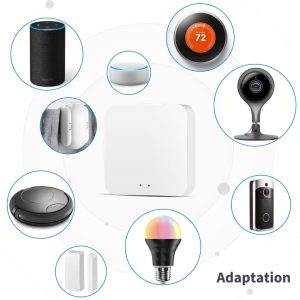
However, Many Smart home devices use Bluetooth because it’s low-power and reliable. However, Bluetooth alone has limits — you can’t control devices when you’re away from home. Therefore, a Bluetooth gateway is essential. The Tuya Bluetooth gateway bridges your Bluetooth devices to WiFi, allowing remote control from anywhere in the world.
Moreover, this compact hub connects up to 128 devices simultaneously. As a result, it becomes the central nervous system of your smart home.
Three Functions in One Compact Device
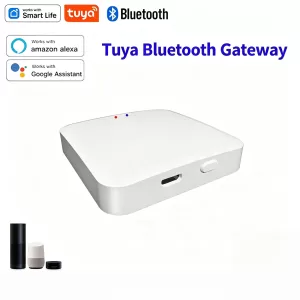
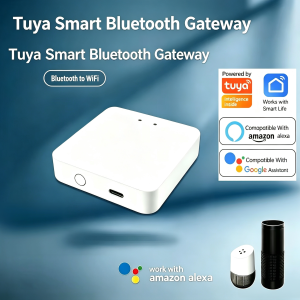
First, this gateway bridges Bluetooth to WiFi seamlessly. Second, it works with Amazon Alexa and Google Assistant for voice control. Third, it integrates with the Tuya Smart Life APP for unified management.
In addition, the device features a minimalist white square design with two LED indicators and a side Button. Furthermore, it uses a Type-C USB port for convenient Power.
bulbs, sensors and cameras” />
Connect Up to 128 Bluetooth Devices
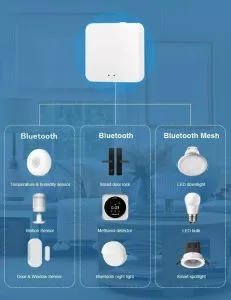
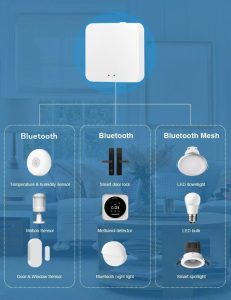
The gateway supports both standard Bluetooth and Bluetooth Mesh protocols. Consequently, you can connect a wide range of smart home devices. These include temperature and humidity sensors, smart door locks, LED downlights, motion sensors, door and window sensors, methanol detectors, Bluetooth night lights, LED bulbs, and smart spotlights.
In other words, one gateway handles your entire smart home ecosystem.
More Stable Than WiFi Solutions
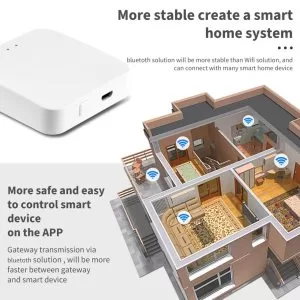
Compared to WiFi-only devices, Bluetooth solutions are more stable. Furthermore, the gateway can connect with many smart home devices at the same time. As a result, you get reliable performance across your entire home.
Additionally, Bluetooth transmission is faster between gateway and smart devices. Therefore, commands execute with minimal delay.
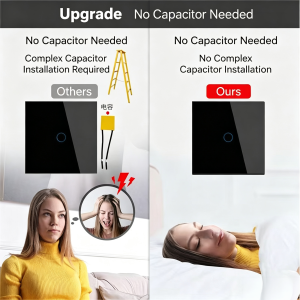
Upgrade Version — No Capacitor Needed
Unlike older smart home devices that require complex capacitor installation, this upgraded gateway features a simpler design. Moreover, there’s no need for complex capacitor substitution during setup. As a result, installation is hassle-free for everyday users.
In fact, you don’t need any electrical expertise. Simply plug in and connect.
APP Link — Intelligent Control
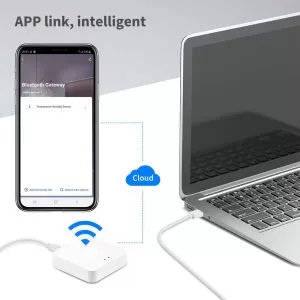
Setup takes under two minutes. First, plug the gateway into any USB power source using the included Type-C cable. Second, open the Tuya Smart Life APP and scan for the device. Third, connect to your 2.4GHz WiFi network. Finally, start pairing your Bluetooth smart devices.
Once connected, you can control all paired devices from anywhere via the APP. Furthermore, the gateway communicates through a secure cloud connection.
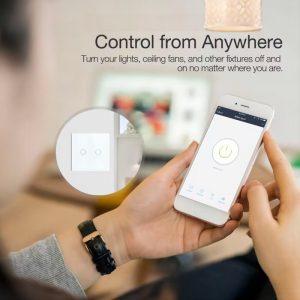
Control from Anywhere
Turn your lights, ceiling fans, and other fixtures off and on no matter where you are. In other words, as long as you have internet access, you can control your entire home. Additionally, the APP provides real-time status updates for all connected devices.
For example, you can turn off lights you accidentally left on at the office. Similarly, you can pre-heat your smart home before arriving.
Voice Control with Alexa & Google Assistant
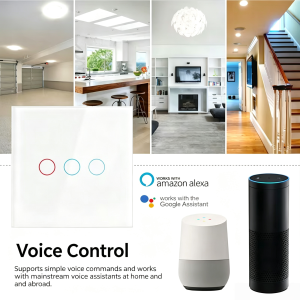
This gateway fully supports Amazon Alexa and Google Assistant. Therefore, you can control all paired Bluetooth devices with simple voice commands. For instance, say “Alexa, turn off the bedroom light” and the gateway executes the command instantly.
In addition, the gateway works with both Google Home Mini and Amazon Echo smart speakers. As a result, voice control is available throughout your home.
Tuya Bluetooth gateway works with voice assistants — control lights, fans, switches, and more with simple commands to Alexa or Google Assistant.
Multi-Room Lighting Control
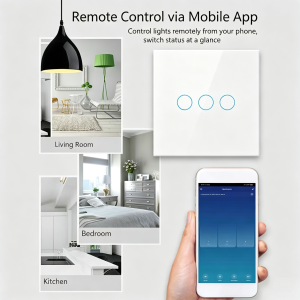
The gateway enables comprehensive lighting control across multiple rooms. For example, control living room pendant lights, bedroom fixtures, and kitchen lights all from one APP. Moreover, the APP displays switch status at a glance.
Consequently, managing your entire home’s lighting becomes effortless.
Smart Home Automation Scenes
Beyond basic control, this hub enables powerful automation. Create custom scenes such as “Good Morning” that trigger multiple Bluetooth devices at once. Alternatively, set schedules, timers, and triggers based on sensor input.
For instance, you can create a scene that turns on lights when the motion sensor detects movement. Similarly, you can automate the smart lock based on door sensor status.
Based on the breakdown in this article, Tuya Bluetooth Gateway Bridge offers a solid mix of features and value. If your main goal matches the key benefits described above, it is a practical choice for everyday use.
How do I choose the right tuya bluetooth gateway bridge for my needs?
Start with your core use case, then compare battery life, compatibility, and build quality as covered above. Choosing the right tuya bluetooth gateway bridge comes down to matching specs with how you actually use it.
Does tuya bluetooth gateway bridge require a companion app?
Most devices of this type pair with a free companion app for setup and firmware updates. A few advanced features may sit behind a paid plan, so check the official specs page before buying.
📌 This article is part of our Complete Tuya Hub — more guides and buying tips inside.
Transform any ordinary appliance into a Smart device with the Tuya WiFi Smart Socket EU 16A. This compact yet powerful smart plug plugs into any standard European outlet and instantly gives you full remote control via the Tuya Smart Life APP — from anywhere in the world. With built-in energy monitoring, voice control via Alexa and Google Home, and robust 16A / 3520W power handling, it’s the perfect entry point into smart home automation. Whether you want to schedule your coffee maker, monitor your electricity usage, or control devices with simple voice commands, this versatile smart socket delivers premium features at an affordable price. The high-power design even supports demanding appliances like water heaters, air conditioners, and washing machines.
Why the Tuya WiFi Smart Socket EU 16A Stands Out
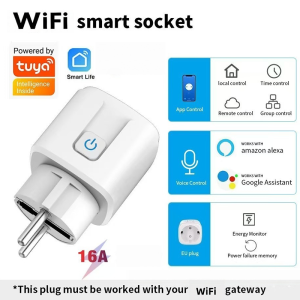
The first thing you’ll notice is the clean, compact design of this EU-style smart plug. The white housing features a subtle LED indicator and a physical power button for manual control when needed. Five official compatibility badges confirm its capabilities: Tuya Intelligence Inside, Smart Life APP, WiFi connectivity, Amazon Alexa, and Google Assistant. Key features highlighted in the main image include: App Control for smartphone management, Local Control for Bluetooth operation without internet, Time Control for scheduling, Remote Control for worldwide access, Group Control for managing multiple devices, Voice Control for hands-free operation, Energy Monitor for tracking power usage, and Power Failure Memory to restore settings after outages. The 16A high-current rating and EU plug design make it ideal for European households.
1. Timing Function — Automate Your Daily Routine
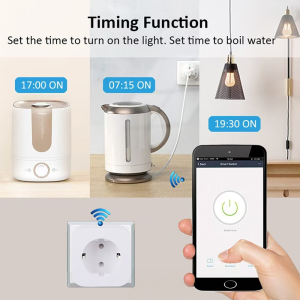
One of the most practical features is the intelligent timing function. As the image illustrates, you can set precise schedules for any connected appliance:
17:00 ON — Turn on the humidifier before you arrive home
07:15 ON — Start the electric kettle for your morning coffee
19:30 ON — Automatically turn on living room lights at sunset
The countdown timer is equally useful — set your phone charger to turn off after 3 hours to prevent overcharging, or schedule the heater to run for exactly 2 hours before automatically shutting off. The Smart Life APP interface shows a large power button with clear on/off status, plus tabs for Switch, Countdown, and Timer functions. This scheduling capability helps you save energy, enhance security with simulated presence when away, and build automated routines that match your lifestyle.
2. Group Control — Manage Multiple Devices with One Tap
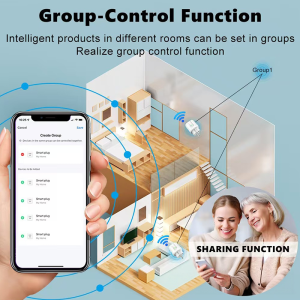
The group control feature transforms how you manage multiple smart devices. As shown in the bird’s-eye floor plan view, you can place Tuya smart sockets throughout your home — living room, bedroom, kitchen, dining room, and office — and control them all from a single interface.
Simply create a group in the Smart Life APP, assign your smart plugs to it, then turn all devices on or off with one click. This is perfect for:
“All Lights” group — Turn off every lamp in the house at bedtime
“Living Room” group — Activate entertainment devices with one tap
“Heaters” group — Manage multiple space heaters for consistent warmth
“Morning Routine” group — Turn on coffee maker, lights, and radio simultaneously
Group control eliminates the hassle of switching between individual device controls, making whole-home automation effortless for families of any size.
3. APP Remote Control — Your Home in Your Pocket
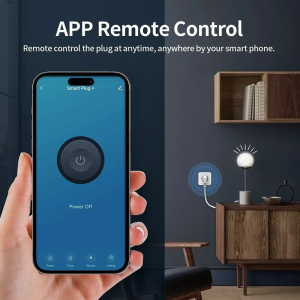
The APP remote control feature puts complete command of your home appliances in your smartphone. Whether you’re at work, on vacation, or simply in another room, you can check device status and control power with a single tap.
The Smart Life APP interface shown in the image features a large, intuitive power button with clear “Power Off” or “Power On” status display. Additional controls at the bottom include Power (instant on/off), Timer (schedule settings), Electric (energy monitoring), and Setting (device configuration). The visual demonstrates a modern living room scene where the smart socket controls a desk lamp — showing how seamlessly the device integrates into contemporary home decor while providing powerful smart functionality.
4. Voice Control — Hands-Free Smart Home
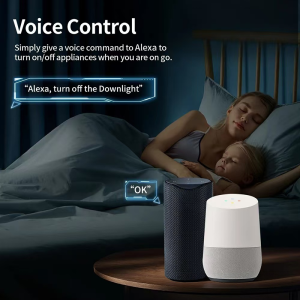
Perhaps the most convenient feature is full voice control integration with Amazon Alexa and Google Home. As the image shows, you can control devices hands-free from anywhere in your home — even from bed.
The example command “Alexa, turn off the Downlight” demonstrates natural language control that’s intuitive for the whole family. Both Amazon Echo and Google Home smart speakers are shown in the bedroom scene, confirming dual-platform compatibility. Simply say:
“Alexa, turn on the coffee maker”
“Hey Google, turn off the heater”
“Alexa, is the living room lamp on?”
“Hey Google, set the bedroom light timer for 30 minutes”
This hands-free control is perfect for when your hands are full, you’re relaxing, or for elderly family members and children who find smartphone apps challenging. The voice assistants respond instantly, making smart home control as easy as speaking.
5. Energy Monitoring — Track and Save on Electricity
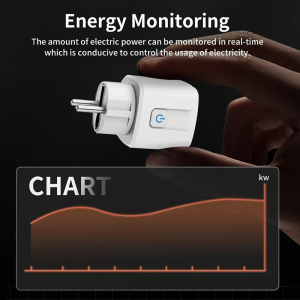
The built-in energy monitoring chip tracks real-time power consumption with precision accuracy, helping you understand and optimize your electricity usage. As the image shows, the Smart Life APP displays a detailed power consumption chart with kW measurements over time.
Based on the breakdown in this article, Tuya Wifi Socket 16a offers a solid mix of features and value. If your main goal matches the key benefits described above, it is a practical choice for everyday use.
How do I choose the right tuya wifi socket 16a for my needs?
In today’s smart home world, one of the most common frustrations is that your existing remote-controlled appliances don’t speak WiFi. Your TV, air conditioner, fan, set-top box, and other IR devices still rely on their old infrared remotes. The Tuya Smart Zigbee IR Remote Controller S11 solves this elegantly — combining a ZigBee gateway, a universal IR blaster, and a built-in temperature & humidity sensor in one compact device. This all-in-one device works with Tuya Smart Life APP, Amazon Alexa, and Google Home, turning your traditional home into a fully connected smart home. Whether you want to control your AC before arriving home, schedule your TV to auto-off at bedtime, or build whole-home automation with ZigBee sensors, this little black box delivers premium smart home control at an accessible price.
Why the Tuya ZigBee IR Remote S11 Stands Out
Tuya Smart ZigBee IR Remote Controller S11 – universal IR remote control with built-in temperature & humidity sensor. Works with Tuya Smart Life, Amazon Alexa, and Google Home.
The first thing you’ll notice about the Tuya ZigBee IR Remote S11 is its sleek, minimalist design. The compact matte black square housing with rounded corners features a small blue WiFi status LED indicator on the front and a Micro USB port on the back. The device is officially certified for Tuya Intelligence Inside, Works with Smart Life, ZigBee 3.0, Amazon Alexa, and Google Assistant — ensuring seamless integration with your existing smart home ecosystem.
Despite its tiny 32.5g footprint, this device packs three powerful functions: a ZigBee 3.0 gateway for connecting hundreds of smart home sensors, a 360-degree universal IR blaster for controlling all your traditional IR appliances, and a built-in temperature & humidity sensor for environmental monitoring and smart triggers.
1. Whole Linkage of Your Smart Home — ZigBee Gateway Function
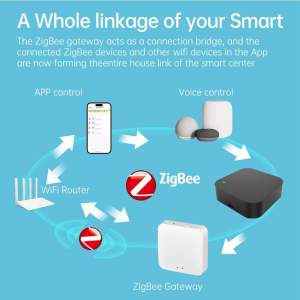
Tuya ZigBee IR Remote S11 serves as a whole linkage hub for your smart home — connect APP control and voice control to ZigBee subdevices via the ZigBee gateway.
The S11 serves as a ZigBee smart home gateway — the central hub that connects and controls all your ZigBee-compatible devices. As the diagram shows, the gateway acts as a connection bridge: user commands from APP control (via Smartphone) and Voice control (via smart speakers like Google Home and Amazon Echo) are received and routed through the Tuya cloud, then transmitted to the ZigBee gateway, which broadcasts commands to all connected ZigBee subdevices.
ZigBee smart switches and dimmers — for lights, fans, and appliances
ZigBee smart bulbs and LED strips — for whole-home lighting control
ZigBee smart locks and security devices — for home security integration
WiFi smart devices — for hybrid ZigBee + WiFi ecosystems
Instead of buying multiple hubs for different brands, this Single device serves as the unified control center for your entire smart home.
2. All-in-One Remote — 5 Powerful Smart Functions
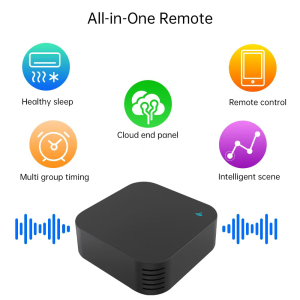
Tuya ZigBee IR Remote S11 combines 5 all-in-one remote functions: healthy sleep, remote control, cloud end panel, multi group timing, and intelligent scene. The Tuya IR Remote combines five powerful smart home functions into one compact device, as illustrated in the feature overview:
Healthy Sleep — schedule air conditioners, lights, and bedroom devices for optimal sleep environments
Remote Control — control all your IR appliances from anywhere via smartphone
Cloud End Panel — automatic cloud-based device matching for instant setup with thousands of brands
Multi Group Timing — set up multiple schedule groups for different rooms and routines
Intelligent Scene — create automation scenarios that trigger multiple devices at once
Whether you’re looking to control a Single TV or build a complex multi-room automation system, this device scales to fit your needs.
3. Preset Air Conditioner Modes — Multi-Mode & Timing
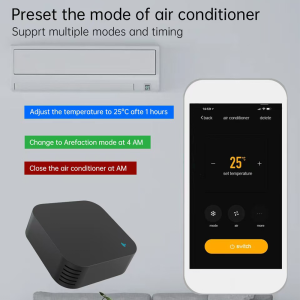
Tuya ZigBee IR Remote S11 supports preset air conditioner modes with multiple timing options — schedule temperature adjustments, defrost mode, and auto shutoff.
One of the most popular use cases is smart air conditioner control. The Tuya IR Remote supports multiple AC modes and timing functions, allowing you to preset commands like:
Adjust the temperature to 25°C after 1 hour — perfect for falling asleep at a comfortable temperature then auto-adjusting through the night
Change to Defrost mode at 4 AM — for energy-saving overnight cooling in winter
Close the air conditioner at 6 AM — automatic shutoff when you wake up
The Tuya Smart Life APP provides a full virtual remote interface for your AC unit, with controls for temperature, fan speed, mode (cool, heat, dry, fan), timer, and all the functions you’d find on your original AC remote. No more getting out of bed to adjust the temperature!
4. Suitable for Multiple Scenes — Universal IR Appliance Compatibility
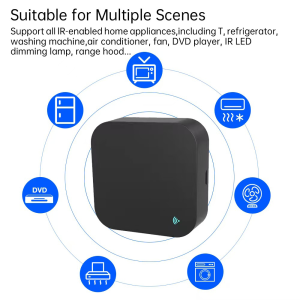
Tuya ZigBee IR Remote S11 is suitable for multiple scenes — supports TVs, refrigerators, washing machines, air conditioners, fans, DVDs, LED dimming lamps, and range hoods.
The Tuya IR Remote S11 supports all IR-enabled home appliances, making it truly universal. As the image illustrates, it works seamlessly with:
TVs — all major brands
Refrigerators — IR-controlled smart fridges
Washing Machines — IR-controlled models with remote start/stop
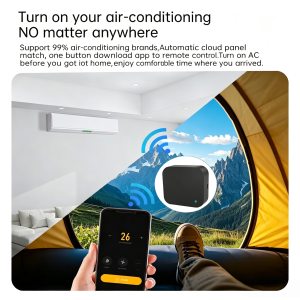
Air Conditioners — full temperature and mode control for 99% of brands
Fans — tower fans, ceiling fans, stand fans
DVD Players — all major brands
IR LED Dimming Lamps — smart lighting with IR control
Range Hoods — kitchen exhaust fans with IR remotes
With the automatic cloud-based device matching, adding a new IR appliance takes just seconds — the APP recognizes your device brand and model, then downloads the corresponding IR code library automatically.
5. Turn On Your Air-Conditioning Anywhere — 99% Brand Compatibility
Imagine this: it’s a hot summer day, and you’re camping in the mountains, hiking on a trail, or stuck at work late. With the Tuya IR Remote, you can turn on your home air co
Based on the breakdown in this article, Tuya Zigbee Remote offers a solid mix of features and value. If your main goal matches the key benefits described above, it is a practical choice for everyday use.
How do I choose the right tuya zigbee remote for my needs?
Start with your core use case, then compare Battery life, compatibility, and build quality as covered above. Choosing the right tuya zigbee remote comes down to matching specs with how you actually use it.
Does tuya zigbee remote require a companion app?
Most devices of this type pair with a free companion app for setup and firmware updates. A few advanced features may sit behind a paid plan, so check the official specs page before buying.
📌 This article is part of our Complete Zigbee Hub — more guides and buying tips inside.
Tuya USB Camera Review: A Tiny 3MP Plug-In Smart Camera That Actually Makes Sense
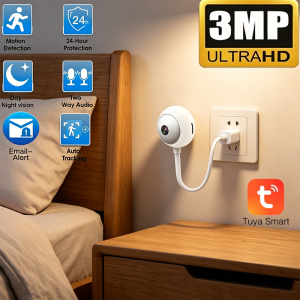
However, If you’ve ever wished a security camera could just. plug into a wall outlet and start working — no drilling, no cables, no mess — the Tuya USB camera is built for exactly that. After several weeks of testing it as a baby monitor, a pet camera, and a casual home-security device, here’s everything you need to know before buying one.
Why a USB Plug-In Camera Is Worth Considering
Therefore, Most home security cameras today are either battery-powered (great for outdoors, painful to charge) or wall-mounted with a thick power brick (great for fixed locations, terrible for renters). The Tuya USB camera takes a third path: a tiny egg-shaped unit with a built-in USB-A cable that you simply plug into any USB power source. Wall adapter, power bank, laptop — anything works.
Moreover, What makes this design genuinely useful is how invisible the installation feels. There’s no app to set up for power, no screws, no cable to hide. You plug it in, scan the QR code in the Tuya Smart app, and you’re live.
3MP Image Quality: Sharper Than You Expect for the Price
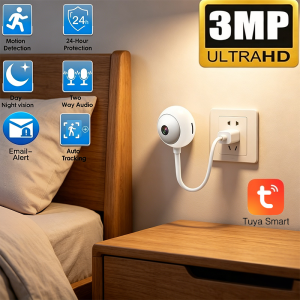
In addition, Let’s talk specs first. The Tuya USB camera is a 3MP sensor (2304×1296) recording at 2K resolution, which puts it ahead of most 1080p cameras in the same price bracket. In real-world use, the extra resolution matters when you need to zoom into a detail later — a face, a pet’s collar tag, a package label.
For example, The 4mm fixed lens gives a moderate wide-angle view that works well for a bedroom corner, a doorway, or a kitchen counter. It’s not a panoramic lens, so plan your placement accordingly. The camera also supports 4× digital zoom through the app, which is helpful when you want to inspect something specific without physically moving the camera.
Day Vision, Infrared Night Vision, and Color Night Vision
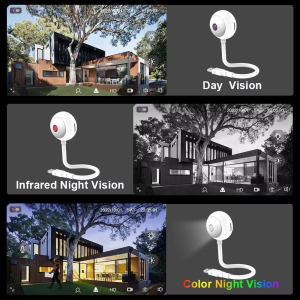
Consequently, A pleasant surprise: the Tuya USB camera actually delivers three distinct viewing modes.
Day Vision is sharp and natural-looking. Colors are accurate, motion is smooth, and there’s no over-sharpening that makes indoor scenes look artificial.
Infrared Night Vision kicks in automatically when the lights go down, producing a clean black-and-white image. It’s not pitch-black cinematic night — it’s the kind of clear, readable footage you’d expect from a dedicated baby monitor. The 30m (98 ft) range is more than enough for indoor rooms and small yards.
Color Night Vision is the standout. Thanks to dual-light LEDs (infrared + a small white spotlight), the camera can produce a full-color image even in very low light. For parents checking on sleeping kids, or anyone wanting to identify clothing colors and details at night, this is genuinely useful — not a gimmick.
Two-Way Audio: Clear Enough to Calm a Crying Baby
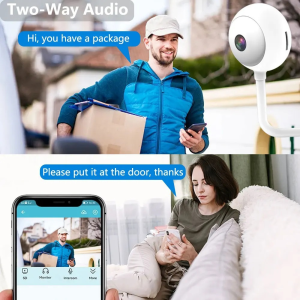
The built-in microphone and speaker are not just a checkbox feature here — they actually work. We tested the two-way audio as a baby monitor (parent unit in another room speaking into the phone), and the sound came through the camera cleanly enough to soothe a toddler back to sleepThere’s a small delay (typical for WiFi cameras), but no distortion or cut-out.
For everyday use, the two-way audio also handles practical jobs well: telling a delivery driver where to leave a package, calling the family to dinner, or scaring off an opportunistic cat on the kitchen counter.
AI Human Detection and Auto-Tracking That Actually Works
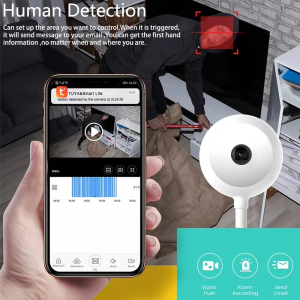
This is where most budget cameras fall apart — they detect every shadow and send you 200 useless alerts a day. The Tuya USB camera’s AI human detection is genuinely smarter.
You can set up a custom detection zone (only the front door, only the baby’s crib, only the kitchen entrance), and the camera filters out motion from pets, swaying curtains, and light changes. When a person actually enters the zone, you get a real-time push notification on your phone with a snapshot. From there, you can open the live feed, talk through the speaker, or trigger an alarm sound.
The auto-tracking feature follows the detected person as they move across the frame. It’s smooth, not jumpy, and re-centers the moment the person leaves the scene. For a camera in this price range, this is impressive.
USB Convenient Interface: The Single Best Feature
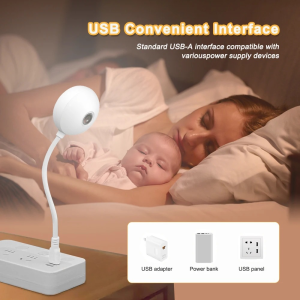
Here’s the thing that makes this camera special: the USB Convenient InterfaceThe cable ends in a standard USB-A plug, which means you can power it from:
The wall adapter that came with your old phone
A power bank (great for temporary setups, traveling, camping)
A laptop USB port (perfect for monitoring a room while you work)
A USB wall outlet panel (cleanest install)
No proprietary connectors. No “you need to buy our specific adapter.” Just USB. This also makes it trivially easy to relocate the camera — unplug it, move it, plug it back in. Done.
355° Pan & 90° Tilt via the Flexible Neck — Almost a Pan-Tilt Camera
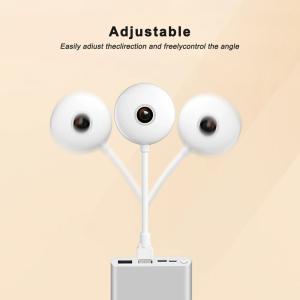
Strictly speaking, the Tuya USB camera isn’t a motorized pan-tilt camera. But the flexible gooseneck arm between the camera head and the USB plug lets you manually point the camera in almost any direction — 355° horizontal pan, 90° vertical tilt — and then adjust it again whenever you need to.
In practice, this means you can aim it at the crib today, then re-aim it at the front door tomorrow, without unmounting anything. The neck is stiff enough to hold position but easy to bend with one hand.
If you want true motorized pan-tilt control from the app, you’ll need a different product. But for fixed-point monitoring that you occasionally re-aim, this design is honestly more reliable than a motorized mechanism that will eventually wear out.
Storage: Local SD Card and Cloud, Both Supported
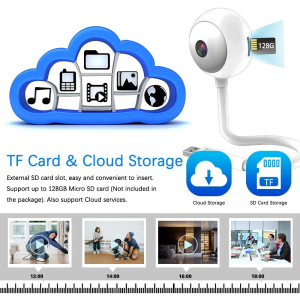
The Tuya USB camera supports both TF card (microSD) storage up to 128GB and cloud storage through the Tuya app. Both can run simultaneously, which is the safest setup — local storage for quick playback, cloud storage as backup if the camera is tampered with or stolen.
128GB of microSD storage gives you roughly 10–14 days of continuous 2K recording, or longer with motion-only recording enabled. The cloud storage plan is optional and reasonably priced, but the camera works perfectly fine without it.
The Free Tuya Smart App — No Subscription Required
Unlike many “smart” cameras that lock basic features behind a monthly fee, the Tuya USB camera works fully without any subscription:
Live streaming: free
Two-way audio: free
Motion/human detection alerts: free
Local recording playback: free
Multi-device sharing: free
The Tuya Smart app (or Smart Life — they’re essentially the same platform) also ties into the wider Tuya ecosystem, so if
(truncated).
Based on the breakdown in this article, Tuya Usb Camera offers a solid mix of features and value. If your main goal matches the key benefits described above, it is a practical choice for everyday use.
How do I choose the right tuya usb camera for my needs?
Start with your core use case, then compare battery life, compatibility, and build quality as covered above. Choosing the right tuya usb camera comes down to matching specs with how you actually use it.
Does tuya usb camera require a companion app?
Most devices of this type pair with a free companion app for setup and firmware updates. A few advanced features may sit behind a paid plan, so check the official specs page before buying.
📌 This article is part of our Complete Camera Hub — more guides and buying tips inside.
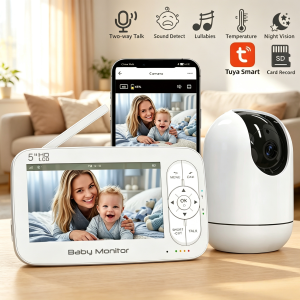
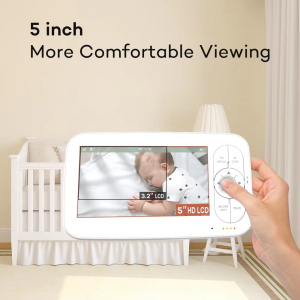
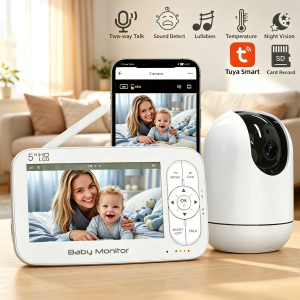
Tuya Smart Baby Monitor – 5-Inch HD display with APP Control, SD Card Storage & Two-Way Audio
Short Description
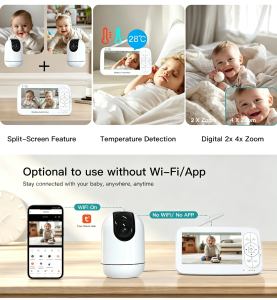
Tuya Smart Baby Monitor with 5-inch HD display, 1280×720 resolution, two-way audio, cry detection, lullabies, temperature monitoring, and night vision. Supports Tuya Smart APP for remote viewing, SD card storage (8-128GB), and WiFi/No-WiFi dual modes. Multi-user sharing, split-screen feature, and 2x/4x digital zoom.
Product Description
Stay connected with your baby anytime, anywhere with the Tuya Smart Baby Monitor. Featuring a large 5-inch HD display, intelligent cry detection, and flexible connectivity options — use with or without WiFi, with or without the APP.
Key Features
5 Core Functions for Complete Baby Care:
Feature
Description
🎤 Two-Way Talk
Built-in microphone and speaker for crystal-clear communication
😢 Sound Detect
Smart cry detection with instant VOX mode alerts
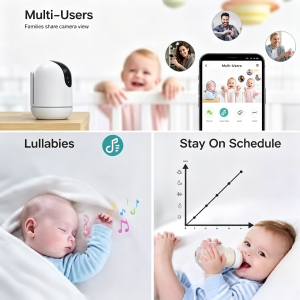
🎵 Lullabies
Soothing sounds and white noise to calm your baby
🌡️ Temperature
Real-time room temperature display (°F/°C)
🌙 Night Vision
Automatic infrared LEDs for clear video in darkness
💾 SD Card Storage
Local recording with 8-128GB micro SD card support
📱 Tuya APP
Remote viewing via Tuya Smart APP
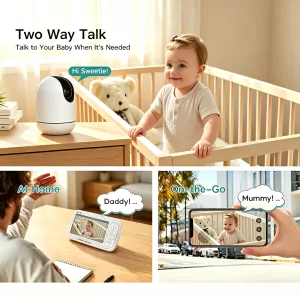
Two-Way Talk – Stay Connected Anytime
Talk to your baby from anywhere in the house or on-the-go. The Tuya Smart Baby Monitor features high-sensitivity microphone and speaker for crystal-clear two-way audio communication.
Key Benefits:
Strong 2.4GHz signal connection
No delay, real-time communication
Comfort your baby remotely at home or away
“Hi Sweetie!” – Talk to your baby instantly
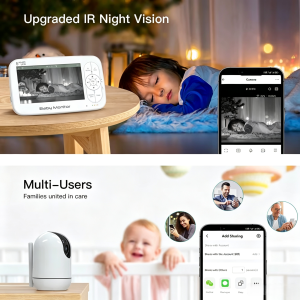
Upgraded IR Night Vision
Sleep Mode – Monitor your baby with audio-only mode for peaceful nights.
Upgraded IR Night Vision – Automatic infrared night vision ensures you can see your baby clearly even in complete darkness. The 5-inch HD display shows every detail, day or night.
Multi-Users – Families United in Care
Share access with family members! The Tuya Smart APP allows multi-user sharing, so grandparents, parents, and caregivers can all monitor the baby from their own devices.
Add Sharing Options:
Share with Account
Share with Others (WeChat, Messages, Copy Link)
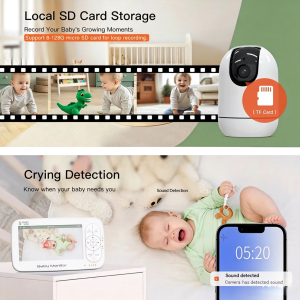
Local SD Card Storage
Record Your Baby’s Growing Moments
Support 8-128GB micro SD card for loop recording. Never miss a precious moment — save videos locally and review them anytime.
Automatic loop recording
Local storage, no cloud fees
Easy playback on parent unit or APP
Crying Detection – Know When Your Baby Needs You
Smart sound detection alerts you instantly when your baby cries. The Tuya APP sends push notifications to your phone, so you’re always connected.
Sound Detection Alert: “Camera has detected sound” at 05:20
Split-Screen, Temperature & Zoom
Feature
Description
Split-Screen Feature
Monitor multiple cameras on one screen
Temperature Detection
Real-time room temperature (28°C shown)
Digital 2x 4x Zoom
See every detail with digital zoom
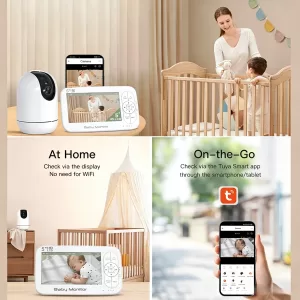
Optional to Use Without Wi-Fi/App
Flexible Connectivity Options:
Mode
Connection
Use Case
WiFi On
Tuya Smart APP + WiFi
Remote viewing from anywhere
No WiFi / No APP
Direct monitor connection
Simple plug-and-play at home
Stay connected with your baby, anywhere, anytime — with or without WiFi.
Specifications
Specification
Details
Display Size
5 Inch HD LCD
Resolution
1280 × 720 HD (720P)
APP Support
Tuya Smart APP (iOS & Android)
WiFi Support
Yes, 2.4GHz WiFi
SD Card Storage
8-128GB micro SD card (TF Card)
Wireless Range
Up to 300 Meters (direct mode)
Night Vision
Upgraded IR Night Vision
Temperature Display
°F / °C
Zoom
2x / 4x Digital Zoom
Multi-User
Yes, via Tuya APP
Split-Screen
Yes, supports multiple cameras
Two-Way Audio
Yes, built-in microphone & speaker
Cry Detection
Yes, with push notifications
Lullabies
Yes, built-in soothing sounds
Battery
Rechargeable (capacity varies by model)
What’s in the Box
1 × Parent Unit (5-Inch Monitor)
1 × Baby Unit (Camera)
2 × Power Adapters
1 × User Manual
Perfect For
Newborn nursery monitoring
Toddler sleep supervision
Nanny/babysitter monitoring
Travel and vacation use
Multi-room home coverage
Elderly care
Pet watching
Families who want flexible viewing options (APP or no APP)
Give yourself peace of mind and give your baby the best care with this professional-grade smart baby monitor system.
Based on the breakdown in this article, Tuya Baby Monitor offers a solid mix of features and value. If your main goal matches the key benefits described above, it is a practical choice for everyday use.
How do I choose the right tuya baby monitor for my needs?
Start with your core use case, then compare battery life, compatibility, and build quality as covered above. Choosing the right tuya baby monitor comes down to matching specs with how you actually use it. 6MP WiFi Security Camera
Does tuya baby monitor require a companion app?
Most devices of this type pair with a free companion app for setup and firmware updates. A few advanced features may sit behind a paid plan, so check the official specs page before buying.
Does tuya baby monitor work with both iPhone and Android?
Yes, in most cases this type of device ships with iOS and Android apps, and standard Bluetooth protocols keep cross-platform pairing simple.
F6 Multi Functional Intelligent Central Control Screen
Best Tuya Smart Control Screen 2026: Wall-Mounted Central Panel for Modern Homes
However, The Smart control screen has become the centerpiece of modern home automation. Instead of juggling multiple apps and switches, a single wall-mounted panel lets you control lights, curtains, temperature, music, security, and scenes from one elegant interface.
Therefore, If you are building or upgrading a smart home in 2026, a Tuya Smart control screen is one of the best investments you can make. In this guide, we’ll explain what to look for, compare size options, and introduce the Xingliao F6 / F8 Multi-Functional Intelligent Central Control Screen available in 6″, 7″, 8″, 10″, and 12″ sizes.
Scene automation for lighting, climate, and security
Mobile app control from anywhere
Hotel and real estate compatibility for commercial projects
6″, 7″, 8″, 10″, 12″ — Which Size Is Right for You?
Size
Best For
Key Benefit
6 inch
Small rooms, hallways, bedrooms
Compact, affordable, fits standard 86 boxes
7 inch
Apartments, home offices
Balanced screen size and installation flexibility
F6 Smart Control Panel Tuya APP Remote Control
8 inch
Living rooms, master bedrooms
Larger display for music, video doorbell, and scenes
10 inch
Luxury homes, villas, showrooms
Premium visual experience and full home overview
12 inch
Commercial projects, hotels, real estate
Maximum impact and multi-user control
For example, The right size depends on your room, budget, and how many devices you want to control from one panel.
Xingliao Multi-Functional Smart Control Screen: Features Breakdown
Consequently, At Xingliao Smart Home, we offer a professional-grade Tuya smart control screen designed for both residential and commercial installations.
All-in-One Smart Home Control
The Xingliao control panel integrates voice control, gateway, music playback, lighting control, curtain control, air conditioning, and video intercom into one device.
Triple Connectivity
Support for WiFi, Zigbee, and RS485 means the panel works with nearly every smart device and building management system.
Built-In Music and Voice
Synchronize with your mobile phone to stream music directly. The built-in 4-microphone array supports voice commands for hands-free control.
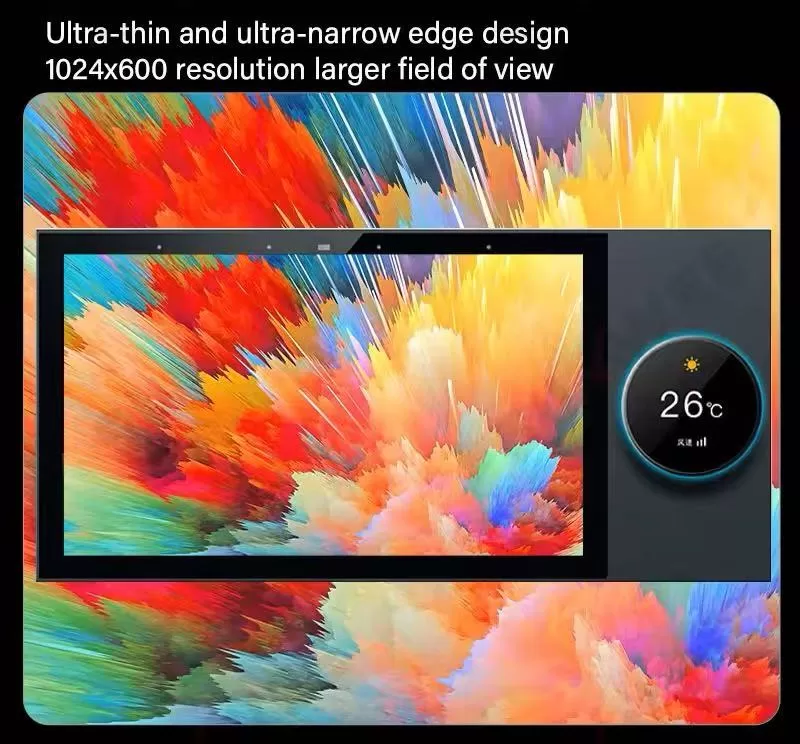
Stunning Display
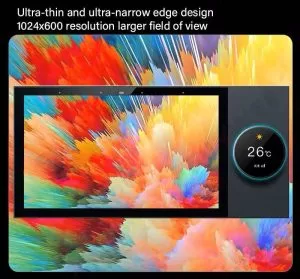
The ultra-thin, ultra-narrow bezel design delivers a premium look. Screen resolution up to 1280 × 800 IPS LCD ensures crisp visuals and responsive touch.
Easy Installation
The dual 86 bottom box design allows direct replacement of existing double 86 switches. No need to reroute wiring or rebuild walls.
Smart Scenes for Every Space
From hotels and shopping malls to real estate projects and private homes, the Xingliao smart control screen adapts to any environment.
Technical Specifications
Adjust RGB lighting colors and brightness directly from the Xingliao smart control panel. Shop smart home screens at odmhome.com.
Control RGB lighting, temperature, and music without leaving the sofa. Create a “Movie Mode” scene that dims lights, closes curtains, and starts your playlist.
Smart Bedrooms
Use the panel as a bedside control center. Adjust temperature, set wake-up scenes, and check who is at the door through the video intercom.
Hotels and Commercial Buildings
The Xingliao smart control screen integrates with hotel management systems, giving guests centralized control over room lighting, climate, and entertainment.
How to Install a Tuya Smart Control Screen
Installation is simple for electricians and DIY enthusiasts:
Turn off power at the breaker.
Remove the existing double 86 switch.
Connect the panel according to the wiring diagram.
Secure the panel into the standard 86 box.
Power on and configure through the Tuya Smart app.
Because the panel uses a standard double 86 box, it fits most existing wall installations without modification.
Smart Control Screen vs Smart Switch: What’s the Difference?
A smart switch controls one or two circuits. A smart control screen controls your entire home. If you want centralized control, scene automation, music, video intercom, and app access, the control screen is the better choice.
Final Thoughts
A Tuya smart control screen is the fastest way to transform a regular home into a truly smart home. With sizes from 6 inch to 12 inch, the Xingliao multi-functional central control panel fits projects of every scale.
Xingliao Smart Home — Smart Living for Everyone. Discover premium smart home solutions including smart control screens, sensors, security cameras, and more at odmhome.com.
Based on the breakdown in this article, Tuya Control Screen offers a solid mix of features and value. If your main goal matches the key benefits described above, it is a practical choice for everyday use.
How do I choose the right tuya control screen for my needs?
Start with your core use case, then compare battery life, compatibility, and build quality as covered above. Choosing the right tuya control screen comes down to matching specs with how you actually use it.
Does tuya control screen require a companion app?
Most devices of this type pair with a free companion app for setup and firmware updates. A few advanced features may sit behind a paid plan, so check the official specs page before buying.
Therefore, You’ve installed a security camera. You’ve got the APP on your phone. You sleep soundly believing your property is protected. But here’s the question that keeps security professionals awake at night:
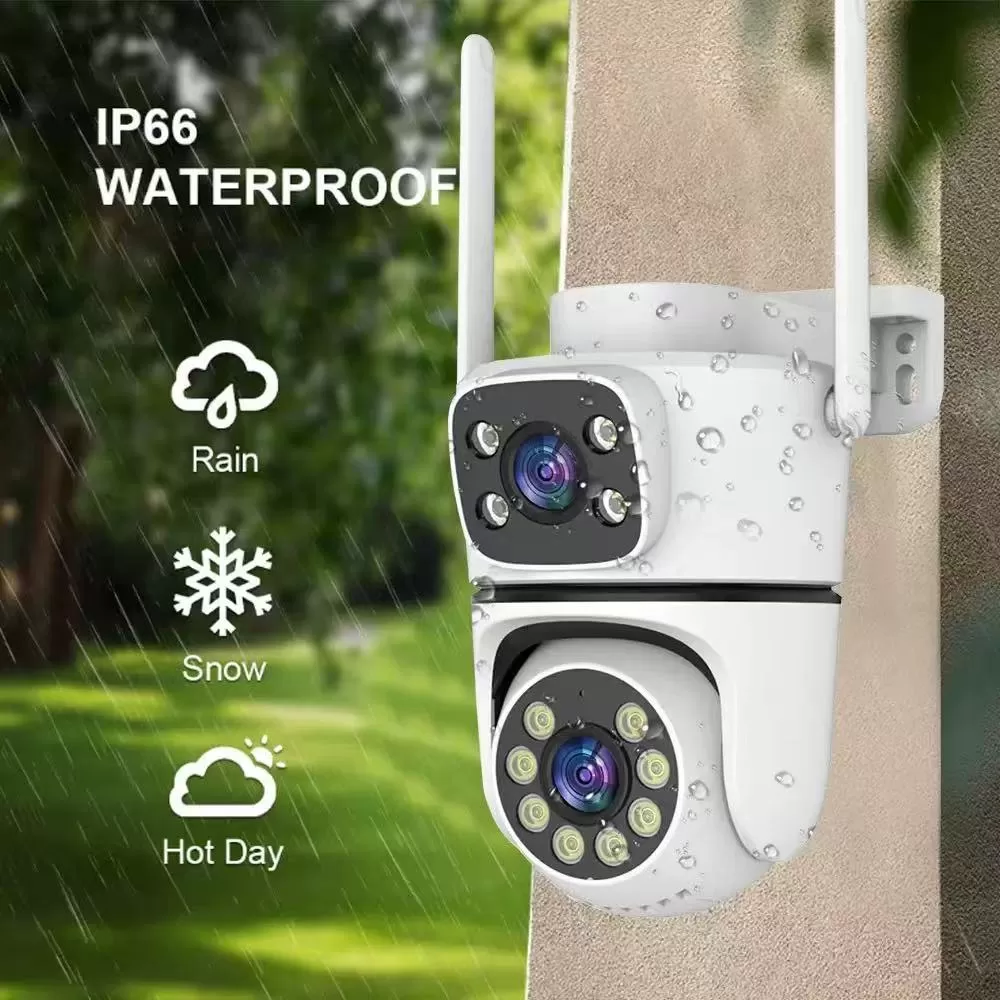
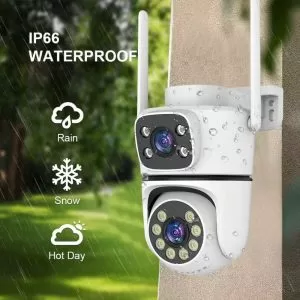
IP66 Weatherproof – Built for Outdoor Extreme Conditions
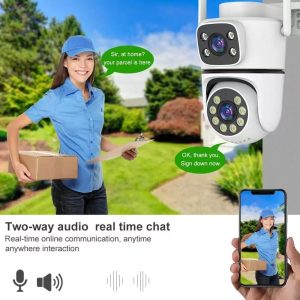
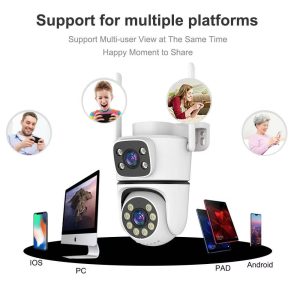
Two-Way Audio – Real-Time Voice Communication Multi-Platform Remote Access – Any Device, Anywhere
SD Card (Local)
No subscription, works offline
Limited capacity, physical theft risk
Cloud
Off-site backup, easy sharing
Subscription cost, bandwidth usage
NVR/DVR
Massive capacity, professional grade
Higher upfront cost, complex setup
Hybrid
Best of both worlds
Slightly more complex
Our recommendationHybrid. SD card for immediate local recording, cloud for backup and remote access. If someone steals the camera, you still have the footage.
The Hidden Costs of Cheap Cameras
Before you buy that $29 “4K security camera” from an unknown brand, consider:
Subscription traps — $5-15/month for basic features
Data privacy — who’s watching your footage? Where is it stored?
App quality — buggy apps that crash when you need them most
Support — no customer service when something breaks
Lifespan — cheap cameras die in 6-12 months outdoors
Real cost of a “cheap” camera over 3 years:
Camera: $29
Subscription: $15/month × 36 months = $540
Replacements (2x): $58
Total: $627
Quality camera, no subscription, 3-year warranty:
Camera: $199
No subscription
No replacements
Total: $199
Math isn’t hard. Quality pays for itself.
So, What’s the Answer? Two Lenses. One Device. Zero Blind Spots.
After testing dozens of outdoor cameras across every price point, the conclusion is unavoidable: dual lens technology isn’t the future — it’s the present.
Single-lens cameras are compromise devices. They force you to choose between wide coverage and detail zoom. Between overview and inspection. Between seeing the threat and identifying it.
Dual lens cameras refuse that compromise.
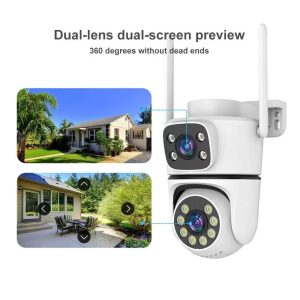
This is where the Tuya-powered dual lens security camera approach stands apart in 2026. Instead of one lens trying to do everything, it uses two specialized lenses working in harmony:
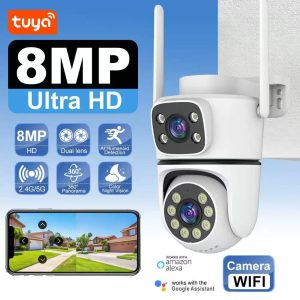
Wide-angle lens (8MP)355° panoramic coverage — sees everything happening across your property
Detail lens (8MP)10× digital zoom with auto-tracking — locks onto threats and delivers identification-grade clarity
Both recording simultaneously — never miss the big picture or the critical detail
The technical foundation:
3264×2448 resolution — true 8MP clarity, not upscaled 4MP
CMOS sensor with backlit compensation — handles challenging light conditions
F4.0 aperture with full-color night vision — see faces, license plates, and colors at midnight
IP66 weatherproofing — survives rain, dust, snow, and temperature extremes
5G WiFi + PoE dual connectivity — wireless flexibility or wired reliability, your choice
Two-way audio with noise cancellation — crystal clear communication in any weather
But the real differentiator? The ecosystem.
This isn’t just a camera — it’s a node in the Tuya Smart home network. Connect it to:
Smart door locks — see who’s at the door, unlock remotely
Motion sensors — trigger recording before motion reaches the camera
Smart lights — floodlights activate when camera detects intrusion
Alarm systems — 110dB siren triggers automatically or manually
Smart displays — view camera feed on kitchen or living room panels
Everything works through one app. One interface. One system.
Final Verdict: What Should You Buy in 2026?
If you have a small property (apartment, townhouse):
A single dual-lens camera at the main entrance covers 80% of your needs. Add a second for the rear if accessible.
If you have a medium property (suburban home, small business):
Two dual-lens cameras — front and rear — with overlapping coverage zones. The auto-tracking feature means one camera can monitor multiple entry points.
If you have a large property (estate, farm, warehouse):
Three to four dual-lens cameras at key positions, supplemented by fixed cameras for perimeter coverage. Use the PTZ cameras as “active” responders and fixed cameras as “passive” recorders.
If you care about privacy:
Demand local storage options, end-to-end encryption, and clear data policies. Tuya’s platform supports local SD recording with optional cloud backup — your choice, not forced.
If you want it to just work: Choose a camera with broad smart home compatibility. Tuya works with Alexa, Google HomeSmartThingsand thousands of third-party devices. No vendor lock-in.
The Bottom Line
Choosing an outdoor security camera in 2026 isn’t about megapixels or brand names. It’s about eliminating blind spots — both physical and technological.
Ask the hard questions:
Does this camera see everything I need it to see?
Can it identify a face at 20 meters, day or night?
Will it survive my local weather for 3+ years?
Can I access footage without paying a monthly ransom?
Does it work with the smart home devices I already own?
Get those answers right, and your camera becomes a guardiannot just a gadget.
Two lenses. One device. Zero blind spots. One decision that protects everything.
What’s your current security setup? Are you still relying on single-lens cameras, or have you upgraded to dual-lens technology? Share your experience in the comments — I’d love to hear what’s working (and what isn’t) in your area.
Ready to eliminate your blind spots? Explore the full range of Tuya-powered dual lens security cameras and find your perfect fit.
LocationShenzhen, China — Global shipping available
From 8MP dual-lens PTZ cameras to complete smart home security systems — all built on the Tuya ecosystem with One Screen One System integration.
About the author:Security technology consultant and smart home integrator with 12 years of experience designing surveillance systems for residential and commercial properties. Currently maintaining a 24-camera setup across three locations — all dual-lens, zero blind spots.
Based on the breakdown in this article, Tuya Dual Lens Camera offers a solid mix of features and value. If your main goal matches the key benefits described above, it is a practical choice for everyday use.
How do I choose the right tuya dual lens camera for my needs?
Start with your core use case, then compare battery life, compatibility, and build quality as covered above. Choosing the right tuya dual lens camera comes down to matching specs with how you actually use it.
Does tuya dual lens camera require a companion app?
Most devices of this type pair with a free companion app for setup and firmware updates. A few advanced features may sit behind a paid plan, so check the official specs page before buying.
📌 This article is part of our Complete Camera Hub — more guides and buying tips inside.
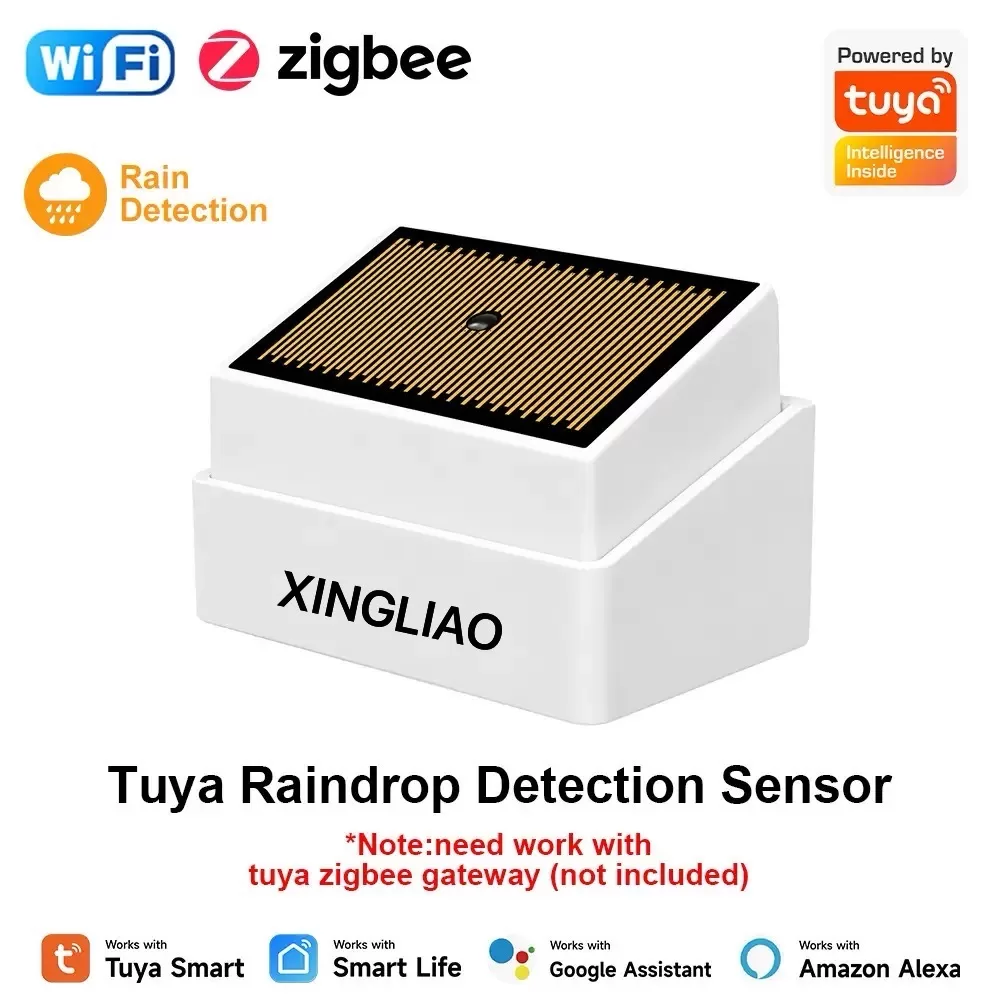
Based on the breakdown in this article, Tuya Rain Sensor Html offers a solid mix of features and value. If your main goal matches the key benefits described above, it is a practical choice for everyday use.
How do I choose the right tuya rain sensor html for my needs?
Start with your core use case, then compare battery life, compatibility, and build quality as covered above. Choosing the right tuya rain sensor html comes down to matching specs with how you actually use it.
Does tuya rain sensor html require a companion app?
Most devices of this type pair with a free companion app for setup and firmware updates. A few advanced features may sit behind a paid plan, so check the official specs page before buying.
📌 This article is part of our Complete Sensor Hub — more guides and buying tips inside.