Transform any ordinary appliance into a Smart device with the Tuya WiFi Smart Socket EU 16A. This compact yet powerful smart plug plugs into any standard European outlet and instantly gives you full remote control via the Tuya Smart Life APP — from anywhere in the world. With built-in energy monitoring, voice control via Alexa and Google Home, and robust 16A / 3520W power handling, it’s the perfect entry point into smart home automation. Whether you want to schedule your coffee maker, monitor your electricity usage, or control devices with simple voice commands, this versatile smart socket delivers premium features at an affordable price. The high-power design even supports demanding appliances like water heaters, air conditioners, and washing machines.
Why the Tuya WiFi Smart Socket EU 16A Stands Out
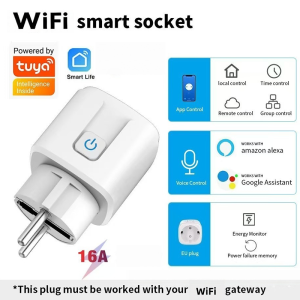
The first thing you’ll notice is the clean, compact design of this EU-style smart plug. The white housing features a subtle LED indicator and a physical power button for manual control when needed. Five official compatibility badges confirm its capabilities: Tuya Intelligence Inside, Smart Life APP, WiFi connectivity, Amazon Alexa, and Google Assistant. Key features highlighted in the main image include: App Control for smartphone management, Local Control for Bluetooth operation without internet, Time Control for scheduling, Remote Control for worldwide access, Group Control for managing multiple devices, Voice Control for hands-free operation, Energy Monitor for tracking power usage, and Power Failure Memory to restore settings after outages. The 16A high-current rating and EU plug design make it ideal for European households.
1. Timing Function — Automate Your Daily Routine
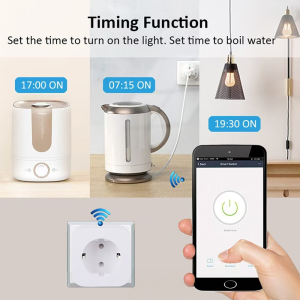
One of the most practical features is the intelligent timing function. As the image illustrates, you can set precise schedules for any connected appliance:
- 17:00 ON — Turn on the humidifier before you arrive home
- 07:15 ON — Start the electric kettle for your morning coffee
- 19:30 ON — Automatically turn on living room lights at sunset
The countdown timer is equally useful — set your phone charger to turn off after 3 hours to prevent overcharging, or schedule the heater to run for exactly 2 hours before automatically shutting off. The Smart Life APP interface shows a large power button with clear on/off status, plus tabs for Switch, Countdown, and Timer functions. This scheduling capability helps you save energy, enhance security with simulated presence when away, and build automated routines that match your lifestyle.
2. Group Control — Manage Multiple Devices with One Tap
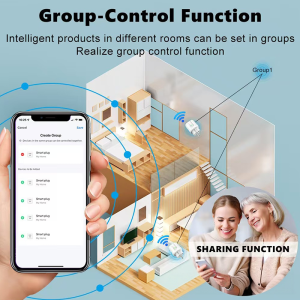
The group control feature transforms how you manage multiple smart devices. As shown in the bird’s-eye floor plan view, you can place Tuya smart sockets throughout your home — living room, bedroom, kitchen, dining room, and office — and control them all from a single interface.
Simply create a group in the Smart Life APP, assign your smart plugs to it, then turn all devices on or off with one click. This is perfect for:
- “All Lights” group — Turn off every lamp in the house at bedtime
- “Living Room” group — Activate entertainment devices with one tap
- “Heaters” group — Manage multiple space heaters for consistent warmth
- “Morning Routine” group — Turn on coffee maker, lights, and radio simultaneously
Group control eliminates the hassle of switching between individual device controls, making whole-home automation effortless for families of any size.
3. APP Remote Control — Your Home in Your Pocket
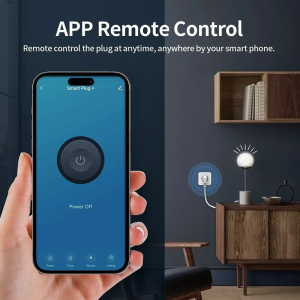
The APP remote control feature puts complete command of your home appliances in your smartphone. Whether you’re at work, on vacation, or simply in another room, you can check device status and control power with a single tap.
The Smart Life APP interface shown in the image features a large, intuitive power button with clear “Power Off” or “Power On” status display. Additional controls at the bottom include Power (instant on/off), Timer (schedule settings), Electric (energy monitoring), and Setting (device configuration). The visual demonstrates a modern living room scene where the smart socket controls a desk lamp — showing how seamlessly the device integrates into contemporary home decor while providing powerful smart functionality.
4. Voice Control — Hands-Free Smart Home
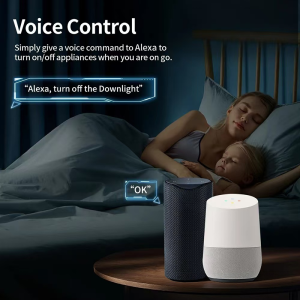
Perhaps the most convenient feature is full voice control integration with Amazon Alexa and Google Home. As the image shows, you can control devices hands-free from anywhere in your home — even from bed.
The example command “Alexa, turn off the Downlight” demonstrates natural language control that’s intuitive for the whole family. Both Amazon Echo and Google Home smart speakers are shown in the bedroom scene, confirming dual-platform compatibility. Simply say:
- “Alexa, turn on the coffee maker”
- “Hey Google, turn off the heater”
- “Alexa, is the living room lamp on?”
- “Hey Google, set the bedroom light timer for 30 minutes”
This hands-free control is perfect for when your hands are full, you’re relaxing, or for elderly family members and children who find smartphone apps challenging. The voice assistants respond instantly, making smart home control as easy as speaking.
5. Energy Monitoring — Track and Save on Electricity
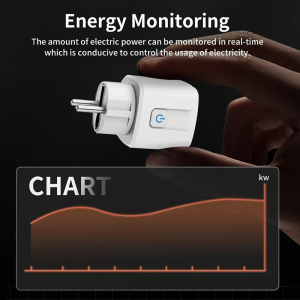
The built-in energy monitoring chip tracks real-time power consumption with precision accuracy, helping you understand and optimize your electricity usage. As the image shows, the Smart Life APP displays a detailed power consumption chart with kW measurements over time.
Related Articles
- WiFi Smart Wall Socket: Tuya 16A with PD20W Fast Charging
- Tuya Smart Watch 1.28 Inch Review: Best Budget Health & Alexa Smartwatch in 2026
- WiFi Smart Wall Socket: Intelligent Power Control for Modern Homes
- Tuya USB camera
- Smart Light Switch Buying Guide 2026: WiFi vs Zigbee vs Matter Protocol
Frequently Asked Questions
Is Tuya Wifi Socket 16a worth buying?
Based on the breakdown in this article, Tuya Wifi Socket 16a offers a solid mix of features and value. If your main goal matches the key benefits described above, it is a practical choice for everyday use.
How do I choose the right tuya wifi socket 16a for my needs?
Start with your core use case, then compare battery life, compatibility, and build quality as covered above. Choosing the right tuya wifi socket 16a comes down to matching specs with how you actually use it. Best_Smart_Rain_Sensor_2026 Tuya Smart Switch Wholesale Guide: The Ultimate B2B Solution for Smart Home Automation Solar Step Lights: Complete Guide to Wire-Free Stair and Deck Lighting Smart Home Starter Guide 2026: How to Build Your First Connected Home WiFi Smart Wall Switch Buying Guide for Wholesale Distributors
Does tuya wifi socket 16a require a companion app?
Most devices of this type pair with a free companion app for setup and firmware updates. A few advanced features may sit behind a paid plan, so check the official specs page before buying. How to Choose a Video Intercom Doorbell in 2026: The Complete Buying Guide 6-Inch Baby Monitor The Complete Guide to Smart Peephole Doorbell Cameras The Ultimate Guide to Smart Baby Monitors (2026) Solar Lights for Garden: Complete Buying Guide for 2026
📌 This article is part of our Complete Tuya Hub — more guides and buying tips inside. Zigbee PIR Motion Sensor: The Smart Home Upgrade for Security, Lighting & Pet Care Smart Lighting Complete Guide: From Color Temperature to Automation Scenes






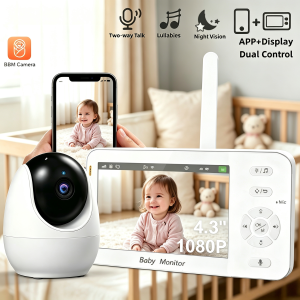
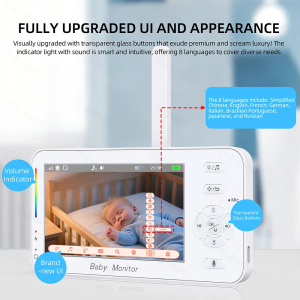 Stay connected with your baby anytime, anywhere:
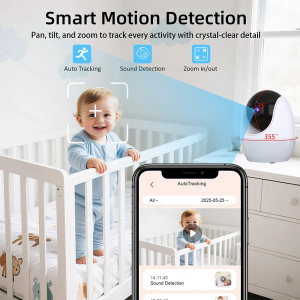
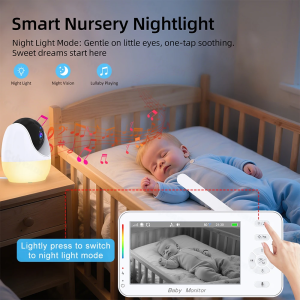 Create the perfect
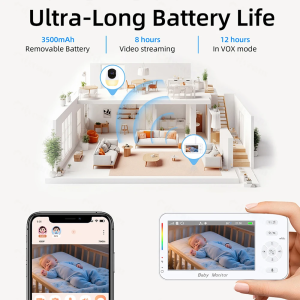 Power that lasts through the day and night: