Posted on — Leave a comment

Tuya vs eWeLink: Which App Fits Your Brand?

If you are sourcing smart switches, plugs or doorbells for your own brand, the first decision is not the mould or the price — it is which app ecosystem your devices will live in. Tuya vs eWeLink is the comparison most importers end up making, because both platforms let a small brand ship app-controlled hardware without building a cloud team. They are not interchangeable, though: the account model, the white-label route and the way each one behaves when the internet drops are different enough to change your support costs.

This page compares the Two from the factory side, in the terms that matter to a buyer placing an OEM or ODM order.

What Tuya and eWeLink actually are

Tuya is an IoT platform company. Hardware makers license its modules and firmware, and end users control the devices through the Tuya Smart or Smart Life app — the same app under two brand names. Because hundreds of factories build on the same modules, the catalogue is very wide: switches, plugs, sensors, cameras, locks, curtain motors, IR blasters.

eWeLink is the app and cloud platform that grew out of Sonoff (ITEAD). It supports the Sonoff range and a smaller set of third-party devices. Its reputation rests on two things: a strong DIY and maker community, and a local-area-network mode that keeps some device control working when the cloud is unreachable.

Side-by-side comparison

Question Tuya eWeLink
Consumer app Tuya Smart / Smart Life (same app, two names) eWeLink
Device catalogue Very broad, many factories on one platform Narrower, strongest around Sonoff hardware
White-label app Available through private PID and app branding programmes Available through eWeLink’s OEM/branding route
Voice assistants Alexa, Google Home, plus regional assistants Alexa, Google Home
Offline behaviour Cloud-first; ZigBee gateways can hold local scenes LAN mode on supported devices, otherwise cloud
Typical buyer Brands wanting one app across many categories Brands standardising on Sonoff-style hardware

Account model and app ownership

With Tuya, the default path is that your customers download Tuya Smart or Smart Life and the device appears under a Tuya account. If you want your own app name and icon, you move up to a private product ID (PID) and app branding. That step is what most OEM buyers underestimate: it changes the firmware identity, the cloud listing and the app store presence, so it is quoted and scheduled separately from the hardware.

eWeLink works the same way in principle — generic app first, branded route later — but the number of factories that can deliver a fully branded eWeLink build is smaller, so lead times and minimum quantities tend to be less flexible.

Cloud dependency and what happens offline

This is where the two platforms feel different to an end user, and where your support inbox is decided.

Tuya devices are cloud-first. A WiFi Switch with no internet still responds to its physical button, and Zigbee sub-devices keep working through a gateway that holds local scenes, but app control and voice control need the cloud. For most retail buyers that is acceptable; for installation projects — hotels, rental flats, remote sites — you should specify a gateway and local scene behaviour in the contract.

eWeLink’s LAN mode is the feature importers ask about most. On supported devices the app can talk to the device directly over the local network, so schedules and on/off keep working during an outage. If your customers are technical, or your market has unreliable broadband, that is a real differentiator. Confirm per model before you promise it: LAN support is device-specific, not platform-wide.

White-label and OEM routes compared

Four levels exist on both platforms, and it helps to name them the same way when you ask for quotes:

  • Logo and packaging only — the device stays on the generic app; you print your brand on the product and box. Fastest and cheapest.
  • Private PID / app identity — your own product ID and a branded app panel; the device is listed under your account rather than the generic catalogue.
  • Branded app — your own app in the stores, built on the platform’s SDK. Adds review cycles and an annual platform cost.
  • Custom firmware and tooling — your enclosure, your PCB layout, your firmware feature set. Months, not weeks.

Most first orders land on level one or two. Level three only pays back once you are shipping several categories and want one app for all of them.

Which one should an importer choose?

Choose Tuya when you need breadth — switches, sensors, cameras and locks from one supplier network, one app, one account model — and when your customers expect a mainstream retail experience. Choose eWeLink when your range is deliberately Sonoff-compatible, when local control is a selling point you intend to advertise, or when your technical customers already use the app.

Two checks decide it faster than any comparison table:

  • Ask each supplier which models can be re-platformed, and at what quantity. A factory that builds only one platform will quote the other badly.
  • Ask for a sample pair — one device on each platform — and test them on a network you can switch off. Twenty minutes of testing beats a spec sheet.

Our own smart switch and video doorbell ranges are built on Tuya, which is why our smart switch range, Tuya OEM programme and white-label ladder are documented in Tuya terms. If your programme is committed to eWeLink, say so at enquiry stage and we will confirm model by model which units can be supplied that way before any quote is issued. For the sourcing checklist that applies to either platform, see how to vet a smart switch manufacturer in China, or send us your requirements.

Frequently Asked Questions

Is eWeLink the same company as Tuya?

No. Tuya is an IoT platform company that licenses modules and cloud services to many hardware makers. eWeLink is the app and cloud platform built around Sonoff (ITEAD) hardware. They are separate ecosystems with separate accounts, so a device belongs to one or the other.

Can a Tuya device be moved to the eWeLink app?

Not by the end user. The platform identity is set in firmware and in the cloud listing at manufacture. Moving a model from Tuya to eWeLink is a re-platforming project done at the factory, and it is only possible on hardware the factory can reflash and re-certify.

Which platform is better for offline control?

eWeLink, on devices that support LAN mode, because the app can reach the device over the local network without the cloud. Tuya devices keep physical button control offline, and Zigbee gateways can hold local scenes, but app and voice control normally need the cloud.

Do both platforms support Alexa and Google Home?

Yes. Both publish voice assistant integrations, and both support the account-linking flow your customers will use. Regional assistants and Matter support vary by model, so confirm per SKU rather than per platform.

What does a private PID change for my brand?

It gives the device your own product identity instead of the generic catalogue entry: your app panel, your firmware identity and your cloud listing. It is the step between printing a logo and owning a branded app, and it is usually the right level for a first own-brand range.

Related Articles

You Might Also Like

Posted on — Leave a comment

Tuya vs Sonoff Smart Switch: Which Ecosystem Should You Build On?

The comparison gets phrased as a brand fight, but the Two are not the same kind of thing. Tuya is a platform: it licenses the chip, the firmware and the cloud to hundreds of manufacturers, which is why a switch from one brand and a socket from another still pair in the same app. Sonoff (from ITEAD) is a manufacturer that builds its own hardware, mostly modules and relays, and runs its own eWeLink app. Both work. They suit different installs.

This is written from the switch side, since that is where the decision has the longest consequences — switches are wired into walls and are the least fun thing to replace later.

Where they differ in practice

Tuya-based switches Sonoff
What it is Platform behind many brands One maker’s product line
App Smart Life / Tuya Smart (and many white-label apps) eWeLink
Strength Wall plates — glass touch boards, multi-gang, regional standards Relay modules, DIN-rail, DIY-friendly plug-in devices
Voice Alexa, Google, and most regional assistants Alexa, Google
Local control Depends on the device and hub Strong DIY story, LAN mode on some devices
Buying in bulk Built for OEM and project supply Retail-focused

Form factor: the deciding factor for switches

If the job is a wall plate — a glass touch board replacing the plate in the hall — Tuya-based hardware has far more choice, because every regional standard exists somewhere in the ecosystem: square 86 × 86 plates with fan and scene keys, the wide 147 × 86 touch series used across Europe, and the 118 × 72 US standard series for North American boxes. Multi-gang boards are the same story: the DS-1011ZC single-gang through to the DS-126 six-gang are all platform devices. CCTV Camera or IP Camera for Home: What the Difference Actually Buys You

If the job is a Module hidden in a ceiling rose, a DIN-rail relay in a consumer unit, or a one-off experiment on a bench, Sonoff’s catalogue is the natural place to look, and its DIY community is a genuine advantage — there is a forum answer for almost everything.

App and ecosystem lock-in

You cannot put a Sonoff device into Smart Life, or a Tuya device into eWeLink. That is the real lock-in, and it is why the decision should be made once rather than per device. Two apps on one house means two sets of automations, and scene logic that cannot cross between them — a motion sensor in one app cannot trigger a light in the other.

Both ecosystems talk to Alexa and Google, and both have moved toward Matter, which is the long-term answer to this problem. If you are starting fresh and want the option to change your mind, prefer devices that carry Matter or run on Zigbee behind a hub; the reasoning is set out in our WiFi versus Zigbee comparison.

Can you mix them?

Technically yes, with voice control as the glue: both respond to Alexa, so “turn off the downstairs lights” can span both. What you lose is cross-vendor automation and a single timeline of what happened. For two or three devices it does not matter. For a whole-house install it becomes annoying quickly.

A practical middle path used on a lot of project installs: Tuya-platform wall plates for anything visible in the wall, plus a Zigbee hub for sensors, with one app for day-to-day control. Our smart switch board guide covers the plate decision; the no-neutral guide covers what to do when the box turns out to have no neutral Wire.

If you are buying for a project

Here the platform model wins on logistics rather than features: wall plates in one series, matching sockets from the same series, spares that interchange, and OEM branding available. That is why our switch range is built on it — the matching 147 × 86 socket series exists so a board looks like one unit instead of a patchwork, and US push-button plates and the 30 A water heater switch all sit in the same app as the lighting boards.

Three questions that settle it

If you are still undecided, answer these and the choice usually makes itself. First: is this going in a wall or in a box? Wall plate means the platform ecosystem, in-wall module means either, DIN-rail means Sonoff’s catalogue is the natural place to look. Second: how many devices will there be in two years? Two or three, and it genuinely does not matter. Twenty, and you want one app, one series of plates and spares that interchange — which is the platform argument. Third: does someone else maintain it? If a landlord or a facilities company will service it later, pick whichever ecosystem is easiest to buy spares for in your country, because that is what they will be doing in five years.

Frequently Asked Questions

Can I add a Sonoff device to the Smart Life app?

No. The two clouds are separate. Voice assistants are the only practical bridge, and even then automations cannot cross between them.

Which is cheaper?

Sonoff is usually cheaper for modules and single plug-in devices. For wall plates in quantity, platform-based supply is typically lower per unit and available in more regional standards.

Do both work without internet?

Basic local control survives on many devices in both ecosystems, but app-based remote control and cloud automations do not. A Zigbee hub keeps local schedules running in either case.

I already have one ecosystem — should I switch?

Only if you are replacing most of the hardware anyway. For anything smaller, finish on what you have and prefer Matter-certified devices on the next purchase.

Related Articles

You Might Also Like
Posted on — Leave a comment

Smart Socket vs Smart Plug: Which to Buy?

A Smart socket and a Smart plug do the same job from the app’s point of view: they switch power on and off, on a schedule or by voice. The difference is physical, and it decides which one belongs in your house. A Smart socket replaces the wall outlet itself; a smart plug goes into the outlet you already have. This guide explains where each one wins, what the power ratings mean, and how to set either type up in a few minutes.

The difference in one line

A smart wall socket is installed in place of a normal outlet, so nothing sticks out and you never lose a socket. A smart plug sits in an existing outlet and turns whatever is plugged into it into a connected device. If you own the wall, choose sockets. If you rent, move often, or want to move control from room to room, choose plugs.

Where smart wall sockets win

  • Nothing sticks out. Furniture sits flush, and a socket behind a sofa or a bed stays usable.
  • You do not lose an outlet. A plug occupies the socket it uses; a 2-gang wall socket gives you two switched channels instead of one.
  • Charging built in. Many models add USB-A and USB-C ports — a 20 W Type-C port charges a phone at full speed Without an adapter.
  • Metering where it matters. A wall socket with energy monitoring measures exactly what that appliance draws, every day, without any extra hardware.
  • Cleaner look in a finished home. One glass panel on the wall instead of a plug with an LED floating in the outlet.

The trade-off is installation: a wall socket needs the circuit isolated and the wiring moved, exactly like fitting a smart switch. That is a 20-minute job per socket for someone comfortable with basic wiring, and a short electrician visit otherwise.

Where smart plugs win

  • Zero installation. Plug in, pair, done — no breaker, no screwdriver, no landlord conversation.
  • They move. Take the plug from the lamp in winter to the fan in summer, or to a hotel room on a trip.
  • Perfect for lamps and small appliances. A floor lamp, a coffee machine, a Christmas tree, a router that needs a scheduled reboot.
  • Test before committing. If you are unsure which appliances are worth automating, a plug tells you for a few dollars.
  • No lost sockets indoors, sometimes. Slim models fit two per double outlet; the chunky ones do not.

Which one goes where in a real house

  • Kitchen counter (kettle, coffee machine): plug, because appliances get swapped and moved.
  • Living room lamps: plug, hidden behind the sofa, controlled as a group.
  • Bedside USB charging: wall socket with USB-C, so the phone charges fast without an adapter.
  • Heater or heated floor: socket with a temperature probe, or a temperature-control socket, so it switches on by temperature rather than by clock.
  • Washing machine, dishwasher, tumble dryer: wall socket, ideally one per appliance, so each can be scheduled and monitored on its own.
  • Rented flat: plugs only. Take them with you when you leave.

Power ratings and safety, in plain numbers

  • EU sockets: 16 A at 230 V is about 3,680 W. Fine for kettles, washing machines, small heaters.
  • UK sockets: 13 A at 230 V is about 3,000 W per gang.
  • US sockets: 15 A at 120 V is about 1,800 W — a single US plug should not run a large space heater continuously.

Two rules that matter more than the number: never plug an extension lead into a smart plug and then load it, and never put a smart plug on a device that draws more than the plug is rated for. A smart socket installed on its own circuit is the safer way to automate heating or laundry.

Energy monitoring: what the numbers actually tell you

Energy monitoring is the feature people use longest, because it answers a question nobody can guess: which appliance is costing money. A metering socket reports live watts, and the app keeps daily and monthly totals. In practice you learn three things:

  • The standby load of a room — the TV, console and router that together draw 30 to 60 W all night.
  • Which appliance is the real consumer — usually an old fridge, a dryer or a space heater, rarely the one you suspected.
  • Whether a scheduled run actually finished: zero watts after 90 minutes means the cycle ended, which is a useful laundry reminder for free.

Sockets that do more than switch

Two special cases are worth knowing before you buy:

  • Temperature-control sockets pair with a probe and switch by temperature — for a heater, a heat mat for seedlings, or an aquarium. No hub needed, and no schedule to fight with weather.
  • Multi-mode socket gateways act as a socket and a hub at once, so Zigbee sensors elsewhere in the house can join the same system. Useful in a small flat where you want sensors but not another box behind the television.

Setting either type up (same steps)

  1. Install the Tuya Smart or Smart Life app and create one account for the household.
  2. For a socket, switch the breaker off, connect live, neutral and earth, then switch it back on. For a plug, just put it in the outlet.
  3. Put the device in pairing mode — usually hold the button until the indicator blinks fast.
  4. Join your 2.4 GHz WiFi. A socket will not connect to a 5 GHz-only network name.
  5. Name it by what it controls, not by where it lives: “Coffee machine” beats “Socket 3”.
  6. Set a schedule and add it to a scene — “Good night” turning off lamps, heater and router in one tap.
  7. If you use Alexa or Google Home, link the Tuya account once and the names carry over.

Buying checklist

  • Own the wall, or rent? Sockets or plugs.
  • Do you need to know consumption, or only switch power? Metering costs a little more, and pays back in curiosity alone.
  • Which standard: EU 86 mm, UK, US, or a socket module for a country-specific frame?
  • How many gangs on one panel — two is the sweet spot in a kitchen or office.
  • USB charging needed? Look for Type-C at 20 W or more, not 5 W legacy ports.
  • Do you already have Zigbee sensors? A multi-mode gateway socket saves a hub.

XingLiao smart sockets

Frequently Asked Questions

Is a smart socket better than a smart plug?

Neither is better — they solve different problems. A socket is permanent, flush and never cost you an outlet, which suits appliances you want automated for years. A plug is instant and portable, which suits rented homes, lamps and anything you might automate only for a season.

Can a smart plug catch fire?

The plug itself rarely causes the problem; overload does. Keep the load inside the rating printed on the device, avoid daisy-chaining extension leads behind a plug, and use a wall socket on its own circuit for heaters, dryers and other high-draw appliances.

Do smart sockets need a neutral wire?

A wall socket needs live, neutral and earth — the same wires as a normal outlet, so no extra conductor is required. A smart switch sometimes needs a neutral that older switch boxes lack; a socket does not have that problem.

Do I need a hub or gateway?

Not for WiFi models. Tuya WiFi sockets talk to your router directly and appear in the app. A gateway is only needed for Zigbee-only devices, and some sockets combine both roles so you can skip the extra box.

Will a smart socket work with Alexa and Google Home?

Yes, for Tuya-based devices: link the Tuya Smart or Smart Life account in the voice assistant once, and every named socket appears as a controllable device. Scenes created in the app also run from voice.

What happens to schedules if the internet goes down?

Schedules stored on the device keep running, and physical switches still work. Only remote control and app history pause until the connection returns, which is why local time-based schedules are worth setting even when you mainly use voice.

Can I monitor energy without a subscription?

Yes. Metering is built into the socket or plug itself and the consumption history is shown in the app with no monthly fee. Subscriptions only appear if you opt into third-party analytics services.

Related guides

Browse smart switches and sockets · Tell us which appliances you want to automate and we will match the right socket

Posted on — Leave a comment

Smart Thermostat vs Smart Switch for Heating: Which One You Need

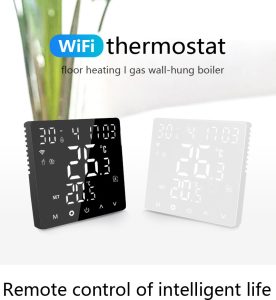
Choose a Smart thermostat when you want to control temperature — schedules, setpoints, and a boiler or heat pump that runs only when the room needs it. Choose a smart switch or relay when you want to control a circuit — a towel rail, a panel heater, a water heater, a floor heating mat — on a timer or remotely, Without measuring the room. If you want both heating comfort and energy savings on a wet system, the thermostat is usually the right first purchase.

This is the decision that most people get wrong, and it comes down to one question: does the device need to know the room temperature?

What a smart thermostat does

A thermostat measures room temperature and switches the heat source to hold a setpoint. Smart versions add scheduling, remote control, geofencing, and — on the better ones — weather compensation and open-window detection. Typical Wiring: a boiler switched live (often 3 A rated for the boiler contact) plus a mains supply, sometimes with a separate receiver near the boiler.

  • Best for: gas boilers, combi boilers, heat pumps, underfloor heating zones, and anyone whose goal is lower gas or electricity use.
  • Needs: a wiring point at the thermostat location or a wireless receiver at the boiler; check whether you have a neutral at the switch box.
  • Watch for: proprietary wiring (some heat pump controls), and boilers with their own bus protocol that a generic thermostat cannot drive.

What a smart switch or relay does

A smart switch or relay simply makes or breaks a circuit to a fixed load. It does not measure temperature. A 16 A smart switch on a towel rail turns it on for 30 minutes each morning; a 30 A relay on a water heater runs it on an off-peak tariff Window. That is control, not regulation.

  • Best for: electric towel rails, panel heaters, convectors, water heaters, floor heating mats with their own thermostat, and anything you want on a timer.
  • Needs: the right current rating (16 A ≈ 3.6 kW, 30 A ≈ 7 kW at 230 V) and, for in-wall modules, usually a neutral at the box.
  • Watch for: inrush current on some heaters, and the temptation to control a boiler’s mains supply directly — that is what the thermostat’s switched output is for.

Which one fits your heating

  • Gas or combi boiler with radiators: smart thermostat. It modulates and schedules the boiler; a switch would only turn the whole thing on and off.
  • Electric underfloor heating: a thermostat with a floor probe is the safe answer. If the mat already has its own thermostat, put a smart relay in front of it for scheduling and keep the probe in control of temperature.
  • Electric towel rail: smart switch, 16 A, on a Schedule. Temperature control adds nothing here.
  • Water heater or immersion: smart relay rated for the element (often 30 A), ideally on an off-peak schedule, with a hard over-temperature cut-out left in Place.
  • Heat pump: usually the manufacturer’s own controller. Adding a generic thermostat can defeat the weather compensation that makes a heat pump efficient.
  • Air conditioner or split unit: an IR or WiFi controller made for that unit, not a wall thermostat.

Savings: what is realistic

Scheduling is Where the money is, and both devices can do it. Turning heating down by 1 °C typically trims a few percent off a heating bill; not heating an empty house for eight hours a day saves far more. The thermostat wins on top of that because it stops short-cycling and overshoot — a switch left “on” simply runs the heater until you remember to turn it off.

Practical setup: heat the rooms you use, to the temperature you actually want, only when they are occupied. Then add a lower setback temperature rather than switching off completely, so you are not reheating cold walls and furniture.

Frequently Asked Questions

Can I control my boiler with a smart switch?

Not directly. A boiler is switched by the thermostat’s low-voltage or volt-free contact. Use a smart thermostat for the boiler and reserve smart switches for fixed resistive loads such as towel rails, panel heaters and water heaters.

Do I need a neutral wire?

Most in-wall smart switches and relays need a neutral at the box; many older switch boxes do not have one. No-neutral models and battery/hub-based switches exist, but check before buying.

What rating do I need for an electric heater?

Work from the load: 2 kW needs about 9 A, so a 10 A switch is marginal and a 16 A switch is safer; 3 kW needs 13 A, so use 16 A. Water heaters and large storage units often need a 30 A relay or contactor.

Is a smart thermostat worth it for underfloor heating?

Yes, if it supports a floor probe or a floor limit. The probe protects the floor finish and stops the screed overshooting, which is why a plain relay is not enough on its own.

Can I use both together?

Often yes, and it is a good combination: a smart thermostat on the boiler or heat source, and a smart relay on a specific circuit such as a towel rail or an immersion that should only run at certain times.

Will heating still work if the internet goes down?

A thermostat should keep its schedule and keep the heating running, because that logic is local. Choose models that keep a schedule on the device rather than relying on cloud routines.

Related guides

Browse thermostats and control panels · Tell us your heating type and we will advise

Related Articles

You Might Also Like