Posted on — Leave a comment

How to Choose a Bluetooth Touch Switch for a 86 Wall Box — DS-101BY Series

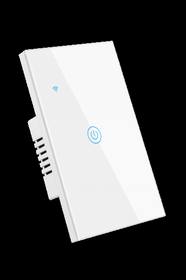
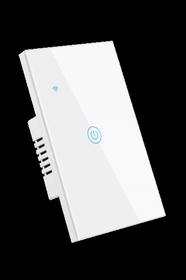
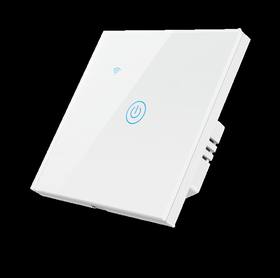
DS-101BY Series WiFi Touch Switch (1 Gang)
How to Choose a Bluetooth Touch Switch for a 86 Wall Box — DS-101BY Series

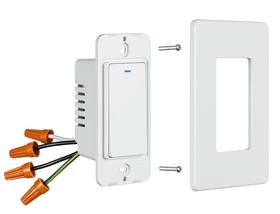
Replacing a wall Switch looks simple until you open the box. The Plate size, whether a neutral is present, and which radio the Switch uses decide whether the job takes ten minutes or a visit from an electrician. The DS-101BY Series is built around zero-fire (neutral required) Wiring and Bluetooth, and it ships in 1 Gang — so the same look can run through a whole flat or hotel floor.

This guide walks through the four things to settle before you order, with the numbers that matter for European Standard / British standard / China national standard installations.

1. Match the wall box first

The DS-101BY plate is made for the 86 × 86 mm square wall box (EU / UK / China), which is the standard box in European standard / British standard / China national standard installations. Measure the box, not the old plate: a cover frame can hide a smaller opening, and a plate that is a few millimetres out will not sit flush against the wall.

2. Check whether you have a neutral

This unit needs a neutral wire in the box — it will not work in a two-wire single-fire box. Open the box and look for a neutral bundle before ordering; if it is not there, you need a single-fire model instead.

3. Pick the radio for the project

No hub and no router needed — pair it straight from the phone for local control and schedules. Bluetooth suits rooms Where you do not want the Switch on the network at all, and it keeps working when the router is down.

4. Count the gangs per plate

DS-101BY covers 1 Gang. Fewer plates means fewer boxes to chase into the wall and One clean frame instead of three, which is usually the reason people move to multi-gang Touch plates in the first place. Where the DS-101BWHK Series Fits: Apartments, Hotels and Office Retrofits

Specifications

Quantity pricing

Indicative unit prices ($10.03–$10.03 depending on gang and finish):

FAQ

Is a neutral wire required?
Yes. This model is zero-fire only.
Does it work with Alexa and Google Home?
Voice control depends on the app ecosystem you pair with; local control and schedules work straight from the phone.
Can I order mixed gangs and colors in one shipment?
Yes. Gang sizes and finishes can be mixed within one order; tell us the split at checkout.

Ready to specify it? Full specifications, gang options, colors and quantity pricing are on the DS-101BY series product page — OEM logo, manual and packaging are available from the first order.

Related Articles

You Might Also Like

Frequently Asked Questions

Is Choose Bluetooth Touch worth buying?

Based on the breakdown in this article, Choose Bluetooth Touch offers a solid mix of features and value. If your main goal matches the key benefits described above, it is a practical choice for everyday use.

How do I choose the right choose bluetooth touch for my needs?

Start with your core use case, then compare battery life, compatibility, and build quality as covered above. Choosing the right choose bluetooth touch comes down to matching specs with how you actually use it.

Does choose bluetooth touch require a companion app?

Most devices of this type pair with a free companion app for setup and firmware updates. A few advanced features may sit behind a paid plan, so check the official specs page before buying.

Posted on — Leave a comment

Do You Actually Need a Zigbee Gateway? (And What Breaks Without One)

actually need zigbee - Do You Actually Need a Zigbee Gateway? (And What Breaks Without One)
Do You Actually Need a Zigbee Gateway? (And What Breaks Without One)

Every Zigbee project reaches the same question: which gateway, and do we really Need One? The short answer is yes — Zigbee Devices do not talk to a router, they talk to a gateway, and the gateway is what makes the mesh, the scenes and the remote access work.

What the gateway does

It is the coordinator of the Zigbee mesh: it holds the device list, runs automations locally, and bridges the mesh to your router so the app can reach it from anywhere. Without it, a Zigbee Switch is a switch — local control only, no app, no scenes, no voice. Mini Smart Breakers: Putting a Whole Circuit on a Schedule

Wired or wireless

A wired gateway connects by Ethernet, which is what you want for a permanent installation: fixed location, no WiFi dependency, stable mesh. A Wireless one connects over WiFi, which is easier to place but puts the mesh behind the router’s Wireless performance.

How many gateways

One gateway handles a large mesh — dozens of devices across a house is normal. What limits you is range, not count: Zigbee is a mesh, so mains-powered devices relay for each other, but a Battery sensor at the far end of a garden still needs something nearby to talk to. 2.8 Inch Offline Video Baby Monitor: Private, Simple, No-WiFi Nursery Monitoring

Placement

Central, off the floor, away from the router and away from large metal objects. A gateway in a metal consumer unit Works but reduces range.

FAQ
Can Zigbee devices work without a gateway?
No. Local control works, but app control, scenes and voice need the gateway.
Can I mix brands of Zigbee devices?
Usually within the same ecosystem — keep the gateway and the devices on the same platform.
Does the internet need to be up for automation?
No — scenes stored on the gateway run locally, which is one of the reasons people choose Zigbee.

Ready to specify it? Full specifications, gang options, colors and quantity pricing are on the ZigBee Smart Gateway — Wired & Wireless product page — OEM logo, manual and packaging are available from the first order.

Related Articles

You Might Also Like
Frequently Asked Questions

Is Actually Need Zigbee worth buying?

Based on the breakdown in this article, Actually Need Zigbee offers a solid mix of features and value. If your main goal matches the key benefits described above, it is a practical choice for everyday use.

How do I choose the right actually need zigbee for my needs?

Start with your core use case, then compare battery life, compatibility, and build quality as covered above. Choosing the right actually need zigbee comes down to matching specs with how you actually use it.

Does actually need zigbee require a companion app?

Most devices of this type pair with a free companion app for setup and firmware updates. A few advanced features may sit behind a paid plan, so check the official specs page before buying.

Posted on — Leave a comment

Mini Smart Breakers: Putting a Whole Circuit on a Schedule

mini smart breakers - Mini Smart Breakers: Putting a Whole Circuit on a Schedule
Mini Smart Breakers: Putting a Whole Circuit on a Schedule

A switch controls a fitting. A breaker module controls the circuit feeding it — and reports what that circuit is drawing. For anyone trying to find where the electricity Actually goes, that is a different level of useful.

What a smart breaker does

It sits on the DIN rail in the consumer unit, switches the circuit, and reports voltage, current, Power and energy to the app. You Get per-circuit data instead of one number on a monthly bill, and you can trip or restore a circuit remotely.

Why it is worth it

  • Find the load — see which circuit is actually expensive before you change anything.
  • Protect the load — set limits and get told when a circuit approaches them.
  • Schedule — water heaters, pool pumps and exterior lighting on time, not on memory.

Sizing

Pick the module to match the breaker rating and the circuit load, and be honest about the duty cycle — a breaker that runs at 90 % all day is not the same job as one that sees a few amps. P10 Mini WiFi Security Camera: Compact 24/7 Indoor Surveillance for Home & Pets

Installation

DIN rail in the consumer unit, in series with the circuit. This is not a DIY item in most jurisdictions — use a licensed electrician and follow local rules. P9 Low Power Battery Camera: Best Wire-Free Home Security Solution for 2026

FAQ
Does it replace the existing breaker?
No — it works alongside the protective device. Keep the protection.
Does it keep working Offline?
Local protection and manual operation always work; the app adds remote control and history.
Can I see historical consumption?
Yes — energy data is logged in the app.

Ready to specify it? Full specifications, gang options, colors and quantity pricing are on the Mini Smart Breaker Module — WiFi / ZigBee / HomeKit product page — OEM logo, manual and packaging are available from the first order. Q81 Wireless Button Microphone – Mini Invisible Lapel Mic for Vlogging, Interview & Live Streaming

Related Articles

You Might Also Like
Frequently Asked Questions

Is Mini Smart Breakers worth buying?

Based on the breakdown in this article, Mini Smart Breakers offers a solid mix of features and value. If your main goal matches the key benefits described above, it is a practical choice for everyday use.

How do I choose the right mini smart breakers for my needs?

Start with your core use case, then compare battery life, compatibility, and build quality as covered above. Choosing the right mini smart breakers comes down to matching specs with how you actually use it.

Does mini smart breakers require a companion app?

Most Devices of this type pair with a free companion app for setup and firmware updates. A few advanced features may sit behind a paid plan, so check the official specs page before buying.

Posted on — Leave a comment

The Invisible Smart Socket: Modules That Hide Behind the Plate

invisible smart socket - The Invisible Smart Socket: Modules That Hide Behind the Plate
The Invisible Smart Socket: Modules That Hide Behind the Plate

Not every project wants a visible Smart Socket. A module is the version nobody sees: it goes behind the existing plate or inside the appliance space, and the socket looks exactly as it did before — except it is now on a schedule.

Why a module instead of a plate

Three reasons come up repeatedly: the client does not want the design changed, the existing plate is part of a matching set that cannot be replaced, or the socket is behind furniture where a visible device would look wrong.

EU, UK and US versions

The range covers the three plate standards, so the same installation method follows you between markets. Match the module to the box and the wire colours you actually have. 86 × 86 mm Smart Sockets: The Smallest Way to Add Control to a Room

What it does

On/off, schedules, countdown and voice. Because it is inside the wall, there is nothing for a guest to unplug and nothing to knock off a table. 147 × 86 mm Smart Sockets: Power, USB and Metering on One Plate

Installation notes

Allow space behind the plate — modules are deeper than the wiring they replace, and a shallow box is the usual reason a module will not seat. Test before closing up.

FAQ
Will it fit my existing box?
Usually yes, but check depth. Shallow boxes are the common problem.
Is the socket still usable by hand?
Yes — the mechanical socket remains, the module just controls the supply.
Does it need a hub?
The WiFi versions do not; Zigbee versions need a gateway.

Ready to specify it? Full specifications, gang options, colors and quantity pricing are on the WiFi Smart Socket Module — EU / UK / US Standard product page — OEM logo, manual and packaging are available from the first order. Upgrade Home Security – X8 Wireless Visual Doorbell 4.3 Inch IPS Screen IP66 Waterproof

Related Articles

You Might Also Like
Frequently Asked Questions

Is Invisible Smart Socket worth buying?

Based on the breakdown in this article, Invisible Smart Socket offers a solid mix of features and value. If your main goal matches the key benefits described above, it is a practical choice for everyday use.

How do I choose the right invisible smart socket for my needs?

Start with your core use case, then compare battery life, compatibility, and build quality as covered above. Choosing the right invisible smart socket comes down to matching specs with how you actually use it.

Does invisible smart socket require a companion app?

Most devices of this type pair with a free companion app for setup and firmware updates. A few advanced features may sit behind a paid plan, so check the official specs page before buying.

Posted on — Leave a comment

How Many Smart Devices One Router Can Handle

A normal home router handles somewhere between 30 and 60 smart home clients before things start feeling flaky — and the failures rarely look like “too many devices”. They look like one switch that randomly misses a command, or a camera that reconnects every few hours.

The limit is not bandwidth. Smart switches and sensors move a few kilobytes a day. The limit is connection slots, airtime, and the router’s NAT/ARP tables.

What actually runs out first

  • DHCP pool: most routers hand out 50–250 addresses by default. A /24 subnet is 254 usable; a crowded flat with phones, laptops and 40 gadgets gets closer to it than people expect.
  • Wi-Fi airtime: every client, however quiet, sends beacons and listens for them. Forty sleepy devices still occupy the channel.
  • NAT and connection tracking: cheap routers keep a table of every active connection. Chatty cloud-polling devices fill it faster than their data volume suggests.
  • 2.4 GHz congestion: nearly all Wi-Fi smart home gear is 2.4 GHz only. That band has three non-overlapping channels, and your neighbours are on them too.

This is why the first symptoms are intermittent rather than a hard failure: a device that gets a slot most of the time but not all of the time.

Symptoms that mean “router”, not “device”

Devices drop after a router reboot, and some never come back

Often a DHCP lease problem or a device that retries on the wrong channel. Give smart home devices static leases, and keep the 2.4 GHz SSID on a fixed channel (1, 6 or 11) instead of “auto”.

Everything works at 2 a.m. and gets flaky in the evening

Airtime contention, not your internet speed. Streaming plus twenty idle clients is enough to push cheap access points over.

One brand’s devices are fine, another’s keep dropping

Different keep-alive intervals. Aggressive polling fills the connection table; the fix is firmware, or moving that brand to a ZigBee gateway.

A new device won’t join until you unplug something else

You have hit the DHCP pool or a per-radio client cap. Some consumer routers cap associations per radio well below their advertised “supports 100 devices”.

How to fit more devices without buying new hardware

  • Split SSIDs by band, and put every smart device on 2.4 GHz. Band steering that pushes a 2.4-only device around is a common cause of random drop-offs.
  • Reserve DHCP leases for anything you control remotely, so a reboot does not reshuffle addresses.
  • Turn off “smart connect” / band steering and Wi-Fi optimisation features if your router has them.
  • Move high-bandwidth things — laptops, TV, consoles — to 5 GHz or Ethernet, out of the 2.4 GHz airtime budget.
  • Use a separate, cheap access point or an old router as a dedicated smart-home AP on its own channel. One SSID, one job, no roaming logic to confuse simple devices.

The structural fix: stop putting every device on Wi-Fi

Every device you move to ZigBee stops being a Wi-Fi client. Thirty ZigBee switches and sensors show up to your router as a single gateway. That is the real reason large installs go ZigBee: not range, not battery life, but the fact that your router stops being the bottleneck.

A sensible split: cameras and anything with a video stream stay on Wi-Fi (they genuinely need bandwidth); switches, sockets, sensors and locks go on a Tuya ZigBee gateway. See smart switches for the in-wall side of that split.

Frequently Asked Questions

How many devices can a normal home router really handle?

Realistically 30–60 smart home clients on consumer hardware. Spec sheets quote much higher numbers, but those assume light traffic and a clean channel.

Does a smart switch use much bandwidth?

Almost none — a few kilobytes per event. The load is connection slots and airtime, not throughput.

Why are my devices 2.4 GHz only?

2.4 GHz reaches further through walls and the chipsets are cheaper. 5 GHz gives you speed these devices do not need and range they do want.

Will a mesh system fix it?

Usually yes, and for the right reason: more radios share the airtime load. But keep band steering off for smart devices and make sure the mesh supports a separate 2.4 GHz SSID.

Should I give smart devices static IPs?

Static DHCP leases by MAC address, yes. Hard-coded static IPs on the device itself tend to break after a router swap.

Why does my camera reconnect constantly?

Cameras are the one device class with real bandwidth needs. Weak signal at the mounting point plus a busy channel means reconnects; check RSSI at the camera’s actual location, not at the router.

Is it better to use a separate SSID for smart home devices?

Often, yes. A dedicated 2.4 GHz SSID on a fixed channel, preferably on its own access point, keeps roaming and band-steering logic away from devices that handle it badly.

Do ZigBee devices count against my router’s limit?

No. Only the gateway does. Everything behind it is invisible to your Wi-Fi.

Posted on — Leave a comment

Socket with a Clamp: Fitting a Smart Socket Where There Is No Box

socket clamp fitting - Socket with a Clamp: Fitting a Smart Socket Where There Is No Box
Socket with a Clamp: Fitting a Smart Socket Where There Is No Box

Sometimes there is no Wall box and no appetite for cutting one — a rented office, a glass partition, a temporary site cabin, a garage wall. A Smart Socket with a clamp fixes to the surface instead of going into the wall, and still gives you app Control and scheduling.

What the clamp solves

No chasing, no plastering, no back box. The body clamps to the surface or the edge of a panel and the wiring is surface-run in conduit. It is reversible, which matters in rented space where you take the fittings with you.

What you still get

App on/off, schedules, countdown and voice through the usual ecosystem. The rating is the same class as a fixed Socket, so it is not a toy — but check the load and the cable route before you rely on it for a heater.

Where it is the wrong answer

In a finished living space you usually want the flush plate instead. The clamp version is for the places where a box is genuinely not available, or where the installation has to be removable. 147 × 86 mm Smart Sockets: Power, USB and Metering on One Plate

FAQ
Is it safe for permanent installation?
It is designed for surface mounting with the clamp; follow local wiring rules and use conduit for the run.
Does it need a neutral?
Check the model line — surface wiring usually makes a neutral easier to provide.
Can it be used outdoors?
Only where the enclosure rating allows it; ask before specifying it for a wet area.

Ready to specify it? Full specifications, gang options, colors and quantity pricing are on the US Standard WiFi Smart Socket — 1-in 2-out, with or without Shelf Clamp product page — OEM logo, manual and packaging are available from the first order. Upgrade Home Security – X8 Wireless Visual Doorbell 4.3 Inch IPS Screen IP66 Waterproof

Related Articles

You Might Also Like
Frequently Asked Questions

Is Socket Clamp Fitting worth buying?

Based on the breakdown in this article, Socket Clamp Fitting offers a solid mix of features and value. If your main goal matches the key benefits described above, it is a practical choice for everyday use.

How do I choose the right socket clamp fitting for my needs?

Start with your core use case, then compare battery life, compatibility, and build quality as covered above. Choosing the right socket clamp fitting comes down to matching specs with how you actually use it.

Does socket clamp fitting require a companion app?

Most devices of this type pair with a free companion app for setup and firmware updates. A few advanced features may sit behind a paid plan, so check the official specs page before buying.

Posted on — Leave a comment

British Standard 5-Hole Smart Sockets: One Plate for Every Plug in the Room

british standard hole - British Standard 5-Hole Smart Sockets: One Plate for Every Plug in the Room
British Standard 5-Hole Smart Sockets: One Plate for Every Plug in the Room

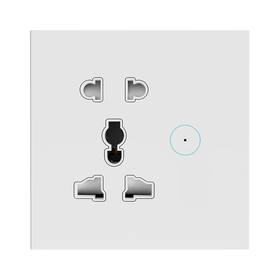
Anybody who has travelled with a UK plug knows the problem: a Socket that takes one shape of pin and nothing else. The 5-hole universal plate solves it — it accepts British, European, US and other pin shapes on the same face, which is why it is the default choice in hotels, airports, offices and mixed-occupancy buildings.

Universal, with USB

The range covers the plain 5-hole plate, the same plate with 2 × USB-A, and versions with USB-A + Type-C for current phones and laptops. On a bedside or a desk, the USB outlets remove the charger brick entirely. 86 × 86 mm Smart Sockets: The Smallest Way to Add Control to a Room

Protocol choice

  • WiFi — straight to the router, no hub, quickest to commission.
  • Zigbee — needs a gateway, better for whole-building rollouts.
  • HomeKit — direct to Apple Home with no bridge app.

13 A rating

These are 13 A plates, which is the UK ring-main standard. That rating is the reason a Wall Socket can run a kettle or a heater Where a travel adapter cannot.

Finishes

Standard glass panels, plus a 2.5D glass on plastic frame version if you want the softer edge, in the usual White / Black / Gold / Grey.

FAQ
Does “universal” really take every plug?
It takes the common UK, EU, US and other shapes used in hotels and offices. It is not a substitute for a certified plug in every jurisdiction — check local rules for fixed installations.
Are the USB ports always live?
On most models yes, so phones charge overnight; check the model line where that matters.
Is a neutral needed?
Most models are zero-fire — check the individual model before ordering.

Ready to specify it? Full specifications, gang options, colors and quantity pricing are on the British / GB Standard 5-Hole Universal Smart Socket (WiFi / ZigBee / HomeKit) product page — OEM logo, manual and packaging are available from the first order.

Related Articles

You Might Also Like
Frequently Asked Questions

Is British Standard Hole worth buying?

Based on the breakdown in this article, British Standard Hole offers a solid mix of features and value. If your main goal matches the key benefits described above, it is a practical choice for everyday use.

How do I choose the right british standard hole for my needs?

Start with your core use case, then compare battery life, compatibility, and build quality as covered above. Choosing the right british standard hole comes down to matching specs with how you actually use it.

Does british standard hole require a companion app?

Most devices of this type pair with a free companion app for setup and firmware updates. A few advanced features may sit Behind a paid plan, so check the official specs page before buying.

Posted on — Leave a comment

Why Cameras Miss Faces but Doorbells Don’t

Pull up two clips from the same afternoon. One is from the video doorbell: you can see who it was, clearly enough that you’d recognise them again. The other is from the camera over the driveway — the one that cost more — and it’s a shot of the top of someone’s head and a shoulder.

It’s tempting to blame resolution. It isn’t resolution. It’s mounting height, and a trade-off that nobody mentions when you’re buying.

The two cameras are aiming from different places

A video doorbell sits roughly at chest height, somewhere around 1.4 to 1.6 metres, because that’s where the existing doorbell wiring and the door frame put it. A person standing at the door is therefore shot almost head-on, at eye level. That’s the single best angle for identifying a face, and the doorbell gets it for free — not because the sensor is better, but because of where the thing happens to be screwed in.

A security camera goes up high. Two and a half to three metres is typical, sometimes higher. There are good reasons: out of reach means out of easy reach, a wide view covers the whole driveway instead of one doorway, and nobody walks into it. But once you’re looking down at someone from three metres, the face tilts away from the lens. What the sensor gets is forehead, the crown of a head, and the brim of a cap.

Why the tilt matters more than the distance

Face recognition — yours, and the software’s — leans heavily on the area around the eyes and the relative spacing of features. Look at someone from 30 degrees above and that geometry compresses. The forehead looms, the nose foreshortens, and the eye sockets fall into shadow.

At night it gets worse. The infrared LEDs sit in a ring around the lens and light the face from the same direction the camera is looking from. Tilted down from above, that light lands on the forehead and the cheekbones and leaves the eye sockets dark — the “panda” look you’ve probably seen in your own night clips. Straight-on, the same LEDs give you even illumination and a usable face.

This is why a doorbell’s odd vertical framing is deliberate rather than sloppy. That tall, slightly stretched, head-to-toe window isn’t a wide-angle accident; it’s chosen so that a person standing at the door is fully in frame from shoes to hair, at the height where a face reads.

The trade-off you’re actually making

Lower the camera to 1.6 metres and you’d get faces like the doorbell does. You’d also get a camera someone can reach up and grab, one whose view is blocked by the first parked car, and one that covers a doorway instead of a driveway.

Raise it to three metres and you get coverage and security, and you lose identification. There’s no setting that fixes this — it’s geometry.

So the honest answer is that the two products are doing different jobs. A doorbell is an identification device that happens to also record. A surveillance camera is a coverage device that will tell you something happened, when, and from which direction. Expecting both to deliver a clean face at 3 a.m. is asking one device to be two devices.

Where to compromise

If you want usable faces from a camera rather than a doorbell, the workable range is about 2.2 to 2.5 metres with a downward tilt of no more than 15 to 20 degrees. That’s high enough to be out of casual reach and low enough that a face still reads. Our security cameras mostly end up somewhere in that band, and it’s worth checking the mounting height before checking the spec sheet.

Keep it off the soffit. Infrared reflects, and a camera mounted close under an eave or tight against a wall gets its own IR bounced straight back, which blows out the near half of the image while leaving the far half dark. Give it 30 cm or so of clearance from any surface it’s lighting.

And watch for sky. A camera angled slightly up will meter for the bright sky and darken everything below it, which is why so many driveway clips have a bright pavement and a person rendered as a silhouette. Aim so the horizon sits in the upper third of the frame.

If you genuinely need both — coverage and identification — the answer is two devices, not one. A camera high and wide for the approach, and a video doorbell at the door doing what it’s positioned to do.

How to check what you’ve got

Stand where a visitor would stand, in daylight, and take a screenshot from playback. Then take the same screenshot at night with the IR on. If you can’t identify yourself in either one, the camera is too high or too steeply tilted, and no firmware update will change that.

Do the same test for the doorbell. It’ll almost always pass, and that’s not because it’s the better camera.

Posted on — Leave a comment

86 × 86 mm Smart Sockets: The Smallest Way to Add Control to a Room

smart sockets smallest - 86 × 86 mm Smart Sockets: The Smallest Way to Add Control to a Room
86 × 86 mm Smart Sockets: The Smallest Way to Add Control to a Room

Not every room needs a wide plate. The 86 × 86 mm Socket is the European, British and GB standard, and putting Smart control on it is the least intrusive way to make one circuit controllable — no adapters, no trailing leads, nothing plugged into anything.

Where a wall socket beats a smart plug

A plug-in adapter is fine for a lamp and useless for a fixed appliance. A wall Socket is permanent, cannot be borrowed by someone who wants a charger, and looks like the rest of the room. It also keeps the earth and the plate rating, which matters on any load above a few hundred watts.

What to check

  • Box — 86 × 86 mm square, the EU / UK / China standard.
  • Load — stay inside the plate rating; a Socket used for a heater needs the headroom.
  • Wiring — confirm whether the model needs a neutral.

Control

On / off from the app, schedules, countdown timers and sharing with other household members. Voice works through Alexa and Google Home once the socket is in the Tuya / Smart Life app.

FAQ
Is it a like-for-like swap?
Yes, in a standard 86 × 86 mm box.
Does it work if the internet drops?
Local control and stored schedules keep running.
Can I have it in other colours?
The range covers the standard finishes — see the product page for the current list.

Ready to specify it? Full specifications, gang options, colors and quantity pricing are on the 86 × 86 mm 5-Hole Universal Smart Socket (WiFi) product page — OEM logo, manual and packaging are available from the first order.

Related Articles

You Might Also Like
Frequently Asked Questions

Is Smart Sockets Smallest worth buying?

Based on the breakdown in this article, Smart Sockets Smallest offers a solid mix of features and value. If your main goal matches the key benefits described above, it is a practical choice for everyday use.

How do I choose the right smart sockets smallest for my needs?

Start with your core use case, then compare battery life, compatibility, and build quality as covered above. Choosing the right Smart sockets smallest comes down to matching specs with how you actually use it.

Does smart sockets smallest require a companion app?

Most devices of this type pair with a free companion app for setup and firmware updates. A few advanced features may sit behind a paid plan, so check the official specs page before buying.

Posted on — Leave a comment

147 × 86 mm Smart Sockets: Power, USB and Metering on One Plate

147 smart sockets - 147 × 86 mm Smart Sockets: Power, USB and Metering on One Plate
147 × 86 mm Smart Sockets: Power, USB and Metering on One Plate

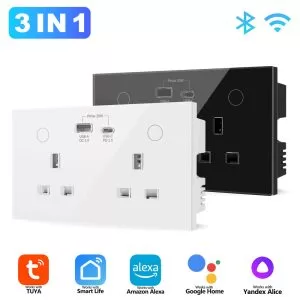
A Smart Socket on a wall plate does three jobs a plug-in adapter cannot: it meters the circuit, it switches a load that is too big for a portable adapter, and it disappears into the wall so nothing hangs out of it. The 147 × 86 mm format adds USB charging and, on some models, energy monitoring.

What the format gives you

The wider plate takes a mains Socket plus USB-A and Type-C outlets side by side, which is the configuration that actually gets used in a bedroom or a hotel desk. It is the Standard plate in Pakistan and Middle East installations. Upgrade Home Security – X8 Wireless Visual Doorbell 4.3 Inch IPS Screen IP66 Waterproof

Metering

Socket-level energy statistics are the underrated feature: you can see what a television, a kettle or an air conditioner really draws, instead of guessing from the electricity bill. Several models in this group report it in the app.

Scheduling heavy loads

Unlike a portable Smart plug, a wall socket rated for the full plate current can run an air conditioner or a water heater on a schedule. That is where the money is saved — not by switching phone chargers.

WiFi and Zigbee

WiFi models go straight to the router for quick commissioning; Zigbee models need a gateway but scale better across a building and keep standby consumption low.

FAQ
Does it replace a standard socket plate?
Yes, in a 147 × 86 mm box.
Are the USB ports switched with the socket?
On most models the USB outlets are separately controlled — check the model line.
Can it report energy use?
Yes on the metering models in the range.

Ready to specify it? Full specifications, gang options, colors and quantity pricing are on the 147 × 86 mm Smart Socket & Switch Combo Series (WiFi / ZigBee) product page — OEM logo, manual and packaging are available from the first order. Solar Flood Light: The Ultimate Guide to Camping, Emergency, and Outdoor Lighting

Related Articles

You Might Also Like
Frequently Asked Questions

Is 147 Smart Sockets worth buying?

Based on the breakdown in this article, 147 Smart Sockets offers a solid mix of features and value. If your main goal matches the key benefits described above, it is a practical choice for everyday use.

How do I choose the right 147 smart sockets for my needs?

Start with your core use case, then compare battery life, compatibility, and build quality as covered above. Choosing the right 147 Smart sockets comes down to matching specs with how you actually use it.

Does 147 smart sockets require a companion app?

Most devices of this type pair with a free companion app for setup and firmware updates. A few advanced features may sit behind a paid plan, so check the official specs page before buying.