Posted on — Leave a comment

Where to Put Water Leak Sensors: The Spots That Catch a Flood Before It Spreads

Water damage is expensive out of proportion to its cause. A washing machine hose that fails while nobody is home runs for hours; a slow drip under a sink rots a cabinet for months before anyone notices. A leak sensor costs a fraction of either, and the whole question is where it stands.

A sensor detects water where it sits. Put it in the wrong place and it will sit dry through exactly the flood you were worried about. Choosing a Smart Lock That Fits the Door You Already Have

The six positions worth covering

  1. Under the kitchen sink. The most common failure point in the house: supply hoses, a trap, a dishwasher connection. One sensor flat on the cabinet floor.
  2. Behind or beneath the washing machine and dishwasher. Appliance hoses are the classic burst. Put the sensor at the lowest point behind the machine, not beside it.
  3. Under the water heater or boiler. Slow leaks here run unnoticed for months. Include the pressure relief valve’s discharge area.
  4. At the toilet base. A failing wax ring or a loose supply line shows up as water on the floor behind the bowl.
  5. In the basement, cellar or sump pit. The lowest point in the building is where water arrives first — a Zigbee level sensor in a pit or tank reports rising water before it becomes a flood.
  6. In the loft or under the roof. Rain ingress and condensate from heating pipework. Also the place nobody checks.

If you only buy two, make it the kitchen sink and the washing machine. Those two cover the majority of real claims. Do Solar Lights Work in Winter? What Changes When the Days Get Short

Which sensor for which job

Probe or contact sensors trigger when water bridges two contacts on the floor — the default choice for sinks, appliances and basements. Level sensors measure depth and suit a tank, a pit or a water butt, where “it is rising” matters more than “it is wet”. Rain sensors are the outdoor equivalent: the WiFi/Zigbee rain sensor and the IPX4 rain detection sensor close a skylight, retract an awning or simply tell you it started raining.

Two further types solve adjacent problems. The vibration and tilt sensor reports movement or a change of angle — a gate, a hatch, a washing machine that has started shaking itself across the floor. And for an outdoor position where a cable is impossible, the solar rainwater and leak sensor runs off its own panel.

Winter: the case for installing before December

Frozen pipes are the seasonal argument. A pipe in an unheated room, a loft, a garage or against an external wall can split, and it does not leak while frozen — it leaks when it thaws, which is often when nobody is there. Two precautions go with the sensors: keep the heating at a low setpoint rather than off when the house is empty, and put a sensor under any pipe run that passes through an unheated space. That combination is also why our guide to thermostat plugs for heaters is relevant here — a cheap scheduled heater in an unheated room is cheaper than the repair.

Making the alert useful

A sensor that beeps in an empty house does nothing. These are Zigbee devices, so they need a gateway to reach you and to run automations locally — see our guide to smart home hubs for why local execution matters when the internet is out. Then set the obvious automation: leak detected, send a push to every adult in the household, not just the one who installed it.

Be realistic about shut-off. A sensor cannot close a valve unless there is a motorised valve on the main; without one, the value of the sensor is speed of notification, which is still most of the value.

Installation details that decide whether it works

  • Place it at the lowest point of the area, flat on the floor — water does not travel uphill to meet a sensor.
  • Keep contacts off bare metal. A sensor resting on a metal tray or a foil-faced board can false-trigger.
  • Do not mount it where it will be soaked by normal use — outside the shower tray, inside the washing machine’s drip line, but not under the sink’s cleaning spray.
  • Test it with a wet cloth twice a year, and note that battery-powered sensors should be checked at the same time.

A plan that takes one afternoon

Install the gateway first and pair everything at a table, not in a cupboard — pairing is far quicker with the devices in front of you. Then walk the house once with a list of every place water enters or leaves: sink, appliances, toilet, boiler, tank, and the lowest floor. Place a sensor at each, name it in the app after its location rather than “sensor 3”, and set one automation that notifies everyone. Finish by wetting a cloth and testing each one; a sensor that has never been tested is an assumption, not a precaution.

Frequently Asked Questions

How many do I need?

Two for the essentials, six for full coverage. Start with the kitchen sink and the washing machine, then add the water heater and the lowest floor.

Do they work without WiFi?

The local alarm sounds. Remote notification needs the gateway and your network; automations stored on the gateway keep running without internet.

WiFi or Zigbee?

Zigbee for battery sensors — the battery lasts far longer and the mesh covers a basement better than a single WiFi radio.

Can one detect a leak inside a wall?

Not until it reaches the floor. For concealed pipes, place sensors at the lowest accessible point below the run, and Watch for a boiler losing pressure.

Related Articles

You Might Also Like

Posted on — Leave a comment

CO2 and Air Quality Monitors: Where to Put One and What the Numbers Mean

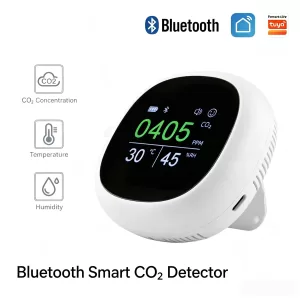
A CO2 monitor is one of the few Smart sensors whose reading should change your behaviour rather than trigger a gadget. Carbon dioxide is not toxic at the levels found in homes, but it is an excellent proxy for how stale the air is — and stale air is what makes a bedroom feel stuffy in the morning and a meeting room foggy by mid-afternoon.

Our Bluetooth CO2 detector reads CO2, temperature and humidity on a built-in display, and pairs with a Zigbee temperature and humidity sensor if you want readings from more than one room. Rain Sensor: What It Is Actually Good For Beyond Telling You It Rains

What the numbers mean

CO2 Level (ppm) What it indicates Typical action
400-600 Fresh outdoor air None
600-800 Well ventilated indoors None
800-1000 Getting stale Consider opening a window
1000-1500 Poorly ventilated Ventilate; people often feel drowsy
1500+ Very stale Ventilate now

A sealed bedroom with two adults and the door closed routinely passes 1200 ppm overnight. That is not dangerous, and it is exactly why you wake up with a dry mouth and a slightly heavy head. P11 Wireless Low-Power Battery Security Camera: No-Wire No-Drill Indoor Home Surveillance

Where to put it

  • Breathing height, not on the floor. Around 1 to 1.5 metres — roughly where people’s heads are.
  • In the room you occupy longest. A bedroom or a home office tells you more than a hallway.
  • Away from windows and doors. Right next to an open window, it reads outdoor air and tells you nothing about the room.
  • Not in a draught or above a radiator. Both distort temperature readings and the airflow affects CO2 sampling.
  • Give it time. CO2 readings settle over a few minutes after moving the unit.

Using the reading rather than admiring it

The useful step is connecting the number to an action. The simplest version is a habit: if the bedroom reads above 1000 in the morning, leave the door open or crack a window while you make coffee. The automated version is a rule that turns on a fan or opens a motorised window above a threshold.

Humidity matters alongside CO2. Very dry air (below 30 percent) is uncomfortable in winter; persistently damp air (above 60 percent) is where mould becomes a risk in a poorly ventilated room. A unit that shows both numbers on one screen is genuinely more useful than two separate sensors you have to cross-reference. Q81 Wireless Button Microphone – Mini Invisible Lapel Mic for Vlogging, Interview & Live Streaming

CO2 is not carbon monoxide

This is the important safety note. A CO2 monitor does not detect carbon monoxide (CO) — the odourless gas produced by faulty boilers, stoves and blocked flues. CO is dangerous at far lower concentrations and requires a certified CO alarm. If you have any fuel-burning appliance, fit a proper CO alarm regardless of what your air quality monitor says.

FAQ

Does it need to be calibrated?
Most consumer units auto-calibrate against the lowest reading they see over several days, which is why they should occasionally experience fresh outdoor air. Leave a window open weekly.
Why does it read 400 in the garden and 900 indoors?
Outdoor air is around 420 ppm. Indoor levels rise with occupancy and fall with ventilation — that difference is the whole point of the measurement.
Can one monitor cover a whole house?
No. CO2 varies room by room. One in the bedroom and one in the main living or working space covers most needs.
Does it detect smoke or gas leaks?
No. CO2 sensors measure carbon dioxide only. Smoke needs a smoke alarm; combustible gas and CO need their own certified detectors.
Does the app log history?
Bluetooth units typically show live readings on the display with logging in the app when in range; Zigbee units report to the gateway and keep history in the app.
Is a higher reading always bad?
It means the air is stale, not toxic. The action is ventilation, not alarm.

Related Articles

You Might Also Like
Frequently Asked Questions

Is Co2 Air Quality worth buying?

Based on the breakdown in this article, Co2 Air Quality offers a solid mix of features and value. If your main goal matches the key benefits described above, it is a practical choice for everyday use.

How do I choose the right co2 air quality for my needs?

Start with your core use case, then compare battery life, compatibility, and build quality as covered above. Choosing the right co2 air quality comes down to matching specs with how you Actually use it.

Does co2 air quality require a companion app?

Most devices of this type pair with a free companion app for setup and firmware updates. A few advanced features may sit behind a paid plan, so check the official specs page before buying.

Posted on — Leave a comment

Where to Mount a Video Doorbell: Height, Angle and Sun Glare

A good doorbell camera mounted badly produces worse footage than a cheap one mounted well. Three variables decide it: how high the lens sits, which way it points, and what the light is doing behind the visitor. None of them need an electrician — just ten minutes with a tape measure before you drill.

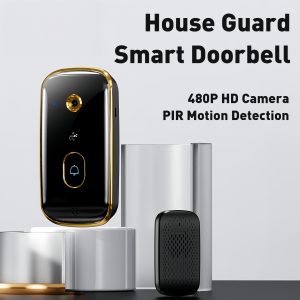
This applies to wall-mounted models across our video doorbell range, including the X8 and the Battery U9.

Height: chest to eye level, not above the door

Most doorbells are fitted at roughly 1.2 to 1.5 metres from the ground — around chest height on an average adult. That puts the lens close enough to a visitor’s face to be useful while keeping the camera out of easy reach.

Higher than about 1.6 metres and you start photographing the tops of heads and hat brims. Lower, and the camera is easy to tamper with and the view fills with shoulders. If the only sensible mounting point is higher — a frame above the Door, for instance — look for a model with a wide vertical field of view, or use a wedge mount to tilt the lens down.

Angle: tilt down slightly, and decide what you want in frame

A lens pointed straight ahead catches faces well and parcels badly. A lens tilted down by 10 to 15 degrees catches both. The trade-off is a slightly distorted view of a tall visitor standing close.

Decide which matters more:

  • Faces first — keep the lens level, useful where you mostly want to know who called.
  • Parcels first — tilt down, useful where porch theft is the concern.

Wedge mounts solve this without moving the unit: a 15 or 30 degree shim under the bracket changes the angle and, usefully, can also turn the view along a side path.

Light: the backlit visitor problem

The classic failure is a doorbell facing east or west into low sun, or facing a bright street with the visitor silhouetted. The camera exposes for the bright background and the face goes dark.

Fixes, in order of effort:

  1. Move the unit to the shaded side of the door frame if the sun comes from one direction.
  2. Use the porch light after dark — a lit face in front of a dark street is far easier to read than the reverse.
  3. Choose a model with wide dynamic range or full-colour night vision for difficult entrances.
  4. Add a shade — even a small porch overhang above the camera reduces direct glare.

WiFi and power still constrain where it can go

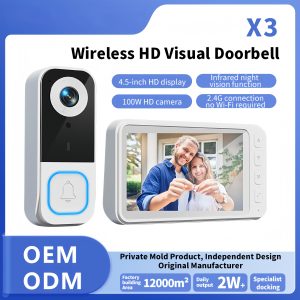
The best camera position is useless if the WiFi signal there is dead. Before fixing the bracket, stand at the chosen spot with a phone on 2.4 GHz and check the signal. If it is weak, either move the router or extender, or pick a model that does not depend on your network — the monitor-based kits run their own radio link.

Special case: peephole cameras

A peephole doorbell has no mounting choice at all — it sits at viewer height, typically around 1.5 metres, and looks straight out. That is ideal for faces, poor for parcels, and the only realistic option when you cannot attach anything to the outside of the door or wall.

Check before you drill

  • WiFi signal at the exact spot, on 2.4 GHz.
  • Door thickness if you are fitting a peephole unit.
  • Whether the surface is brick, render, wood or metal — each needs different fixings.
  • Whether a wedge mount is needed for the angle you want.
  • Local rules if you are in a managed building or a listed property.
FAQ
What height should a Video doorbell be?
Around 1.2 to 1.5 metres from the ground. Above 1.6 metres you mostly capture the tops of heads unless you tilt the lens down.
Can I mount it on a metal door or frame?
Yes mechanically, but metal can affect both the Wireless link and the WiFi signal. Test signal strength before fixing it permanently.
Why is my footage washed out during the day?
Usually direct sun or a bright background behind the visitor. Move the unit to the shaded side, add a shade, or use the porch light to balance the scene after dark.
Do I need a wedge mount?
If the door is set back in a recess, or you want to see along a path rather than straight ahead, a wedge mount is the simplest fix.
Can it be stolen?
Anything surface-mounted can be. Use the security screw where supplied, mount with proper fixings, and rely on cloud or card storage so footage survives the unit going missing.
Does rain matter?
On an exposed door, yes — choose a unit with an IP rating (such as the IP66 X8) rather than an indoor-rated model.

Related Articles

You Might Also Like
Frequently Asked Questions

Is Where Mount Video worth buying?

Based on the breakdown in this article, Where Mount Video offers a solid mix of features and value. If your main goal matches the key benefits described above, it is a practical choice for everyday use.

How do I choose the right where mount video for my needs?

Start with your core use case, then compare Battery life, compatibility, and build quality as covered above. Choosing the right where mount video comes down to matching specs with how you actually use it.

Does where mount video require a companion app?

Most devices of this type pair with a free companion app for setup and firmware updates. A few advanced features may sit behind a paid plan, so check the official specs page before buying.

Posted on — Leave a comment

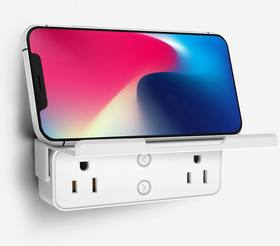
Socket with a Clamp: Fitting a Smart Socket Where There Is No Box

socket clamp fitting - Socket with a Clamp: Fitting a Smart Socket Where There Is No Box
Socket with a Clamp: Fitting a Smart Socket Where There Is No Box

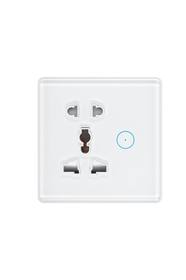
Sometimes there is no Wall box and no appetite for cutting one — a rented office, a glass partition, a temporary site cabin, a garage wall. A Smart Socket with a clamp fixes to the surface instead of going into the wall, and still gives you app Control and scheduling.

What the clamp solves

No chasing, no plastering, no back box. The body clamps to the surface or the edge of a panel and the wiring is surface-run in conduit. It is reversible, which matters in rented space where you take the fittings with you.

What you still get

App on/off, schedules, countdown and voice through the usual ecosystem. The rating is the same class as a fixed Socket, so it is not a toy — but check the load and the cable route before you rely on it for a heater.

Where it is the wrong answer

In a finished living space you usually want the flush plate instead. The clamp version is for the places where a box is genuinely not available, or where the installation has to be removable. 147 × 86 mm Smart Sockets: Power, USB and Metering on One Plate

FAQ
Is it safe for permanent installation?
It is designed for surface mounting with the clamp; follow local wiring rules and use conduit for the run.
Does it need a neutral?
Check the model line — surface wiring usually makes a neutral easier to provide.
Can it be used outdoors?
Only where the enclosure rating allows it; ask before specifying it for a wet area.

Ready to specify it? Full specifications, gang options, colors and quantity pricing are on the US Standard WiFi Smart Socket — 1-in 2-out, with or without Shelf Clamp product page — OEM logo, manual and packaging are available from the first order. Upgrade Home Security – X8 Wireless Visual Doorbell 4.3 Inch IPS Screen IP66 Waterproof

Related Articles

You Might Also Like
Frequently Asked Questions

Is Socket Clamp Fitting worth buying?

Based on the breakdown in this article, Socket Clamp Fitting offers a solid mix of features and value. If your main goal matches the key benefits described above, it is a practical choice for everyday use.

How do I choose the right socket clamp fitting for my needs?

Start with your core use case, then compare battery life, compatibility, and build quality as covered above. Choosing the right socket clamp fitting comes down to matching specs with how you actually use it.

Does socket clamp fitting require a companion app?

Most devices of this type pair with a free companion app for setup and firmware updates. A few advanced features may sit behind a paid plan, so check the official specs page before buying.

Posted on — Leave a comment

Where the DS-129JL Series Fits: Apartments, Hotels and Office Retrofits

DS-129JL Series — New WiFi Touch Switch (1 Gang / 2 Gang / 3 Gang / 4 Gang)
Where the DS-129JL Series Fits: Apartments, Hotels and Office Retrofits

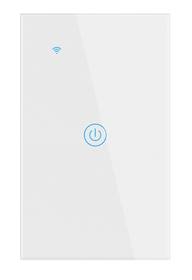
Not every Smart Switch belongs in every building. Multi-gang Touch plates earn their keep Where several circuits meet at One point, Where guests need a single obvious control, or where the Wall cannot be chased for extra boxes. The DS-129JL Series covers 1 Gang / 2 Gang / 3 Gang / 4 Gang on the 118 × 72 mm US-style Wall box, over WiFi 2.4 GHz.

Apartments and flats

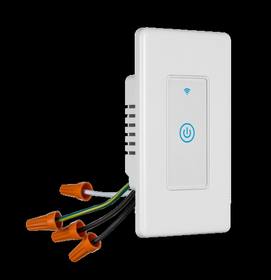
In a flat the usual problem is a living room with three or four circuits on one plate position and no appetite for opening the wall. A 1 Gang / 2 Gang / 3 Gang / 4 Gang plate replaces the stack of single Switches with one frame, and the app can group the gangs so “evening” is one tap. Because the unit works in both single-fire (no neutral) and zero-fire (with neutral) boxes, it also works in blocks where the boxes were never wired with a neutral (fit the supplied capacitor on L1).

Hotels and serviced apartments

Guest rooms benefit from fewer controls and a plate that is easy to wipe clean. The DS-129JL glass face has no gaps for dust, the gangs can be labelled for bedside, desk and bathroom, and WiFi lets housekeeping check a room from the front desk.

Offices and small commercial refits

Meeting rooms need scene control rather than individual Switches, and retrofits are usually done outside working hours — a like-for-like plate swap keeps the programme short. Schedule the lights to drop after hours and the switch pays for itself in the first year.

Specifications

Quantity pricing

Unit price depends on quantity ($8.46–$10.25 across the variants):

FAQ
How many gangs can go on one plate?
The Series covers 1 Gang / 2 Gang / 3 Gang / 4 Gang.
Can different gangs control different circuits?
Yes — each gang is an independent channel.
Is there a minimum order for OEM branding?
OEM logo, manual and packaging can be done from the first order; ask for the exact MOQ for custom tooling.

Ready to specify it? Full specifications, gang options, colors and quantity pricing are on the DS-129JL series product page — OEM logo, manual and packaging are available from the first order.

Related Articles

You Might Also Like
Frequently Asked Questions

Is Where 129jl Series worth buying?

Based on the breakdown in this article, Where 129jl Series offers a solid mix of features and value. If your main goal matches the key benefits described above, it is a practical choice for everyday use.

How do I choose the right where 129jl series for my needs?

Start with your core use case, then compare battery life, compatibility, and build quality as covered above. Choosing the right where 129jl series comes down to matching specs with how you actually use it.

Does where 129jl series require a companion app?

Most devices of this type pair with a free companion app for setup and firmware updates. A few advanced features may sit behind a paid plan, so check the official specs page before buying.

Posted on — Leave a comment

Where the DS-123Y Series Fits: Apartments, Hotels and Office Retrofits

DS-123Y Series WiFi Touch Switch (1 Gang / 2 Gang / 3 Gang)
Where the DS-123Y Series Fits: Apartments, Hotels and Office Retrofits

Not every smart Switch belongs in every building. Multi-gang Touch plates earn their keep Where several circuits meet at one point, Where guests need a single obvious control, or where the Wall cannot be chased for extra boxes. The DS-123Y Series covers 1 Gang / 2 Gang / 3 Gang on the Standard wall box, over WiFi 2.4 GHz.

Apartments and flats

In a flat the usual problem is a living room with three or four circuits on one plate position and no appetite for opening the wall. A 1 Gang / 2 Gang / 3 Gang plate replaces the stack of single switches with one frame, and the app can group the gangs so “evening” is one tap. Because the unit works in both single-fire (no neutral) and zero-fire (with neutral) boxes, it also works in blocks where the boxes were never wired with a neutral (fit the supplied capacitor on L1).

Hotels and serviced apartments

Guest rooms benefit from fewer controls and a plate that is easy to wipe clean. The DS-123Y glass face has no gaps for dust, the gangs can be labelled for bedside, desk and bathroom, and WiFi lets housekeeping check a room from the front desk.

Offices and small commercial refits

Meeting rooms need scene control rather than individual switches, and retrofits are usually done outside working hours — a like-for-like plate swap keeps the programme short. Schedule the lights to drop after hours and the switch pays for itself in the first year.

Specifications
Quantity pricing

Unit price depends on quantity ($11.82–$13.61 across the variants):

FAQ
How many gangs can go on one plate?
The Series covers 1 Gang / 2 Gang / 3 Gang.
Can different gangs control different circuits?
Yes — each gang is an independent channel.
Is there a minimum order for OEM branding?
OEM logo, manual and packaging can be done from the first order; ask for the exact MOQ for custom tooling.

Ready to specify it? Full specifications, gang options, colors and quantity pricing are on the DS-123Y series product page — OEM logo, manual and packaging are available from the first order.

Related Articles

You Might Also Like
Frequently Asked Questions

Is Where 123y Series worth buying?

Based on the breakdown in this article, Where 123y Series offers a solid mix of features and value. If your main goal matches the key benefits described above, it is a practical choice for everyday use.

How do I choose the right where 123y series for my needs?

Start with your core use case, then compare battery life, compatibility, and build quality as covered above. Choosing the right where 123y series comes down to matching specs with how you actually use it.

Does where 123y series require a companion app?

Most devices of this type pair with a free companion app for setup and firmware updates. A few advanced features may sit behind a paid plan, so check the official specs page before buying.

Posted on — Leave a comment

Where the DS-121JLHK Series Fits: Apartments, Hotels and Office Retrofits

DS-121JLHK Series — New WiFi Touch Switch (1 Gang / 2 Gang / 3 Gang / 4 Gang)
Where the DS-121JLHK Series Fits: Apartments, Hotels and Office Retrofits

Not every smart Switch belongs in every building. Multi-gang Touch plates earn their keep Where several circuits meet at one point, Where guests need a single obvious control, or Where the Wall cannot be chased for extra boxes. The DS-121JLHK Series covers 1 Gang / 2 Gang / 3 Gang / 4 Gang on the 118 × 72 mm US-style Wall box, over WiFi 2.4 GHz.

Apartments and flats

In a flat the usual problem is a living room with three or four circuits on one plate position and no appetite for opening the Wall. A 1 Gang / 2 Gang / 3 Gang / 4 Gang plate replaces the stack of single switches with one frame, and the app can group the gangs so “evening” is one tap. Because the unit works in both single-fire (no neutral) and zero-fire (with neutral) boxes, it also works in blocks where the boxes were never wired with a neutral (fit the supplied capacitor on L1).

Hotels and serviced apartments

Guest rooms benefit from fewer controls and a plate that is easy to wipe clean. The DS-121JLHK glass face has no gaps for dust, the gangs can be labelled for bedside, desk and bathroom, and WiFi lets housekeeping check a room from the front desk.

Offices and small commercial refits

Meeting rooms need scene control rather than individual switches, and retrofits are usually done outside working hours — a like-for-like plate swap keeps the programme short. Schedule the lights to drop after hours and the switch pays for itself in the first year.

Specifications
Quantity pricing

Unit price depends on quantity ($10.78–$12.42 across the variants):

FAQ
How many gangs can go on one plate?
The Series covers 1 Gang / 2 Gang / 3 Gang / 4 Gang.
Can different gangs control different circuits?
Yes — each gang is an independent channel.
Is there a minimum order for OEM branding?
OEM logo, manual and packaging can be done from the first order; ask for the exact MOQ for custom tooling.

Ready to specify it? Full specifications, gang options, colors and quantity pricing are on the DS-121JLHK series product page — OEM logo, manual and packaging are available from the first order.

Related Articles

You Might Also Like
Frequently Asked Questions

Is Where 121jlhk Series worth buying?

Based on the breakdown in this article, Where 121jlhk Series offers a solid mix of features and value. If your main goal matches the key benefits described above, it is a practical choice for everyday use.

How do I choose the right where 121jlhk series for my needs?

Start with your core use case, then compare battery life, compatibility, and build quality as covered above. Choosing the right where 121jlhk Series comes down to matching specs with how you actually use it.

Does where 121jlhk series require a companion app?

Most devices of this type pair with a free companion app for setup and firmware updates. A few advanced features may sit behind a paid plan, so check the official specs page before buying.

Posted on — Leave a comment

Where the DS-112 Series Fits: Apartments, Hotels and Office Retrofits

DS-112 Series WiFi Touch Switch (1 Gang / 2 Gang / 3 Gang)
Where the DS-112 Series Fits: Apartments, Hotels and Office Retrofits

Not every smart Switch belongs in every building. Multi-gang Touch plates earn their keep Where several circuits meet at one point, Where guests need a single obvious control, or where the Wall cannot be chased for extra boxes. The DS-112 Series covers 1 Gang / 2 Gang / 3 Gang on the 86 × 86 mm square Wall box (EU / UK / China), over Zigbee 3.0.

Apartments and flats

In a flat the usual problem is a living room with three or four circuits on one plate position and no appetite for opening the Wall. A 1 Gang / 2 Gang / 3 Gang plate replaces the stack of single switches with one frame, and the app can group the gangs so “evening” is one tap. Because the unit works in both single-fire (no neutral) and zero-fire (with neutral) boxes, it also works in blocks where the boxes were never wired with a neutral (fit the supplied capacitor on L1).

Hotels and serviced apartments

Guest rooms benefit from fewer controls and a plate that is easy to wipe clean. The DS-112 glass face has no gaps for dust, the gangs can be labelled for bedside, desk and bathroom, and Zigbee keeps dozens of rooms off the guest WiFi while still reporting to one gateway.

Offices and small commercial refits

Meeting rooms need scene control rather than individual switches, and retrofits are usually done outside working hours — a like-for-like plate swap keeps the programme short. Schedule the lights to drop after hours and the switch pays for itself in the first year.

Specifications
Quantity pricing

Unit price depends on quantity ($10.48–$11.37 across the variants):

FAQ
How many gangs can go on one plate?
The Series covers 1 Gang / 2 Gang / 3 Gang.
Can different gangs control different circuits?
Yes — each gang is an independent channel.
Is there a minimum order for OEM branding?
OEM logo, manual and packaging can be done from the first order; ask for the exact MOQ for custom tooling.

Ready to specify it? Full specifications, gang options, colors and quantity pricing are on the DS-112 series product page — OEM logo, manual and packaging are available from the first order.

Related Articles

You Might Also Like
Frequently Asked Questions

Is Where 112 Series worth buying?

Based on the breakdown in this article, Where 112 Series offers a solid mix of features and value. If your main goal matches the key benefits described above, it is a practical choice for everyday use.

How do I choose the right where 112 series for my needs?

Start with your core use case, then compare battery life, compatibility, and build quality as covered above. Choosing the right where 112 Series comes down to matching specs with how you actually use it.

Does where 112 series require a companion app?

Most devices of this type pair with a free companion app for setup and firmware updates. A few advanced features may sit behind a paid plan, so check the official specs page before buying.

Posted on — Leave a comment

Where the DS-1081WL Series Fits: Apartments, Hotels and Office Retrofits

DS-1081WL Series WiFi Touch Switch (1 Gang / 2 Gang / 3 Gang / 4 Gang)
Where the DS-1081WL Series Fits: Apartments, Hotels and Office Retrofits

Not every smart Switch belongs in every building. Multi-gang Touch plates earn their keep Where several circuits meet at one point, Where guests need a single obvious control, or Where the Wall cannot be chased for extra boxes. The DS-1081WL Series covers 1 Gang / 2 Gang / 3 Gang / 4 Gang on the 86 × 86 mm square Wall box (EU / UK / China), over WiFi 2.4 GHz.

Apartments and flats

In a flat the usual problem is a living room with three or four circuits on one plate position and no appetite for opening the wall. A 1 Gang / 2 Gang / 3 Gang / 4 Gang plate replaces the stack of single switches with one frame, and the app can group the gangs so “evening” is one tap. Because the unit works in both single-fire (no neutral) and zero-fire (with neutral) boxes, it also works in blocks where the boxes were never wired with a neutral (fit the supplied capacitor on L1).

Hotels and serviced apartments

Guest rooms benefit from fewer controls and a plate that is easy to wipe clean. The DS-1081WL glass face has no gaps for dust, the gangs can be labelled for bedside, desk and bathroom, and WiFi lets housekeeping check a room from the front desk.

Offices and small commercial refits

Meeting rooms need scene control rather than individual switches, and retrofits are usually done outside working hours — a like-for-like plate swap keeps the programme short. Schedule the lights to drop after hours and the switch pays for itself in the first year.

Specifications
Quantity pricing

Unit price depends on quantity ($7.50–$9.00 across the variants):

FAQ
How many gangs can go on one plate?
The Series covers 1 Gang / 2 Gang / 3 Gang / 4 Gang.
Can different gangs control different circuits?
Yes — each gang is an independent channel.
Is there a minimum order for OEM branding?
OEM logo, manual and packaging can be done from the first order; ask for the exact MOQ for custom tooling.

Ready to specify it? Full specifications, gang options, colors and quantity pricing are on the DS-1081WL series product page — OEM logo, manual and packaging are available from the first order.

Related Articles

You Might Also Like
Frequently Asked Questions

Is Where 1081wl Series worth buying?

Based on the breakdown in this article, Where 1081wl Series offers a solid mix of features and value. If your main goal matches the key benefits described above, it is a practical choice for everyday use.

How do I choose the right where 1081wl series for my needs?

Start with your core use case, then compare battery life, compatibility, and build quality as covered above. Choosing the right where 1081wl Series comes down to matching specs with how you actually use it.

Does where 1081wl series require a companion app?

Most devices of this type pair with a free companion app for setup and firmware updates. A few advanced features may sit behind a paid plan, so check the official specs page before buying.

Posted on — Leave a comment

Where the DS-102JLHK Series Fits: Apartments, Hotels and Office Retrofits

DS-102JLHK Series WiFi Touch Switch (1 Gang / 2 Gang / 3 Gang)
Where the DS-102JLHK Series Fits: Apartments, Hotels and Office Retrofits

Not every smart switch belongs in every building. Multi-gang Touch plates earn their keep Where several circuits meet at one point, where guests need a single obvious control, or where the Wall cannot be chased for extra boxes. The DS-102JLHK Series covers 1 Gang / 2 Gang / 3 Gang on the 86 × 86 mm square wall box (EU / UK / China), over WiFi 2.4 GHz.

Apartments and flats

In a flat the usual problem is a living room with three or four circuits on one plate position and no appetite for opening the wall. A 1 Gang / 2 Gang / 3 Gang plate replaces the stack of single switches with one frame, and the app can group the gangs so “evening” is one tap. Because the unit works in both single-fire (no neutral) and zero-fire (with neutral) boxes, it also works in blocks where the boxes were never wired with a neutral (fit the supplied capacitor on L1).

Hotels and serviced apartments

Guest rooms benefit from fewer controls and a plate that is easy to wipe clean. The DS-102JLHK glass face has no gaps for dust, the gangs can be labelled for bedside, desk and bathroom, and WiFi lets housekeeping check a room from the front desk.

Offices and small commercial refits

Meeting rooms need scene control rather than individual switches, and retrofits are usually done outside working hours — a like-for-like plate swap keeps the programme short. Schedule the lights to drop after hours and the switch pays for itself in the first year.

Specifications
Quantity pricing

Unit price depends on quantity ($10.33–$11.52 across the variants):

FAQ
How many gangs can go on one plate?
The Series covers 1 Gang / 2 Gang / 3 Gang.
Can different gangs control different circuits?
Yes — each gang is an independent channel.
Is there a minimum order for OEM branding?
OEM logo, manual and packaging can be done from the first order; ask for the exact MOQ for custom tooling.

Ready to specify it? Full specifications, gang options, colors and quantity pricing are on the DS-102JLHK series product page — OEM logo, manual and packaging are available from the first order.

Related Articles

You Might Also Like
DS-102JLHK Series WiFi Touch Switch (1 Gang / 2 Gang / 3 Gang)DS-102JLHK Series WiFi Touch Switch (1 Gang / 2 Gang / 3 Gang) Price range: $10.33 through $11.52
Frequently Asked Questions

Is Where 102jlhk Series worth buying?

Based on the breakdown in this article, Where 102jlhk Series offers a solid mix of features and value. If your main goal matches the key benefits described above, it is a practical choice for everyday use.

How do I choose the right where 102jlhk series for my needs?

Start with your core use case, then compare battery life, compatibility, and build quality as covered above. Choosing the right where 102jlhk series comes down to matching specs with how you actually use it.

Does where 102jlhk series require a companion app?

Most devices of this type pair with a free companion app for setup and firmware updates. A few advanced features may sit behind a paid plan, so check the official specs page before buying.