Posted on — Leave a comment

Socket with a Clamp: Fitting a Smart Socket Where There Is No Box

socket clamp fitting - Socket with a Clamp: Fitting a Smart Socket Where There Is No Box
Socket with a Clamp: Fitting a Smart Socket Where There Is No Box

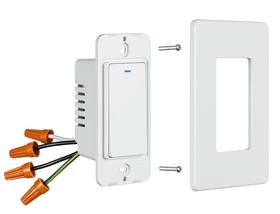
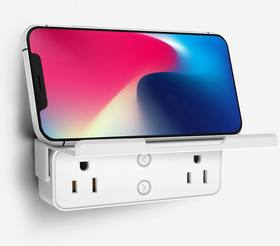
Sometimes there is no Wall box and no appetite for cutting one — a rented office, a glass partition, a temporary site cabin, a garage wall. A Smart Socket with a clamp fixes to the surface instead of going into the wall, and still gives you app Control and scheduling.

What the clamp solves

No chasing, no plastering, no back box. The body clamps to the surface or the edge of a panel and the wiring is surface-run in conduit. It is reversible, which matters in rented space where you take the fittings with you.

What you still get

App on/off, schedules, countdown and voice through the usual ecosystem. The rating is the same class as a fixed Socket, so it is not a toy — but check the load and the cable route before you rely on it for a heater.

Where it is the wrong answer

In a finished living space you usually want the flush plate instead. The clamp version is for the places where a box is genuinely not available, or where the installation has to be removable. 147 × 86 mm Smart Sockets: Power, USB and Metering on One Plate

FAQ

Is it safe for permanent installation?
It is designed for surface mounting with the clamp; follow local wiring rules and use conduit for the run.
Does it need a neutral?
Check the model line — surface wiring usually makes a neutral easier to provide.
Can it be used outdoors?
Only where the enclosure rating allows it; ask before specifying it for a wet area.

Ready to specify it? Full specifications, gang options, colors and quantity pricing are on the US Standard WiFi Smart Socket — 1-in 2-out, with or without Shelf Clamp product page — OEM logo, manual and packaging are available from the first order. Upgrade Home Security – X8 Wireless Visual Doorbell 4.3 Inch IPS Screen IP66 Waterproof

Related Articles

You Might Also Like

Frequently Asked Questions

Is Socket Clamp Fitting worth buying?

Based on the breakdown in this article, Socket Clamp Fitting offers a solid mix of features and value. If your main goal matches the key benefits described above, it is a practical choice for everyday use.

How do I choose the right socket clamp fitting for my needs?

Start with your core use case, then compare battery life, compatibility, and build quality as covered above. Choosing the right socket clamp fitting comes down to matching specs with how you actually use it.

Does socket clamp fitting require a companion app?

Most devices of this type pair with a free companion app for setup and firmware updates. A few advanced features may sit behind a paid plan, so check the official specs page before buying.

Posted on — Leave a comment

147 × 86 mm Touch Switches: Fitting 4, 6 and 8 Gangs on One Plate

147 touch switches - 147 × 86 mm Touch Switches: Fitting 4, 6 and 8 Gangs on One Plate
147 × 86 mm Touch Switches: Fitting 4, 6 and 8 Gangs on One Plate

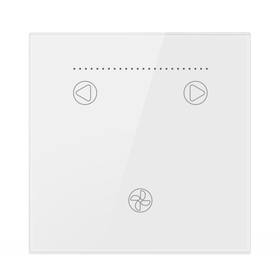
Standard plates stop at three gangs. When a room needs four, six or eight circuits on one position — a hotel bedside, a conference room, a large living room — the usual answer is a stack of plates and a lot of chasing. The 147 × 86 mm format puts all of them behind one piece of glass.

Why 147 × 86

The wider format gives room for up to 8 gangs at comfortable spacing, at 90–265 VAC, so it suits Pakistan, Middle East and other 220–240 V markets with wide boxes. Every unit in the family reports energy statistics and has a child lock. Where the DS-129JL Series Fits: Apartments, Hotels and Office Retrofits

WiFi or Zigbee

WiFi models (…WN) go straight to the router with no hub. Zigbee models (…ZN) need a gateway but give you mesh coverage and far lower standby consumption — the better choice when a floor has twenty plates. Where the DS-123Y Series Fits: Apartments, Hotels and Office Retrofits

Fan control on the same plate

Two models in the range add a Fan channel beside the Switch keys, so the light keys and the fan speed live on one plate instead of two. The DS-14A… variants use a 2.5D glass face on a plastic frame if you want the softer edge.

What to check before ordering

  • Box size — 147 × 86 mm, not 86 × 86. Measure the opening.
  • Gang count — 4, 6 or 8; more gangs means more load on one board, so check the per-gang rating.
  • Finish — White or Black across the family.
FAQ
Can I mix gang counts in one order?
Yes — 4, 6 and 8 gang plates can be mixed, and they share the same frame style.
Does the fan channel need a special fan?
Standard AC ceiling fans with a speed regulator chain work; check the rating before ordering.
Is a gateway needed?
Only for the Zigbee (…ZN) models.

Ready to specify it? Full specifications, gang options, colors and quantity pricing are on the 147 × 86 mm Touch Switch Series — 4 / 6 / 8 Gang, WiFi & ZigBee product page — OEM logo, manual and packaging are available from the first order.

Related Articles

You Might Also Like
Frequently Asked Questions

Is 147 Touch Switches worth buying?

Based on the breakdown in this article, 147 Touch Switches offers a solid mix of features and value. If your main goal matches the key benefits described above, it is a practical choice for everyday use.

How do I choose the right 147 touch switches for my needs?

Start with your core use case, then compare battery life, compatibility, and build quality as covered above. Choosing the right 147 Touch Switches comes down to matching specs with how you actually use it.

Posted on — Leave a comment

Door and Window Sensor Installation: Fitting, Gaps and Automations

A door and window sensor is a two-part reed Switch: a magnet on the moving part, a sensor body on the frame. When the magnet moves more than about 15–20 mm away, the circuit opens and the sensor reports “open”. Fit the body on the fixed frame, the magnet on the door or sash, keep the gap under 10 mm when closed, and align the two marks — almost every “it says open when it is shut” problem is alignment or gap, not a faulty unit.

This guide covers windows, doors, sliding doors, garage doors and the awkward cases, plus the automations that are actually worth setting up. Smart Switch Series: Models, Specs, MOQ

Fit it in five steps

  1. Clean both surfaces with alcohol and dry them. Adhesive on paint that is flaking, or on dusty uPVC, fails within weeks.
  2. Dry-fit first: hold the two parts together in the closed position and watch the app or the LED. Find the position Where “closed” is stable.
  3. Mount the larger body on the fixed frame so the battery and button stay accessible; put the small magnet on the moving door or sash.
  4. Mind the gap: keep the closed gap under 10 mm and the faces parallel. On uPVC windows with a deep rebate, use the slim spacer or the narrow magnet edge.
  5. Press for 30 seconds and leave the adhesive 12 hours before testing repeatedly.

Doors

  • Front and back doors: top corner on the latch side, body on the frame. Top mounting keeps it out of the way of bags, pets and small children.
  • Which side: the hinge side works too, but the sensor must sit very close to the hinge to avoid a large travel arc — latch side is easier.
  • Metal doors: a steel door or a steel frame can shield the magnet slightly and, more importantly, weaken the radio link. Test before sticking, and consider a Zigbee repeater nearby.
  • French and double doors: one sensor per leaf, or one on the active leaf plus a second on the other if you want to know which one is open.

Windows

  • Casement and tilt-and-turn: top corner opposite the handle, magnet on the sash. Remember a tilt-and-turn window has two open states — if you want to know which, add a second sensor or use a handle-position sensor.
  • Sliding sash and patio doors: mount at the meeting rail in the closed position, keeping the two parts parallel as they pass. The gap on sliders is often larger, so check the spec (some sensors tolerate 20 mm+).
  • Rooflights and skylights: fine, but keep the sensor body Where condensation will not drip on it.

Awkward cases

  • Garage and roller doors: use a sensor rated for outdoor or garage use (temperature range matters) or a tilt sensor on the door panel, which reports angle rather than contact.
  • Gates and sheds: choose IP-rated outdoor sensors and expect shorter battery life in cold weather.
  • Fridges and freezers: mount externally; the magnet works through the door seal, and it is a cheap way to catch a door left ajar.
  • Mailbox and letterbox: a small sensor plus a notification is a genuinely useful, low-cost automation.

Automations worth setting

  • Heating off when a window is open for more than two minutes, back on when it closes — the single most useful one.
  • Arm the alarm mode only when all external doors report closed, so you never arm with a door ajar.
  • Night alert if a ground-floor door opens between 00:00 and 05:00.
  • Child and Pet safety: a chime when a specific door opens, Without triggering a full alarm.
  • Left-open reminder after 10 minutes for an external door, and for the fridge after 2 minutes.
Frequently Asked Questions

How do I stop a door sensor reporting open when it is closed?

Check the gap and the alignment first: the two marks should face each other and the closed gap should be under 10 mm. Deep window rebates and warped doors are the usual culprits — use a spacer or move the magnet.

Which part goes on the door and which on the frame?

Sensor body on the fixed frame, magnet on the moving door or window. It works the other way round, but mounting the body on the frame keeps the battery change easy and avoids cable or Wiring strain. Smart Switch for Water Heater and AC

Do door sensors work on sliding doors?

Yes, mounted at the meeting rail so the two parts stay parallel as the panel slides. Watch the gap: some sliders sit further apart, so check the sensor’s maximum operating distance. Reolink vs Tuya Security Camera

How long does the battery last?

Usually one to two years for a coin-cell contact sensor. Cold garages and outbuildings shorten that considerably, and the app’s low-battery notification is the only warning you get.

Can one sensor cover two doors?

No. One sensor covers one opening. For double doors you need one per leaf if you want to know which leaf is open.

Do they work without internet?

Contact detection and local automations run on the hub and keep working. Cloud routines and remote notifications need a connection.

Related guides

Browse door, window and leak sensors · Ask us about your window types

Related Articles

You Might Also Like

Recommended Products