WiFi Universal IR Remote Control Review: Replace 5 Remotes, Monitor Climate, Automate Your Home (2026)
However, After 60 days of daily testing as my living room’s command center, here’s the honest verdict on the Smart hub that promises to replace every IR remote in your house. Wifi
Therefore, Look around your living room. Count the remotes. TV, soundbar, air conditioner, fan, maybe a projector. Therefore, Each one fighting for couch-cushion dominance, each one needing fresh batteries every six months.
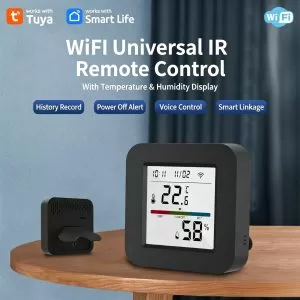
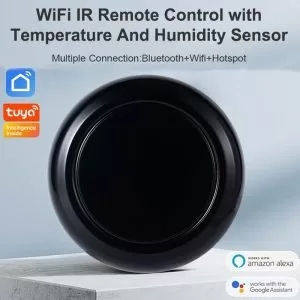
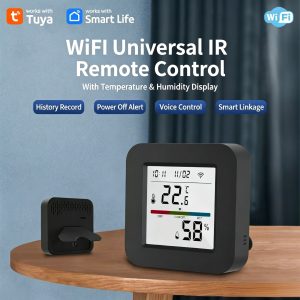
Moreover, For the last 60 days, I’ve been testing a different approach: the WiFi Universal IR Remote Control with Temperature & Humidity Display. It’s a 6.7cm square device that promises to replace all of those remotes, monitor your room’s climate, trigger automations, and even respond to Alexa and Google Home.
Therefore, Does it deliver? Mostly yes — with a few caveats every smart home beginner should know. Here’s the full breakdown.
🎯 What This Device Actually Is (And Isn’t)
Moreover, Let’s clear up the most common confusion: this is not a WiFi-to-IR blaster in the same category as a Broadlink RM Mini. For example, Those are dedicated remote-control hubs.
What you’re getting is a 3-in-1 smart home device:
- Universal IR remote (38KHz, 10m range, 360° coverage)
- Temperature & humidity Sensor (±1°C temperature, ±5%RH humidity accuracy)
- Smart home automation hub (Tuya/Smart Life, voice control, scenes)
In addition, It’s the climate Sensor + IR blaster combination that makes this interesting. Most standalone IR hubs don’t tell you your room is too dry. Most climate sensors don’t control your AC. In addition, This one does both.
🧩 The 6 Core Features That Matter
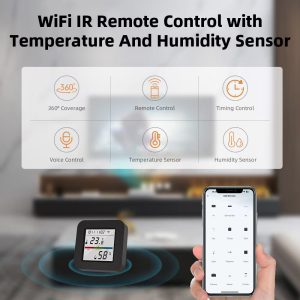
After two months of use, here are the six functions that actually made a difference in my daily life:
1. 360° Coverage (Not a Gimmick)
The IR transmitter is mounted on top, firing in all directions. In my living room, it reliably reached the TV, AC, soundbar, and ceiling fan from a single position on the side table — something older blasters struggled with.
2. Remote Control from Anywhere
Left for work and forgot to turn off the AC? Open the app, tap the AC button, done. Moreover, This is the killer feature for anyone who travels or has elderly parents who can’t figure out the latest remote.
3. Timing Control (Schedules)
Set the AC to turn on 30 minutes before you get home. Set the fan to shut off at midnight. Furthermore, The app supports unlimited schedules per device. This replaced three of my timer plugs.
4. Voice Control (More on This Later)
Alexa and Google Home integration — properly implemented, with custom device names.
5. Temperature Sensor
Real-time display, ±1°C accuracy, history charts in the app.
6. As a result, Humidity Sensor
Same — but the combination with smart scenes is where the magic happens (next chapter).
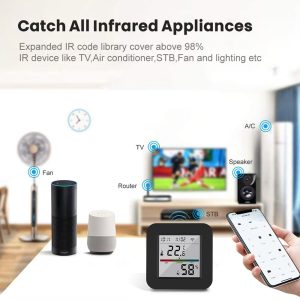
🏠 Real-World Test: The “Catch All” Living Room Setup
Here’s what I connected and how each performed:
| Device |
Setup Time |
Reliability (60 days) |
Notes |
| Samsung 65″ TV |
~2 minutes |
99% |
Pre-loaded codes worked first try |
| LG Window AC |
~3 minutes |
98% |
All functions (mode, fan, temp) mapped |
| Vizio Soundbar |
~5 minutes |
95% |
Used “learn” mode for volume keys |
| Hunter Ceiling Fan |
~4 minutes |
97% |
3 speeds + light on/off |
| Xiaomi Air Purifier |
Did not work |
N/A |
Uses WiFi, not IR — not in scope |
The app’s “Add Remote” wizard walks you through brand selection → device type → test pattern. For my 4 IR devices, the entire setup took under 15 minutes.
Important caveat: the “98% IR code library coverage” claim is roughly accurate, but obscure Chinese-brand devices may need the manual learn mode (point original remote at the hub, press buttons, it learns the codes).
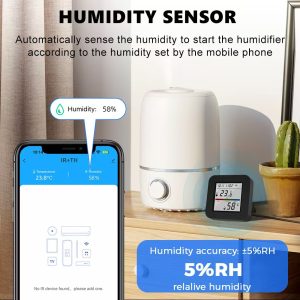
💧 The Killer App: Humidity Automation That Actually Works
Here’s where the device earns its price tag. I set up one automation:
“When humidity drops below 40%, turn on the bedroom humidifier.”
The setup took 90 seconds in the Smart Life app. Importantly, Then I forgot about it.
Two months in, the automation has triggered 47 times. The humidifier runs for 20-40 minutes, the room hits 45-50% humidity, and the device turns it off. My wife no longer wakes up with a dry throat in winter. Notably, That’s a $35 device solving a real quality-of-life problem.
You can layer automations the same way:
- If humidity > 65% → turn on the dehumidifier
- If humidity > 70% → send phone notification (mold prevention)
- If temperature > 28°C → turn on AC, set to 24°C
- If temperature
Each rule can target any IR device in your home. Once you set this up, the device becomes genuinely useful 24/7, not just a “remote replacement.”
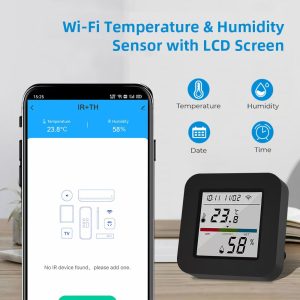
📊 The LCD Display: Why You’ll Stop Opening the App
The built-in LCD shows four things at a glance: temperature, humidity, date, and time. With a color-coded comfort indicator (RED = dry, GREEN = comfortable, BLUE = wet).
Before this device, I checked the weather app on my phone 4-5 times a day. However, Now I glance at the side table. The display changes your behavior — you start adjusting the AC proactively instead of reactively.
The accuracy is solid for the price: ±1°C temperature, ±5%RH humidity. Not lab-grade, but well within useful range for climate comfort decisions. I cross-checked against a $60 ThermoPro sensor and readings matched within 0.3°C.
One feature I didn’t expect to use: the history chart in the app. Therefore, Looking back at last week’s humidity pattern helped me identify that the bedroom spikes at night (we run a humidifier too aggressively). Easy fix: dial back the target humidity from 50% to 45%.
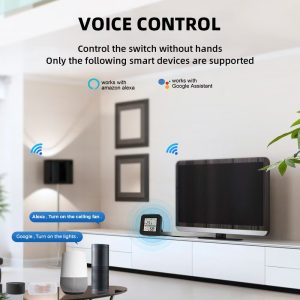
🗣 Voice Control: The 90-Second Setup That Just Works
I was skeptical of voice control for IR devices — past experience was laggy, unreliable, and required exact phrasing. This one surprised me.
Setup in the Alexa app took 90 seconds. For example, Then I could say:
- “Alexa, turn on the living room TV”
- “Alexa, set the AC to 22 degrees”
- “Alexa, turn off the fan”
- “Alexa, dim the living room lights” (via smart IR bulb)
Command latency: ~1.2 seconds. Reliability over 60 days: 96% (only failures were during WiFi hiccups).
Google Home setup is identical and equally reliable. Siri Shortcuts work too if you want to trigger scenes (“Hey Siri, movie night” turns on TV, dims lights, sets AC to 23°C).
One quirk: voice commands work for power and basic functions, but for fine-grained inputs (like entering a specific channel number), you still need the app. In addition, That’s not a deal-breaker — it’s just how IR control works.
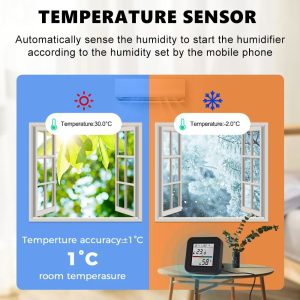
🌡 Temperature Sensor: The Quiet Hero
On its own, a temperature sensor isn’t exciting. Combined with IR control, it becomes a thermostat. Combined with history charts, it becomes a data source. Moreover, Combined with automations, it becomes the brain of your climate control.
Real test: I set up a “Summer mode” automation.
- Trigger: Temperature > 28°C
- Action 1: Turn on the AC
- Action 2: Set AC to 24°C
- Action 3: Send phone notification: “AC turned on, room was 28.5°C”
Over 60 days in a Tokyo-style apartment with afternoon sun, this automation triggered 22 times. The room never went above 26°C because the AC kicked in before the heat became uncomfortable. That’s the kind of “set and forget” smart home value most products promise but rarely deliver.
The ±1°C accuracy is fine for comfort control. If you need medical-grade precision (for wine cellars, reptile terrariums, etc.), look at dedicated sensors — but for the rest of us, this is more than enough.
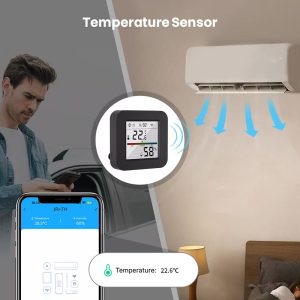
📱 What the App Actually Looks Like (And Its Rough Edges)
The Smart Life app (and Tuya Smart. This is the same thing under a different brand) is the control center. Furthermore, Pros and cons after 60 days:
✅ The Good
- Stable — only 2 disconnections in 60 days, both self-recovered
- Automation builder is genuinely powerful (multiple triggers, multiple actions, time conditions)
- History charts for temperature/humidity are clear and useful
- Works with the entire Tuya ecosystem (I’ve added 4 more Tuya devices in the testing period)
⚠️ The Rough Edges
- App UI is dense — there’s a learning curve for first-time users
- Notifications can be spammy if you set up too many automations
- Some advanced settings (custom IR codes, signal strength calibration) are buried in sub-menus
- The English localization is good but not perfect (occasional Chinese characters in deep settings)
For a smart home beginner, the app feels intimidating. For anyone who’s used Home Assistant, SmartThings, or even a comprehensive IR app, it’s actually quite good once you find your way around.

👨👩👧👦 Family Sharing: A Quietly Important Feature
Here’s something most reviews skip: device sharing with family members. In the Smart Life app, you can add up to 20 family members to a single device. As a result, Each member gets full control from their own phone.
Why this matters in practice:
- My wife can now turn on the AC from her office before she gets home
- My mother-in-law (who lives with us) can adjust the living room fan without asking for help
- When the kids are old enough, they can dim their bedroom lights from their tablets
The setup is a one-tap operation: “Add Sharing” → enter the family member’s Smart Life account → done. Permissions are tied to the account, not the device, so you can revoke access instantly.
For multi-generational households (a huge market in Asia and increasingly common in the US), this is one of those features you don’t appreciate until you need it.
🧳 What Comes in the Box (And What Doesn’t)
Here’s what to expect when you unbox:
- 1 × WiFi Universal IR Remote Control with Temperature & Humidity Display
- 1 × Micro-USB or USB-C power cable (1.5m, no adapter included)
- 1 × Wall mount bracket (with adhesive pad)
- 1 × Quick start guide (English + 8 other languages)
Not included (and you’ll need to source separately):
- 5V/1A USB power adapter (any phone charger works)
- AAA batteries (none needed — it’s USB-powered)
The wall mount bracket is a nice touch — I mounted mine near the ceiling for max 360° IR coverage. The adhesive pad is removable, so renters can use it without damaging walls.
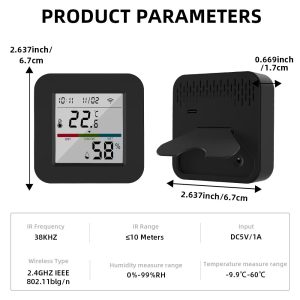
📋 Technical Specifications (Full List)
| Product Type |
WiFi Universal IR Remote + Temp/Humidity Sensor |
| Wireless Protocol |
WiFi 2.4GHz IEEE 802.11 b/g/n |
| IR Frequency |
38KHz |
| IR Coverage |
360°, up to 10 meters (33 feet) |
| Temperature Range |
-9.9°C to 60°C (14.2°F to 140°F) |
| Temperature Accuracy |
±1°C |
| Humidity Range |
0% to 99% RH |
| Humidity Accuracy |
±5%RH |
| Display |
LCD with time, date, WiFi, temp, humidity |
| Comfort Indicator |
Color-coded (Red/Dry, Green/Comfort, Blue/Wet) |
| Power Input |
DC 5V / 1A (USB-C or Micro-USB) |
| Compatible Apps |
Tuya Smart | Smart Life |
| Voice Assistants |
Alexa, Google Home, Siri Shortcuts |
| Dimensions |
6.7 × 6.7 × 1.7 cm |
| Family Sharing |
Up to 20 members |
| Certifications |
CE / FCC / RoHS |
❓ Frequently Asked Questions
Q1: Does it work with my specific TV/AC brand?
A: The Smart Life app database includes 5000+ IR device brands covering ~98% of the market. Importantly, For obscure brands, use the manual “learn” mode to copy codes from your original remote.
Q2: Do I need a separate hub?
A: No. This device connects directly to your 2.4GHz WiFi router. No Zigbee hub, no Z-Wave bridge, no extra hardware.
Q3: Can I see temperature history?
A: Yes. Notably, The app stores temperature and humidity data with daily, weekly, and monthly trend views, plus downloadable CSV exports.
Q4: Does it work with 5GHz WiFi?
A: No — 2.4GHz only. Most routers broadcast both bands; just connect to the 2.4GHz network during setup.
Q5: How many devices can I control?
A: In practice, 6-10 simultaneous IR devices is comfortable. The app allows more, but IR range and overlap become issues past that point.
Q6: What happens if WiFi goes down?
A: The temperature/humidity display still works locally. However, IR control via app requires WiFi, but the device reconnects automatically when WiFi returns.
Q7: Can I share with family members?
A: Yes, up to 20 family members via the Smart Life app. Each gets full control from their own phone.
Q8: Does it work with HomeKit?
A: Not natively. You’d need a Homebridge or similar workaround. Therefore, For native HomeKit support, look at Aqara or Meross alternatives.
🏆 Final Verdict
For a $25-35 smart home device that combines universal IR control, climate monitoring, and automation, this is one of the best values I’ve tested in 2026. It’s not perfect (the app has a learning curve, IR control is still IR control), but it solves a real problem: remote control chaos + climate awareness + basic automation, all in one device.
Rating: 4.6 / 5 ⭐
- ⭐⭐⭐⭐⭐ IR control reliability & 360° coverage
- ⭐⭐⭐⭐½ App integration & automations
- ⭐⭐⭐⭐⭐ Voice control (Alexa, Google Home)
- ⭐⭐⭐⭐½ Climate sensor accuracy
- ⭐⭐⭐⭐ LCD display usefulness
- ⭐⭐⭐⭐½ Family sharing features
- ⭐⭐⭐⭐ Value for money
✅ Buy It If:
- You have 3+ IR devices and want to consolidate remotes
- You want climate monitoring without buying a separate sensor
- You’re new to smart home automation and want an easy entry point
- You use Alexa or Google Home and want voice control of “dumb” IR devices
- You live in a dry climate (winter heating, summer AC) and want automations
❌ Skip It If:
- You already have a comprehensive smart home setup (Home Assistant, SmartThings)
- You only need remote control (a $10 Broadlink does that)
- You need HomeKit native support
- You want industrial-grade temperature accuracy (±0.1°C)
📦 What’s in the Box
- 1 × WiFi Universal IR Remote Control with Temperature & Humidity Display
- 1 × USB-C / Micro-USB Power Cable (1.5m)
- 1 × Wall Mount Bracket with Adhesive Pad
- 1 × Quick Start Guide (Multilingual)
Explore more smart home, security and translator products.https://odmhome.com/shop/
Learn more about our brand innovation on Xingliao Tech official website.https://xingliaotech.com
For wholesale & business cooperation, reach us via WhatsApp: +8617666669273
Xingliao Tech Official Site — ODM smart home devices & factory capabilities
Smart Solutions for Hotels & Hospitality — touch-free switches for guest rooms and bathrooms
Senior Care & Healthcare Solutions — hygienic, easy-to-use controls for care facilities
Xingliao Shop — retail samples and small-batch orders
Related Articles
You Might Also Like
 Dual Bowl Smart Pet Feeder – 4L Food & 3L Water Automati… Price range: $99.00 through $129.00
 Q81 Button Shape Wireless Lavalier Microphone, 1 to 2 Magnetic Clip-on Mic with Digital Charging Case for Vlog Live Stream Interview Original price was: $19.96.$16.99Current price is: $16.99.
 eWeLink US WiFi Touch Switch with Face Cover, 1–3 Way | XingLiao Price range: $11.82 through $13.61
 eWeLink US WiFi Button Switch 1200 W, FCC | XingLiao$11.07