Posted on — Leave a comment

Touch‑Free Hand‑Wave Wall Switch: Hygienic Smart Lighting for Hotels, Healthcare & Modern Homes

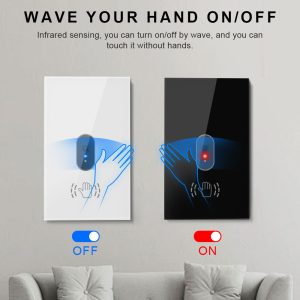
TUYA Smart Wave Sensor Light Switch, Touch‑Free Infrared Wall Switch - view 5
TUYA Smart Wave Sensor Light Switch, Touch‑Free Infrared Wall Switch - view 1
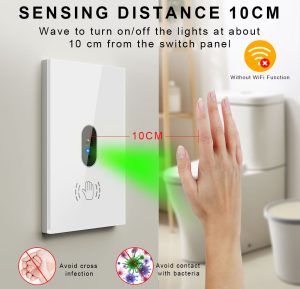
Demonstration of hand‑wave induction for Tuya infrared wall switch, no touch needed to turn lights on and off.

Touch‑Free Hand‑Wave Wall Switch: Hygienic Infrared Sensing Solution for Homes, Hotels and Healthcare Facilities

When we talk about home and commercial lighting upgrades, most people focus on brightness, energy saving or Smart APP control. Yet one easily overlooked detail is the light switch itself. Traditional touch or push‑button wall switches are touched dozens or hundreds of times every day. Fingerprints, grease and bacteria accumulate on the surface, especially in high‑traffic public spaces, hotel bathrooms and nursing care rooms. Regular cleaning takes extra labour, and cross‑contamination risk cannot be fully avoided.

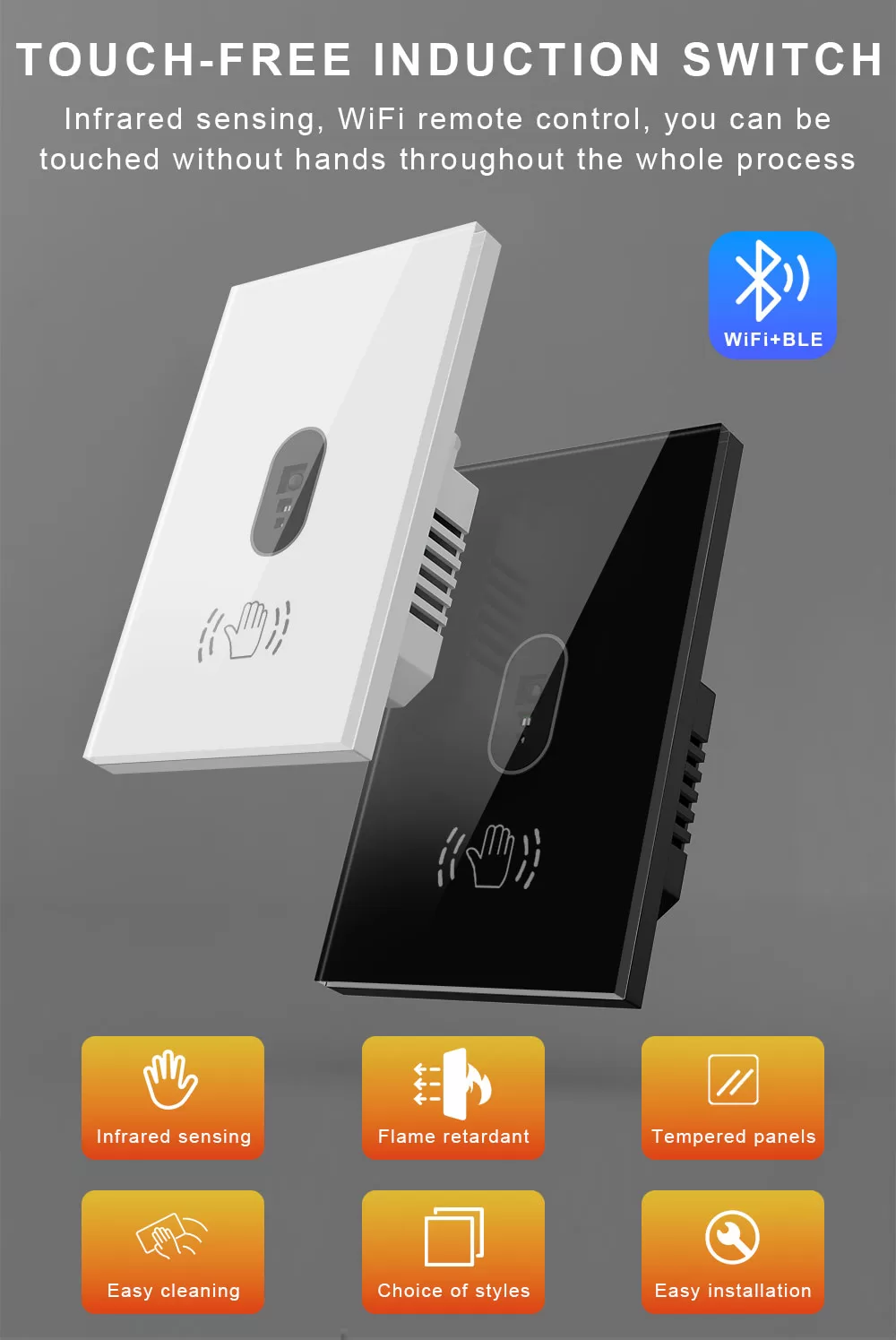
Our infrared touch‑free hand‑wave wall switch is designed exactly for this pain point. Instead of pressing or touching the panel, you only need to wave your hand about 10 centimetres in front of the switch to complete light on and off operation. Zero physical contact greatly reduces germ transfer, bringing cleaner and safer lighting control for residential and commercial environments.

Two Versions To Fit Different Project Requirements

We provide two complete functional variants, both support single‑wire and neutral‑wire universal wiring, so they can adapt to old‑building renovation as well as new construction projects. No need to change the original wall circuit structure in most scenarios.

Tuya WiFi + Bluetooth Smart Version

This is the full‑feature smart model built on Tuya ecosystem. Equipped with WiFi and Bluetooth dual‑mode connection, it works perfectly with Tuya Smart and Smart Life APP.

Home users can realise remote light control anywhere, set timed on/off, countdown lighting and cyclic scene modes. For example, you can automatically turn on corridor lights at dusk or turn off bathroom lights after a fixed delay. It also supports voice control via Amazon Alexa, Google Home and Yandex Alice. Hands‑free voice command plus hand‑wave sensing creates a fully contact‑free smart lighting experience.

This version is widely chosen for Tuya WiFi + Bluetooth smart version, smart home renovation, high‑end boutique hotels and intelligent apartment projects.

Standard Non‑WiFi Basic Version

If you do not need remote APP or voice functions but focus purely on hygienic non‑contact control, the non‑WiFi version is your cost‑effective choice. It keeps the core infrared hand‑wave sensing function, with stable and sensitive response. Without smart module, the cost is lower, which is very suitable for large‑quantity hotel retrofits, nursing institutions, public restrooms and budget renovation projects. All wiring advantages are reserved: single‑wire / neutral‑wire compatible, wide‑voltage 100‑240V input.
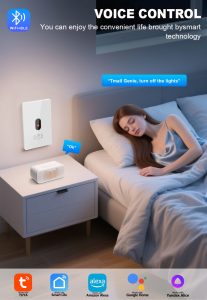
Tuya smart wave switch function graphic, WiFi Bluetooth APP control non‑contact wall light switch feature
Feature introduction graphic for Tuya infrared sensor wall switch, support Tuya App remote control, WiFi and Bluetooth connectivity.

Hardware & Installation Advantages

Many non‑contact switches on the market are only compatible with neutral‑wire circuits, bringing huge trouble for old‑house reconstruction. Our hand‑wave switch solves this difficulty. Both versions support single‑fire and zero‑fire universal installation.

  • Input Voltage: 100‑240V, 50/60Hz, maximum load 400W, compatible with most LED lamps and household lighting sources.
  • Front panel adopts high‑hardness tempered glass, scratch‑resistant, anti‑fingerprint, easy to wipe and disinfect.
  • Back shell uses flame‑retardant PC material, with overload and overheat protection for daily safety.
  • Standard EU wall‑mount size, fits conventional EU junction boxes, convenient for electricians to install.
  • Two classic colour options: matte black and milky white glass panel, match modern minimalist, Nordic and hotel interior decoration styles.

touch free hand waveTypical Application Scenarios

🏨 Hotel & Hospitality Industry
Guest room bathrooms, public toilets, corridor lighting. Contact‑free operation reduces cleaning workload for housekeeping staff and improves guest experience.

🏥 Senior Care & Medical Institutions
Nursing rooms, rehabilitation wards. Elderly people with limited mobility can control lights without touching panels; meanwhile it lowers bacterial cross‑transmission risk.

🏠 Residential Renovation
Kitchens, bathrooms, children’s rooms. Hands stained with water, oil or detergent do not need to dirty the switch panel.

🏢 Commercial Public Spaces
Office restrooms, shared apartments, serviced accommodation.

About Sourcing & Order Options

As an ODM smart home hardware manufacturer, Xingliao Tech supports multiple cooperation modes.

  • Retail samples: you can order small quantity samples for project testing.
  • Bulk wholesale: competitive price for hotel and engineering bulk orders.
  • ODM customisation: support panel surface, logo printing and function customisation according to project demands.

Whether you are an end‑user upgrading your house, an interior designer, hotel purchaser or hardware distributor, you can select the WiFi smart version or basic non‑WiFi hand‑wave switch according to your actual needs.

👉 View our touch‑free hand‑wave wall switch product page

If you have project‑related questions about wiring, bulk quotation or custom requirements, feel free to contact our sales team.

However, Xingliao Tech Official Site — ODM smart home devices & factory production capacity
ODM Home Custom Solutions — custom smart hardware & project OEM‑ODM service
Smart Solutions for Hotels & Hospitality — touch‑free switches for guest rooms and bathrooms
Senior Care & Healthcare Solutions — hygienic, user‑friendly controls for care facilities
Xingliao Shop — retail samples and small‑batch orders

Related Articles

You Might Also Like

Related guides

Frequently Asked Questions

Is Touch Free Hand Wave worth buying?

Based on the breakdown in this article, Touch Free Hand Wave offers a solid mix of features and value. If your main goal matches the key benefits described above, it is a practical choice for everyday use.

How do I choose the right touch free hand wave for my needs?

Start with your core use case, then compare battery life, compatibility, and build quality as covered above. Choosing the right touch free hand wave comes down to matching specs with how you actually use it. Smart Home Beginner’s Guide 2026: 8 Practical Devices Worth Starting With

Does touch free hand wave require a companion app?

Most devices of this type pair with a free companion app for setup and firmware updates. A few advanced features may sit behind a paid plan, so check the official specs page before buying.
Posted on — Leave a comment

Zigbee Smart Light Sensor: The Tiny Device That Automates Your Entire Home

zigbee smart lightZigbee light sensor tiny” width=”300″ height=”300″>

However, Most Smart homes are still pretty dumb about one thing: Light itself. They use timers that fire at 7 PM sharp, even on a stormy winter afternoon when it’s already pitch dark at 4. They forget to close the curtains when the afternoon sun starts bleaching your sofa. They turn on hallway lights at midnight when you’re trying to sleep. They turn off the bedroom lights at 6 AM when you actually need them most. In short, Zigbee

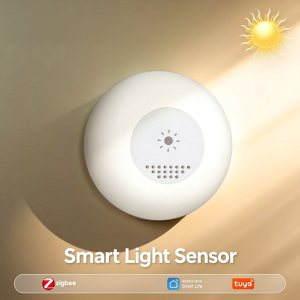
Therefore, The Tuya Zigbee Smart Light Sensor fixes all of that. This tiny, battery-powered disc quietly measures the actual ambient light in your room 24/7, then tells your smart home exactly what to do about it. Curtains open when the sun rises. Lights fade on at dusk. Blinds close when the glare gets too intense. All without you touching a single switch, app, or voice command.

Moreover, It’s the missing sensor that turns a collection of smart devices into a home that genuinely thinks and at under $15, it’s the cheapest upgrade with the biggest impact you’ll make to your smart home in 2025.

What Is a Smart Light Sensor, and Why Do You Need One?

In addition, A smart light sensor is a small wireless device that measures ambient light intensity (in Lux) and reports it to your smart home hub in real time. Once connected, it becomes the trigger for automation rules that respond to actual daylight conditions — not the clock on your wall.

For example, Without a light sensor, your smart home is blind to its most important environmental input. With one, you unlock automations that feel almost magical:

  • 🌅 Wake up to natural light — curtains open gradually as the sun rises, instead of a jarring alarm
  • 🌙 Evening ambiance — warm lights fade on as daylight fades, perfectly timed every day
  • ☀️ Sun protection — motorized blinds close when direct sunlight threatens to fade furniture or overheat a room
  • 💡 Energy savings — lights only turn on when actually needed, not by the schedule
  • 👁️ Eye protection — desk lamps adjust brightness based on ambient conditions, reducing eye strain
  • 🌱 Plant care — grow lights activate when natural light drops below plant-specific thresholds

Consequently, It’s the kind of device you install and forget — then wonder how you ever lived without it.

Meet the Tuya Zigbee Smart Light Sensor

This ultra-compact (50mm × 17mm) white disc uses a high-precision photodiode to continuously measure ambient light levels from 0 to 1000 Lux — the full range from total darkness to direct sunlight. It runs on a single CR2032 battery for up to 365 days, and connects to your smart home via the Zigbee 3.0 protocol — the most widely adopted standard for reliable, low-power smart home devices.

zigbee light sensor tiny

Key specifications at a glance:

  • ✅ 0-1000 Lux detection range — covers every lighting condition you’ll encounter
  • ✅ Zigbee 3.0 protocol — reliable, low-power mesh networking
  • ✅ 365-day battery life — single CR2032 coin cell (included)
  • ✅ Low battery alert — push notification when replacement needed
  • ✅ Compact design — 50mm diameter × 17mm thin, fits anywhere
  • ✅ 3M adhesive mount — no tools, no drilling, no wiring
  • ✅ Smart Life & Tuya app — works with the world’s largest smart home ecosystem

Real-World Scenario 1: Automated Curtain Control

Picture this. It’s 6:30 AM in summer. The sun is already up. Your curtains are still closed from last night. You don’t want to wake up to a jarring alarm — you want to wake up to soft, natural sunlight gently filling your bedroom.

Without a light sensor: Your curtains stay closed until 7 AM when the timer fires. You wake up in the dark, fumble for your phone, and manually open them.

With this Zigbee light sensor:

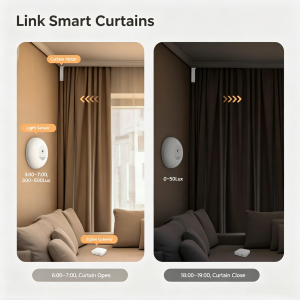
  1. 🌅 At 6:00 AM, the sensor detects 300-500 Lux (early morning light)
  2. 📱 It sends a signal to your Zigbee curtain motor
  3. 🪟 Curtains open gradually over 60 seconds
  4. ☀️ Natural sunlight fills the room
  5. 😌 You wake up naturally, feeling rested

And in the evening, the reverse happens automatically:

  1. 🌙 At 18:00, the sensor detects 0-50 Lux (dusk)
  2. 📱 Signal goes to your curtain motor
  3. 🪟 Curtains close for privacy and thermal insulation
  4. 🏠 Your home is secure for the night

You never touched a switch. The light in your home made the decision for you — and it was right every single time.

Real-World Scenario 2: Smart Bulb That Knows When to Turn On

You’re reading a book on the sofa at 7:30 PM. The room is getting dim, but you’re comfortable and don’t want to get up. The reading lamp is across the room.

zigbee light sensor tiny

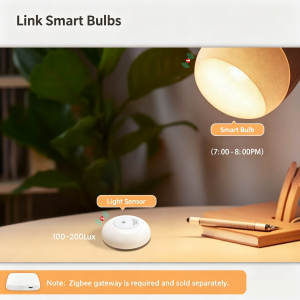
With this light sensor + smart bulb setup:

  • 💡 The sensor detects when ambient light drops below your set threshold (e.g., 150 Lux)
  • 📱 It signals your smart bulb to turn on at 70% warm brightness
  • 📖 Perfect reading light appears without you moving
  • ⏱️ After 30 minutes of no further changes, the bulb can auto-dim or stay on until you say otherwise

Conversely, when morning comes and the sun brightens the room, the same sensor signals the bulb to turn off. No more lights left on all day because nobody remembered to flip the switch.

Popular time-based automations for smart bulbs:

  • 🌙 19:00-23:00 — Living room lamps fade on to 60% warm white when light drops below 100 Lux
  • 💻 9:00-17:00 — Desk lamp turns on when ambient light is below 200 Lux (cloudy days)
  • 🌅 5:00-7:00 — Bedroom lights gradually brighten to mimic sunrise (e.g., 50% → 100% over 30 minutes)
  • 🛌 22:00-6:00 — All lights dim to 10% for nighttime bathroom trips, preventing eye shock

Real-World Scenario 3: Eye Protection & Screen Comfort

If you work from home or spend hours in front of a screen, you’ve probably experienced eye strain from working in a dim room with a bright monitor. The contrast between your screen and ambient lighting is a major cause of fatigue, headaches, and long-term vision problems.

zigbee light sensor tiny

Real-World Scenario 3: Eye Protection & Screen Comfort

If you work from home or spend hours in front of a screen, you’ve probably experienced eye strain from working in a dim room with a bright monitor. The contrast between your screen and ambient lighting is a major cause of fatigue, headaches, and long-term vision problems.

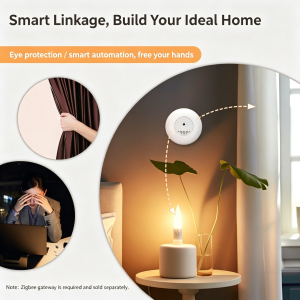
The fix: pair this light sensor with a smart desk lamp or smart bulb. Create a rule:

“When ambient light is below 300 Lux between 9 AM and 6 PM → set desk lamp to 80% brightness, color temperature 4500K (daylight white).”

Now your workspace lighting automatically matches the ambient conditions outside. On bright sunny days, the lamp dims because natural light is already enough. On dark winter days, it brightens to compensate. Your eyes stay comfortable all day, and you didn’t touch a single switch.

The image above shows a woman rubbing her eyes in front of a laptop — a scene that plays out in millions of home offices every day. The same scene with this sensor installed? No more squinting, no more headaches, no more 4 PM eye fatigue.

Eye protection is just one application. The same setup works for:

  • 👶 Kids’ homework area — desk lamp brightens automatically as evening approaches, preventing eye strain during study time
  • 🎨 Art and craft room — color-accurate task lighting that adjusts to natural daylight conditions
  • 📚 Reading nook — warm reading light that turns on only when needed, never wasting energy
  • 🖥️ Streaming setup — bias lighting behind monitors that adapts to room brightness for the perfect viewing experience

zigbee light sensor tiny

Real-World Scenario 4: Whole-Home Smart Lighting

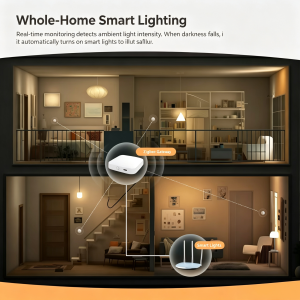
One sensor in the living room is great. But a multi-sensor setup across your home creates a truly intelligent lighting system that responds to the actual conditions in every room — not a one-size-fits-all schedule.

Here’s how a real whole-home setup works:

  • 📍 Living room sensor — triggers floor lamp and overhead lights at 100 Lux
  • 📍 Bedroom sensor — controls bedside lamps and reading lights at 80 Lux (more sensitive for evening reading)
  • 📍 Hallway sensor — activates dim night lights at 30 Lux (so you don’t trip at 2 AM)
  • 📍 Office sensor — manages desk lamp and overhead panel at 250 Lux (eye-protection threshold)
  • 📍 Staircase sensor — turns on step lights immediately when light drops, regardless of time

Each room’s threshold is tuned to its purpose. The system runs locally on your Zigbee gateway — no internet required, instant response, and completely reliable.

The result: your home’s lighting feels thoughtful and intentional, even though you haven’t touched a switch in months.

Scaling tips for whole-home setups:

  • 💰 Start small — install one sensor in the most-used room first (usually the living room), then expand
  • 🎚️ Tune thresholds per room — bedrooms are more sensitive than kitchens, hallways are most sensitive of all
  • 🔄 Use the light curve data — after 2 weeks, review historical data to optimize your threshold settings
  • 👨‍👩‍👧 Share with family — let everyone in the household suggest automations based on their daily routines

zigbee light sensor tiny

Real-Time Monitoring via Smart Life App

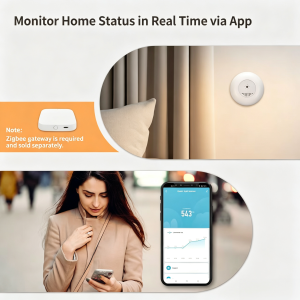
The Smart Life and Tuya Smart apps transform this tiny sensor into a window into your home’s lighting conditions — anywhere in the world.

The app provides:

  • 📊 Real-time Lux reading — see the exact ambient light level right now (e.g., 543 lx as shown in the screenshot)
  • 📈 Historical light curve — view how light levels changed over the past 24 hours, 7 days, or 30 days
  • ⏰ Event history — log of every threshold crossing with timestamps
  • ⚙️ Custom thresholds — set different Lux levels for “turn on” and “turn off” actions
  • 🔋 Battery status — know exactly when to replace the CR2032
  • 👨‍👩‍👧 Family sharing — multiple household members can monitor the data

The light curve visualization is particularly useful for understanding your home’s lighting patterns. You might discover that:

  • 🌅 Your living room gets direct sunlight from 10 AM to 2 PM (good for plants, bad for TV glare)
  • 🌧️ The bedroom only reaches 100 Lux on overcast days (need stronger artificial lighting)
  • 🌆 Sunset in your area happens around 18:30 in summer, 16:30 in winter (plan curtain schedules accordingly)

You can also manually trigger scenes from the app when needed. Spontaneous movie night? Tap “Movie Mode” in the app and the lights dim, curtains close, and the TV turns on. The light sensor is just one piece of a much larger smart home system that responds to your life.

Pro tip: Use the app’s Record tab to track automation triggers over time. If you notice a specific rule firing at unexpected moments, you can adjust the threshold in real time without re-pairing the device.

zigbee light sensor tiny

365-Day Battery Life with Low Battery Alert

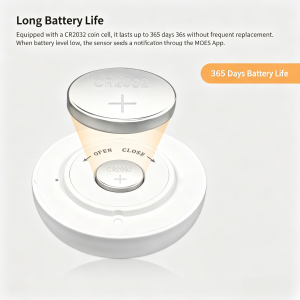
The sensor runs on a single CR2032 coin cell battery (pre-installed) and lasts up to 365 days under typical usage. The Zigbee 3.0 protocol keeps power consumption ultra-low, and the sensor only draws current during measurement updates — most of the time, it’s in deep sleep mode drawing microamps.

When the battery finally runs low, you receive a push notification in the Smart Life app — no more guessing when devices need new batteries. The app displays real-time battery percentage for every paired sensor, so you can plan replacements in advance.

Replacing the battery takes 10 seconds: twist open the cover, swap the CR2032, twist closed. No tools, no service calls, no downtime.

Place or Stick — Install Anywhere in Seconds

No wiring. No drilling. No electrician. The included 3M adhesive pad lets you mount this sensor on virtually any flat surface:

Posted on — Leave a comment

Zigbee PIR Motion Sensor: The Smart Home Upgrade for Security, Lighting & Pet Care

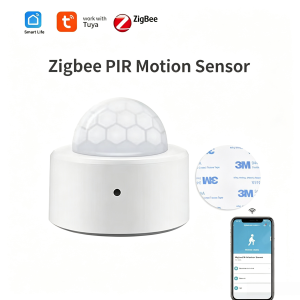
zigbee pir motionZigbee pir motion sensor” width=”300″ height=”300″>

However, From a stranger slipping in through the back door at 2 AM, to fumbling in the dark for a Light switch on the way to the bathroom, to wondering what your cat is up to while you’re at work — a single small Sensor can quietly handle all of these everyday worries. The Tuya Zigbee PIR Motion Sensor is one of the most versatile smart home devices you can add in 2025, and it costs less than a single takeout dinner.

Therefore, Compact, battery-powered, and equipped with a hemispherical Fresnel lens, this tiny white dome detects human (and animal) body heat with 120° wide-angle coverage. The moment motion is detected, it sends an instant push notification to your smartphone via the Smart Life or Tuya Smart app. More importantly, it can automatically trigger lights, sirens, cameras, and any other smart device in your home — turning a passive sensor into the brain of your home’s automation.

Moreover, In this guide, we’ll walk through everything this little device can do, how to set it up in under 2 minutes, and the most popular real-world scenarios where it makes life noticeably better.

Why Every Smart Home Needs a PIR Motion Sensor

In addition, Most “smart” homes only automate the obvious things: lights, plugs, thermostats. But the real magic happens when your home reacts to your presence. A PIR (Passive Infrared) motion sensor is the trigger that makes every other smart device smarter.

Here’s what this sensor catches in real time:

  • 🚨 Intruders at night — instant alert + automatic siren when armed
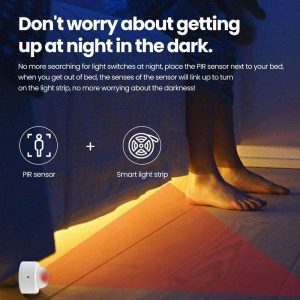
  • 🌙 You getting out of bed — bedroom lights or floor light strip turn on softly
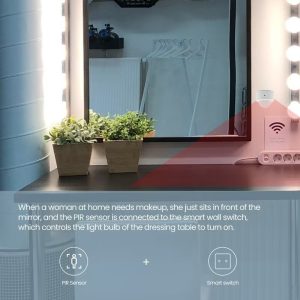
  • 💄 You sitting at the vanity — makeup mirror lights turn on automatically
  • 🐈 Your pet jumping on the sofa — smart camera starts recording
  • 📦 Someone walking past your front door — push notification with optional video

zigbee pir motion sensor

For example, The average cost of a basic smart motion sensor is now under $15, but the value it adds to a home security and automation system is easily ten times that. A single sensor, properly placed, can protect an entire room, automate a hallway, or watch over an elderly relative for years.

The Technology: Passive Infrared (PIR) Explained

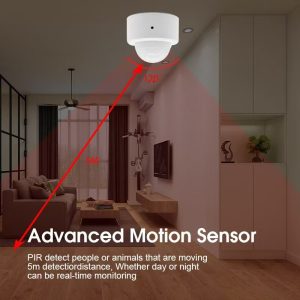
Consequently, This sensor uses passive infrared (PIR) technology — the same technology used in commercial security systems for decades. It works by detecting the infrared radiation (body heat) emitted by humans and animals.

  • 🔒 Privacy-friendly — no camera, no recording, no video surveillance concerns
  • ⚡ Ultra-low power — battery lasts 2+ years because PIR draws almost no current
  • 🎯 Highly accurate — detects body heat specifically, fewer false alarms than radar or ultrasonic
  • 📐 Wide coverage — 120° detection angle covers most rooms with a single sensor
  • 💡 Works in total darkness — infrared detection works at night, in closets, under beds

Hemispherical Lens — Wider Angle, Larger Coverage

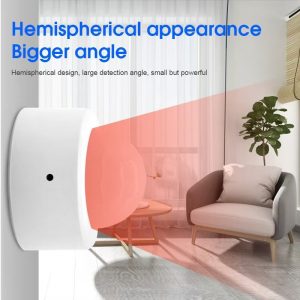
Unlike flat-faced PIR sensors, the hemispherical (half-ball) lens design enables much wider detection coverage. The Fresnel lens divides the detection area into multiple zones, dramatically increasing the field of view while maintaining accurate human detection.

zigbee pir motion sensor

Real-world coverage with a single sensor:

  • 🏠 Living rooms — single sensor covers the entire space
  • 🚪 Hallways & entryways — detects anyone entering or passing through
  • 🛏️ Bedrooms — can trigger gentle night lighting when you get up
  • 🛁 Bathrooms — automatic night light when you enter at night
  • 🏢 Offices — track occupancy and automate lighting/HVAC
  • 🏪 Retail stores — customer counting and after-hours security

For larger rooms, simply add multiple sensors — the Zigbee mesh network handles coordination seamlessly across your home.

Real-World Scenario 1: Bedroom Night Light Automation

You wake up at 2 AM. You’re half asleep. The room is pitch black. Fumbling for the light switch is uncomfortable, and turning on a bright overhead light ruins your sleep rhythm.

zigbee pir motion sensor

With this PIR sensor, here’s what happens instead:

  1. 🌙 You put your foot on the floor
  2. 👀 The PIR sensor (placed under the bed) detects your movement within 1 second
  3. 💡 The smart LED light strip under the bed automatically turns on at 10% warm brightness
  4. 🚶 You walk to the bathroom, lit by gentle warm light
  5. 😴 You get back into bed; after 90 seconds of no motion, the light strip turns off

No more stumbling. No more blinding lights. No more disturbing your partner. The sensor, the strip, and the app handle it all automatically.

Real-World Scenario 2: Vanity Mirror Light Automation

If you’ve ever sat in front of a makeup mirror in a dimly-lit room, you know the frustration of bad lighting. With this PIR sensor, your mirror lights can turn on automatically the moment you sit down.

zigbee pir motion sensor

Setup takes 60 seconds:

  • 📍 Stick the PIR sensor under the dressing table or beside the mirror
  • 💡 Pair your smart wall switch with the sensor in the Smart Life app
  • ⚙️ Create a one-tap automation: “When motion detected → turn on dressing table light”
  • ✅ Done. Every time you sit down, the light turns on. Every time you leave, it turns off after 60 seconds.

It’s like having a personal lighting assistant — and it works for the whole family.

Real-World Scenario 3: Pet Monitoring with Smart Camera

Ever wonder what your cat or dog does while you’re at work? Pair the PIR sensor with a Tuya-compatible smart camera, and you’ll get an instant video clip the moment your pet enters the monitored area.

zigbee pir motion sensor

Real-World Scenario 3: Pet Monitoring with Smart Camera

Ever wonder what your cat or dog does while you’re at work? Pair the PIR sensor with a Tuya-compatible smart camera, and you’ll get an instant video clip the moment your pet enters the monitored area.

Here’s how it works:

  1. 📍 Place the PIR sensor near your pet’s favorite spot (couch, food bowl, litter box)
  2. 📹 Pair your smart camera with the sensor in the same Smart Life app
  3. ⚙️ Set automation: “When motion detected → start camera recording + send push notification”
  4. 📱 You receive a 10-second video clip on your phone every time your pet moves

It’s not just for fun — pet monitoring with motion sensors also helps catch early signs of illness. If your normally active dog stops moving for hours, you’ll know something is wrong. Conversely, if your cat is suddenly bouncing off the walls at 3 AM, you can see exactly what mischief they’re getting into.

Bonus: The same setup works for baby monitoring. Place a PIR sensor in the nursery, pair it with a smart camera, and you’ll know the moment your little one starts moving — without constantly watching a video feed.

zigbee pir motion sensor

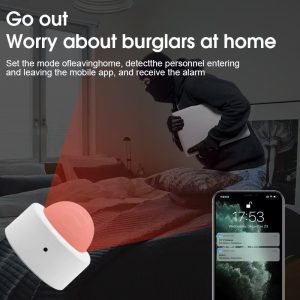
Real-World Scenario 4: Home Security Against Burglars

Worrying about home break-ins is exhausting. With this PIR sensor and a Zigbee siren, you can set up a complete security system in under 10 minutes.

Set up an “Away” mode in the Smart Life app:

  • 🏠 Step 1: Place PIR sensors at entry points (front door, back door, windows)
  • 📱 Step 2: Enable “Away” mode in the app when you leave home
  • 🚨 Step 3: When motion is detected, the Zigbee siren sounds at 100+ dB
  • 📞 Step 4: You receive an instant push notification with a map of which sensor triggered
  • 📹 Step 5: Optional — start a smart camera recording for visual evidence

Compare this to a traditional PIR alarm that just beeps locally: the burglar smashes it and goes on with the crime. With a smart PIR + siren + camera setup, you and your neighbors know about the intrusion in real time.

The push notification includes the exact sensor name (e.g., “Living Room PIR Motion Detection”) and the precise timestamp (e.g., “17:31”). If you have multiple sensors around the home, you’ll know exactly which entry point the intruder is using — critical information for both you and the police.

Armed mode flexibility:

  • 🏠 Home mode — only perimeter sensors (windows, doors) trigger the alarm; indoor sensors remain inactive so you can move freely
  • 🚪 Away mode — all sensors active; the system arms in full
  • 🌙 Night mode — only downstairs sensors active while you sleep upstairs

zigbee pir motion sensor

Zigbee 3.0 + Smart Life App — The Complete Ecosystem

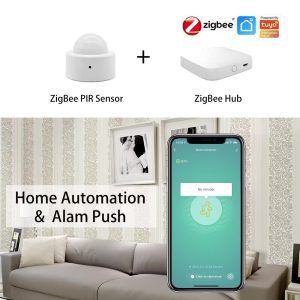
This sensor uses the Zigbee 3.0 protocol, which is the most widely adopted smart home standard in the world. Pair it natively with the Tuya Smart and Smart Life apps — two of the largest smart home ecosystems on the planet, supporting over 1 million compatible devices.

The Zigbee Hub (gateway) shown in the product image is the brain that connects your PIR sensor to your home network and the Smart Life app. It’s a one-time purchase that opens up your entire smart home.

Why Zigbee is the right choice:

  • ✅ Low power — battery lasts 2+ years vs. 2-3 months for Wi-Fi sensors
  • ✅ Mesh networking — each Zigbee device extends the network range
  • ✅ Reliable — doesn’t depend on Wi-Fi bandwidth or router performance
  • ✅ Massive ecosystem — works with thousands of Zigbee 3.0 devices from hundreds of brands
  • ✅ Local automation — automations run on the gateway, even if internet is down

The Smart Life app shows you real-time sensor status at a glance. The home screen displays the current battery level (e.g., 80% as shown in the screenshot), the latest motion event (“No intruder” or “Motion detected”), and a full event history with timestamps. Tap “Click to view more” to see every motion event in chronological order — perfect for reviewing when the kids got home, when the dog walker arrived, or when suspicious activity happened.

Note: A Tuya-compatible Zigbee gateway is required (sold separately). The sensor does not work as a standalone Wi-Fi or Bluetooth device.

zigbee pir motion sensor

Smart App Control — Know What’s Happening, Anywhere

The single biggest advantage of a smart PIR sensor is remote monitoring. You no longer have to wonder “did I leave the window open?” or “is the dog okay?” — the app tells you in real time.

Through the Smart Life or Tuya Smart app, you can:

  • 📊 View real-time status — see if motion was detected in the last 5 minutes
  • 📜 Check event history — every motion event logged with a timestamp
  • 👨‍👩‍👧 Share with family — multiple household members get alerts
  • 🤖 Build automations — trigger sirens, lights, cameras, plugs, blinds, etc.
  • 🔋 Monitor battery — get low-battery alerts before the sensor dies
  • 📱 Receive push notifications — instant alerts the moment motion is detected

The app’s HISTORY tab lets you scroll through every motion event with timestamps. The RECORD tab shows the actual video clip captured by your paired smart camera (if you have one). The BATTERY tab displays the current battery percentage so you know when it’s time to replace the cell — usually every 2+ years.

Real-world example: you’re on a business trip in another country. At 3 AM local time, you receive a push notification: “Stranger Passing By”. You open the app, see the event happened in your living room 2 minutes ago, tap into the RECORD tab to see a video clip, and immediately call your neighbor to check on the house. The entire response — notification, review, action — takes under 60 seconds. Compare that to a traditional alarm system that just beeps into an empty room.

It’s like having a security guard in every room, working 24/7, costing pennies per month.

You Might Also Like
Frequently Asked Questions

Is Zigbee Pir Motion Sensor worth buying?

Based on the breakdown in this article, Zigbee Pir Motion Sensor offers a solid mix of features and value. If your main goal matches the key benefits described above, it is a practical choice for everyday use.

How do I choose the right zigbee pir motion sensor for my needs?

Start with your core use case, then compare battery life, compatibility, and build quality as covered above. Choosing the right zigbee pir motion sensor comes down to matching specs with how you actually use it. Smart Home Sensors Explained: Window Camera and Rain Sensor for a Home That Reacts

Does zigbee pir motion sensor require a companion app?

Most devices of this type pair with a free companion app for setup and firmware updates. A few advanced features may sit behind a paid plan, so check the official specs page before buying. Tuya WiFi IR Remote Review: Universal Control Meets Climate Intelligence
Related Articles
Posted on — Leave a comment

Smart Zigbee Smoke Alarm: The Connected Fire Safety Device Every Smart Home Needs

smart zigbee smokeZigbee smoke alarm connected” width=”300″ height=”300″>

However, Every year, house fires claim thousands of lives and cause billions of dollars in property damage. Most of these tragedies are preventable — if only someone had known about the smoke in time. Traditional smoke alarms beep loudly, but only if you’re home to hear them. If a fire starts while you’re at work, on vacation, or asleep in a different room, that local alarm does nothing to save your home.

Therefore, This is exactly where a Smart Zigbee smoke alarm changes the game. Compact, wireless, and battery-powered, this connected smoke detector acts as an always-on guardian for your home — instantly alerting you and your family the moment smoke is detected, no matter where you are in the world.

Moreover, Below, we’ll break down why this small device is one of the Smartest fire safety upgrades you can make to your smart home in 2025, and what features to look for before you buy.

Why Every Home Needs a Smart Smoke Alarm

In addition, Most homeowners only think about fire safety after an incident happens. By then, the damage is done, the insurance claim is filed, and the “what ifs” pile up.

For example, A smart smoke alarm catches the very first sign of danger. It detects smoke particles in the air long before flames are visible — the kind of early warning that can mean the difference between a minor scare and a total loss.

zigbee smoke alarm connected

Consequently, These are the everyday situations where a connected smoke alarm makes a difference:

  • 🔥 Kitchen fires — catch burning food before it spreads
  • ⚡ Electrical fires — detect overheating wires behind walls
  • 🕯️ Candle accidents — alert before curtains catch fire
  • 🔌 Heater malfunctions — early warning for space heaters and furnaces
  • 🚬 Smoldering materials — detect slow-burning threats before flames

They all share one trait: you don’t notice them until it’s already too late. A smart smoke alarm with real-time push notifications turns silent threats into instant alerts on your phone — giving you precious minutes to act.

Standalone Smoke Alarm — Independent Protection

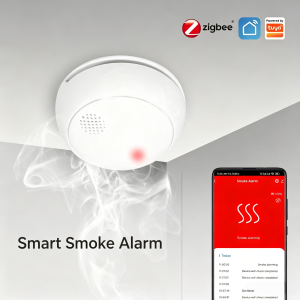
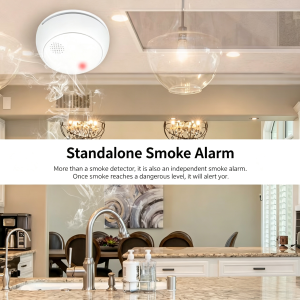
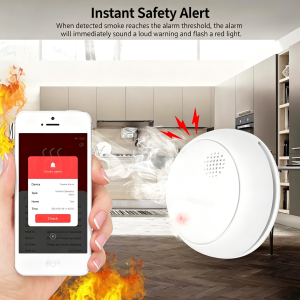
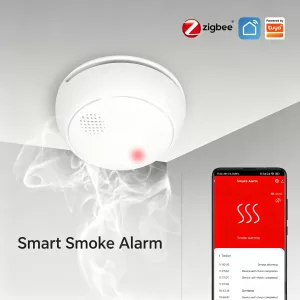
More than just a smoke detector, this device is also an independent smoke alarm. Once smoke reaches a dangerous level, it will alert you on its own — even without being connected to the app. The local 85dB alarm sounds immediately, and the red LED indicator flashes brightly, providing critical protection even if the Wi-Fi network is down or the smart home system is offline.

This dual-mode design is essential for true fire safety. Smart features are great, but they should enhance — not replace — the fundamental ability of the alarm to work on its own.

Remote Monitoring, Makes Your Home Smarter

zigbee smoke alarm connected

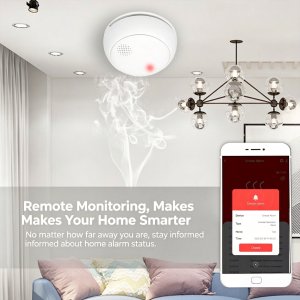
The single most important feature of any smart smoke alarm is speed of notification. When smoke is detected, this Zigbee Sensor sends a real-time push notification through the Smart Life or Tuya app within seconds — no matter where you are in the world.

Picture this scenario: you’re at the office, 30 minutes from home. Your phone buzzes with:

“Smoke Alarm: Smoke detected in Living Room. Please check immediately.”

You open the live camera feed from your smart security camera. See smoke coming from the kitchen. Call 911 remotely. Unlock the smart door lock for firefighters. All while rushing home. Precious minutes saved. Potential disaster averted.

Without a smart alarm, you wouldn’t know about the fire until a neighbor called — or until you walked into a burned-out home.

85dB Alarm Sound — Loud Enough to Wake the Dead

zigbee smoke alarm connected

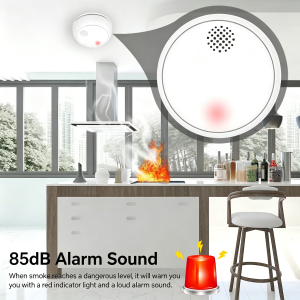
When seconds count, you need an alarm that demands attention. This smart smoke detector emits a piercing 85 decibel alarm — roughly equivalent to a passing motorcycle or a busy freight train at close range.

At 85dB, this alarm is:

  • 🔊 Loud enough to wake deep sleepers — even through closed bedroom doors
  • 📢 Audible throughout an average home — covers 1,000+ square feet
  • ⏱️ Instantly recognizable — the classic three-pulse smoke alarm pattern
  • 🔄 Continuous until smoke clears — doesn’t stop until the danger passes

The alarm pattern follows international standards: three beeps, pause, three beeps — universally understood as “fire emergency.”

Instant Safety Alert — Real-Time Fire Notification

zigbee smoke alarm connected

The dual-alert system combines the loud 85dB audible siren with a bright flashing red LED — ensuring that no matter the situation, the alarm captures attention. The visual alert is especially valuable for:

  • 👂 Hearing-impaired individuals who may not hear the siren
  • 🔇 Heavy sleepers who might sleep through the sound
  • 🌙 Nighttime emergencies when the flashing red light is most visible
  • 🔊 Noisy environments where audio might be drowned out

The instant both alerts activate, your phone receives a push notification — creating a triple-layer warning system: audible, visual, and digital.

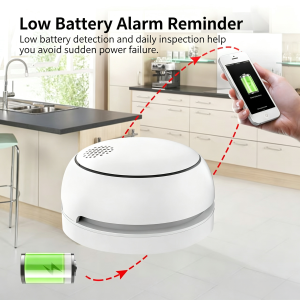
Low Battery Alarm Reminder

zigbee smoke alarm connected

No one wants a smoke alarm that dies in the middle of the night. This smart detector includes low battery detection and daily inspection features that send advance notifications to your phone — typically weeks before the battery actually depletes.

How is that possible? Three engineering choices make the difference:

  • 🔋 Zigbee 3.0 protocol — far more power-efficient than Wi-Fi
  • 😴 Deep sleep mode — the sensor only actively monitors when needed
  • 📡 Short-burst transmissions — status signals sent in milliseconds

The Smart Life and Tuya apps display a real-time battery level indicator for every paired alarm. When the batt

Stay Ahead of Fire Risks — Before It’s Too Late

House fires can start silently and spread fast. Traditional smoke alarms only alert people who are home to hear them. This Tuya Zigbee Smart Smoke Alarm changes everything — it sends a real-time alert to your phone the moment smoke is detected, no matter where you are in the world.

Photoelectric Smoke Sensing Technology

zigbee smoke alarm connected

Unlike basic ionization detectors, this smoke alarm uses photoelectric sensing — the preferred technology for residential fire safety. It detects smoldering fires faster, produces fewer false alarms from cooking steam, and contains no radioactive materials.

When smoke particles enter the sensing chamber, a light beam scatters and triggers the alarm within seconds — giving you precious early warning before flames even appear.

85dB Audible Alarm + Red LED Visual Alarm

This alarm uses a dual-alert system for maximum effectiveness:

  • 85dB audible alarm — piercing, unmistakable fire-alarm sound loud enough to wake deep sleepers through closed doors
  • Red LED visual indicator — bright flashing red light for nighttime emergencies and hearing-impaired individuals

The three-beep pattern follows international fire-alarm standards — universally recognized as an emergency signal.

Real-Time App Notifications via Zigbee

Pair with any Tuya-compatible Zigbee gateway and connect to the Smart Life or Tuya Smart app (iOS & Android). The moment smoke is detected, you receive:

  • 📱 Instant push notification to your phone
  • 📜 Time-stamped event log in the app
  • 👨‍👩‍👧 Shared alerts to all family members
  • 🔔 Optional SMS and call alerts

Picture this: you’re at the office. Your smoke alarm detects smoke at home. Your phone buzzes. You open the app, check your security camera, call 911, and unlock the smart door for firefighters — all before a neighbor even notices.

Standalone Smoke Alarm — Independent Protection

Beyond smart connectivity, this device also functions as a fully independent smoke alarm. Even without Wi-Fi or app connection, the local 85dB alarm and red LED activate immediately when smoke is detected — ensuring critical protection during network outages.

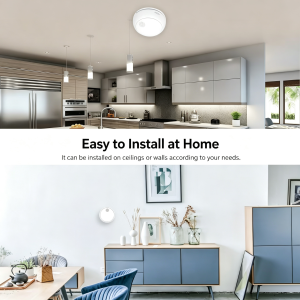
Wall or Ceiling Mount Installation

The included mounting bracket supports two installation methods:

  • Ceiling mount (recommended) — smoke rises; ceiling placement catches it fastest. Ideal for hallways, bedrooms, and living rooms.
  • Wall mount — 4–12 inches from the ceiling. Ideal for kitchens (away from cooking steam), garages, and high-ceiling rooms.

The twist-lock mechanism makes installation and battery replacement quick — no tools required to attach the unit to the mounting base.

2-Year Battery Life + Low Battery Alert

The long-life battery powers the alarm for up to 2 years. The Zigbee 3.0 protocol keeps power consumption ultra-low, while the Smart Life app displays real-time battery level. When the battery runs low, you get advance push notifications — no surprise failures, no unprotected nights.

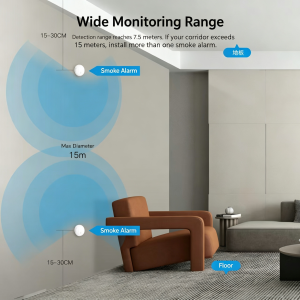
Wide 15-Meter Monitoring Range

zigbee smoke alarm connected

The photoelectric sensor detects smoke particles within a maximum diameter of 15 meters — ideal for most rooms, hallways, and open-plan living spaces. For corridors longer than 15 meters, install multiple alarms in a daisy-chain pattern.

Wide Application — Home, Office & Factory

zigbee smoke alarm connected

This smoke alarm is perfect for residential use, but its reliability makes it equally valuable for commercial and industrial settings:

  • 🏠 Home: bedrooms, kitchens, hallways, basements, attics
  • 🏢 Office: open-plan offices, server rooms, conference rooms
  • 🏭 Factory: warehouses, manufacturing floors, mechanical rooms

Smart Home Ecosystem Integration

Through the Smart Life or Tuya app, the smoke alarm can trigger other Zigbee devices when smoke is detected:

  • 🔊 Zigbee siren sounds throughout the home
  • 💡 Smart lights flash red to mark escape routes
  • 🔓 Smart locks unlock for firefighter access
  • 📹 Security cameras start recording
  • 🔌 Smart plugs cut power to potential ignition sources

Self-Test Function

With one tap in the app, you can test the smoke sensor, audible alarm, LED indicator, and Zigbee connectivity simultaneously. Every self-test is logged with a timestamp — perfect for maintenance records, warranty claims, and insurance documentation. Monthly test reminders keep maintenance on schedule.

Technical Specifications

  • Wireless Protocol: Zigbee 3.0
  • Sensor Type: Photoelectric smoke detection
  • Audible Alarm: 85dB at 3 meters
  • Visual Alarm: Red LED indicator
  • Battery: Low-power design (battery included)
  • Battery Life: Up to 2 years
  • App Compatibility: Smart Life, Tuya Smart (iOS & Android)
  • Gateway Required: Tuya-compatible Zigbee gateway (sold separately)
  • Mounting: Ceiling or wall mount (bracket included)
  • Detection Range: Max diameter 15 meters
  • Install Height: 15-30 cm from ceiling
  • Color: White
  • Certification: CE, RoHS
  • Package Contents: 1× smoke alarm, 1× mounting bracket, battery, 2× screws, 2× anchors, 1× user manual

Who Is This For?

  • 🏠 Homeowners wanting connected fire safety
  • 👶 Parents protecting children while away
  • 👴 Caregivers monitoring elderly relatives’ homes
  • 🏢 Landlords managing rental property safety
  • 🏪 Small business owners protecting after-hours inventory
  • 🏢 Office managers safeguarding employees
  • 🏭 Factory operators monitoring industrial facilities

Related Articles

You Might Also Like
Frequently Asked Questions

Is Zigbee Smoke Alarm Connected worth buying?

Based on the breakdown in this article, Zigbee Smoke Alarm Connected offers a solid mix of features and value. If your main goal matches the key benefits described above, it is a practical choice for everyday use.

How do I choose the right zigbee smoke alarm connected for my needs?

Start with your core use case, then compare battery life, compatibility, and build quality as covered above. Choosing the right zigbee smoke alarm connected comes down to matching specs with how you actually use it. Solar Motion Sensor Street Light: Buying Guide, 4 Lighting Modes, and FAQ

Does zigbee smoke alarm connected require a companion app?

Most devices of this type pair with a free companion app for setup and firmware updates. A few advanced features may sit behind a paid plan, so check the official specs page before buying. Tuya WiFi IR Remote Review: Universal Control Meets Climate Intelligence
Does zigbee smoke alarm connected work with both iPhone and Android?

Yes, in most cases this type of device ships with iOS and Android apps, and standard Bluetooth protocols keep cross-platform pairing simple.

Posted on — Leave a comment

Smart PIR Motion Sensor: The Wireless, Battery-Powered Home Security Upgrade

pir motion sensor wireless

However, Whether it’s a stranger slipping into your front door at 3 AM, a toddler wandering out of the bedroom in the middle of the night, or a delivery person walking away with a package that should have been handed over — every one of these moments is invisible until it’s too late. Traditional wired security systems are expensive, complicated to install, and easy for intruders to disable.

Therefore, This is exactly where a Smart PIR motion Sensor changes the game. Compact, wireless, and battery-powered, this Zigbee motion detection sensor acts as an always-on guardian for your home — instantly alerting you the moment movement is detected, no matter where you are.

Moreover, Below, we’ll break down why this small device is one of the smartest home security upgrades you can make in 2025, and what features to look for before you buy.

Why Every Home Needs a Smart PIR Motion Sensor

In addition, Most homeowners only think about motion detection after an incident happens. By then, the package is gone, the window is broken, or the damage is done.

For example, A smart PIR motion sensor catches the very first sign of movement. It detects the kind of activity humans simply miss when they’re asleep, at work, or on vacation. Whether it’s a burglar testing a door handle or a child waking in the night, you’ll know within seconds.

pir motion sensor wireless

Consequently, These are the everyday situations where a PIR sensor makes a difference, and they all share one trait: you don’t notice them until it’s already too late. A motion sensor with real-time push notifications turns silent intrusions into instant alerts on your phone.

Meet the Smart PIR Motion Sensor

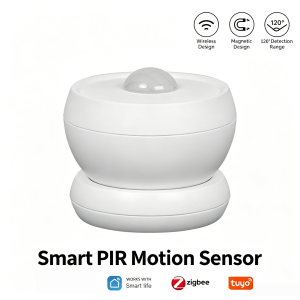
This wireless, battery-powered motion detection sensor is built on the Zigbee 3.0 protocol and works natively with the Smart Life and Tuya apps — two of the largest smart home ecosystems in the world. Setup takes under two minutes: pair, place, and you’re protected.

Key headline features at a glance:

  • ✅ Wireless design — no cables, no drilling
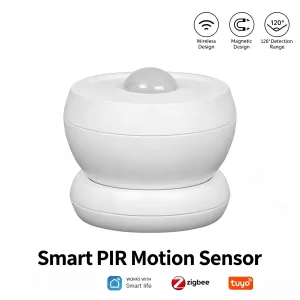
  • ✅ Magnetic mount — install in seconds, reposition anytime
  • ✅ 120° wide detection — covers a broad area from a single unit
  • ✅ Up to 2 years battery life — set it and forget it
  • ✅ Real-time push notifications — know the instant motion is detected

Wireless, Magnetic Design — Install in Seconds

pir motion sensor wireless

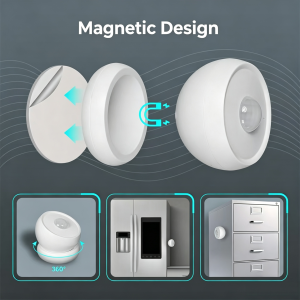
Forget the screwdriver, the drill, and the tangled mess of cables. This PIR motion sensor features a 3M adhesive magnetic mount that installs in literally seconds.

Here’s how it works:

  1. 🧲 Peel the protective film from the 3M adhesive pad
  2. 📍 Stick the metal base to any clean, flat surface — wall, ceiling, cabinet, or furniture
  3. 🧲 The magnetic sensor body snaps onto the base — instantly secured
  4. 🔄 The 360° rotating base lets you fine-tune the detection angle without moving the adhesive

Need to reposition the sensor? Just pull it off the magnetic base and snap it somewhere new. No tools. No holes in the wall. No residue. The same sensor can move from the front door to the hallway to the baby’s room in seconds — perfect for renters, frequent travelers, and anyone who likes to rearrange.

Because there are no cables to run, you can place this sensor in places wired sensors simply can’t go: above a door frame, on the back of a bookshelf, inside a closet, or on a refrigerator door.

120° Wide Detection Range — One Sensor, Broad Coverage

pir motion sensor wireless

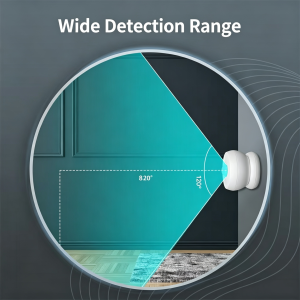
A motion sensor that misses half the room is useless. That’s why this PIR sensor is engineered with a 120° wide detection angle and an 8-meter detection distance — enough coverage to protect an entire entryway, hallway, or room from a single mounting point.

What can you protect with 120° coverage?

  • 🚪 Front doors and back doors — catch anyone approaching or leaving
  • 🛗 Hallways and staircases — log movement between rooms
  • 🛏️ Bedrooms and nurseries — get alerts when kids or elderly parents get up at night
  • 🏠 Living rooms and offices — detect unauthorized access during off hours
  • 🏪 Garages, basements, and storage rooms — monitor low-traffic areas

For larger spaces, pair multiple sensors in the same Zigbee mesh network. Each one reports independently to the Smart Life or Tuya app, so you always know exactly where motion was detected.

2-Year Battery Life — Set It and Forget It

pir motion sensor wireless

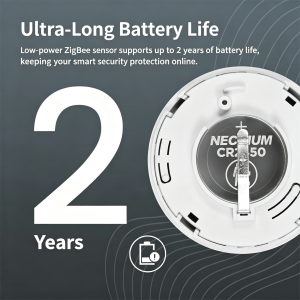
No one wants a security device that dies in the middle of the night. That’s why this PIR motion sensor is engineered for ultra-low power consumption — a single CR2450 coin cell battery keeps the sensor running for up to 2 full years under typical usage.

How is that possible? Three engineering choices make the difference:

  • 🔋 Zigbee 3.0 protocol — far more power-efficient than Wi-Fi or Bluetooth
  • 😴 Deep sleep mode — the sensor only wakes up when motion is detected
  • 📡 Short-burst transmissions — the sensor sends signals in milliseconds, not continuously

The Smart Life and Tuya apps also display a real-time battery level indicator for every paired sensor. When the battery finally does run low, you’ll get a push notification weeks in advance — no surprise failures, no unprotected windows.

Replacing the battery is just as easy as installation: pull the sensor off the magnetic mount, swap in a fresh CR2450 coin cell, snap it back on. The whole process takes about 30 seconds.

Real-Time APP Notification — Know the Instant Motion Is Detected

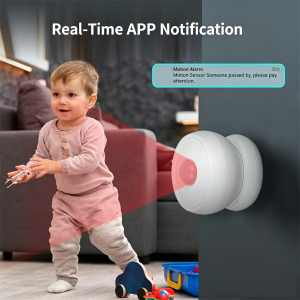
The single most important feature of any motion sensor is speed of notification. When movement crosses the detection zone, this PIR sensor sends a real-time push notification through the Smart Life or Tuya app within seconds.

Picture this: you’re at the office, and your phone buzzes with:

“Motion Sensor: Someone passed by, please pay attention.”

You open the live camera feed from a paired smart camera, see the delivery driver at your front door, and unlock the smart lock remotely so they can leave the package inside. Crisis averted in under a minute.

Beyond the basic alert, the app also shows a complete timestamped history of every motion event — so you can review who came and went, when, and how often. This is invaluable for secu

Motion / No-Motion Detection — Customize Your Smart Scenes

pir motion sensor wireless

This isn’t a one-way sensor. The PIR detector monitors both motion AND no motion states, which unlocks a much wider range of smart home automations.

Motion Detected — Triggers Active Responses

  • 💡 Smart lights turn on automatically when you walk into a dark hallway at night
  • 🔔 Smart siren or chime plays when an unexpected visitor enters a restricted area
  • 📹 Security cameras start recording the moment a door or window is crossed
  • 📱 Push notification alerts are sent to every family member’s phone

No Motion Detected for 60 Seconds — Triggers Standby Responses

  • 💡 Smart lights turn off when nobody’s in the room for 60 seconds — perfect for energy savings
  • 🌡️ Smart thermostat adjusts to eco-mode when the house is empty
  • 🔒 Smart locks re-engage when no motion is detected at the entryway for several minutes
  • 🛏️ Sleep mode activates when no motion is detected in the bedroom for 10 minutes at bedtime

All of this is configured through simple if-then rules in the Smart Life or Tuya app. No programming. No coding. Just pick a trigger, pick an action, and you’re done.

View History Records — Every Event Logged

pir motion sensor wireless

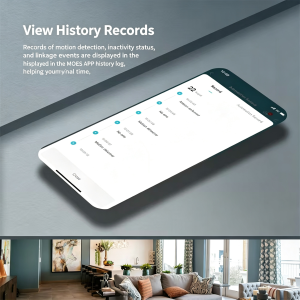
Curious whether you actually got an alert at 2 PM on Tuesday? Want to verify when your kids got home from school, or how long the cleaning service was in the house? The Smart Life / Tuya app keeps a complete, time-stamped activity log of every motion event:

  • 🟢 Motion detected — the moment someone entered the detection zone
  • 🔴 No motion — the moment the zone became empty
  • 🔵 Smart linkage — every time a paired device was triggered by the sensor

Each entry includes the exact time and date. So you can:

  • 📋 Review past incidents when troubleshooting false alarms or unusual activity
  • 📑 Document patterns for insurance claims or security audits
  • ✅ Verify the system is working properly with a clear event log
  • 🤝 Share data with family members, house sitters, or security services

Place It Anywhere — The Right Spot for Total Coverage

pir motion sensor wireless

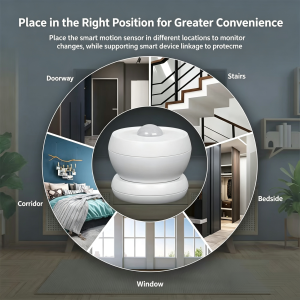
Worried about complicated installation or limited placement options? Don’t be. This wireless motion sensor is designed to fit seamlessly into every corner of your home. Here are the best locations to place it:

  • 🚪 Doorways — alert the moment anyone enters or exits a room
  • 🪜 Staircases — track movement between floors, especially helpful for elderly care
  • 🛏️ Bedside — monitor nighttime activity in the bedroom or nursery
  • 🪟 Windows — detect when someone approaches an open or vulnerable window
  • 🚶 Corridors — log movement through long hallways and entryways

Thanks to the magnetic mount, you can experiment with different placements until you find the perfect spot — without leaving marks on the wall. Built on a 360° rotating base, you can fine-tune the detection angle without re-sticking the adhesive.

Seamless Smart Home Integration — Build Your Custom Scene

pir motion sensor wireless

One of the most powerful features of this Zigbee-based motion sensor is its ability to link with other smart devices through your Zigbee gateway. The motion event becomes the trigger point for an entire ecosystem of automated responses:

  • 🔊 Zigbee Siren / Alarm — emits a loud sound to scare off intruders the moment motion is detected in a restricted zone
  • 💡 Smart Bulbs — flash red as a visual warning, or turn on automatically when you enter a dark room
  • 🪟 Smart Curtains — close automatically when the room is unoccupied to save energy
  • 📹 Security Cameras — start recording the instant motion is detected, capturing video evidence
  • 🔌 Smart Plugs — turn on lights, fans, or even coffee machines when you walk into the room
  • 🔒 Smart Locks — re-engage automatically when no motion is detected for several minutes

All of this is configured through the Smart Life or Tuya app using simple “if-this-then-that” rules. You don’t need to write a single line of code. You don’t need an expensive proprietary hub. You just need this sensor, a Zigbee gateway, and a few minutes to set up the scenes that matter to you.

Related Articles

You Might Also Like
Frequently Asked Questions

Is Pir Motion Sensor Wireless worth buying?

Based on the breakdown in this article, Pir Motion Sensor Wireless offers a solid mix of features and value. If your main goal matches the key benefits described above, it is a practical choice for everyday use.

How do I choose the right pir motion sensor wireless for my needs?

Start with your core use case, then compare battery life, compatibility, and build quality as covered above. Choosing the right pir motion sensor wireless comes down to matching specs with how you actually use it. Tuya WiFi IR Remote Review: Universal Control Meets Climate Intelligence

Does pir motion sensor wireless require a companion app?

Most devices of this type pair with a free companion app for setup and firmware updates. A few advanced features may sit behind a paid plan, so check the official specs page before buying.
Further reading: How to Choose Between Wired and Wireless Zigbee 3.0 Gateway for Your Smart Home

Posted on — Leave a comment

WiFi Smart Temperature and Humidity Switch Module: Complete Guide to Automated Climate Control for Home, Garden & Poultry

wifi temperature humidity switch

However, Whether you are a hobby gardener trying to germinate seeds faster, an aquarium keeper wanting stable water temperature for your fish, or a poultry farmer brooding chicks in a cold coop, climate control is the single most important factor for success. Yet most smart home devices are built for indoor Lighting — they have no idea what temperature or humidity is, and they cannot react automatically to changing conditions. In short, Wifi

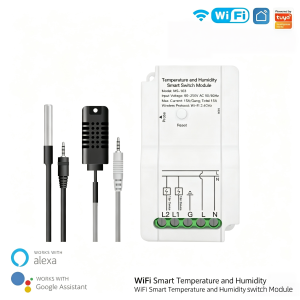
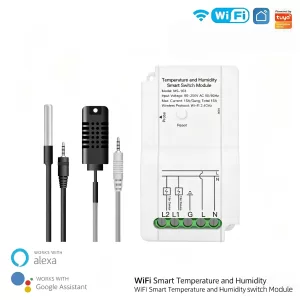
Therefore, This is exactly where the WiFi Smart Temperature and Humidity Switch Module MS-103 changes the game. It is a DIN-rail relay module with built-in climate sensing, dual 15A output, and full Tuya app integration. It turns ordinary heaters, fans, misters, pumps, and irrigation valves into autonomous climate-control devices — controlled by real temperature and humidity readings, not by timers or guesswork.

Moreover, In this guide, we will break down everything this compact module can do, the scenarios it shines in, and how to set it up for your specific needs. M8 Dopamine Color Wireless Lavalier Microphone – Best Budget 1-to-2 Lapel Mic for Vloggers & Streamers 2026

What Is the WiFi Smart T&H Switch Module?

In addition, The MS-103 module is a smart relay that combines three things in one compact device: 3-Axis Smartphone Gimbal Stabilizer: Why It’s a Must-Have Vlog Gear in 2026

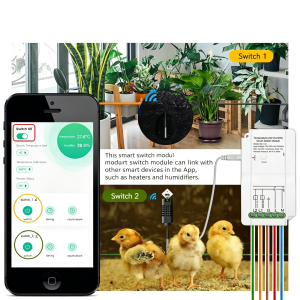
  • ✅ Dual 15A relay output — control two separate high-power devices independently
  • ✅ Built-in temperature & humidity sensor port — read ambient climate in real time
  • ✅ External temperature probe — measure a second location (water, soil, air, or compost)

For example, It connects directly to your 2.4GHz Wi-Fi network, pairs with the Smart Life or Tuya Smart app, and works with Amazon Alexa and Google Assistant for voice control. No hub required, no monthly fees, and no complex programming.

In short: it is the missing link between your climate sensors and your climate-control appliances. Once you set it up, it works 24/7 in the background — even when your phone is off or you are on the other side of the world. M2 Collapsible 3-Axis Gimbal Stabilizer – Pocket-Sized Professional Video Tool for All Creators

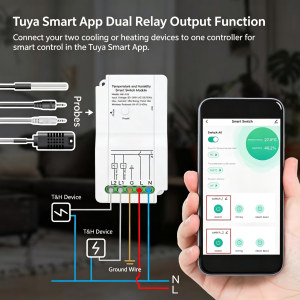
Tuya Smart App Dual Relay Output Function

The headline feature of this module is its true dual-channel independent control. Unlike single-relay smart switches, the MS-103 has two isolated 15A outputs (L1 and L2) that can be wired to two completely different devices — and controlled completely independently from the Tuya app.

wifi temperature humidity switch

Here is what that means in practice:

  • 🌡️ Gang 1 = Heater, Gang 2 = Cooler — set up automatic toggling between heating and cooling based on temperature
  • 💧 Gang 1 = Irrigation pump, Gang 2 = Mister — water plants and mist on independent schedules or sensor triggers
  • 🐠 Gang 1 = Water heater, Gang 2 = Air pump — keep your aquarium in perfect condition around the clock
  • 🌱 Gang 1 = Grow Light, Gang 2 = Inline fan — manage both lighting and airflow for a complete indoor garden

Each gang has its own schedule, its own automation rule, and its own manual override. You can switch them independently from the app, by voice, or by pressing the physical Button on the module itself.

Two Independent Channels for Total Control

What makes the dual relay design so powerful is the smart-linkage capability. The MS-103 can be paired with other Tuya-compatible devices inside the same app ecosystem, creating complex automation scenarios without any coding.

wifi temperature humidity switch

For example, you can build an automation that says:

“When humidity drops below 40%, turn on Switch 2 (humidifier). When temperature drops below 20°C, turn on Switch 1 (heater). When both conditions recover, turn off both.”

The module handles all of this locally and in real time. The Tuya app shows you the live status of both gangs, lets you adjust thresholds with simple sliders, and pushes a notification to your phone whenever an automation triggers.

Built-In Temperature and Humidity Sensor

The MS-103 ships with a cylindrical T&H probe that plugs into the dedicated Probe port on the side of the module. This probe reports:

  • 🌡️ Real-time temperature with ±0.5°C accuracy
  • 💧 Real-time humidity with ±3% RH accuracy
  • ⏱️ Live updates every few seconds in the Smart Life app

The probe cable uses a standard 3.5mm audio jack, so you can extend it with any 3.5mm extension cable up to several meters if you need to mount the sensor in a different location from the module itself.

Real-Time Aquarium Climate Control

Aquarium keepers know: stable water temperature is non-negotiable for fish health. A 2-3°C swing can stress tropical fish, trigger ich outbreaks, or worse. The MS-103 solves this elegantly by combining the T&H probe with the dual relay output.

wifi temperature humidity switch

Pair the external waterproof temperature probe (rated -40°C to +125°C) into your sump or directly into the tank, and you can build an automation like:

  • 🐠 When water temperature drops below 24°C → turn on water heater (Gang 1)
  • 🐠 When water temperature rises above 28°C → turn on cooling fan (Gang 2)

The system maintains a stable temperature band automatically, 24/7, with no timer programming required. Your fish get consistent conditions, and you get peace of mind — even during a power outage, you will get a push notification as soon as Wi-Fi reconnects (with the power-restart-state feature explained below).

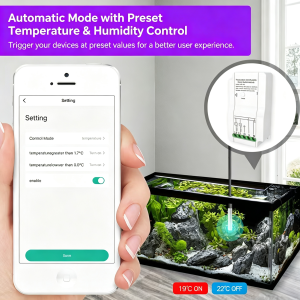
Automatic Mode with Preset Temperature & Humidity Control

The automatic mode is the heart of the MS-103. Instead of programming complex schedules, you simply set upper and lower thresholds for temperature (or humidity), and the module handles the rest.

wifi temperature humidity switch

The setup is incredibly intuitive:

  1. 📱 Open the Smart Life app and select the device
  2. ⚙️ Choose Control Mode: temperature, humidity, or both
  3. 🎚️ Set your upper threshold (e.g., 30°C → turn on exhaust fan)
  4. 🎚️ Set your lower threshold (e.g., 18°C → turn on heater)
  5. ✅ Toggle “enable” and tap Save

That is it. The MS-103 will now toggle your connected devices automatically whenever the threshold is crossed. The app even lets you set different rules for each gang — so Gang 1 reacts to temperature while Gang 2 reacts to humidity, all on the same module.

Smart Home Heating Integration

Beyond greenhouses and aquariums, the MS-103 shines in everyday smart home heating. Imagine your living room electric radiator or bathroom towel warmer turning on automatically when the room temperature drops below your comfort threshold — and turning off again when it warms up.

wifi temperature humidity switch

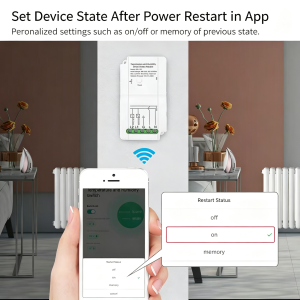
The standout feature here is the power-restart state setting. After a power outage, you can configure each gang to:

  • 🔴 Always OFF — safe default for heaters and high-power devices
  • 🟢 Always ON — for always-needed loads like circulation pumps
  • 🧠 Memory — resume the last state before power was cut

This is critical for unattended installations. You do not want a heater turning itself on full blast after a brownout if no one is home. The MS-103 lets you set the safe default in advance.

Plant Germination Optimization

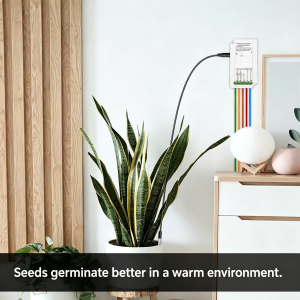
Seeds germinate faster and more reliably in warm, humid conditions. Most gardeners rely on heat mats and humidity domes — but those run 24/7 regardless of whether the conditions are already ideal. The MS-103 adds intelligence to the equation.

wifi temperature humidity switch

Drop the T&H probe into your seedling tray, set a rule like:

“When temperature drops below 22°C, turn on heat mat. When temperature rises above 26°C, turn off.”

Your seedlings get exactly the warmth they need — no more, no less. As an added bonus, the module’s app shows you the temperature curve over time, so you can see at a glance whether your germination environment is stable.

Poultry and Chick Brooding

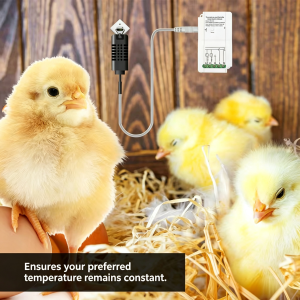
Chicks need a steady 32-35°C for the first week, dropping by about 2°C each week until they are fully feathered. Manual adjustment of heat lamps is error-prone — too cold and chicks pile up and suffocate, too hot and they dehydrate.

wifi temperature humidity switch

With the MS-103:

  • 🐥 Set upper and lower temperature thresholds for the brooder
  • 🔥 Heat lamp (Gang 1) toggles automatically to maintain the target temperature
  • 📱 Get push notifications if the temperature goes out of range
  • 📊 Review temperature history to optimize your brooding schedule

For multi-age flocks, you can deploy multiple MS-103 modules — one per brooder zone — each with its own independent settings. Commercial poultry operations use this exact setup to reduce chick mortality and improve feed conversion.

Wireless Control from Anywhere

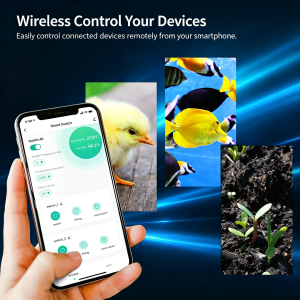
The headline benefit of any smart home device is remote control, and the MS-103 delivers this in spades. Once paired with the Smart Life or Tuya app, you can check the live temperature, humidity, and on/off status of both gangs from anywhere in the world.

wifi temperature humidity switch

Picture this: you are at work, and the weather report says a cold front is moving in tonight. Open the app, see the current coop temperature is 25°C, and turn on the brooder heater remotely so it is warm and ready when you get home. Or, you are on vacation and want to check that your greenhouse is still in the safe temperature range. One tap on the app shows you live data — and lets you intervene if needed.

Explore more smart home, security and translator products.https://odmhome.com/shop/

Learn more about our brand innovation on Xingliao Tech official website.https://xingliaotech.com

For wholesale & business cooperation, reach us via WhatsApp: +8617666669273

Related Articles

You Might Also Like
Frequently Asked Questions

Is Wifi Temperature Humidity Switch worth buying?

Based on the breakdown in this article, Wifi Temperature Humidity Switch offers a solid mix of features and value. If your main goal matches the key benefits described above, it is a practical choice for everyday use.

How do I choose the right wifi temperature humidity switch for my needs?

Start with your core use case, then compare battery life, compatibility, and build quality as covered above. Choosing the right wifi temperature humidity switch comes down to matching specs with how you actually use it.

Does wifi temperature humidity switch require a companion app?

Most devices of this type pair with a free companion app for setup and firmware updates. A few advanced features may sit behind a paid plan, so check the official specs page before buying.
Posted on — Leave a comment

Wooden Digital Alarm Clock: Your Ideal Bedside Companion for Better Sleep & Morning Routine

Wooden Digital Alarm Clock | Xingliao Smart Home

Wooden Digital Alarm Clock: Your Ideal Bedside Companion for Better Sleep & Morning Routine

Looking for a stylish bedside wooden digital alarm clock? Dual alarms, dimmable night Lighttap snooze & Multi‑power supply for bedroom, dorm and office. Perfect home decor & gift choice.


A good morning always starts with a reliable bedside alarm clock. Many people use Smartphones to wake up, yet screen blue light and endless notifications often ruin your sleep quality before bedtime. A well‑designed wooden digital alarm clock brings you back to a gentle, distraction‑free sleeping environment, blending home decor and practical daily functions into one compact device.

Why Choose This Wooden Digital Alarm Clock

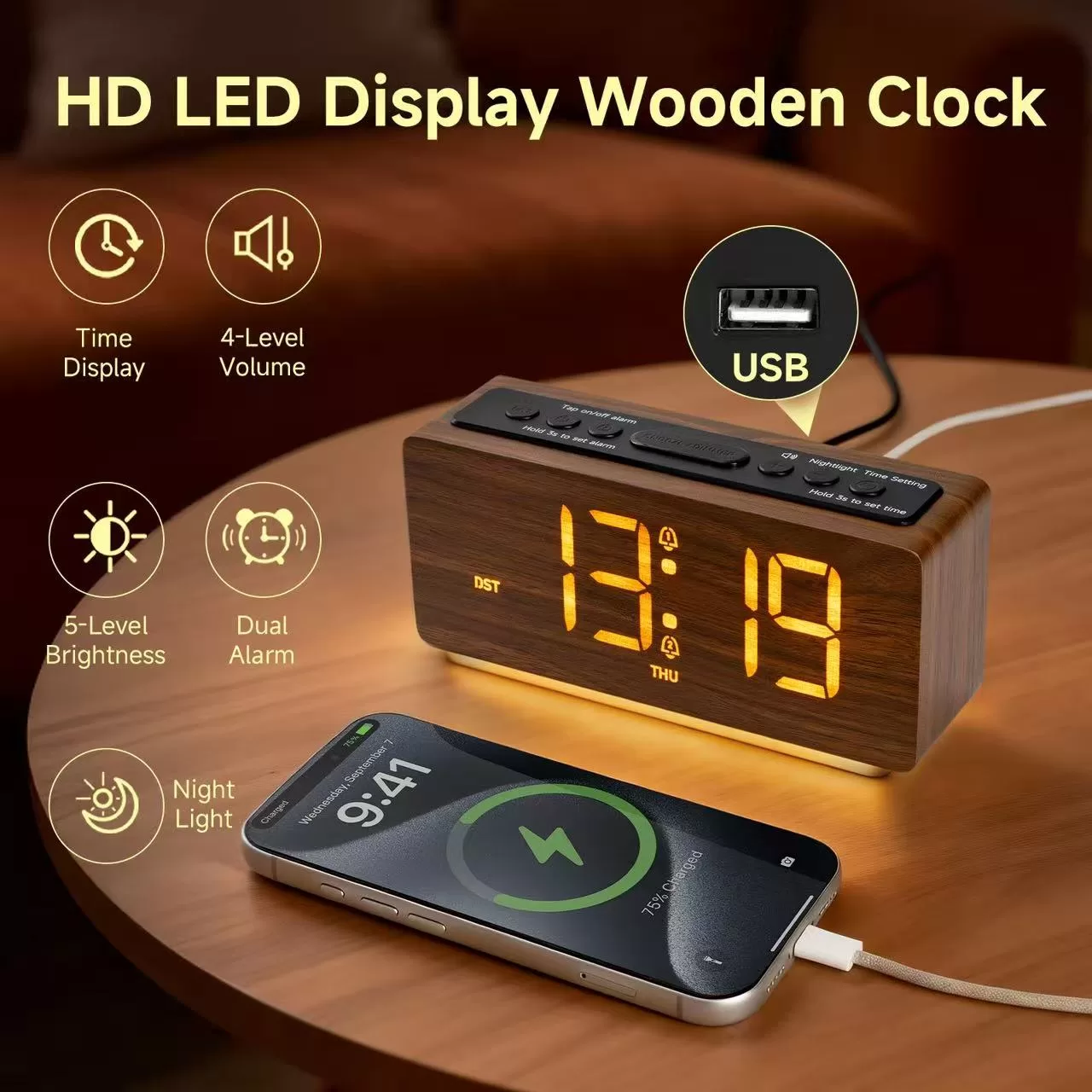
Wooden digital alarm clock close‑up view of control buttons and USB port
Close‑up detail of control buttons and USB power port on wooden digital alarm clock.

In addition to showing time, this wood‑look digital alarm clock serves as a nice home decor piece. It fits Scandinavian, farmhouse and modern home styles with ease. Furthermore, it keeps your phone away from bed so you can enjoy better sleep. You can place it on nightstands, dorm desks or office tables without taking up much space.

Flexible Dual‑Alarm Setting for Varied Schedules

This unit gives you two fully independent alarm times. For example, couples with different wake‑up times or users who separate weekday and weekend routines will love this feature. Besides, you get three convenient cycle modes: Monday‑Sunday, Monday‑Friday, and weekend‑only. Therefore, you will not need to turn alarms on and off manually every week.

Sleep‑Friendly Dimmable Display & Warm Night Light

Moreover, five‑level adjustable brightness lets you customize screen brightness freely. You can pick a bright setting for daytime reading and a dim soft glow for late nights. Apart from this, the built‑in warm night light delivers gentle light for midnight water‑drinking or quick room checks. It never throws harsh glaring light to interrupt your deep sleep.

Tap‑to‑Snooze and Adjustable Alarm Volume

For heavy sleepers, the tap‑to‑snooze function offers great convenience. You simply tap the clock top to gain extra 9 minutes of rest, and you do not need to hunt for small buttons in darkness. In addition, four‑level alarm volume solves common pain points. You can pick soft beeps or louder alerts so you will never sleep through your alarm.

Triple‑Power Supply Avoids Power‑Failure Troubles

Most importantly, this wooden digital alarm clock supports three power options. You plug in USB power for full‑time display in daily bedside use. When you use AAA batteries, the screen lights for only 10 seconds after tapping to save battery life. Even if power cuts happen, battery backup protects all your time and alarm settings. You will never miss important wake‑up moments.

A Thoughtful Gift for Many Occasions

Besides daily home usage, this compact clock works as a wonderful gift. It suits birthdays, housewarming parties, Christmas and graduation gifts. Whether you shop for family members, roommates or close friends, this decorative yet functional wooden alarm clock remains a thoughtful pick.
If you want to step away from phone‑dependent wake‑up habits and refresh your bedroom setup, this wooden digital alarm clock is worth your consideration. It brings style, comfort and practicality right to your bedside table.
Wooden digital alarm clock placed on bedroom nightstand home decor
Home scene showing wooden digital alarm clock decorating bedroom nightstand.

Explore more bedroom smart home gadgets to upgrade your nightstand setup.
This decorative yet functional wooden alarm clock remains one of our top housewarming gift picks.
Check out our wooden digital alarm clock.
Learn more about our brand innovation on Xingliao Tech official website.
For wholesale & business cooperation, reach us via WhatsApp: +8617666669273

Related Articles

You Might Also Like
Frequently Asked Questions

Is Wooden Digital Alarm Clock worth buying?

Based on the breakdown in this article, Wooden Digital Alarm Clock offers a solid mix of features and value. If your main goal matches the key benefits described above, it is a practical choice for everyday use.

How do I choose the right wooden digital alarm clock for my needs?

Start with your core use case, then compare battery life, compatibility, and build quality as covered above. Choosing the right wooden digital alarm clock comes down to matching specs with how you actually use it. Solar Ultrasonic Pest Repeller: The Complete Guide to Chemical-Free Mole and Snake Control Window Vacuum Cleaner: Say Goodbye To Streaky Glass At Home & In Your Car

Does wooden digital alarm clock require a companion app?

Most devices of this type pair with a free companion app for setup and firmware updates. A few advanced features may sit behind a paid plan, so check the official specs page before buying.
Posted on — Leave a comment

3-in-1 CO Detector: The Smart Home Device That Could Save Your Family’s Life

detector device that save

However, Carbon monoxide is called the silent killer for one terrifying reason: you can’t see it, smell it, or taste it. By the time you feel symptoms, it may already be too late. As a resultevery household needs reliable early warning.

For examplein the U.S. alone, CO poisoning sends 50,000+ Americans to the emergency room each year. Furthermoreit kills over400 people annually — and most of these deaths are completely preventable with one small device.

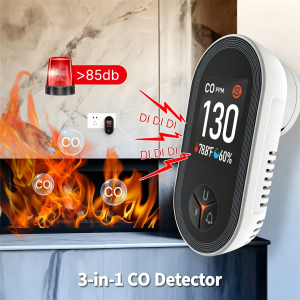
However, Meet the 3-in-1 CO Detector — a compact, plug-and-play guardian that monitors carbon monoxide, temperature, and humidity 24/7Additionallyit features a2.0-inch HD screen>85dB alarmandflame-retardant ABS housingThereforeit’s designed to save lives without complicating your life.

Therefore, Below, we’ll break down why this small device is one of the Smartest home safety upgrades you can make in 2025. In additionwe’ll show you what features to look for before you buy.

Why Every Home Needs a 3-in-1 CO Detector

Most homeowners think about CO detectors only after a tragedy makes the news. Howeverthe truth is this: CO leaks happen in ordinary homes every single day.

Common CO sources include the following

  • 🔥 Gas stoves and ovens — incomplete combustion releases CO
  • 🔥 Fireplaces and wood stoves — bLocked chimneys can cause CO buildup
  • 🔥 Furnaces and water heaters — in factcracked heat exchangers are deadly
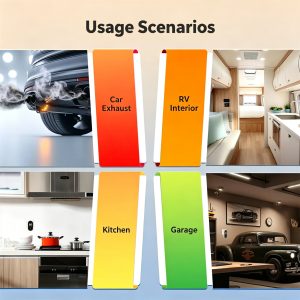
  • 🚗 Attached garages — vehicle exhaust seeps into living spaces
  • 🔥 Portable generators — moreoverthey are the leading cause of CO deaths during storms

On averageresidential CO incidents cost over$10,000 in medical bills, lost work, and property damage. Consequentlymost of these incidents could have been prevented with an early-warning detector.

The3-in-1 Advantage

Unlike traditional single-function CO alarms, this device monitorsthree critical environmental factors simultaneouslySpecificallyit tracks

  • 🛡️ Carbon Monoxide (0-999 PPM) — detects deadly gas leaks
  • 🌡️ Temperature (-10°C to 59°C) — monitors HVAC failures and overheating
  • 💧 Humidity (0-95% RH) — additionally tracks air quality and mold risk

In shortone device, three lifesaving functions, zero monthly fees.

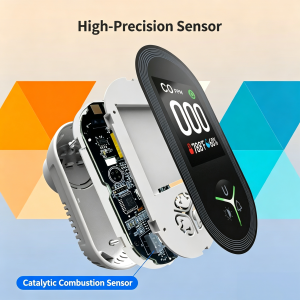
High-Precision Catalytic Combustion Sensor

The heart of any CO detector is its SensorIn this devicea high-precision catalytic combustion sensor powers the readings — the same technology trusted by industrial safety systems worldwide. Tuya WiFi IR Remote Review: Universal Control Meets Climate Intelligence

detector device that save

Here’s how it works

  • 🔬 Catalytic combustion — CO molecules oxidize on a heated catalyst surface
  • 📊 Electrical signal — the oxidation produces a measurable current
  • 📈 Real-time calculation — thenthe processor converts signal to PPM reading
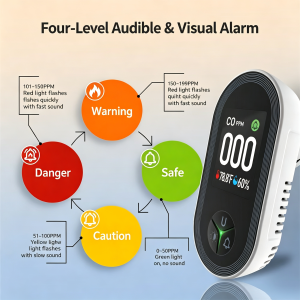
  • 🚨 Instant alert — finallyreadings above51 PPM trigger audible + visual alarms

As a resultthis technology delivers±10% accuracy across the full 0-999 PPM range — well within the safety standards required by UL2034.

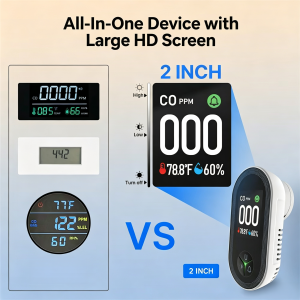
All-In-One Device with Large 2-Inch HD Screen

Most CO detectors have tiny, hard-to-read displays. In contrastthis one features a 2.0-inch HD screen with high-contrast digits you can read from across the room.

detector device that save

Screen size matters for several reasons

  • 👁️ Readable from distance — check status without walking up close
  • 🌙 Backlit for nighttime — moreoverit’s visible in dark bedrooms and hallways
  • 👵 Senior-friendly — large digits help older family members
  • ⚡ Instant readability — thereforeno squinting in emergencies

Compare this to the small 1-inch displays on competing detectors. Indeedthe difference is life-saving clarity

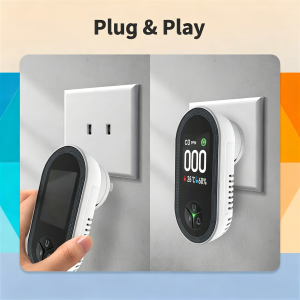
Plug & Play — Zero Installation Required

No tools. No wiring. No batteries. No monthly fees. Simply plug into any standard wall outlet and the detector starts working immediately.

detector device that save

Moreover, The setup takes literally3 seconds. Firstfind any wall outlet. Secondplug in the detector. Finallyyou’re protected — no app, no pairing, no configuration needed.

  1. 🔌Find any wall outlet — bedroom, kitchen, hallway, garage
  2. 🔌 Plug in the detector — it powers on automatically
  3. ✅ You’re protected — thenno app, no pairing, no configuration

Unlike battery-operated detectors that fail when batteries die, this plug-in design ensures your detector is always powered. As a resultit’s always working.

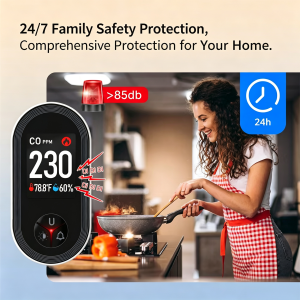
24/7 Family Safety Protection, Comprehensive Protection for Your Home

This isn’t just a detector — ratherit’s a complete home safety monitoring system that runs continuously in the background.

detector device that save

Here’s what24/7 protection means for your family

  • 👨‍👩‍👧Continuous monitoring — every breath you take is monitored
  • 🍳 Kitchen safety — additionallyalerts you to gas stove malfunctions while cooking
  • 🛏️ Sleep protection — loud alarm wakes you from deep sleep
  • 🚪 Garage safety — detects CO seepage from attached garages
  • 🌙 Nighttime safety — moreovervisual alarm indicators help hearing-impaired users

At >85dBthe alarm is louder than a vacuum cleaner. Thereforeit’s audible throughout most homes, even with doors closed.

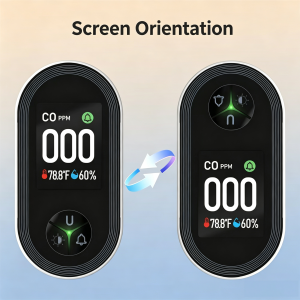
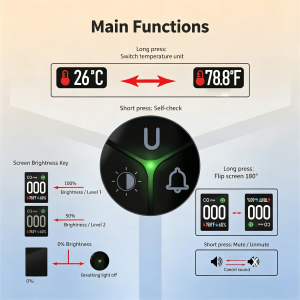
Flexible Screen Orientation — Vertical & Horizontal Display

Different outlets require different viewing angles. To address thisthe detector features flexible screen orientation that adapts to your home’s layout.

detector device that save

Choose the orientation that fits your outlet. For example

  • 📱Vertical display — perfect for standard wall outlets in living areas
  • 🔄 Horizontal display — alternativelyideal for outlets behind furniture or in tight spaces
  • ⚙️ Auto-rotation — additionallyit automatically adjusts based on how you plug it in

As a resultyou canalways read the screen clearlyno matter where you install the detector.

Main Functions — Temperature Unit Switch, Brightness Control, Mute

This detector is packed with thoughtful features. Specificallyit makes daily use effortless.

detector device that save

Key Functions at a Glance

  • 🌡️ Temperature unit switch — long press to toggle between °C and °F
  • ☀️ 3-level brightness control — namely 100% / 50% / 0% (off)
  • 🔄 Screen flip 180° — long press to rotate display
  • 🔇 Mute / unmute — short press to silence false alarms
  • ✅ Self-test function — additionallyverify it’s operating correctly

All controls are accessed via the single large button on the front. As a resultthere are no tiny switches or complicated menus to navigate.

Four-Level Audible & Visual Alarm System

Not all CO events are the same. To address thisthe detector uses a smart four-level alarm system that matches the alert to the danger level.

detector device that save

Here’s how the four levels work

CO Level (PPM) Status Visual Indicator Audible Alarm
0-50 PPM Safe 🟢 Green light on No sound
51-100 PPM Caution 🟡 Yellow light flashes Slow sound
101-150 PPM Warning 🟠 Red light flashes quickly Fast sound
150-199 PPM Danger 🔴 Red light flashes quickly Fast sound
200+ PPM Critical 🔴 Continuous red flash Loud continuous alarm

As a resultthis smart system preventsalarm fatigue from false alarms. At the same timeit ensures you never miss a real emergency.

Usage Scenarios — Perfect for Every Room

CO can accumulate anywhere fuel is burned. Belowyou’ll find the four most common places to install this detector

detector device that save

1. Kitchen — Monitor Gas Stoves & Ovens

Gas stoves and ovens release CO during incomplete combustion. Thereforeplace this detector near your kitchen to catch gas leaks and ventilation failures before they harm your family.

2. Garage — Detect Vehicle Exhaust

Starting your car in an attached garage — even with the door open — releases CO that seeps into living spaces. As a resulta detector near the garage entry alerts you before CO reaches dangerous levels.

3. RV Interior — Travel With Confidence

RV propane heaters, generators, and cooking appliances all release CO. Additionallythis compact, plug-in detector is perfect for RV travel — just plug it into any wall outlet inside your motorhome.

4. Car Exhaust — Workshop & Mechanical Spaces

If you run engines in workshops, garages, or mechanical rooms, this detector monitors CO from exhaust fumes. Moreoverit also tracks fuel-burning equipment emissions.

Technical Specifications
Specification Detail
Product Name 3-in-1 CO Detector
Model PTH-24D
Sensor Type High-precision Catalytic Combustion Sensor
CO Detection Range 0-999 PPM (±10% accuracy)
CO Alarm Threshold 51 PPM (lowest trigger)
Temperature Range -10°C to 59°C (±1.5°C)
Humidity Range 0-95% RH (±5%)
Power Supply 100-220V AC, 50/60Hz
Display 2.0 inch HD LCD
Alarm Volume >85dB
Housing Material Flame-retardant ABS
Operating Temperature -10°C to 50°C (14°F to 122°F)
Product Size 105mm × 52mm × 52mm (with plug)

Where to Install Your CO Detector

For maximum protection, install CO detectors in the following locations:

  • 🛏️ Outside each sleeping area — CO poisoning is most dangerous while asleep
  • 🔥 Near fuel-burning appliances — for examplefurnaces, water heaters, stoves, fireplaces
  • 🚗 Garages — vehicle exhaust is a major CO source
  • 🏠 Every floor of your home — because CO can accumulate on any level
  • 📏 At breathing height — CO mixes with air; place 3-5 feet from floor

Avoid placing near windows, doors, or vents where drafts may affect readings. Otherwisethe readings may be inaccurate.

Frequently Asked Questions (FAQ)

Q: How often should I test my CO detector?
A: Test monthly using the self-check function. In additionreplace the unit every 5-7 years or according to manufacturer guidelines.

Q: What should I do if the alarm sounds?
A: Immediately move to fresh air outdoors. Thencall emergency services (911 in the U.S.) from a safe location. Most importantlydo not re-enter until professionals clear the building.

Q: Does this require batteries?
A: No — this is a plug-in model powered by 100-220V AC wall outlet. Thereforeno battery replacement is needed.

Q: Can I use this in my RV or boat?
A: Yes, with a compatible AC power inverter. Specificallyensure voltage matches 100-220V AC requirements.

Q: What’s the difference between CO and smoke detectors?
A: CO detectors monitor carbon monoxide gas; smoke detectors monitor particles from fire. In shortyou need both for complete protection.

Q: Is this detector UL certified?
A: Yes — in factit meets UL 2034 safety standards for residential CO detectors.

Final Verdict: Is a 3-in-1 CO Detector Worth It?

If you have any fuel-burning appliances, an attached garage, or simply want to protect your family from the silent killer, the answer is absolutely yesIndeedthe peace of mind alone is worth the investment.

This 3-in-1 detector offers:

  • ✅ Real-time CO monitoring (0-999 PPM)
  • ✅ Temperature & humidity tracking
  • ✅ >85dB audible + visual alarms
  • ✅ Plug & play — zero installation
  • ✅ 2.0-inch HD display
  • ✅ Flame-retardant ABS housing
  • ✅ Four-level smart alarm system

Overallat a fraction of the cost of a single ER visit, this device provides 24/7 protection for your most valuable asset — your family.


Shop & Contact

🛒 Browse our full collection of home safety devices at odmhome.comSpecificallywe carry CO detectors, smoke alarms, gas leak detectors, and complete home safety kits.

🏢 Wholesale, OEM, and bulk orders are available at xingliaotech.comAs a resultwe offer competitive pricing for retailers, distributors, and safety equipment suppliers.

💬 Questions? WhatsApp our support team at +86 176 6666 9273We typically reply within 12 hours in English and.

Related Articles

You Might Also Like
Posted on — Leave a comment

Zigbee Water Leak Detector: The Smart Home Upgrade That Could Save You $11,000 in Water Damage

zigbee water leak detector

However, Water damage is one of the most expensive and most preventable disasters a homeowner can face. The average residential water damage incident costs over $11,000 in the U.S. alone — and most of these events happen silently, when nobody is watching. In short, Zigbee

Therefore, A single forgotten open window during a storm, a slow leak under the kitchen sink, or an overflowing bathtub can ruin floors, walls, furniture, and electronics in a matter of minutes. By the time you notice, the damage is already done.

Moreover, Here’s exactly where a Zigbee water leak detector changes the game. Compact, wireless, and battery-powered, this small device acts as an always-on guardian for your home. The moment water shows up where it shouldn’t, you receive a real-time push notification on your phone.

In addition, Below, we’ll break down what makes a Zigbee leak detector one of the Smartest smart home upgrades you can make in 2025. We’ll also show you how to choose the right one for your home.

Why Every Home Needs a Smart Water Leak Detector

For example, Most homeowners only think about water damage after it happens. By then, the cleanup bill is already in the thousands, insurance paperwork is piling up, and the mold remediation crew is on the way.

Consequently, Smart water leak detectors catch the very first sign of trouble. They detect the kind of slow leak or sudden downpour that humans simply miss when they’re asleep, at work, or on vacation.

You can rely on real-time mobile alerts to shut off the water main Remotely, call a neighbor, or rush home. A small drip never has to turn into a flooded basement.

The Average Cost of Water Damage (and Why Prevention Pays)

  • 💧 Average claim: $11,000+ per incident
  • 🏠 Most common cause: plumbing supply line failure
  • 📈 Frequency: 1 in 50 homes files a water damage claim each year
  • 🦠 Hidden risk: mold can start growing within 24–48 hours

zigbee water leak detector

Meet the ZigBee Water Leak Detector

Working on Zigbee 3.0, this wireless water leak detector uses the same protocol trusted by leading smart home ecosystems worldwide. Pair it natively with the Tuya Smart and Smart Life apps — two of the largest platforms on the planet, supporting over 1 million compatible devices.

You can set it up in under two minutes. Pop in the battery, open the app, and pair. You’re protected.

Key features at a glance:

  • ✅ Zigbee 3.0 protocol — reliable, low-power mesh networking
  • ✅ Battery powered — runs 1+ year on a single CR2032 coin cell
  • ✅ Ultra-thin 17mm design — fits anywhere, 50mm diameter
  • ✅ IP66 waterproof — survives splashes, humidity, and outdoor use
  • ✅ High sensitivity detection — catches the smallest leaks
  • ✅ Low battery alert — never get caught off guard

zigbee water leak detector

Alarm Triggered When Water Level Rises to Preset Level

Not every water event is the same. A Light splash shouldn’t trigger the same alarm as a fully submerged basement. That’s why this Sensor lets you set a preset water level threshold through the app. When water rises to that level, the alarm triggers immediately.

Use this sensor for:

  • 🛁 Bathtubs — get alerted before water overflows
  • 🪣 Sump pump areas — know the moment water levels rise
  • 🐠 Aquariums — catch overflow before it floods the floor
  • 🌊 Basement drains — early warning before flooding

Smart App Control — No Need to Monitor by Yourself

What makes a smart leak detector so valuable is remote monitoring. You no longer have to physically check under every sink, behind every washing machine, or beside every water heater.

zigbee water leak detector

After pairing with the Tuya Smart or Smart Life app via a compatible Zigbee gateway, the sensor works 24/7 in the background. You can:

  • 📊 Monitor real-time status — see if every sensor is dry or wet
  • 📜 View event history — every water event logged with a timestamp
  • 👨‍👩‍👧 Share with family — multiple household members get alerts
  • 🤖 Create smart automations — trigger sirens, lights, or shutoff valves

It’s like having a plumber on call 24 hours a day and it costs less than a single service visit.

Super Signal Smart Linkage

One of the most powerful features of a Zigbee-based water leak detector is its ability to link with other Zigbee devices through the smart home gateway. When the water level is abnormal or reaches the preset height, the Zigbee device can trigger a strong sound alarm within your home — even if your phone is on silent.

zigbee water leak detector

Your leak detector isn’t just a passive sensor. It’s the trigger point for a complete emergency response system.

What Can You Link Together?

  • 🔊 Zigbee Siren / Alarm — emit a loud, attention-grabbing sound
  • 💡 Smart lights — flash red as a visual warning throughout the home
  • 🔌 Smart water valve — automatically shut off the main water line (see below)
  • 📱 Smartphone notifications — instant push to every family member
  • 📹 Security cameras — start recording visual evidence

Automatic Water Shutoff (When Paired with a Smart Water Valve)

Here’s the truly hands-off feature. Pair this leak detector with a Tuya-compatible smart water valve (sold separately), and the moment water is detected, the valve closes automatically to stop the leak at its source.

zigbee water leak detector

Suddenly, a small leak becomes a non-event. You don’t have to be home. You don’t have to call a plumber. You don’t have to rush back from vacation. The system handles it for you.

Note: The smart water valve is not included in the package. You must purchase it separately.

Professional Waterproof Panel — IP66 Rated

zigbee water leak detector

zigbee water leak detector

zigbee water leak detector

Related Articles

You Might Also Like
Frequently Asked Questions

Is Zigbee Water Leak Detector worth buying?

Based on the breakdown in this article, Zigbee Water Leak Detector offers a solid mix of features and value. If your main goal matches the key benefits described above, it is a practical choice for everyday use.

How do I choose the right zigbee water leak detector for my needs?

Start with your core use case, then compare battery life, compatibility, and build quality as covered above. Choosing the right zigbee water leak detector comes down to matching specs with how you actually use it.

Does zigbee water leak detector require a companion app?

Most devices of this type pair with a free companion app for setup and firmware updates. A few advanced features may sit behind a paid plan, so check the official specs page before buying.
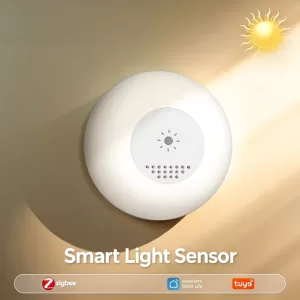
Posted on — Leave a comment

Smart WiFi Plant Watering Pump: A Must-Have for Indoor Plant Parents

wifi plant watering pump

Smart WiFi Plant Watering Pump: A Must-Have for Indoor Plant Parents

If you’ve ever come Home to a drooping pothos, a crispy fern, or a tragically over-watered succulent — you’re not alone. Studies show that over 60% of houseplants die from inconsistent watering, and most plant parents simply can’t keep up with the daily grind of checking soil, refilling cans, and remembering which plant likes what.

Enter the Smart WiFi Plant Watering Pump — a compact, app-controlled device that turns any container of water into a fully automatic, precision irrigation system for your indoor jungle. Pair it with a Tuya smart soil moisture sensor and your plants essentially water themselves.

In this guide, we’ll break down the features that make this little white bucket one of the smartest upgrades for plant parents in 2025 — and why it’s flying off the shelves of indoor gardeners worldwide.

wifi plant watering pump

Why Every Plant Parent Needs a Smart Watering Pump

Plant Care is a relationship built on consistency — and humans are notoriously bad at it. Here’s what every plant parent struggles with:

  • 🌿 Different species, different needs — Pothos, ferns, monsteras, succulents, orchids all want completely different watering schedules
  • ✈️ Travel and vacations — Two weeks in Bali shouldn’t mean two weeks of dead plants
  • 💼 Busy workdays — By the time you get home, the Light has shifted and you’ve forgotten
  • 🧠 Memory fatigue — “Did I water it Tuesday or Wednesday?”

A smart watering pump solves all four problems in one device. The screenshot above shows the Smart Life app interface — set “How Long” to 180 seconds, “How often” to 20 hours, and the pump automatically runs the cycle. You can also see the live countdown (00:03:00) as the pump waters your plant on schedule, with the Mode set to Auto for hands-off operation.

wifi plant watering pump

5 Key Features That Set This Pump Apart

This isn’t just “a pump with WiFi” — every detail is built for real-world indoor use.

1. 🌿 Automatic Watering With the Smart Life App

The pump connects seamlessly to the Smart Life and Tuya Smart apps, giving you complete control from anywhere in the world. Set custom schedules by day, time, and duration. The pump follows your schedule to the minute — even when your phone is in another room or off entirely.

Real-world example: Set the pump to run for 60 seconds every 24 hours. Your pothos gets consistent moisture, your monstera stays lush, and you never have to think about it again.

2. 💧 Manual Mode for On-Demand Watering

Sometimes a plant needs a quick extra drink outside the schedule. Switch to Manual Mode directly on the device or in the app, and trigger a single watering cycle without disturbing your automated routine. The pump runs for the duration you set, then returns to the auto schedule on the next cycle.

3. 🔒 Child Lock for Family Safety

Pets and curious toddlers can change device settings with a single tap. The built-in Child Lock prevents accidental setting changes, so your carefully designed plant care schedule stays exactly how you set it. A long press on the device unlocks it when you need to make changes.

4. 🔌 USB-C Powered — No Batteries Required

No batteries to replace. No proprietary chargers. Just plug in any standard USB-C cable (5.0–6.0V) and let the pump run continuously. Use a power bank for ultra-flexible placement, or plug it into a wall adapter and forget about it. This is the kind of set-it-and-forget-it reliability indoor gardeners love.

5. 🚿 Multiple Watering Modes — Drip or Spray

The pump supports two interchangeable nozzles:

  • Drip mode (blue nozzle) — Slow, deep watering for established plants like monsteras, pothos, and peace lilies
  • Spray mode (orange nozzle) — Gentle misting for humidity-loving tropicals like ferns, calatheas, and seedlings

Just swap the nozzle to match your plant’s needs. With a flow rate of 550 mL/min, the pump is calibrated for both styles without over-watering.
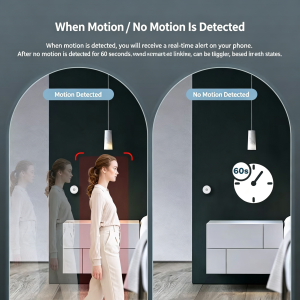
wifi plant watering pump

Pair With a Tuya Smart Soil Moisture Sensor — The Magic Combo

Here’s where the device goes from “smart” to genius. Pair this watering pump with a Tuya Smart Soil Moisture Sensor in the same Smart Life app, and you unlock fully automatic, soil-aware irrigation:
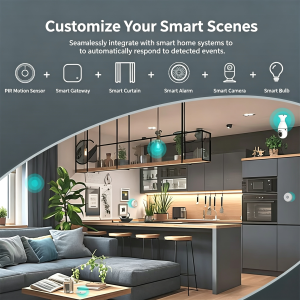
  1. 🌡️ Soil moisture sensor measures real-time moisture levels in the pot
  2. 📉 When moisture drops below your set threshold (e.g., 30%), it triggers the watering pump
  3. 💧 Pump runs for the exact duration you set to bring moisture back to ideal levels
  4. ✅ Pump stops automatically — no over-watering, no root rot, no waste

This is called a closed-loop smart irrigation system, and it’s the same technology used in professional greenhouses — now available for your living room at a fraction of the cost.

Real-world example:

  • Set soil threshold to 35% (ideal for pothos)
  • Set pump duration to 15 seconds per trigger
  • Connect a 10L water reservoir with the included 5m tube
  • Go on a 3-week vacation
  • Come back to perfectly watered, healthy plants

wifi plant watering pump

Water Multiple Plants Simultaneously

One of the most underrated features of this watering pump is its ability to water multiple potted plants at the same time with a simple 4-way splitter. The image above shows the pump connected to three different plants:

  • 🪴 Pothos (left, gray pot)
  • 🌿 Peace Lily (center, black pot)
  • 🌱 Boston Fern (right, white pot)

All three plants get watered from the same reservoir (the clear glass bowl in the foreground) at the same time, with each outlet getting exactly the right amount of water for its specific plant. The built-in sponge filter in the reservoir keeps debris out of the pump, extending its lifespan and preventing clogs.

This makes the pump perfect for:

  • 🌸 Balcony gardens with multiple hanging baskets
  • 🪴 Indoor plant collections with 5–20+ plants
  • 🌿 Greenhouse setups with rows of seedlings
  • 🏡 Mixed-species displays where every plant has different water needs

wifi plant watering pump

11-Settings Control Panel — Total Customization at a Glance

For users who prefer hands-on control, the pump features a circular LCD control panel with 11 customizable settings. As the diagram above shows:

  1. Weather Icon — Visual weather status display
  2. Watering Duration — Set how long each cycle runs (in seconds)
  3. Watering Interval — How often the pump runs (in hours)
  4. Working Status — Real-time pump activity indicator
  5. Auto — One-tap activation of automatic mode
  6. Manual Setting — Trigger a manual watering cycle
  7. Child Lock — Long-press to lock/unlock
  8. WiFi Icon — Connection status indicator
  9. Mode — Switch between Auto and Manual
  10. Down — Decrease value
  11. Up — Increase value

The bright LED display makes every setting easy to read at a glance — no need to dig into the app for basic adjustments. The 4 directional buttons (Set / Up/ Down / Mode) make navigation intuitive, even for users who aren’t tech-savvy.


wifi plant watering pump

Child Lock Function — Built for Family Homes

If you have toddlers, curious kids, or pets in the house, the Child Lock function is essential. The image above shows the lock activated on the device display, with a “Long press to lock/unlock” indicator showing the simple operation. A long press on the device locks the control panel and app interface, preventing any accidental setting changes.

This means:

  • 👶 Toddlers can’t change your carefully tuned watering schedule
  • 🐕 Cats and dogs bumping into the device won’t trigger unwanted cycles
  • 🧒 Kids playing near the device can’t accidentally disable the pump
  • 🔒 Your settings stay exactly as you set them, week after week

Related Articles

You Might Also Like
Frequently Asked Questions

Is Wifi Plant Watering Pump worth buying?

Based on the breakdown in this article, Wifi Plant Watering Pump offers a solid mix of features and value. If your main goal matches the key benefits described above, it is a practical choice for everyday use.

How do I choose the right wifi plant watering pump for my needs?

Start with your core use case, then compare battery life, compatibility, and build quality as covered above. Choosing the right wifi plant watering pump comes down to matching specs with how you actually use it. Solar Ultrasonic Pest Repeller: The Complete Guide to Chemical-Free Mole and Snake Control

Does wifi plant watering pump require a companion app?

Most devices of this type pair with a free companion app for setup and firmware updates. A few advanced features may sit behind a paid plan, so check the official specs page before buying.