However, Looking for a simple, battery-powered way to control your Smart Lights, curtains, and scenes with a single tap? The new Tuya Zigbee Smart Knob Button packs five customizable actions into a coin-sized remote. Here’s what it can really do.
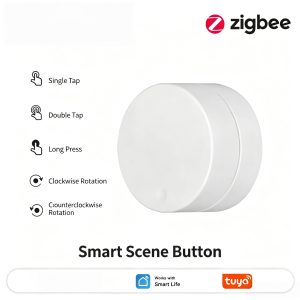
Therefore, Smart home control shouldn’t require pulling out your phone every time you want to dim the lights or close the curtains. The Tuya Zigbee Smart Knob Button is a wireless, battery-powered scene controller that brings tactile, one-touch control back to your fingertips — and it works with virtually every Tuya-compatible device in your home. Window Vacuum Cleaner: Say Goodbye To Streaky Glass At Home & In Your Car
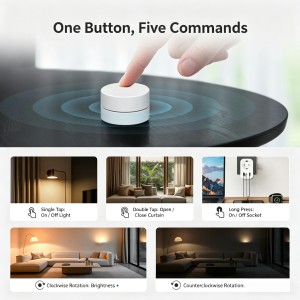
One Button, Five Commands
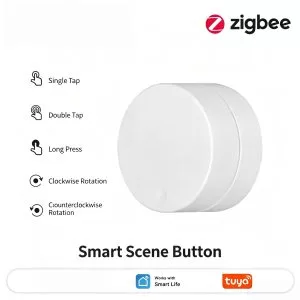
Moreover, The standout feature is the 5-action control system. Instead of a single press, the knob supports:
- 👆 Single Tap — trigger a preset scene or device
- 👆👆 Double Tap — switch to a different scene or device group
- ✋ Long Press — turn everything on/off or run a master scene
- 🔄 Clockwise Rotation — step-up brightness, volume, or color temperature
- 🔁 Counterclockwise Rotation — step-down brightness, volume, or color temperature
In addition, All five actions are fully programmable inside the Smart Life, MOES, or Tuya app, so the same physical button can behave completely differently in different rooms.
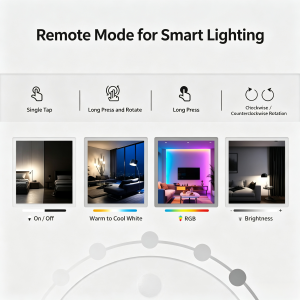
Remote Mode for Smart Lighting
For example, When paired with a Zigbee smart bulb, the knob doubles as a wireless lighting remote. You can map the actions to:
- 💡 On / Off — single tap toggles power
- 🌡️ Warm to Cool White — long press and rotate to fine-tune color temperature
- 🌈 RGB Color — long press to cycle through colors
- 🔆 Brightness — clockwise / counterclockwise rotation to dim or brighten smoothly
Four Ready-Made Scenes You Can Set Up in Minutes
Consequently, The real magic of the smart knob is how it triggers Multi-device scenes with a single gesture. Out of the box, it’s commonly used for these four popular scenes:
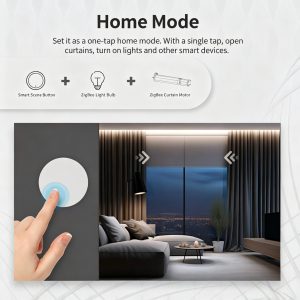
🏠 Home Mode
Set it as a one-tap Home Mode. With a single tap, open curtains, turn on lights and other smart devices. Perfect for the moment you walk in the front door after a long day.
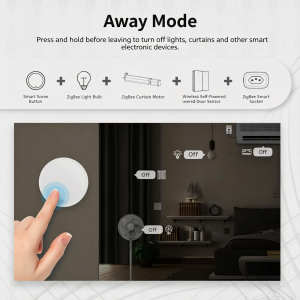
🚪 Away Mode
Press and hold before leaving to turn off lights, curtains and other smart electronic devices. No more running back to check if you left the iron on.
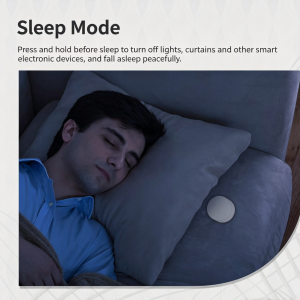
😴 Sleep Mode
Press and hold before sleep to turn off lights, curtains and other smart electronic devices, and fall asleep peacefully. Keep the button on your nightstand for easy, fumbling-free access.
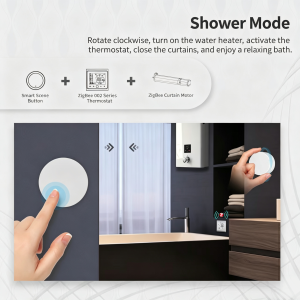
🛁 Shower Mode
Rotate clockwise to turn on the water heater, activate the thermostat, close the curtains, and enjoy a relaxing bath. Your bathroom is pre-heated the moment you decide to shower.
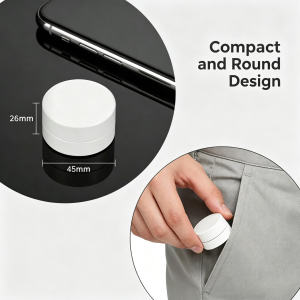
Compact and Round Design
Measuring just Φ45 × 26 mm, the knob is smaller than a coaster and roughly the size of a bottle cap. It slips into a pocket, sits unobtrusively on a nightstand, or sticks to any wall with the included 3M adhesive pad.
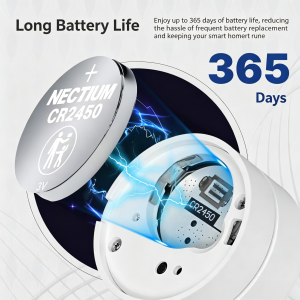
365-Day Long Battery Life
Powered by a single CR2450 coin cell battery (3V), the device delivers up to 365 days of standby life thanks to Zigbee’s ultra-low-power design. When the battery finally runs out, simply twist off the back cover and drop in a replacement — no charging cables, no downtime.
Technical Specifications
| SKU | ZT-RD02 |
| Model | SYT-ZB01 |
| Protocol | Zigbee 3.0 |
| Battery | CR2450 / 3V |
| Battery Life | Up to 365 days |
| Standby Current | < 8 μA |
| Operating Temperature | -10°C ~ 55°C |
| Operating Humidity | 0 ~ 99% RH |
| Dimensions | Φ45 × 26 mm |
| Frequency Range | 2.405 – 2.480 GHz |
| Max RF Output Power | < +10 dBm |
| Compatible Apps | Smart Life, MOES, Tuya Smart |
Setup & Compatibility
To use the smart knob, you’ll need:
- A Zigbee 3.0 gateway (any Tuya / Smart Life compatible hub)
- The Smart Life, MOES, or Tuya Smart app on your phone
- Tuya-compatible smart devices to control (lights, curtains, sockets, thermostats, etc.)
Pairing takes about 30 seconds: open the app, select “Add Device,” and follow the in-app instructions to put the gateway into pairing mode.
Who Is This For?
The Tuya Zigbee Smart Knob Button is a great fit if you:
- Want a physical, app-free way to control smart devices
- Have elderly family members or kids who can’t easily use a phone app
- Already use Tuya-compatible bulbs, curtains, or sockets
- Need a portable remote you can move between rooms
- Want a budget-friendly scene controller without expensive touch panels
Final Verdict
For the price of a fancy coffee, the Tuya Zigbee Smart Knob Button delivers surprisingly versatile control over your entire smart home. Five programmable actions, four ready-made scenes, 365-day battery life, and a footprint smaller than a coaster — it’s one of the most cost-effective ways to add tactile automation to any room.
👉 Shop the Tuya Zigbee Smart Knob Button here and start building your whole-home automation system today.
Explore more smart home, security and translator products.https://odmhome.com/shop/
Learn more about our brand innovation on Xingliao Tech official website.https://xingliaotech.com
For wholesale & business cooperation, reach us via WhatsApp: +8617666669273.
Xingliao Tech Official Site — ODM smart home devices & factory capabilities
Smart Solutions for Hotels & Hospitality — touch-free switches for guest rooms and bathrooms
Senior Care & Healthcare Solutions — hygienic, easy-to-use controls for care facilities
Xingliao Shop — retail samples and small-batch orders
Related Articles
- Tuya ZigBee IR Remote
- smart_home_panel_guide_2026
You Might Also Like
Frequently Asked Questions
Is Tuya Zigbee Knob Button worth buying?
Based on the breakdown in this article, Tuya Zigbee Knob Button offers a solid mix of features and value. If your main goal matches the key benefits described above, it is a practical choice for everyday use.
How do I choose the right tuya zigbee knob button for my needs?
Start with your core use case, then compare battery life, compatibility, and build quality as covered above. Choosing the right tuya zigbee knob button comes down to matching specs with how you actually use it. Solar Ultrasonic Pest Repeller: The Complete Guide to Chemical-Free Mole and Snake Control
Does tuya zigbee knob button require a companion app?
Most devices of this type pair with a free companion app for setup and firmware updates. A few advanced features may sit behind a paid plan, so check the official specs page before buying. Car Cup Holder Expander: The Complete Guide to 360° Rotating Dual-Slot Drink Holders
📌 This article is part of our Complete Tuya Hub — more guides and buying tips inside.
