They work. They just work less. A solar light stores energy during the day and spends it at night, so when December cuts the charging day from nine hours to four, the lamp that ran until dawn in July dies at midnight. Nothing has broken — there is simply less in the tank.
That distinction matters, because most winter complaints are fixed with position and mode rather than a replacement.
What actually changes
| Summer | Winter (temperate) | |
|---|---|---|
| Usable charging hours | 8 to 10 | 3 to 5 |
| Sun angle | High, near overhead | Low on the horizon |
| Shade | Leaves screen the panel | Bare trees help; buildings shade more |
| Battery | Normal capacity | Capacity drops below freezing |
| Result | Dusk to dawn | A few hours, or all night on motion mode |
The last row is the one people notice. Set to a dim always-on mode, a light will run out in winter. Set to motion mode — dark until something moves, then bright briefly — the same light usually lasts the night, because motion mode spends far less energy. Changing modes is the most effective winter fix and it costs nothing. Choosing a Smart Lock That Fits the Door You Already Have
Three adjustments worth making in autumn
Tilt the panel toward the winter sun. The sun sits much lower in December, so a panel laid flat catches far less. Angling it steeper, facing the equator (south in the northern hemisphere), recovers a surprising amount. Most units mount on a bracket that allows it. Zigbee Gateway OEM: Complete Guide for Smart Home Distributors
Move it out of the new shade. Shadows lengthen as the sun drops, and a position that was sunny in September can sit behind a fence or a wall by November. Watch the spot for a day before deciding Where to drill.
Wipe the panel. Winter grime — traffic film, salt, dust — cuts charging noticeably, and a panel under a tree collects it faster. A cloth twice a season is the cheapest maintenance there is.
Not all solar lights struggle equally
Decorative lights — a lantern on a table or a path marker — have low expectations and generally do fine, because nobody needs them at full brightness for six hours. The ambient patio lantern belongs here.
Security lights have the hardest job: bright, reliable, often all night. This is where motion mode and a larger panel matter, and it is why a dedicated 300-degree motion security light or the remote-controlled wall lamp is specified differently from a garden ornament. The magnetic-mount courtyard light is the useful middle case: it detaches for charging indoors when a run of dark weeks arrives.
Step and fence lights run for short periods and are usually fine, but their panels are small — the solar step light and fence wall light are worth checking on the shortest days of the year rather than assuming.
Where a light must be reliable regardless of weather, a mains-powered option such as the mains motion sensor wall light is the honest answer. Solar buys you freedom from wiring, not immunity from December.
Snow, frost and the battery
Snow on the panel stops charging entirely, so brush it off; a light under an eaves overhang avoids the problem. Cold itself is less damaging than people assume — the LEDs are unaffected — but lithium cells deliver less capacity below freezing and recover when they warm up, which is another reason winter nights are shorter than summer ones. Rechargeable cells also age: expect Two to three years before a light’s runtime noticeably shortens, at which point replacing the cell is usually cheaper than replacing the fitting.
For outages rather than ambience, a rechargeable solar camping floodlight kept charged indoors does more good than a fitting that has spent the week under snow.
Buying for a cold or dark climate
If your winters are genuinely dark — northern Europe, Canada, the northern US states — buy on panel size and battery capacity rather than lumen count, because brightness is useless for three hours a night. Prefer a model with a selectable mode so you can Switch to motion sensing in October and back to a brighter setting in spring. Separate panels are worth having: a fitting whose panel can be aimed independently lets you put the light where you Need it and the panel where the sun reaches, which is often not the same place.
Frequently Asked Questions
Should I bring solar lights indoors for winter?
Usually no. Leaving them out is fine; the failure mode is a flat battery at midnight, not damage. Bring them in only for a long unoccupied period, and give them a charge before redeploying.
Do they charge on cloudy days?
Yes, at a reduced rate — typically a fraction of full sun. Several consecutive grey days are what drain them.
Why does my light come on but only stays lit an hour?
Almost always charging, not the lamp: shade, a dirty panel, or a flat-facing angle. Correct those before suspecting the battery.
Can I use one to light a driveway camera’s view?
Yes, and it helps — motion-activated light improves what a camera records at night. Just remember the camera has its own power question, which our CCTV versus IP camera guide covers separately.
Related Articles
- Why Tuya 4MP Solar WiFi PTZ Camera Is The Ideal Outdoor Home Security Solution
- Solar Magnetic Outdoor Light: Wire-Free Motion Sensor Solar Security Light for Yard & Fence
- No Wi‑Fi? This Wireless Video Doorbell Still Works For Your Front Door
- Matter PIR Motion Sensor: 8 Automations That Actually Work, and the 5 Things That Cause False Triggers
- Solar Rainwater Sensor: Zigbee 3.0 Leak Detection with Tuya Smart Home Automation
You Might Also Like
 Tuya Solar WiFi PTZ Security Camera 4MP Outdoor Wireless Camera, Full Color Night Vision IP65 Waterproof Price range: $59.99 through $65.99
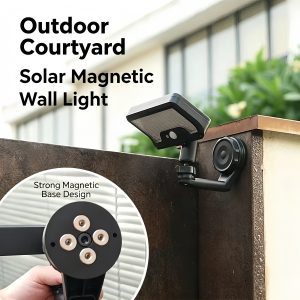 Solar Outdoor Courtyard Wall Light, Magnetic Mount Motion Sensor Solar Security Light for Home Patio Garden Price range: $19.96 through $22.96
 Tuya Zigbee Solar Rainwater Leak Sensor – Smart Home Water Detection Alarm with AI Automation Original price was: $35.96.$26.99Current price is: $26.99.
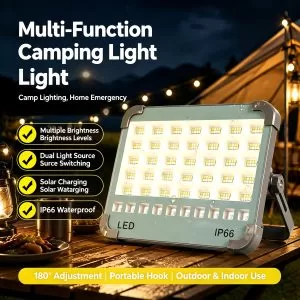 Solar Camping Light IP66 Waterproof LED Floodlight Portable Rechargeable Lantern for Outdoor Camping Hiking Emergency Price range: $9.96 through $15.86
📌 This article is part of our Complete What Hub — more guides and buying tips inside.