
Building a Smart Home can feel overwhelming with all the buzzwords. This guide breaks it down into 8 practical, field-tested devices — the same models we manufacture and ship most. Read it like a checklist, not a textbook.

Why We Recommend Tuya-Based Devices
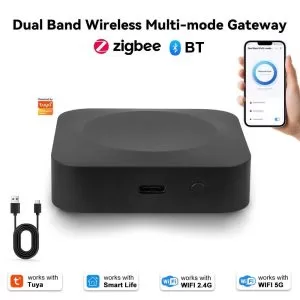
However, All our plug-and-play devices work with the free Smart Life app (powered by the Tuya IoT platform). That means you can control lights, sensors, cameras, and doorbells from one dashboard, even if you mix brands later.
3. Wall Control — Tuya Smart Control Panel
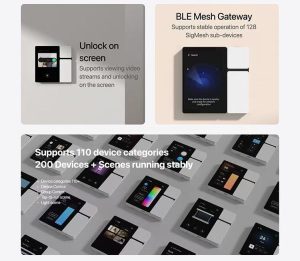
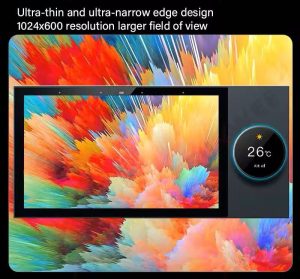
Once you have a hub and a doorbell, the next upgrade is wall control. As a result, The Tuya smart control panel replaces a messy row of switches with one clean touchscreen. From it, you can control lights, curtains, scenes, and music. The version in our catalog supports adjustable light color and RGB lighting, with color temperature range around 35%–65%. Importantly, It also shows live room status like temperature (for example, 26°C on screen).
This panel integrates voice, gateway, and music in one device, and it can connect to the Tuya hotel system if you’re running short-term rentals or hospitality projects. Pick a screen size based on your wall space and existing switch box. Look for one-tap scene switching — that’s what turns “movie night” or “leave home” from a slogan into one button press.
4. Notably, Motion & Security — Human Body Sensor
This is the device people call “I can’t live without it anymore.” The human body sensor turns lights on when you walk into a room and off when you leave. It sounds simple, but it saves power, prevents fumbling for switches at night, and makes hallways safer.
Paired with the Zigbee gateway, it can do more than lighting. It can trigger cameras to record, sound an alarm, or send a phone notification when unexpected motion is detected. Meanwhile, you’re away. However, Because it’s wireless and battery-powered, installation is just peel-and-stick. Place it in entryways, hallways, staircases, or near valuables.
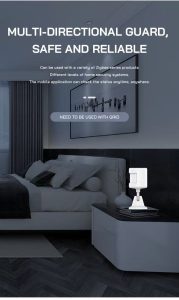
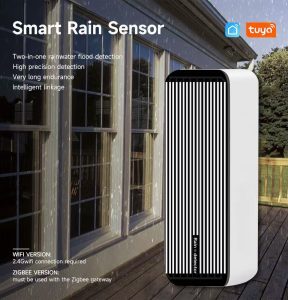
5. Outdoor Alert — Rain Sensor
A rain sensor is one of those small devices that quietly saves money. Therefore, When rain starts, it can send a signal to close motorized windows, retract awnings, or pause irrigation systems. If you have plants, a garden, or outdoor equipment, this pays for itself quickly.
It’s tiny, wireless, and works outdoors. Set the automation once, and you never have to rush home because you forgot to close a window. For example, For greenhouses, balconies, and vacation homes, it’s especially useful.
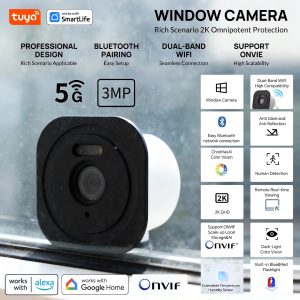
6. Window Watch — Window Camera
Not everyone can drill holes or run cables through walls. The window camera solves that. In addition, It mounts with a suction cup on the inside of a window and gives you a clear view outside. It’s ideal for renters, small shops, apartments, or any room where you want monitoring without renovation.
Phone remote viewing means you can check your home or store from anywhere. Pair it with the motion sensor or doorbell, and you have a layered security setup without professional installation.
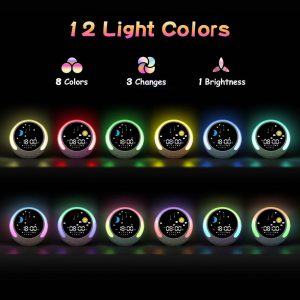
7. Moreover, Better Mornings — Smart Alarm Clock
A smart alarm clock is the gentlest way to upgrade your bedroom. Instead of a harsh buzzer, it uses gradual light to wake you up naturally, plus weather reports and music. Some models also work as a bedside voice assistant or display your daily schedule.
It’s not the most technical device on this list, but it’s the one guests and family members notice first. Furthermore, Put it on a nightstand and let the light-based wake-up replace your phone alarm.
8. Pet Essential — Auto Pet Feeder
If you travel or work long hours, an automatic pet feeder removes the daily guilt. Our model includes a camera, microphone, and stainless steel food bowl. As a result, You can schedule timed, portioned meals, and press a button to drop a bonus snack remotely.
The camera and mic let you check on your pet and talk to them from work. The stainless bowl is easier to clean and more hygienic than plastic. For cats and small-to-medium dogs, it’s one of the most practical smart home devices you can buy.


Related Articles
- Smart Home FAQ: Must-Read Guide for Beginners
- blog-essential-smart-home-devices-v2
- Tuya Smart WiFi Curtain Switch Review: Touch, App, and Voice Control for Modern Smart Homes
- Touch‑Free Hand‑Wave Wall Switch: Hygienic Smart Lighting for Hotels, Healthcare & Modern Homes
- Tuya Smart Soil Tester Sensor: Stop Guessing, Start Growing
You Might Also Like
 Tuya Smart Watch 1.28 Inch Full Round HD – Alexa Voice Control Blood Oxygen Heart Rate Pressure Monitor Original price was: $69.96.$52.99Current price is: $52.99.
 Tuya 4MP Indoor WiFi Smart Camera – HD Night Vision Pan-Tilt Remote Home Monitor with Two-Way Audio Original price was: $39.96.$29.98Current price is: $29.98.
 Tuya 2MP 4MP Indoor PTZ Smart Camera – 360° Panoramic WiFi Pan-Tilt Home Monitor with Two-Way Audio Price range: $21.69 through $25.96
Frequently Asked Questions
Is Beginner Practical Devices Worth worth buying?
Based on the breakdown in this article, Beginner Practical Devices Worth offers a solid mix of features and value. If your main goal matches the key benefits described above, it is a practical choice for everyday use.
How do I choose the right beginner practical devices worth for my needs?
Start with your core use case, then compare battery life, compatibility, and build quality as covered above. Choosing the right beginner practical devices worth comes down to matching specs with how you actually use it.
Does beginner practical devices worth require a companion app?
Most devices of this type pair with a free companion app for setup and firmware updates. A few advanced features may sit behind a paid plan, so check the official specs page before buying.