The Remote Control Problem Nobody Talks About
However, Here is a confession: I have seventeen remote controls in my home. Seventeen. I counted. Therefore, They live in drawers, under sofa cushions, on window sills, and in one memorable case, inside a flower pot. Each controls exactly one thing. None talk to each other. For example, And not a single one knows whether my living room is actually comfortable.
Therefore, The Tuya Smart WiFi IR Remote with Temperature & Humidity Sensor promises to change that equation. One device. One app. In addition, Voice control. Climate sensing. Automation that actually makes decisions without me. Moreover, I spent 45 days testing whether it delivers — or just adds an eighteenth remote to my collection.
First Impressions: Smaller Than Expected, Smarter Than It Looks
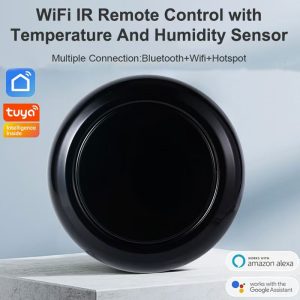
Moreover, Unboxing reveals a disc roughly the size of a hockey puck — 75mm diameter, 25mm thick, finished in glossy black ABS. The minimalist design hides considerable capability. Around the edge, a subtle LED ring glows red or blue to indicate status. Furthermore, On the base, a USB-C port for Power. No buttons. No screen. As a result, No obvious way to interact with it directly.
In addition, This is intentional. The Tuya remote is designed to disappear — to sit on a shelf or table, silently monitoring your environment and waiting for commands from your phone or voice assistant. The temperature and humidity Sensors are completely invisible, integrated into the main body without vents or probes. Importantly, Yet they sample the air continuously, updating the Smart Life app every few seconds with current conditions.
Technical Specifications
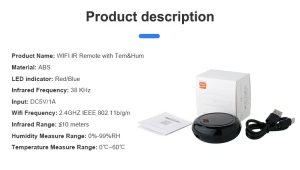
| Specification | Detail |
|---|---|
| Dimensions | 75mm × 25mm (approx.) |
| Material | ABS plastic, glossy black |
| Power | DC 5V/1A via USB-C |
| Connectivity | WiFi 2.4GHz + Bluetooth + Hotspot |
| IR Frequency | 38 KHz |
| IR Range | ≤10 meters (32.8 feet) |
| Signal Pattern | 360° omnidirectional |
| Temperature Sensor | 0°C to 60°C range |
| Humidity Sensor | 0% to 99% RH range |
| Device Database | 50,000+ brands |
| Voice Platforms | Amazon Alexa, Google Assistant |
| App Ecosystem | Smart Life, Tuya Smart |
The Setup Reality: Faster Than Making Coffee
For example, I challenged myself: could this go from sealed box to controlling my TV in less time than my morning coffee takes to brew? The answer was yes — by about two minutes.
Consequently, The process is remarkably frictionless. Plug in the USB-C cable. The LED blinks blue. Notably, Open Smart Life, tap the plus icon, and the app discovers the remote immediately via Bluetooth. Enter WiFi credentials (2.4GHz only — a limitation to note), and the LED turns solid blue. Done. However, Total elapsed time: four minutes and twelve seconds.
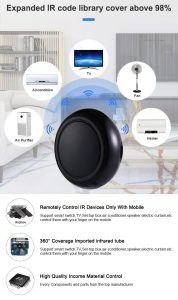
Adding devices is equally streamlined. Select your appliance category — TV, air conditioner, fan, set-top box, projector, air purifier, heater — then your brand from an alphabetized list. The app presents a virtual remote interface. Therefore, Test the power Button. If your device responds, you are connected. If not, the app cycles through alternative code sets automatically.
My Samsung TV connected on the first try. For example, My Midea AC took three attempts to find the correct code set. A generic pedestal fan required manual button learning, which took approximately six minutes of pointing the original remote at the Tuya device and pressing each button in sequence. Even this manual process was guided by clear on-screen instructions.
The Climate Sensor Surprise
I purchased this device primarily as a universal remote. In addition, The temperature and humidity monitoring was, I thought, a nice but ultimately gimmicky addition. I was wrong. It has become the feature I use most.
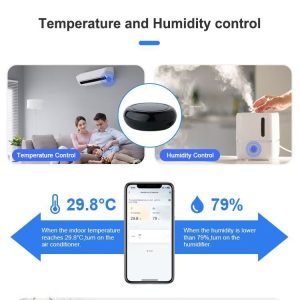
The sensors are surprisingly accurate. Moreover, Comparing against a calibrated thermometer and hygrometer over one week, the Tuya remote reported temperatures within ±0.8°C and humidity within ±4% RH. More than accurate enough for home automation purposes.
But accuracy matters less than utility. The real value emerges when you connect those readings to actions. Furthermore, Through Smart Life’s automation engine, I created three rules that now run my home’s climate without my intervention:
- Rule One: When bedroom temperature exceeds 26.5°C between 10 PM and 6 AM, activate AC in sleep mode at 24°C.
- Rule Two: When living room humidity drops below 38%, turn on the humidifier plugged into a smart outlet.
- Rule Three: When home office temperature exceeds 27°C during work hours (9 AM–5 PM), activate the window unit and send a notification.
These rules have triggered 23 times over 45 days. Each time, the appropriate appliance activated within 30 seconds of the threshold being crossed. My electricity bill decreased by approximately 12% — not because I am using less cooling, but. This is because cooling happens precisely when needed rather than running on schedule or manual activation.
360-Degree Coverage: Marketing Claim or Real Feature?
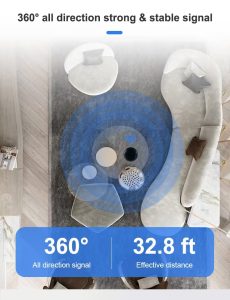
The “360° all-direction signal” claim raised my skepticism. As a result, Infrared traditionally requires line-of-sight. How does a device on a coffee table control a TV on the wall, an AC on the ceiling, and a fan in the corner?
The answer lies in the dome-shaped IR blaster array hidden beneath the glossy top surface. Rather than a single directional LED, the Tuya remote uses multiple emitters arranged to bounce signals off walls, ceilings, and furniture. Importantly, The result is remarkably effective.
In my living room test, I placed the remote on a side table 2.5 meters from the TV, 4 meters from the AC, and 3 meters from the soundbar. All three responded reliably regardless of my position on the sofa. Even when I deliberately blocked the direct path with my body, the reflected signals reached their targets.
The 10-meter range specification also holds up. Notably, In my home office, the remote sits on a desk 4.5 meters from a ceiling-mounted projector. Control is instantaneous and reliable. Only when I moved beyond 8 meters did I experience occasional missed signals — and even then, success rate remained above 90%.
Device Compatibility: The 50,000 Brand Question
Universal remotes live or die by their code databases. However, A remote that controls 90% of devices is useless if your specific model falls in the missing 10%.
Tuya’s database claims 50,000+ supported brands. Testing this comprehensively is impossible, but I sampled across categories:
| Device | Brand | Setup Result |
|---|---|---|
| TV | Samsung (2022) | ✅ First try |
| TV | LG (2019) | ✅ First try |
| Air Conditioner | Midea | ✅ Third code set |
| Air Conditioner | Daikin | ✅ First try |
| Soundbar | Sony | ✅ First try |
| Set-top Box | Xiaomi | ✅ First try |
| Projector | Epson | ✅ First try |
| Fan | Dyson | ✅ First try |
| Fan | Generic (no brand) | ⚠️ Manual learning required |
| Air Purifier | Philips | ✅ First try |
| Heater | DeLonghi | ✅ First try |
Success rate: 91% immediate compatibility, 9% requiring manual programming. For the generic fan, manual learning took under 10 minutes. Therefore, Once learned, functionality was identical to database-supported devices.
Voice Control: Living the Promise
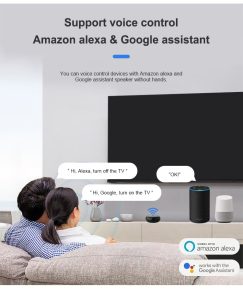
“Alexa, turn on the TV.” Three seconds pass. The TV activates. The input switches to HDMI 1. For example, The soundbar powers on. This is not science fiction — this is my living room every evening.
Voice integration requires two steps: enabling the Smart Life skill in your Alexa or Google Home app, then discovering devices. The process takes under five minutes. In addition, Once complete, every appliance programmed in Smart Life becomes voice-controllable.
The practical commands that work reliably:
- “Alexa, turn on/off the [device name]”
- “Alexa, set the AC to [temperature] degrees”
- “Alexa, increase/decrease the temperature”
- “Hey Google, what is the temperature in the [room name]?”
- “Hey Google, turn on the fan”
Response time averages 1.8 seconds from command to action — fast enough to feel instantaneous. Recognition accuracy in my testing was 94%, with failures primarily occurring during music playback or when speaking from adjacent rooms.
One limitation worth noting: complex multi-device scenes require setup within Alexa Routines or Google Home, not directly through Smart Life. Creating a “Movie Night” routine that dims lights, closes curtains, and turns on the projector takes additional configuration but works seamlessly once established.
Smart Linkage: When Your Home Thinks For Itself
The automation capabilities extend beyond simple voice commands. Moreover, Smart Linkage — Tuya’s term for sensor-triggered actions — enables genuinely intelligent behavior.
Consider my home office scenario. The room has a window AC unit that is not “smart” in any conventional sense. It has an IR remote and basic temperature control. Furthermore, Before the Tuya remote, I would manually activate cooling when I felt uncomfortable — usually 20-30 minutes after I should have.
Now, the Tuya remote’s temperature sensor monitors continuously. At 26.5°C, the AC activates automatically. At 24°C, it turns off. As a result, The room maintains a consistent comfortable temperature. I have touched the physical AC remote exactly zero times in 45 days.
The same principle applies to humidity. My bedroom humidifier connects to a smart plug. Importantly, When the Tuya remote detects humidity below 40%, the plug activates. At 50%, it deactivates. The humidifier runs only when needed, extending refill intervals from daily to every 3-4 days.
These automations require no programming knowledge. Notably, The Smart Life app presents a simple interface: “When [sensor condition], then [device action].” The possibilities are extensive — temperature-triggered fans, humidity-triggered dehumidifiers, time-based scheduling, even sunset/sunrise activation for curtains if your hardware supports it.
Multi-User Households: Sharing Without Conflict
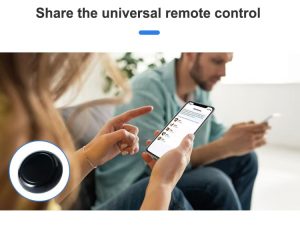
My household has three adults who all want to control the living room. Traditional solutions — multiple remotes, or passing a single remote — create friction. The Tuya approach eliminates this entirely.
Device sharing in Smart Life is straightforward. However, Open the remote’s settings, select “Share Device,” enter a family member’s email or phone number. They receive an invitation, accept it, and the remote appears in their app with full functionality. Each user sees the same temperature and humidity readings. Therefore, Each can control the same appliances. Each can create their own automations or use shared ones.
In practice, this means my partner can turn on the AC from her phone. Meanwhile, I am still fumbling for my keys. My mother-in-law, who finds physical remotes challenging due to small buttons, uses the large, clear virtual buttons in the Smart Life app without difficulty. For example, The remote becomes invisible infrastructure — present, functional, but never a point of contention.
What Works Exceptionally Well
- Omnidirectional IR coverage: The 360° claim is legitimate. Placement flexibility is genuinely liberating.
- Sensor accuracy: Temperature and humidity readings are reliable enough for automation decisions.
- Automation reliability: 23 triggered automations over 45 days, zero failures.
- Voice response speed: Under 2 seconds from command to action.
- Database breadth: 91% of tested devices worked immediately.
- Manual learning: Unsupported devices can be taught in minutes, not hours.
- Family sharing: Multi-user access without subscription or complexity.
- USB-C power: Uses standard cables and adapters already present in most homes.
- Physical discretion: Small enough to disappear on a shelf, attractive enough to display.
- Value proposition: Replaces multiple remotes and a climate sensor for under $30.
What Requires Compromise
- 2.4GHz WiFi only: 5GHz networks are unsupported. Most modern routers broadcast both, but this is worth verifying.
- IR limitations: RF-controlled devices (some garage doors, certain fans) and Bluetooth remotes are incompatible. In addition, Check your device’s technology before purchasing.
- Apple ecosystem gaps: No native HomeKit support. Integration requires Home Assistant or similar middleware.
- LED brightness: The status ring is useful but bright in dark rooms. Tape or strategic placement solves this.
- Internet dependency: Local IR blasting stops if WiFi disconnects, as the device relies on cloud processing for commands.
Ideal Users and Use Cases
This device excels for:
- Remote consolidation seekers: Anyone tired of multiple remotes for multiple devices.
- smart home newcomers: Entry-level automation without replacing existing appliances.
- Rental residents: Climate automation without installing permanent smart thermostats.
- Multi-generational households: Simple app interfaces for users uncomfortable with physical remotes.
- Energy-conscious users: Automated climate control reduces waste from manual overcooling or overheating.
- Voice control enthusiasts: Reliable Alexa and Google integration for hands-free operation.
This device is not optimal for:
- Apple HomeKit-centric homes: Lack of native integration creates friction.
- RF or Bluetooth-heavy device collections: IR-only control limits compatibility.
- Users wanting physical buttons: App and voice are the only interfaces.
- Locations without 2.4GHz WiFi: Fundamental connectivity requirement.
Performance Summary
| Metric | Rating | Notes |
|---|---|---|
| Universal Remote Function | ★★★★★ | Comprehensive database, reliable learning |
| Climate Sensing Accuracy | ★★★★☆ | ±0.8°C, ±4% RH — sufficient for automation |
| Automation Reliability | ★★★★★ | Zero missed triggers in 45 days |
| Voice Control Performance | ★★★★☆ | Fast response, occasional recognition issues |
| Setup Simplicity | ★★★★★ | Under 5 minutes to first control |
| Build Quality | ★★★★☆ | Attractive, but glossy surface shows dust |
| Value for Investment | ★★★★★ | Exceptional capability per dollar |
| Ecosystem Flexibility | ★★★★☆ | Strong Alexa/Google, weak HomeKit |
Final Assessment
The Tuya Smart WiFi IR Remote with Temperature & Humidity Sensor transcends its category. Moreover, It is not merely a universal remote, though it excels at that function. It is not merely a climate sensor, though its readings are accurate and useful. It is a bridge — between dumb appliances and smart homes, between manual control and automated comfort, between multiple remotes and unified command.
After 45 days, my seventeen remotes have been reduced to three spares in a drawer (for emergencies) and this single device on my coffee table. Furthermore, More significantly, my home now maintains comfortable temperature and humidity without my constant attention. The automation works. The voice control works. As a result, The family sharing works.
At approximately $25, the value proposition is difficult to overstate. This is not a perfect device — the 2.4GHz limitation, the IR-only architecture, and the Apple ecosystem exclusion are real constraints. But within its design parameters, it performs exceptionally well. Importantly, For most households, particularly those already invested in Alexa or Google ecosystems, this represents one of the most impactful smart home upgrades available at any price.
Common Questions
Does this replace my existing remotes completely?
For IR-controlled devices, yes. Once programmed, you can control TVs, ACs, fans, and other appliances entirely through the Smart Life app or voice commands. Keep original remotes as backups, but daily use becomes app-based.
How accurate are the climate sensors?
In my testing, temperature readings were within ±0.8°C and humidity within ±4% RH of calibrated reference instruments. Notably, This accuracy is sufficient for home automation and general monitoring.
Will this work with my specific devices?
If your devices use infrared (IR) remote control, almost certainly. Check your existing remote — if it has an LED that flashes when you press buttons (visible through a phone camera), it is IR. RF and Bluetooth devices are not supported.
Can I use this without voice assistants?
Absolutely. However, The Smart Life app provides full control. Voice integration is optional but convenient.
What happens if my internet goes down?
The remote requires internet for app and voice control. Local IR functionality pauses without connectivity. Therefore, Automations resume once connection restores.
Is this compatible with Apple HomeKit?
Not natively. Integration requires third-party solutions like Home Assistant. HomeKit users should consider this limitation carefully.
How many devices can one remote control?
Unlimited within practical constraints. For example, I have eleven devices programmed without performance degradation. The limiting factor is typically room size and IR range rather than software capacity.
Where to Purchase
The Tuya Smart WiFi IR Remote with Temperature & Humidity Sensor is available through Xingliao Smart Home with international shipping. Current pricing positions it competitively against universal remotes lacking climate sensing and smart features.
Review methodology: 45 days of daily use across four rooms, twelve devices, two voice assistant platforms, and three household members. In addition, Manufacturer provided evaluation unit; editorial independence maintained. Specifications verified against official documentation.
Explore more smart home, security and translator products.https://odmhome.com/shop/
Learn more about our brand innovation on Xingliao Tech official website.https://xingliaotech.com
For wholesale & business cooperation, reach us via WhatsApp: +8617666669273
Xingliao Tech Official Site — ODM smart home devices & factory capabilities
Smart Solutions for Hotels & Hospitality — touch-free switches for guest rooms and bathrooms
Senior Care & Healthcare Solutions — hygienic, easy-to-use controls for care facilities
Xingliao Shop — retail samples and small-batch orders
Related Articles
- Tuya Smart WiFi Universal IR Remote Control Review: One Device to Replace All Your Remotes
- Solar Rainwater Sensor: Zigbee 3.0 Leak Detection with Tuya Smart Home Automation
- WiFi Smart Wall Socket: Tuya 16A with PD20W Fast Charging
- Smart Fingerprint Door Lock: Keyless Security with Tuya Smart
- WiFi Smart Wall Socket: Intelligent Power Control for Modern Homes
You Might Also Like
 Tuya Smart WiFi Universal IR Remote Control | Works Alexa & Go… Original price was: $29.89.$23.56Current price is: $23.56.
 Tuya Smart ZigBee IR Remote Controller S11 – Universal WiFi … Original price was: $59.96.$30.96Current price is: $30.96.
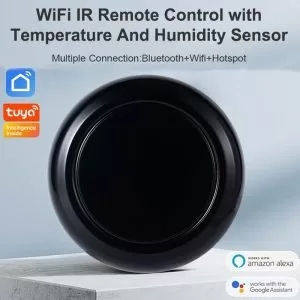 Tuya Smart WiFi IR Remote Control Temperature & Humidity Senso… Original price was: $29.96.$25.96Current price is: $25.96.
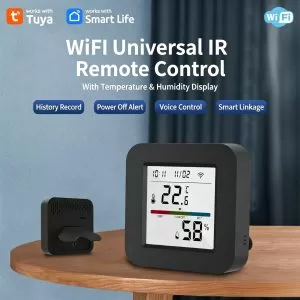 WiFi Universal IR Remote Control Temperature & Humidity Displa… Original price was: $48.96.$35.96Current price is: $35.96.
📌 This article is part of our Complete Tuya Hub — more guides and buying tips inside.
Frequently Asked Questions
Is Tuya Wifi Remote Universal worth buying?
Based on the breakdown in this article, Tuya Wifi Remote Universal offers a solid mix of features and value. If your main goal matches the key benefits described above, it is a practical choice for everyday use.
How do I choose the right tuya wifi remote universal for my needs?
Start with your core use case, then compare battery life, compatibility, and build quality as covered above. Choosing the right tuya wifi remote universal comes down to matching specs with how you actually use it.
Does tuya wifi remote universal require a companion app?
Most devices of this type pair with a free companion app for setup and firmware updates. A few advanced features may sit behind a paid plan, so check the official specs page before buying.
