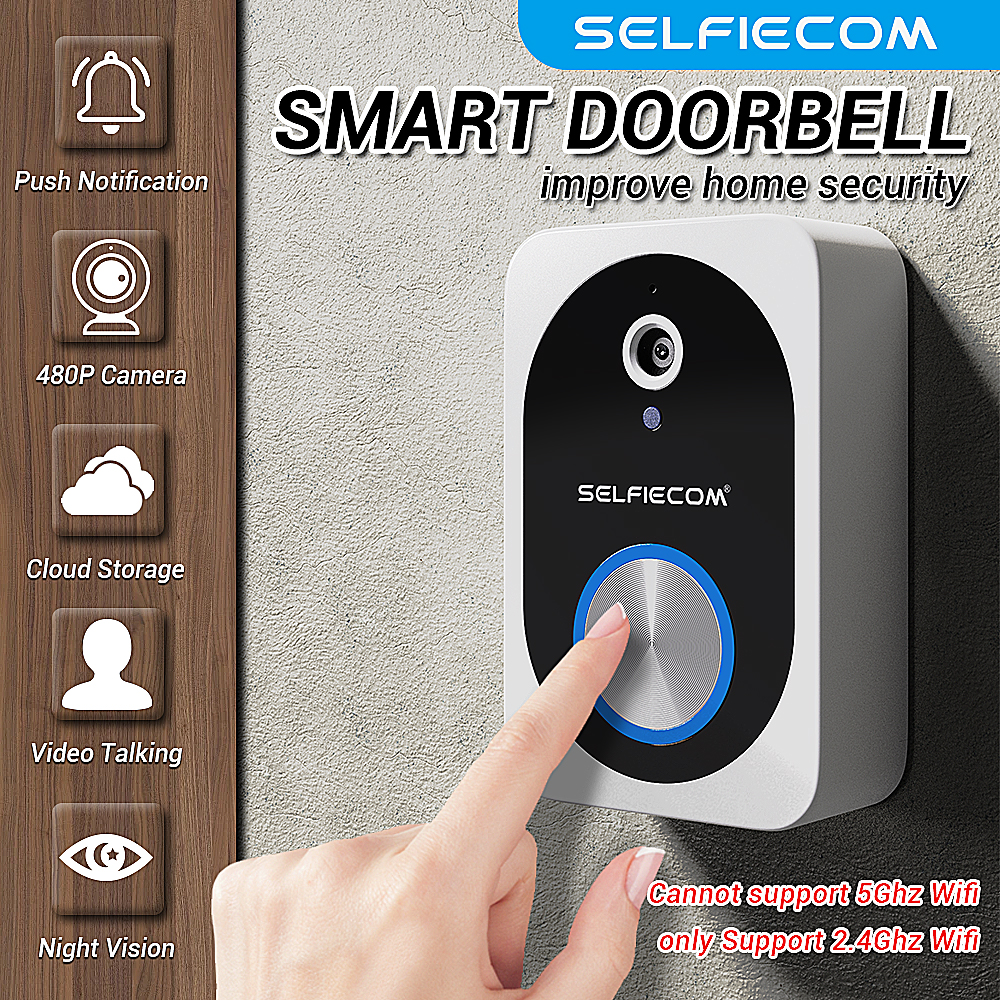
If you have ever missed a delivery because you were in the shower, or wondered who rang the bell while you were upstairs, a Video doorbell solves a very ordinary problem in a very direct way. The SELFIECOM D10 is a compact WiFi Video doorbell that puts your front Door on your phone: it rings, it talks, it captures a snapshot, and it keeps that snapshot in the cloud at no cost. This guide covers what the D10 actually does, the numbers that matter, and how to decide whether it belongs on your door.
What the SELFIECOM D10 Actually Is
The D10 is a battery-powered Smart video doorbell built around a 480P camera, two-way video talk, infrared night vision, and an indoor chime receiver option. The body is a white square housing with a black camera panel on the front and a blue LED ring around the silver press button, so visitors know exactly where to push and you can tell at a glance that the unit is powered. Setup runs through a phone app available on the App Store and Google Play, and the doorbell joins your home network over 2.4 GHz WiFi only, which is worth remembering before you buy.
<table> <tr><th>Item</th><th>Detail</th></tr> <tr><td>Model</td><td>D10</td></tr> <tr><td>Type</td><td>WiFi Smart video doorbell</td></tr> <tr><td>Camera</td><td>480P</td></tr> <tr><td>Night vision</td><td>Infrared LED, automatic day and night switching</td></tr> <tr><td>Audio</td><td>Two-way video talk</td></tr> <tr><td>Voice change</td><td>Supported during a call</td></tr> <tr><td>Auto capture</td><td>Snapshot taken when the button is pressed</td></tr> <tr><td>Storage</td><td>Free 72-hour cyclic cloud storage, no memory card required</td></tr> <tr><td>Wireless</td><td>2.4 GHz WiFi only, 5 GHz not supported</td></tr> <tr><td>App</td><td>Available on the App Store and Google Play</td></tr> <tr><td>Battery</td><td>Built-in lithium battery, standby up to 365 days</td></tr> <tr><td>Users per doorbell</td><td>Up to 9 shared accounts</td></tr> <tr><td>Finish</td><td>White housing, black camera panel, blue LED ring button</td></tr> </table>
Two-Way Video Talk and Sharing With Up to 9 People
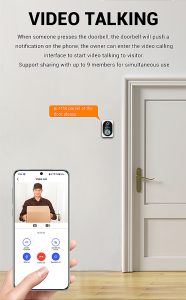
When someone presses the button, the app rings like a phone call, and every user linked to that doorbell is notified at the same moment. Any one of them can answer, and once the call is picked up the other accounts can no longer join it. One doorbell binds to one account, but you can share it with family members, up to 9 users in total, and they do not have to bind the device again. They download the same app, register, and accept the share.
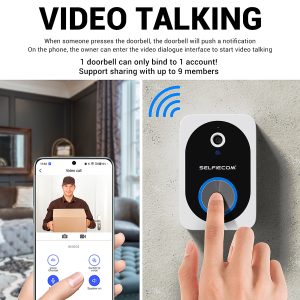
That detail matters more than it sounds. With a traditional doorbell, whoever is closest answers, and if nobody is close, nobody answers. With the D10, the person who responds can be whoever is actually free: a parent upstairs, a teenager in the kitchen, or someone at the office who wants to tell a courier to leave the parcel by the side gate. For households where everyone is on a different schedule, this is the feature that gets used every day.
Cloud Storage, Auto Capture, and What 72 Hours Means
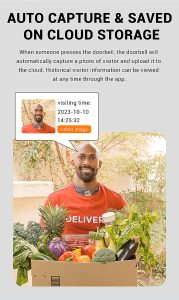
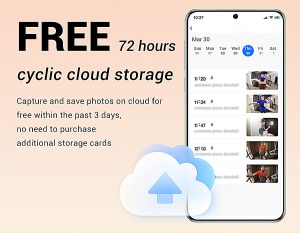
Each time the button is pressed, the D10 automatically captures a photo of the visitor and saves it to cloud storage. That storage is free and works in a 72-hour cycle, which means you always have a rolling three-day record of who came to your door, with no memory card to buy, format, or lose. Open the app and the visitors appear as a timeline you can scroll through.
The practical value shows up on ordinary days. You come home and see that a delivery arrived at 2:14 in the afternoon. You notice a stranger walked up the path twice on Saturday. You check whether your teenager actually got home when they said they did. None of that requires a subscription or extra hardware, and it works even when your phone was on silent or in another room.
Night Vision That Switches Itself
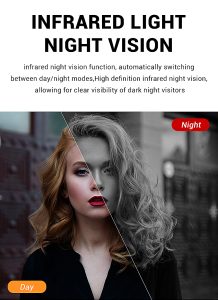
The camera uses infrared light for night vision and switches between day and night modes automatically as the light drops. That means the view does not go black at dusk, and you do not have to change any settings as the seasons shift. For a front door, where most activity happens either early morning or after dark, this is not a bonus feature, it is the core of the product.
Voice Change
The app includes a voice change option, so the person speaking through the doorbell can mask their voice during a call. On its own that sounds like a gimmick, but it has a real use: if you are home alone, or you are a woman answering an unexpected caller at night, hiding your gender on the intercom is a small and sensible layer of privacy. It costs nothing to have it available.
Battery Life and Power
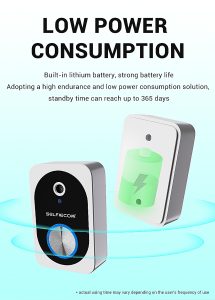
The D10 runs on a built-in lithium battery rated for up to 365 days of standby. Real-world battery life depends on how often the bell rings, how often you open live view, and how strong your WiFi signal is at the door, so treat 365 days as the best case rather than a promise. In a busy household with several rings a day, expect to charge it more often than that. Mounting is wall-mounted and straightforward, which keeps the installation wiring-free.
The 2.4 GHz Rule
This is the one specification that trips people up. The D10 supports 2.4 GHz WiFi only and will not connect to a 5 GHz network. If your router broadcasts separate names for each band, connect the doorbell to the 2.4 GHz one. If your router uses a single combined name for both bands, you may need to split them in the router settings or temporarily disable 5 GHz during pairing. Check this before you set the doorbell up rather than after, because a doorbell that cannot see your network is the most common setup frustration with any budget WiFi camera.
How to Set Up the D10
1. Charge the doorbell fully with the built-in lithium battery. 2. Download the app from the App Store or Google Play and register an account. 3. Open the app, add the device, and enter your 2.4 GHz WiFi name and password. 4. Mount the doorbell beside your front door at roughly chest height, clear of metal surfaces that can block the signal. 5. Share the doorbell from your account to family members, up to 9 users, and ask each of them to accept the invitation in the app.
Buying Tips
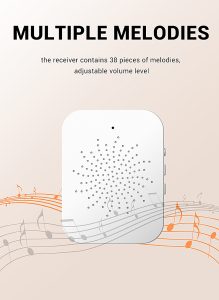
<table> <tr><th>Consideration</th><th>What to Check</th><th>Why It Matters</th></tr> <tr><td>WiFi band</td><td>2.4 GHz network available at your door</td><td>The D10 does not support 5 GHz</td></tr> <tr><td>Camera resolution</td><td>480P on the D10</td><td>Enough to identify a visitor at close range, not enough for license plates down the street</td></tr> <tr><td>Storage expectations</td><td>Free 72-hour cyclic cloud storage</td><td>You get a rolling three-day history, not permanent archiving</td></tr> <tr><td>Household size</td><td>Up to 9 shared users</td><td>Everyone who needs access can answer, not just the account owner</td></tr> <tr><td>Power</td><td>Built-in rechargeable battery</td><td>No wiring needed, but you will recharge it periodically</td></tr> <tr><td>Chime</td><td>Indoor receiver with 38 melodies and adjustable volume</td><td>Useful if your phone is often on silent or left in another room</td></tr> </table>
How the D10 Compares to an Old-School Doorbell
<table> <tr><th>Feature</th><th>Traditional wired doorbell</th><th>SELFIECOM D10</th></tr> <tr><td>See who is at the door</td><td>Only through a peephole or window</td><td>Live video on your phone</td></tr> <tr><td>Talk to visitors</td><td>Not possible when you are out</td><td>Two-way video talk from anywhere with an internet connection</td></tr> <tr><td>Night vision</td><td>None</td><td>Infrared with automatic day and night switching</td></tr> <tr><td>Record of visitors</td><td>None</td><td>Auto capture to free 72-hour cloud storage</td></tr> <tr><td>Multiple users</td><td>Not applicable</td><td>Up to 9 shared accounts</td></tr> <tr><td>Wiring</td><td>Requires existing doorbell wiring</td><td>Battery powered, wall mounted, no wiring</td></tr> </table>
Where the D10 Helps Most
<table> <tr><th>Situation</th><th>What the D10 Does</th></tr> <tr><td>Child home alone</td><td>You see and speak to whoever is at the door from your phone, and the auto capture leaves a record of every ring</td></tr> <tr><td>Friends or family visiting</td><td>Answer from anywhere, tell them where the spare key is, or let them know you are five minutes away</td></tr> <tr><td>Package delivery</td><td>Speak to the courier and give instructions without opening the door, with a timestamped snapshot saved automatically</td></tr> <tr><td>Late-night callers</td><td>Check the video first, and use voice change if you would rather not reveal who is speaking</td></tr> <tr><td>Shared households</td><td>Up to 9 users get the ring at the same time, so the first person available answers</td></tr> </table>
Common Questions
Does the D10 work with 5 GHz WiFi?
No. It connects to 2.4 GHz networks only. Point it at your 2.4 GHz band during setup.
Do I have to buy a memory card?
No. The doorbell uses free 72-hour cyclic cloud storage, so there is no microSD card to purchase or manage.
How many people can use one doorbell?
One account binds the device, and that account can share it with family members, up to 9 users in total.
What happens if two people try to answer at the same time?
Everyone is notified when the button is pressed, and any one user can answer. Once the call is taken, the other accounts cannot join it.
Is the camera 1080p?
The D10 uses a 480P camera. It is sharp enough to recognize a visitor standing at your door, but if you specifically need 1080p you should check the specification list before ordering.
How long does the battery really last?
Standby is rated up to 365 days. Actual runtime depends on how often the bell rings and how often you watch live video, so heavy use means more frequent charging.
Can it see in the dark?
Yes. Infrared night vision takes over automatically as light fades, with no manual switching needed.
Do I need to run any wires?
No. The D10 is battery powered and wall mounted, so no existing doorbell wiring is required.
Can I change how my voice sounds to a stranger?
Yes. The app includes a voice change mode for calls, which is useful if you would rather not reveal your gender to an unexpected visitor.
Which app do I need?
The app is available on both the App Store and Google Play, and the same app is used for setup, live video, two-way talk, and viewing your cloud visitor timeline.
Final Thoughts
The SELFIECOM D10 is not trying to be a professional security system, and it does not pretend to. It is a straightforward, battery-powered video doorbell that answers one question several times a day: who is at my door, and can I talk to them right now? With two-way video talk, automatic snapshots saved to free 72-hour cloud storage, infrared night vision, up to 9 shared users, and voice change for privacy, it covers the practical essentials without a subscription or a wiring job. Check that you have a 2.4 GHz network at your door, set your expectations for 480P video, and the D10 will quietly handle the rest.
SELFIECOM D10 smart doorbell – 480P camera, two-way video talk, night vision, auto capture and free cloud storage.
You Might Also Like
Frequently Asked Questions
Is Selfiecom D10 Smart worth buying?
Based on the breakdown in this article, Selfiecom D10 Smart offers a solid mix of features and value. If your main goal matches the key benefits described above, it is a practical choice for everyday use.
How do I choose the right selfiecom d10 smart for my needs?
Start with your core use case, then compare battery life, compatibility, and build quality as covered above. Choosing the right selfiecom d10 smart comes down to matching specs with how you actually use it.
Does selfiecom d10 smart require a companion app?
Most devices of this type pair with a free companion app for setup and firmware updates. A few advanced features may sit behind a paid plan, so check the official specs page before buying.